EKS Auto Mode Operations Guide
Supported Versions: EKS Auto Mode GA; example baseline EKS 1.36 Last Updated: October 12, 2026
Amazon EKS Auto Mode automates Kubernetes node management, including provisioning and optimization for workload requirements. This guide covers Auto Mode concepts, configuration and operations. AWS manages the Auto Mode infrastructure; you remain responsible for application availability, resource requests, security, monitoring and cluster/VPC configuration. Validate examples in your environment before production use.
October 2026 Update: EKS 1.37 Defaults
EKS 1.37 became available on October 1, 2026. A newly created custom NodePool that omits its consolidation policy defaults to Balanced; the built-in general-purpose and system pools also use Balanced, and their policies cannot be changed. Set WhenEmptyOrUnderutilized explicitly on a custom pool when that behavior is intended. Not every NodePool example in this guide sets the field, so on EKS 1.37 those examples get Balanced when created. See the Kubernetes 1.37 section of the EKS standard-support release notes.
July 2026 Update: EFA and Placement Group Support
On July 22, 2026, AWS announced that EKS Auto Mode and open-source Karpenter node pools support Elastic Fabric Adapter (EFA) network-device configuration and EC2 placement groups.
On EFA-capable instances, network interfaces can be configured as EFA-only or standard ENI. EFA-only interfaces do not consume VPC IP addresses while still delivering full interconnect bandwidth. Node pool configuration can also specify cluster, spread or partition placement strategies. These options target distributed training and inference workloads that need high throughput or fault isolation. See the announcement for details.
July 2026 Update: ARC Zonal Shift Support
As of July 10, 2026, EKS Auto Mode clusters support Amazon Application Recovery Controller (ARC) zonal shift and autoshift. Enable ARC zonal shift on the cluster; Auto Mode needs no additional flag or Karpenter version management.
During a zonal shift, Auto Mode stops provisioning capacity in the impaired AZ and halts voluntary disruptions such as consolidation and drift for nodes there. It also blocks voluntary disruptions in healthy AZs when replacement scheduling would depend on the impaired AZ. Configure ARC zonal autoshift separately after cluster registration.
Zonal shift does not make zonal volumes or strict AZ-bound workloads portable. ARC adds no zonal-shift charge; replacement capacity and normal infrastructure charges still apply. See the announcement and the ARC zonal shift documentation for details.
Table of Contents
- Getting Started with Auto Mode - Cluster creation and enabling Auto Mode
- NodePool Configuration and Optimization - Default and custom NodePools
- Understanding Scaling Behavior - Provisioning, consolidation, drift detection
- Spot Instance Utilization Strategies - Mixed capacity and interrupt handling
- Operations and Management - Disruption budgets, rolling replacement, monitoring
- Cost Management and Optimization - Cost analysis, Spot savings, right-sizing
- Node Lifecycle Management - Expiration, AMI management, freshness policies
- Workload-Specific Optimization - Web, batch, GPU, AI/ML workloads
- Migrating from Managed Node Groups - Migration steps and coexistence
Introduction to EKS Auto Mode
What is Auto Mode?
EKS Auto Mode is a fully automated node management solution managed by AWS. It is based on Karpenter internally; AWS operates the managed infrastructure controllers. Users configure workload constraints, custom NodePools/NodeClasses and disruption budgets rather than installing a separate Karpenter controller for Auto Mode.
+-----------------------------------------------------------------------------+
|                           EKS Auto Mode Architecture                         |
+-----------------------------------------------------------------------------+
|                                                                              |
|  +---------------------------------------------------------------------+    |
|  |                    EKS Control Plane (AWS Managed)                   |    |
|  |  +------------+  +------------+  +------------+  +------------+    |    |
|  |  | API Server |  |   etcd     |  | Controller |  |  Karpenter |    |    |
|  |  |            |  |            |  |  Manager   |  | Controller |    |    |
|  |  +------------+  +------------+  +------------+  +------------+    |    |
|  +---------------------------------------------------------------------+    |
|                                    |                                         |
|                                    v                                         |
|  +---------------------------------------------------------------------+    |
|  |                        NodePool Resources                            |    |
|  |  +------------------+  +------------------+  +------------------+  |    |
|  |  |  general-purpose |  |      system      |  |   custom-pool    |  |    |
|  |  | (Default Provided)|  | (Default Provided)|  |  (User Defined)  |  |    |
|  |  +------------------+  +------------------+  +------------------+  |    |
|  +---------------------------------------------------------------------+    |
|                                    |                                         |
|                                    v                                         |
|  +---------------------------------------------------------------------+    |
|  |                     EC2 Instances (Auto Managed)                     |    |
|  |  +--------------+  +--------------+  +--------------+              |    |
|  |  |   m6i.2xl    |  |   c7g.xl     |  |   r6i.4xl    |   ...        |    |
|  |  |  (On-Demand) |  |   (Spot)     |  |  (On-Demand) |              |    |
|  |  +--------------+  +--------------+  +--------------+              |    |
|  +---------------------------------------------------------------------+    |
|                                                                              |
+-----------------------------------------------------------------------------+
Comparison with Existing Management Methods
| Feature | Managed Node Groups | Fargate | Auto Mode |
|---|---|---|---|
| Node management | AWS manages node groups; you configure capacity and updates | AWS manages per-Pod infrastructure | AWS manages launched nodes and infrastructure controllers |
| Scaling | Cluster Autoscaler if installed, or explicit group scaling | Per-Pod provisioning with Fargate profiles | Karpenter-based provisioning for unschedulable Pods |
| Provisioning time | Depends on capacity, bootstrap and workload | Depends on capacity, images and workload; not instantaneous | Depends on capacity, bootstrap, images and constraints; no fixed-time guarantee |
| Instance selection | Configured instance types | Managed compute sizes | Selection within NodePool and workload constraints |
| Spot | Supported by managed node groups | Not supported on EKS Fargate | Supported when permitted by a NodePool |
| GPU workloads | Supported on appropriate nodes | Not supported | Supported on compatible accelerated instances; workload/runtime requirements still apply |
| DaemonSets | Supported | Not supported | Supported within managed-node restrictions |
| Cost control | Requests, instance choices and autoscaler policies | Pod resource sizing and replicas | Requests, allowed capacity and consolidation policies; no guaranteed savings |
| Host customization | AMI/launch-template options | No host customization | AWS-managed Bottlerocket variants; supported NodeClass settings |
Internal Architecture and Operating Principles
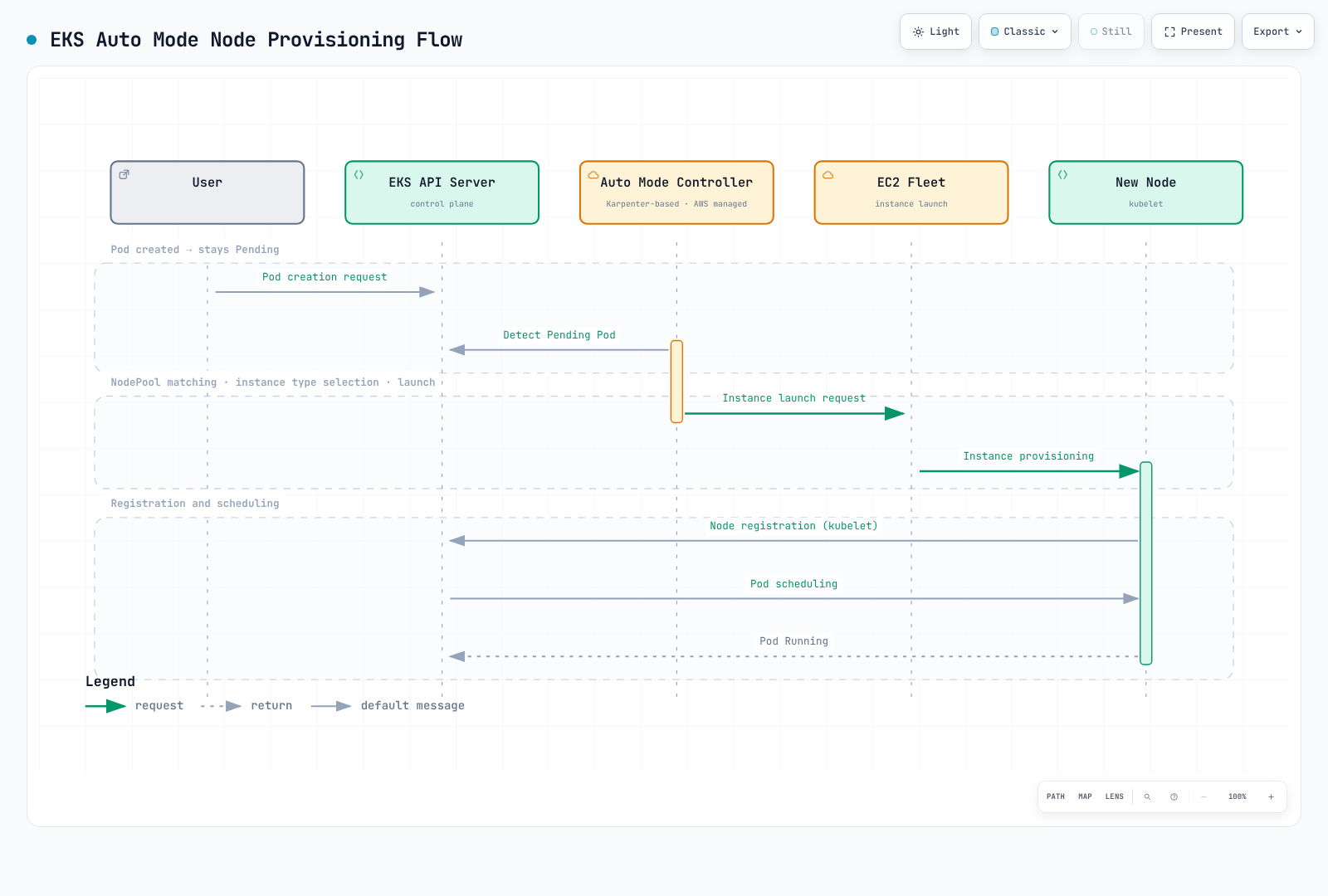
The Karpenter-based controller is operated by AWS, outside your worker nodes. The drawings are conceptual: the scheduler identifies unschedulable Pods and later binds them to nodes; the API server stores the objects. A Pod being Pending alone does not establish that adding a node will solve its problem.
Supported Regions and Limitations
Regions and supported versions
The EKS FAQ lists Auto Mode in EKS regions, including GovCloud (US), except China regions. Check regional instance/feature availability separately. The earlier short region list was not exhaustive.
The FAQ's original 1.29+ feature floor does not mean that every such version can still be created or is in standard support. On October 12, 2026, EKS 1.34–1.37 are in standard support; the examples retain their reviewed 1.36 baseline. Consult the current EKS version calendar for lifecycle dates and extended-support charges.
Constraints to check
| Item | Guidance |
|---|---|
| Capacity and scale | Check applied EKS/EC2 quotas, subnet IP capacity and workload constraints; validate the intended scale in your environment |
| NodePool limits | User-defined resource limits differ from AWS account/service quotas; validate scale and replacement headroom |
| Operating system | AWS selects its managed Bottlerocket variant; AL2023 or arbitrary custom AMIs are not an Auto Mode AMI choice |
| Windows | Auto Mode does not provide Windows nodes; use a compatible separate node group where needed |
| DNS and storage | Auto Mode nodes provide local CoreDNS; mixed clusters retain CoreDNS for other nodes. Managed node-disk encryption does not establish encryption for every dynamic PVC; set the StorageClass explicitly |
Use Service Quotas and the NodeClass reference to verify the relevant constraints. Actual account quotas and instance capacity were not queried during this audit.
Next Steps
After successfully configuring EKS Auto Mode, we recommend learning the following topics:
- EKS Cost Optimization: Spot, Savings Plans, resource optimization
- EKS Monitoring and Logging: CloudWatch, Prometheus, Grafana
- EKS Security: IAM, network policies, Pod security
- Karpenter Deep Dive: Direct Karpenter installation and advanced features
Related Quiz
To test your learning, try the EKS Auto Mode Quiz.