Zone Aware Routing
Last Updated: September 11, 2026 · Istio1.31. This chapter uses
localityLbSettingfor locality weighting/priority failover. The separatezoneAwareLbSettingAPI has different prerequisites and semantics; do not mix their fields. Examples assume a sidecar mesh and independent same-host policy alternatives. They have not been deployed or load-tested.
Zone Aware Routing is a feature that optimizes traffic by recognizing Kubernetes Availability Zones. It reduces latency and cross-AZ data transfer costs by prioritizing communication within the same AZ.
Table of Contents
- Overview
- How It Works
- Basic Configuration
- Advanced Configuration
- Configuration on AWS EKS
- Practical Examples
- Monitoring
- Troubleshooting
Overview
Zone Aware Routing provides the following benefits:
Benefits
- Reduced Latency: Minimize network latency with same-AZ communication
- Cost Savings: Reduce cross-AZ data transfer costs
- Estimate actual billable bytes, direction, region and AWS service path; there is no universal per-GB price for every EKS request.
- Availability support: Requires healthy reachable endpoints and spare capacity in other zones.
- Performance Optimization: Optimized network bandwidth
How It Works
Locality Load Balancing Algorithm
An80/10/10 distribute policy sends normal traffic to all three healthy zones; the10% portions are not standby failover. Priority-based locality failover is a separate mode. Health/capacity weighting may spill traffic before every local host fails. AZ letters do not encode physical adjacency or latency.
Locality Hierarchy
Istio uses the following hierarchical Locality:
Region/Zone/SubZone

Example:
us-east-1/us-east-1a/*
us-east-1/us-east-1b/*
us-west-2/us-west-2a/*
Default locality priorities (when priority failover is active):
- Same region, zone and subzone.
- Same region/zone, different subzone.
- Same region, different zone.
- Other regions, ordered by the configured regional failover policy where provided.
How It Works Without Pod AZ Labels
Important: Pods themselves do not need AZ labels. Istio reads Node Topology labels to automatically determine Pod Locality.
How It Works
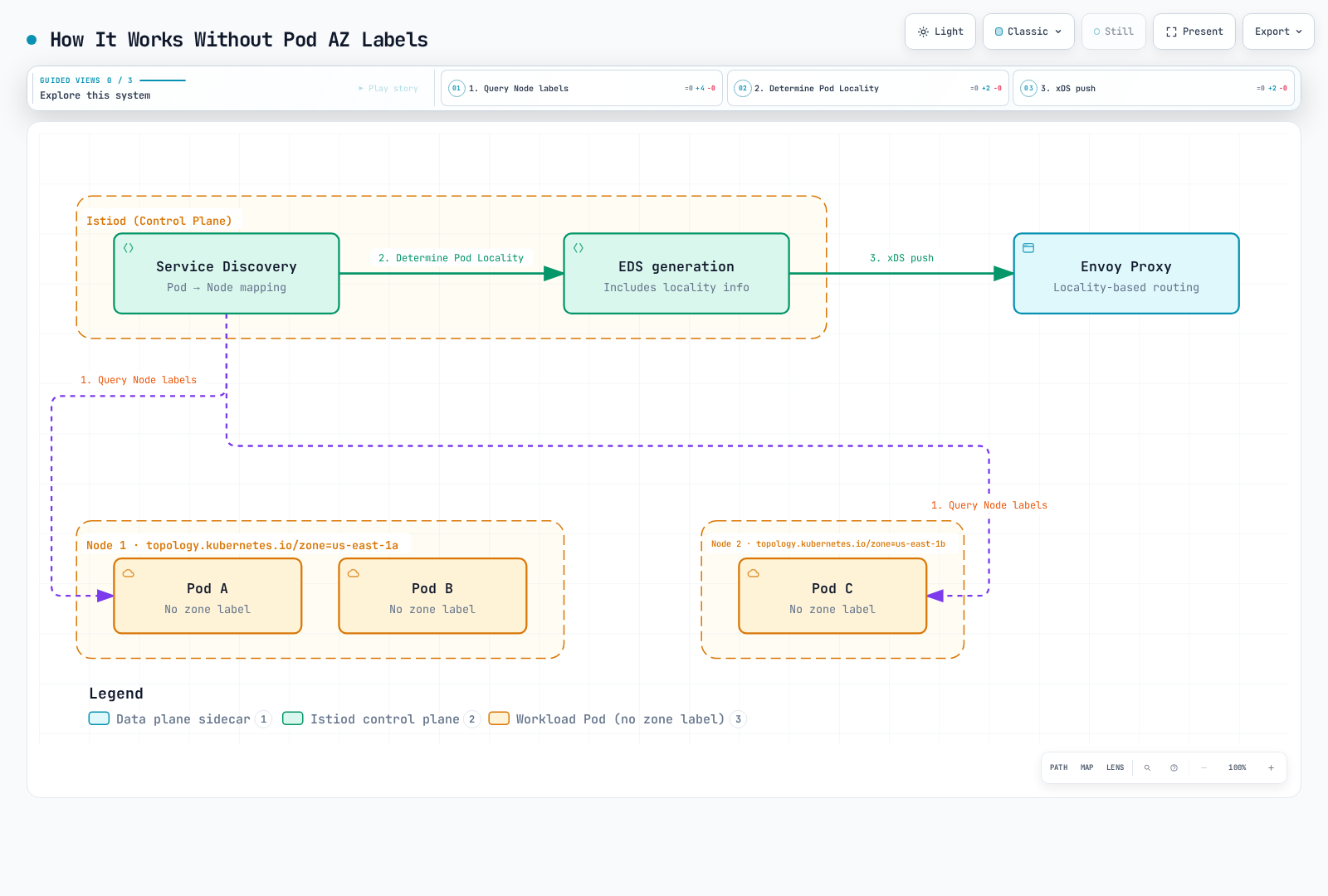
Step-by-Step Process
Step 1: Istiod Collects Pod Information
# Istiod queries Pod information via Kubernetes API
kubectl get pod <pod-name> -o json | jq '.spec.nodeName'
# Output: "ip-10-0-1-10.ec2.internal"
Step 2: Query Topology Labels of Node Running the Pod
# Query Node info using Pod's nodeName
kubectl get node ip-10-0-1-10.ec2.internal -o json | \
  jq '.metadata.labels."topology.kubernetes.io/zone"'
# Output: "us-east-1a"
Step 3: Generate EDS (Endpoint Discovery Service)
The following is a schematic ClusterLoadAssignment, not captured CLI output. Real EDS also carries generated weights/priorities and health state:
{
  "cluster_name": "outbound|8080||myapp.default.svc.cluster.local",
  "endpoints": [
    {
      "locality": {
        "region": "us-east-1",
        "zone": "us-east-1a"
      },
      "lb_endpoints": [
        {
          "endpoint": {
            "address": {
              "socket_address": {
                "address": "10.0.1.10",
                "port_value": 8080
              }
            }
          }
        }
      ]
    },
    {
      "locality": {
        "region": "us-east-1",
        "zone": "us-east-1b"
      },
      "lb_endpoints": [
        {
          "endpoint": {
            "address": {
              "socket_address": {
                "address": "10.0.2.20",
                "port_value": 8080
              }
            }
          }
        }
      ]
    }
  ]
}
Step 4: Envoy Performs Locality-Based Routing
Envoy compares its own Locality with received EDS information for routing:
# Check Envoy's Locality (based on node it's running on)
istioctl proxy-config bootstrap <pod-name> -n default -o json | \
  jq '.bootstrap.node.locality'

# Output:
# {
#   "region": "us-east-1",
#   "zone": "us-east-1a"
# }
Verification Method
# 1. Check which Node the Pod is running on
kubectl get pod <pod-name> -o wide
# NAME        READY   STATUS    NODE
# myapp-abc   2/2     Running   ip-10-0-1-10.ec2.internal

# 2. Check the Node's Zone label
kubectl get node ip-10-0-1-10.ec2.internal \
  -o jsonpath='{.metadata.labels.topology\.kubernetes\.io/zone}'
# Output: us-east-1a

# 3. Check Endpoint Locality recognized by Envoy
istioctl proxy-config all <pod-name> -n default -o json | \
  jq '.configs[] | select(.["@type"] | endswith("EndpointsConfigDump")) |
      ((.dynamic_endpoint_configs // .dynamicEndpointConfigs // [])[] |
       (.endpoint_config // .endpointConfig)) |
      select((.cluster_name // .clusterName) == "outbound|8080||myapp.default.svc.cluster.local") |
      .endpoints[] | {locality, priority}'
Why Pod Labels Are Not Needed
A scheduled Pod stays on its node for that Pod UID; a controller can replace it with a new Pod on another node. Istiod associates endpoints with node topology through Kubernetes discovery. Additional Pod zone labels are not required for this normal locality-routing path. API watches/caches and proxy configuration converge asynchronously; inspect effective configuration instead of assuming an immediate update. Custom telemetry enrichment is a separate concern.
# Relevant existing Node metadata; do not overwrite actual cloud topology
metadata:
  labels:
    topology.kubernetes.io/zone: us-east-1a
    topology.kubernetes.io/region: us-east-1
AWS EKS Automatic Setup
AWS EKS automatically adds Topology labels when creating nodes:
# Check EKS nodes
kubectl get nodes -L topology.kubernetes.io/zone,topology.kubernetes.io/region

# Example output:
# NAME                           ZONE         REGION
# ip-10-0-1-10.ec2.internal      us-east-1a   us-east-1
# ip-10-0-2-20.ec2.internal      us-east-1b   us-east-1
# ip-10-0-3-30.ec2.internal      us-east-1c   us-east-1
For EC2-backed nodes, the cloud/bootstrap integration uses AWS instance placement information. spec.providerID identifies the provider instance; it is not itself an EC2 instance ID. IMDS access from a workload may be restricted and IMDSv2 requires a token; use the read-only EC2 diagnostic below when appropriate. Fargate nodes need their own platform diagnostics.
Basic Configuration
1. Set Topology Labels on Kubernetes Nodes
AWS EKS automatically adds the following labels:
topology.kubernetes.io/region: us-east-1
topology.kubernetes.io/zone: us-east-1aVerification:
kubectl get nodes -L topology.kubernetes.io/zone -L topology.kubernetes.io/region

# Example output:
# NAME                          ZONE         REGION
# ip-10-0-1-10.ec2.internal     us-east-1a   us-east-1
# ip-10-0-2-20.ec2.internal     us-east-1b   us-east-1
# ip-10-0-3-30.ec2.internal     us-east-1c   us-east-1
2. Enable Zone Aware Routing in DestinationRule
apiVersion: networking.istio.io/v1
kind: DestinationRule
metadata:
  name: myapp
  namespace: default
spec:
  host: myapp
  trafficPolicy:
    loadBalancer:
      localityLbSetting:
        enabled: true
    outlierDetection:
      consecutive5xxErrors: 5
      interval: 10s
      baseEjectionTime: 30s
      maxEjectionPercent: 100
      minHealthPercent: 0
The basic example uses locality priority plus outlier detection. Its100% ejection cap allows all unhealthy endpoints to be excluded, which can produce “no healthy upstream” if no capacity survives. It is an illustrative failover setting, not a universal safe limit.
3. Configure Distribution Ratios
apiVersion: networking.istio.io/v1
kind: DestinationRule
metadata:
  name: myapp
  namespace: default
spec:
  host: myapp
  trafficPolicy:
    loadBalancer:
      localityLbSetting:
        enabled: true
        distribute:
        - from: us-east-1/us-east-1a/*
          to:
            us-east-1/us-east-1a/*: 80
            us-east-1/us-east-1b/*: 10
            us-east-1/us-east-1c/*: 10
        - from: us-east-1/us-east-1b/*
          to:
            us-east-1/us-east-1b/*: 80
            us-east-1/us-east-1a/*: 10
            us-east-1/us-east-1c/*: 10
        - from: us-east-1/us-east-1c/*
          to:
            us-east-1/us-east-1c/*: 80
            us-east-1/us-east-1a/*: 10
            us-east-1/us-east-1b/*: 10
    outlierDetection:
      consecutive5xxErrors: 5
      interval: 10s
      baseEjectionTime: 30s
      maxEjectionPercent: 100
      minHealthPercent: 0
Advanced Configuration
Failover Configuration
apiVersion: networking.istio.io/v1
kind: DestinationRule
metadata:
  name: myapp-failover
  namespace: default
spec:
  host: myapp
  trafficPolicy:
    loadBalancer:
      localityLbSetting:
        enabled: true
        failoverPriority:
        - topology.kubernetes.io/region
        - topology.kubernetes.io/zone
    outlierDetection:
      consecutive5xxErrors: 5
      interval: 10s
      baseEjectionTime: 30s
      maxEjectionPercent: 100
      minHealthPercent: 0
For localityLbSetting, failoverPriority can compare region/zone metadata as above. The failover field instead takes region names, not region/zone paths; it does not express A→B→C zone order. Use one of distribute, failover or failoverPriority here. These rules differ from the separate zoneAwareLbSetting API.
Use with Outlier Detection
apiVersion: networking.istio.io/v1
kind: DestinationRule
metadata:
  name: myapp-resilient
  namespace: default
spec:
  host: myapp
  trafficPolicy:
    loadBalancer:
      localityLbSetting:
        enabled: true
        distribute:
        - from: us-east-1/us-east-1a/*
          to:
            us-east-1/us-east-1a/*: 80
            us-east-1/us-east-1b/*: 20
    outlierDetection:
      consecutive5xxErrors: 5
      interval: 30s
      baseEjectionTime: 30s
      maxEjectionPercent: 50
      minHealthPercent: 0
minHealthPercent is a pool panic/fail-open threshold, not minimum healthy capacity per zone. Zero disables that threshold. Weighted80/20 distribution continues to use both healthy zones; it is not standby failover.
Multi-Region Configuration
apiVersion: networking.istio.io/v1
kind: DestinationRule
metadata:
  name: myapp-multi-region
  namespace: default
spec:
  host: myapp.default.svc.cluster.local
  trafficPolicy:
    loadBalancer:
      localityLbSetting:
        enabled: true
        distribute:
        - from: us-east-1/*
          to:
            us-east-1/*: 90
            us-west-2/*: 10
        - from: us-west-2/*
          to:
            us-west-2/*: 90
            us-east-1/*: 10
    outlierDetection:
      consecutive5xxErrors: 5
      interval: 10s
      baseEjectionTime: 30s
      maxEjectionPercent: 100
      minHealthPercent: 0
The90/10 example is distribution only. It requires a real multi-cluster/network setup exposing that service in both regions; myapp.global is not an automatically created service. For priority failover instead, use this separate policy and verify actual endpoints/connectivity:
# Alternative to distribute: region-name priority failover
apiVersion: networking.istio.io/v1
kind: DestinationRule
metadata:
  name: myapp-regional-failover
  namespace: default
spec:
  host: myapp.default.svc.cluster.local
  trafficPolicy:
    loadBalancer:
      localityLbSetting:
        enabled: true
        failover:
        - from: us-east-1
          to: us-west-2
        - from: us-west-2
          to: us-east-1
    outlierDetection:
      consecutive5xxErrors: 5
      interval: 10s
      baseEjectionTime: 30s
      maxEjectionPercent: 100
      minHealthPercent: 0
Configuration on AWS EKS
1. Create Multi-AZ Node Groups
apiVersion: eksctl.io/v1alpha5
kind: ClusterConfig
metadata:
  name: my-cluster
  region: us-east-1
  version: '1.36'
nodeGroups:
- name: ng-zone-a
  instanceType: t3.medium
  desiredCapacity: 2
  availabilityZones:
  - us-east-1a
  amiFamily: AmazonLinux2023
- name: ng-zone-b
  instanceType: t3.medium
  desiredCapacity: 2
  availabilityZones:
  - us-east-1b
  amiFamily: AmazonLinux2023
- name: ng-zone-c
  instanceType: t3.medium
  desiredCapacity: 2
  availabilityZones:
  - us-east-1c
  amiFamily: AmazonLinux2023
The eksctl file is a billable cluster/node-group design example, not a command run by this audit. It pins Kubernetes1.36 for the documented Istio/EKS compatibility range and uses AL2023. Select real subnets/AZs, instance capacity and access settings; existing clusters need an appropriate node-group change plan.
2. Distribute Pods Across Zones
Replace the intentionally non-resolving image reference with the tested application image serving HTTP8080 and configure its readiness behavior. The Service below provides the myapp destination used by the policies. maxSkew: 1 applies across eligible domains, not an unconditional three-zone guarantee; node affinity, taints, resource capacity and minDomains affect scheduling.
apiVersion: apps/v1
kind: Deployment
metadata:
  name: myapp
  namespace: default
spec:
  replicas: 9
  selector:
    matchLabels:
      app: myapp
  template:
    metadata:
      labels:
        app: myapp
    spec:
      topologySpreadConstraints:
      - maxSkew: 1
        topologyKey: topology.kubernetes.io/zone
        whenUnsatisfiable: DoNotSchedule
        labelSelector:
          matchLabels:
            app: myapp
      containers:
      - name: myapp
        image: example.invalid/myapp:replace-with-tested-tag
        ports:
        - containerPort: 8080
        resources:
          requests:
            memory: 64Mi
            cpu: 100m
          limits:
            memory: 128Mi
            cpu: 200m
---
apiVersion: v1
kind: Service
metadata:
  name: myapp
  namespace: default
spec:
  selector:
    app: myapp
  ports:
  - name: http
    port: 8080
    targetPort: 8080
3. Enable Zone Aware Routing in Istio
apiVersion: networking.istio.io/v1
kind: DestinationRule
metadata:
  name: myapp
  namespace: default
spec:
  host: myapp
  trafficPolicy:
    loadBalancer:
      localityLbSetting:
        enabled: true
        distribute:
        - from: us-east-1/us-east-1a/*
          to:
            us-east-1/us-east-1a/*: 80
            us-east-1/us-east-1b/*: 10
            us-east-1/us-east-1c/*: 10
    outlierDetection:
      consecutive5xxErrors: 5
      interval: 10s
      baseEjectionTime: 30s
      maxEjectionPercent: 100
      minHealthPercent: 0
Practical Examples
Example 1: Microservice Chain
The first three documents are Pod-template patches for existing frontend/backend Deployments and a database workload, not complete Kubernetes resources. Merge them into workloads with actual containers, selectors, Services and storage. The database affinity illustrates one already-zonal volume/instance; placing every database replica in one AZ is not an HA recommendation. The final DestinationRule assumes a real backend Service.
spec:
  template:
    metadata:
      labels:
        app: frontend
    spec:
      topologySpreadConstraints:
      - maxSkew: 1
        topologyKey: topology.kubernetes.io/zone
        whenUnsatisfiable: DoNotSchedule
        labelSelector:
          matchLabels:
            app: frontend
---
spec:
  template:
    metadata:
      labels:
        app: backend
    spec:
      topologySpreadConstraints:
      - maxSkew: 1
        topologyKey: topology.kubernetes.io/zone
        whenUnsatisfiable: DoNotSchedule
        labelSelector:
          matchLabels:
            app: backend
---
spec:
  template:
    metadata:
      labels:
        app: database
    spec:
      affinity:
        nodeAffinity:
          requiredDuringSchedulingIgnoredDuringExecution:
            nodeSelectorTerms:
            - matchExpressions:
              - key: topology.kubernetes.io/zone
                operator: In
                values:
                - us-east-1a
---
apiVersion: networking.istio.io/v1
kind: DestinationRule
metadata:
  name: backend
  namespace: default
spec:
  host: backend
  trafficPolicy:
    loadBalancer:
      localityLbSetting:
        enabled: true
        distribute:
        - from: us-east-1/us-east-1a/*
          to:
            us-east-1/us-east-1a/*: 90
            us-east-1/us-east-1b/*: 5
            us-east-1/us-east-1c/*: 5
    outlierDetection:
      consecutive5xxErrors: 5
      interval: 10s
      baseEjectionTime: 30s
      maxEjectionPercent: 100
      minHealthPercent: 0
Example 2: Cost Optimization
apiVersion: networking.istio.io/v1
kind: DestinationRule
metadata:
  name: cost-optimized
  namespace: default
spec:
  host: myapp
  trafficPolicy:
    loadBalancer:
      localityLbSetting:
        enabled: true
        distribute:
        - from: us-east-1/us-east-1a/*
          to:
            us-east-1/us-east-1a/*: 95
            us-east-1/us-east-1b/*: 3
            us-east-1/us-east-1c/*: 2
    outlierDetection:
      consecutive5xxErrors: 5
      interval: 10s
      baseEjectionTime: 30s
      maxEjectionPercent: 100
      minHealthPercent: 0
The95/3/2 policy covers callers in zoneA only; define other source localities if needed. Concentration can overload local endpoints. Compare measured billable bytes and service-specific pricing with the EKS network cost guide; request counts/weights alone are not a cost calculation.
Example 3: High Availability
apiVersion: networking.istio.io/v1
kind: DestinationRule
metadata:
  name: high-availability
  namespace: default
spec:
  host: myapp
  trafficPolicy:
    loadBalancer:
      localityLbSetting:
        enabled: true
        distribute:
        - from: us-east-1/us-east-1a/*
          to:
            us-east-1/us-east-1a/*: 34
            us-east-1/us-east-1b/*: 33
            us-east-1/us-east-1c/*: 33
    outlierDetection:
      consecutive5xxErrors: 5
      interval: 10s
      baseEjectionTime: 30s
      maxEjectionPercent: 100
      minHealthPercent: 0
Monitoring
Prometheus Metrics
source_zone and destination_zone are not standard Istio metric labels. The following optional queries require a separately implemented, validated enrichment pipeline that maps both endpoints to actual zones while preserving the normal service labels. This chapter does not deploy that pipeline. Merely labeling Nodes, enabling locality routing or adding a Grafana panel does not create these metrics. Keep cluster/account context when necessary; AWS AZ names can map differently across accounts, while AZ IDs identify the same physical zone.
The examples explicitly cover traffic between us-east-1a/b/c in one cluster/account. Unknown zones, other regions and other destinations are excluded from both numerator and denominator. PromQL cannot compare two label values inside a selector such as {source_zone=destination_zone}; use explicit matching pairs as below. Rates are per second and the same-zone result is0–100 percent.
sum by (source_zone, destination_zone) (rate(istio_requests_total{reporter="source",source_workload_namespace="default",destination_service="myapp.default.svc.cluster.local",source_zone=~"us-east-1[abc]",destination_zone=~"us-east-1[abc]"}[5m]))

100 * sum(rate(istio_requests_total{reporter="source",source_workload_namespace="default",destination_service="myapp.default.svc.cluster.local",source_zone="us-east-1a",destination_zone="us-east-1a"}[5m]) or rate(istio_requests_total{reporter="source",source_workload_namespace="default",destination_service="myapp.default.svc.cluster.local",source_zone="us-east-1b",destination_zone="us-east-1b"}[5m]) or rate(istio_requests_total{reporter="source",source_workload_namespace="default",destination_service="myapp.default.svc.cluster.local",source_zone="us-east-1c",destination_zone="us-east-1c"}[5m])) / sum(rate(istio_requests_total{reporter="source",source_workload_namespace="default",destination_service="myapp.default.svc.cluster.local",source_zone=~"us-east-1[abc]",destination_zone=~"us-east-1[abc]"}[5m]))

sum by (destination_zone) (rate(istio_requests_total{reporter="source",source_workload_namespace="default",destination_service="myapp.default.svc.cluster.local",source_zone=~"us-east-1[abc]",destination_zone=~"us-east-1[abc]",response_code=~"5.."}[5m])) / sum by (destination_zone) (rate(istio_requests_total{reporter="source",source_workload_namespace="default",destination_service="myapp.default.svc.cluster.local",source_zone=~"us-east-1[abc]",destination_zone=~"us-east-1[abc]"}[5m]))
Handle no traffic, missing enrichment and scrape failures separately. Source reports count requests, not billable bytes; destination reports omit failures that never reached the service. Active cluster connections do not reveal their destination zone and are not evidence of locality effectiveness.
Grafana Dashboard
This dashboard requires the enrichment above and datasource UID prometheus. Provision the complete object using the dashboard chapter. Without enrichment these panels are not a functioning measurement of AZ traffic.
{
  "uid": "istio-enriched-zone-traffic",
  "title": "Istio Enriched Zone Traffic",
  "panels": [
    {
      "id": 1,
      "title": "Enriched Request Rate by Zone",
      "type": "timeseries",
      "datasource": {
        "type": "prometheus",
        "uid": "prometheus"
      },
      "targets": [
        {
          "expr": "sum by (source_zone, destination_zone) (rate(istio_requests_total{reporter=\"source\",source_workload_namespace=\"default\",destination_service=\"myapp.default.svc.cluster.local\",source_zone=~\"us-east-1[abc]\",destination_zone=~\"us-east-1[abc]\"}[5m]))",
          "legendFormat": "{{source_zone}} → {{destination_zone}}",
          "refId": "A"
        }
      ],
      "gridPos": {
        "x": 0,
        "y": 0,
        "w": 24,
        "h": 8
      },
      "fieldConfig": {
        "defaults": {
          "unit": "reqps"
        }
      }
    },
    {
      "id": 2,
      "title": "Same-Zone Percentage (Known a/b/c Traffic)",
      "type": "timeseries",
      "datasource": {
        "type": "prometheus",
        "uid": "prometheus"
      },
      "targets": [
        {
          "expr": "100 * sum(rate(istio_requests_total{reporter=\"source\",source_workload_namespace=\"default\",destination_service=\"myapp.default.svc.cluster.local\",source_zone=\"us-east-1a\",destination_zone=\"us-east-1a\"}[5m]) or rate(istio_requests_total{reporter=\"source\",source_workload_namespace=\"default\",destination_service=\"myapp.default.svc.cluster.local\",source_zone=\"us-east-1b\",destination_zone=\"us-east-1b\"}[5m]) or rate(istio_requests_total{reporter=\"source\",source_workload_namespace=\"default\",destination_service=\"myapp.default.svc.cluster.local\",source_zone=\"us-east-1c\",destination_zone=\"us-east-1c\"}[5m])) / sum(rate(istio_requests_total{reporter=\"source\",source_workload_namespace=\"default\",destination_service=\"myapp.default.svc.cluster.local\",source_zone=~\"us-east-1[abc]\",destination_zone=~\"us-east-1[abc]\"}[5m]))",
          "legendFormat": "Same-zone %",
          "refId": "A"
        }
      ],
      "gridPos": {
        "x": 0,
        "y": 8,
        "w": 24,
        "h": 8
      },
      "fieldConfig": {
        "defaults": {
          "unit": "percent"
        }
      }
    }
  ],
  "time": {
    "from": "now-1h",
    "to": "now"
  },
  "refresh": "30s"
}
Real-time Verification
proxy-config endpoints is useful for host health, but its presentation differs from the EDS locality assignment. proxy-config all -o json includes EDS; inspect the matching ClusterLoadAssignment. The query accepts raw snake_case and normalized camelCase JSON field names. This is configuration evidence, not observed traffic distribution.
istioctl proxy-config endpoints <pod-name> -n <namespace>

istioctl proxy-config all <pod-name> -n <namespace> -o json | \
  jq '.configs[] | select(.["@type"] | endswith("EndpointsConfigDump")) |
      ((.dynamic_endpoint_configs // .dynamicEndpointConfigs // [])[] |
       (.endpoint_config // .endpointConfig)) |
      select((.cluster_name // .clusterName) == "outbound|8080||myapp.default.svc.cluster.local") |
      .endpoints[] | {locality, priority}'
Troubleshooting
Zone Aware Routing Not Working
Check actual cloud topology before repairing labels. Arbitrarily applying one zone label to every node changes scheduler/storage/routing decisions and can make the metadata false. The routing example needs the intended policy to reach the caller proxy and the destination endpoints to be discoverable.
kubectl get nodes -L topology.kubernetes.io/region,topology.kubernetes.io/zone
kubectl get destinationrule -n <namespace>
kubectl describe destinationrule <name> -n <namespace>
istioctl analyze -n <namespace>
istioctl proxy-config clusters <pod-name> -n <namespace> --fqdn myapp.default.svc.cluster.local -o json
kubectl get pods -n <namespace> -l app=myapp -o wide
Read EDS with the command above. For Kubernetes EDS clusters, .loadAssignment in the cluster config is not the endpoint source. Pod zone labels are not automatically copied from Nodes; join by .spec.nodeName.
High Ratio of Traffic Going to Other Zones
Inspect Pod-to-node placement and readiness using structured fields. A Running Pod can be unready, and a node-count summary is not an AZ-count summary. These two snapshots may differ in time during rollouts.
kubectl get nodes -o json > /tmp/zone-nodes.json
kubectl get pods -n default -l app=myapp -o json > /tmp/zone-pods.json
jq -r --slurpfile nodes /tmp/zone-nodes.json '
  ($nodes[0].items | map({key: .metadata.name,
    value: .metadata.labels["topology.kubernetes.io/zone"]}) | from_entries) as $zones |
  .items[] | [.metadata.name, (.spec.nodeName // "unscheduled"),
    ($zones[(.spec.nodeName // "")] // "unknown"),
    ([.status.conditions[]? | select(.type == "Ready") | .status][0] // "Unknown")] | @tsv
' /tmp/zone-pods.json

istioctl x envoy-stats <pod-name> -n <namespace> --output prom | grep outlier_detection
Also inspect endpoint/ejection state, the source-locality from match, connection reuse, traffic volume and spare zonal capacity. Weighted distribution intentionally sends some healthy traffic to other zones; uneven replica counts do not by themselves redefine configured zone weights.
Topology Labels Missing on EKS
AWS Node Termination Handler responds to interruption/termination events; installing it does not repair topology labels. Inspect the EKS node bootstrap/cloud integration and actual instance placement. The following diagnostic is read-only and EC2-node-only; it extracts the instance ID from providerID and supplies the cluster region. It does not relabel nodes. Use the appropriate platform diagnostics for Fargate or a non-EC2 provider.
CLUSTER_REGION=us-east-1
NODE_NAME=<node-name>
PROVIDER_ID=$(kubectl get node "$NODE_NAME" -o jsonpath='{.spec.providerID}')
INSTANCE_ID=${PROVIDER_ID##*/}
if [[ ! "$INSTANCE_ID" =~ ^i-([0-9a-f]{8}|[0-9a-f]{17})$ ]]; then
  echo "Expected an EC2 instance ID in providerID; inspect the node platform." >&2
  exit 1
fi
aws ec2 describe-instances --region "$CLUSTER_REGION" \
  --instance-ids "$INSTANCE_ID" \
  --query 'Reservations[].Instances[].{InstanceId:InstanceId,AZ:Placement.AvailabilityZone,State:State.Name}' \
  --output table
Confirm account/region and the actual node identity before applying a reviewed bootstrap or label repair. Do not pass the whole aws:///zone/i-... URI to --instance-ids, and do not assume unauthenticated IMDSv1 access works.
Best Practices
1. Even Pod Distribution Across Zones
Place this fragment under a Pod template’s spec and ensure its selector matches the Pod labels. Constraints count eligible domains; consider whether strict scheduling should leave Pods Pending when a zone is unavailable.
# Use topologySpreadConstraints
topologySpreadConstraints:
- maxSkew: 1
  topologyKey: topology.kubernetes.io/zone
  whenUnsatisfiable: DoNotSchedule
  labelSelector:
    matchLabels:
      app: myapp
2. Cost Optimization
# Prioritize same zone (80% or more)
distribute:
- from: us-east-1/us-east-1a/*
  to:
    "us-east-1/us-east-1a/*": 80
    "us-east-1/us-east-1b/*": 10
    "us-east-1/us-east-1c/*": 10
3. Ensure High Availability
Use locality priorities and outlier detection with tested spare capacity. This fragment belongs under trafficPolicy.loadBalancer.localityLbSetting; failover orders regions, not zones, and is an alternative to distribute.
failover:
- from: us-east-1
  to: us-west-2
4. Stateful Workload Storage and Availability
An EBS volume and its attached EC2 instance must be in the same AZ. That constrains an individual volume/replica, not every replica of a StatefulSet. Design database replication/failover across failure domains with compatible storage and scheduling; topology-aware routing cannot elect a safe writable primary. The affinity below is only for a workload intentionally tied to an existing zoneA volume. It is not a general recommendation to put all stateful replicas in one AZ.
# Pod-spec fragment for one existing zonal volume/replica
affinity:
  nodeAffinity:
    requiredDuringSchedulingIgnoredDuringExecution:
      nodeSelectorTerms:
      - matchExpressions:
        - key: topology.kubernetes.io/zone
          operator: In
          values:
          - us-east-1a
Kubernetes Service topology hints/traffic distribution and Istio’s Envoy load balancing are distinct mechanisms. Do not assume enabling a Service annotation configures the caller sidecar’s locality policy.