Advanced
Last Updated: September 11, 2026 · Istio1.31. These independent examples assume the named workloads, Services and controllers exist. Follow each detailed chapter for installation/compatibility and validation; snippets are not a production-tested stack.
This section covers advanced Istio features including Ambient Mode, Multi-cluster, EnvoyFilter, gRPC/WebSocket support, and more.
Table of Contents
- Ambient Mode
- Multi-cluster
- EnvoyFilter
- DNS Caching
- gRPC
- WebSocket
- Sidecar Injection
- Argo Rollouts Integration
- Zone-Aware Argo Rollouts
- KEDA Autoscaling
Overview
This section covers advanced Istio features and in-depth topics needed for production environments.
Key Topics
Deployment mode, protocol routing, customization, rollout control and autoscaling are related but distinct choices. EnvoyFilter does not configure Rust-based ztunnel, and Istio traffic routing for Argo Rollouts is not inherently dependent on application sidecar injection.
1. Ambient Mode
Ambient first shipped as alpha in Istio1.18 and reached GA in1.24. It separates the node-level L4 secure overlay from optional waypoint-based L7 processing.
Sidecar Mode vs Ambient Mode
| Characteristic | Sidecar Mode | Ambient Mode |
|---|---|---|
| Architecture | Envoy proxy injected in each pod | ztunnel (node-level) + waypoint (optional) |
| Resource model | Per-Pod Envoy allocation | Shared ztunnel plus any waypoint allocation; measure total usage |
| Enrollment | Injection generally requires creating new Pods | Label-based enrollment with required CNI/ztunnel; waypoint enrollment is separate |
| Performance | Depends on proxy/workload configuration | Depends on path, waypoint use and capacity; not universally faster |
| Features | Mature L4/L7 feature set | L4 by default; L7 requires waypoint; verify release-specific feature support |
Ambient Mode Architecture
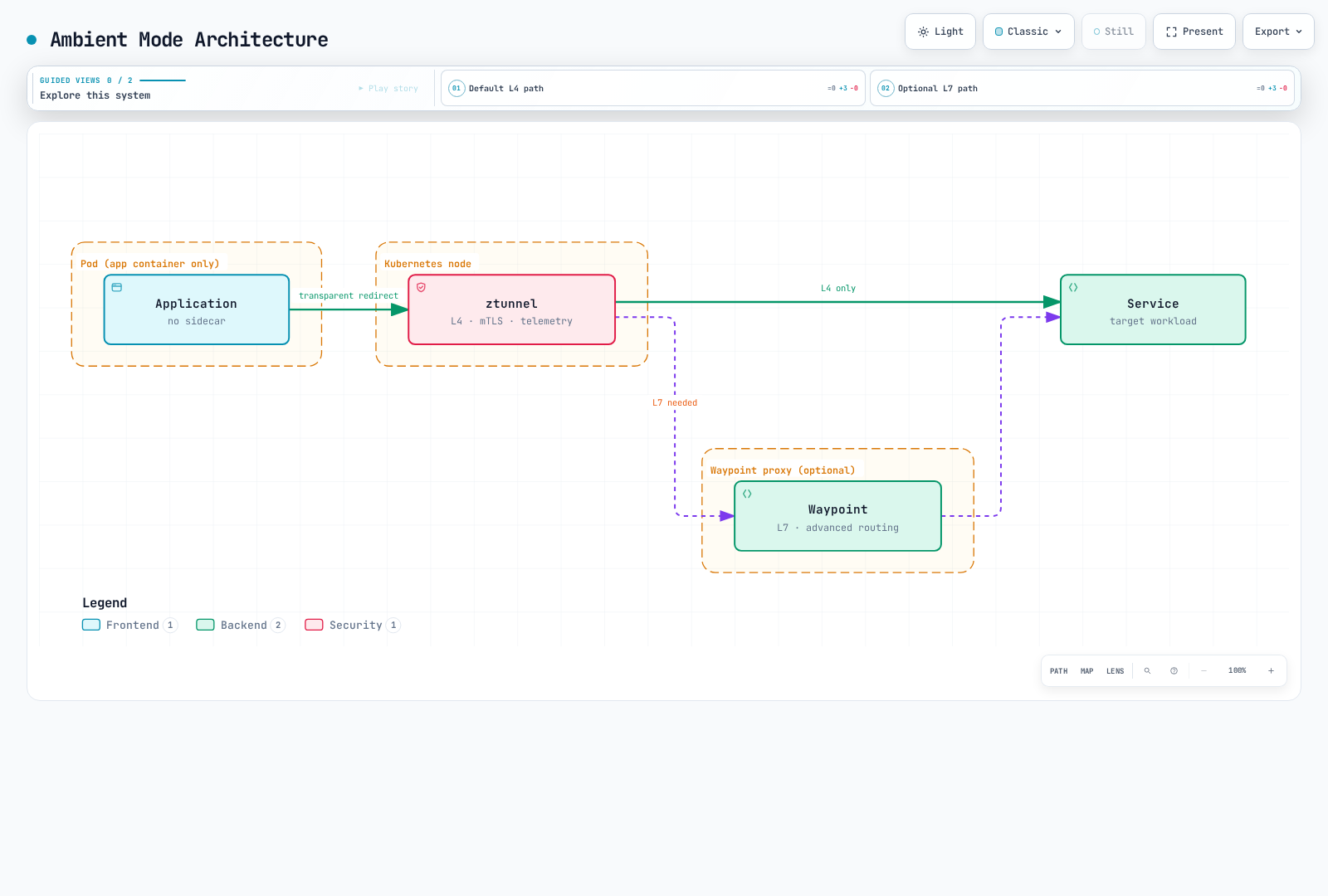
The architecture figure is conceptual: a resource must be enrolled to use a waypoint. The configured traffic scope then traverses that waypoint; ztunnel does not inspect HTTP requests and decide per request whether L7 is needed.
More details: Ambient Mode Detailed Guide
2. Multi-cluster
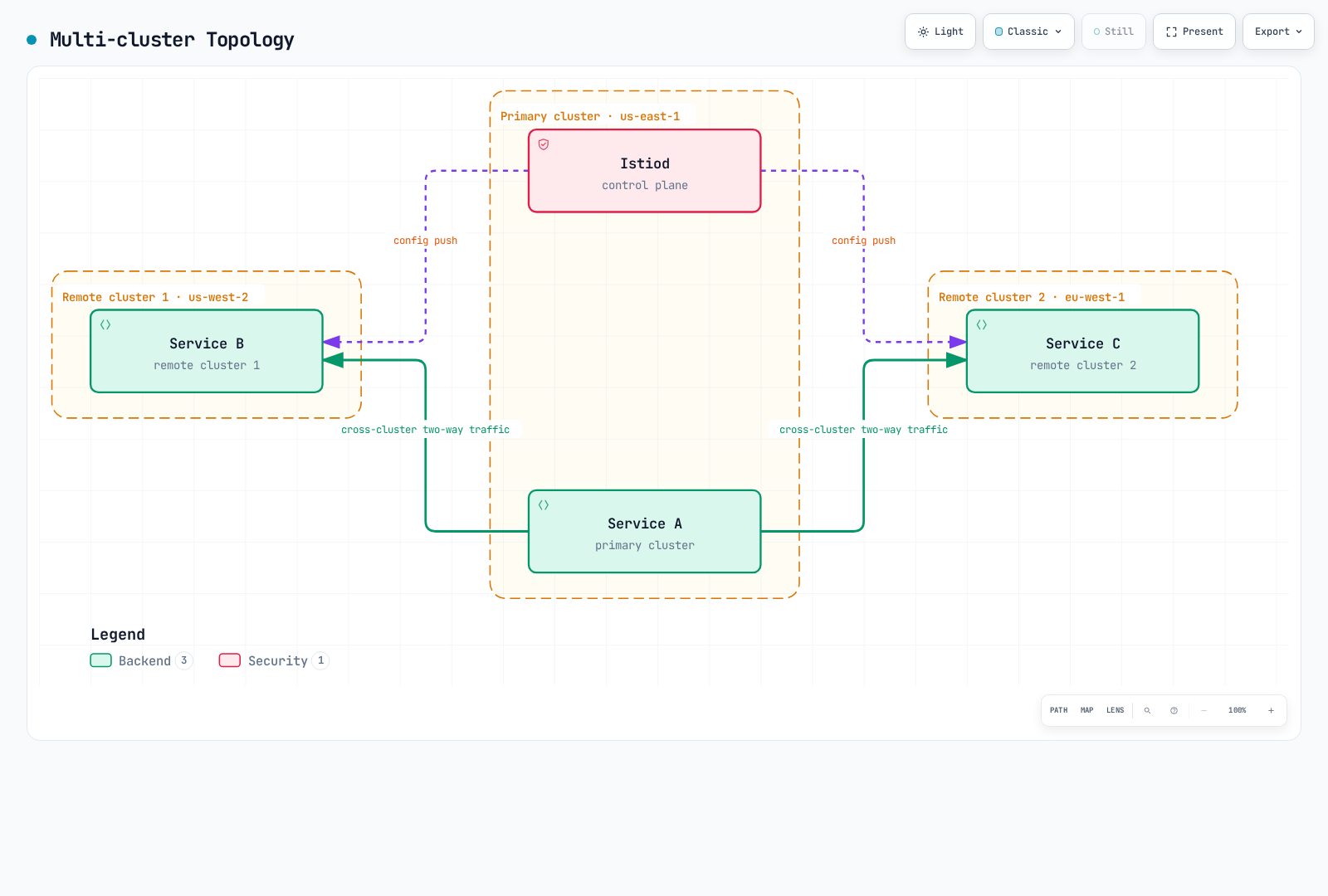
Connect multiple Kubernetes clusters as a single service mesh.
Multi-cluster Topology
Use Cases:
- Multi-region deployment
- Disaster Recovery (DR)
- Blue/Green cluster deployment
- Deliberately connect selected environments; isolation still needs identity/network/authorization boundaries
The figure illustrates a primary/remote topology with assumed connectivity. Multi-primary is another topology; different networks require suitable east-west gateway/routing and trust configuration. Merely connecting clusters does not provide DR or isolate environments.
More details: Multi-cluster Setup Guide
3. EnvoyFilter
Directly customize Envoy proxy configuration.
EnvoyFilter Use Cases
Prefer supported APIs such as VirtualService headers, AuthorizationPolicy or WasmPlugin when they express the requirement. This Lua example illustrates a version-sensitive sidecar extension, not a universal ambient configuration or authentication system.
apiVersion: networking.istio.io/v1alpha3
kind: EnvoyFilter
metadata:
  name: custom-header
  namespace: default
spec:
  workloadSelector:
    labels:
      app: myapp
  configPatches:
  - applyTo: HTTP_FILTER
    match:
      context: SIDECAR_OUTBOUND
      listener:
        filterChain:
          filter:
            name: envoy.filters.network.http_connection_manager
            subFilter:
              name: envoy.filters.http.router
    patch:
      operation: INSERT_BEFORE
      value:
        name: envoy.filters.http.lua
        typed_config:
          '@type': type.googleapis.com/envoy.extensions.filters.http.lua.v3.Lua
          default_source_code:
            inline_string: "function envoy_on_request(request_handle)\n  request_handle:headers():replace(\"x-custom-header\", \"value\")\nend\n"
Key Use Cases:
- Rate Limiting
- Custom Authentication/Authorization
- Header Manipulation
- Request/Response Transformation
- WASM Plugins
More details: EnvoyFilter Guide
4. DNS Caching
Istio DNS proxying captures application DNS queries and can answer mesh/service entries locally. A DestinationRule connection pool does not enable DNS caching. Merge this Pod-template fragment and create new sidecar Pods:
spec:
  template:
    metadata:
      annotations:
proxy.istio.io/config: "proxyMetadata:\n ISTIO_META_DNS_CAPTURE: \"true\"\n"Benefits:
- Reduced DNS lookup latency
- Reduced load on external DNS servers
- Registry-aware answers, subject to discovery/TTL/refresh behavior
Sidecar DNS capture is opt-in; ambient enables DNS proxying by default from1.25. Capture, registry address allocation and upstream DNS refresh are separate behaviors; caching does not promise permanently identical DNS answers or eliminate every external lookup.
More details: DNS Caching Guide
5. gRPC Support
gRPC uses HTTP/2 routing. This example assumes a grpc-service Service with a named gRPC port9090 and ready Pods labeled version: v2. RPCs are not inherently idempotent, so mesh retries are explicitly disabled here; clients still need deadlines/context propagation.
apiVersion: networking.istio.io/v1
kind: VirtualService
metadata:
  name: grpc-service
  namespace: default
spec:
  hosts:
  - grpc-service
  http:
  - match:
    - uri:
        prefix: /mypackage.MyService/
    route:
    - destination:
        host: grpc-service
        subset: v2
        port:
          number: 9090
    retries:
      attempts: 0
  - route:
    - destination:
        host: grpc-service
        port:
          number: 9090
    retries:
      attempts: 0
---
apiVersion: networking.istio.io/v1
kind: DestinationRule
metadata:
  name: grpc-service
  namespace: default
spec:
  host: grpc-service
  subsets:
  - name: v2
    labels:
      version: v2
Key Features:
- HTTP/2-based load balancing
- Application health protocol/Kubernetes probes when explicitly configured
- Deadlines and Retries
- Metadata-based routing
More details: gRPC Guide
6. WebSocket Support
Istio supports HTTP WebSocket upgrades. This assumes an existing my-gateway in default for ws.example.com, and an HTTP8080 backend Service serving /ws. An exact case-sensitive Upgrade-header match is unnecessary.
apiVersion: networking.istio.io/v1
kind: VirtualService
metadata:
  name: websocket-service
  namespace: default
spec:
  hosts:
  - ws.example.com
  http:
  - match:
    - uri:
        prefix: /ws
    route:
    - destination:
        host: websocket-service
        port:
          number: 8080
    retries:
      attempts: 0
  gateways:
  - my-gateway
Key Features:
- Long-lived connection maintenance
- Connection Pool configuration
- Idle Timeout management
This example omits the HTTP route timeout, which is disabled by default in Istio; that does not disable all load-balancer/proxy/application idle or maximum-duration limits. Plan connection draining and reconnect behavior during rollout.
More details: WebSocket Guide
7. Sidecar Injection
Covers sidecar proxy injection mechanisms and customization.
Injection Methods
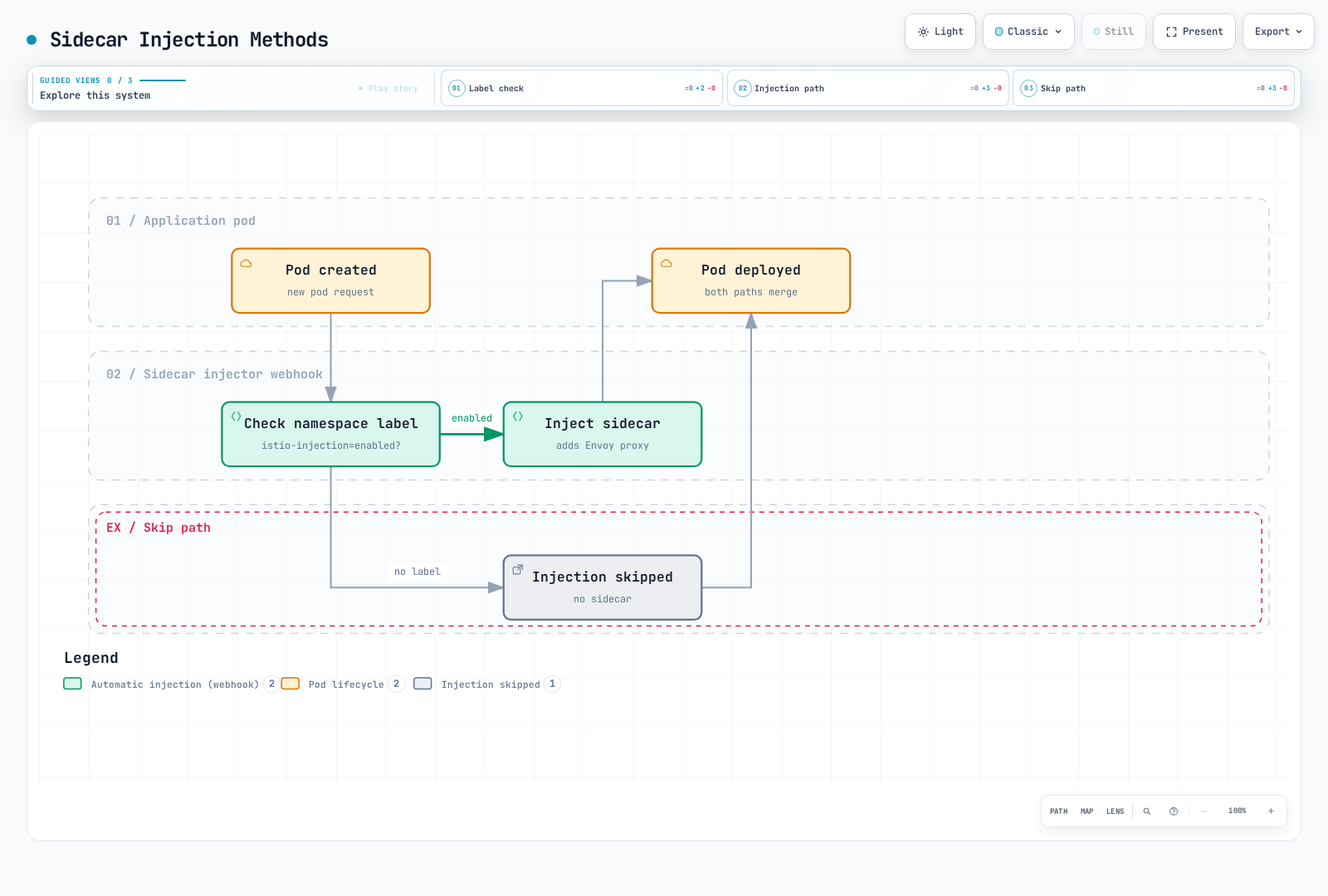
The diagram shows only the simple namespace-label branch. Actual injection also depends on Pod labels, revision/webhook selectors, exclusions and the chosen sidecar lifecycle; changing a namespace label does not inject already-running Pods.
More details: Sidecar Injection Guide
8. Argo Rollouts Integration
The following is a strategy fragment for a complete Rollout with selector, Pod template and containers. It also requires the controller, stable/canary Services and a VirtualService primary route with matching destinations. Analysis/automatic rollback requires its own AnalysisTemplate and policy; the steps alone do not configure metric analysis. Only traffic handled by the intended Istio routing path follows these weights.
spec:
  strategy:
    canary:
      trafficRouting:
        istio:
          virtualService:
            name: myapp-vsvc
            routes:
            - primary
      steps:
      - setWeight: 10
      - pause:
          duration: 2m
      - setWeight: 50
      - pause:
          duration: 2m
      stableService: myapp-stable
      canaryService: myapp-canary
Key Features:
- Metrics-based automatic Canary deployment
- Analysis and automatic rollback
- Blue/Green deployment
- Progressive Delivery
More details: Argo Rollouts Integration Guide
9. Zone-Aware Argo Rollouts
Perform zone-aware Canary deployments by availability zone.
More details: Zone-Aware Argo Rollouts Guide
10. KEDA Autoscaling
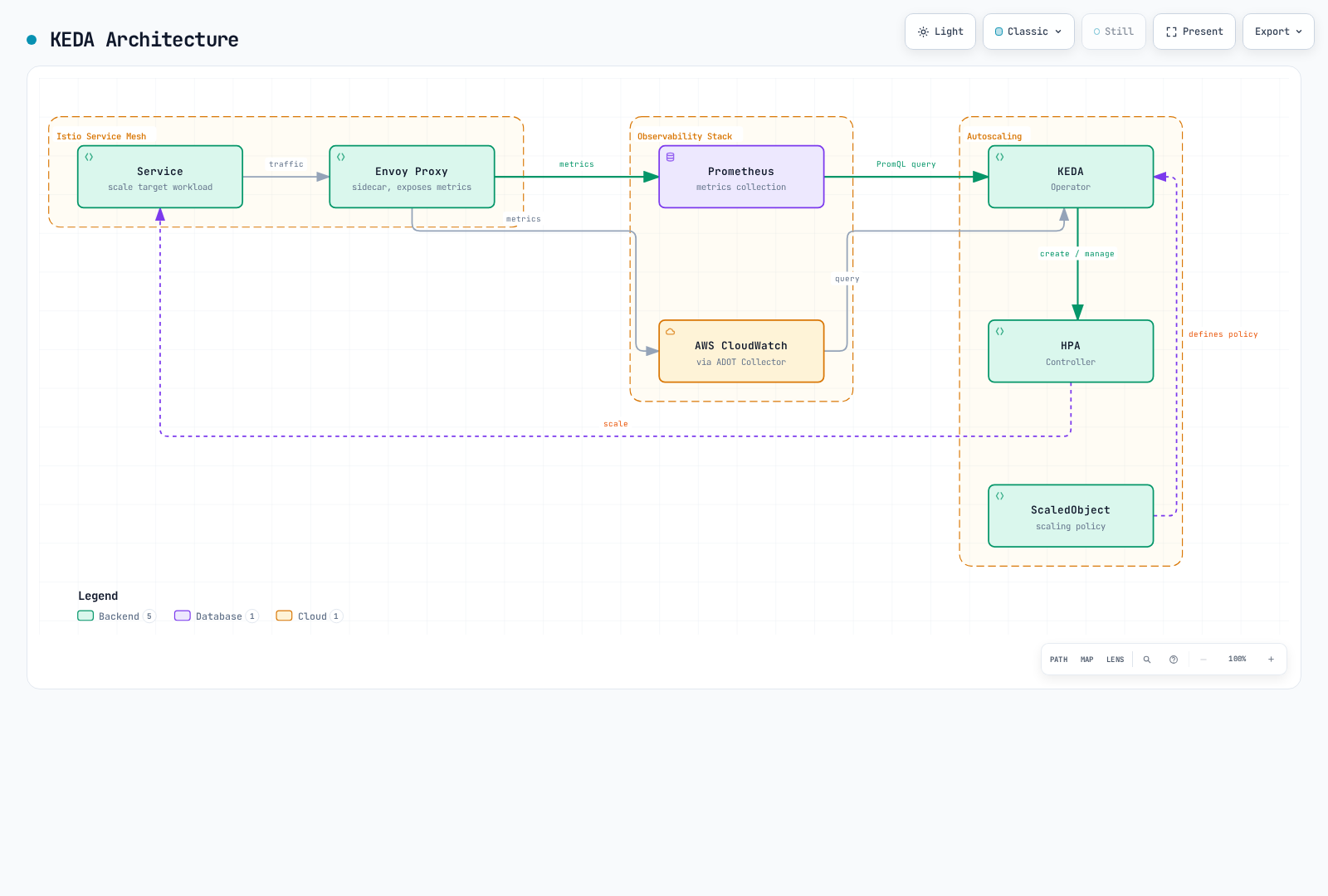
Implement Istio metrics-based autoscaling using KEDA.
KEDA vs HPA
| Topic | Kubernetes HPA | KEDA |
|---|---|---|
| Metric inputs | Resource/custom/external metrics APIs | Scalers expose backend metrics to HPA |
| Scaling roles | Replica adjustment, normally with minReplicas1 | Activation/deactivation plus a managed HPA for1→N |
| External metrics | Requires an external-metrics adapter | Provides its metrics API adapter |
| Query logic | Consumes numeric metric values | PromQL or CloudWatch metric/math/Metrics Insights queries, depending on scaler |
Metrics Server supplies resource metrics; it is not the generic external-metrics adapter. KEDA2.20 requires Kubernetes≥1.30; verify the selected release, APIs and platform support independently of Istio. Scale-to-zero also requires a signal that stays observable at zero and a viable activation path. CloudWatch Metrics Insights is distinct from CloudWatch Logs Insights.
KEDA Architecture
Key Scaling Strategies
This KEDA2.20 API example assumes an existing reviews Deployment in default, collected destination-workload metrics and an accessible private Prometheus endpoint. Configure supported authentication/TLS for your backend. It returns one aggregate value and uses an AverageValue target of100 requests/s per replica.
apiVersion: keda.sh/v1alpha1
kind: ScaledObject
metadata:
  name: reviews-rps-scaler
  namespace: default
spec:
  scaleTargetRef:
    name: reviews
  triggers:
  - type: prometheus
    metadata:
      query: sum(rate(istio_requests_total{reporter="destination",destination_workload="reviews",destination_workload_namespace="default"}[1m]))
      threshold: '100'
      serverAddress: http://prometheus.istio-system.svc.cluster.local:9090
      ignoreNullValues: 'false'
    metricType: AverageValue
  minReplicaCount: 1
  maxReplicaCount: 10
The minimum remains1 because destination traffic metrics disappear when the target has no running Pods; this example cannot wake itself from zero. ignoreNullValues: false treats an empty result as an error instead of silently treating lost telemetry as zero. Do not attach a competing HPA to the same workload. Latency/error ratios and breaker gauges are not inherently proportional to replica capacity; validate their control behavior rather than adding them as arbitrary scaling signals.
Scaling Metrics:
- RPS (Requests Per Second): Based on requests per second
- Latency (P50/P95/P99): Based on latency percentiles
- Error Rate: Based on 5xx error rate
- Circuit Breaker: Based on Circuit Breaker state
- Composite Metrics: Combination of multiple metrics
Metric Sources:
- Prometheus: Real-time Istio/Envoy metrics
- AWS CloudWatch: CloudWatch metrics via ADOT Collector
More details: KEDA Autoscaling Guide
Learning Path
- Ambient Mode - Understanding the new architecture
- Multi-cluster - Multi-cluster configuration
- EnvoyFilter - Advanced customization
- Sidecar Injection - Injection mechanisms
- gRPC - gRPC protocol support
- WebSocket - WebSocket support
- DNS Caching - Performance optimization
- Argo Rollouts - Progressive Delivery
- Zone-Aware Argo Rollouts - Zone-based deployment
- KEDA Autoscaling - Metrics-based autoscaling
References
Quiz
To test what you've learned in this chapter, take the Istio Advanced Quiz.