Egress 제어
Egress 제어는 메시 외부로 나가는 트래픽을 관리하고 보안을 강화하는 기능입니다.
목차
Egress 개요
앱에서 시작한 HTTPS를 Sidecar와 Egress Gateway로 전달하는 예제입니다. api.external.com은 관리하는 DNS 해석 가능한 엔드포인트로 바꾸고 호환 Istio Control Plane을 먼저 설치하세요. ServiceEntry는 목적지를 등록하며 게이트웨이 경유 강제나 방화벽 역할을 하지 않습니다. Egress 제한은 네트워크 정책으로 함께 집행하세요.
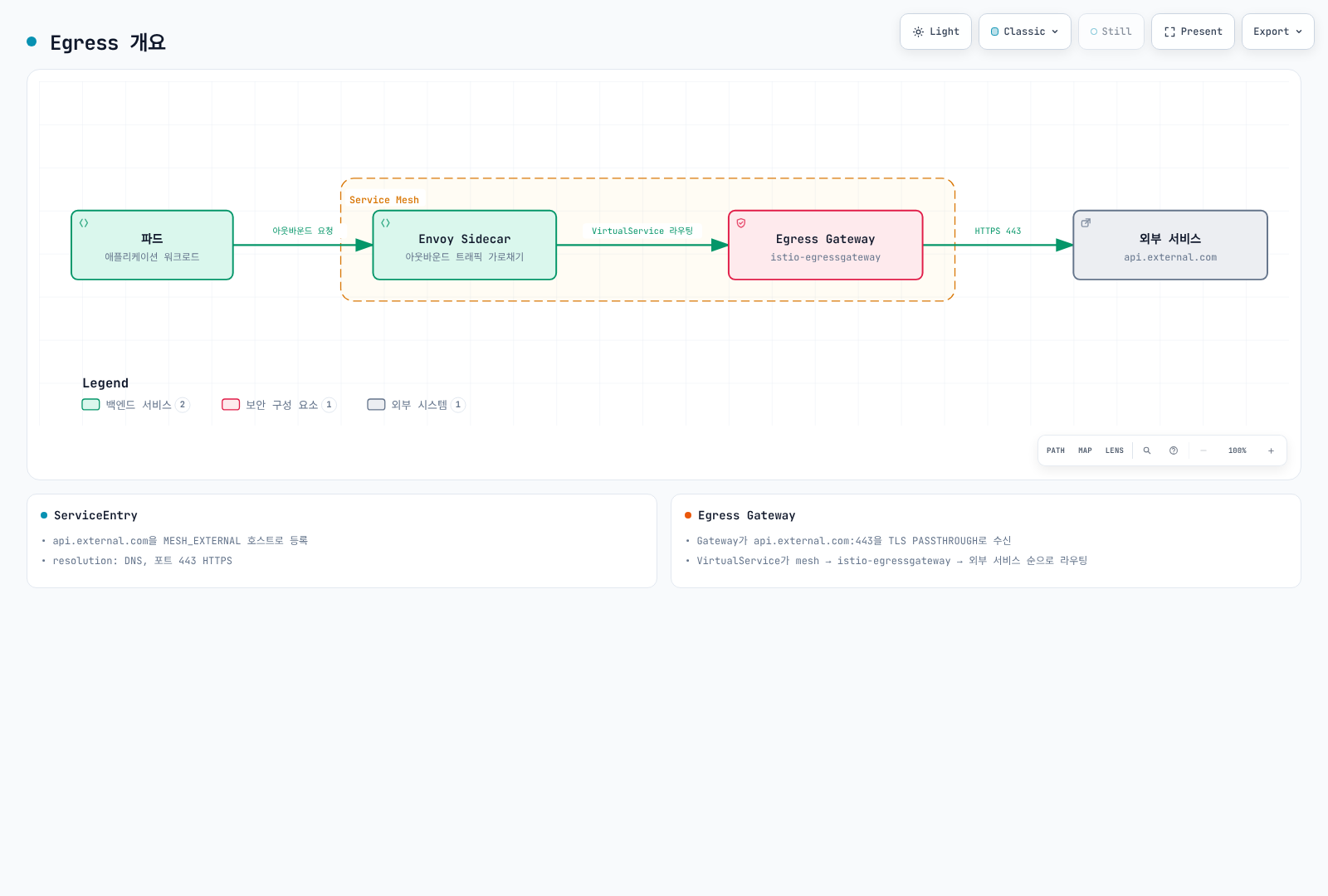
ServiceEntry 설정
외부 서비스 등록
yaml
apiVersion: networking.istio.io/v1
kind: ServiceEntry
metadata:
  name: external-api
spec:
  hosts:
  - api.external.com
  ports:
  - number: 443
    name: https
    protocol: HTTPS
  location: MESH_EXTERNAL
  resolution: DNS
HTTP 외부 서비스
yaml
apiVersion: networking.istio.io/v1
kind: ServiceEntry
metadata:
  name: httpbin
spec:
  hosts:
  - httpbin.org
  ports:
  - number: 80
    name: http
    protocol: HTTP
  location: MESH_EXTERNAL
  resolution: DNS
Egress Gateway
Egress Gateway 설치
bash
helm install istio-egressgateway istio/gateway \
  -n istio-system \
  --version 1.31.0 \
  --set service.type=ClusterIP \
  --set labels.app=istio-egressgateway \
  --set labels.istio=egressgateway \
  --wait
Egress Gateway 구성
yaml
apiVersion: networking.istio.io/v1
kind: Gateway
metadata:
  name: istio-egressgateway
  namespace: istio-system
spec:
  selector:
    istio: egressgateway
  servers:
  - port:
      number: 443
      name: tls
      protocol: TLS
    hosts:
    - api.external.com
    tls:
      mode: PASSTHROUGH
---
apiVersion: networking.istio.io/v1
kind: DestinationRule
metadata:
  name: egressgateway-for-external
  namespace: default
spec:
  host: istio-egressgateway.istio-system.svc.cluster.local
  subsets:
  - name: external
---
apiVersion: networking.istio.io/v1
kind: VirtualService
metadata:
  name: direct-external-through-egress-gateway
  namespace: default
spec:
  hosts:
  - api.external.com
  gateways:
  - mesh
  - istio-system/istio-egressgateway
  tls:
  - match:
    - gateways:
      - mesh
      port: 443
      sniHosts:
      - api.external.com
    route:
    - destination:
        host: istio-egressgateway.istio-system.svc.cluster.local
        subset: external
        port:
          number: 443
  - match:
    - gateways:
      - istio-system/istio-egressgateway
      port: 443
      sniHosts:
      - api.external.com
    route:
    - destination:
        host: api.external.com
        port:
          number: 443
TLS Origination
위 예제는 앱과 외부 서비스의 TLS 연결을 유지하고 Egress Gateway가 SNI로 라우팅합니다. TLS Origination은 앱이 HTTP를 보낸 뒤 프록시가 TLS를 시작하는 방식입니다. 일치하는 HTTP ServiceEntry 포트/targetPort와 DestinationRule TLS 정책이 필요하므로 TLS Origination 가이드를 따르고 이미 암호화한 앱 연결 위에 TLS를 중복 생성하지 마세요.
검증
차트 저장소와 버전은 설치 가이드를 따릅니다. 리소스의 명시한 네임스페이스를 유지하고 외부 ServiceEntry는 default 또는 클라이언트에 export된 네임스페이스에 두세요. SNI를 보내는 메시 클라이언트로 테스트하고 두 프록시의 구성을 확인한 뒤 게이트웨이가 연결을 받는지 검증하세요. 외부 엔드포인트 접근 성공만으로 게이트웨이 경유가 입증되지는 않습니다.
bash
istioctl analyze -A
kubectl get pods -n istio-system -l istio=egressgateway
istioctl proxy-config listeners <egress-pod> -n istio-system
istioctl proxy-config clusters <client-pod> -n default