Traffic Management
Istio의 트래픽 관리 기능은 서비스 메시 내에서 트래픽 흐름을 세밀하게 제어할 수 있게 해줍니다.
목차
- Gateway와 VirtualService
- 라우팅
- DestinationRule ⭐ 필수 개념
- 트래픽 분할
- Retry 및 Timeout
- 로드 밸런싱
- Circuit Breaker
- Fault Injection
- Traffic Mirroring
- Session Affinity
- Egress 제어
- ServiceEntry (외부 서비스 관리)
- WorkloadEntry (VM 등록)
개요
아래는 지원되는 Istio 릴리스의 Sidecar 모드 구성 예제입니다. Gateway, VirtualService, DestinationRule은 프록시가 사용하는 API 객체이며 별도의 네트워크 홉이 아닙니다. Mirror는 90/10 분배의 나머지가 아니라 선택한 요청의 추가 복사본이며 응답은 버립니다. 그림은 논리적인 구성 관계를 나타냅니다.
각 발췌는 대안 예제이며 동시에 적용할 하나의 매니페스트가 아닙니다. 참조하는 Service와 DestinationRule subset을 먼저 준비하세요. gateways가 없는 VirtualService는 메시 내부에 적용되며 인바운드에는 Gateway 연결과 호스트 일치가 필요합니다. Ambient는 지원되는 Gateway API/waypoint 라우팅을 사용하세요.
트래픽 관리는 Istio의 핵심 기능 중 하나로, 다음과 같은 작업을 코드 변경 없이 수행할 수 있습니다:
주요 기능
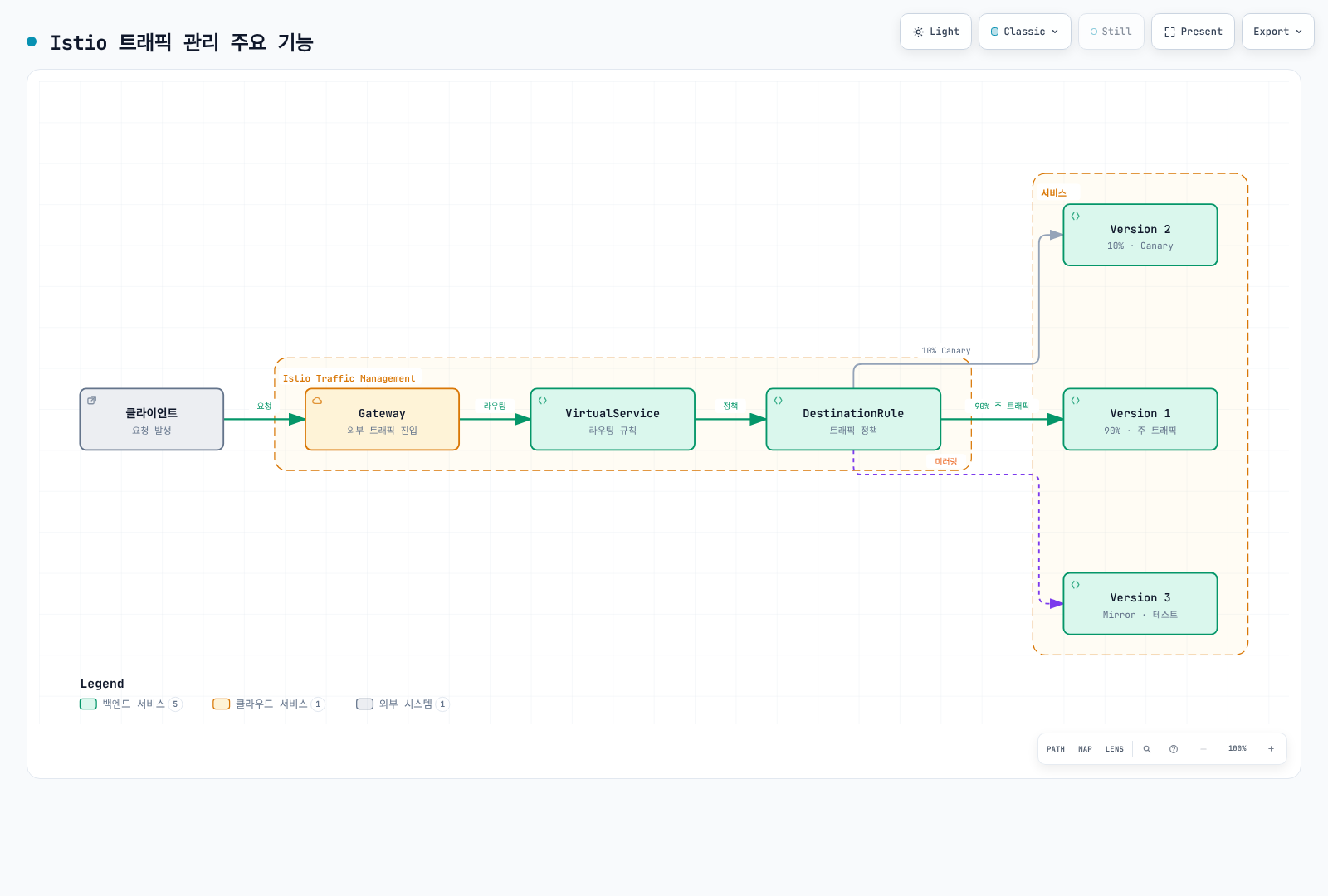
1. 지능형 라우팅
- Path 기반:
/api/v1→ Service A,/api/v2→ Service B - Header 기반:
User-Agent: Mobile→ Mobile Version - Cookie 기반: 특정 사용자를 특정 버전으로 라우팅
- Weight 기반: 트래픽을 비율로 분배
2. 배포 전략
Canary 배포:
# 10%만 새 버전으로
route:
- destination:
    host: reviews
    subset: v1
  weight: 90
- destination:
    host: reviews
    subset: v2
  weight: 10
Blue/Green 배포:
# 순간 전환
route:
- destination:
    host: reviews
    subset: v2  # Green으로 전환
  weight: 100
3. 복원력 패턴
- Circuit Breaker: 장애 서비스 격리
- Retry: 자동 재시도
- Timeout: 응답 시간 제한
- Rate Limiting: 요청 속도 제한
4. 테스트 및 디버깅
- Traffic Mirroring: 프로덕션 트래픽 복제하여 테스트
- Fault Injection: 의도적인 장애 주입
- A/B Testing: 사용자 그룹별 다른 버전 제공
핵심 리소스
Gateway
외부 트래픽이 메시로 들어오는 진입점을 정의합니다.
apiVersion: networking.istio.io/v1
kind: Gateway
metadata:
  name: my-gateway
spec:
  selector:
    istio: ingressgateway
  servers:
  - port:
      number: 80
      name: http
      protocol: HTTP
    hosts:
    - "myapp.example.com"
VirtualService
요청을 어떻게 라우팅할지 정의합니다.
apiVersion: networking.istio.io/v1
kind: VirtualService
metadata:
  name: reviews
spec:
  hosts:
  - reviews
  http:
  - match:
    - uri:
        prefix: "/v2"
    route:
    - destination:
        host: reviews
        subset: v2
  - route:
    - destination:
        host: reviews
        subset: v1
DestinationRule
대상 서비스에 대한 정책을 정의합니다.
apiVersion: networking.istio.io/v1
kind: DestinationRule
metadata:
  name: reviews
spec:
  host: reviews
  trafficPolicy:
    loadBalancer:
      simple: LEAST_REQUEST
  subsets:
  - name: v1
    labels:
      version: v1
  - name: v2
    labels:
      version: v2
실전 예제
안전한 Canary 배포
# 1단계: 5% 트래픽으로 시작
apiVersion: networking.istio.io/v1
kind: VirtualService
metadata:
  name: reviews-canary
spec:
  hosts:
  - reviews
  http:
  - route:
    - destination:
        host: reviews
        subset: v1
      weight: 95
    - destination:
        host: reviews
        subset: v2
      weight: 5
모니터링 후 문제가 없으면 점진적으로 증가:
- 5% → 10% → 25% → 50% → 100%
Header 기반 라우팅 (개발자 테스트)
apiVersion: networking.istio.io/v1
kind: VirtualService
metadata:
  name: reviews-dev
spec:
  hosts:
  - reviews
  http:
  # 개발자는 새 버전 사용
  - match:
    - headers:
        x-dev-user:
          exact: "true"
    route:
    - destination:
        host: reviews
        subset: v2
  # 일반 사용자는 안정 버전
  - route:
    - destination:
        host: reviews
        subset: v1
개발자 헤더는 클라이언트가 제공하는 라우팅 힌트이며 인증이나 인가 경계가 아닙니다.
Circuit Breaker + Retry
apiVersion: networking.istio.io/v1
kind: DestinationRule
metadata:
  name: reviews-resilient
spec:
  host: reviews
  trafficPolicy:
    # Connection Pool 설정
    connectionPool:
      tcp:
        maxConnections: 100
      http:
        http1MaxPendingRequests: 50
        maxRequestsPerConnection: 2
    # Circuit Breaker
    outlierDetection:
      consecutive5xxErrors: 5
      interval: 30s
      baseEjectionTime: 30s
---
apiVersion: networking.istio.io/v1
kind: VirtualService
metadata:
  name: reviews-retry
spec:
  hosts:
  - reviews
  http:
  - route:
    - destination:
        host: reviews
    retries:
      attempts: 3
      perTryTimeout: 2s
      retryOn: 5xx,reset,connect-failure
    timeout: 10s
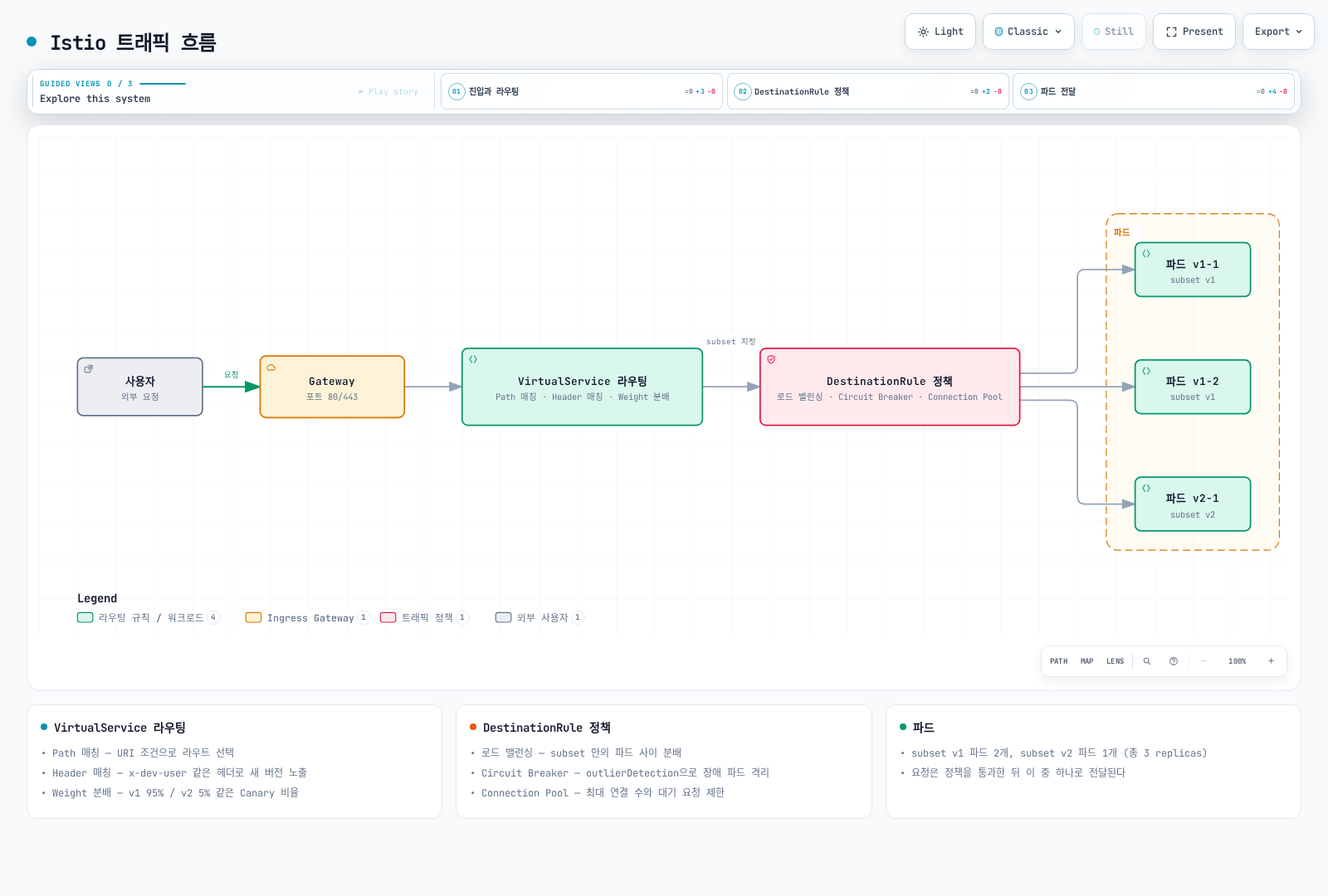
트래픽 흐름
학습 순서
트래픽 관리를 효과적으로 학습하려면 다음 순서를 권장합니다:
Gateway와 VirtualService ⭐ 시작점
- 기본 개념 이해
- 외부 트래픽 처리
- 고급 라우팅 패턴
- 조건부 라우팅
DestinationRule ⭐ 필수 개념
- Subset 개념 이해
- Traffic Policy 기초
- VirtualService와 통합
- Canary 배포
- A/B 테스트
- 장애 복구
- 응답 시간 제어
- 다양한 알고리즘
- 성능 최적화
- 장애 격리
- Cascading Failure 방지
- 장애 테스트
- Chaos Engineering
- 프로덕션 테스트
- 새 버전 검증
- Sticky Session
- 상태 유지
- 외부 서비스 접근
- 보안 강화
- 외부 서비스 등록
- Egress Gateway 통합
모범 사례
1. 점진적 롤아웃
# ❌ 나쁜 예: 한번에 100%
weight: 100

# ✅ 좋은 예: 점진적 증가
# 5% → 모니터링 → 10% → 모니터링 → ...
2. 워크로드에 맞는 Timeout 설정
# ✅ 항상 timeout 설정
http:
- route:
  - destination:
      host: reviews
  timeout: 10s
스트리밍 요청에는 별도 타임아웃 설정이 필요할 수 있습니다. 짧은 HTTP 기한이 모든 gRPC 스트림이나 장시간 응답에 적합하지는 않습니다.
3. Retry 신중하게 사용
# ✅ 멱등성이 보장되는 경우만
retries:
  attempts: 3
  perTryTimeout: 2s
  retryOn: 5xx,reset,connect-failure
4. Circuit Breaker 임계값 조정
# ✅ 서비스 특성에 맞게 조정
outlierDetection:
  consecutive5xxErrors: 5      # 서비스에 따라 조정
  interval: 30s
  baseEjectionTime: 30s
  maxEjectionPercent: 50    # 최대 50%만 제외
5. 메트릭 모니터링
트래픽 관리 변경 시 반드시 모니터링:
- Request Rate: 요청 수 변화
- Error Rate: 에러 비율
- Latency: P50, P95, P99 지연시간
- Success Rate: 성공률
문제 해결
Traffic이 라우팅되지 않음
# 1. VirtualService 확인
kubectl get virtualservice -n <namespace>
kubectl describe virtualservice <name> -n <namespace>

# 2. DestinationRule 확인
kubectl get destinationrule -n <namespace>

# 3. 파드 레이블 확인
kubectl get pods --show-labels -n <namespace>

# 4. Istio 구성 분석
istioctl analyze -n <namespace>
Weight가 적용되지 않음
# Envoy 구성 확인
istioctl proxy-config routes <pod-name> -n <namespace>

# 클러스터 정보 확인
istioctl proxy-config clusters <pod-name> -n <namespace>
다음 단계
- Security: mTLS 및 인증/권한 부여
- Observability: 메트릭, 로그, 트레이스
- Resilience: Rate Limiting, Zone Aware Routing
참고 자료
퀴즈
이 장에서 배운 내용을 테스트하려면 Istio Traffic Management 퀴즈를 풀어보세요.