AWS 통합
이 문서에서는 Amazon EKS 환경에서 Istio를 AWS 서비스와 통합하는 방법을 다룹니다.
목차
2026-09-11 기준 Linux EC2 기반 EKS 노드와 AWS Load Balancer Controller를 대상으로 검토했습니다. 아래 NLB 패스스루, ALB 종료, NLB 종료는 대안 구성으로 같은 Service/Gateway에 동시에 적용하지 마세요. 설치 문서의 게이트웨이 파드 레이블과 대상 포트에 맞추고 Service 변경은 관리 중인 Helm/istioctl 설정에 병합하세요. EKS Auto Mode는 로드 밸런서 관리 및 지원 annotation이 다르며 Fargate에서는 Istio CNI/ztunnel을 실행할 수 없습니다.
AWS Load Balancer 통합
Istio Ingress Gateway를 AWS Load Balancer와 통합하여 외부 트래픽을 처리할 수 있습니다.
Network Load Balancer (NLB) 통합
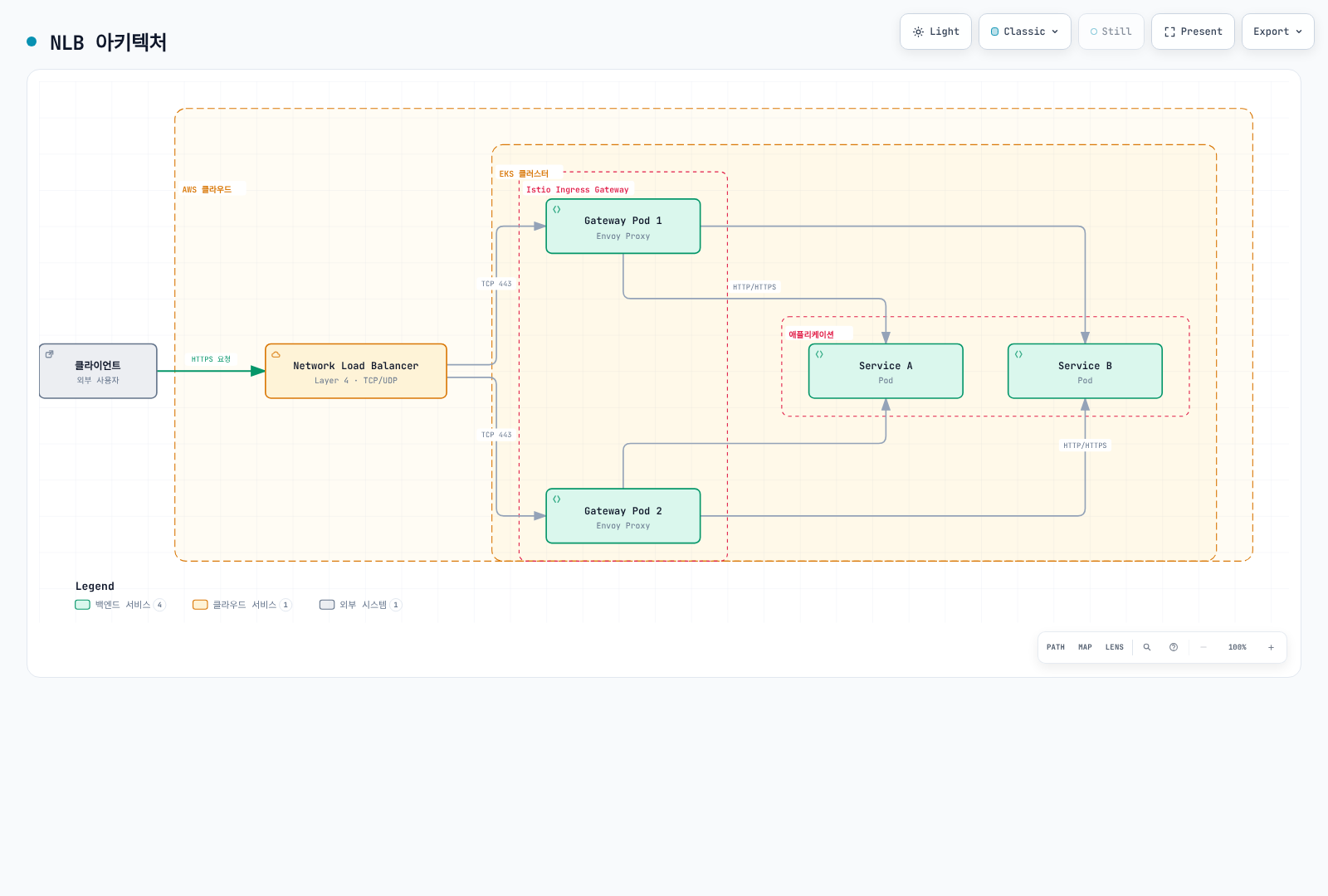
NLB는 Layer 4 (TCP/UDP) 로드 밸런서로, 높은 성능과 낮은 지연시간이 필요한 경우 적합합니다.
NLB 아키텍처
NLB 설정
1. AWS Load Balancer Controller 설치
# IAM 정책 생성
curl -fsSL -o iam_policy.json https://raw.githubusercontent.com/kubernetes-sigs/aws-load-balancer-controller/v3.5.0/docs/install/iam_policy.json

aws iam create-policy \
    --policy-name AWSLoadBalancerControllerIAMPolicy \
    --policy-document file://iam_policy.json

# IRSA 생성 전에 클러스터 OIDC 프로바이더를 한 번 연결
eksctl utils associate-iam-oidc-provider --cluster my-cluster --approve

# IRSA 설정
eksctl create iamserviceaccount \
  --cluster=my-cluster \
  --namespace=kube-system \
  --name=aws-load-balancer-controller \
  --attach-policy-arn="arn:aws:iam::<AWS_ACCOUNT_ID>:policy/AWSLoadBalancerControllerIAMPolicy" \
  --override-existing-serviceaccounts \
  --approve

# Helm으로 컨트롤러 설치
helm repo add eks https://aws.github.io/eks-charts
helm repo update

helm install aws-load-balancer-controller eks/aws-load-balancer-controller \
  -n kube-system \
  --version 3.5.0 \
  --set clusterName=my-cluster \
  --set region=us-west-2 \
  --set vpcId="<VPC_ID>" \
  --set serviceAccount.create=false \
  --set serviceAccount.name=aws-load-balancer-controller
2. NLB를 사용하는 Istio Ingress Gateway 설정
# istio-ingress-nlb.yaml
apiVersion: v1
kind: Service
metadata:
  name: istio-ingressgateway
  namespace: istio-system
  annotations:
    # NLB 설정
    service.beta.kubernetes.io/aws-load-balancer-type: "external"
    service.beta.kubernetes.io/aws-load-balancer-nlb-target-type: "ip"
    service.beta.kubernetes.io/aws-load-balancer-scheme: "internet-facing"

    # TCP 패스스루: TLS는 Istio에서 종료; 여기에는 ACM TLS 리스너 없음

    # 헬스 체크 설정
    service.beta.kubernetes.io/aws-load-balancer-healthcheck-protocol: "http"
    service.beta.kubernetes.io/aws-load-balancer-healthcheck-port: "15021"
    service.beta.kubernetes.io/aws-load-balancer-healthcheck-path: "/healthz/ready"

    # 추가 설정
    service.beta.kubernetes.io/aws-load-balancer-attributes: "load_balancing.cross_zone.enabled=true"
spec:
  type: LoadBalancer
  selector:
    app: istio-ingressgateway
    istio: ingressgateway
  ports:
  - name: http2
    port: 80
    protocol: TCP
    targetPort: 8080
  - name: https
    port: 443
    protocol: TCP
    targetPort: 8443
3. Gateway 리소스 설정
apiVersion: networking.istio.io/v1
kind: Gateway
metadata:
  name: my-gateway
  namespace: istio-system
spec:
  selector:
    istio: ingressgateway
  servers:
  - port:
      number: 443
      name: https
      protocol: HTTPS
    tls:
      mode: SIMPLE
      credentialName: my-tls-secret
    hosts:
    - "myapp.example.com"
  - port:
      number: 80
      name: http
      protocol: HTTP
    hosts:
    - "myapp.example.com"
    tls:
      httpsRedirect: true
NLB 장점
- 높은 성능: 초당 수백만 요청 처리
- 낮은 지연시간: Layer 4에서 동작하여 빠른 응답
- 고정 IP: Elastic IP 할당 가능
- 프로토콜 지원: TCP, UDP, TLS
- 용량 계획: 연결 수·바이트 사용량을 측정하고 리전별 요금 비교
NLB 사용 시나리오
- WebSocket, gRPC 등 장시간 연결이 필요한 경우
- 초당 수백만 요청을 처리해야 하는 경우
- 고정 IP가 필요한 경우
- TLS 종료를 Istio에서 수행하려는 경우
Application Load Balancer (ALB) 통합
ALB는 Layer 7 (HTTP/HTTPS) 로드 밸런서로, 고급 라우팅 기능이 필요한 경우 적합합니다.
ALB 아키텍처
클라이언트 HTTPS는 ALB에서 ACM 인증서로 종료되며 이 예제는 Istio 게이트웨이에 HTTP/1.1을 전달합니다. 이후 Envoy가 애플리케이션으로 라우팅합니다.
ALB 설정
1. Ingress 리소스로 ALB 생성
# istio-ingress-alb.yaml
apiVersion: networking.k8s.io/v1
kind: Ingress
metadata:
  name: istio-ingress
  namespace: istio-system
  annotations:
    # ALB 설정
    alb.ingress.kubernetes.io/scheme: internet-facing
    alb.ingress.kubernetes.io/target-type: ip
    alb.ingress.kubernetes.io/listen-ports: '[{"HTTP": 80}, {"HTTPS": 443}]'
    alb.ingress.kubernetes.io/ssl-redirect: '443'

    # ACM 인증서
    alb.ingress.kubernetes.io/certificate-arn: arn:aws:acm:region:account:certificate/cert-id

    # 헬스 체크
    alb.ingress.kubernetes.io/healthcheck-protocol: HTTP
    alb.ingress.kubernetes.io/healthcheck-port: '15021'
    alb.ingress.kubernetes.io/healthcheck-path: /healthz/ready
    alb.ingress.kubernetes.io/healthcheck-interval-seconds: '15'
    alb.ingress.kubernetes.io/healthcheck-timeout-seconds: '5'
    alb.ingress.kubernetes.io/success-codes: '200'
    alb.ingress.kubernetes.io/healthy-threshold-count: '2'
    alb.ingress.kubernetes.io/unhealthy-threshold-count: '2'

    # 추가 설정
    alb.ingress.kubernetes.io/load-balancer-attributes: idle_timeout.timeout_seconds=60
    alb.ingress.kubernetes.io/target-group-attributes: deregistration_delay.timeout_seconds=30
spec:
  ingressClassName: alb
  rules:
  - host: "myapp.example.com"
    http:
      paths:
      - path: /
        pathType: Prefix
        backend:
          service:
            name: istio-ingressgateway
            port:
              number: 80
ALB 구성에서는 게이트웨이 Service를 ClusterIP로 구성해 별도 NLB가 생성되지 않게 하세요. ALB가 TLS를 종료하고 기본적으로 HTTP/1.1을 전달하므로 아래 HTTP Gateway에는 HTTPS 리다이렉트를 넣지 않습니다. 애플리케이션 라우트는 my-alb-gateway에 연결한 VirtualService로 정의하세요.
apiVersion: networking.istio.io/v1
kind: Gateway
metadata:
  name: my-alb-gateway
  namespace: istio-system
spec:
  selector:
    istio: ingressgateway
  servers:
  - port:
      number: 80
      name: http
      protocol: HTTP
    hosts:
    - "myapp.example.com"
2. 경로 기반 라우팅
apiVersion: networking.k8s.io/v1
kind: Ingress
metadata:
  name: istio-ingress-path-based
  namespace: istio-system
  annotations:
    alb.ingress.kubernetes.io/scheme: internet-facing
    alb.ingress.kubernetes.io/target-type: ip
spec:
  ingressClassName: alb
  rules:
  - host: "api.example.com"
    http:
      paths:
      - path: /v1
        pathType: Prefix
        backend:
          service:
            name: istio-ingressgateway
            port:
              number: 80
  - host: "admin.example.com"
    http:
      paths:
      - path: /
        pathType: Prefix
        backend:
          service:
            name: istio-ingressgateway
            port:
              number: 80
ALB 장점
- 고급 라우팅: Path, Header, Query String 기반 라우팅
- WAF 통합: AWS WAF로 보안 강화
- 인증 통합: Cognito, OIDC 통합
- ACM 통합: 인증서 자동 관리
- 컨테이너 최적화: ECS, EKS에 최적화
ALB 사용 시나리오
- HTTP/HTTPS 전용 트래픽
- 경로 기반 라우팅이 필요한 경우
- WAF 보안이 필요한 경우
- 여러 도메인을 단일 로드 밸런서에서 처리하는 경우
NLB vs ALB 비교
| 특성 | NLB | ALB |
|---|---|---|
| OSI Layer | Layer 4 (TCP/UDP) | Layer 7 (HTTP/HTTPS) |
| 용량 | 트래픽 및 용량 설정에 따라 다름 | 트래픽 및 용량 설정에 따라 다름 |
| 지연시간 | 매우 낮음 | 낮음 |
| 고정 IP | 지원 (Elastic IP) | 미지원 |
| TLS 종료 | TCP 패스스루 또는 NLB TLS 리스너 | ALB에서 처리 가능 |
| 라우팅 | IP/Port 기반 | Path, Host, Header 기반 |
| WAF 통합 | 불가 | 가능 |
| 비용 | NLCU 사용량과 리전 요금 | LCU 사용량과 리전 요금 |
| WebSocket | 네이티브 지원 | 지원 |
| gRPC | 네이티브 지원 | HTTP/2 필요 |
| 권장 사용 | 높은 성능, WebSocket, gRPC | HTTP 라우팅, WAF, 인증 |
Istio vs 다른 솔루션 비교
Istio vs VPC Lattice
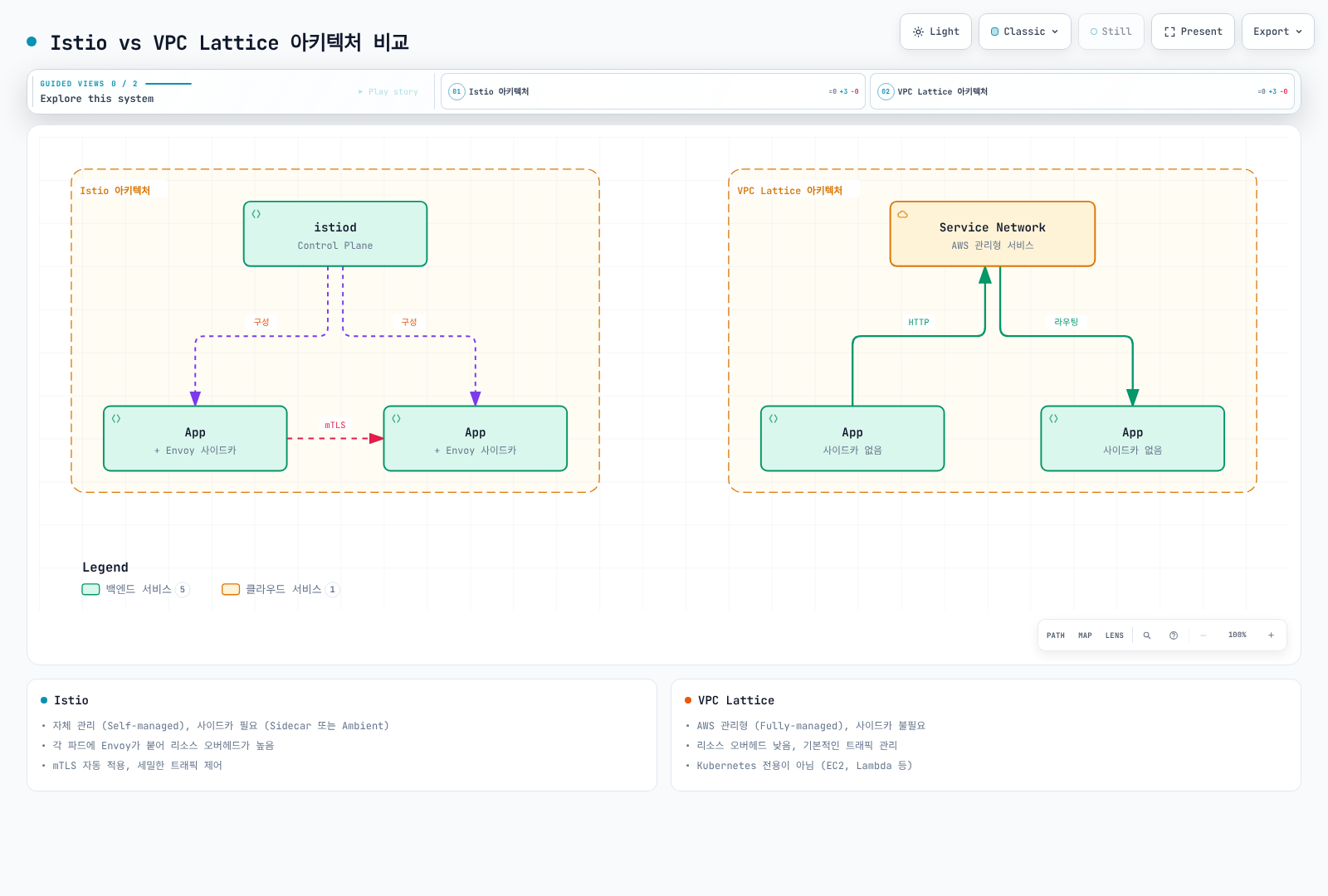
VPC Lattice는 AWS의 관리형 애플리케이션 네트워킹 서비스입니다.
아키텍처 비교
기능 비교
| 특성 | Istio | VPC Lattice |
|---|---|---|
| 관리 주체 | 자체 관리 (Self-managed) | AWS 관리형 (Fully-managed) |
| 사이드카 | Sidecar 모드만 필요; Ambient는 없음 | 불필요 |
| 리소스 오버헤드 | Sidecar/Ambient 토폴로지에 따라 다름 | 낮음 (사이드카 없음) |
| 복잡도 | 높음 | 낮음 |
| 학습 곡선 | 가파름 | 완만함 |
| 트래픽 관리 | 매우 고급 (세밀한 제어) | 기본적 (충분한 기능) |
| mTLS | 자동 워크로드 ID/인증서 관리 | TLS 패스스루에서 애플리케이션이 직접 처리 |
| Observability | 풍부한 메트릭, 트레이스 | 기본 메트릭 |
| Fault Injection | 지원 | 미지원 |
| Circuit Breaker | 세밀한 제어 | 동등한 Istio 정책 API 없음; 서비스 할당량과는 다름 |
| Rate Limiting | Local + Global | 동등한 Istio 정책 API 없음; 서비스 할당량과는 다름 |
| Multi-cluster | 강력한 지원 | VPC 간 연결 |
| 크로스 계정 | 복잡 | 간단 (네이티브 지원) |
| 비용 | 컴퓨팅 비용 (EC2) | 서비스 사용 비용 |
| 벤더 종속 | 없음 (오픈소스) | AWS 종속 |
| Kubernetes 전용 | 아니오 (VM 지원) | 아니오 (EC2, Lambda 등) |
VPC Lattice TLS 패스스루는 앱 TLS/mTLS를 유지하지만 해당 리스너에서는 IAM ID 기반 인증이나 Lambda 대상을 사용할 수 없습니다. HTTPS 리스너와 TLS 패스스루의 보안 기능을 구분하세요.
언제 Istio를 선택할까?
Istio가 적합한 경우:
- 세밀한 트래픽 제어 필요
- Canary 배포, A/B 테스트, Traffic Mirroring
- 복잡한 라우팅 규칙 (Header, Cookie 기반 등)
- Fault Injection으로 Chaos Engineering
- 강력한 보안 요구사항
- 서비스 간 자동 mTLS 암호화
- 세밀한 권한 부여 정책
- JWT 검증, RBAC
- 고급 관찰성 필요
- 상세한 메트릭 (Latency P50/P95/P99)
- 분산 추적 (Jaeger, Zipkin)
- 서비스 토폴로지 시각화 (Kiali)
- 멀티 클러스터 메시
- 여러 EKS 클러스터 간 통신
- 클러스터 간 페일오버
- 글로벌 로드 밸런싱
- 벤더 독립성
- 다른 클라우드 또는 온프레미스로 이동 가능성
- Kubernetes 표준 사용
예제: Istio의 고급 트래픽 관리
apiVersion: networking.istio.io/v1
kind: VirtualService
metadata:
  name: reviews
spec:
  hosts:
  - reviews
  http:
  # Header 기반 라우팅
  - match:
    - headers:
        user-agent:
          regex: ".*Mobile.*"
    route:
    - destination:
        host: reviews
        subset: mobile-v2
  # Canary 배포 (10%)
  - match:
    - headers:
        x-canary:
          exact: "true"
    route:
    - destination:
        host: reviews
        subset: v3
      weight: 10
    - destination:
        host: reviews
        subset: v2
      weight: 90
  # Traffic Mirroring
  - route:
    - destination:
        host: reviews
        subset: v2
    mirror:
      host: reviews
      subset: v3
    mirrorPercentage:
      value: 100
언제 VPC Lattice를 선택할까?
VPC Lattice가 적합한 경우:
- 간단한 서비스 연결
- 기본적인 로드 밸런싱과 라우팅만 필요
- 빠른 구현이 중요
- 낮은 운영 오버헤드
- AWS 관리형 서비스 선호
- 사이드카 관리 부담 없음
- 크로스 VPC/계정 통신
- 여러 AWS 계정 간 서비스 연결
- VPC 피어링 없이 통신
- 혼합 환경
- EKS + EC2 + Lambda 혼합 환경
- Kubernetes만이 아닌 다양한 컴퓨팅 사용
- 비용 최적화
- 사이드카 리소스 비용 절감
- 작은 규모의 서비스
Istio + VPC Lattice 함께 사용하기
두 솔루션은 상호 배타적이지 않으며, 함께 사용할 수 있습니다:
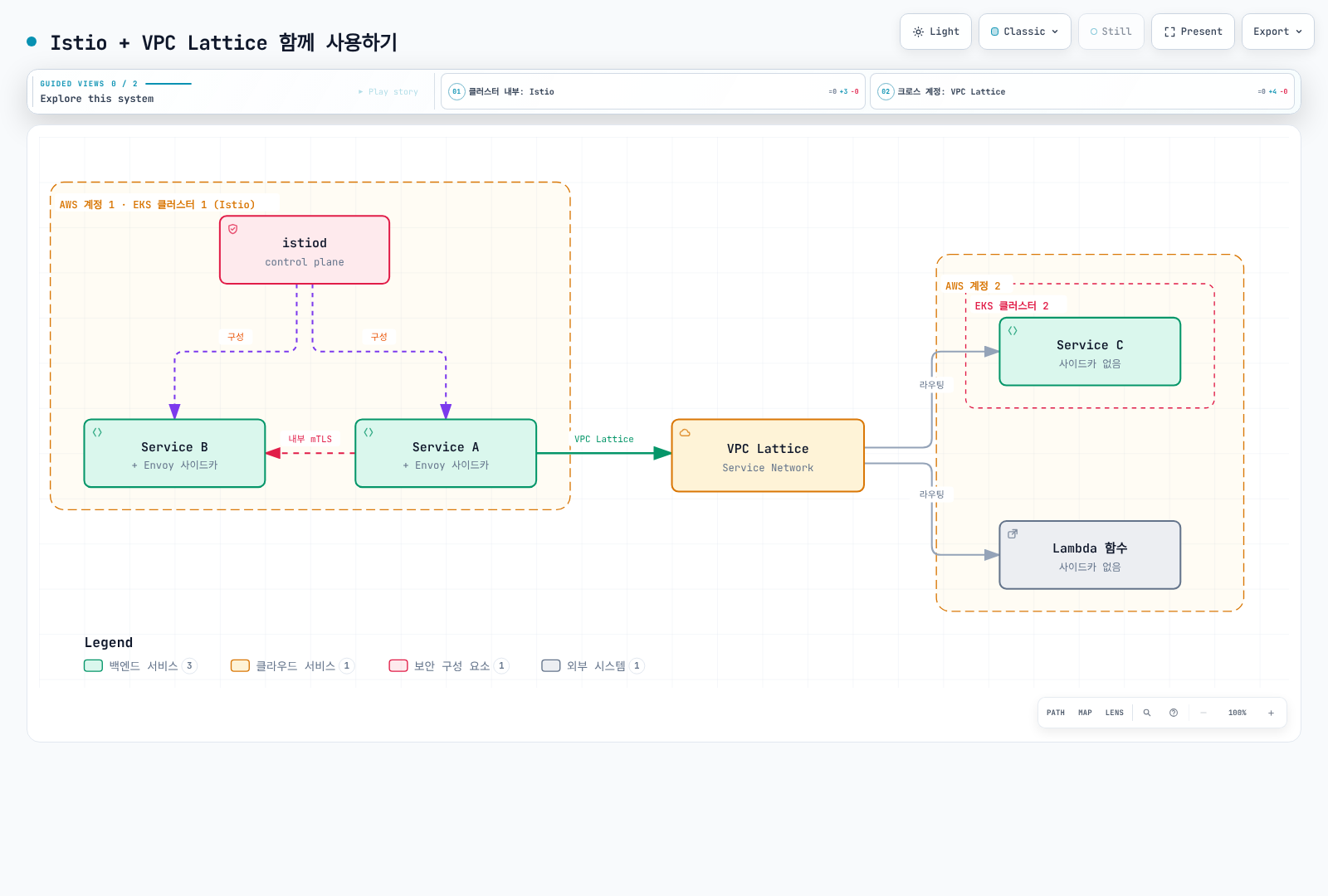
사용 사례:
- 클러스터 내부: Istio로 세밀한 트래픽 관리와 보안
- 클러스터 간/크로스 계정: VPC Lattice로 간단한 연결
- 혼합 환경: Istio 클러스터와 Lambda/EC2 연결에 VPC Lattice 사용
Istio vs Cilium (eBPF 기반)
Cilium은 eBPF를 사용하는 Kubernetes 네트워킹 및 보안 솔루션입니다.
아키텍처 비교
| 특성 | Istio | Cilium |
|---|---|---|
| 기술 스택 | Envoy Proxy (사이드카) | eBPF (커널 레벨) |
| 주요 목적 | Service Mesh | CNI + Service Mesh |
| 네트워킹 | Kubernetes CNI 위에 동작 | CNI 자체를 제공 |
| 성능 | 좋음 | 매우 우수 (커널 레벨) |
| 리소스 사용 | 높음 (사이드카) | 낮음 (커널 레벨) |
| L7 기능 | 매우 강력 | 기본적 |
| 관찰성 | 풍부함 | Hubble (기본적) |
| 학습 곡선 | 가파름 | 가파름 |
| 성숙도 | 높음 | 중간 (Service Mesh 기능) |
기능 비교
| 기능 | Istio | Cilium |
|---|---|---|
| Network Policy | Kubernetes + Istio | Kubernetes + Cilium (더 강력) |
| L7 Load Balancing | 매우 세밀함 | 기본적 |
| mTLS | 자동 워크로드 mTLS | 상호 인증과 WireGuard/IPsec 암호화는 별도 |
| Traffic Management | 매우 고급 | 기본적 |
| Observability | Prometheus, Jaeger, Kiali | Hubble |
| 성능 | 좋음 | 우수 |
| Multi-cluster | 강력함 | Cluster Mesh |
언제 무엇을 선택할까?
Istio 선택:
- L7 트래픽 관리가 핵심 요구사항
- 강력한 서비스 메시 기능 필요
- 풍부한 관찰성과 디버깅 도구 필요
Cilium 선택:
- CNI 교체를 고려 중
- 네트워크 보안이 주 관심사
- 성능 최적화가 중요
- eBPF 기술 활용 원함
함께 사용:
- Cilium을 CNI로, Istio를 Service Mesh로 사용 가능
- 단, 기능 중복과 복잡도 증가 고려 필요
EKS 특화 최적화
VPC CNI Pod ENI trunking과 SecurityGroupPolicy를 함께 쓰는 Ambient 워크로드는 EKS Ambient 사전 요구사항을 확인하세요. strict Pod Security Group 모드는 link-local 헬스 프로브를 차단할 수 있습니다. 문서의 standard enforcing mode 또는 exec probe 대안을 검토하고 CNI 모드 변경의 정책 영향을 확인하세요.
IAM Roles for Service Accounts (IRSA) 통합
EC2 기반 노드에서는 EKS Pod Identity도 AWS API 자격 증명 옵션입니다. Pod Identity Agent와 호환 AWS SDK가 필요하며 IRSA 역할 annotation은 사용하지 않습니다. 두 방식 모두 Istio SPIFFE 워크로드 ID를 대체하지 않습니다.
Istio 워크로드가 AWS 서비스에 안전하게 접근할 수 있도록 IRSA를 설정합니다.
IRSA 설정
# 1. OIDC 프로바이더 생성
eksctl utils associate-iam-oidc-provider \
    --cluster my-cluster \
    --approve

# 2. IAM 정책 생성
cat <<EOF > app-policy.json
{
    "Version": "2012-10-17",
    "Statement": [
        {
            "Effect": "Allow",
            "Action": [
                "s3:GetObject",
                "s3:ListBucket"
            ],
            "Resource": [
                "arn:aws:s3:::my-bucket",
                "arn:aws:s3:::my-bucket/*"
            ]
        }
    ]
}
EOF

aws iam create-policy \
    --policy-name MyAppS3Policy \
    --policy-document file://app-policy.json

# 3. Service Account에 IAM Role 연결
eksctl create iamserviceaccount \
    --cluster my-cluster \
    --namespace default \
    --name my-app-sa \
    --role-name my-app-role \
    --attach-policy-arn "arn:aws:iam::<ACCOUNT_ID>:policy/MyAppS3Policy" \
    --approve
Istio와 IRSA 사용
apiVersion: v1
kind: ServiceAccount
metadata:
  name: my-app-sa
  namespace: default
  annotations:
    eks.amazonaws.com/role-arn: arn:aws:iam::<ACCOUNT_ID>:role/my-app-role
---
apiVersion: apps/v1
kind: Deployment
metadata:
  name: my-app
  namespace: default
spec:
  selector:
    matchLabels:
      app: my-app
  template:
    metadata:
      labels:
        app: my-app
    spec:
      serviceAccountName: my-app-sa  # IRSA 사용
      containers:
      - name: app
        image: my-app:latest
        env:
        - name: AWS_REGION
          value: us-west-2
AWS Certificate Manager (ACM) 통합
ACM 인증서를 Istio Gateway에서 사용하는 방법입니다.
NLB에서 TLS 종료
apiVersion: v1
kind: Service
metadata:
  name: istio-ingressgateway
  namespace: istio-system
  annotations:
    service.beta.kubernetes.io/aws-load-balancer-type: "external"
    service.beta.kubernetes.io/aws-load-balancer-nlb-target-type: "ip"
    service.beta.kubernetes.io/aws-load-balancer-ssl-cert: "arn:aws:acm:region:account:certificate/cert-id"
    service.beta.kubernetes.io/aws-load-balancer-ssl-ports: "443"
    service.beta.kubernetes.io/aws-load-balancer-backend-protocol: "tcp"
spec:
  type: LoadBalancer
  selector:
    istio: ingressgateway
  ports:
  - name: https
    port: 443
    targetPort: 8080
별도 대안 구성입니다. ACM TLS는 NLB에서 끝나며 대상에는 평문 HTTP가 전달됩니다. TLS Gateway 대신 Service 443 포트의 아래 HTTP 리스너를 사용하고 백엔드에 SIMPLE TLS나 HTTPS 리다이렉트를 적용하지 마세요.
apiVersion: networking.istio.io/v1
kind: Gateway
metadata:
  name: nlb-terminated-gateway
  namespace: istio-system
spec:
  selector:
    istio: ingressgateway
  servers:
  - port:
      number: 443
      name: http-after-nlb
      protocol: HTTP
    hosts:
    - "myapp.example.com"
Istio에서 TLS 종료 (ACM Private CA)
# Generate a private key and CSR locally; clients must trust this private CA
openssl req -new -newkey rsa:2048 -nodes \
  -keyout private-key.pem -out csr.pem \
  -subj '/CN=myapp.example.com' -addext 'subjectAltName=DNS:myapp.example.com'

CA_ARN='arn:aws:acm-pca:region:account:certificate-authority/ca-id'
CERT_ARN=$(aws acm-pca issue-certificate \
  --certificate-authority-arn "$CA_ARN" \
  --csr fileb://csr.pem \
  --signing-algorithm SHA256WITHRSA \
  --validity Value=365,Type=DAYS \
  --query CertificateArn --output text)
aws acm-pca wait certificate-issued \
  --certificate-authority-arn "$CA_ARN" --certificate-arn "$CERT_ARN"
aws acm-pca get-certificate \
  --certificate-authority-arn "$CA_ARN" --certificate-arn "$CERT_ARN" \
  --output json > issued-certificate.json
jq -r '.Certificate + "\n" + .CertificateChain' issued-certificate.json > certificate-chain.pem
kubectl create secret tls my-tls-secret \
--cert=certificate-chain.pem --key=private-key.pem -n istio-systemapiVersion: networking.istio.io/v1
kind: Gateway
metadata:
name: my-gateway
namespace: istio-system
spec:
selector:
istio: ingressgateway
servers:
- port:
number: 443
name: https
protocol: HTTPS
tls:
mode: SIMPLE
credentialName: my-tls-secret # ACM 인증서
hosts:
- "myapp.example.com"인증서 발급만으로 Secret이 설치·갱신되지는 않습니다. 갱신 및 Secret 업데이트를 자동화하세요. ACM ARN을 Istio credentialName으로 직접 사용할 수 없습니다.
CloudWatch Container Insights 통합
Istio 메트릭을 CloudWatch로 전송하여 통합 모니터링을 구현합니다.
CloudWatch Agent 설정
# For EC2-backed EKS; OIDC association is required for this IRSA path
kubectl create namespace amazon-cloudwatch --dry-run=client -o yaml | kubectl apply -f -
eksctl create iamserviceaccount \
  --cluster my-cluster --namespace amazon-cloudwatch --name cwagent-prometheus \
  --attach-policy-arn arn:aws:iam::aws:policy/CloudWatchAgentServerPolicy --approve
curl -fsSL -o prometheus-eks.yaml \
  https://raw.githubusercontent.com/aws-samples/amazon-cloudwatch-container-insights/latest/k8s-deployment-manifest-templates/deployment-mode/service/cwagent-prometheus/prometheus-eks.yaml
# Review/pin this manifest; merge the Istio scrape jobs and EMF declarations below before applying
kubectl apply -f prometheus-eks.yaml
kubectl rollout status deployment/cwagent-prometheus -n amazon-cloudwatch
Namespace와 ServiceAccount만으로 에이전트가 배포되지는 않습니다. 공식 매니페스트에는 Deployment, RBAC, 마운트된 ConfigMap이 포함됩니다. 배포 도구가 ServiceAccount를 교체하면 IRSA annotation을 보존하세요. 기존 수집기가 있으면 중복 배포 대신 기존 구성을 변경하세요.
Prometheus 메트릭 스크래핑
# prometheus-config.yaml
apiVersion: v1
kind: ConfigMap
metadata:
  name: prometheus-config
  namespace: amazon-cloudwatch
data:
  prometheus.yaml: |
    global:
      scrape_interval: 1m
      scrape_timeout: 10s

    scrape_configs:
    # Istio Control Plane 메트릭
    - job_name: 'istiod'
      kubernetes_sd_configs:
      - role: pod
        namespaces:
          names:
          - istio-system
      relabel_configs:
      - source_labels: [__meta_kubernetes_pod_label_app, __meta_kubernetes_pod_container_port_name]
        action: keep
        regex: istiod;http-monitoring

    # Envoy 사이드카 메트릭
    - job_name: 'envoy-stats'
      metrics_path: /stats/prometheus
      kubernetes_sd_configs:
      - role: pod
      relabel_configs:
      - source_labels: [__meta_kubernetes_pod_container_port_name]
        action: keep
regex: '.*-envoy-prom'prometheus-cwagentconfig의 logs.metrics_collected.prometheus.emf_processor.metric_declaration에 선언을 병합하세요. 스크래핑 ConfigMap만으로 사용자 지정 CloudWatch 메트릭이 게시되지는 않습니다. 매니페스트의 prometheus_config_path와 기존 설정을 보존하고 에이전트를 재배포/재시작하세요. 예:
{
  "source_labels": ["job"],
  "label_matcher": "^envoy-stats$",
  "dimensions": [["ClusterName", "job"]],
  "metric_selectors": ["^istio_requests_total$", "^istio_tcp_received_bytes_total$"]
}
CloudWatch Logs Insights 쿼리
아래 쿼리는 따로 실행합니다. 로그 수집기로 프록시 로그를 전송해야 하며 Prometheus 수집은 액세스 로그를 수집하지 않습니다. 지연 시간 쿼리는 숫자형 request_duration_ms JSON 필드를 전제로 합니다 (Envoy %DURATION%으로 구성하거나 기존 형식을 먼저 파싱).
# Istio 에러 로그 분석
fields @timestamp, @message
| filter @logStream like /istio-proxy/
| filter @message like /error/
| sort @timestamp desc
| limit 100# 요청 지연시간 분석
fields @timestamp, request_duration_ms
| filter @logStream like /istio-proxy/
| stats avg(request_duration_ms), max(request_duration_ms), pct(request_duration_ms, 95) by bin(5m)EKS 최적화 설정
1. Pod Resources 최적화
# Envoy 사이드카 리소스 최적화
apiVersion: install.istio.io/v1alpha1
kind: IstioOperator
spec:
  meshConfig:
    defaultConfig:
      concurrency: 2  # Envoy 워커 스레드 수이며 Connection Pool 제한이 아님
      proxyMetadata:
        # EKS 최적화
        ISTIO_META_DNS_CAPTURE: "true"
  values:
    global:
      proxy:
        resources:
          requests:
            cpu: 100m
            memory: 128Mi
          limits:
            cpu: 2000m
            memory: 1024Mi
2. Cluster Autoscaler 고려
HPA는 replica를 조정하며 Metrics Server와 리소스 요청이 필요합니다. Cluster Autoscaler/Karpenter는 노드를 확장합니다. 차트가 관리하는 기존 HPA를 수정하고 중복 HPA를 만들지 마세요.
# Istio Gateway Autoscaling
apiVersion: autoscaling/v2
kind: HorizontalPodAutoscaler
metadata:
  name: istio-ingressgateway
  namespace: istio-system
spec:
  scaleTargetRef:
    apiVersion: apps/v1
    kind: Deployment
    name: istio-ingressgateway
  minReplicas: 2
  maxReplicas: 10
  metrics:
  - type: Resource
    resource:
      name: cpu
      target:
        type: Utilization
        averageUtilization: 80
  - type: Resource
    resource:
      name: memory
      target:
        type: Utilization
        averageUtilization: 80
3. Pod Disruption Budget
apiVersion: policy/v1
kind: PodDisruptionBudget
metadata:
  name: istio-ingressgateway
  namespace: istio-system
spec:
  minAvailable: 1
  selector:
    matchLabels:
      app: istio-ingressgateway
모범 사례
1. 로드 밸런서 선택 가이드
NLB 사용:
- gRPC, WebSocket 등 장시간 연결
- 초당 수백만 요청 처리
- 고정 IP 필요
- TLS 종료를 Istio에서 수행
ALB 사용:
- HTTP/HTTPS 전용
- 경로 기반 라우팅
- WAF 보안 필요
- Cognito 인증 통합
2. TLS 종료 위치
로드 밸런서에서 종료:
- ACM 인증서 자동 갱신
- 관리 용이
- Istio 부하 감소
Istio에서 종료:
- 엔드 투 엔드 암호화 필요
- 세밀한 TLS 정책 제어
- mTLS 사용
3. 비용 최적화
- Spot 인스턴스: Istio Gateway 워크로드에 활용
- Graviton 인스턴스: ARM 기반으로 비용 절감
- 리소스 제한: 사이드카 리소스 적절히 설정
- Ambient Mode: 사이드카 오버헤드 제거 고려
4. 보안
- IRSA: IAM 역할로 AWS 서비스 접근
- Security Group: 최소 권한 원칙
- mTLS: 서비스 간 암호화 활성화
- Network Policy: Amazon VPC CNI, Cilium 또는 Calico에서 정책 집행 활성화 및 플랫폼 지원 확인
5. 모니터링
- CloudWatch: 통합 로그 및 메트릭
- X-Ray: 분산 추적
- Prometheus + Grafana: 상세 메트릭
- Kiali: 서비스 메시 시각화
다음 단계
AWS 통합을 완료했다면 다음 문서를 참고하세요:
- Traffic Management: 고급 트래픽 관리 기능
- Security: mTLS 및 인증/권한 부여
- Observability: 메트릭, 로그, 트레이스 수집