ArgoCD 알림
검토 기준: Argo CD 3.5.2 (포함된 Notifications Engine 0cff13b8a717). 릴리스 노트 검토 후 같은 Notifications Engine 커밋을 쓰는 패치 3.5.4로 갱신(예제 재실행 안 함) 마지막 업데이트: 2026년 10월 12일
목차
ArgoCD Notifications 개요
ArgoCD Notifications Controller는 Application 이벤트를 다양한 서비스로 전송합니다.
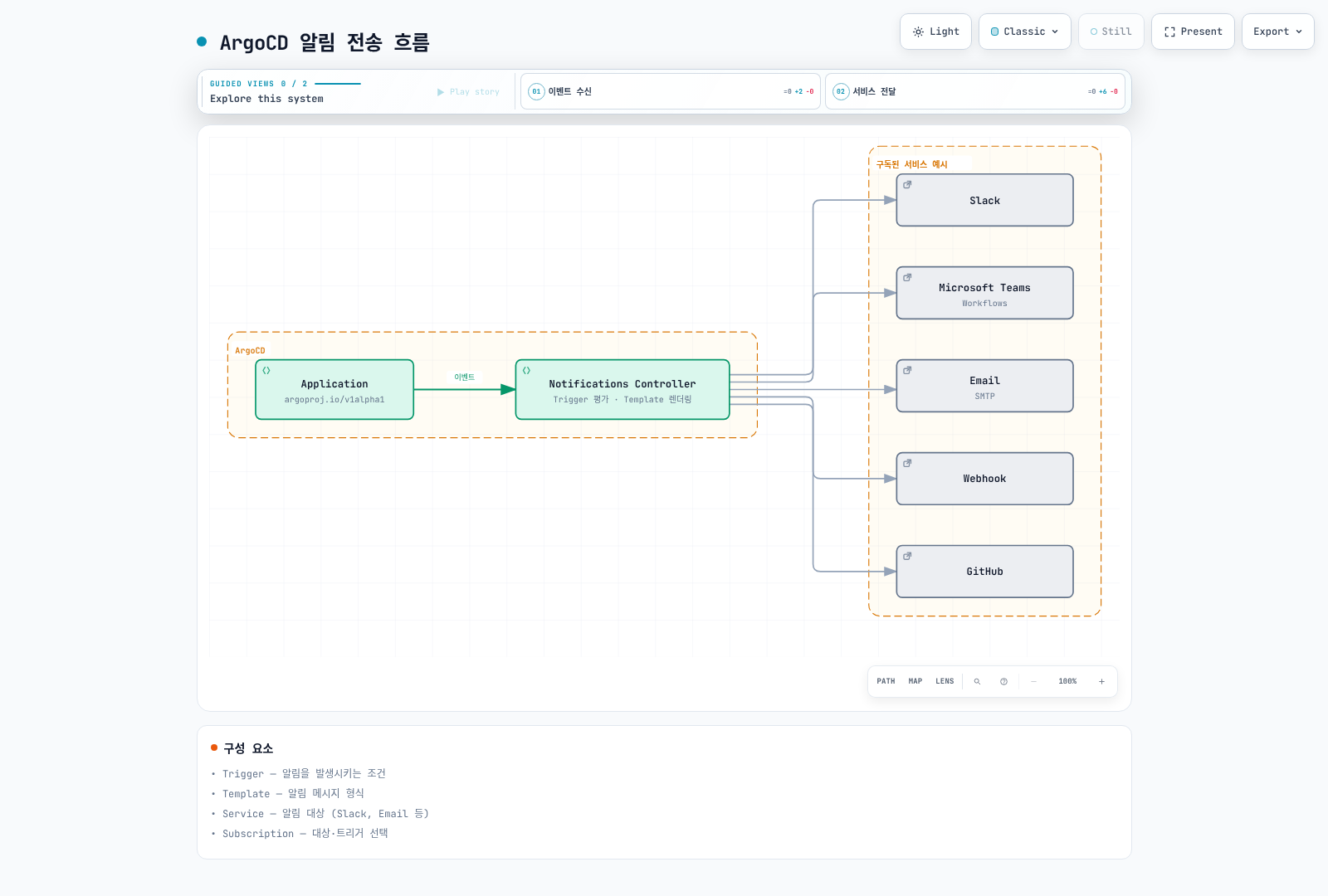
아키텍처
| 구성 요소 | 설명 |
|---|---|
| Trigger | 알림을 발생시키는 조건 |
| Template | 알림 메시지 형식 |
| Service | 알림 대상 (Slack, Email 등) |
| Subscription | Application과 알림 연결 |
알림 서비스
이 장의 ConfigMap 조각은 argocd-notifications-cm의 data에 병합해 하나의 최종 설정을 만듭니다. 동일 이름의 ConfigMap/Secret 예제를 각각 교체 적용하지 않습니다. 토큰·서명된 Webhook URL·개인키는 보호된 argocd-notifications-secret에 준비하고 값 자체는 Git에 저장하지 않습니다. 서비스/템플릿/트리거/구독 이름이 모두 연결되어야 전송됩니다.
Slack
Slack Bot token에 필요한 chat:write 권한과 채널 참여를 설정합니다. chat:write.public은 참여하지 않은 공개 채널 게시가 필요한 경우만 선택합니다. signingSecret은 Incoming Webhook URL을 대신하는 설정이 아닙니다.
apiVersion: v1
kind: ConfigMap
metadata:
  name: argocd-notifications-cm
  namespace: argocd
data:
  service.slack: |
    token: $slack-token
---
apiVersion: v1
kind: Secret
metadata:
  name: argocd-notifications-secret
  namespace: argocd
type: Opaque
stringData:
  slack-token: xoxb-xxxxxxxxxx-xxxxxxxxxx-xxxxxxxxxxxxxxxxxxxxxxxx
Microsoft Teams Workflows
legacy Office365 Connector 대신 Workflows 엔드포인트와 teams-workflows 서비스를 사용합니다. 실제 발급한 URL의 인증 방식과 흐름 소유자를 확인하고 공동 소유/유지보수 절차를 준비합니다. URL은 Secret 참조이며 기존 MessageCard endpoint를 단순 교체하는 것으로 가정하지 않습니다.
apiVersion: v1
kind: ConfigMap
metadata:
  name: argocd-notifications-cm
  namespace: argocd
data:
  service.teams-workflows: |
    recipientUrls:
      devops-channel: $teams-devops-channel
      alerts-channel: $teams-alerts-channel
Email (SMTP)
SMTP 발신 계정·허용된 발신 주소·TLS 및 인증 정책을 맞춥니다. Gmail을 쓸 경우 조직 정책에서 허용한 앱 비밀번호가 필요하며 일반 계정 비밀번호를 가정하지 않습니다.
apiVersion: v1
kind: ConfigMap
metadata:
  name: argocd-notifications-cm
  namespace: argocd
data:
  service.email: |
    host: smtp.gmail.com
    port: 587
    from: argocd@example.com
    username: $email-username
    password: $email-password
    html: true
---
apiVersion: v1
kind: Secret
metadata:
  name: argocd-notifications-secret
  namespace: argocd
type: Opaque
stringData:
  email-username: argocd@example.com
  email-password: your-app-password
Webhook
apiVersion: v1
kind: ConfigMap
metadata:
  name: argocd-notifications-cm
  namespace: argocd
data:
  service.webhook.custom: |
    url: https://api.example.com/webhook
    headers:
    - name: Authorization
      value: $webhook-authorization
    - name: Content-Type
      value: application/json
GitHub
GitHub App을 대상 저장소에 설치하고 Commit statuses 쓰기 권한을 부여합니다. 아래 ID와 개인키는 해당 설치의 값으로 교체합니다.
apiVersion: v1
kind: ConfigMap
metadata:
  name: argocd-notifications-cm
  namespace: argocd
data:
  service.github: |
    appID: 123456
    installationID: 12345678
    privateKey: $github-private-key
Grafana
필요한 annotation 작성 권한을 가진 Service Account token을 사용합니다. 이 버전의 apiUrl은 /api를 포함하며 엔진이 annotations를 덧붙입니다. 관리자 토큰이나 불필요한 장기 만료를 기본값으로 사용하지 않습니다.
apiVersion: v1
kind: ConfigMap
metadata:
  name: argocd-notifications-cm
  namespace: argocd
data:
  service.grafana: |
    apiUrl: https://grafana.example.com/api
    apiKey: $grafana-api-key
PagerDuty Events API v2
apiVersion: v1
kind: ConfigMap
metadata:
  name: argocd-notifications-cm
  namespace: argocd
data:
  service.pagerdutyv2: |
    serviceKeys:
      default: $pagerduty-service-key
Opsgenie (기존 고객)
신규 판매는 2025-06-04 종료되었고 지원/제품 종료는 2027-04-05로 공지되어 있습니다. 아래는 기존 통합 유지용이며 공식 이전 안내에 따라 이전 계획을 준비합니다.
apiVersion: v1
kind: ConfigMap
metadata:
  name: argocd-notifications-cm
  namespace: argocd
data:
  service.opsgenie: |
    apiUrl: https://api.opsgenie.com
    apiKeys:
      default: $opsgenie-api-key
트리거 구성
다음은 이 장에서 직접 정의하는 예제입니다. 같은 이름의 트리거가 자동으로 설치되었다고 가정하지 않습니다. send는 아래의 template.app-status를 참조합니다. 서비스 설정과 함께 하나의 ConfigMap으로 병합하세요.
apiVersion: v1
kind: ConfigMap
metadata:
  name: argocd-notifications-cm
  namespace: argocd
data:
  context: |
    argocdUrl: https://argocd.example.com
  trigger.on-sync-succeeded: |
    - when: app.status?.operationState?.phase == 'Succeeded'
      oncePer: app.status.operationState.startedAt
      send:
      - app-status
  trigger.on-sync-failed: |
    - when: app.status?.operationState?.phase in ['Failed', 'Error']
      oncePer: app.status.operationState.startedAt
      send:
      - app-status
  trigger.on-sync-running: |
    - when: app.status?.operationState?.phase == 'Running'
      oncePer: app.status.operationState.startedAt
      send:
      - app-status
  trigger.on-sync-status-unknown: |
    - when: app.status?.sync?.status == 'Unknown'
      send:
      - app-status
  trigger.on-health-degraded: |
    - when: app.status?.health?.status == 'Degraded'
      send:
      - app-status
  trigger.on-deployed: |
    - when: app.status?.operationState?.phase == 'Succeeded' && app.status?.sync?.status == 'Synced' && app.status?.health?.status
        == 'Healthy'
      oncePer: app.status.operationState.startedAt
      send:
- app-status?.는 아직 status/operationState가 없는 Application을 처리합니다. on-sync-succeeded는 동기화 작업 성공이며 애플리케이션 준비 완료를 뜻하지 않습니다. on-deployed는 마지막 작업 성공과 현재 Synced + Healthy를 모두 검사합니다. 새 변경으로 OutOfSync가 되었는데 이전 성공 상태가 남은 경우를 제외합니다.
커스텀 조건
apiVersion: v1
kind: ConfigMap
metadata:
  name: argocd-notifications-cm
  namespace: argocd
data:
  trigger.on-production-deployed: |
    - when: app.metadata?.labels?.environment == 'production' && app.status?.operationState?.phase == 'Succeeded' &&
        app.status?.sync?.status == 'Synced' && app.status?.health?.status == 'Healthy'
      oncePer: app.status.operationState.startedAt
      send:
      - app-status
  trigger.on-resource-failed: |
    - when: app.status?.resources != nil && any(app.status.resources, {#.health?.status == 'Degraded'})
      send:
      - app-status
  trigger.on-many-images: |
    - when: app.status?.summary?.images != nil && len(app.status.summary.images) > 5
      oncePer: app.metadata.generation
      send:
      - app-status
  trigger.on-long-sync: |
    - when: app.status?.operationState?.phase == 'Running' && app.status.operationState.startedAt != nil && time.Now().Sub(time.Parse(app.status.operationState.startedAt)).Minutes()
        > 10
      oncePer: app.status.operationState.startedAt
      send:
      - app-status
  trigger.on-declared-rollback: |
    - when: 'app.status?.operationState?.phase == ''Succeeded'' && app.status.operationState.operation?.info != nil
        && any(app.status.operationState.operation.info, {#.name == ''release-action'' && #.value == ''rollback''})'
      oncePer: app.status.operationState.startedAt
      send:
      - app-status
  trigger.on-critical-failure: |
    - when: app.status?.operationState?.phase in ['Failed', 'Error'] && app.metadata?.labels?.tier == 'critical'
      oncePer: app.status.operationState.startedAt
      send:
      - app-status
  trigger.on-production-namespace-failure: |
    - when: app.status?.operationState?.phase in ['Failed', 'Error'] && app.spec?.destination?.namespace != nil && app.spec.destination.namespace
        matches '^prod-.*$'
      oncePer: app.status.operationState.startedAt
      send:
      - app-status
  trigger.on-utc-window: |
    - when: app.status?.operationState?.phase == 'Succeeded' && time.Now().UTC().Hour() >= 9 && time.Now().UTC().Hour()
        < 18
      oncePer: app.status.operationState.startedAt
      send:
- app-status- 이미지 개수는
summary.images의 길이이며 replica 수가 아닙니다. 리소스 배열 조건은any(...), 정규식은matches를 사용합니다. - 시간 조건은 Application 재평가 시 검사합니다. 정확히 10분 후 실행하는 타이머가 아니며, UTC 업무 시간 밖의 알림을 나중에 보내는 큐도 아닙니다.
- revision 불일치만으로 롤백을 판정할 수 없습니다.
on-declared-rollback은 배포 절차가 명시적으로 기록한 operation info를 읽습니다. Git에서 복구 변경을 검토한 뒤 수동 sync하는 절차라면argocd app sync my-app --info release-action=rollback으로 표시할 수 있습니다. 자동 sync에는 이 표식이 자동 추가되지 않습니다.
지속적인 OutOfSync 감시
마지막 작업의 finishedAt은 OutOfSync가 시작된 시간이 아닙니다. 연속 30분 상태를 감시하려면 Argo CD metrics를 수집하는 Prometheus와 아래 규칙을 사용합니다. Prometheus Operator 설치 및 해당 Prometheus의 ruleSelector/namespace 선택 조건에 맞는 레이블이 선행 조건입니다.
apiVersion: monitoring.coreos.com/v1
kind: PrometheusRule
metadata:
  name: argocd-sync-alerts
  namespace: monitoring
spec:
  groups:
  - name: argocd-sync
    rules:
    - alert: ArgoCDApplicationOutOfSync
      expr: argocd_app_info{sync_status="OutOfSync"} == 1
      for: 30m
      labels:
        severity: warning
      annotations:
        summary: Application {{ $labels.name }} has remained OutOfSync for 30 minutes
템플릿
아래 공통 템플릿은 Slack, Teams Workflows, HTML email, Webhook 및 장애 알림용 PagerDuty/Opsgenie 형식을 정의합니다. 전송 대상은 구독이 선택합니다. 템플릿에 서비스가 들어 있다는 이유만으로 모든 곳에 보내지 않습니다. PagerDuty/Opsgenie 구독은 실패·Degraded 조건에만 연결하고, 이 예제가 장애 해제를 자동 처리한다고 가정하지 않습니다.
이 엔진 버전은 Go text/template과 Sprig 함수를 사용합니다. JSON 값은 toJson, HTML 삽입값은 html로 이스케이프합니다. 각 필드는 별도로 렌더링되므로 지역 변수 선언도 필드별로 필요합니다. multi-source는 작업 결과의 revisions를 사용하고, 없는 상태와 단일 revision을 함께 처리합니다. 전체 operation 오류 메시지를 외부 채널로 그대로 노출하지 않습니다.
apiVersion: v1
kind: ConfigMap
metadata:
  name: argocd-notifications-cm
  namespace: argocd
data:
  template.app-status: |
    message: |
      {{- $status := default (dict) .app.status -}}
      {{- $sync := default (dict) $status.sync -}}
      {{- $health := default (dict) $status.health -}}
      {{- $op := default (dict) $status.operationState -}}
      {{- $result := default (dict) $op.syncResult -}}
      {{- $applied := default (list) $result.revisions -}}
      {{- if and (not $applied) $result.revision -}}{{- $applied = list $result.revision -}}{{- end -}}
      {{- $url := printf "%s/applications/%s/%s" (trimSuffix "/" .context.argocdUrl) .app.metadata.namespace .app.metadata.name -}}
      Application {{.app.metadata.namespace}}/{{.app.metadata.name}}: phase={{default "None" $op.phase}}, sync={{default "Unknown" $sync.status}}, health={{default "Unknown" $health.status}}.
      Details: {{$url}}
    slack:
      attachments: |
        {{- $status := default (dict) .app.status -}}
        {{- $sync := default (dict) $status.sync -}}
        {{- $health := default (dict) $status.health -}}
        {{- $op := default (dict) $status.operationState -}}
        {{- $result := default (dict) $op.syncResult -}}
        {{- $applied := default (list) $result.revisions -}}
        {{- if and (not $applied) $result.revision -}}{{- $applied = list $result.revision -}}{{- end -}}
        {{- $url := printf "%s/applications/%s/%s" (trimSuffix "/" .context.argocdUrl) .app.metadata.namespace .app.metadata.name -}}
        [{
          "color": "#f4c030",
          "title": {{.app.metadata.name | toJson}},
          "title_link": {{$url | toJson}},
          "fields": [
            {"title":"Sync","value":{{default "Unknown" $sync.status | toJson}},"short":true},
            {"title":"Health","value":{{default "Unknown" $health.status | toJson}},"short":true},
            {"title":"Operation revision(s)","value":{{join ", " $applied | toJson}},"short":false}
          ]
        }]
    teams-workflows:
      title: 'Application status changed: {{.app.metadata.name}}'
      text: |-
        {{- $status := default (dict) .app.status -}}
        {{- $sync := default (dict) $status.sync -}}
        {{- $health := default (dict) $status.health -}}
        {{- $op := default (dict) $status.operationState -}}
        {{- $result := default (dict) $op.syncResult -}}
        {{- $applied := default (list) $result.revisions -}}
        {{- if and (not $applied) $result.revision -}}{{- $applied = list $result.revision -}}{{- end -}}
        {{- $url := printf "%s/applications/%s/%s" (trimSuffix "/" .context.argocdUrl) .app.metadata.namespace .app.metadata.name -}}
        Application {{.app.metadata.namespace}}/{{.app.metadata.name}}
        {{$url}}
      themeColor: Accent
      facts: |-
        {{- $status := default (dict) .app.status -}}
        {{- $sync := default (dict) $status.sync -}}
        {{- $health := default (dict) $status.health -}}
        {{- $op := default (dict) $status.operationState -}}
        {{- $result := default (dict) $op.syncResult -}}
        {{- $applied := default (list) $result.revisions -}}
        {{- if and (not $applied) $result.revision -}}{{- $applied = list $result.revision -}}{{- end -}}
        {{- $url := printf "%s/applications/%s/%s" (trimSuffix "/" .context.argocdUrl) .app.metadata.namespace .app.metadata.name -}}
        [{"name":"Sync","value":{{default "Unknown" $sync.status | toJson}}},{"name":"Health","value":{{default "Unknown" $health.status | toJson}}}]
    email:
      subject: '[Argo CD] Application status changed: {{.app.metadata.name}}'
      body: |-
        {{- $status := default (dict) .app.status -}}
        {{- $sync := default (dict) $status.sync -}}
        {{- $health := default (dict) $status.health -}}
        {{- $op := default (dict) $status.operationState -}}
        {{- $result := default (dict) $op.syncResult -}}
        {{- $applied := default (list) $result.revisions -}}
        {{- if and (not $applied) $result.revision -}}{{- $applied = list $result.revision -}}{{- end -}}
        {{- $url := printf "%s/applications/%s/%s" (trimSuffix "/" .context.argocdUrl) .app.metadata.namespace .app.metadata.name -}}
        <h2>Application status changed</h2><p>Application: {{.app.metadata.namespace | html}}/{{.app.metadata.name | html}}</p><p>Sync: {{default "Unknown" $sync.status | html}}; health: {{default "Unknown" $health.status | html}}</p><a href="{{$url | html}}">View in Argo CD</a>
    webhook:
      custom:
        method: POST
        body: |
          {{- $status := default (dict) .app.status -}}
          {{- $sync := default (dict) $status.sync -}}
          {{- $health := default (dict) $status.health -}}
          {{- $op := default (dict) $status.operationState -}}
          {{- $result := default (dict) $op.syncResult -}}
          {{- $applied := default (list) $result.revisions -}}
          {{- if and (not $applied) $result.revision -}}{{- $applied = list $result.revision -}}{{- end -}}
          {{- $url := printf "%s/applications/%s/%s" (trimSuffix "/" .context.argocdUrl) .app.metadata.namespace .app.metadata.name -}}
          {{ dict "event" "application-status" "application" .app.metadata.name "namespace" .app.metadata.namespace "uid" (default "" .app.metadata.uid) "project" (default "default" .app.spec.project) "phase" (default "" $op.phase) "syncStatus" (default "Unknown" $sync.status) "healthStatus" (default "Unknown" $health.status) "appliedRevisions" $applied "operationStartedAt" (default "" $op.startedAt) "url" $url | toJson }}
    pagerdutyv2:
      summary: 'Application status changed: {{.app.metadata.namespace}}/{{.app.metadata.name}}'
      severity: error
      source: argocd
      dedupKey: argocd/{{.app.metadata.namespace}}/{{.app.metadata.name}}/application-status
    opsgenie:
      description: 'Application status changed: {{.app.metadata.namespace}}/{{.app.metadata.name}}'
      priority: P2
      alias: argocd/{{.app.metadata.namespace}}/{{.app.metadata.name}}/application-status
service.email.html: true가 HTML 본문을 활성화합니다. Teams는 teams-workflows 필드와 Adaptive Card 색상 이름을 사용합니다. service.webhook.custom의 서비스 이름은 custom이며 본문은 webhook.custom 아래에 둡니다. POST를 생략하면 의도와 다른 기본 요청이 될 수 있습니다. apiUrl을 사용하는 Grafana는 공통 message로 annotation을 작성합니다.
| 함수 | 용도 |
|---|---|
upper, lower | 대소문자 변환 |
default, dict, list | 없는 값의 기본값 및 자료구조 |
join, splitList | 목록 결합·분리 |
toJson | JSON 문자열/객체 인코딩 |
html | HTML 특수문자 이스케이프 |
GitHub 커밋 상태
커밋 상태는 별도 트리거/템플릿을 씁니다. 아래 예제는 단일 HTTPS GitHub 소스만 대상으로 하며 실제 작업 결과의 저장소/revision이 확인될 때만 게시합니다. multi-source, Helm/OCI, SSH URL은 별도 매핑이 필요합니다. 실패 시 작업 revision이 기록되기 전이면 게시하지 않습니다. status.label이 GitHub status context에 대응하며 context/description을 임의 필드로 넣지 않습니다.
apiVersion: v1
kind: ConfigMap
metadata:
  name: argocd-notifications-cm
  namespace: argocd
data:
  trigger.on-github-deployed: |
    - when: app.spec?.source?.repoURL != nil && app.spec.source.repoURL startsWith 'https://github.com/' && app.spec?.sources
        == nil && app.status?.operationState?.syncResult?.revision != nil && app.status.operationState.syncResult?.source?.repoURL
        == app.spec.source.repoURL && app.status?.operationState?.phase == 'Succeeded' && app.status?.sync?.status ==
        'Synced' && app.status?.health?.status == 'Healthy'
      oncePer: app.status.operationState.startedAt
      send:
      - github-deployed
  trigger.on-github-failed: |
    - when: app.spec?.source?.repoURL != nil && app.spec.source.repoURL startsWith 'https://github.com/' && app.spec?.sources
        == nil && app.status?.operationState?.syncResult?.revision != nil && app.status.operationState.syncResult?.source?.repoURL
        == app.spec.source.repoURL && app.status?.operationState?.phase in ['Failed', 'Error']
      oncePer: app.status.operationState.startedAt
      send:
      - github-failed
  template.github-deployed: |
    github:
      repoURLPath: '{{.app.status.operationState.syncResult.source.repoURL}}'
      revisionPath: '{{.app.status.operationState.syncResult.revision}}'
      status:
        state: success
        label: argocd/{{.app.metadata.namespace}}/{{.app.metadata.name}}
        targetURL: '{{.context.argocdUrl}}/applications/{{.app.metadata.namespace}}/{{.app.metadata.name}}'
  template.github-failed: |
    github:
      repoURLPath: '{{.app.status.operationState.syncResult.source.repoURL}}'
      revisionPath: '{{.app.status.operationState.syncResult.revision}}'
      status:
        state: failure
        label: argocd/{{.app.metadata.namespace}}/{{.app.metadata.name}}
        targetURL: '{{.context.argocdUrl}}/applications/{{.app.metadata.namespace}}/{{.app.metadata.name}}'
구독 설정
Application 어노테이션
다음은 기존 Application의 metadata에 병합할 조각입니다. 독립적인 Application manifest가 아닙니다. 서비스에 구성한 수신자 이름을 맞추고, 필요한 구독만 선택합니다. 복수 수신자는 쉼표가 아닌 세미콜론으로 구분합니다.
metadata:
  name: my-app
  namespace: argocd
  annotations:
    notifications.argoproj.io/subscribe.on-sync-succeeded.slack: deployments
    notifications.argoproj.io/subscribe.on-sync-failed.slack: deployments;alerts
    notifications.argoproj.io/subscribe.on-health-degraded.slack: alerts
    notifications.argoproj.io/subscribe.on-deployed.teams-workflows: devops-channel
    notifications.argoproj.io/subscribe.on-sync-failed.email: ops@example.com
    notifications.argoproj.io/subscribe.on-deployed.custom: ''
    notifications.argoproj.io/subscribe.on-github-deployed.github: ''
    notifications.argoproj.io/subscribe.on-github-failed.github: ''
기본 트리거와 전역 구독
defaultTriggers는 notifications.argoproj.io/subscribe.slack: alerts처럼 트리거 이름을 생략한 구독에 적용됩니다. 이것만으로 모든 Application의 구독이 생성되지는 않습니다. 중앙에서 적용할 대상은 subscriptions로 지정하며 selector는 Application 레이블을 선택합니다.
apiVersion: v1
kind: ConfigMap
metadata:
  name: argocd-notifications-cm
  namespace: argocd
data:
  defaultTriggers: |
    - on-sync-failed
    - on-health-degraded
  subscriptions: |
    - recipients:
      - slack:alerts
      triggers:
      - on-sync-failed
      - on-health-degraded
    - recipients:
      - email:ops@example.com
      triggers:
      - on-sync-failed
      selector: environment=production
AppProject 구독
아래 metadata 조각을 기존 AppProject에 병합하면 해당 프로젝트의 Application에 적용됩니다. 앞 장에서 설정한 source/destination/RBAC 정책을 유지합니다.
metadata:
  name: production
  namespace: argocd
  annotations:
    notifications.argoproj.io/subscribe.on-sync-failed.slack: production-alerts
    notifications.argoproj.io/subscribe.on-health-degraded.pagerdutyv2: default
운영 및 검증
oncePer와 중복 처리
oncePer는 지정된 식의 값을 기준으로 동일 조건의 중복 알림을 줄입니다. 초당 요청 수 제한이나 exactly-once 전달 보장이 아닙니다. 이 장의 작업 트리거는 operationState.startedAt을 써서 같은 revision의 새 sync 시도를 구별합니다. rate limit은 수신 서비스/중계 계층에서 다루고, 재전송 가능한 Webhook/SQS 소비자는 멱등 처리합니다.
콘솔 검증
최종 ConfigMap을 notifications.yaml로 저장합니다. 아래 명령은 현재 kubeconfig로 Application/AppProject를 읽으며, 수신자는 console:stdout으로 지정해 외부 전송 없이 출력합니다. 실제 Slack/Teams/GitHub/SQS 권한과 수신 결과는 별도 통합 테스트 대상입니다.
kubectl get application my-app -n argocd -o yaml > sample-application.yaml
argocd admin notifications trigger run on-deployed ./sample-application.yaml \
  --config-map ./notifications.yaml --secret :empty
argocd admin notifications template notify app-status ./sample-application.yaml \
  --config-map ./notifications.yaml --secret :empty --recipient console:stdout
AWS 통합
SQS 기본 서비스
이 버전은 awssqs 서비스를 제공합니다. 일반 Webhook에 AWS API URL이나 고정 Authorization: AWS4-HMAC-SHA256 ... 문자열을 넣는 것으로 SigV4 서명이 되지 않습니다. IRSA/Pod Identity 자격 증명이 있어도 일반 Webhook이 요청을 서명해 주지는 않습니다.
같은 계정/리전의 Standard queue argocd-notifications와 Notifications Controller 서비스 계정의 IRSA 또는 EKS Pod Identity 연결을 먼저 준비합니다. SDK 기본 자격 증명 체인을 사용하므로 아래에 장기 access key를 넣지 않습니다. 계정/리전/큐 이름은 실제 값으로 바꾸고 위의 context 설정도 함께 병합합니다.
apiVersion: v1
kind: ConfigMap
metadata:
  name: argocd-notifications-cm
  namespace: argocd
data:
  service.awssqs: |
    queue: argocd-notifications
    region: ap-northeast-2
    account: '123456789012'
  trigger.on-aws-sync-completed: |
    - when: app.status?.operationState?.phase in ['Succeeded', 'Failed', 'Error']
      oncePer: app.status.operationState.startedAt
      send:
      - aws-app-event
  template.aws-app-event: |
    message: |
      {{- $status := default (dict) .app.status -}}
      {{- $sync := default (dict) $status.sync -}}
      {{- $health := default (dict) $status.health -}}
      {{- $op := default (dict) $status.operationState -}}
      {{- $result := default (dict) $op.syncResult -}}
      {{- $applied := default (list) $result.revisions -}}
      {{- if and (not $applied) $result.revision -}}{{- $applied = list $result.revision -}}{{- end -}}
      {{- $url := printf "%s/applications/%s/%s" (trimSuffix "/" .context.argocdUrl) .app.metadata.namespace .app.metadata.name -}}
      {{ dict "event" "sync-completed" "application" .app.metadata.name "namespace" .app.metadata.namespace "uid" (default "" .app.metadata.uid) "project" (default "default" .app.spec.project) "phase" (default "" $op.phase) "syncStatus" (default "Unknown" $sync.status) "healthStatus" (default "Unknown" $health.status) "appliedRevisions" $applied "operationStartedAt" (default "" $op.startedAt) "url" $url | toJson }}
Controller 역할의 송신 권한 예제입니다. SQS 관리형 암호화를 가정합니다. 고객 관리 KMS 키를 쓰면 해당 키 정책과 필요한 KMS 권한도 검토합니다.
{
  "Version": "2012-10-17",
  "Statement": [
    {
      "Effect": "Allow",
      "Action": [
        "sqs:GetQueueUrl",
        "sqs:SendMessage"
      ],
      "Resource": "arn:aws:sqs:ap-northeast-2:123456789012:argocd-notifications"
    }
  ]
}
기존 Application의 annotations에 다음 항목을 추가합니다. 수신자 값은 큐 이름이며 서비스의 기본 queue보다 우선합니다.
metadata:
  annotations:
    notifications.argoproj.io/subscribe.on-aws-sync-completed.awssqs: argocd-notifications
번들 엔진은 SendMessage에 10초 지연을 설정합니다. FIFO 큐는 per-message delay를 지원하지 않으므로 이 예제를 FIFO로 바꾸지 않습니다. messageAttributes 설정을 송신하는 것으로도 가정하지 않습니다. 필요한 메타데이터는 JSON message 본문에 포함합니다.
Lambda, SNS, EventBridge 연계
권장 연결은 Notifications → SQS → Lambda → SNS 또는 EventBridge입니다. 뒤쪽 리소스는 별도로 구현/배포해야 하며 위 ConfigMap만으로 생성되지 않습니다.
| 단계 | 필요한 구성 |
|---|---|
| SQS → Lambda | 같은 리전의 event source mapping, 실행 역할의 큐 수신·삭제·속성 조회 권한, timeout에 맞춘 visibility timeout, 재시도/DLQ |
| Lambda → SNS | 실행 역할에 대상 topic의 sns:Publish; AWS SDK로 호출하여 서명 |
| Lambda → EventBridge | 대상 bus의 events:PutEvents; SDK 응답의 FailedEntryCount/개별 오류도 확인 |
| 소비자 처리 | JSON 유효성 검사, Application UID·event·operationStartedAt·현재 상태를 고려한 멱등 키, SQS partial batch failure 응답 구성 |
API Gateway를 통한 Webhook이 꼭 필요하면 인증된 중계 API를 별도로 구성합니다. API key/usage plan만으로 인증을 대신하지 않습니다. 이 장에서는 AWS 리소스를 생성하거나 실 메시지를 발송하지 않았습니다.
다음 단계
참고 자료
- Notifications
- Triggers
- Subscriptions
- Teams Workflows
- Engine template implementation
- Engine SQS implementation
- Lambda with SQS
퀴즈
알림 퀴즈에서 학습 내용을 확인하세요.