관리형 노드 그룹에서 Auto Mode로 마이그레이션
지원 버전: EKS Auto Mode GA; 예제 검토 기준 EKS 1.36 마지막 업데이트: 2026년 9월 12일
기존 용량 제거 전에 애플리케이션·스토리지·controller 소유권을 확인해야 합니다. 아래는 로컬 스키마/CLI fixture를 확인한 단계별 예제이며 무중단 프로덕션 검증 절차가 아닙니다. 이번 감사에서 클라우드·클러스터 변경은 수행하지 않았습니다.
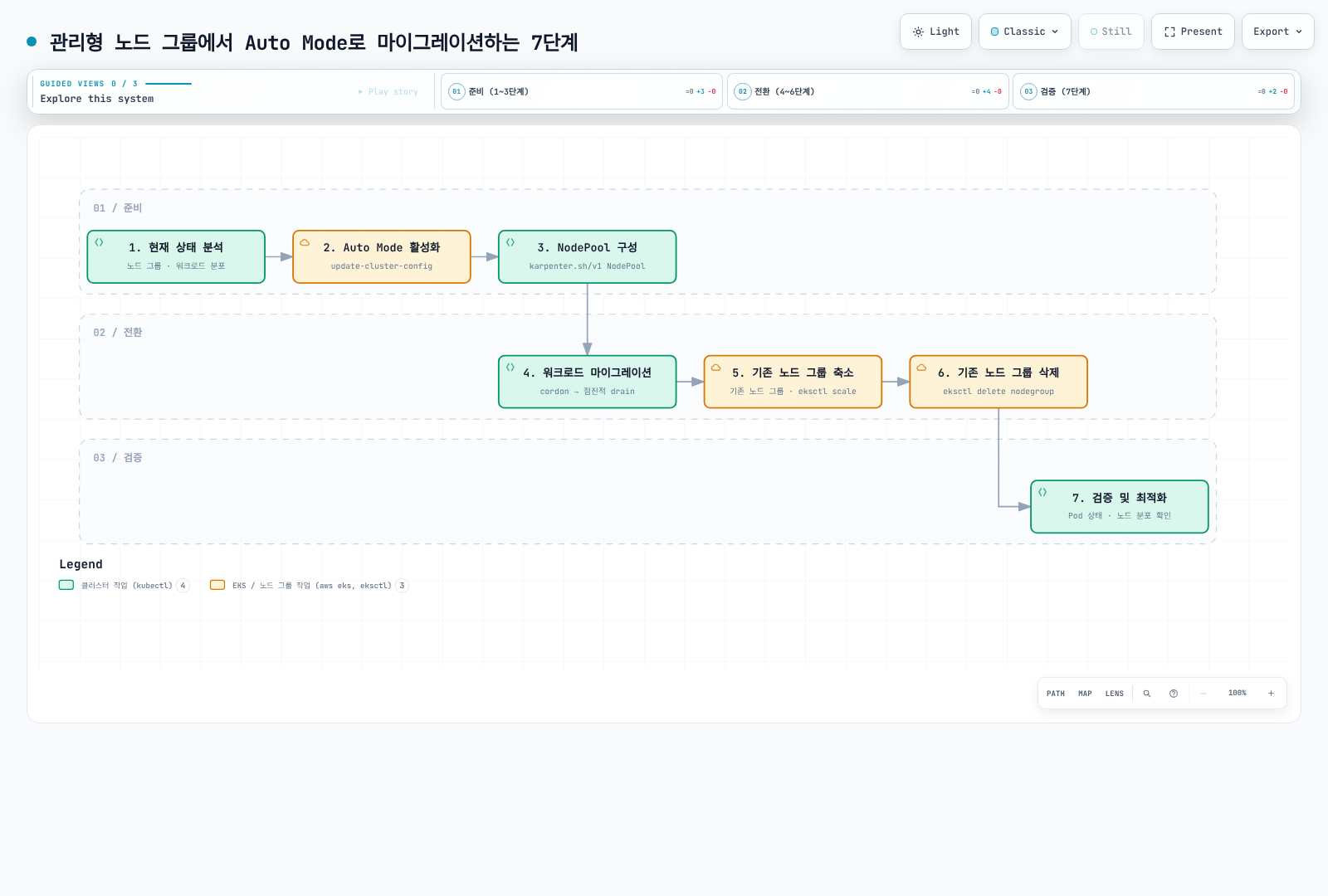
그림의 마지막 검증 단계가 앞선 health check·rollback 계획 없이 drain, 0으로 축소, 삭제해도 된다는 의미는 아닙니다.
1. 인벤토리와 운영 Context 고정
현재 지원되는 EKS/add-on 조합을 사용하세요. 이전 1.29 최소값은 과거 기능 기준이며 현재 지원 버전 안내가 아닙니다. 설치된 VPC CNI·kube-proxy·EBS CSI·snapshot controller·Pod Identity Agent에 공식 migration 최소값과 실제 Kubernetes 버전의 호환 목록을 함께 적용합니다.
Controller 소유권, workload placement, system agent, volume/AZ, load-balancer class, IAM, 복구 절차와 비용을 기록합니다. 아래는 계정, cluster ARN/생성 시각/API endpoint와 node-group ARN/생성 시각을 확인합니다. 특정 시점의 identity 검사이며 동시 controller 변경을 막는 원자적 lock은 아닙니다. 의도적으로 proxy한 endpoint에는 검토된 대안이 필요하며 불일치를 조용히 우회하면 안 됩니다.
set -euo pipefail
: "${EXPECTED_ACCOUNT_ID:?Set the intended account}"
: "${AWS_REGION:?Set the cluster region}"
: "${CLUSTER_NAME:?Set the cluster name}"
: "${OLD_NODEGROUP:?Set the reviewed managed node group}"
: "${KUBECONFIG:?Set the reviewed kubeconfig}"
export KUBECONFIG
export KUBE_CONTEXT="${KUBE_CONTEXT:-$CLUSTER_NAME}"
check_account() {
  local actual
  actual=$(aws sts get-caller-identity --region "$AWS_REGION" --query Account --output text) || return
  test "$actual" = "$EXPECTED_ACCOUNT_ID" || { printf 'Account mismatch.\n' >&2; return 1; }
}
check_account
umask 077
export WORK_DIR
WORK_DIR=$(mktemp -d "$PWD/auto-migration.XXXXXXXX")
aws eks describe-cluster --name "$CLUSTER_NAME" --region "$AWS_REGION" --output json \
  > "$WORK_DIR/cluster-before.json"
aws eks describe-nodegroup --cluster-name "$CLUSTER_NAME" --nodegroup-name "$OLD_NODEGROUP" \
  --region "$AWS_REGION" --output json > "$WORK_DIR/nodegroup-before.json"
guard_context() {
  check_account || return
  local endpoint
  aws eks describe-cluster --name "$CLUSTER_NAME" --region "$AWS_REGION" --output json \
    > "$WORK_DIR/cluster-current.json" || return
  endpoint=$(kubectl --context "$KUBE_CONTEXT" config view --minify \
    -o jsonpath='{.clusters[0].cluster.server}') || return
  jq -e --arg endpoint "$endpoint" --slurpfile before "$WORK_DIR/cluster-before.json" '
    .cluster.arn == $before[0].cluster.arn and
    .cluster.createdAt == $before[0].cluster.createdAt and
    .cluster.endpoint == $endpoint and .cluster.status == "ACTIVE"
  ' "$WORK_DIR/cluster-current.json" >/dev/null
}
guard_nodegroup() {
  guard_context || return
  aws eks describe-nodegroup --cluster-name "$CLUSTER_NAME" --nodegroup-name "$OLD_NODEGROUP" \
    --region "$AWS_REGION" --output json > "$WORK_DIR/nodegroup-current.json" || return
  jq -e --slurpfile before "$WORK_DIR/nodegroup-before.json" '
    .nodegroup.nodegroupArn == $before[0].nodegroup.nodegroupArn and
    .nodegroup.createdAt == $before[0].nodegroup.createdAt and .nodegroup.status == "ACTIVE"
  ' "$WORK_DIR/nodegroup-current.json" >/dev/null
}
guard_nodegroup
printf 'Private migration evidence: %s\n' "$WORK_DIR"kubectl --context "$KUBE_CONTEXT" --request-timeout=15s \
get deployments,statefulsets,daemonsets,jobs,cronjobs -A -o json |
jq '[.items[] | (.spec.template // .spec.jobTemplate.spec.template) as $t |
{kind,namespace:.metadata.namespace,name:.metadata.name,uid:.metadata.uid,
nodeSelector:$t.spec.nodeSelector,affinity:$t.spec.affinity,tolerations:$t.spec.tolerations,
serviceAccountName:$t.spec.serviceAccountName,hostNetwork:$t.spec.hostNetwork,
pvcNames:[$t.spec.volumes[]?.persistentVolumeClaim.claimName // empty]}]' \
> "$WORK_DIR/workload-placement.json"
kubectl --context "$KUBE_CONTEXT" --request-timeout=15s get pods -A -o json |
jq '[.items[] | {namespace:.metadata.namespace,name:.metadata.name,node:.spec.nodeName,
phase:.status.phase,deletionTimestamp:.metadata.deletionTimestamp,
ready:([.status.conditions[]?|select(.type=="Ready")|.status]|first // "NotReported"),
owners:[.metadata.ownerReferences[]?|{kind,name,controller}]}]' \
> "$WORK_DIR/pod-state.json"Private 파일은 운영 metadata를 포함하므로 복구용으로 보존합니다. 조회 실패는 실패로 남습니다. kubectl top에는 정상 metrics API가 필요하고 순간 CPU snapshot은 workload 이력을 대체하지 않습니다.
| 기존 구성 | 이전 시 고려 사항 |
|---|---|
| 커스텀 AMI/bootstrap/user data | Auto Mode는 관리형 Bottlerocket이며 임의 AL2023/custom AMI/userData가 아님 |
| Node IAM 권한 | Node role/profile/access entry 준비; workload는 node-role/IMDS fallback 대신 검토한 IRSA/Pod Identity로 이전 |
| Cluster IAM role | 기존 role에 필요한 Auto Mode 권한/trust 추가; CLI 활성화가 모든 role을 자동 생성하지 않음 |
| Selector/affinity/taint | Deployment·StatefulSet·DaemonSet·Job·CronJob 포함; 충돌 placement를 의도적으로 제거 |
| 대체 CNI/network | 활성화 전 공식 호환성 확인; NodeClass가 미지원 networking을 고치지 않음 |
| Scaling/IaC 소유자 | Cluster Autoscaler·GitOps·원래 IaC owner가 이전 변경을 되돌리지 않도록 조율 |
데이터·Load Balancer·혼합 노드 DNS
Driver/controller 인터페이스는 다릅니다.
| 리소스 | 자체 관리 | Auto Mode |
|---|---|---|
| EBS StorageClass provisioner | ebs.csi.aws.com | ebs.csi.eks.amazonaws.com |
| NLB Service loadBalancerClass | service.k8s.aws/nlb | eks.amazonaws.com/nlb |
| ALB IngressClass controller | ingress.k8s.aws/alb | eks.amazonaws.com/alb |
| TargetGroupBinding apiVersion | elbv2.k8s.aws/v1beta1 | eks.amazonaws.com/v1 |
| Compute class | karpenter.k8s.aws/v1 EC2NodeClass | eks.amazonaws.com/v1 NodeClass |
StorageClass 이름을 바꿔도 기존 PVC의 driver가 바뀌지 않으며 기존 load balancer가 관리형 controller에 자동 인수되지도 않습니다. EBS에는 검증한 backup/snapshot 복원 계획이나 현재 AWS가 문서화한 workload 중지·Retain·static PV/PVC 재생성 절차를 사용합니다. 후자는 EBS volume을 재사용하지만 Kubernetes binding 객체를 재생성하며 in-place driver 전환은 아닙니다. Backup 복구, volume/AZ/KMS 소유권, reclaim policy, finalizer, binding과 앱 일관성을 검증하세요. 이 문서는 파괴적인 volume 이전 스크립트를 제공하지 않습니다.
자체 AWS Load Balancer Controller가 리소스를 소유하는 동안 유지합니다. 새 관리형 load balancer를 생성·검증하고 blue/green DNS 계획으로 트래픽을 전환한 뒤 기존 것을 정리합니다. Class 불변성, annotation과 TargetGroupBinding 소유권은 별도로 검토하며 API group 변경만으로 안전한 인수가 되지는 않습니다.
Auto Mode 노드는 node-local DNS를 사용합니다. 비 Auto 노드가 필요로 하는 동안 CoreDNS Deployment를 유지하세요. 남은 노드 유형의 CNI/proxy/storage/identity agent와 placement도 유지합니다. Pure Auto Mode 관리형 기능을 이유로 혼합 클러스터 의존성을 먼저 제거하면 안 됩니다.
2. 무제한 기본 Pool 없이 Auto Mode 활성화
먼저 시작하기의 IAM/access 준비를 완료하세요. 기존 cluster role에는 공식 Compute, BlockStoragePolicyV2, LoadBalancing, Networking, Cluster 정책과 필요한 sts:TagSession trust가 필요합니다. 예제는 API 또는 API_AND_CONFIG_MAP 인증과 준비된 custom node role/profile·EC2 access entry를 가정합니다.
이 단계적 절차는 built-in pool 없이 시작하므로 다음 단계에서 자체 NodeClass를 만들며 default가 있다고 가정하지 않습니다. 무제한 general-purpose pool은 의도한 전환 전에 기존 Pending workload를 배치할 수 있습니다. 예제는 이미 Auto Mode가 활성화된 cluster의 pool 목록을 덮어쓰지 않고 거부합니다.
특정 update ID의 완료를 기다립니다. Cluster ACTIVE만으로 이번 설정 갱신 성공이 입증되지는 않습니다.
wait_eks_update() {
  local id="$1" group="${2:-}" attempt status
  local extra=()
  test -n "$group" && extra=(--nodegroup-name "$group")
  for ((attempt=0; attempt<120; attempt++)); do
    aws eks describe-update --name "$CLUSTER_NAME" --region "$AWS_REGION" \
      --update-id "$id" "${extra[@]}" --output json > "$WORK_DIR/update-current.json" || return
    status=$(jq -er '.update.status' "$WORK_DIR/update-current.json") || return
    case "$status" in
      Successful) return 0 ;;
      Failed|Cancelled)
        jq '{id:.update.id,status:.update.status,errorCodes:[.update.errors[]?.errorCode]}' \
          "$WORK_DIR/update-current.json" >&2
        return 1 ;;
      InProgress) sleep 10 ;;
      *) printf 'Unknown update state; inspect saved evidence.\n' >&2; return 1 ;;
    esac
  done
  printf 'Update still unconfirmed; stop and retain its ID.\n' >&2
  return 1
}guard_context
jq -e '.cluster.computeConfig.enabled != true and
(.cluster.accessConfig.authenticationMode == "API" or
.cluster.accessConfig.authenticationMode == "API_AND_CONFIG_MAP")' \
"$WORK_DIR/cluster-current.json" >/dev/null
jq -n --arg name "$CLUSTER_NAME" '{
name:$name,
computeConfig:{enabled:true,nodePools:[]},
storageConfig:{blockStorage:{enabled:true}},
kubernetesNetworkConfig:{elasticLoadBalancing:{enabled:true}}
}' > "$WORK_DIR/enable-request.json"
aws eks update-cluster-config --region "$AWS_REGION" \
--cli-input-json "file://$WORK_DIR/enable-request.json" --output json \
> "$WORK_DIR/enable-response.json"
update_id=$(jq -er '.update.id' "$WORK_DIR/enable-response.json")
wait_eks_update "$update_id"
guard_context
jq -e '.cluster.computeConfig.enabled == true and
.cluster.computeConfig.nodePools == [] and
.cluster.storageConfig.blockStorage.enabled == true and
.cluster.kubernetesNetworkConfig.elasticLoadBalancing.enabled == true' \
"$WORK_DIR/cluster-current.json" >/dev/nullCompute·block storage·managed load balancing을 같은 요청에서 함께 활성화/비활성화해야 합니다. Native request 검증이 IAM/service admission 성공을 입증하지는 않습니다. 오류 시 중단하고 update 증거를 보존하며 응답 불명 상태에서 맹목적으로 재실행하지 마세요. Authentication mode에는 별도 이전/rollback 제약이 있습니다.
3. 선택적인 Pool과 양쪽 Canary
NodeClass profile/subnet/security-group placeholder를 검토한 기존 리소스로 바꾸세요. Profile role에는 올바른 node access entry가 필요합니다. Manifest는 IAM·VPC·애플리케이션 자격 증명을 만들지 않습니다.
apiVersion: v1
kind: Namespace
metadata:
  name: migration-lab
  labels:
    pod-security.kubernetes.io/enforce: restricted
    pod-security.kubernetes.io/enforce-version: v1.36
    pod-security.kubernetes.io/warn: restricted
    pod-security.kubernetes.io/warn-version: v1.36
    pod-security.kubernetes.io/audit: restricted
    pod-security.kubernetes.io/audit-version: v1.36
---
apiVersion: eks.amazonaws.com/v1
kind: NodeClass
metadata:
  name: migration-nodeclass
spec:
  instanceProfile: eks-migration-node-profile
  subnetSelectorTerms:
  - tags:
      Name: private-subnet
  securityGroupSelectorTerms:
  - tags:
      Name: worker-restricted
  advancedNetworking:
    associatePublicIPAddress: false
  ephemeralStorage:
    size: 100Gi
    iops: 3000
    throughput: 125
---
apiVersion: karpenter.sh/v1
kind: NodePool
metadata:
  name: migration-pool
spec:
  template:
    spec:
      requirements:
      - key: eks.amazonaws.com/instance-category
        operator: In
        values:
        - m
      - key: karpenter.sh/capacity-type
        operator: In
        values:
        - on-demand
      nodeClassRef:
        group: eks.amazonaws.com
        kind: NodeClass
        name: migration-nodeclass
      expireAfter: 168h
      terminationGracePeriod: 24h
      taints:
      - key: migration
        value: auto-mode
        effect: NoSchedule
    metadata:
      labels:
        migration: auto-mode
  disruption:
    consolidationPolicy: WhenEmptyOrUnderutilized
    consolidateAfter: 2m
    budgets:
    - nodes: '1'
  limits:
    cpu: '32'
    memory: 128Gi
---
apiVersion: apps/v1
kind: Deployment
metadata:
  name: legacy-canary
  namespace: migration-lab
spec:
  replicas: 2
  selector:
    matchLabels:
      app: legacy-canary
  template:
    metadata:
      labels:
        app: legacy-canary
    spec:
      containers:
      - name: web
        image: nginxinc/nginx-unprivileged:1.30.4@sha256:cb92301e719d6639028de775fe8b28e15f58343aca5e5372001311958aafb300
        resources:
          requests:
            cpu: 100m
            memory: 64Mi
          limits:
            cpu: 500m
            memory: 128Mi
        ports:
        - containerPort: 8080
        securityContext:
          allowPrivilegeEscalation: false
          capabilities:
            drop:
            - ALL
          readOnlyRootFilesystem: true
        volumeMounts:
        - name: tmp
          mountPath: /tmp
        readinessProbe:
          httpGet:
            path: /
            port: 8080
          periodSeconds: 5
      terminationGracePeriodSeconds: 60
      automountServiceAccountToken: false
      nodeSelector:
        eks.amazonaws.com/nodegroup: REPLACE_WITH_OLD_NODEGROUP
      tolerations: []
      securityContext:
        runAsNonRoot: true
        runAsUser: 101
        runAsGroup: 101
        fsGroup: 101
        seccompProfile:
          type: RuntimeDefault
      volumes:
      - name: tmp
        emptyDir:
          sizeLimit: 128Mi
  strategy:
    type: RollingUpdate
    rollingUpdate:
      maxSurge: 1
      maxUnavailable: 0
---
apiVersion: apps/v1
kind: Deployment
metadata:
  name: auto-canary
  namespace: migration-lab
spec:
  replicas: 2
  selector:
    matchLabels:
      app: auto-canary
  template:
    metadata:
      labels:
        app: auto-canary
    spec:
      containers:
      - name: web
        image: nginxinc/nginx-unprivileged:1.30.4@sha256:cb92301e719d6639028de775fe8b28e15f58343aca5e5372001311958aafb300
        resources:
          requests:
            cpu: 100m
            memory: 64Mi
          limits:
            cpu: 500m
            memory: 128Mi
        ports:
        - containerPort: 8080
        securityContext:
          allowPrivilegeEscalation: false
          capabilities:
            drop:
            - ALL
          readOnlyRootFilesystem: true
        volumeMounts:
        - name: tmp
          mountPath: /tmp
        readinessProbe:
          httpGet:
            path: /
            port: 8080
          periodSeconds: 5
      terminationGracePeriodSeconds: 60
      automountServiceAccountToken: false
      nodeSelector:
        karpenter.sh/nodepool: migration-pool
        eks.amazonaws.com/compute-type: auto
      tolerations:
      - key: migration
        operator: Equal
        value: auto-mode
        effect: NoSchedule
      securityContext:
        runAsNonRoot: true
        runAsUser: 101
        runAsGroup: 101
        fsGroup: 101
        seccompProfile:
          type: RuntimeDefault
      volumes:
      - name: tmp
        emptyDir:
          sizeLimit: 128Mi
  strategy:
    type: RollingUpdate
    rollingUpdate:
      maxSurge: 1
      maxUnavailable: 0
Legacy canary의 REPLACE_WITH_OLD_NODEGROUP를 바꿔 사용합니다. 완전한 nginx 예제는 운영 장에서 검토한 non-root image/security context를 사용하며 기본 placement/readiness만 시험합니다. 실제 앱의 상태·identity·traffic 경로 검증은 아닙니다.
Auto canary는 정확한 pool과 eks.amazonaws.com/compute-type=auto를 함께 선택합니다. karpenter.sh/nodepool 존재만 확인하면 자체 Karpenter 노드도 선택됩니다. Toleration은 배치를 허용하지만 그 자체로 pool을 선택하지는 않습니다.
| MNG 설정 | Auto Mode 대응 |
|---|---|
| Instance type/capacity type | 정확한 instance requirement 또는 의도적으로 확장한 category; capacity-type requirement |
| Label/taint | spec.template.metadata.labels / spec.template.spec.taints |
| Min/desired/max 노드 수 | CPU/memory spec.limits와 동등하지 않음; 고정 desired node 수에는 별도 static-pool 의미 검토 |
| Subnet/security group | Custom NodeClass selector와 검토한 rule |
| AMI/bootstrap | 임의 AMI-family/userData 대응 필드 없음 |
4. Wave별 이전과 실패 시 중단
대표성이 있는 저위험 workload부터 staging/비중요 production, 의존성 검증 후 중요 workload로 진행합니다. Live Pod만 바꾸지 말고 소유 controller/GitOps desired configuration을 바꿉니다.
전체 placement를 검토하세요. 기존 node-group selector를 유지하면서 Auto selector를 추가하면 두 조건의 교집합이 없어 배치되지 않을 수 있습니다. affinity: null로 관련 없는 Pod affinity·보안 placement·toleration을 지우지 마세요. StatefulSet·active Job·local-volume workload에는 데이터에 맞는 절차가 필요합니다.
복제본이 0이 아닌 Deployment의 rollout·관측 replica readiness 검사입니다.
: "${WORKLOAD_NAMESPACE:?Select the namespace}"
: "${DEPLOYMENT_NAME:?Select one migrated Deployment}"
kubectl --context "$KUBE_CONTEXT" -n "$WORKLOAD_NAMESPACE" rollout status \
  "deployment/$DEPLOYMENT_NAME" --timeout=10m
kubectl --context "$KUBE_CONTEXT" --request-timeout=15s -n "$WORKLOAD_NAMESPACE" \
  get deployment "$DEPLOYMENT_NAME" -o json |
jq -e '(.spec.replicas // 1) as $desired |
  $desired > 0 and .status.observedGeneration >= .metadata.generation and
  .status.updatedReplicas == $desired and .status.readyReplicas == $desired and
  .status.availableReplicas == $desired' >/dev/null
실제 요청, DNS, load-balancer target, volume read/write, identity, logs/metrics와 앱 SLO도 확인합니다. Deployment rolling-update 설정과 PDB Eviction API 보호는 다른 제어입니다. rollout status 성공이나 Pod phase Running만으로 종단 간 가용성이 입증되지 않으며 완료 Job은 Succeeded가 정상일 수 있습니다.
선택적인 단일 노드 Drain
대체 용량, placement, PDB와 데이터 내구성을 검토한 뒤 기존 managed node 하나와 기록한 UID를 선택합니다.
: "${NODE_NAME:?Select exactly one old managed node}"
: "${EXPECTED_NODE_UID:?Set its previously reviewed UID}"
guard_nodegroup
kubectl --context "$KUBE_CONTEXT" --request-timeout=15s get node "$NODE_NAME" -o json \
  > "$WORK_DIR/node-before-drain.json"
jq -e --arg uid "$EXPECTED_NODE_UID" --arg group "$OLD_NODEGROUP" '
  .metadata.uid == $uid and .metadata.labels["eks.amazonaws.com/nodegroup"] == $group and
  .metadata.labels["eks.amazonaws.com/compute-type"] != "auto" and
  .metadata.deletionTimestamp == null and
  any(.status.conditions[]?; .type=="Ready" and .status=="True")
' "$WORK_DIR/node-before-drain.json" >/dev/null
kubectl --context "$KUBE_CONTEXT" drain "$NODE_NAME" --ignore-daemonsets --timeout=10m
printf 'Drain returned successfully. Validate application health before selecting another node.\n'
일괄 cordon/drain loop, 고정 sleep health gate나 “실패 후 계속 진행”은 없습니다. 기본 drain은 unmanaged Pod/local emptyDir data를 의도적으로 처리하기 전에는 거부합니다. 오류를 없애려고 --force, --disable-eviction, --delete-emptydir-data를 붙이지 마세요. 실패·중단된 drain은 노드를 cordon 상태로 남길 수 있습니다. 상태를 확인하고 복구 계획상 필요할 때만 배치를 복원합니다. 다음 노드 전에 영향 앱을 검증하세요.
5. 기존 Workload 제거 확인 후 축소
MNG desired size 변경은 PDB를 따르지 않습니다. EKS는 ASG scale-down을 사용하며 일반 node-group version update의 drain과 다릅니다. Desired size를 절반으로 줄이고 5분 기다리는 것은 안전한 안정화가 아닙니다.
원래 scaling/IaC owner와 조율하고 이전 노드에 신규 앱 배치를 막습니다. 아래 API 예제는 모든 관측된 이전 노드가 cordon됐고 active non-DaemonSet Pod가 없는지 확인한 뒤 min/desired 0을 요청합니다. Cordon을 무시하거나 노드를 교체하는 controller와의 race까지 없애지는 못하므로 migration placement를 유지합니다. 먼저 남은 모든 DaemonSet/system 의존성과 완료 Job artifact export를 확인하세요.
guard_nodegroup
kubectl --context "$KUBE_CONTEXT" --request-timeout=15s get nodes \
  -l "eks.amazonaws.com/nodegroup=$OLD_NODEGROUP" -o json > "$WORK_DIR/old-nodes.json"
jq -e 'all(.items[]; .spec.unschedulable == true)' "$WORK_DIR/old-nodes.json" >/dev/null
kubectl --context "$KUBE_CONTEXT" --request-timeout=15s get pods -A -o json \
  | jq '{items:[.items[]|{metadata:{name:.metadata.name,namespace:.metadata.namespace,
         ownerReferences:.metadata.ownerReferences},spec:{nodeName:.spec.nodeName},
         status:{phase:.status.phase}}]}' > "$WORK_DIR/pods-before-scale.json"
jq --slurpfile nodes "$WORK_DIR/old-nodes.json" '
  ($nodes[0].items|map(.metadata.name)) as $names |
  [.items[] | select(.spec.nodeName as $n | $names|index($n)) |
   select(.status.phase!="Succeeded" and .status.phase!="Failed") |
   select(any(.metadata.ownerReferences[]?; .kind=="DaemonSet" and .controller==true)|not) |
   {namespace:.metadata.namespace,name:.metadata.name,phase:.status.phase}]
' "$WORK_DIR/pods-before-scale.json" > "$WORK_DIR/old-active-workloads.json"
jq -e 'length == 0' "$WORK_DIR/old-active-workloads.json" >/dev/null

guard_nodegroup
aws eks update-nodegroup-config --cluster-name "$CLUSTER_NAME" --nodegroup-name "$OLD_NODEGROUP" \
  --region "$AWS_REGION" --scaling-config minSize=0,desiredSize=0 --output json \
  > "$WORK_DIR/scale-zero-response.json"
update_id=$(jq -er '.update.id' "$WORK_DIR/scale-zero-response.json")
wait_eks_update "$update_id" "$OLD_NODEGROUP"
실제 이전 노드·인스턴스가 사라지는지와 앱 health를 확인합니다. 합의한 rollback 기간 동안 node-group 정의와 원 scaling 설정을 보존하세요. Desired 0이 즉시 복구 가능한 용량을 보장하지는 않습니다.
6. 원래 소유자를 통한 정리
Workload/data/traffic 검증과 정한 안정화 기간 후 원래 owner인 Terraform·CloudFormation·eksctl 등으로 group을 삭제합니다. IaC 소유 group을 EKS API로 직접 지우면 drift, stack, IAM role 등이 남을 수 있습니다.
다음은 검토한 direct-API-managed group 전용입니다. Desired 0, node/workload 상태를 다시 확인하고 보이는 CloudFormation ownership tag를 거부합니다. 모든 외부 IaC owner를 발견하는 검사는 아니므로 소유권 확인은 사전 조건입니다.
guard_nodegroup
kubectl --context "$KUBE_CONTEXT" --request-timeout=15s get nodes \
  -l "eks.amazonaws.com/nodegroup=$OLD_NODEGROUP" -o json > "$WORK_DIR/old-nodes.json"
jq -e 'all(.items[]; .spec.unschedulable == true)' "$WORK_DIR/old-nodes.json" >/dev/null
kubectl --context "$KUBE_CONTEXT" --request-timeout=15s get pods -A -o json \
  | jq '{items:[.items[]|{metadata:{name:.metadata.name,namespace:.metadata.namespace,
         ownerReferences:.metadata.ownerReferences},spec:{nodeName:.spec.nodeName},
         status:{phase:.status.phase}}]}' > "$WORK_DIR/pods-before-scale.json"
jq --slurpfile nodes "$WORK_DIR/old-nodes.json" '
  ($nodes[0].items|map(.metadata.name)) as $names |
  [.items[] | select(.spec.nodeName as $n | $names|index($n)) |
   select(.status.phase!="Succeeded" and .status.phase!="Failed") |
   select(any(.metadata.ownerReferences[]?; .kind=="DaemonSet" and .controller==true)|not) |
   {namespace:.metadata.namespace,name:.metadata.name,phase:.status.phase}]
' "$WORK_DIR/pods-before-scale.json" > "$WORK_DIR/old-active-workloads.json"
jq -e 'length == 0' "$WORK_DIR/old-active-workloads.json" >/dev/null

: "${NODEGROUP_MANAGEMENT:?Use the original IaC owner, or explicitly set direct-api for an API-managed group}"
test "$NODEGROUP_MANAGEMENT" = direct-api
guard_nodegroup
jq -e '.nodegroup.scalingConfig.desiredSize == 0 and
  ((.nodegroup.tags // {} | keys | map(select(startswith("aws:cloudformation:"))) | length) == 0)' \
  "$WORK_DIR/nodegroup-current.json" >/dev/null
aws eks delete-nodegroup --cluster-name "$CLUSTER_NAME" --nodegroup-name "$OLD_NODEGROUP" \
  --region "$AWS_REGION" --output json > "$WORK_DIR/delete-nodegroup-response.json"
aws eks wait nodegroup-deleted --cluster-name "$CLUSTER_NAME" --nodegroup-name "$OLD_NODEGROUP" \
  --region "$AWS_REGION"
Deletion waiter가 성공해야 합니다. AccessDenied·만료 자격 증명·조회 실패는 부재가 아닙니다. 별도 소유 IAM/network/storage와 청구도 확인하세요. Node-group API 객체 삭제가 모든 관련 비용 종료의 증거는 아닙니다. 이전 1–2주 안정화는 계획 예시이지 보편적 필수 기간이 아닙니다.
7. 최종 검증과 최적화
Wave별 검증 증거를 보존하고 정리 후 controller/Pod readiness, placement, PVC, DNS, 앱 트래픽, IAM, logs/metrics와 전체 비용 할당을 다시 확인합니다. 양쪽 compute·load balancer가 함께 과금될 수 있으므로 비용은 공존 중에도 추적합니다.
이전 Pending 0–5/5분간 >10, 시작 <90초/>120초, 가용성 >99.9%/<99.5%, API 응답 <200ms/>500ms는 미검증 예시 임계값입니다. Auto Mode 기본 메트릭이라고 가정하지 말고 실제 publisher·앱 목표·측정 baseline을 사용하세요.
Self-Managed Karpenter와 공존
AWS는 직접 공존 이전을 지원합니다. v1.1 조건은 migration 기능의 최소값이며 현재 Kubernetes 호환 matrix도 만족해야 합니다. 예를 들어 Kubernetes 1.36은 Karpenter 1.13 이상이 필요합니다. 기존 controller를 유지한 상태에서 별도 taint Auto Mode pool을 만들고 선택한 workload group을 이전합니다.
이전 중 공유 nodepools.karpenter.sh·nodeclaims.karpenter.sh CRD를 변경·삭제하지 마세요. 일반 Karpenter label 대신 class reference·정확한 pool로 소유권을 기록합니다. 기존 workload가 사라지면 기존 controller가 finalization을 완료할 수 있는 동안 해당 소유 NodePool/NodeClaim만 정리합니다. 인스턴스·의존성 정리를 확인한 뒤 자체 release와 그 소유 IAM/queue만 제거하세요. 먼저 uninstall하거나 namespace 삭제를 리소스 정리 대용으로 사용하면 안 됩니다.
Auto 용량 제거 전 Capacity·Placement Rollback
이는 workload/인프라 이전 rollback이며 Kubernetes control-plane version rollback과 다릅니다.
- Auto pool을 유지하고 호환되는 이전 용량을 먼저 복원·확보합니다. Old group을 이미 삭제했다면 scaling JSON만으로 재생성할 수 없습니다.
- 기록된 scaling 값을 현재 수요와 대조합니다. 여전히 존재하며 identity가 같은 group에는 아래처럼 원 설정을 복원할 수 있습니다.
guard_nodegroup
jq --arg name "$CLUSTER_NAME" --arg group "$OLD_NODEGROUP" '{
  clusterName:$name,nodegroupName:$group,scalingConfig:.nodegroup.scalingConfig
}' "$WORK_DIR/nodegroup-before.json" > "$WORK_DIR/restore-capacity-request.json"
aws eks update-nodegroup-config --region "$AWS_REGION" \
  --cli-input-json "file://$WORK_DIR/restore-capacity-request.json" --output json \
  > "$WORK_DIR/restore-capacity-response.json"
update_id=$(jq -er '.update.id' "$WORK_DIR/restore-capacity-response.json")
wait_eks_update "$update_id" "$OLD_NODEGROUP"- 이전 노드가 충분히 Ready가 되고 network/DNS/identity/storage agent가 정상인지 확인합니다. Update 성공만으로 Pod 용량 Ready가 입증되지 않습니다. 남아 있는 이전 노드를 uncordon하기 전 UID도 확인하세요.
- 검토한 controller placement/traffic/data 계획을 복원합니다. 관련 없는 affinity를 보존하면서 충돌하는 Auto selector를 명시적으로 제거하고 이전 fleet에서 실제 readiness·앱 동작을 검증합니다.
- 그 후에만 정확한 migration 소유 Auto pool/resource를 원 owner로 정리합니다. NodePool 삭제는 node까지 cascade될 수 있으므로 rollback 첫 단계에 삭제하거나 Karpenter label 전체를 선택하면 안 됩니다.
Auto Mode 비활성화는 선택적인 별도 작업입니다. 먼저 Auto 소유 compute/storage/load-balancer 의존성을 해결합니다. 필요하면 세 flag가 한 요청에 들어가야 하며, 아래는 검토할 요청 파일만 준비합니다.
jq -n --arg name "$CLUSTER_NAME" '{
  name:$name,
  computeConfig:{enabled:false},
  storageConfig:{blockStorage:{enabled:false}},
  kubernetesNetworkConfig:{elasticLoadBalancing:{enabled:false}}
}' > "$WORK_DIR/disable-request.json"
필요할 때 context 검사·update-ID 추적을 포함한 검토된 절차로 제출합니다. Auto Mode 비활성화가 앱 selector·data·traffic을 복원하거나 authentication mode 변경을 되돌리지는 않습니다.
참고 자료
- Enable Auto Mode on an existing cluster
- Migration reference, EBS and load balancers
- Managed node-group migration
- Self-managed Karpenter migration
- Managed node-group scaling and PDB behavior
- Auto Mode networking and mixed-node DNS
- NodeClass identity and access entry
- Karpenter/Kubernetes compatibility
- Safely drain a Kubernetes node
- Kubernetes Pod disruptions
< 이전: 워크로드 최적화 | 목차 | EKS 주제로 >