Skip to content

EKS에서의 AI/ML 모범 사례

지원 버전: Kubernetes 1.31, 1.32, 1.33 마지막 업데이트: 2026년 2월 25일

이 가이드는 Amazon EKS에서 AI/ML 워크로드를 실행하기 위한 종합적인 모범 사례를 다룹니다. 벤치마킹, 컨테이너 최적화, GPU 선택, 네트워킹, 스토리지, 관측성, 비용 최적화, 보안에 대해 알아봅니다.

개요

Kubernetes에서 AI/ML 워크로드를 효율적으로 실행하려면 여러 차원에서 신중한 고려가 필요합니다:

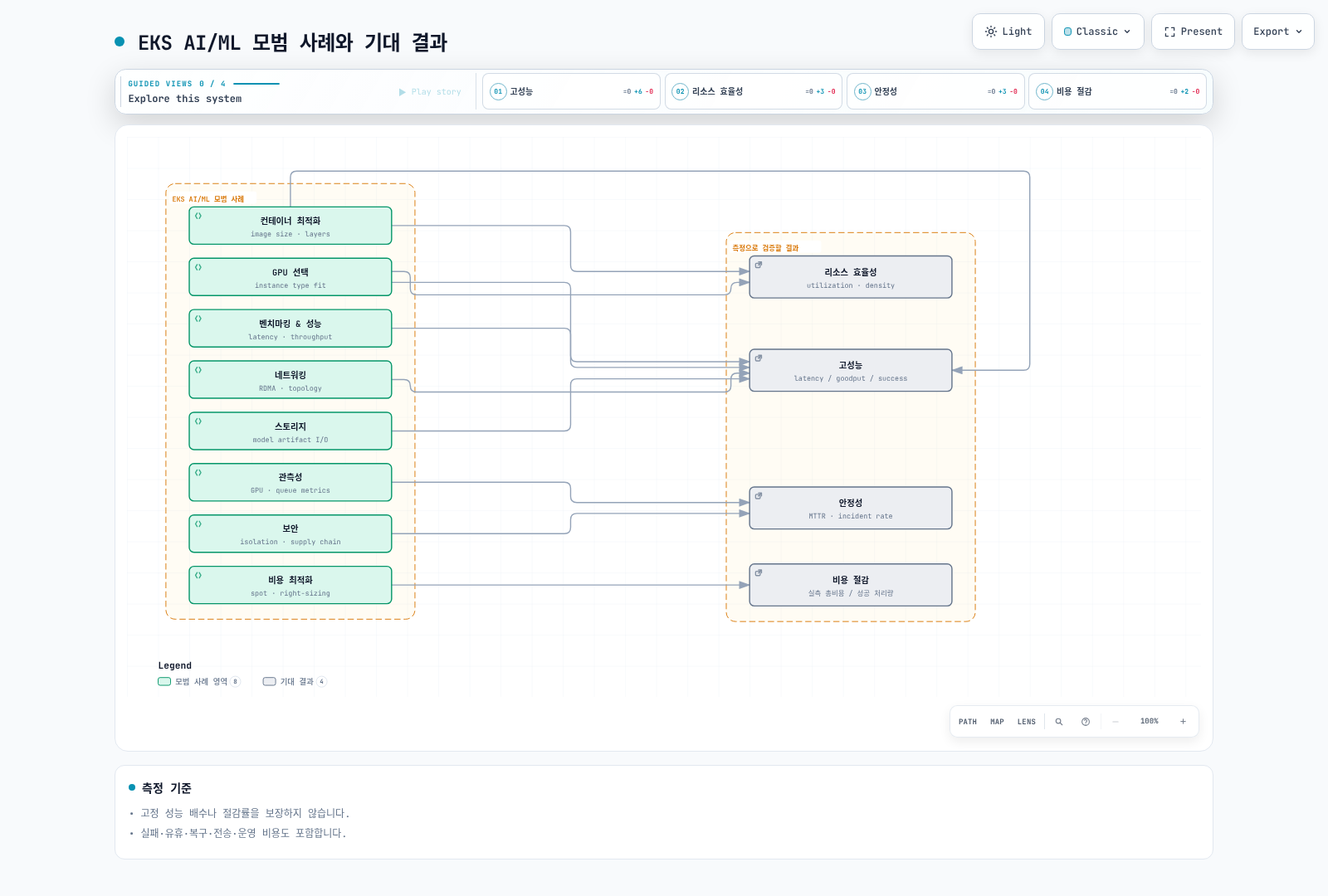
EKS AI/ML 모범 사례 8개 영역(벤치마킹, 컨테이너 최적화, GPU 선택, 네트워킹, 스토리지, 관측성, 비용 최적화, 보안)이 고성능, 리소스 효율성, 안정성, 비용 절감이라는 4가지 기대 결과로 이어지는 관계를 보여주는 아키텍처형 다이어그램.

LLM 추론 벤치마킹

벤치마킹은 LLM 추론 서비스의 성능 특성을 이해하는 데 필수적입니다. 적절한 벤치마킹을 통해 스케일링, 리소스 할당, 최적화에 대한 정보에 입각한 결정을 내릴 수 있습니다.

핵심 성능 지표

LLM 추론 성능을 평가하기 위한 핵심 지표를 이해하는 것이 중요합니다:

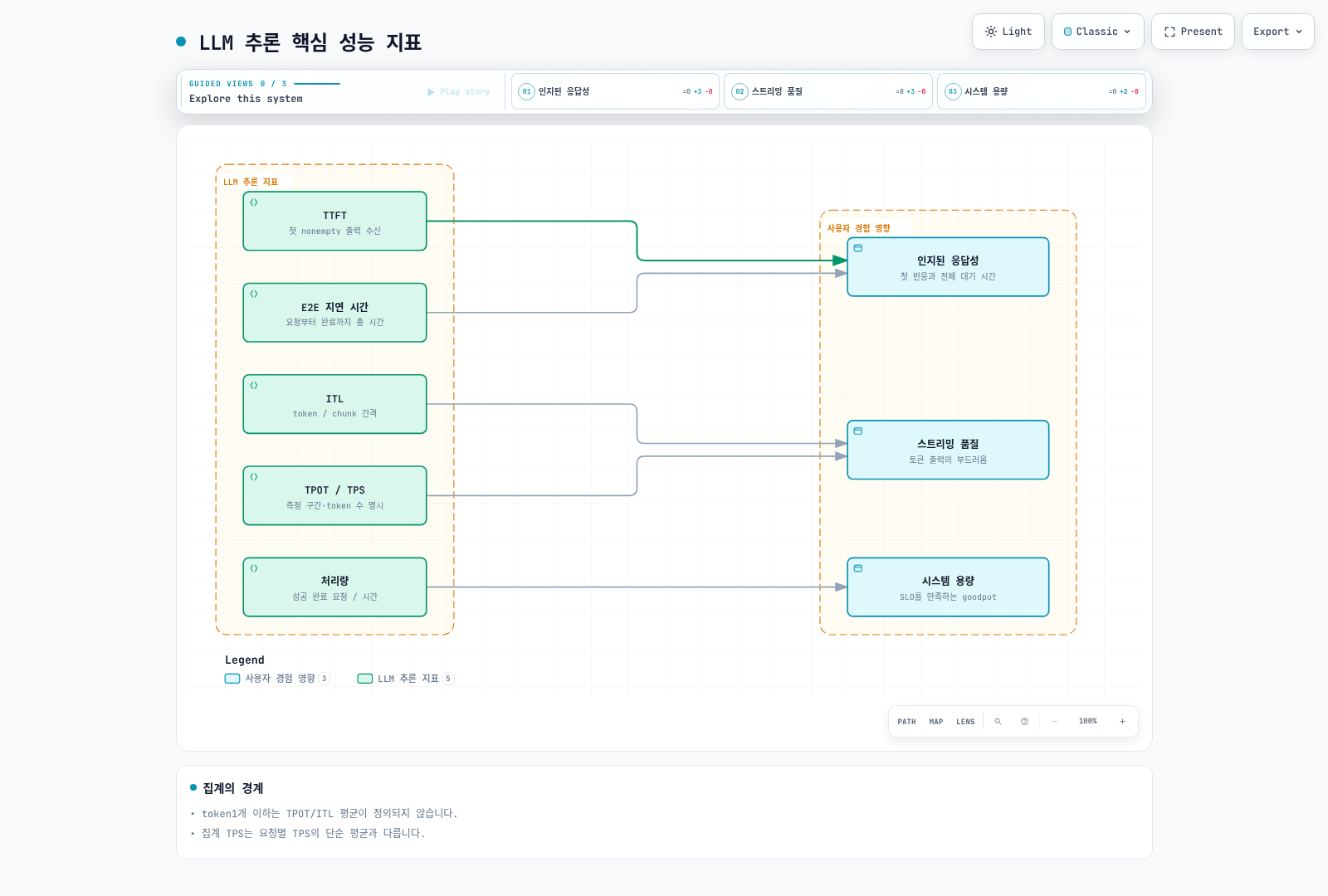
TTFT, ITL, TPS, 종단간 지연, 처리량이라는 5가지 LLM 추론 지표가 인지된 응답성, 스트리밍 품질, 시스템 용량이라는 3가지 사용자 경험 요소에 미치는 영향을 보여주는 다이어그램.

지표설명공식목표 범위
TTFT요청부터 첫 토큰 생성까지의 시간t_first_token - t_request대화형 앱에서 < 500ms
ITL연속 토큰 간 평균 시간(t_last_token - t_first_token) / (n_tokens - 1)부드러운 스트리밍을 위해 < 50ms
TPS요청당 초당 생성 토큰 수n_tokens / total_generation_time좋은 UX를 위해 > 20 TPS
E2E 지연 시간요청부터 완료까지 총 시간t_complete - t_request출력 길이에 따라 다름
처리량초당 처리되는 요청 수total_requests / time_window지연 시간 SLO 내에서 최대화

벤치마킹 도구

inference-perf 도구

AI on EKS의 inference-perf 도구는 포괄적인 벤치마킹 기능을 제공합니다:

bash
# inference-perf 설치
pip install inference-perf

# vLLM 엔드포인트에 대한 기본 벤치마크
inference-perf benchmark \
  --endpoint http://vllm-service:8000/v1/completions \
  --model meta-llama/Llama-3.1-8B-Instruct \
  --num-requests 1000 \
  --concurrency 10 \
  --prompt-length 128 \
  --max-tokens 256

다양한 테스트 시나리오 구성:

yaml
# benchmark-config.yaml
apiVersion: v1
kind: ConfigMap
metadata:
  name: inference-perf-config
data:
  config.yaml: |
    endpoint:
      url: http://vllm-service:8000/v1/completions
      model: meta-llama/Llama-3.1-8B-Instruct

    scenarios:
      baseline:
        description: "단일 요청 기준선"
        concurrency: 1
        num_requests: 100
        prompt_length: 128
        max_tokens: 256

      saturation:
        description: "최대 처리량 측정"
        concurrency: [1, 5, 10, 20, 50, 100]
        num_requests: 500
        prompt_length: 256
        max_tokens: 512

      production:
        description: "프로덕션 트래픽 시뮬레이션"
        concurrency: 20
        num_requests: 10000
        prompt_distribution: "zipf"
        prompt_length_range: [64, 2048]
        max_tokens_range: [128, 1024]

      real_dataset:
        description: "실제 대화 데이터 사용"
        dataset: "ShareGPT"
        num_requests: 5000
        concurrency: 15

NVIDIA GenAI-Perf 도구

상세한 GPU 수준 메트릭을 위해 NVIDIA의 GenAI-Perf를 사용합니다:

bash
# GenAI-Perf 설치 (Triton Inference Server의 일부)
pip install genai-perf

# 상세 GPU 메트릭과 함께 벤치마크 실행
genai-perf profile \
  --model llama-3-8b \
  --backend vllm \
  --endpoint localhost:8000 \
  --concurrency 10 \
  --request-count 1000 \
  --streaming \
  --output-format json \
  --profile-export-file results.json

테스트 시나리오

시나리오목적구성주요 관찰 지표
기준선단일 요청 성능 확립동시성=1, 100 요청TTFT, ITL, E2E 지연 시간
포화처리량 한계 찾기지연 시간 저하까지 동시성 증가처리량 vs 지연 시간 곡선
프로덕션 시뮬레이션실제 성능 검증가변 프롬프트, 현실적 동시성P50/P95/P99 지연 시간
실제 데이터셋실제 대화 패턴 테스트ShareGPT 또는 도메인 특화 데이터토큰 분포 분석
긴 컨텍스트컨텍스트 윈도우 처리 테스트4K-128K 토큰 프롬프트메모리 사용량, TTFT 스케일링
버스트 트래픽오토스케일링 응답 테스트10에서 100 동시성으로 스파이크스케일업 시간, 오류율

벤치마킹용 Kubernetes Job

yaml
apiVersion: batch/v1
kind: Job
metadata:
  name: llm-benchmark
  namespace: ai-ml
spec:
  template:
    spec:
      containers:
      - name: benchmark
        image: public.ecr.aws/ai-on-eks/inference-perf:latest
        command:
        - inference-perf
        - benchmark
        - --config
        - /config/benchmark-config.yaml
        - --output
        - /results/benchmark-results.json
        volumeMounts:
        - name: config
          mountPath: /config
        - name: results
          mountPath: /results
        resources:
          requests:
            cpu: "2"
            memory: 4Gi
          limits:
            cpu: "4"
            memory: 8Gi
      volumes:
      - name: config
        configMap:
          name: inference-perf-config
      - name: results
        persistentVolumeClaim:
          claimName: benchmark-results-pvc
      restartPolicy: Never
  backoffLimit: 3

결과 해석

bash
# 샘플 벤치마크 출력 분석
{
  "summary": {
    "total_requests": 1000,
    "successful_requests": 998,
    "failed_requests": 2,
    "total_duration_sec": 120.5,
    "requests_per_second": 8.3
  },
  "latency": {
    "ttft_ms": {
      "p50": 245,
      "p95": 512,
      "p99": 890,
      "mean": 298
    },
    "itl_ms": {
      "p50": 32,
      "p95": 48,
      "p99": 72,
      "mean": 35
    },
    "e2e_ms": {
      "p50": 2450,
      "p95": 4200,
      "p99": 6800,
      "mean": 2780
    }
  },
  "throughput": {
    "tokens_per_second": 1245,
    "tokens_per_request_mean": 150
  }
}

성능 가이드라인:

  • TTFT P95 > 1s: 프리필 최적화 또는 배치 크기 조정 고려
  • ITL P95 > 100ms: GPU 메모리 압력 확인, 더 작은 배치 크기 고려
  • 높은 동시성에서 처리량 감소: GPU 메모리 또는 컴퓨팅 병목
  • 지연 시간의 높은 변동성: 노이지 네이버 또는 열 스로틀링 확인

컨테이너 시작 최적화

AI/ML 컨테이너는 큰 이미지 크기와 모델 로딩 요구 사항으로 인해 고유한 콜드 스타트 문제에 직면합니다.

콜드 스타트 타임라인 분석

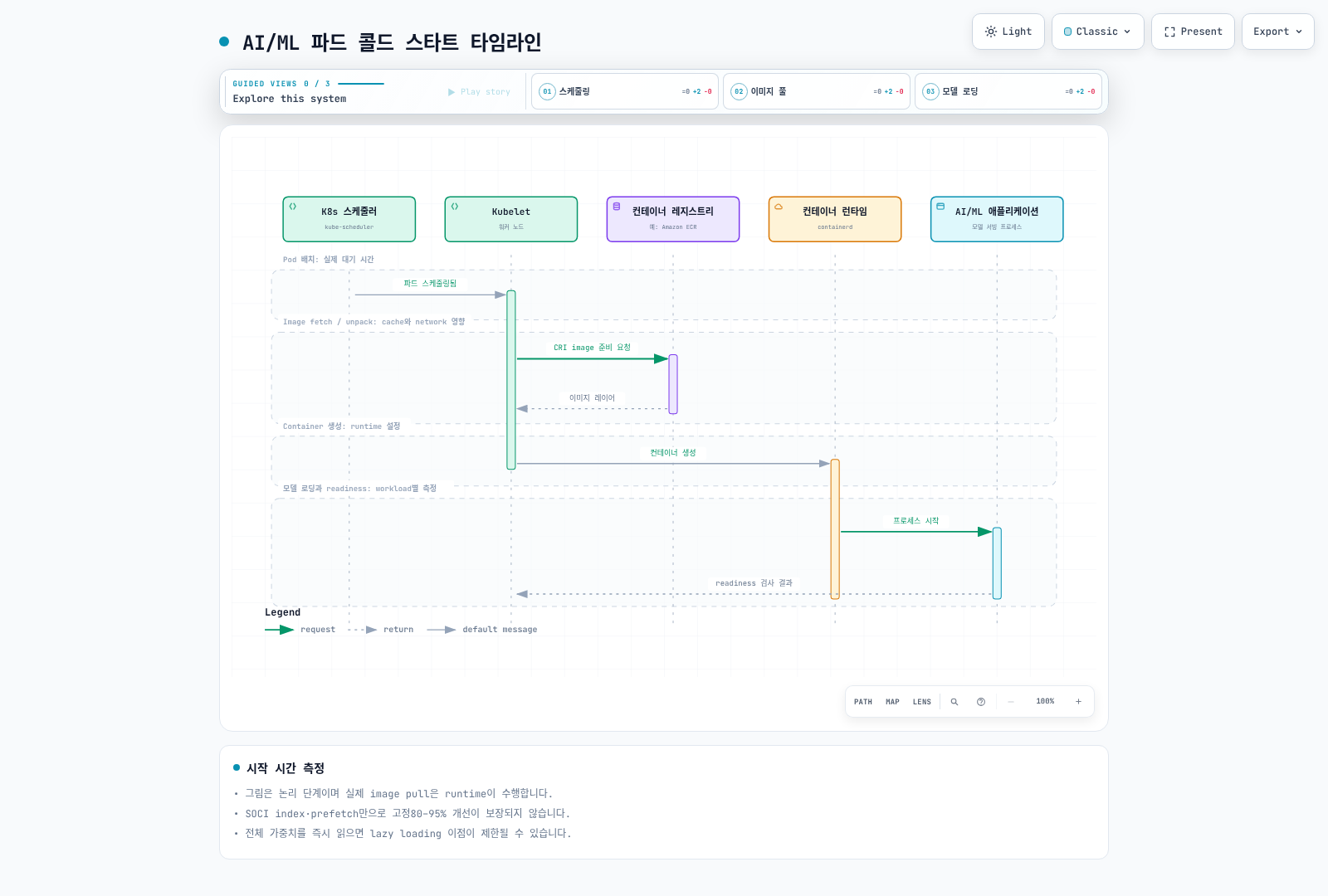
쿠버네티스 스케줄러, Kubelet, 컨테이너 레지스트리, 컨테이너 런타임, AI/ML 애플리케이션 5개 참여자 사이에서 파드 스케줄링, 이미지 풀, 컨테이너 생성, 모델 로딩, 헬스 체크로 이어지는 콜드 스타트 시퀀스와 각 단계의 소요 시간을 보여주는 시퀀스 다이어그램.

이미지 크기 분석

일반적인 AI/ML 컨테이너 이미지 구성:

구성 요소크기 범위최적화 가능성
기본 OS (Ubuntu/Debian)100-500MBslim/distroless 사용
CUDA 런타임2-4GBruntime 전용 이미지 사용
Python + 의존성1-3GB멀티 스테이지 빌드
ML 프레임워크 (PyTorch/TensorFlow)2-5GB최적화된 빌드 사용
모델 가중치5-100GB+이미지에서 분리
총계10-115GB목표: 5-10GB

전략 1: 모델 아티팩트 분리

모델 가중치를 컨테이너 이미지에서 분리합니다:

yaml
# 시작 시 S3에서 모델을 로드하는 파드
apiVersion: v1
kind: Pod
metadata:
  name: llm-inference
spec:
  initContainers:
  # 메인 컨테이너 시작 전 S3에서 모델 다운로드
  - name: model-downloader
    image: amazon/aws-cli:latest
    command:
    - sh
    - -c
    - |
      aws s3 sync s3://models-bucket/llama-3-8b /models/llama-3-8b \
        --only-show-errors
      echo "모델 다운로드 완료"
    volumeMounts:
    - name: model-storage
      mountPath: /models
    env:
    - name: AWS_REGION
      value: us-west-2
    resources:
      requests:
        cpu: "2"
        memory: 4Gi

  containers:
  - name: vllm
    image: vllm/vllm-openai:v0.6.0  # 모델 없는 슬림 이미지
    args:
    - --model
    - /models/llama-3-8b
    - --tensor-parallel-size
    - "1"
    volumeMounts:
    - name: model-storage
      mountPath: /models
    resources:
      limits:
        nvidia.com/gpu: 1

  volumes:
  - name: model-storage
    emptyDir:
      sizeLimit: 50Gi

  # 노드 간 공유 모델 캐싱을 위해 EFS 사용
  # - name: model-storage
  #   persistentVolumeClaim:
  #     claimName: models-efs-pvc

전략 2: 멀티 스테이지 빌드

최소 런타임 이미지를 위한 Dockerfile 최적화:

dockerfile
# 빌드 스테이지 - 모든 빌드 의존성 포함
FROM nvidia/cuda:12.4.0-devel-ubuntu22.04 AS builder

RUN apt-get update && apt-get install -y \
    python3.11 python3.11-dev python3-pip git \
    && rm -rf /var/lib/apt/lists/*

WORKDIR /build
COPY requirements.txt .
RUN pip3 install --no-cache-dir --target=/install \
    -r requirements.txt

# 런타임 스테이지 - 최소 의존성만
FROM nvidia/cuda:12.4.0-runtime-ubuntu22.04 AS runtime

# 런타임 Python만 설치 (개발 패키지 없음)
RUN apt-get update && apt-get install -y --no-install-recommends \
    python3.11 python3.11-distutils \
    && rm -rf /var/lib/apt/lists/* \
    && ln -s /usr/bin/python3.11 /usr/bin/python

# 빌더에서 설치된 패키지 복사
COPY --from=builder /install /usr/local/lib/python3.11/dist-packages

# 애플리케이션 코드만 복사
COPY src/ /app/
WORKDIR /app

# 보안을 위한 비루트 사용자
RUN useradd -m -u 1000 appuser
USER appuser

ENTRYPOINT ["python", "serve.py"]

이미지 크기 비교:

접근 방식이미지 크기풀 시간 (1Gbps)
단순 (모든 것을 하나의 이미지에)45GB~6분
멀티 스테이지 빌드12GB~1.5분
멀티 스테이지 + 외부 모델5GB~40초

전략 3: containerd Snapshotter

지연 풀링을 위한 SOCI (Seekable OCI) snapshotter 사용:

yaml
# EKS 노드에 SOCI snapshotter 설치
apiVersion: apps/v1
kind: DaemonSet
metadata:
  name: soci-snapshotter-installer
  namespace: kube-system
spec:
  selector:
    matchLabels:
      app: soci-snapshotter
  template:
    metadata:
      labels:
        app: soci-snapshotter
    spec:
      hostPID: true
      hostNetwork: true
      containers:
      - name: installer
        image: public.ecr.aws/soci-workshop/soci-snapshotter:latest
        securityContext:
          privileged: true
        volumeMounts:
        - name: containerd-config
          mountPath: /etc/containerd
        - name: containerd-socket
          mountPath: /run/containerd
      volumes:
      - name: containerd-config
        hostPath:
          path: /etc/containerd
      - name: containerd-socket
        hostPath:
          path: /run/containerd

이미지에 대한 SOCI 인덱스 생성:

bash
# 더 빠른 지연 로딩을 위한 SOCI 인덱스 생성
soci create \
  --ref public.ecr.aws/myrepo/vllm:latest \
  --platform linux/amd64

# ECR에 인덱스 푸시
soci push \
  --ref public.ecr.aws/myrepo/vllm:latest

전략 4: Bottlerocket에서 이미지 프리페칭

이미지 프리페칭을 위한 Bottlerocket 구성:

toml
# bottlerocket-settings.toml
[settings.container-registry]
# 노드 시작 시 이미지 미리 풀
[settings.container-registry.credentials]
[settings.container-registry.credentials."public.ecr.aws"]

# 이미지 사전 캐싱 구성
[settings.kubernetes]
# GPU 워크로드를 위한 권한 있는 컨테이너 허용
allowed-unsafe-sysctls = ["net.core.*"]

[settings.bootstrap-containers.prefetch-images]
source = "public.ecr.aws/bottlerocket/bottlerocket-bootstrap-prefetch:latest"
mode = "once"
essential = false
user-data = """
#!/bin/bash
# 노드 부트스트랩 중 AI/ML 이미지 사전 가져오기
ctr images pull public.ecr.aws/myrepo/vllm:v0.6.0
ctr images pull public.ecr.aws/nvidia/cuda:12.4.0-runtime-ubuntu22.04
"""

프리페칭이 포함된 Karpenter NodePool:

yaml
apiVersion: karpenter.sh/v1
kind: NodePool
metadata:
  name: gpu-inference
spec:
  template:
    spec:
      nodeClassRef:
        group: karpenter.k8s.aws
        kind: EC2NodeClass
        name: gpu-bottlerocket
      requirements:
      - key: node.kubernetes.io/instance-type
        operator: In
        values: ["g5.xlarge", "g5.2xlarge", "g5.4xlarge"]
      - key: karpenter.sh/capacity-type
        operator: In
        values: ["on-demand", "spot"]
---
apiVersion: karpenter.k8s.aws/v1
kind: EC2NodeClass
metadata:
  name: gpu-bottlerocket
spec:
  amiSelectorTerms:
  - alias: bottlerocket@latest

  # 이미지 프리페칭을 위한 사용자 정의 데이터
  userData: |
    [settings.bootstrap-containers.prefetch]
    source = "public.ecr.aws/myrepo/image-prefetcher:latest"
    mode = "once"
    essential = false

    [settings.kubernetes.node-labels]
    "ai-ml/images-prefetched" = "true"

콜드 스타트 최적화 요약

기법시작 시간 단축구현 난이도
모델 분리50-70%중간
멀티 스테이지 빌드30-50%낮음
SOCI snapshotter60-80%중간
이미지 프리페칭70-90%낮음
통합 접근 방식80-95%높음

GPU 인스턴스 선택 가이드

올바른 GPU 인스턴스 유형 선택은 비용 효율적인 AI/ML 워크로드에 중요합니다.

GPU 인스턴스 비교

인스턴스 패밀리GPU 유형GPU 메모리GPU 수vCPU메모리네트워크사용 사례비용 등급
G5NVIDIA A10G24GB1-84-19216-768GB최대 100 Gbps추론, 파인튜닝$$
G5gNVIDIA T4G16GB1-24-648-256GB최대 25 Gbps비용 효율적 추론$
G6NVIDIA L424GB1-84-19216-768GB최대 100 Gbps추론, 비디오$$
G6eNVIDIA L40S48GB1-88-38432-1536GB최대 100 Gbps대규모 모델 추론$$$
P4dNVIDIA A10040GB8961152GB400 Gbps EFA대규모 훈련$$$$
P4deNVIDIA A10080GB8961152GB400 Gbps EFALLM 훈련$$$$
P5NVIDIA H10080GB81922048GB3200 Gbps EFA최첨단 모델 훈련$$$$$
P5eNVIDIA H200141GB81922048GB3200 Gbps EFA최대 규모 모델$$$$$
Trn1AWS Trainium32GB1-168-12832-512GB최대 800 Gbps훈련 (최적화)$$$
Inf2AWS Inferentia232GB1-124-9616-384GB최대 100 Gbps추론 (최적화)$$

워크로드 기반 선택 가이드

yaml
# 워크로드 요구 사항에서 인스턴스로의 매핑
workload_selection:

  small_model_inference:  # 모델 < 7B 파라미터
    recommended:
      - g5.xlarge       # 1x A10G, 비용 효율적
      - g6.xlarge       # 1x L4, 최신 세대
      - inf2.xlarge     # 1x Inferentia2, 최고의 가격/성능
    requirements:
      gpu_memory: "8-16GB"
      throughput: "10-50 req/s"
      latency: "< 500ms P95"

  medium_model_inference:  # 모델 7B-30B 파라미터
    recommended:
      - g5.4xlarge      # 1x A10G 24GB
      - g6e.2xlarge     # 1x L40S 48GB
      - inf2.8xlarge    # 1x Inferentia2
    requirements:
      gpu_memory: "24-48GB"
      throughput: "5-20 req/s"
      latency: "< 1s P95"

  large_model_inference:  # 모델 30B-70B 파라미터
    recommended:
      - g5.12xlarge     # 4x A10G (텐서 병렬)
      - g6e.12xlarge    # 4x L40S
      - p4d.24xlarge    # 8x A100 (70B+용)
    requirements:
      gpu_memory: "80-320GB"
      throughput: "1-10 req/s"
      latency: "< 3s P95"

  distributed_training:  # 멀티 노드 훈련
    recommended:
      - p4d.24xlarge    # 8x A100, EFA
      - p5.48xlarge     # 8x H100, EFA
      - trn1.32xlarge   # 16x Trainium
    requirements:
      interconnect: "EFA 필수"
      gpu_memory: "노드당 320GB+"
      scaling: "2-64+ 노드"

  fine_tuning:  # LoRA, QLoRA, 전체 파인튜닝
    recommended:
      - g5.4xlarge      # 소형 모델, LoRA
      - g5.12xlarge     # 중형 모델
      - p4d.24xlarge    # 대형 모델, 전체 파인튜닝
    requirements:
      gpu_memory: "24-640GB"
      training_time: "몇 시간에서 며칠"

인스턴스 선택 결정 트리

python
def select_gpu_instance(model_size_b, workload_type, budget):
    """
    요구 사항에 따라 최적의 GPU 인스턴스를 선택합니다.

    Args:
        model_size_b: 수십억 파라미터 단위의 모델 크기
        workload_type: 'inference', 'training', 'fine_tuning'
        budget: 'low', 'medium', 'high'
    """

    # 메모리 추정 (대략): FP16의 경우 파라미터당 2바이트
    required_memory_gb = model_size_b * 2

    if workload_type == 'inference':
        if model_size_b <= 7:
            return 'g5.xlarge' if budget == 'low' else 'g6.xlarge'
        elif model_size_b <= 13:
            return 'g5.2xlarge' if budget == 'low' else 'g6e.2xlarge'
        elif model_size_b <= 30:
            return 'g5.4xlarge' if budget != 'high' else 'g6e.4xlarge'
        elif model_size_b <= 70:
            return 'g5.12xlarge'  # 4-way 텐서 병렬
        else:
            return 'p4d.24xlarge'  # 8-way 텐서 병렬

    elif workload_type == 'training':
        if model_size_b <= 7:
            return 'g5.12xlarge'
        elif model_size_b <= 30:
            return 'p4d.24xlarge'
        else:
            return 'p5.48xlarge'  # 멀티 노드 필요

    elif workload_type == 'fine_tuning':
        # LoRA는 메모리를 ~10배 줄임
        if budget == 'low':
            return 'g5.xlarge'  # 대부분의 모델에서 LoRA
        else:
            return 'g5.4xlarge'  # 소형 모델 전체 파인튜닝

네트워킹 모범 사례

고성능 네트워킹은 분산 AI/ML 워크로드에 필수적입니다.

분산 훈련을 위한 EFA 설정

Elastic Fabric Adapter (EFA)는 멀티 노드 훈련에 필수적인 저지연, 고대역폭 네트워킹을 제공합니다:

yaml
# EFA 지원 노드 구성
apiVersion: karpenter.k8s.aws/v1
kind: EC2NodeClass
metadata:
  name: efa-training-nodes
spec:
  amiSelectorTerms:
  - alias: al2023@latest

  # EFA는 최적 성능을 위해 배치 그룹 필요
  subnetSelectorTerms:
  - tags:
      karpenter.sh/discovery: my-cluster
      network/efa-enabled: "true"

  # 빠른 로컬 스크래치를 위한 인스턴스 스토어
  instanceStorePolicy: RAID0

  blockDeviceMappings:
  - deviceName: /dev/xvda
    ebs:
      volumeSize: 200Gi
      volumeType: gp3
      iops: 10000
      throughput: 500

  userData: |
    #!/bin/bash
    # EFA 드라이버 설치
    curl -O https://efa-installer.amazonaws.com/aws-efa-installer-latest.tar.gz
    tar -xf aws-efa-installer-latest.tar.gz
    cd aws-efa-installer && ./efa_installer.sh -y

    # EFA 설치 확인
    fi_info -p efa
---
apiVersion: karpenter.sh/v1
kind: NodePool
metadata:
  name: efa-training
spec:
  template:
    spec:
      nodeClassRef:
        group: karpenter.k8s.aws
        kind: EC2NodeClass
        name: efa-training-nodes
      requirements:
      - key: node.kubernetes.io/instance-type
        operator: In
        values: ["p4d.24xlarge", "p5.48xlarge"]
      - key: karpenter.sh/capacity-type
        operator: In
        values: ["on-demand"]
      taints:
      - key: nvidia.com/gpu
        value: "true"
        effect: NoSchedule

NCCL 구성

EFA를 위한 NVIDIA Collective Communication Library (NCCL) 최적화:

yaml
apiVersion: v1
kind: ConfigMap
metadata:
  name: nccl-config
  namespace: ai-ml
data:
  nccl-env.sh: |
    # EFA 최적화 NCCL 설정
    export NCCL_DEBUG=INFO
    export NCCL_DEBUG_SUBSYS=ALL

    # 노드 간 통신에 EFA 사용
    export FI_PROVIDER=efa
    export FI_EFA_USE_DEVICE_RDMA=1
    export FI_EFA_FORK_SAFE=1

    # P4d/P5 인스턴스 최적화
    export NCCL_ALGO=Ring,Tree
    export NCCL_PROTO=Simple

    # 네트워크 인터페이스 선택
    export NCCL_SOCKET_IFNAME=eth0
    export NCCL_IB_DISABLE=1

    # 대규모 모델을 위한 버퍼 크기
    export NCCL_BUFFSIZE=8388608
    export NCCL_P2P_NET_CHUNKSIZE=524288

    # 타임아웃 설정
    export NCCL_TIMEOUT=1800

    # AWS OFI NCCL 플러그인
    export LD_LIBRARY_PATH=/opt/amazon/efa/lib:$LD_LIBRARY_PATH
    export FI_EFA_ENABLE_SHM_TRANSFER=1
---
apiVersion: v1
kind: Pod
metadata:
  name: distributed-training
spec:
  containers:
  - name: trainer
    image: my-training-image:latest
    command: ["/bin/bash", "-c"]
    args:
    - |
      source /config/nccl-env.sh
      torchrun --nproc_per_node=8 \
               --nnodes=$WORLD_SIZE \
               --node_rank=$RANK \
               --master_addr=$MASTER_ADDR \
               --master_port=29500 \
               train.py
    volumeMounts:
    - name: nccl-config
      mountPath: /config
    - name: shm
      mountPath: /dev/shm
    resources:
      limits:
        nvidia.com/gpu: 8
        vpc.amazonaws.com/efa: 4  # EFA 장치 요청
  volumes:
  - name: nccl-config
    configMap:
      name: nccl-config
  - name: shm
    emptyDir:
      medium: Memory
      sizeLimit: 64Gi

배치 그룹

최적의 네트워크 성능을 위한 배치 그룹 구성:

yaml
# 분산 훈련을 위한 클러스터 배치 그룹
apiVersion: karpenter.k8s.aws/v1
kind: EC2NodeClass
metadata:
  name: training-cluster-pg
spec:
  # ... 기타 구성 ...

  # 최저 지연 시간을 위해 클러스터 배치 그룹 사용
  tags:
    aws:ec2:placement-group: training-cluster-pg
---
# AWS CLI를 통한 배치 그룹 생성
# aws ec2 create-placement-group \
#   --group-name training-cluster-pg \
#   --strategy cluster \
#   --tag-specifications 'ResourceType=placement-group,Tags=[{Key=Purpose,Value=ai-training}]'

GPU 트래픽을 위한 보안 그룹 규칙

yaml
# 분산 훈련을 위한 보안 그룹 구성
# Terraform 또는 CloudFormation을 통해 적용

security_group_rules:
  # 배치 그룹 내 모든 트래픽 허용
  - type: ingress
    from_port: 0
    to_port: 65535
    protocol: tcp
    self: true
    description: "클러스터 내 통신"

  # NCCL 통신 포트
  - type: ingress
    from_port: 29500
    to_port: 29600
    protocol: tcp
    self: true
    description: "PyTorch 분산 훈련"

  # EFA 트래픽 (특정 규칙 필요)
  - type: ingress
    from_port: 0
    to_port: 0
    protocol: "-1"  # 모든 프로토콜
    self: true
    description: "EFA 트래픽"

추론 엔드포인트용 네트워크 정책

yaml
apiVersion: networking.k8s.io/v1
kind: NetworkPolicy
metadata:
  name: llm-inference-policy
  namespace: ai-ml
spec:
  podSelector:
    matchLabels:
      app: llm-inference
  policyTypes:
  - Ingress
  - Egress

  ingress:
  # API 게이트웨이에서의 트래픽 허용
  - from:
    - namespaceSelector:
        matchLabels:
          name: api-gateway
    ports:
    - protocol: TCP
      port: 8000

  # kubelet의 헬스 체크 허용
  - from:
    - ipBlock:
        cidr: 10.0.0.0/8
    ports:
    - protocol: TCP
      port: 8000

  egress:
  # DNS 허용
  - to:
    - namespaceSelector: {}
    ports:
    - protocol: UDP
      port: 53

  # 모델 다운로드를 위한 S3 액세스 허용
  - to:
    - ipBlock:
        cidr: 0.0.0.0/0
    ports:
    - protocol: TCP
      port: 443

스토리지 모범 사례

올바른 스토리지 솔루션 선택은 AI/ML 워크로드 성능에 큰 영향을 미칩니다.

스토리지 선택 가이드

스토리지 유형처리량지연 시간용량사용 사례비용
인스턴스 스토어최대 7.5 GB/s< 1ms최대 7.6TB스크래치 공간, 체크포인트포함
EBS gp3최대 1 GB/s1-2ms최대 16TB부팅, 소규모 데이터셋$
EBS io2최대 4 GB/s< 1ms최대 64TB높은 IOPS 요구 사항$$$
EFS버스팅/프로비저닝2-5ms무제한공유 모델, 데이터셋$$
FSx Lustre최대 1+ TB/s< 1ms페타바이트대규모 훈련 데이터셋$$$
S3사실상 무제한50-100ms무제한모델 아티팩트, 아카이브$

각 스토리지 유형 사용 시기

yaml
# 스토리지 결정 매트릭스
storage_recommendations:

  model_weights:
    primary: EFS  # 파드 간 공유
    alternative: S3 + init 컨테이너 다운로드
    reasoning: |
      - 모델은 여러 파드에서 접근 가능해야 함
      - EFS는 캐싱과 함께 공유 액세스 제공
      - S3는 더 저렴하지만 다운로드 시간 필요

  training_datasets:
    small: EBS gp3  # < 500GB, 단일 노드
    medium: EFS  # 500GB-10TB, 멀티 노드 읽기
    large: FSx Lustre  # > 10TB, 높은 처리량
    reasoning: |
      - FSx Lustre는 병렬 파일 시스템 제공
      - 데이터 로딩을 위해 S3에 직접 연결 가능

  checkpoints:
    training: 인스턴스 스토어  # 빠름, 임시
    persistent: S3  # 장기 저장
    reasoning: |
      - 체크포인트는 훈련 중 자주 기록됨
      - 인스턴스 스토어는 가장 낮은 지연 시간 제공
      - 내구성을 위해 S3로 주기적 동기화

  inference_cache:
    kv_cache: 인스턴스 스토어 또는 tmpfs
    model_cache: EFS 또는 로컬 EBS
    reasoning: |
      - KV 캐시는 임시적이며 가장 낮은 지연 시간 필요
      - 모델 캐시는 지속성의 이점을 받음

모델 캐싱 전략

yaml
# 공유 모델 캐시용 PVC
apiVersion: v1
kind: PersistentVolumeClaim
metadata:
  name: model-cache-efs
  namespace: ai-ml
spec:
  accessModes:
  - ReadWriteMany  # 모든 추론 파드 간 공유
  storageClassName: efs-sc
  resources:
    requests:
      storage: 500Gi
---
# 모델 캐시 사이드카
apiVersion: v1
kind: Pod
metadata:
  name: llm-inference
spec:
  initContainers:
  # 캐시 확인, 없으면 다운로드
  - name: model-cache-check
    image: amazon/aws-cli:latest
    command:
    - sh
    - -c
    - |
      MODEL_PATH="/models/llama-3-8b"
      if [ ! -f "$MODEL_PATH/config.json" ]; then
        echo "캐시에 모델 없음, 다운로드 중..."
        aws s3 sync s3://models/llama-3-8b $MODEL_PATH
      else
        echo "캐시에서 모델 발견"
      fi
    volumeMounts:
    - name: model-cache
      mountPath: /models

  containers:
  - name: vllm
    image: vllm/vllm-openai:latest
    args:
    - --model
    - /models/llama-3-8b
    volumeMounts:
    - name: model-cache
      mountPath: /models
      readOnly: true  # 추론을 위해 읽기 전용
    resources:
      limits:
        nvidia.com/gpu: 1

  volumes:
  - name: model-cache
    persistentVolumeClaim:
      claimName: model-cache-efs

훈련을 위한 체크포인트 관리

yaml
apiVersion: v1
kind: ConfigMap
metadata:
  name: checkpoint-manager
data:
  checkpoint-sync.sh: |
    #!/bin/bash
    # 주기적으로 체크포인트를 S3로 동기화

    LOCAL_CKPT_DIR="/scratch/checkpoints"
    S3_CKPT_PATH="s3://training-checkpoints/${JOB_NAME}"
    SYNC_INTERVAL=1800  # 30분

    while true; do
      sleep $SYNC_INTERVAL

      # 최신 체크포인트 찾기
      LATEST=$(ls -t $LOCAL_CKPT_DIR/checkpoint-* 2>/dev/null | head -1)

      if [ -n "$LATEST" ]; then
        echo "$LATEST를 S3로 동기화 중..."
        aws s3 cp --recursive $LATEST $S3_CKPT_PATH/$(basename $LATEST)

        # 로컬에 마지막 3개 체크포인트만 유지
        ls -t $LOCAL_CKPT_DIR/checkpoint-* | tail -n +4 | xargs rm -rf
      fi
    done
---
apiVersion: v1
kind: Pod
metadata:
  name: training-job
spec:
  containers:
  - name: trainer
    image: training-image:latest
    volumeMounts:
    - name: scratch
      mountPath: /scratch
    env:
    - name: CHECKPOINT_DIR
      value: /scratch/checkpoints

  - name: checkpoint-sync
    image: amazon/aws-cli:latest
    command: ["/scripts/checkpoint-sync.sh"]
    volumeMounts:
    - name: scratch
      mountPath: /scratch
      readOnly: true
    - name: scripts
      mountPath: /scripts
    env:
    - name: JOB_NAME
      valueFrom:
        fieldRef:
          fieldPath: metadata.name

  volumes:
  - name: scratch
    emptyDir:
      medium: Memory  # 또는 인스턴스 스토어 사용
      sizeLimit: 100Gi
  - name: scripts
    configMap:
      name: checkpoint-manager
      defaultMode: 0755

FSx for Lustre 설정

yaml
# FSx Lustre용 StorageClass
apiVersion: storage.k8s.io/v1
kind: StorageClass
metadata:
  name: fsx-lustre-sc
provisioner: fsx.csi.aws.com
parameters:
  subnetId: subnet-0123456789abcdef0
  securityGroupIds: sg-0123456789abcdef0
  deploymentType: PERSISTENT_2
  perUnitStorageThroughput: "250"  # TiB당 MB/s
  dataCompressionType: LZ4

  # 투명한 데이터 액세스를 위해 S3에 연결
  s3ImportPath: s3://training-data
  s3ExportPath: s3://training-data
  autoImportPolicy: NEW_CHANGED_DELETED
---
apiVersion: v1
kind: PersistentVolumeClaim
metadata:
  name: training-data-fsx
spec:
  accessModes:
  - ReadWriteMany
  storageClassName: fsx-lustre-sc
  resources:
    requests:
      storage: 2400Gi  # 최소 1.2TiB, 2.4TiB 단위로 증가

AI/ML 관측성

포괄적인 관측성은 대규모 AI/ML 워크로드 운영에 필수적입니다.

NVIDIA DCGM Exporter 설정

GPU 메트릭을 위한 DCGM exporter 배포:

yaml
apiVersion: apps/v1
kind: DaemonSet
metadata:
  name: dcgm-exporter
  namespace: monitoring
spec:
  selector:
    matchLabels:
      app: dcgm-exporter
  template:
    metadata:
      labels:
        app: dcgm-exporter
      annotations:
        prometheus.io/scrape: "true"
        prometheus.io/port: "9400"
    spec:
      nodeSelector:
        nvidia.com/gpu.present: "true"
      tolerations:
      - key: nvidia.com/gpu
        operator: Exists
        effect: NoSchedule

      containers:
      - name: dcgm-exporter
        image: nvcr.io/nvidia/k8s/dcgm-exporter:3.3.5-3.4.0-ubuntu22.04
        ports:
        - containerPort: 9400
          name: metrics
        env:
        - name: DCGM_EXPORTER_LISTEN
          value: ":9400"
        - name: DCGM_EXPORTER_KUBERNETES
          value: "true"
        - name: DCGM_EXPORTER_COLLECTORS
          value: "/etc/dcgm-exporter/dcp-metrics-included.csv"
        securityContext:
          runAsNonRoot: false
          runAsUser: 0
          capabilities:
            add: ["SYS_ADMIN"]
        volumeMounts:
        - name: pod-resources
          mountPath: /var/lib/kubelet/pod-resources
          readOnly: true
        resources:
          requests:
            cpu: 100m
            memory: 128Mi
          limits:
            cpu: 500m
            memory: 512Mi

      volumes:
      - name: pod-resources
        hostPath:
          path: /var/lib/kubelet/pod-resources
---
apiVersion: v1
kind: Service
metadata:
  name: dcgm-exporter
  namespace: monitoring
  labels:
    app: dcgm-exporter
spec:
  type: ClusterIP
  ports:
  - port: 9400
    targetPort: 9400
    name: metrics
  selector:
    app: dcgm-exporter

GPU 메트릭 수집

모니터링할 주요 GPU 메트릭:

yaml
# Prometheus Operator용 ServiceMonitor
apiVersion: monitoring.coreos.com/v1
kind: ServiceMonitor
metadata:
  name: dcgm-exporter
  namespace: monitoring
spec:
  selector:
    matchLabels:
      app: dcgm-exporter
  endpoints:
  - port: metrics
    interval: 15s
    path: /metrics
---
# GPU 알림용 PrometheusRule
apiVersion: monitoring.coreos.com/v1
kind: PrometheusRule
metadata:
  name: gpu-alerts
  namespace: monitoring
spec:
  groups:
  - name: gpu.rules
    rules:
    # GPU 사용률 알림
    - alert: GPUHighUtilization
      expr: DCGM_FI_DEV_GPU_UTIL > 95
      for: 10m
      labels:
        severity: warning
      annotations:
        summary: "GPU {{ $labels.gpu }} 사용률이 95% 이상"
        description: "GPU 사용률이 10분 동안 95% 이상 유지됨"

    # GPU 메모리 알림
    - alert: GPUMemoryAlmostFull
      expr: (DCGM_FI_DEV_FB_USED / DCGM_FI_DEV_FB_TOTAL) > 0.95
      for: 5m
      labels:
        severity: warning
      annotations:
        summary: "GPU {{ $labels.gpu }} 메모리 사용량이 95% 이상"

    # GPU 온도 알림
    - alert: GPUHighTemperature
      expr: DCGM_FI_DEV_GPU_TEMP > 80
      for: 5m
      labels:
        severity: warning
      annotations:
        summary: "GPU {{ $labels.gpu }} 온도가 80C 이상"

    - alert: GPUCriticalTemperature
      expr: DCGM_FI_DEV_GPU_TEMP > 90
      for: 1m
      labels:
        severity: critical
      annotations:
        summary: "GPU {{ $labels.gpu }} 온도 위험 (>90C)"

    # GPU 오류
    - alert: GPUXidErrors
      expr: increase(DCGM_FI_DEV_XID_ERRORS[5m]) > 0
      labels:
        severity: critical
      annotations:
        summary: "GPU {{ $labels.gpu }} XID 오류 감지됨"

주요 GPU 메트릭 참조

메트릭설명알림 임계값
DCGM_FI_DEV_GPU_UTILGPU 컴퓨팅 사용률 %> 95% 지속
DCGM_FI_DEV_MEM_COPY_UTIL메모리 복사 사용률 %> 90% 지속
DCGM_FI_DEV_FB_USED사용된 프레임 버퍼 메모리 (바이트)> 전체의 95%
DCGM_FI_DEV_GPU_TEMPGPU 온도 (섭씨)> 80C 경고, > 90C 심각
DCGM_FI_DEV_POWER_USAGE전력 소비 (와트)TDP 한계 근접
DCGM_FI_DEV_SM_CLOCKSM 클럭 주파수 (MHz)스로틀링 감지
DCGM_FI_DEV_XID_ERRORSXID 오류 횟수모든 증가
DCGM_FI_DEV_NVLINK_BANDWIDTH_TOTALNVLink 대역폭예상 미만

모델 서빙 메트릭

yaml
# vLLM 메트릭 구성
apiVersion: v1
kind: ConfigMap
metadata:
  name: vllm-metrics-config
data:
  prometheus.yaml: |
    # vLLM은 /metrics 엔드포인트에서 메트릭 노출
    # 모니터링할 주요 메트릭:

    # 요청 메트릭
    # - vllm:num_requests_running - 현재 실행 중인 요청
    # - vllm:num_requests_waiting - 대기 중인 요청
    # - vllm:request_success_total - 성공한 요청
    # - vllm:request_prompt_tokens_total - 처리된 입력 토큰
    # - vllm:request_generation_tokens_total - 생성된 출력 토큰

    # 지연 시간 메트릭
    # - vllm:time_to_first_token_seconds - TTFT 히스토그램
    # - vllm:time_per_output_token_seconds - ITL 히스토그램
    # - vllm:e2e_request_latency_seconds - 종단간 지연 시간

    # GPU 메트릭
    # - vllm:gpu_cache_usage_perc - KV 캐시 사용률
    # - vllm:gpu_prefix_cache_hit_rate - 프리픽스 캐싱 효율성

    # 배치 메트릭
    # - vllm:num_preemptions_total - 요청 선점
    # - vllm:iteration_tokens_total - 반복당 토큰
---
apiVersion: monitoring.coreos.com/v1
kind: PrometheusRule
metadata:
  name: vllm-alerts
  namespace: ai-ml
spec:
  groups:
  - name: vllm.rules
    rules:
    - alert: vLLMHighQueueDepth
      expr: vllm:num_requests_waiting > 50
      for: 5m
      labels:
        severity: warning
      annotations:
        summary: "vLLM 요청 대기열 깊이가 높음"
        description: "50개 이상의 요청이 처리 대기 중"

    - alert: vLLMHighTTFT
      expr: histogram_quantile(0.95, rate(vllm:time_to_first_token_seconds_bucket[5m])) > 2
      for: 10m
      labels:
        severity: warning
      annotations:
        summary: "vLLM TTFT P95가 2초 초과"

    - alert: vLLMKVCacheFull
      expr: vllm:gpu_cache_usage_perc > 0.95
      for: 5m
      labels:
        severity: critical
      annotations:
        summary: "vLLM KV 캐시가 거의 가득 참"
        description: "KV 캐시 사용량이 95% 이상, 요청이 거부될 수 있음"

Grafana 대시보드 구성

json
{
  "dashboard": {
    "title": "AI/ML 워크로드 개요",
    "panels": [
      {
        "title": "노드별 GPU 사용률",
        "type": "timeseries",
        "targets": [
          {
            "expr": "DCGM_FI_DEV_GPU_UTIL",
            "legendFormat": "{{node}}-GPU{{gpu}}"
          }
        ]
      },
      {
        "title": "GPU 메모리 사용량",
        "type": "gauge",
        "targets": [
          {
            "expr": "DCGM_FI_DEV_FB_USED / DCGM_FI_DEV_FB_TOTAL * 100",
            "legendFormat": "{{node}}-GPU{{gpu}}"
          }
        ],
        "fieldConfig": {
          "defaults": {
            "thresholds": {
              "steps": [
                {"color": "green", "value": 0},
                {"color": "yellow", "value": 70},
                {"color": "red", "value": 90}
              ]
            }
          }
        }
      },
      {
        "title": "추론 지연 시간 (TTFT P95)",
        "type": "timeseries",
        "targets": [
          {
            "expr": "histogram_quantile(0.95, rate(vllm:time_to_first_token_seconds_bucket[5m]))",
            "legendFormat": "{{pod}}"
          }
        ]
      },
      {
        "title": "초당 요청 수",
        "type": "stat",
        "targets": [
          {
            "expr": "sum(rate(vllm:request_success_total[5m]))",
            "legendFormat": "총 RPS"
          }
        ]
      },
      {
        "title": "초당 토큰 수",
        "type": "timeseries",
        "targets": [
          {
            "expr": "sum(rate(vllm:request_generation_tokens_total[5m]))",
            "legendFormat": "생성 TPS"
          }
        ]
      },
      {
        "title": "GPU 온도",
        "type": "timeseries",
        "targets": [
          {
            "expr": "DCGM_FI_DEV_GPU_TEMP",
            "legendFormat": "{{node}}-GPU{{gpu}}"
          }
        ],
        "fieldConfig": {
          "defaults": {
            "custom": {
              "thresholdsStyle": {
                "mode": "line"
              }
            },
            "thresholds": {
              "steps": [
                {"color": "green", "value": 0},
                {"color": "yellow", "value": 75},
                {"color": "red", "value": 85}
              ]
            }
          }
        }
      }
    ]
  }
}

비용 최적화

비용 최적화 전략을 구현하면 AI/ML 인프라 비용을 크게 줄일 수 있습니다.

추론을 위한 스팟 인스턴스

yaml
# 추론을 위한 스팟을 포함한 Karpenter NodePool
apiVersion: karpenter.sh/v1
kind: NodePool
metadata:
  name: inference-spot
spec:
  template:
    spec:
      nodeClassRef:
        group: karpenter.k8s.aws
        kind: EC2NodeClass
        name: inference-ec2
      requirements:
      - key: node.kubernetes.io/instance-type
        operator: In
        values:
        - g5.xlarge
        - g5.2xlarge
        - g6.xlarge
        - g6.2xlarge
      - key: karpenter.sh/capacity-type
        operator: In
        values: ["spot"]  # 스팟 선호
      - key: kubernetes.io/arch
        operator: In
        values: ["amd64"]

      taints:
      - key: nvidia.com/gpu
        value: "true"
        effect: NoSchedule

  # 스팟을 위한 중단 설정
  disruption:
    consolidationPolicy: WhenEmptyOrUnderutilized
    consolidateAfter: 1m
    budgets:
    - nodes: "20%"  # 노드의 20% 중단 허용

  limits:
    cpu: 1000
    memory: 4000Gi
    nvidia.com/gpu: 100
---
# 우아한 스팟 종료를 위한 파드 구성
apiVersion: v1
kind: Pod
metadata:
  name: inference-pod
spec:
  terminationGracePeriodSeconds: 120  # 스팟 인터럽션 처리
  containers:
  - name: inference
    image: vllm/vllm-openai:latest
    lifecycle:
      preStop:
        exec:
          command:
          - /bin/sh
          - -c
          - |
            # 요청을 우아하게 드레인
            curl -X POST localhost:8000/drain
            sleep 30

Karpenter 통합 정책

yaml
apiVersion: karpenter.sh/v1
kind: NodePool
metadata:
  name: gpu-workloads
spec:
  template:
    spec:
      nodeClassRef:
        group: karpenter.k8s.aws
        kind: EC2NodeClass
        name: gpu-nodes
      requirements:
      - key: node.kubernetes.io/instance-type
        operator: In
        values:
        - g5.xlarge
        - g5.2xlarge
        - g5.4xlarge
        - g5.8xlarge
        - g5.12xlarge
      - key: karpenter.sh/capacity-type
        operator: In
        values: ["spot", "on-demand"]

  disruption:
    # 미활용 노드 통합
    consolidationPolicy: WhenEmptyOrUnderutilized
    consolidateAfter: 5m

    # 피크 시간 중 중단 방지를 위한 예산
    budgets:
    - nodes: "0"
      schedule: "0 9-17 * * 1-5"  # 업무 시간 중 통합 없음
      duration: 8h
    - nodes: "30%"  # 비피크 시간에 30% 허용

  # 비용 최적화를 위한 가중치
  weight: 100  # 높은 가중치 = 스케줄링 선호

적정 크기 조정 권장 사항

yaml
# 추론 워크로드를 위한 VPA
apiVersion: autoscaling.k8s.io/v1
kind: VerticalPodAutoscaler
metadata:
  name: llm-inference-vpa
  namespace: ai-ml
spec:
  targetRef:
    apiVersion: apps/v1
    kind: Deployment
    name: llm-inference
  updatePolicy:
    updateMode: "Off"  # 권장 사항만
  resourcePolicy:
    containerPolicies:
    - containerName: inference
      minAllowed:
        cpu: "2"
        memory: 8Gi
      maxAllowed:
        cpu: "16"
        memory: 64Gi
      controlledResources: ["cpu", "memory"]
      controlledValues: RequestsAndLimits
---
# GPU 사용률 분석 및 적정 크기 조정 권장 스크립트
apiVersion: v1
kind: ConfigMap
metadata:
  name: rightsizing-analysis
data:
  analyze.sh: |
    #!/bin/bash
    # Prometheus에서 GPU 사용률 쿼리

    echo "=== GPU 적정 크기 조정 분석 ==="

    # 지난 7일간 평균 GPU 사용률
    GPU_UTIL=$(curl -s "http://prometheus:9090/api/v1/query" \
      --data-urlencode 'query=avg_over_time(DCGM_FI_DEV_GPU_UTIL[7d])' \
      | jq -r '.data.result[0].value[1]')

    # 평균 GPU 메모리 사용률
    GPU_MEM=$(curl -s "http://prometheus:9090/api/v1/query" \
      --data-urlencode 'query=avg_over_time((DCGM_FI_DEV_FB_USED/DCGM_FI_DEV_FB_TOTAL)[7d])' \
      | jq -r '.data.result[0].value[1]')

    echo "평균 GPU 사용률: ${GPU_UTIL}%"
    echo "평균 GPU 메모리: ${GPU_MEM}%"

    # 권장 사항
    if (( $(echo "$GPU_UTIL < 30" | bc -l) )); then
      echo "권장: 더 작은 GPU 인스턴스 또는 GPU 공유 고려"
    elif (( $(echo "$GPU_UTIL > 90" | bc -l) )); then
      echo "권장: 더 큰 GPU 인스턴스 또는 스케일 아웃 고려"
    fi

    if (( $(echo "$GPU_MEM < 50" | bc -l) )); then
      echo "권장: GPU 메모리가 적은 인스턴스 고려"
    elif (( $(echo "$GPU_MEM > 90" | bc -l) )); then
      echo "권장: GPU 메모리가 많은 인스턴스 고려"
    fi

비용 비교 및 Savings Plans

전략일반적인 절감구현 복잡도적합한 용도
스팟 인스턴스60-90%중간상태 비저장 추론
Savings Plans (1년)30-40%낮음기준선 용량
Savings Plans (3년)50-60%낮음안정적인 워크로드
Reserved Instances40-70%중간예측 가능한 사용량
Karpenter 통합20-40%낮음가변적인 워크로드
GPU 공유 (MIG/MPS)30-50%높음소규모 모델
적정 크기 조정20-50%중간과다 프로비저닝된 경우
yaml
# 비용 최적화 배포 전략 예시
apiVersion: apps/v1
kind: Deployment
metadata:
  name: llm-inference-cost-optimized
spec:
  replicas: 10
  strategy:
    type: RollingUpdate
    rollingUpdate:
      maxSurge: 2
      maxUnavailable: 1
  template:
    spec:
      # 가용성을 위한 토폴로지 분산
      topologySpreadConstraints:
      - maxSkew: 2
        topologyKey: topology.kubernetes.io/zone
        whenUnsatisfiable: ScheduleAnyway
        labelSelector:
          matchLabels:
            app: llm-inference

      # 스팟 선호, 온디맨드로 폴백
      affinity:
        nodeAffinity:
          preferredDuringSchedulingIgnoredDuringExecution:
          - weight: 100
            preference:
              matchExpressions:
              - key: karpenter.sh/capacity-type
                operator: In
                values: ["spot"]
          - weight: 50
            preference:
              matchExpressions:
              - key: karpenter.sh/capacity-type
                operator: In
                values: ["on-demand"]

      containers:
      - name: inference
        resources:
          requests:
            nvidia.com/gpu: 1
            cpu: "4"
            memory: 16Gi
          limits:
            nvidia.com/gpu: 1
            cpu: "8"
            memory: 32Gi

보안 고려 사항

민감한 데이터나 귀중한 모델을 다루는 AI/ML 워크로드를 배포할 때 보안은 매우 중요합니다.

모델 액세스 제어

yaml
# S3 모델 액세스를 위한 IRSA
apiVersion: v1
kind: ServiceAccount
metadata:
  name: model-loader
  namespace: ai-ml
  annotations:
    eks.amazonaws.com/role-arn: arn:aws:iam::123456789012:role/ModelLoaderRole
---
# 모델 액세스를 위한 IAM 정책 (Terraform으로 적용)
# {
#   "Version": "2012-10-17",
#   "Statement": [
#     {
#       "Effect": "Allow",
#       "Action": [
#         "s3:GetObject",
#         "s3:ListBucket"
#       ],
#       "Resource": [
#         "arn:aws:s3:::models-bucket",
#         "arn:aws:s3:::models-bucket/*"
#       ],
#       "Condition": {
#         "StringEquals": {
#           "aws:ResourceTag/Environment": "production"
#         }
#       }
#     }
#   ]
# }
---
# IRSA를 사용하는 파드
apiVersion: v1
kind: Pod
metadata:
  name: inference-pod
spec:
  serviceAccountName: model-loader
  containers:
  - name: inference
    image: vllm/vllm-openai:latest
    # AWS SDK가 자동으로 IRSA 자격 증명 사용

API 키를 위한 시크릿 관리

yaml
# HuggingFace/NGC 토큰을 위한 External Secrets Operator
apiVersion: external-secrets.io/v1beta1
kind: ExternalSecret
metadata:
  name: model-registry-secrets
  namespace: ai-ml
spec:
  refreshInterval: 1h
  secretStoreRef:
    name: aws-secretsmanager
    kind: ClusterSecretStore
  target:
    name: model-registry-credentials
    creationPolicy: Owner
  data:
  - secretKey: HUGGING_FACE_HUB_TOKEN
    remoteRef:
      key: ai-ml/huggingface-token
      property: token
  - secretKey: NGC_API_KEY
    remoteRef:
      key: ai-ml/ngc-api-key
      property: key
---
# 외부 시크릿을 사용하는 파드
apiVersion: v1
kind: Pod
metadata:
  name: model-downloader
spec:
  containers:
  - name: downloader
    image: python:3.11-slim
    command: ["python", "download_model.py"]
    env:
    - name: HUGGING_FACE_HUB_TOKEN
      valueFrom:
        secretKeyRef:
          name: model-registry-credentials
          key: HUGGING_FACE_HUB_TOKEN
    - name: NGC_API_KEY
      valueFrom:
        secretKeyRef:
          name: model-registry-credentials
          key: NGC_API_KEY
    securityContext:
      readOnlyRootFilesystem: true
      runAsNonRoot: true
      runAsUser: 1000
      allowPrivilegeEscalation: false
      capabilities:
        drop: ["ALL"]

추론 엔드포인트를 위한 네트워크 정책

yaml
# LLM 추론을 위한 엄격한 네트워크 정책
apiVersion: networking.k8s.io/v1
kind: NetworkPolicy
metadata:
  name: llm-inference-strict
  namespace: ai-ml
spec:
  podSelector:
    matchLabels:
      app: llm-inference
  policyTypes:
  - Ingress
  - Egress

  ingress:
  # API 게이트웨이 네임스페이스에서만 허용
  - from:
    - namespaceSelector:
        matchLabels:
          name: api-gateway
      podSelector:
        matchLabels:
          app: gateway
    ports:
    - protocol: TCP
      port: 8000

  # Prometheus 스크래핑 허용
  - from:
    - namespaceSelector:
        matchLabels:
          name: monitoring
      podSelector:
        matchLabels:
          app: prometheus
    ports:
    - protocol: TCP
      port: 8000

  egress:
  # DNS 해석
  - to:
    - namespaceSelector: {}
      podSelector:
        matchLabels:
          k8s-app: kube-dns
    ports:
    - protocol: UDP
      port: 53

  # 다른 모든 이그레스 차단 (모델은 미리 로드되어야 함)
  # 외부 API 호출이 필요한 경우 특정 규칙 추가
---
# 파드 보안 표준
apiVersion: v1
kind: Pod
metadata:
  name: secure-inference
spec:
  securityContext:
    runAsNonRoot: true
    runAsUser: 1000
    runAsGroup: 1000
    fsGroup: 1000
    seccompProfile:
      type: RuntimeDefault

  containers:
  - name: inference
    image: vllm/vllm-openai:latest
    securityContext:
      allowPrivilegeEscalation: false
      readOnlyRootFilesystem: false  # vLLM은 쓰기 액세스 필요
      capabilities:
        drop: ["ALL"]

    volumeMounts:
    - name: model-cache
      mountPath: /models
      readOnly: true
    - name: tmp
      mountPath: /tmp
    - name: cache
      mountPath: /.cache

  volumes:
  - name: model-cache
    persistentVolumeClaim:
      claimName: models-pvc
      readOnly: true
  - name: tmp
    emptyDir:
      sizeLimit: 10Gi
  - name: cache
    emptyDir:
      sizeLimit: 5Gi

모델 액세스 감사 로깅

yaml
# 모델 액세스 감사를 위한 CloudWatch 로깅
apiVersion: v1
kind: ConfigMap
metadata:
  name: fluent-bit-config
  namespace: logging
data:
  fluent-bit.conf: |
    [SERVICE]
        Parsers_File parsers.conf

    [INPUT]
        Name              tail
        Tag               inference.access
        Path              /var/log/containers/llm-inference*.log
        Parser            docker
        Mem_Buf_Limit     50MB
        Skip_Long_Lines   On

    [FILTER]
        Name              grep
        Match             inference.access
        Regex             log .*"request".*

    [OUTPUT]
        Name              cloudwatch_logs
        Match             inference.access
        region            us-west-2
        log_group_name    /eks/ai-ml/inference-audit
        log_stream_prefix inference-
        auto_create_group true

참고 자료


퀴즈: AI/ML 모범 사례 퀴즈로 이해도를 테스트해 보세요.