스케일링 전략
운영 적용 검증: Spot 도입 전 EKS Spot 운영 적용 실험과 결과 판정에서 실제 회수·폴백·정합성·비용을 검증합니다. 구성 예시나 예상 절감률은 실측 결과가 아닙니다.
검토 기준: Prometheus Adapter 0.12.0 / chart 5.3.0, KEDA 2.20.2, VPA 1.7.1 / 공식 chart 0.12.0, Goldilocks 4.16.1 / chart 11.1.0
마지막 검토: 2026년 9월 11일. 버전별 차트·CRD·Kubernetes OpenAPI와 로컬 렌더링을 검증했습니다. 실제 클러스터 설치·부하 시험·SQS/DB 조회·Pod resize는 실행하지 않았습니다.
< 이전: GitOps 자동화 | 목차 | 다음: 운영 알림 >
이 장은 커스텀 메트릭 HPA, KEDA, VPA와 Spot 배치를 구분합니다. 한 워크로드의 replicas는 하나의 autoscaler가 소유해야 합니다. 같은 podinfo를 대상으로 한 HPA·RPS ScaledObject·Cron ScaledObject는 대안이며 동시에 적용하지 않습니다.
KEDA 2.20의 최소 설치 버전과 공개 테스트 범위는 다릅니다. 공식 배포 문서의 최소 Kubernetes 1.30 및 테스트 범위 1.33–1.35를 확인하고, 더 새로운 배포판은 별도로 검증합니다. 이 장의 native 객체 검증은 Kubernetes 1.36.2 OpenAPI를 사용했으며 실제 클러스터 호환성 시험을 대신하지 않습니다.
1. HPA와 커스텀 메트릭
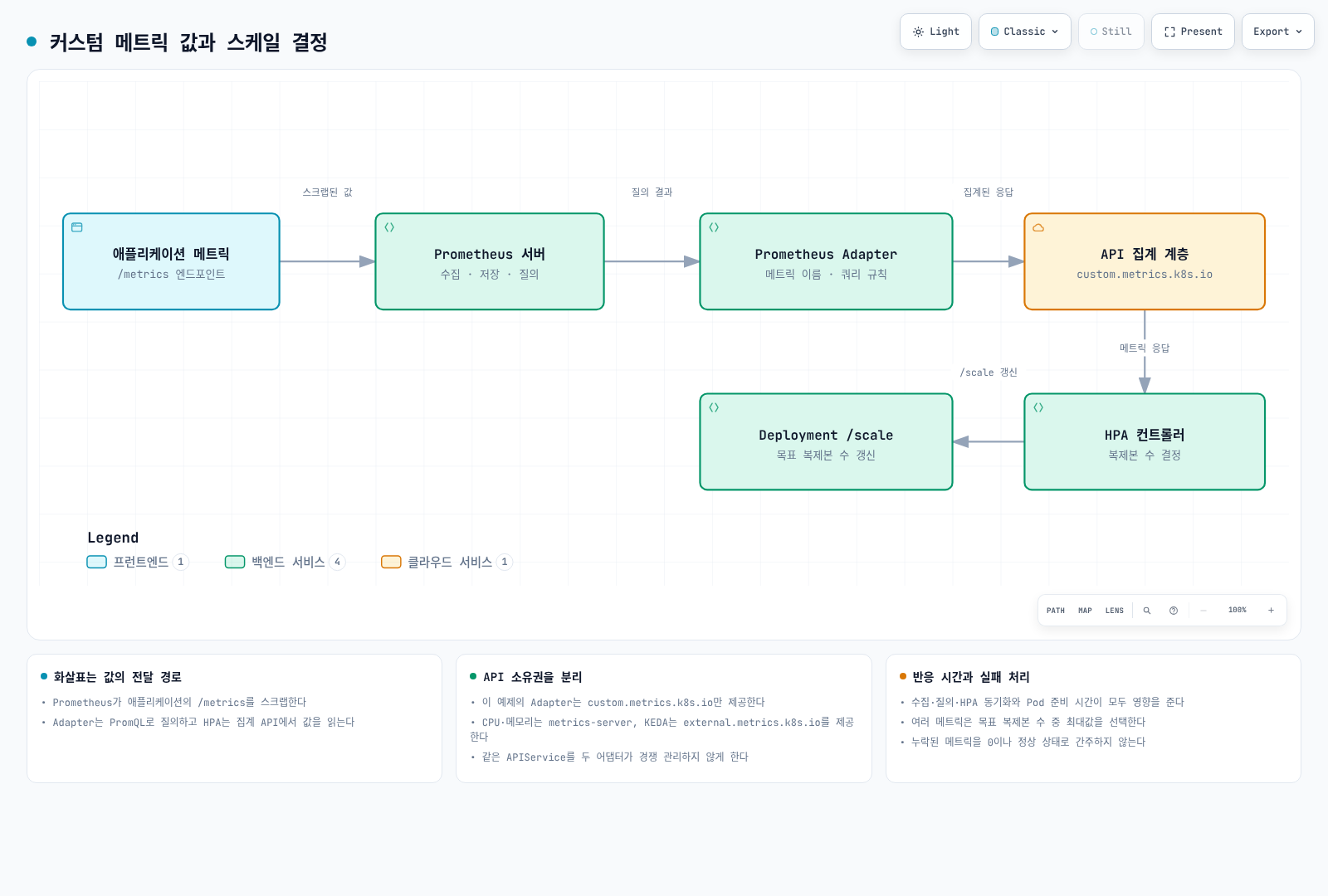
| API | 이 예제의 제공자 | 역할 |
|---|---|---|
metrics.k8s.io | metrics-server | CPU·메모리 리소스 지표 |
custom.metrics.k8s.io | Prometheus Adapter | Pod 등 Kubernetes 객체별 메트릭 |
external.metrics.k8s.io | KEDA를 선택할 때 KEDA metrics API server | 외부 이벤트 메트릭 |
Prometheus Adapter도 external/resource API를 구성할 수 있지만, 이 예제는 custom API만 제공합니다. 같은 APIService를 두 adapter나 KEDA가 경쟁 관리하지 않게 합니다. CloudWatch Exporter만 설치한다고 Kubernetes external metrics API가 생기지는 않습니다.
선행 조건과 실습 애플리케이션
metrics-server, Prometheus Operator/Prometheus와 cert-manager를 먼저 준비합니다. 실제 Prometheus Service 주소를 아래 values에 맞춥니다. Prometheus의 serviceMonitorSelector와 serviceMonitorNamespaceSelector가 scaling-demo의 ServiceMonitor를 선택해야 합니다. /metrics에 namespace, pod, service target label이 붙는지도 확인합니다.
다음 Podinfo 6.15.0 이미지는 공개 registry의 멀티 플랫폼 digest를 확인했습니다. 실제 애플리케이션을 사용할 때는 동작하는 metric·probe·종료 계약을 구현한 승인 이미지로 대체합니다.
# fixtures/application.yaml
apiVersion: v1
kind: Namespace
metadata:
  name: scaling-demo
---
apiVersion: apps/v1
kind: Deployment
metadata:
  name: podinfo
  namespace: scaling-demo
spec:
  replicas: 3
  selector:
    matchLabels:
      app: podinfo
  template:
    metadata:
      labels:
        app: podinfo
    spec:
      automountServiceAccountToken: false
      terminationGracePeriodSeconds: 45
      containers:
        - name: podinfo
          image: ghcr.io/stefanprodan/podinfo@sha256:ec73780a8425f59ea49f5bc8cdff0d598805a224fbaa1f86c67a244f250fa9da
          ports:
            - name: http
              containerPort: 9898
          resources:
            requests:
              cpu: 100m
              memory: 128Mi
            limits:
              cpu: "1"
              memory: 512Mi
          readinessProbe:
            httpGet:
              path: /readyz
              port: http
          livenessProbe:
            httpGet:
              path: /healthz
              port: http
---
apiVersion: v1
kind: Service
metadata:
  name: podinfo
  namespace: scaling-demo
  labels:
    app: podinfo
spec:
  selector:
    app: podinfo
  ports:
    - name: http
      port: 80
      targetPort: http
---
apiVersion: monitoring.coreos.com/v1
kind: ServiceMonitor
metadata:
  name: podinfo
  namespace: scaling-demo
spec:
  selector:
    matchLabels:
      app: podinfo
  namespaceSelector:
    matchNames: [scaling-demo]
  endpoints:
    - port: http
      path: /metrics
      interval: 15s
Podinfo의 http_requests_total은 HTTP 요청 counter입니다. 데모에는 health check 등 운영 요청도 포함될 수 있으므로 사업 트래픽만 정확히 측정하는 production 지표로 그대로 간주하지 않습니다. 별도 scrape annotation을 동시에 추가해 중복 수집하지 않습니다.
Adapter 설정
# fixtures/adapter-values.yaml
replicas: 2
prometheus:
  url: http://prometheus.monitoring.svc
  port: 9090
certManager:
  enabled: true
podDisruptionBudget:
  enabled: true
  minAvailable: 1
  maxUnavailable: null
resources:
  requests:
    cpu: 100m
    memory: 128Mi
  limits:
    cpu: 500m
    memory: 512Mi
rules:
  default: false
  external: []
  custom:
    - seriesQuery: 'http_requests_total{namespace="scaling-demo",pod!=""}'
      resources:
        overrides:
          namespace:
            resource: namespace
          pod:
            resource: pod
      name:
        matches: "^http_requests_total$"
        as: http_requests_per_second
metricsQuery: 'sum(rate(http_requests_total{<<.LabelMatchers>>}[2m])) by (<<.GroupBy>>)'helm repo add prometheus-community https://prometheus-community.github.io/helm-charts
helm repo update
helm upgrade --install prometheus-adapter prometheus-community/prometheus-adapter \
--version 5.3.0 --namespace monitoring --create-namespace \
--kube-context "$TARGET_CONTEXT" --values adapter-values.yaml
kubectl --context "$TARGET_CONTEXT" get --raw \
/apis/custom.metrics.k8s.io/v1beta1cert-manager가 인증서와 APIService CA 주입을 처리하는 구성입니다. tls.enable=false 같은 Helm 옵션 이름만 보고 API 통신이 암호화되지 않는다고 단정하지 말고, 렌더링된 APIService·인증서·검증 설정을 확인합니다. 이 예제에는 external rule이 없으므로 Adapter의 external API가 있어야 한다고 검사하지 않습니다.
Adapter의 Helm rules.custom과 실제 서버 설정 파일의 구조도 다릅니다. 임의의 ConfigMap에 값을 넣는 것만으로 기존 차트가 그 파일을 읽지는 않습니다. 하나의 values 소스로 관리합니다.
Pod당 RPS와 CPU를 사용하는 HPA
# fixtures/hpa.yaml
apiVersion: autoscaling/v2
kind: HorizontalPodAutoscaler
metadata:
  name: podinfo
  namespace: scaling-demo
spec:
  scaleTargetRef:
    apiVersion: apps/v1
    kind: Deployment
    name: podinfo
  minReplicas: 3
  maxReplicas: 20
  metrics:
    - type: Pods
      pods:
        metric:
          name: http_requests_per_second
        target:
          type: AverageValue
          averageValue: "100"
    - type: Resource
      resource:
        name: cpu
        target:
          type: Utilization
          averageUtilization: 70
  behavior:
    scaleUp:
      stabilizationWindowSeconds: 0
      policies:
        - type: Percent
          value: 100
          periodSeconds: 15
        - type: Pods
          value: 4
          periodSeconds: 15
      selectPolicy: Max
    scaleDown:
      stabilizationWindowSeconds: 300
      policies:
        - type: Percent
          value: 10
          periodSeconds: 60
        - type: Pods
          value: 2
          periodSeconds: 60
      selectPolicy: Min
여러 metric은 우선순위나 단순 “CPU fallback” 목록이 아닙니다. 각 metric이 요구한 복제본 중 가장 큰 값을 선택합니다. 일부 metric을 읽지 못하면 scale-down이 생략될 수 있으며, 유효한 다른 metric이 scale-up을 요구하면 증가할 수 있습니다.
모든 대상 Pod와 메트릭이 준비됐다고 가정하면 기본 비율은 ceil(currentReplicas × currentMetric / targetMetric)입니다. Pod당 RPS가 250이고 목표가 100일 때 4개 Pod의 계산상 목표는 10개입니다. 실제 값은 min/max, 준비되지 않은 Pod, 누락 메트릭, 허용 오차와 behavior에 따라 조정됩니다.
| 설정 | 실제 의미 |
|---|---|
| scale-up stabilization | 최근 구간의 낮은 권고를 고려해 급증을 완화 |
| scale-down stabilization | 최근 구간의 높은 권고를 고려해 급감을 완화 |
periodSeconds | 그 구간 동안 허용되는 변경량을 계산하는 관찰 창 |
selectPolicy: Max | 더 많은 변경을 허용하는 정책 |
scale-down Min | 더 적게 삭제하는 정책 |
안정화 구간은 매번 새로 시작하는 고정 sleep이 아닙니다. periodSeconds는 1–1,800, stabilization window는 0–3,600 범위이며 300초 policy도 유효합니다. 500% 증가 제한은 현재 수의 추가 500%, 즉 최대 6배에 해당합니다.
예제 scale-down에서 현재 20개라면 Percent 10%와 Pods 2 모두 최대 2개 삭제를 허용합니다. 최근 변경 이력·권고와 다른 제한도 적용되므로 특정 시각에 반드시 18개가 된다는 시간표로 해석하지 않습니다.
일반 HPA의 minReplicas: 0은 Kubernetes 버전·HPAScaleToZero 및 metric 조건을 확인해야 합니다. 이 예제는 최소 3개를 사용하고 외부 큐의 scale-to-zero는 아래 KEDA 예제로 구분합니다. API 응답이 맞아도 이미지 pull·노드 용량·애플리케이션 준비 시간이 남습니다.
외부 지표와 확인
큐 길이는 순간 gauge이고 *_total 누적 counter를 이름만 바꿔 queue depth로 쓰면 안 됩니다. 전역 큐 길이에서 Pod당 처리량을 목표로 할 때는 일반적으로 AverageValue를 사용합니다. Value와 계산식이 같다고 가정하지 않습니다.
CloudWatch를 사용할 때는 KEDA의 직접 scaler 또는 Exporter → Prometheus → Adapter external rule 전체 경로가 필요합니다. Exporter의 실제 metric/label 이름과 HPA 이름을 맞추고, APIService 소유권 충돌을 피합니다. AWS/ApplicationELB RequestCount에 임의로 TargetGroup dimension을 추가하지 않습니다. 검토된 KEDA 가이드의 CloudWatch 예제를 참고합니다.
kubectl --context "$TARGET_CONTEXT" get --raw \
  '/apis/custom.metrics.k8s.io/v1beta1/namespaces/scaling-demo/pods/*/http_requests_per_second'
kubectl --context "$TARGET_CONTEXT" describe hpa podinfo -n scaling-demo
kubectl --context "$TARGET_CONTEXT" get deployment,pods -n scaling-demo
부하 시험은 별도 실습 환경에서 제한된 요청량·시간으로 수행합니다. 오래된 BusyBox 이미지와 무한 루프를 무심코 실행하지 않습니다. GitOps로 관리할 때는 Deployment의 replicas와 autoscaler의 필드 소유권도 맞춥니다.
2. KEDA 이벤트 기반 스케일링
KEDA operator는 ScaledObject와 HPA를 관리하고 활성화/0 전환을 처리합니다. 1개 이상에서의 수평 조정은 HPA와 연동합니다. ScaledJob은 별도로 Job을 생성하며 HPA가 Job replicas를 조정하는 구조가 아닙니다.
설치와 AWS 인증
일반 설치·호환성·네트워크는 KEDA 가이드를 따릅니다. AWS 예제는 KEDA operator의 IRSA를 명시적으로 사용합니다. 실제 cluster OIDC provider, 정확한 namespace/ServiceAccount trust와 대상 큐 읽기 역할을 먼저 구성합니다.
# fixtures/keda-values.yaml
# This example explicitly uses IRSA on the KEDA operator.
# Prepare the cluster OIDC provider, scoped trust and queue-read role first.
podIdentity:
  aws:
    irsa:
      enabled: true
roleArn: arn:aws:iam::123456789012:role/KedaQueueReadRolehelm repo add kedacore https://kedacore.github.io/charts
helm repo update
helm upgrade --install keda kedacore/keda \
--version 2.20.2 --namespace keda --create-namespace \
--kube-context "$TARGET_CONTEXT" --values keda-values.yaml위 role ARN을 실제 승인한 역할로 바꿉니다. provider: aws-eks라는 구 인증 옵션 이름을 EKS Pod Identity라는 뜻으로 해석하지 않습니다. IRSA와 Pod Identity는 다른 구성이며, 다른 방식을 선택하면 실제 operator SDK credential chain·association·trust를 그 방식에 맞춰야 합니다.
RPS ScaledObject
기존 HPA의 소유권을 정리하거나 지원되는 이전 절차를 따른 뒤 이 대안을 선택합니다.
# fixtures/keda-rps.yaml
# Alternative to hpa.yaml. Do not let both own podinfo's replica count.
apiVersion: keda.sh/v1alpha1
kind: ScaledObject
metadata:
  name: podinfo
  namespace: scaling-demo
spec:
  scaleTargetRef:
    apiVersion: apps/v1
    kind: Deployment
    name: podinfo
  minReplicaCount: 3
  maxReplicaCount: 20
  pollingInterval: 15
  cooldownPeriod: 300
  fallback:
    failureThreshold: 3
    replicas: 5
  advanced:
    horizontalPodAutoscalerConfig:
      behavior:
        scaleDown:
          stabilizationWindowSeconds: 300
  triggers:
    - type: prometheus
      name: requests
      metricType: AverageValue
      metadata:
        serverAddress: http://prometheus.monitoring.svc:9090
        query: sum(rate(http_requests_total{namespace="scaling-demo",service="podinfo"}[2m]))
        threshold: "100"
        activationThreshold: "0"
        ignoreNullValues: "false"
    - type: cpu
      metricType: Utilization
      metadata:
value: "70"AverageValue의 threshold 100은 전체 100 RPS를 넘는 순간 무조건 증가한다는 뜻이 아니라 Pod당 100 RPS 목표입니다. 예를 들어 총 1,000 RPS면 계산상 10개를 요구합니다. activationThreshold는 활성화 조건이며 HPA target과 다릅니다.
ignoreNullValues=false는 누락 결과를 정상 0으로 간주하지 않도록 합니다. Prometheus query는 하나의 값으로 집계하고 오류·NaN·0 traffic을 따로 처리합니다. fallback은 지원 metric의 반복 실패에 대한 제한된 동작이며 metric 제공자·HPA·노드 장애를 모두 복구하지 않습니다.
이 HTTP 예제는 최소 3개를 유지합니다. 애플리케이션 자체의 metric만 읽으면서 모두 0개로 줄이면 새 HTTP 요청을 관측하고 다시 켤 경로가 없어질 수 있습니다. scale-to-zero에는 외부 큐나 별도 activation 경로가 필요합니다.
SQS 큐
실제 sqs-worker Deployment와 worker 전용 SQS 소비 권한을 준비합니다. KEDA의 큐 속성 읽기 권한과 worker의 receive/delete/change-visibility 권한은 별개입니다.
# fixtures/keda-sqs.yaml
apiVersion: keda.sh/v1alpha1
kind: TriggerAuthentication
metadata:
  name: keda-aws
  namespace: scaling-demo
spec:
  podIdentity:
    provider: aws
    identityOwner: keda
---
apiVersion: keda.sh/v1alpha1
kind: ScaledObject
metadata:
  name: sqs-worker
  namespace: scaling-demo
spec:
  scaleTargetRef:
    apiVersion: apps/v1
    kind: Deployment
    name: sqs-worker
  minReplicaCount: 0
  maxReplicaCount: 50
  pollingInterval: 15
  cooldownPeriod: 60
  triggers:
    - type: aws-sqs-queue
      authenticationRef:
        name: keda-aws
      metadata:
        queueURL: https://sqs.ap-northeast-2.amazonaws.com/REPLACE_ACCOUNT/my-queue
        queueLength: "10"
        activationQueueLength: "0"
        scaleOnInFlight: "true"
        scaleOnDelayed: "false"
        awsRegion: ap-northeast-2
activationQueueLength: "0"은 0보다 클 때 활성화합니다. "1"이면 한 개 이상이 아니라 1 초과 조건입니다. 기본/명시한 in-flight 포함 여부, delayed 메시지 처리와 visibility timeout을 함께 검토합니다. DLQ가 자동 합산되는 것은 아닙니다.
폴링 간격은 KEDA 확인 주기에 관계하며 HPA sync period나 Pod 시작 시간이 아닙니다. 일반적인 1→N 조정과 0 전환의 타이밍이 다르고, cooldownPeriod는 모든 scale-down의 고정 대기 시간이 아닙니다. 긴 작업은 종료·재처리·중복 처리와 메시지 visibility를 설계해야 합니다.
PostgreSQL 작업 큐
DB 연결 수가 늘었다는 이유로 애플리케이션을 늘리면 오히려 연결 압력을 악화시킬 수 있습니다. 아래는 worker가 실제로 소비하는 pending 작업 수를 사용합니다.
# fixtures/keda-postgresql.yaml
apiVersion: keda.sh/v1alpha1
kind: TriggerAuthentication
metadata:
  name: queue-database
  namespace: scaling-demo
spec:
  secretTargetRef:
    - parameter: connection
      name: queue-database
      key: connection
---
apiVersion: keda.sh/v1alpha1
kind: ScaledObject
metadata:
  name: database-worker
  namespace: scaling-demo
spec:
  scaleTargetRef:
    apiVersion: apps/v1
    kind: Deployment
    name: database-worker
  minReplicaCount: 1
  maxReplicaCount: 10
  triggers:
    - type: postgresql
      authenticationRef:
        name: queue-database
      metricType: AverageValue
      metadata:
        query: SELECT count(*) FROM public.job_queue WHERE status = 'pending'
        targetQueryValue: "50"
        activationTargetQueryValue: "0"
queue-database Secret의 connection에는 검증된 DSN이 있어야 합니다. TLS hostname/CA를 검증하는 sslmode=verify-full과 필요한 CA 경로를 KEDA operator 환경에 준비합니다. Secret 값은 Git에 넣지 않습니다. KEDA 계정에는 해당 큐 테이블을 읽는 권한만 주며 worker가 사용할 쓰기 권한과 분리합니다.
쿼리는 하나의 숫자를 반환해야 합니다. 오래된 pending 작업을 created_at > now()-1h로 무조건 제외하면 backlog를 보지 못합니다. Worker의 atomic claim, 중복 처리와 완료 상태 관리도 필요합니다.
Cron과 여러 지표
# fixtures/keda-cron.yaml
# Alternative to the preceding podinfo HPA/ScaledObject.
apiVersion: keda.sh/v1alpha1
kind: ScaledObject
metadata:
  name: podinfo
  namespace: scaling-demo
spec:
  scaleTargetRef:
    name: podinfo
  minReplicaCount: 3
  maxReplicaCount: 50
  triggers:
    - type: cron
      metadata:
        timezone: Asia/Seoul
        start: "0 9 * * 1-5"
        end: "0 18 * * 1-5"
        desiredReplicas: "20"
    - type: cron
      metadata:
        timezone: Asia/Seoul
        start: "30 11 * * 1-5"
        end: "30 13 * * 1-5"
        desiredReplicas: "40"
    - type: prometheus
      metricType: AverageValue
      metadata:
        serverAddress: http://prometheus.monitoring.svc:9090
        query: sum(rate(http_requests_total{namespace="scaling-demo",service="podinfo"}[2m]))
        threshold: "100"
        ignoreNullValues: "false"
평일 업무 시간에는 20개, 점심 구간에는 40개가 metric 기반 요구와 함께 비교됩니다. 활성 trigger 중 더 큰 요구가 적용되므로 Cron이나 Prometheus에 임의의 우선순위가 있는 것은 아닙니다. 그 밖의 시간은 최소 3개를 유지합니다. 야간·주말 구간을 추가할 때는 경계와 겹침을 실제 timezone으로 시험합니다.
현재 KEDA에는 advanced.scalingModifiers가 있습니다. “OR만 지원하고 formula는 미래 기능”이라는 설명은 맞지 않습니다. 다음은 같은 worker가 소비하는 두 큐의 동일 단위 gauge를 합하는 예제입니다.
# fixtures/keda-composite.yaml
# Requires a worker that consumes both queues and the two named gauge series.
apiVersion: keda.sh/v1alpha1
kind: ScaledObject
metadata:
  name: shared-queue-worker
  namespace: scaling-demo
spec:
  scaleTargetRef:
    name: shared-queue-worker
  minReplicaCount: 1
  maxReplicaCount: 30
  advanced:
    scalingModifiers:
      formula: queue_a + queue_b
      target: "50"
      activationTarget: "0"
      metricType: AverageValue
  triggers:
    - type: prometheus
      name: queue_a
      metadata:
        serverAddress: http://prometheus.monitoring.svc:9090
        query: sum(queue_messages_pending{queue="a"})
        threshold: "50"
        ignoreNullValues: "false"
    - type: prometheus
      name: queue_b
      metadata:
        serverAddress: http://prometheus.monitoring.svc:9090
        query: sum(queue_messages_pending{queue="b"})
        threshold: "50"
        ignoreNullValues: "false"
formula의 trigger 이름은 표현식에서 참조할 수 있어야 하며 결과는 numeric metric이어야 합니다. CPU·메모리 resource trigger와 서로 다른 단위를 무심코 더하지 않습니다. AND 조건이 필요하면 0/수치가 나오는 조건식을 설계하고 starvation·활성화·오류 시 동작을 검증합니다.
ScaledJob
다음은 실제 worker 이미지와 batch-worker ServiceAccount를 준비한 뒤 사용하는 템플릿입니다.
# fixtures/keda-job.yaml
# Supply an actual bounded, idempotent SQS consumer image and worker identity.
apiVersion: keda.sh/v1alpha1
kind: ScaledJob
metadata:
  name: batch-processor
  namespace: scaling-demo
spec:
  pollingInterval: 30
  minReplicaCount: 0
  maxReplicaCount: 20
  successfulJobsHistoryLimit: 5
  failedJobsHistoryLimit: 5
  scalingStrategy:
    strategy: default
  jobTargetRef:
    parallelism: 1
    completions: 1
    activeDeadlineSeconds: 600
    backoffLimit: 2
    template:
      spec:
        serviceAccountName: batch-worker
        restartPolicy: Never
        containers:
          - name: processor
            image: REPLACE_WITH_APPROVED_WORKER_IMAGE
            env:
              - name: SQS_QUEUE_URL
                value: https://sqs.ap-northeast-2.amazonaws.com/REPLACE_ACCOUNT/batch-queue
            resources:
              requests:
                cpu: 250m
                memory: 256Mi
  triggers:
    - type: aws-sqs-queue
      authenticationRef:
        name: keda-aws
      metadata:
        queueURL: https://sqs.ap-northeast-2.amazonaws.com/REPLACE_ACCOUNT/batch-queue
        queueLength: "1"
awsRegion: ap-northeast-2successfulJobsHistoryLimit과 failedJobsHistoryLimit은 초가 아니라 개수입니다. queueLength: "1"이 특정 메시지와 Job을 정확히 1:1로 묶지는 않습니다. Worker가 메시지를 수신·처리·삭제하고 재시도에 안전해야 합니다. default/accurate/custom/eager 전략은 queue 및 running/pending Job 계산 방식이 다릅니다.
Cron trigger가 활성화된 시간 동안 ScaledJob은 반복 생성될 수 있습니다. “매일 한 번” 작업은 Kubernetes CronJob의 schedule/timeZone·동시 실행·재시도 정책으로 구성합니다. 예제에 autoscaling.keda.sh/paused-replicas를 남겨 스케일링을 의도치 않게 중지하지 않습니다.
3. VPA와 In-Place Resize
VPA는 주로 resource requests 추천을 생성합니다. limits는 선택한 controlledValues와 기존 비율 등에 따라 처리되며 독립적인 최적 limit을 항상 추천하는 것은 아닙니다.
공식 차트와 추천 모드
VPA 1.7.1의 공식 chart 0.12.0을 사용합니다. 기존 VPA 설치가 있으면 또 설치하지 말고 CRD·RBAC·설정 이행을 먼저 확인합니다. 아래 구성은 cert-manager가 webhook 인증서를 관리하므로 cert-manager와 cainjector가 필요합니다.
# fixtures/vpa-values.yaml
admissionController:
  replicas: 2
  certGen:
    enabled: false
  certManager:
    enabled: true
    createSelfSignedIssuer:
      enabled: true
recommender:
  replicas: 2
updater:
  replicas: 2
  extraArgs:
- --in-place-skip-disruption-budget=falsehelm upgrade --install vpa \
https://github.com/kubernetes/autoscaler/releases/download/vertical-pod-autoscaler-chart-0.12.0/vertical-pod-autoscaler-0.12.0.tgz \
--namespace vpa --create-namespace --kube-context "$TARGET_CONTEXT" \
--values vpa-values.yaml차트 key는 replicas이며 다른 차트의 replicaCount·extraArgs 구조를 섞지 않습니다. 이 차트는 여러 recommender/updater replica에 leader election을 설정합니다. --in-place-skip-disruption-budget=false를 명시했으며, 불명확한 Prometheus history 옵션만 추가해 수집 이력이 자동 완성된다고 가정하지 않습니다.
# fixtures/vpa.yaml
apiVersion: autoscaling.k8s.io/v1
kind: VerticalPodAutoscaler
metadata:
  name: podinfo
  namespace: scaling-demo
spec:
  targetRef:
    apiVersion: apps/v1
    kind: Deployment
    name: podinfo
  updatePolicy:
    updateMode: "Off"
  resourcePolicy:
    containerPolicies:
      - containerName: podinfo
        controlledResources: [cpu, memory]
        controlledValues: RequestsOnly
        minAllowed:
          cpu: 100m
          memory: 128Mi
        maxAllowed:
          cpu: "1"
memory: 512MiOff는 추천을 계산하되 Pod에 적용하지 않습니다. 실제 적용 전 request/limit, namespace quota와 노드 용량을 검토합니다. 같은 Deployment에 여러 VPA 예제를 동시에 적용하지 않습니다.
| 모드 | VPA 1.7.1의 의미 |
|---|---|
Off | 추천만 생성 |
Initial | 새 Pod 생성 시 적용 |
Recreate | 필요한 경우 eviction/recreation으로 적용 |
InPlaceOrRecreate | in-place를 시도하고 필요하면 recreation으로 대체 |
InPlace | eviction fallback 없이 in-place 재시도; 별도 feature gate 필요 |
Auto | deprecated이며 현재 Recreate와 같은 동작; 명시적 모드 사용 |
VPA 1.7.1의 in-place 모드는 Kubernetes 1.33 이상 등 요구 조건을 확인해야 합니다. InPlaceOrRecreate의 이전 VPA feature gate는 1.7에서 제거됐지만 InPlace에는 --feature-gates=InPlace=true가 필요합니다. minReplicas는 updater의 적용 조건이지 항상 그만큼 가용 Pod를 보장하는 PDB가 아닙니다.
Kubernetes resize
Pod in-place resize는 1.27에서 alpha로 시작했고 1.33 beta, 1.35 stable로 발전했습니다. “1.27부터 기본적으로 무중단”이라는 뜻이 아닙니다. 지원 노드·runtime·QoS·resizePolicy를 확인합니다.
# Container fragment; select the restart behavior required by the application.
resizePolicy:
  - resourceName: cpu
    restartPolicy: NotRequired
  - resourceName: memory
    restartPolicy: RestartContainer
기존 데모 Pod의 CPU request를 바꾸는 patch 파일입니다. 대상 Pod를 확인한 후 resize subresource를 사용합니다.
{
  "spec": {
    "containers": [
      {
        "name": "podinfo",
        "resources": {
          "requests": {"cpu": "200m"},
          "limits": {"cpu": "1"}
        }
      }
    ]
  }
}kubectl --context "$TARGET_CONTEXT" patch pod "$POD_NAME" -n scaling-demo \
--subresource=resize --type=strategic --patch-file=resize-patch.json
kubectl --context "$TARGET_CONTEXT" get pod "$POD_NAME" -n scaling-demo -o json |
jq '.status.conditions[]? | select(.type | startswith("PodResize"))'PodResizePending의 Deferred/Infeasible와 PodResizeInProgress 조건을 확인합니다. 오래된 .status.resize 필드만 확인하지 않습니다. Pod를 재생성하지 않아도 RestartContainer 정책은 컨테이너를 재시작할 수 있습니다. QoS class를 바꾸는 resize, 지원하지 않는 init/ephemeral container·노드 정책·OS 등의 제한도 있습니다.
Pod에 대한 resize가 Deployment template을 영구 수정하는 것은 아닙니다. Pod가 교체돼도 유지할 설정은 VPA 또는 Git의 목표 상태에 반영합니다.
Goldilocks와 HPA 공존
# fixtures/goldilocks-values.yaml
vpa:
  enabled: false
controller:
  enabled: true
dashboard:
  enabled: true
  service:
type: ClusterIPhelm repo add fairwinds-stable https://charts.fairwinds.com/stable
helm repo update
helm upgrade --install goldilocks fairwinds-stable/goldilocks \
--version 11.1.0 --namespace goldilocks --create-namespace \
--kube-context "$TARGET_CONTEXT" --values goldilocks-values.yaml기존 VPA 설치를 재사용하고 dashboard는 ClusterIP로 둡니다. 검토용 접근은 인증된 내부 경로나 localhost port-forward로 제공합니다. Goldilocks namespace label을 활성화하면 VPA를 생성할 수 있으므로 직접 만든 VPA와 같은 target을 경쟁 관리하지 않게 합니다.
HPA CPU utilization과 VPA CPU request 변경은 같은 계산의 분모에 영향을 줍니다. VPA Initial도 새 Pod의 request를 바꾸므로 이 문제를 자동으로 없애지 않습니다. 추천 모드로 시작하거나 HPA는 RPS/큐, VPA는 resource sizing을 맡기고 실제 동작을 검증합니다. CPU HPA와 memory-only VPA도 재시작·스케줄링 영향을 고려해야 합니다.
4. Pod Deletion Cost
이 annotation은 ReplicaSet 내부 scale-down의 best-effort 선택 기준입니다. 노드 중단·eviction·Job·StatefulSet·서로 다른 Deployment의 복제본 비율을 제어하는 전역 우선순위가 아닙니다.
metadata:
  annotations:
    controller.kubernetes.io/pod-deletion-cost: "100"
현재 ReplicaSet 정렬은 미할당 여부, Pod phase, Ready 여부를 먼저 비교한 뒤 deletion cost를 고려합니다. 이후 동일 노드의 복제본 밀도, Ready 기간, 재시작과 생성 시각 등이 적용됩니다. 낮은 cost가 항상 모든 Pod보다 먼저 삭제된다고 단정하지 않습니다.
범위는 signed 32-bit 정수이며 기본값은 0입니다. 같은 ReplicaSet에 속한 Pod와 현재 상태를 확인한 뒤 다음처럼 특정 Pod의 선호를 바꿀 수 있습니다.
kubectl --context "$TARGET_CONTEXT" get pod "$POD_A" "$POD_B" \
  -n scaling-demo -o json |
  jq '.items[] | {name:.metadata.name,node:.spec.nodeName,
    owners:.metadata.ownerReferences,phase:.status.phase}'

kubectl --context "$TARGET_CONTEXT" annotate pod "$POD_A" -n scaling-demo \
  controller.kubernetes.io/pod-deletion-cost=-100 --overwrite
kubectl --context "$TARGET_CONTEXT" annotate pod "$POD_B" -n scaling-demo \
  controller.kubernetes.io/pod-deletion-cost=100 --overwrite
Pod template의 모든 Pod에 같은 cost를 넣으면 서로 간의 구분은 생기지 않습니다. 생성 시 admission webhook은 대개 아직 할당될 node를 모르고, preStop은 삭제 대상이 선택된 뒤이므로 사전에 삭제 순서를 바꾸는 시점이 아닙니다.
동적 controller가 필요하면 binding 이후 처리, 정확한 controller 소유권·UID, namespace별 patch 권한, 누락 annotations, watch 재연결과 API 오류를 구현해야 합니다. Pod readiness를 작업 완료로 간주하거나 Job 진행률에 cost를 붙이면 Job 종료 순서가 바뀐다고 가정하지 않습니다.
5. Spot 배치와 종료
다음은 Auto Mode default NodeClass가 있는 실습 클러스터용입니다. 두 NodePool 모두 같은 workload label을 제공하므로 Pod가 두 capacity type을 사용할 수 있습니다.
# fixtures/nodepools.yaml
apiVersion: karpenter.sh/v1
kind: NodePool
metadata:
  name: web-spot
spec:
  weight: 100
  template:
    metadata:
      labels:
        workload-type: web
    spec:
      nodeClassRef:
        group: eks.amazonaws.com
        kind: NodeClass
        name: default
      requirements:
        - key: karpenter.sh/capacity-type
          operator: In
          values: [spot]
        - key: kubernetes.io/arch
          operator: In
          values: [amd64, arm64]
        - key: node.kubernetes.io/instance-type
          operator: In
          values: [m7i.large, m7i.xlarge, m7g.large, m7g.xlarge, c7i.large, c7g.large]
  limits:
    cpu: "100"
    memory: 200Gi
  disruption:
    consolidationPolicy: WhenEmpty
    consolidateAfter: 5m
    budgets:
      - nodes: "10%"
---
apiVersion: karpenter.sh/v1
kind: NodePool
metadata:
  name: web-ondemand
spec:
  weight: 10
  template:
    metadata:
      labels:
        workload-type: web
    spec:
      nodeClassRef:
        group: eks.amazonaws.com
        kind: NodeClass
        name: default
      requirements:
        - key: karpenter.sh/capacity-type
          operator: In
          values: [on-demand]
        - key: kubernetes.io/arch
          operator: In
          values: [amd64, arm64]
        - key: node.kubernetes.io/instance-type
          operator: In
          values: [m7i.large, m7i.xlarge, m7g.large, m7g.xlarge, c7i.large, c7g.large]
  limits:
    cpu: "50"
    memory: 100Gi
  disruption:
    consolidationPolicy: WhenEmpty
    consolidateAfter: 10m
    budgets:
      - nodes: "10%"
높은 weight는 provisioning 선호이며 “Spot이 모두 소진됐을 때만 On-Demand”, 특정 Spot 비율 또는 예약된 fallback 용량을 보장하지 않습니다. 기존 노드, scheduling 제약, 가용 AZ·instance type, quota와 용량에 따라 달라집니다.
Auto Mode/Karpenter의 capacity label은 karpenter.sh/capacity-type의 spot/on-demand입니다. Managed node group의 eks.amazonaws.com/capacityType 및 사용자 정의 taint와 혼동하지 않습니다. kubernetes.io/capacity-type은 이 예제의 올바른 label이 아닙니다.
배치 patch와 PDB
# fixtures/placement-patch.yaml
# Kustomize strategic-merge patch for application.yaml; not standalone.
apiVersion: apps/v1
kind: Deployment
metadata:
  name: podinfo
  namespace: scaling-demo
spec:
  template:
    spec:
      nodeSelector:
        workload-type: web
      affinity:
        nodeAffinity:
          preferredDuringSchedulingIgnoredDuringExecution:
            - weight: 80
              preference:
                matchExpressions:
                  - key: karpenter.sh/capacity-type
                    operator: In
                    values: [spot]
      topologySpreadConstraints:
        - maxSkew: 1
          topologyKey: topology.kubernetes.io/zone
          whenUnsatisfiable: DoNotSchedule
          labelSelector:
            matchLabels:
              app: podinfo
        - maxSkew: 1
          topologyKey: kubernetes.io/hostname
          whenUnsatisfiable: ScheduleAnyway
          labelSelector:
            matchLabels:
app: podinfo# fixtures/pdb.yaml
apiVersion: policy/v1
kind: PodDisruptionBudget
metadata:
name: podinfo
namespace: scaling-demo
spec:
minAvailable: 2
selector:
matchLabels:
app: podinfo# fixtures/kustomization.yaml
apiVersion: kustomize.config.k8s.io/v1beta1
kind: Kustomization
resources:
- application.yaml
- hpa.yaml
- nodepools.yaml
- pdb.yaml
patches:
- path: placement-patch.yaml위 파일을 함께 두고 kustomize build .로 합쳐 확인합니다. patch만 완전한 Deployment처럼 적용하지 않습니다. ScheduleAnyway는 soft preference이고 DoNotSchedule도 실제로 적합한 topology domain이 있어야 합니다. 분산 조건이 임의의 80/20 비율이나 예비 노드를 만들지는 않습니다.
PDB는 지원되는 자발적 eviction을 제한합니다. HPA/ReplicaSet의 replica 축소나 실제 Spot 노드 소실을 막아 가용성을 보장하는 장치는 아닙니다. minAvailable: 2가 언제나 두 Pod의 실행을 보장한다는 뜻도 아닙니다.
중단 처리와 graceful shutdown
Auto Mode의 관리형 interruption 처리를 사용하는 노드에 별도 drain controller를 무심코 중복 설치하지 않습니다. 자체 관리 Karpenter는 interruption queue/EventBridge와 controller 권한이 필요합니다. Node Termination Handler가 필요한 다른 노드 유형은 해당 모드와 권한을 명확히 구분합니다.
Spot interruption의 사전 통지를 매번 애플리케이션이 온전히 사용할 수 있는 120초로 해석하지 않습니다. hibernation 등 예외, 통지 감지·drain·종료에 걸린 시간과 실제 종료 시점을 고려합니다.
terminationGracePeriodSeconds는 Pod spec 필드입니다. preStop 시간도 이 종료 예산에 포함됩니다. 애플리케이션이 SIGTERM과 drain을 실제로 처리하도록 만들고, readiness에서 제거된 뒤의 연결·메시지 처리와 재시도를 검증합니다. touch /tmp/unhealthy만으로 HTTP probe가 실패하거나 “연결 정리”라는 echo가 DB pool을 닫지는 않습니다.
외부 알림·Pushgateway 요청이 종료를 무한정 막지 않게 합니다. 임의의 우선순위 클래스나 deletion cost도 Spot 소실 자체를 막지 않습니다.
비용과 용량
CPU request gauge의 increase()는 node-hours가 아닙니다. 실제 노드 실행 시간과 해당 시간·AZ·플랫폼·구매 방식의 비용 자료를 사용하고, 누락된 가격을 무료로 처리하지 않습니다.
동일 자원 사용량의 On-Demand 기준선과 실제 지출을 비교하되 Savings Plans/RI, EKS/Auto Mode, 볼륨·네트워크·재시도·유휴 비용 등 비교 범위를 명시합니다. 고정된 “70% 할인” 또는 “80/20이면 50% 이상 절감”을 보장하지 않습니다.
Capacity Reservation도 생성만으로 targeted 예약이 NodePool에서 사용되는 것은 아닙니다. 지원되는 NodeClass 선택자·AZ/instance 조건과 요금·미사용 용량을 검토합니다. 가용성 요구에 맞는 fallback을 부하·장애 시험으로 확인합니다.
참고 자료
- HPA 동작
- KEDA 2.20 ScaledObject
- KEDA 2.20 ScaledJob
- VPA 1.7.1 기능
- Pod resize
- ReplicaSet deletion cost
- 이 장의 퀴즈
< 이전: GitOps 자동화 | 목차 | 다음: 운영 알림 >