라우팅
Istio의 고급 라우팅 기능을 사용하면 요청의 다양한 속성을 기반으로 트래픽을 세밀하게 제어할 수 있습니다.
목차
- 라우팅 개요
- Match 조건
- URI 기반 라우팅
- Header 기반 라우팅
- Query Parameter 기반 라우팅
- HTTP Method 기반 라우팅
- 소스 기반 라우팅
- 우선순위와 폴백
- 실전 예제
- 문제 해결
라우팅 개요
각 예제는 독립적인 Sidecar 라우팅 구성입니다. 참조하는 Service와 subset을 준비하고 같은 호스트의 중복 VirtualService는 하나씩 적용하세요. gateways가 없으면 메시 Sidecar에 적용되며 외부 호스트의 인바운드 예제는 기존 Gateway 연결과 호스트 일치도 필요합니다. 헤더·쿼리 파라미터·출발 워크로드 레이블은 라우팅 입력이며 사용자 ID 증명이 아닙니다. 테넌트/사용자 권한은 인증과 AuthorizationPolicy로 집행하세요.
VirtualService의 라우팅 규칙은 Match 조건과 Route 대상으로 구성됩니다.
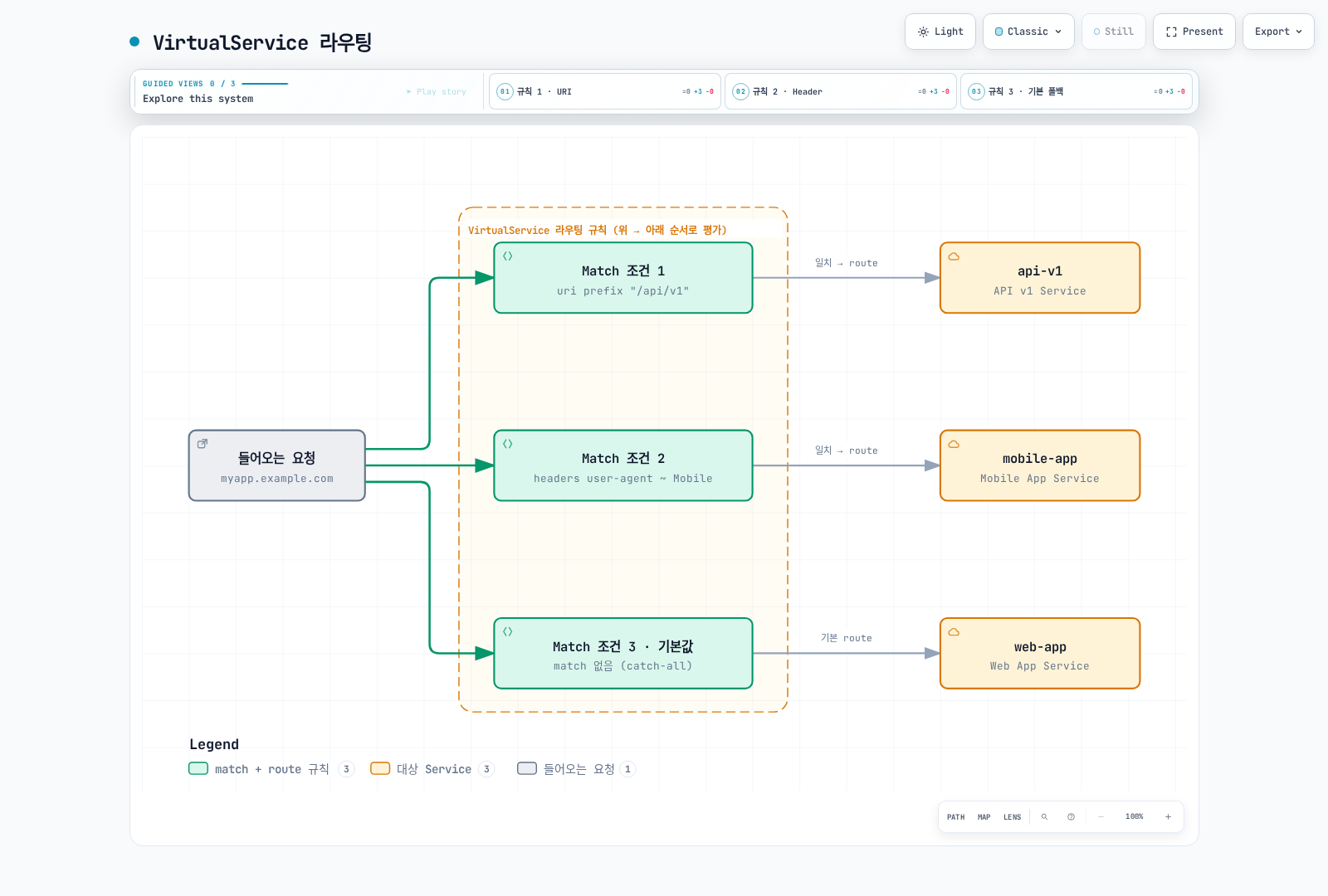
기본 구조
apiVersion: networking.istio.io/v1
kind: VirtualService
metadata:
  name: routing-example
spec:
  hosts:
  - myapp.example.com
  http:
  - match:
    - uri:
        prefix: "/api/v1"
    route:
    - destination:
        host: api-v1
  - match:
    - headers:
        user-agent:
          regex: ".*Mobile.*"
    route:
    - destination:
        host: mobile-app
  - route:  # 기본 라우트 (match 없음)
    - destination:
        host: web-app
Match 조건
Match 조건 유형
| 조건 | 설명 | 매칭 타입 |
|---|---|---|
| uri | 요청 경로 | exact, prefix, regex |
| scheme | HTTP/HTTPS | exact, prefix, regex |
| method | HTTP 메서드 | exact, prefix, regex |
| authority | Host 헤더 | exact, prefix, regex |
| headers | HTTP 헤더 | exact, prefix, regex |
| queryParams | 쿼리 파라미터 | exact, prefix, regex |
| sourceLabels | 소스 워크로드 레이블 | Label selector |
| gateways | Gateway 이름 | List |
매칭 타입
# exact: 정확히 일치
match:
- uri:
exact: "/login"# prefix: 접두사 일치
match:
- uri:
prefix: "/api/"# regex: 정규 표현식 일치
match:
- uri:
regex: "^/api/v[0-9]+/.*"여러 조건 조합
# AND 조건: 모든 조건이 일치해야 함
http:
- match:
  - uri:
      prefix: "/api"
    headers:
      x-api-version:
        exact: "v2"
    queryParams:
      debug:
        exact: "true"
  route:
  - destination:
host: api-debug# OR 조건: 여러 match 블록 사용
http:
- match:
- uri:
prefix: "/api/v1"
- uri:
prefix: "/api/v2"
route:
- destination:
host: api-serviceURI 기반 라우팅
Prefix 매칭
apiVersion: networking.istio.io/v1
kind: VirtualService
metadata:
  name: uri-prefix-routing
spec:
  hosts:
  - myapp.example.com
  http:
  # API 트래픽
  - match:
    - uri:
        prefix: "/api/"
    route:
    - destination:
        host: api-service
        port:
          number: 8080

  # Admin 트래픽
  - match:
    - uri:
        prefix: "/admin/"
    route:
    - destination:
        host: admin-service
        port:
          number: 9000

  # 정적 파일
  - match:
    - uri:
        prefix: "/static/"
    route:
    - destination:
        host: static-service
        port:
          number: 8000

  # 기본 트래픽
  - route:
    - destination:
        host: frontend-service
        port:
          number: 3000
Exact 매칭
apiVersion: networking.istio.io/v1
kind: VirtualService
metadata:
  name: uri-exact-routing
spec:
  hosts:
  - myapp.example.com
  http:
  # 로그인 페이지
  - match:
    - uri:
        exact: "/login"
    route:
    - destination:
        host: auth-service

  # 로그아웃
  - match:
    - uri:
        exact: "/logout"
    route:
    - destination:
        host: auth-service

  # Health check
  - match:
    - uri:
        exact: "/health"
    route:
    - destination:
        host: health-service
Regex 매칭
apiVersion: networking.istio.io/v1
kind: VirtualService
metadata:
  name: uri-regex-routing
spec:
  hosts:
  - myapp.example.com
  http:
  # API 버전별 라우팅: /api/v1/, /api/v2/, etc.
  - match:
    - uri:
        regex: "^/api/v[0-9]+/.*"
    route:
    - destination:
        host: api-service

  # 숫자로 된 리소스 ID: /users/123
  - match:
    - uri:
        regex: "^/users/[0-9]+$"
    route:
    - destination:
        host: user-service

  # 파일 확장자별: .jpg, .png, .gif
  - match:
    - uri:
        regex: ".*\\.(jpg|png|gif)$"
    route:
    - destination:
        host: image-service
Header 기반 라우팅
User-Agent 기반 라우팅
apiVersion: networking.istio.io/v1
kind: VirtualService
metadata:
  name: header-user-agent-routing
spec:
  hosts:
  - reviews
  http:
  # Tablet 디바이스
  - match:
    - headers:
        user-agent:
          regex: ".*(iPad|Tablet).*"
    route:
    - destination:
        host: reviews
        subset: tablet

  # Mobile 디바이스
  - match:
    - headers:
        user-agent:
          regex: ".*Mobile.*"
    route:
    - destination:
        host: reviews
        subset: mobile

  # Desktop (기본)
  - route:
    - destination:
        host: reviews
        subset: desktop
Custom Header 기반 라우팅
apiVersion: networking.istio.io/v1
kind: VirtualService
metadata:
  name: header-custom-routing
spec:
  hosts:
  - myapp
  http:
  # 개발자/테스터용 라우팅
  - match:
    - headers:
        x-dev-user:
          exact: "true"
    route:
    - destination:
        host: myapp
        subset: dev

  # 베타 테스터
  - match:
    - headers:
        x-beta-tester:
          exact: "true"
    route:
    - destination:
        host: myapp
        subset: beta

  # VIP 사용자
  - match:
    - headers:
        x-user-tier:
          exact: "vip"
    route:
    - destination:
        host: myapp
        subset: vip

  # 일반 사용자
  - route:
    - destination:
        host: myapp
        subset: stable
API 버전 기반 라우팅
apiVersion: networking.istio.io/v1
kind: VirtualService
metadata:
  name: header-api-version-routing
spec:
  hosts:
  - api.example.com
  http:
  # API v3
  - match:
    - headers:
        x-api-version:
          exact: "v3"
    route:
    - destination:
        host: api-service
        subset: v3

  # API v2
  - match:
    - headers:
        x-api-version:
          exact: "v2"
    route:
    - destination:
        host: api-service
        subset: v2

  # API v1 (기본)
  - route:
    - destination:
        host: api-service
        subset: v1
Query Parameter 기반 라우팅
기본 Query Parameter 매칭
apiVersion: networking.istio.io/v1
kind: VirtualService
metadata:
  name: query-param-routing
spec:
  hosts:
  - search.example.com
  http:
  # 디버그 모드: ?debug=true
  - match:
    - queryParams:
        debug:
          exact: "true"
    route:
    - destination:
        host: search-service
        subset: debug

  # 프리미엄 검색: ?premium=1
  - match:
    - queryParams:
        premium:
          exact: "1"
    route:
    - destination:
        host: search-service
        subset: premium

  # A/B 테스트: ?variant=b
  - match:
    - queryParams:
        variant:
          exact: "b"
    route:
    - destination:
        host: search-service
        subset: variant-b

  # 기본 검색
  - route:
    - destination:
        host: search-service
        subset: standard
여러 Query Parameter 조합
apiVersion: networking.istio.io/v1
kind: VirtualService
metadata:
  name: query-param-combined-routing
spec:
  hosts:
  - api.example.com
  http:
  # 디버그 모드 + 상세 로그
  - match:
    - queryParams:
        debug:
          exact: "true"
        verbose:
          exact: "true"
    route:
    - destination:
        host: api-service
        subset: debug-verbose

  # 디버그 모드만
  - match:
    - queryParams:
        debug:
          exact: "true"
    route:
    - destination:
        host: api-service
        subset: debug

  # 일반 모드
  - route:
    - destination:
        host: api-service
        subset: production
HTTP Method 기반 라우팅
apiVersion: networking.istio.io/v1
kind: VirtualService
metadata:
  name: method-based-routing
spec:
  hosts:
  - api.example.com
  http:
  # POST 요청 → 쓰기 전용 서비스
  - match:
    - method:
        exact: "POST"
      uri:
        prefix: "/api/"
    route:
    - destination:
        host: api-write-service

  # PUT/PATCH 요청 → 업데이트 서비스
  - match:
    - method:
        regex: "PUT|PATCH"
      uri:
        prefix: "/api/"
    route:
    - destination:
        host: api-update-service

  # DELETE 요청 → 삭제 서비스
  - match:
    - method:
        exact: "DELETE"
      uri:
        prefix: "/api/"
    route:
    - destination:
        host: api-delete-service

  # GET 요청 → 읽기 전용 서비스
  - match:
    - method:
        exact: "GET"
      uri:
        prefix: "/api/"
    route:
    - destination:
        host: api-read-service
소스 기반 라우팅
sourceLabels와 sourceNamespace는 구성을 받을 출발 Sidecar를 선택하며 인바운드 게이트웨이에서 요청별로 인증하는 조건이 아닙니다. 최상위 gateways를 명시했다면 mesh를 포함해야 합니다. 아래 database 예제는 일반 SQL 프로토콜이 아닌 HTTP 서비스라는 가정입니다.
Namespace 기반 라우팅
apiVersion: networking.istio.io/v1
kind: VirtualService
metadata:
  name: source-namespace-routing
  namespace: production
spec:
  hosts:
  - database.production.svc.cluster.local
  http:
  # production 네임스페이스에서 온 요청
  - match:
    - sourceNamespace: production
    route:
    - destination:
        host: database
        subset: production

  # staging 네임스페이스에서 온 요청
  - match:
    - sourceNamespace: staging
    route:
    - destination:
        host: database
        subset: staging

  # HTTP 거부 응답 예시; ID 정책은 목적지에서 집행
  - directResponse:
      status: 403
소스 워크로드 레이블 기반 라우팅
apiVersion: networking.istio.io/v1
kind: VirtualService
metadata:
  name: source-sa-routing
spec:
  hosts:
  - payment-service
  http:
  # 일치하는 출발 워크로드 레이블에 구성 적용
  - match:
    - sourceLabels:
        app: frontend
        version: v2
    route:
    - destination:
        host: payment-service
        subset: v2

  # 레거시 서비스
  - match:
    - sourceLabels:
        app: frontend
        version: v1
    route:
    - destination:
        host: payment-service
        subset: v1
우선순위와 폴백
Match 규칙 우선순위
Istio는 VirtualService의 HTTP 라우팅 규칙을 위에서 아래로 평가합니다.
apiVersion: networking.istio.io/v1
kind: VirtualService
metadata:
  name: priority-example
spec:
  hosts:
  - myapp.example.com
  http:
  # 1순위: 가장 구체적인 조건
  - match:
    - uri:
        exact: "/api/v2/users/admin"
      headers:
        x-admin:
          exact: "true"
    route:
    - destination:
        host: admin-api-v2

  # 2순위: 중간 구체성
  - match:
    - uri:
        prefix: "/api/v2/"
    route:
    - destination:
        host: api-v2

  # 3순위: 덜 구체적
  - match:
    - uri:
        prefix: "/api/"
    route:
    - destination:
        host: api-v1

  # 4순위 (마지막): 기본 폴백
  - route:
    - destination:
        host: frontend
폴백 전략
여기서 폴백은 앞 조건에 일치하지 않은 요청의 기본 경로입니다. 경로가 선택된 뒤 업스트림 오류가 나도 다음 라우팅 규칙으로 다시 평가하지 않습니다. 장애 복구에는 재시도·Outlier Detection 또는 롤아웃 컨트롤러를 별도 구성하세요.
apiVersion: networking.istio.io/v1
kind: VirtualService
metadata:
  name: fallback-strategy
spec:
  hosts:
  - myapp
  http:
  # 특정 조건의 요청
  - match:
    - headers:
        x-canary:
          exact: "true"
    route:
    - destination:
        host: myapp
        subset: canary
    # Canary 실패 시 폴백 없음 - 에러 반환

  # Canary 조건에 일치하지 않은 요청의 기본 경로
  - route:
    - destination:
        host: myapp
        subset: stable
      weight: 100
실전 예제
예제 1: 멀티 테넌트 라우팅
apiVersion: networking.istio.io/v1
kind: VirtualService
metadata:
  name: multi-tenant-routing
spec:
  hosts:
  - api.example.com
  - tenant-b.api.example.com
  http:
  # 테넌트 A (헤더로 식별)
  - match:
    - headers:
        x-tenant-id:
          exact: "tenant-a"
    route:
    - destination:
        host: api-service
        subset: tenant-a

  # 테넌트 B (서브도메인으로 식별)
  - match:
    - authority:
        exact: "tenant-b.api.example.com"
    route:
    - destination:
        host: api-service
        subset: tenant-b

  # 테넌트 C (경로로 식별)
  - match:
    - uri:
        prefix: "/tenant-c/"
    rewrite:
      uri: "/"
    route:
    - destination:
        host: api-service
        subset: tenant-c
예제 2: Feature Flag 기반 라우팅
apiVersion: networking.istio.io/v1
kind: VirtualService
metadata:
  name: feature-flag-routing
spec:
  hosts:
  - myapp
  http:
  # 새 기능 활성화 사용자
  - match:
    - headers:
        x-feature-new-ui:
          exact: "enabled"
    route:
    - destination:
        host: myapp
        subset: new-ui

  # 베타 기능 테스터
  - match:
    - headers:
        x-feature-beta:
          exact: "enabled"
    route:
    - destination:
        host: myapp
        subset: beta

  # role=employee 레이블과 기능 헤더가 있는 워크로드
  - match:
    - headers:
        x-feature-experimental:
          exact: "enabled"
      sourceLabels:
        role: employee
    route:
    - destination:
        host: myapp
        subset: experimental

  # 기본 (안정 버전)
  - route:
    - destination:
        host: myapp
        subset: stable
예제 3: 지역 기반 라우팅
apiVersion: networking.istio.io/v1
kind: VirtualService
metadata:
  name: geo-routing
spec:
  hosts:
  - content.example.com
  http:
  # 한국 사용자
  - match:
    - headers:
        x-country-code:
          exact: "KR"
    route:
    - destination:
        host: content-service
        subset: korea

  # 일본 사용자
  - match:
    - headers:
        x-country-code:
          exact: "JP"
    route:
    - destination:
        host: content-service
        subset: japan

  # 미국 사용자
  - match:
    - headers:
        x-country-code:
          exact: "US"
    route:
    - destination:
        host: content-service
        subset: us

  # 유럽 사용자
  - match:
    - headers:
        x-country-code:
          regex: "DE|FR|GB|IT|ES"
    route:
    - destination:
        host: content-service
        subset: europe

  # 기타 지역 (글로벌)
  - route:
    - destination:
        host: content-service
        subset: global
예제 4: API 게이트웨이 패턴
api-gateway를 실제 게이트웨이에 연결하고 노출 전에 보호 경로에 JWT 인증 및 인가를 적용하세요. Bearer ... 문자열 매칭은 토큰 검증이 아닙니다. 자격 증명이 없다고 보호 경로가 공개/일반 라우트로 넘어가서는 안 됩니다. 지역/테넌트 헤더가 접근 결정에 쓰이면 신뢰하고 인증한 출처에서 제공되어야 합니다.
apiVersion: networking.istio.io/v1
kind: VirtualService
metadata:
  name: api-gateway-routing
spec:
  hosts:
  - api.example.com
  gateways:
  - api-gateway
  http:
  # 보호 경로 라우팅; JWT/인가는 별도 집행 필요
  - match:
    - uri:
        prefix: "/api/v1/protected/"
    route:
    - destination:
        host: protected-api-service

  # 공개 API
  - match:
    - uri:
        prefix: "/api/v1/public/"
    route:
    - destination:
        host: public-api-service

  # GraphQL 엔드포인트
  - match:
    - uri:
        exact: "/graphql"
      method:
        exact: "POST"
    route:
    - destination:
        host: graphql-service

  # REST API
  - match:
    - uri:
        prefix: "/api/v1/"
    route:
    - destination:
        host: rest-api-service

  # Health check
  - match:
    - uri:
        exact: "/health"
    route:
    - destination:
        host: health-service

  # 일치하지 않는 경로에 404 응답
  - directResponse:
      status: 404
문제 해결
라우팅이 작동하지 않음
# 1. VirtualService 상태 확인
kubectl get virtualservice -A
kubectl describe virtualservice <name> -n <namespace>

# 2. 라우팅 규칙 확인
istioctl proxy-config routes <pod-name> -n <namespace>

# 3. 특정 서비스로의 라우팅 확인
istioctl proxy-config routes <pod-name> -n <namespace> --name <route-name> -o json

# 4. 구성 검증
istioctl analyze -n <namespace>
Match 조건 디버깅
# Envoy 로그 레벨 증가
istioctl proxy-config log <pod-name> -n <namespace> --level debug

# 요청 추적
kubectl logs -n <namespace> <pod-name> -c istio-proxy -f

# Pilot 디버그
kubectl logs -n istio-system -l app=istiod --tail=100
일반적인 문제
1. Match 순서 문제
# ❌ 잘못된 순서 - 기본 라우트가 먼저 오면 다른 규칙 무시됨
http:
- route:  # 모든 트래픽이 여기로
  - destination:
      host: myapp
- match:  # 절대 실행 안 됨
  - uri:
      prefix: "/api"
  route:
  - destination:
host: api-service# ✅ 올바른 순서
http:
- match: # 구체적인 규칙 먼저
- uri:
prefix: "/api"
route:
- destination:
host: api-service
- route: # 기본 라우트는 마지막
- destination:
host: myapp2. Regex 매칭 범위
RE2는 전체 문자열을 매칭합니다. /api/v[1-3]은 유효한 문법으로 /api/v1에는 일치하지만 /api/v1/users에는 일치하지 않습니다. /를 이스케이프할 필요는 없습니다. 버전 루트와 하위 경로를 함께 매칭하려면:
match:
- uri:
    regex: "^/api/v[1-3](/.*)?$"
3. Header 이름
전송되는 HTTP 헤더 이름은 대소문자를 구분하지 않지만 Istio match 맵의 키는 소문자로 작성해야 합니다. 값은 표현식에서 달리 지정하지 않으면 대소문자를 구분합니다.
match:
- headers:
    x-custom-header:
      exact: "value"
모범 사례
1. 구체적인 규칙을 먼저 배치
# ✅ 좋은 예
http:
- match:
  - uri:
      exact: "/api/v2/admin"  # 가장 구체적
  route:
  - destination:
      host: admin-v2
- match:
  - uri:
      prefix: "/api/v2/"  # 중간
  route:
  - destination:
      host: api-v2
- match:
  - uri:
      prefix: "/api/"  # 일반적
  route:
  - destination:
      host: api-v1
- route:  # 기본값
  - destination:
      host: frontend
2. 정규 표현식은 최소화
# ❌ 피하기 - 복잡한 regex는 성능 저하
match:
- uri:
regex: "^/(api|admin|public)/v[0-9]+/(users|products|orders)/[a-zA-Z0-9_-]+$"# ✅ 권장 - prefix나 exact 사용
match:
- uri:
prefix: "/api/v1/"3. 명확한 네이밍
# ✅ 명확한 이름 사용
apiVersion: networking.istio.io/v1
kind: VirtualService
metadata:
  name: product-api-routing  # 명확한 이름
  labels:
    app: product-service
    purpose: routing
spec:
  hosts:
  - product-api.example.com
  http:
  - route:
    - destination:
        host: product-api-service
4. 문서화
apiVersion: networking.istio.io/v1
kind: VirtualService
metadata:
  name: myapp-routing
  annotations:
    description: "Routes traffic based on API version and user type"
    owner: "platform-team"
spec:
  hosts:
  - myapp.example.com
  http:
  # VIP 사용자를 전용 인스턴스로 라우팅
  - match:
    - headers:
        x-user-tier:
          exact: "vip"
    route:
    - destination:
        host: myapp
        subset: vip
5. 테스트 전략
GATEWAY_URL을 설치된 인바운드 주소/포트로 지정하고 현재 적용한 예제의 Host와 헤더에 맞추세요. 메시 내부 예제를 외부 curl로 검사하려면 먼저 해당 Gateway에 연결해야 합니다. 임시 프록시 debug 로그 레벨은 조사 후 원래대로 복구하세요.
# 라우팅 규칙 테스트 스크립트
#!/bin/bash

# API v1 테스트
curl -H "Host: api.example.com" http://$GATEWAY_URL/api/v1/users

# API v2 테스트
curl -H "Host: api.example.com" http://$GATEWAY_URL/api/v2/users

# Mobile 사용자 테스트
curl -H "Host: myapp.example.com" -H "User-Agent: Mobile" "http://$GATEWAY_URL/"

# Header 기반 테스트
curl -H "Host: myapp.example.com" -H "x-canary: true" "http://$GATEWAY_URL/"