ArgoCD ApplicationSets
검토 기준: Argo CD 3.5.2 (ApplicationSet 컨트롤러 포함). 릴리스 노트 검토 후 패치 3.5.4로 갱신(예제 재실행 안 함) 마지막 업데이트: 2026년 10월 12일
목차
ApplicationSet 개요
ApplicationSet은 템플릿을 사용하여 여러 ArgoCD Application을 자동으로 생성하는 컨트롤러입니다. 대규모 배포, 멀티 클러스터 환경, 동적 환경 관리에 유용합니다.
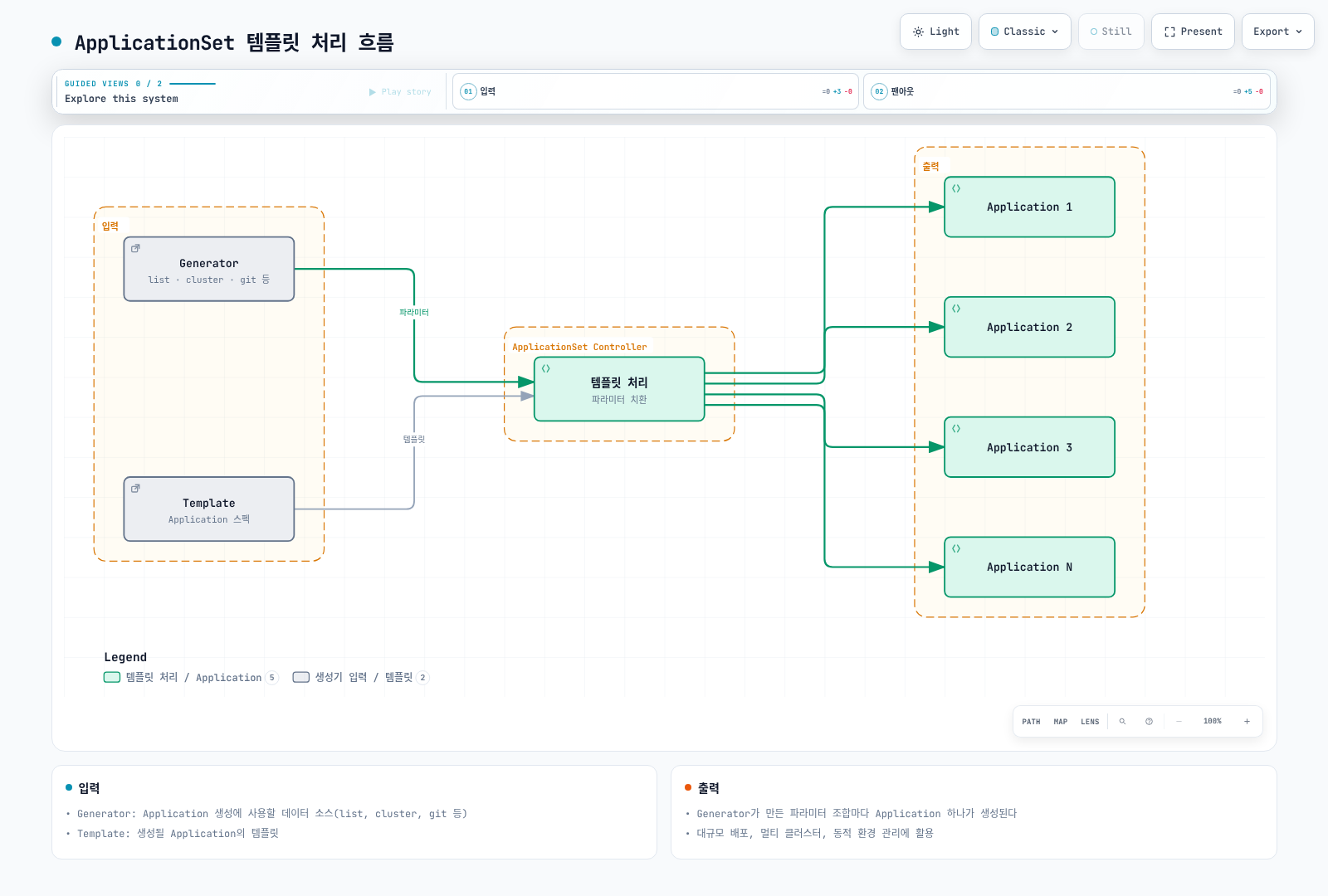
이 문서의 myorg, example.com, 클러스터 URL과 사내 차트는 구조를 설명하는 자리표시자입니다. 저장소 경로·차트·values 파일을 실제 소스로 교체하고 대상 클러스터 등록, AppProject 권한, 인증 정보를 먼저 준비해야 합니다. ApplicationSet은 클러스터나 AppProject를 만들지 않습니다. CreateNamespace=true는 허용된 대상 Namespace만 생성합니다. 모든 예제는 Go 템플릿을 명시적으로 활성화합니다.
ApplicationSet과 생성기 입력을 수정하는 권한은 관리자 범위로 제한합니다. Git/PR에서 project, 저장소 URL, 대상 클러스터 등을 임의로 선택하게 하면 배포 권한이 확대될 수 있으므로 고정한 AppProject의 허용 목록과 저장소 승인 절차를 함께 적용합니다.
기본 구조
apiVersion: argoproj.io/v1alpha1
kind: ApplicationSet
metadata:
  name: my-applicationset
  namespace: argocd
spec:
  generators:
  - list:
      elements:
      - name: dev
        namespace: dev
      - name: staging
        namespace: staging
  template:
    metadata:
      name: myapp-{{ .name }}
    spec:
      project: default
      source:
        repoURL: https://github.com/myorg/myapp.git
        targetRevision: main
        path: environments/{{ .name }}
      destination:
        server: https://kubernetes.default.svc
        namespace: '{{ .namespace }}'
      syncPolicy:
        automated:
          prune: true
          selfHeal: true
        syncOptions:
        - CreateNamespace=true
  syncPolicy:
    preserveResourcesOnDeletion: false
  goTemplate: true
  goTemplateOptions:
  - missingkey=error
생성기 (Generators)
아래에서는 9개 생성기 유형을 다룹니다. Git 생성기의 Directory와 File 모드를 나누어 총 10개 예제로 설명합니다.
1. List Generator
정적 목록에서 Application을 생성합니다:
apiVersion: argoproj.io/v1alpha1
kind: ApplicationSet
metadata:
  name: list-generator-example
  namespace: argocd
spec:
  generators:
  - list:
      elements:
      - name: dev
        namespace: dev-ns
        cluster: https://dev-cluster.example.com
        values:
          replicas: '1'
          environment: development
      - name: staging
        namespace: staging-ns
        cluster: https://staging-cluster.example.com
        values:
          replicas: '2'
          environment: staging
      - name: prod
        namespace: prod-ns
        cluster: https://prod-cluster.example.com
        values:
          replicas: '5'
          environment: production
  template:
    metadata:
      name: myapp-{{ .name }}
      labels:
        environment: '{{ .values.environment }}'
    spec:
      project: default
      source:
        repoURL: https://github.com/myorg/myapp.git
        targetRevision: main
        path: charts/myapp
        helm:
          parameters:
          - name: replicaCount
            value: '{{ .values.replicas }}'
      destination:
        server: '{{ .cluster }}'
        namespace: '{{ .namespace }}'
      syncPolicy:
        syncOptions:
        - CreateNamespace=true
  goTemplate: true
  goTemplateOptions:
  - missingkey=error
2. Cluster Generator
ArgoCD에 등록된 클러스터에서 Application을 생성합니다:
apiVersion: argoproj.io/v1alpha1
kind: ApplicationSet
metadata:
  name: cluster-generator-example
  namespace: argocd
spec:
  generators:
  - clusters:
      selector:
        matchLabels:
          environment: production
  template:
    metadata:
      name: cluster-addons-{{ .nameNormalized }}
      labels:
        cluster: '{{ .name }}'
    spec:
      project: default
      source:
        repoURL: https://github.com/myorg/cluster-addons.git
        targetRevision: main
        path: addons
        helm:
          valueFiles:
          - values-{{ .metadata.labels.environment }}.yaml
      destination:
        server: '{{ .server }}'
        namespace: kube-system
      syncPolicy:
        syncOptions:
        - CreateNamespace=true
  goTemplate: true
  goTemplateOptions:
  - missingkey=error
클러스터 Secret에 레이블 추가:
apiVersion: v1
kind: Secret
metadata:
  name: prod-cluster-secret
  namespace: argocd
  labels:
    argocd.argoproj.io/secret-type: cluster
    environment: production
    region: ap-northeast-2
type: Opaque
stringData:
  name: prod-cluster
  server: https://prod-cluster.example.com
  config: |
    {
      "bearerToken": "...",
      "tlsClientConfig": {
        "insecure": false,
        "caData": "..."
      }
    }
빈 Cluster selector는 로컬 클러스터도 포함할 수 있습니다. 기본 로컬 클러스터는 Secret이 없어 레이블 selector로 선택되지 않을 수 있으므로, 필요한 레이블을 가진 클러스터 Secret을 준비합니다. Application 이름에는 nameNormalized를 사용하며 Namespace·Label의 별도 길이/문자 제한도 확인합니다. Secret 예시는 형식 설명이며 ...는 유효한 인증 정보가 아닙니다.
3. Git Generator - Directory
Git 저장소의 디렉토리 구조에서 Application을 생성합니다:
apiVersion: argoproj.io/v1alpha1
kind: ApplicationSet
metadata:
  name: git-directory-generator
  namespace: argocd
spec:
  generators:
  - git:
      repoURL: https://github.com/myorg/gitops-repo.git
      revision: main
      directories:
      - path: apps/*
      - path: apps/excluded-app
        exclude: true
  template:
    metadata:
      name: '{{ .path.basename }}'
    spec:
      project: default
      source:
        repoURL: https://github.com/myorg/gitops-repo.git
        targetRevision: main
        path: '{{ .path.path }}'
      destination:
        server: https://kubernetes.default.svc
        namespace: '{{ .path.basename }}'
      syncPolicy:
        automated:
          prune: true
          selfHeal: true
        syncOptions:
        - CreateNamespace=true
  goTemplate: true
  goTemplateOptions:
  - missingkey=error
저장소 구조:
gitops-repo/
├── apps/
│   ├── frontend/
│   │   ├── deployment.yaml
│   │   └── service.yaml
│   ├── backend/
│   │   ├── deployment.yaml
│   │   └── service.yaml
│   ├── database/
│   │   └── statefulset.yaml
│   └── excluded-app/    # 제외됨
│       └── ...
4. Git Generator - File
Git 저장소의 JSON/YAML 파일에서 Application을 생성합니다:
apiVersion: argoproj.io/v1alpha1
kind: ApplicationSet
metadata:
  name: git-file-generator
  namespace: argocd
spec:
  generators:
  - git:
      repoURL: https://github.com/myorg/gitops-config.git
      revision: main
      files:
      - path: environments/*/config.json
  template:
    metadata:
      name: '{{ .name }}-app'
      labels:
        environment: '{{ .environment }}'
        region: '{{ .region }}'
    spec:
      project: development
      source:
        repoURL: '{{ .repoURL }}'
        targetRevision: '{{ .targetRevision }}'
        path: '{{ .appPath }}'
        helm:
          valueFiles:
          - values-{{ .environment }}.yaml
          parameters:
          - name: image.tag
            value: '{{ .imageTag }}'
      destination:
        server: '{{ .cluster }}'
        namespace: '{{ .namespace }}'
      syncPolicy:
        syncOptions:
        - CreateNamespace=true
  goTemplate: true
  goTemplateOptions:
  - missingkey=error
config.json 파일 예시:
{
  "name": "myapp-dev",
  "environment": "dev",
  "region": "ap-northeast-2",
  "repoURL": "https://github.com/myorg/myapp.git",
  "targetRevision": "develop",
  "appPath": "helm/myapp",
  "cluster": "https://dev-cluster.example.com",
  "namespace": "myapp-dev",
  "imageTag": "git-8c9f1a2"
}
5. Matrix Generator
두 생성기의 조합을 생성합니다 (카테시안 곱):
apiVersion: argoproj.io/v1alpha1
kind: ApplicationSet
metadata:
  name: matrix-generator-example
  namespace: argocd
spec:
  generators:
  - matrix:
      generators:
      - clusters:
          selector:
            matchLabels:
              environment: production
      - list:
          elements:
          - app: frontend
            port: '80'
          - app: backend
            port: '8080'
          - app: api-gateway
            port: '443'
  template:
    metadata:
      name: '{{ .nameNormalized }}-{{ .app }}'
      labels:
        cluster: '{{ .name }}'
        app: '{{ .app }}'
    spec:
      project: default
      source:
        repoURL: https://github.com/myorg/apps.git
        targetRevision: main
        path: '{{ .app }}'
        helm:
          parameters:
          - name: clusterName
            value: '{{ .name }}'
          - name: service.port
            value: '{{ .port }}'
      destination:
        server: '{{ .server }}'
        namespace: '{{ .app }}'
      syncPolicy:
        syncOptions:
        - CreateNamespace=true
  goTemplate: true
  goTemplateOptions:
  - missingkey=error
결과 예시 (3 클러스터 × 3 앱 = 9 Application):
- prod-ap-northeast-2-frontend
- prod-ap-northeast-2-backend
- prod-ap-northeast-2-api-gateway
- prod-us-west-2-frontend
- prod-us-west-2-backend
- prod-us-west-2-api-gateway
- ...
Matrix는 정확히 두 자식 생성기를 결합하며 조합 생성기의 중첩은 한 단계만 지원합니다. 서로 다른 Git 생성기가 만든 path 키가 충돌하면 pathParamPrefix로 분리합니다.
6. Merge Generator
여러 생성기의 출력을 병합합니다:
apiVersion: argoproj.io/v1alpha1
kind: ApplicationSet
metadata:
  name: merge-generator-example
  namespace: argocd
spec:
  generators:
  - merge:
      mergeKeys:
      - name
      generators:
      - list:
          elements:
          - name: dev
            replicas: '1'
            resources: small
          - name: staging
            replicas: '2'
            resources: medium
          - name: prod
            replicas: '5'
            resources: large
      - list:
          elements:
          - name: dev
            cluster: https://dev-cluster.example.com
            namespace: dev-ns
          - name: staging
            cluster: https://staging-cluster.example.com
            namespace: staging-ns
          - name: prod
            cluster: https://prod-cluster.example.com
            namespace: prod-ns
            replicas: '10'
  template:
    metadata:
      name: myapp-{{ .name }}
    spec:
      project: default
      source:
        repoURL: https://github.com/myorg/myapp.git
        targetRevision: main
        path: helm
        helm:
          parameters:
          - name: replicaCount
            value: '{{ .replicas }}'
          - name: resources
            value: '{{ .resources }}'
      destination:
        server: '{{ .cluster }}'
        namespace: '{{ .namespace }}'
      syncPolicy:
        syncOptions:
        - CreateNamespace=true
  goTemplate: true
  goTemplateOptions:
  - missingkey=error
Merge는 첫 생성기의 항목을 기준으로 mergeKeys가 일치하는 값만 덮어씁니다. 뒤쪽 생성기가 더 높은 우선순위이며, 일치하지 않는 추가 항목은 버립니다. Go 템플릿 모드에서는 중첩된 merge key를 지원하지 않습니다.
7. SCM Provider Generator
GitHub, GitLab 등의 조직/그룹을 스캔하여 Application을 생성합니다:
apiVersion: argoproj.io/v1alpha1
kind: ApplicationSet
metadata:
  name: scm-provider-generator
  namespace: argocd
spec:
  generators:
  - scmProvider:
      github:
        organization: myorg
        api: https://api.github.com/
        tokenRef:
          secretName: github-token
          key: token
      filters:
      - repositoryMatch: ^k8s-.*
        branchMatch: ^main$
        labelMatch: ^argocd-enabled$
        pathsExist:
        - k8s/
  template:
    metadata:
      name: '{{ .repository }}'
    spec:
      project: default
      source:
        repoURL: '{{ .url }}'
        targetRevision: '{{ .branch }}'
        path: k8s
      destination:
        server: https://kubernetes.default.svc
        namespace: '{{ .repository }}'
      syncPolicy:
        automated:
          prune: true
        syncOptions:
        - CreateNamespace=true
  goTemplate: true
  goTemplateOptions:
- missingkey=errorscmProvider.filters는 provider(github 등)와 같은 레벨입니다. 한 filter 안의 조건은 AND, filter 항목 사이는 OR입니다. 예제는 이름·경로·레이블을 모두 만족해야 하도록 한 항목에 묶었습니다. 비공개 저장소와 높은 API 요청량에는 범위가 제한된 토큰이나 GitHub App 인증을 준비합니다.
8. Pull Request Generator
Pull Request를 기반으로 Preview 환경을 생성합니다:
apiVersion: argoproj.io/v1alpha1
kind: ApplicationSet
metadata:
  name: pr-generator-example
  namespace: argocd
spec:
  generators:
  - pullRequest:
      github:
        owner: myorg
        repo: myapp
        tokenRef:
          secretName: github-token
          key: token
        labels:
        - preview
        - deploy-preview
      requeueAfterSeconds: 60
  template:
    metadata:
      name: myapp-pr-{{ .number }}
      labels:
        app: myapp
        pr: '{{ .number }}'
    spec:
      project: previews
      source:
        repoURL: https://github.com/myorg/myapp.git
        targetRevision: '{{ .head_sha }}'
        path: k8s
        kustomize:
          namePrefix: pr-{{ .number }}-
          commonLabels:
            pr: '{{ .number }}'
      destination:
        server: https://kubernetes.default.svc
        namespace: preview-pr-{{ .number }}
      syncPolicy:
        automated:
          prune: true
          selfHeal: true
        syncOptions:
        - CreateNamespace=true
  goTemplate: true
  goTemplateOptions:
  - missingkey=error
기본 sync 정책에서는 다음 재조정 때 필터에 매칭되지 않는 PR의 Application이 삭제됩니다. applicationsSync: create-update 등 삭제 금지 정책이면 달라집니다. Application 삭제 후 배포 리소스 정리는 finalizer와 preserveResourcesOnDeletion 설정을 따릅니다. CreateNamespace=true만으로 생성한 Namespace 자체가 함께 삭제된다고 가정하지 말고 별도로 관리합니다.
PR 예제는 사전에 만든 previews AppProject가 허용하는 격리된 클러스터·Namespace에서만 사용합니다. GitHub의 labels는 모두 매칭되어야 하며 레이블이 배포 코드 자체의 안전성을 보증하지는 않습니다. 외부 PR에 운영 Secret이나 클러스터 관리자 권한을 제공하지 않습니다.
9. Cluster Decision Resource Generator
외부 리소스(예: Placement)를 기반으로 클러스터를 선택합니다:
apiVersion: argoproj.io/v1alpha1
kind: ApplicationSet
metadata:
  name: cluster-decision-resource-generator
  namespace: argocd
spec:
  generators:
  - clusterDecisionResource:
      configMapRef: cluster-decisions
      labelSelector:
        matchLabels:
          cluster.open-cluster-management.io/placement: production
      requeueAfterSeconds: 180
  template:
    metadata:
      name: '{{ normalize .name }}-addon'
    spec:
      project: default
      source:
        repoURL: https://github.com/myorg/cluster-addons.git
        targetRevision: main
        path: addons
      destination:
        server: '{{ .server }}'
        namespace: kube-system
      syncPolicy:
        syncOptions:
        - CreateNamespace=true
  goTemplate: true
  goTemplateOptions:
  - missingkey=error
PlacementDecision 조회 설정:
apiVersion: v1
kind: ConfigMap
metadata:
  name: cluster-decisions
  namespace: argocd
data:
  apiVersion: cluster.open-cluster-management.io/v1beta1
  kind: placementdecisions
  statusListKey: decisions
  matchKey: clusterName
Open Cluster Management의 Placement/PlacementDecision CRD와 컨트롤러가 이미 설치되고 production Placement가 결정을 생성한다는 전제입니다. argocd 네임스페이스의 결정 리소스를 읽을 RBAC 권한이 필요합니다. status.decisions[].clusterName은 Argo CD에 등록된 클러스터 이름과 일치해야 하며 실제 API 주소는 생성기의 server 값에서 가져옵니다. name 또는 labelSelector 중 하나로 결정을 선택합니다.
10. Plugin Generator
외부 서비스를 호출하여 Application을 생성합니다:
apiVersion: argoproj.io/v1alpha1
kind: ApplicationSet
metadata:
  name: plugin-generator-example
  namespace: argocd
spec:
  generators:
  - plugin:
      configMapRef:
        name: my-plugin
      input:
        parameters:
          environment: production
          region: ap-northeast-2
      requeueAfterSeconds: 300
  template:
    metadata:
      name: '{{ .name }}'
    spec:
      project: default
      source:
        repoURL: '{{ .repoURL }}'
        targetRevision: '{{ .revision }}'
        path: '{{ .path }}'
      destination:
        server: '{{ .cluster }}'
        namespace: '{{ .namespace }}'
      syncPolicy:
        syncOptions:
        - CreateNamespace=true
  goTemplate: true
  goTemplateOptions:
  - missingkey=error
Plugin ConfigMap:
apiVersion: v1
kind: ConfigMap
metadata:
  name: my-plugin
  namespace: argocd
data:
  token: "$appset-plugin-token:token"
  baseUrl: "https://appset-plugin.example.com"
  requestTimeout: "30"
Plugin은 ConfigMap 안에서 코드를 실행하지 않습니다. 별도 HTTP 서비스의 /api/v1/getparams.execute에 POST하고 응답의 output.parameters 배열을 사용합니다. 위 도메인은 교체해야 하며 정상 TLS 인증서가 필요합니다. argocd 네임스페이스의 appset-plugin-token Secret에 token 키와 app.kubernetes.io/part-of: argocd 레이블을 준비하고 값은 Git에 저장하지 않습니다. 플러그인의 인증·입력 검증·응답 스키마를 구현한 후 연결합니다.
Go 템플릿
ApplicationSet은 Go 템플릿을 지원합니다:
apiVersion: argoproj.io/v1alpha1
kind: ApplicationSet
metadata:
  name: go-template-example
  namespace: argocd
spec:
  goTemplate: true
  goTemplateOptions:
  - missingkey=error
  generators:
  - list:
      elements:
      - name: dev
        replicas: 1
        features:
        - logging
        - monitoring
      - name: prod
        replicas: 5
        features:
        - logging
        - monitoring
        - alerting
  template:
    metadata:
      name: myapp-{{ .name }}
      annotations:
        notifications.argoproj.io/subscribe.on-sync-failed.slack: '{{ if eq .name "prod" }}production-alerts{{ else
          }}development-alerts{{ end }}'
    spec:
      project: default
      source:
        repoURL: https://github.com/myorg/myapp.git
        targetRevision: main
        path: helm
        helm:
          values: |
            replicaCount: {{ .replicas }}
            features:
            {{- range .features }}
              - {{ . }}
            {{- end }}
      destination:
        server: https://kubernetes.default.svc
        namespace: myapp-{{ .name }}
      syncPolicy:
        syncOptions:
        - CreateNamespace=true
Go 템플릿 함수
각 문자열 필드를 독립적으로 평가합니다. if나 range를 YAML 필드 사이에 걸쳐 배치할 수 없습니다. boolean·object·list 필드를 바꾸려면 spec.templatePatch를 사용합니다. missingkey=error에서는 없는 키에 직접 접근한 뒤 default를 적용해도 오류가 나므로 dig로 조회합니다.
# spec.template.metadata의 문자열 필드 예시
name: '{{ .name | normalize }}'
annotations:
  display-name: '{{ .name | upper }}'
  tier: '{{ if eq .environment "prod" }}critical{{ else }}standard{{ end }}'
  target-namespace: '{{ dig "namespace" "default" . }}'
  feature-list: '{{ join "," .features }}'
  custom-value: '{{ index .values "key-with-dash" }}'
Sprig 함수는 env, expandenv, getHostByName을 제외하고 지원합니다. normalize 결과는 DNS 이름에 맞추지만, Namespace나 Label처럼 더 짧은 길이 제한까지 모두 보장하지는 않습니다. Helm 차트로 ApplicationSet을 배포하면 두 템플릿 단계가 충돌하므로 ApplicationSet 표현식을 Helm 문자열 리터럴로 이스케이프해야 합니다.
Progressive Syncs
Progressive Syncs는 3.3부터 Beta이며 3.5.4에서도 명시적으로 활성화해야 합니다. 기존 argocd-cmd-params-cm.data에 applicationsetcontroller.enable.progressive.syncs: "true"를 병합하고 ApplicationSet 컨트롤러를 재시작합니다. Helm 설치라면 같은 설정을 configs.params에 관리합니다.
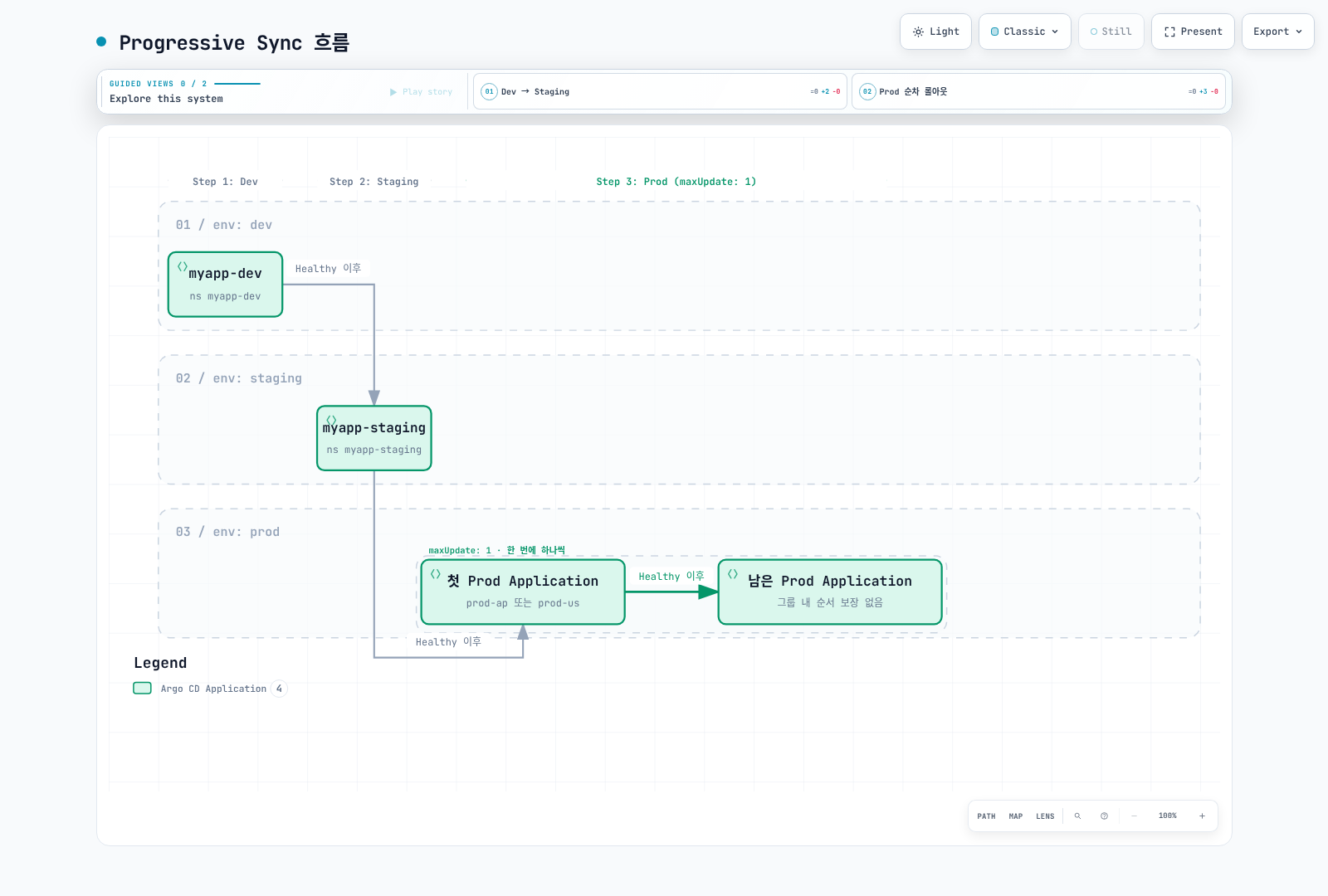
RollingSync는 생성된 Application의 labels로 단계를 선택하고 앞 단계의 모든 Application이 Healthy가 되어야 다음 단계로 진행합니다. 자식 Application의 자동 동기화는 비활성화하며 ApplicationSet 컨트롤러가 sync를 요청합니다. Sync window와 Application retry 정책은 적용됩니다. 어떤 단계에도 매칭되지 않는 Application은 수동 sync가 필요합니다.
maxUpdate: 0은 해당 그룹의 자동 sync를 멈춥니다. 승인을 받은 것처럼 다음 중복 그룹으로 자동 통과하지 않으며, 해당 그룹을 수동으로 동기화하거나 검토한 전략 변경을 적용해야 합니다. 0보다 큰 백분율은 내림하되 최소 1개입니다. 한 그룹 안의 Application 순서는 보장되지 않습니다. 아래 예제는 하나의 클러스터에서 서로 다른 Namespace를 사용하며, region은 그룹화를 위한 메타데이터입니다.
Progressive Syncs를 사용하면 Application을 단계적으로 롤아웃할 수 있습니다:
apiVersion: argoproj.io/v1alpha1
kind: ApplicationSet
metadata:
  name: progressive-sync-example
  namespace: argocd
spec:
  generators:
  - list:
      elements:
      - name: dev
        env: dev
      - name: staging
        env: staging
      - name: prod-ap
        env: prod
        region: ap-northeast-2
      - name: prod-us
        env: prod
        region: us-west-2
  strategy:
    type: RollingSync
    rollingSync:
      steps:
      - matchExpressions:
        - key: env
          operator: In
          values:
          - dev
        maxUpdate: 100%
      - matchExpressions:
        - key: env
          operator: In
          values:
          - staging
      - matchExpressions:
        - key: env
          operator: In
          values:
          - prod
        maxUpdate: 1
  template:
    metadata:
      name: myapp-{{ .name }}
      labels:
        env: '{{ .env }}'
        region: '{{ dig "region" "global" . }}'
    spec:
      project: default
      source:
        repoURL: https://github.com/myorg/myapp.git
        targetRevision: main
        path: envs/{{ .env }}
      destination:
        server: https://kubernetes.default.svc
        namespace: myapp-{{ .name }}
      syncPolicy:
        syncOptions:
        - CreateNamespace=true
  goTemplate: true
  goTemplateOptions:
  - missingkey=error
Progressive Sync 흐름
멀티 클러스터 배포 패턴
패턴 1: 환경별 배포
apiVersion: argoproj.io/v1alpha1
kind: ApplicationSet
metadata:
  name: multi-env-deployment
  namespace: argocd
spec:
  generators:
  - matrix:
      generators:
      - list:
          elements:
          - env: dev
            cluster: https://dev.example.com
            revision: develop
          - env: staging
            cluster: https://staging.example.com
            revision: release
          - env: prod
            cluster: https://prod.example.com
            revision: main
      - git:
          repoURL: https://github.com/myorg/apps.git
          revision: main
          directories:
          - path: apps/*
  template:
    metadata:
      name: '{{ .env }}-{{ .path.basename }}'
    spec:
      project: '{{ .env }}'
      source:
        repoURL: https://github.com/myorg/apps.git
        targetRevision: '{{ .revision }}'
        path: '{{ .path.path }}'
        kustomize:
          namePrefix: '{{ .env }}-'
      destination:
        server: '{{ .cluster }}'
        namespace: '{{ .path.basename }}'
      syncPolicy:
        syncOptions:
        - CreateNamespace=true
  goTemplate: true
  goTemplateOptions:
  - missingkey=error
패턴 2: 리전별 배포
apiVersion: argoproj.io/v1alpha1
kind: ApplicationSet
metadata:
  name: multi-region-deployment
  namespace: argocd
spec:
  generators:
  - clusters:
      selector:
        matchLabels:
          environment: production
      values:
        helmRepo: https://charts.example.com
  strategy:
    type: RollingSync
    rollingSync:
      steps:
      - matchExpressions:
        - key: region
          operator: In
          values:
          - ap-northeast-2
          - ap-southeast-1
      - matchExpressions:
        - key: region
          operator: In
          values:
          - us-west-2
          - us-east-1
      - matchExpressions:
        - key: region
          operator: In
          values:
          - eu-west-1
  template:
    metadata:
      name: '{{ .nameNormalized }}-platform-services'
      labels:
        cluster: '{{ .name }}'
        region: '{{ .metadata.labels.region }}'
    spec:
      project: platform
      source:
        repoURL: '{{ .values.helmRepo }}'
        chart: platform-services
        targetRevision: 2.0.0
        helm:
          valueFiles:
          - values-{{ .metadata.labels.region }}.yaml
      destination:
        server: '{{ .server }}'
        namespace: platform
      syncPolicy:
        syncOptions:
        - CreateNamespace=true
  goTemplate: true
  goTemplateOptions:
  - missingkey=error
패턴 3: 테넌트별 배포
apiVersion: argoproj.io/v1alpha1
kind: ApplicationSet
metadata:
  name: tenant-deployment
  namespace: argocd
spec:
  generators:
  - git:
      repoURL: https://github.com/myorg/tenant-config.git
      revision: main
      files:
      - path: tenants/*/config.yaml
  template:
    metadata:
      name: tenant-{{ .tenant.name }}
      labels:
        tenant: '{{ .tenant.name }}'
        tier: '{{ .tenant.tier }}'
    spec:
      project: tenants
      source:
        repoURL: https://github.com/myorg/tenant-app.git
        targetRevision: main
        path: helm
        helm:
          values: |
            tenant:
              name: {{ .tenant.name }}
              tier: {{ .tenant.tier }}
            resources:
              {{- if eq .tenant.tier "enterprise" }}
              requests:
                cpu: "2"
                memory: "4Gi"
              {{- else }}
              requests:
                cpu: "500m"
                memory: "1Gi"
              {{- end }}
      destination:
        server: '{{ .cluster }}'
        namespace: tenant-{{ .tenant.name }}
      syncPolicy:
        syncOptions:
        - CreateNamespace=true
  goTemplate: true
  goTemplateOptions:
  - missingkey=error
템플릿 오버라이드
생성기별 템플릿 오버라이드
apiVersion: argoproj.io/v1alpha1
kind: ApplicationSet
metadata:
  name: template-override-example
  namespace: argocd
spec:
  generators:
  - list:
      elements:
      - name: dev
        env: development
      - name: prod
        env: production
      template:
        metadata:
          annotations:
            custom-annotation: from-list-generator
        spec:
          project: ''
          destination: {}
  - clusters:
      selector:
        matchLabels:
          environment: staging
      template:
        spec:
          source:
            targetRevision: staging
            repoURL: https://github.com/myorg/myapp.git
          project: ''
          destination:
            server: '{{ .server }}'
            namespace: '{{ .nameNormalized }}'
        metadata:
          name: staging-{{ .nameNormalized }}
  template:
    metadata:
      name: app-{{ .name }}
    spec:
      project: default
      source:
        repoURL: https://github.com/myorg/myapp.git
        targetRevision: main
        path: manifests
      destination:
        server: https://kubernetes.default.svc
        namespace: '{{ .name }}'
      syncPolicy:
        automated:
          prune: true
          selfHeal: true
        syncOptions:
        - CreateNamespace=true
  goTemplate: true
  goTemplateOptions:
  - missingkey=error
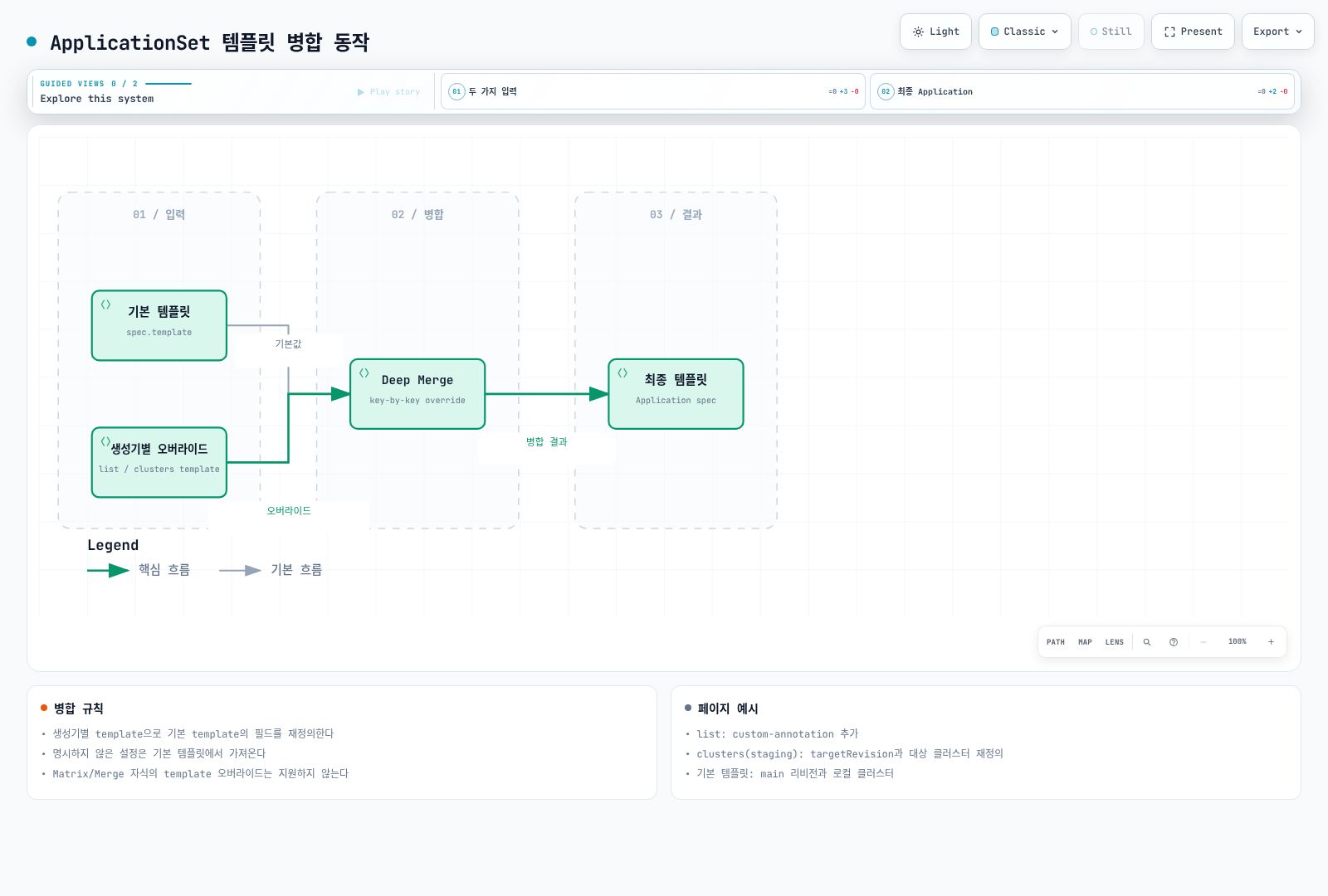
템플릿 병합 동작
삭제와 보존 정책
ApplicationSet 삭제는 ownerReferences를 통해 생성한 Application도 삭제합니다. preserveResourcesOnDeletion: true는 Application의 배포 리소스 삭제 finalizer를 추가하지 않게 하는 설정이며 Application 자체를 보존하는 설정이 아닙니다. 기존 Application의 finalizer 상태를 먼저 확인합니다.
ApplicationSet만 제거하고 자식 Application을 남길 때는 kubectl delete applicationset NAME -n argocd --cascade=orphan을 사용합니다. 남은 Application의 자동 동기화와 finalizer도 계속 유효하므로 이후 그 Application을 삭제하면 배포 리소스가 삭제될 수 있습니다. applicationsSync: create-update는 생성기 재조정에 의한 삭제를 제한할 뿐 부모 삭제에 의한 GC까지 막지 않습니다.
templatePatch는 goTemplate: true에서만 동작합니다. 3.5.4 구현은 Application 타입에 대한 Kubernetes strategic merge patch를 사용합니다. 병합 태그가 없는 Application spec의 배열(예: Helm valueFiles)은 교체되므로 Pod의 containers처럼 이름 기준으로 병합된다고 가정하면 안 됩니다. 값 없는 spec:(null)으로 기존 설정을 지우지 않도록 하고, spec.project 변경에는 사용하지 않습니다. 신뢰할 수 없는 문자열을 삽입할 경우 toJson 등으로 이스케이프합니다.
다음 단계
트래픽 관리: Argo Rollouts를 통한 블루/그린, 카나리 배포를 구현하세요.
프로젝트와 RBAC: ApplicationSet과 함께 프로젝트를 사용하여 접근을 제어하세요.
모범 사례: ApplicationSet 사용 시 권장 패턴을 학습하세요.
참고 자료
퀴즈
이 장에서 배운 내용을 테스트하려면 ApplicationSets 퀴즈를 풀어보세요.