EKS 기반 AI 인프라
마지막 업데이트: 2026년 9월 12일 기준: GPU Operator26.7.0 / NVIDIA DRA0.5.0 / Argo Workflows4.1.3 / JupyterHub chart4.4.2 / Mountpoint CSI2.8.0
AI 인프라는 notebook, pipeline, 분산 runtime, 장치·node, 저장소·네트워크와 인증을 함께 구성해야 합니다. 도구 이름을 모으거나 Helm release가 성공했다고 전체 플랫폼의 보안·고가용성·model 실행이 검증되지는 않습니다.
계층과 책임
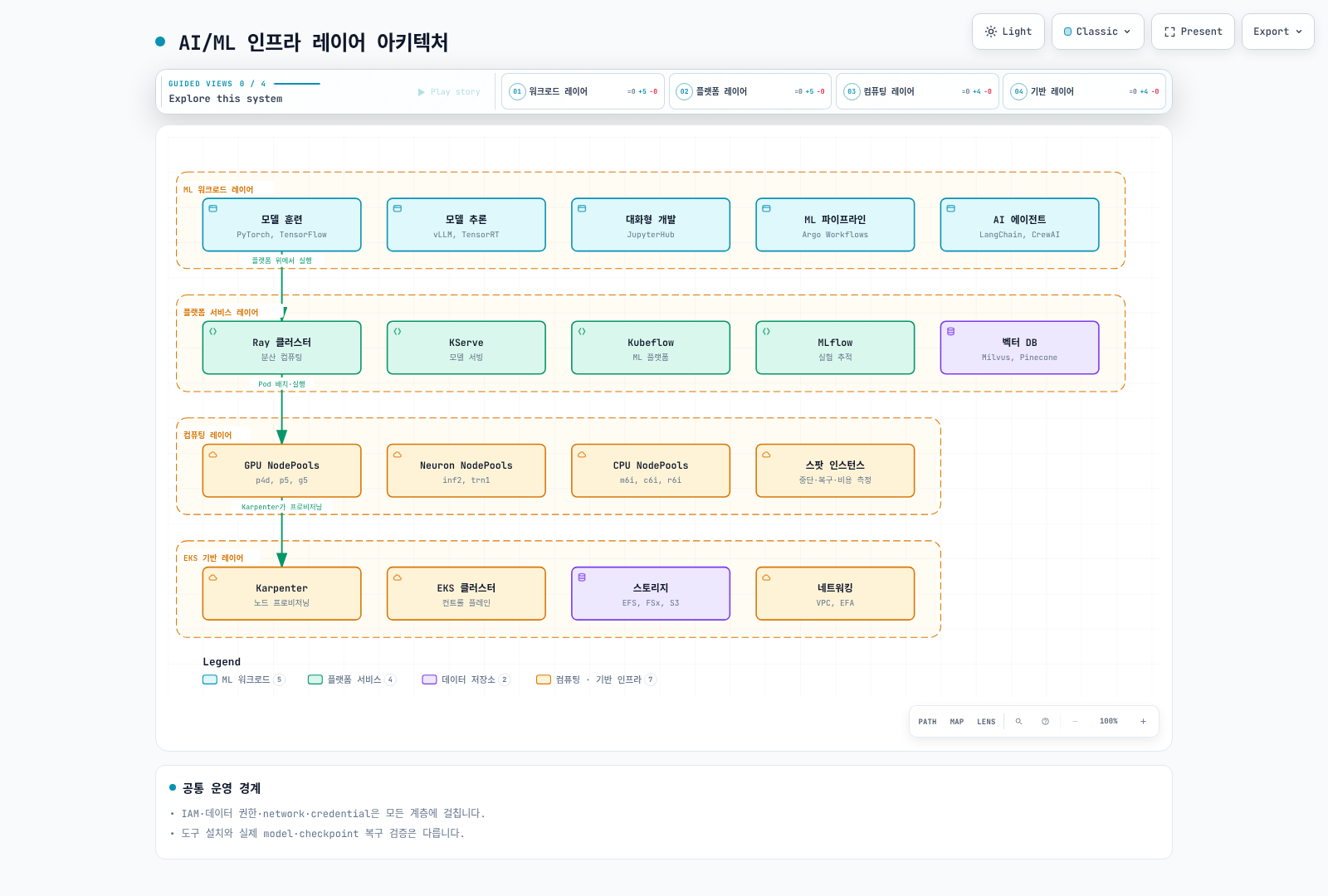
워크로드는 모델·데이터·실행 코드를, 플랫폼은 workflow·runtime·registry를, 컴퓨팅 계층은 실제 장치·Pod·node capacity를 다룹니다. IAM·네트워크·storage identity는 이 계층을 가로지릅니다. “Spot을 포함한 NodePool”은 용량·복구·절감률의 보장이 아닙니다.
JARK 스택
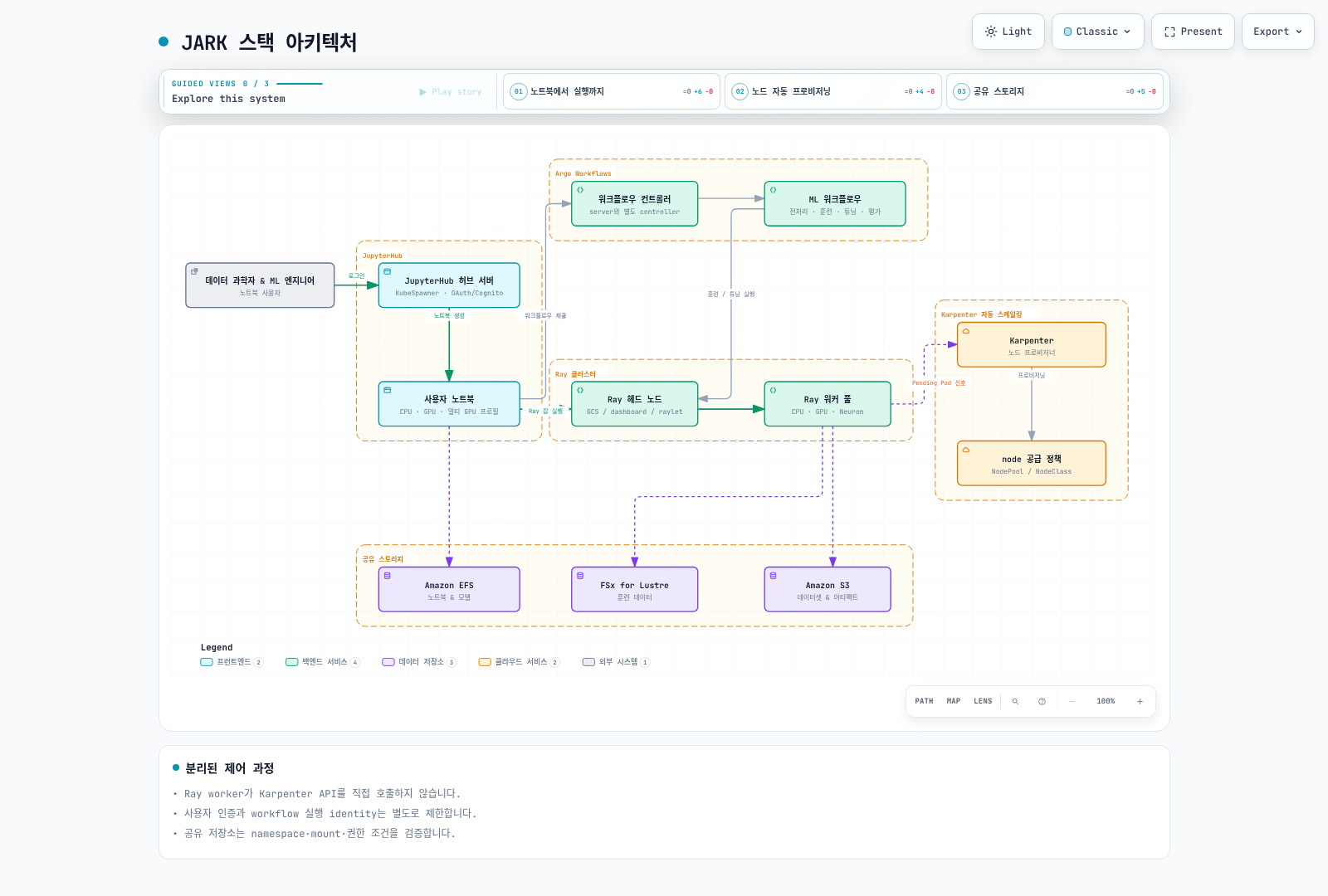
JupyterHub, Argo Workflows, Ray, Karpenter를 조합하는 구성 패턴입니다. 자동으로 연결되는 단일 제품이 아니며 notebook 사용자의 권한, workflow 제출, Ray job 실행, Kubernetes scheduling과 node 공급을 명시적으로 연결합니다.
JupyterHub 인증과 notebook profile
검토한 chart4.4.2의 appVersion은5.5.2이며 PyPI 최신 확인 Hub6.0.0과 다릅니다. 로컬 API 검증은 Hub6.0.0/OAuthenticator17.4.0/KubeSpawner7.1.0에서 수행했습니다. 운영 chart image의 실제 패키지 조합을 다시 확인해야 합니다.
Cognito는 사용할 수 있는 OIDC provider 중 하나입니다. callback URL, token/userInfo endpoint, scope와 안정적인 username claim을 맞추고 접근 허용 규칙을 명시합니다. MFA·기업 federation은 실제 provider에서 구성해야 하며 GenericOAuthenticator 설정만으로 자동 활성화되지 않습니다.
다음은 실제 Secret 볼륨이 /run/secrets/oidc에 준비된 경우의 Hub 설정 예시입니다. 실제 비밀은 ConfigMap·source·환경 변수에 넣지 않습니다. 이 Python 파일도 Hub가 실행하는 config 경로에 연결해야 합니다. URI와 승인된 sub를 환경에 맞게 교체하세요.
from pathlib import Path

c.JupyterHub.authenticator_class = "oauthenticator.generic.GenericOAuthenticator"
c.GenericOAuthenticator.client_id = "prepared-client-id"
c.GenericOAuthenticator.client_secret = Path("/run/secrets/oidc/client-secret").read_text().strip()
c.GenericOAuthenticator.oauth_callback_url = "https://jupyter.example.com/hub/oauth_callback"
c.GenericOAuthenticator.authorize_url = "https://prepared-domain.auth.us-west-2.amazoncognito.com/oauth2/authorize"
c.GenericOAuthenticator.token_url = "https://prepared-domain.auth.us-west-2.amazoncognito.com/oauth2/token"
c.GenericOAuthenticator.userdata_url = "https://prepared-domain.auth.us-west-2.amazoncognito.com/oauth2/userInfo"
c.GenericOAuthenticator.scope = ["openid", "profile", "email"]
c.GenericOAuthenticator.username_claim = "sub"
c.GenericOAuthenticator.allow_all = False
c.GenericOAuthenticator.allow_existing_users = False
c.GenericOAuthenticator.allowed_users = {"replace-with-approved-cognito-sub"}
allow_all=False와 명시적 allowed_users를 사용했고, 기존 Hub 사용자라는 이유만으로 계속 접근할 수 없도록 allow_existing_users=False를 설정했습니다. 로컬 검사에서 승인된 사용자1명은 허용되고 미승인·이전 사용자2명은 거부됐습니다. 실제 OAuth login/token 검증을 실행한 것은 아닙니다.
notebook profile의 CPU/RAM guarantee와 limit을 구분하고 실제 GPU image·label·toleration·driver를 맞춥니다. 예전 jupyter/*:gpu 태그를 존재하는 CUDA 환경으로 가정하지 않습니다. PVC는 Pod와 같은 namespace에 있어야 하므로 ml-platform PVC를 jupyterhub Pod에서 이름만으로 참조할 수 없습니다. 사용자별 access point·UID/GID·quota와 공유 model의 쓰기 권한을 검토합니다. EFS의 storage_capacity는 물리 용량 제한이 아닙니다.
Argo Workflows 데이터 흐름
기존 workflow에는 없는 template·artifact·script를 참조하는 부분이 있었습니다. 아래는6단계의 작은 데이터 흐름 fixture입니다. parameter를 Python source 문자열에 직접 삽입하지 않고 환경 변수로 전달해 JSON으로 읽습니다. 두 후보 coefficient를 선택하는 예제이며 실제 이미지 분류 모델 학습·Ray cluster·외부 registry를 운영하는 pipeline이 아닙니다.
Argo4.1.3 offline lint와6개 Python script 본문을 로컬에서 검증했습니다. prepared-workflow-runner는 실제 환경에서 최소 권한으로 준비해야 하며, 컨테이너 image digest·quota·artifact 저장소는 운영 전에 별도로 구성합니다.
apiVersion: argoproj.io/v1alpha1
kind: Workflow
metadata:
  generateName: toy-dataflow-
  namespace: argo
spec:
  entrypoint: pipeline
  serviceAccountName: prepared-workflow-runner
  parallelism: 1
  activeDeadlineSeconds: 600
  arguments:
    parameters:
    - name: data
      value: '[[1,2],[2,4],[3,6],[4,8]]'
  templates:
  - name: pipeline
    dag:
      tasks:
      - name: validate
        template: validate
        arguments:
          parameters:
          - name: data
            value: '{{workflow.parameters.data}}'
      - name: prepare
        template: prepare
        arguments:
          parameters:
          - name: data
            value: '{{tasks.validate.outputs.result}}'
        dependencies:
        - validate
      - name: tune
        template: tune
        arguments:
          parameters:
          - name: data
            value: '{{tasks.prepare.outputs.result}}'
        dependencies:
        - prepare
      - name: train
        template: train
        arguments:
          parameters:
          - name: scale
            value: '{{tasks.tune.outputs.result}}'
        dependencies:
        - tune
      - name: evaluate
        template: evaluate
        arguments:
          parameters:
          - name: model
            value: '{{tasks.train.outputs.result}}'
          - name: data
            value: '{{tasks.prepare.outputs.result}}'
        dependencies:
        - train
      - name: register
        template: register
        arguments:
          parameters:
          - name: model
            value: '{{tasks.train.outputs.result}}'
        dependencies:
        - evaluate
        when: '{{tasks.evaluate.outputs.result}} == 0'
  - name: validate
    inputs:
      parameters:
      - name: data
    script:
      image: python:3.12.14-slim-trixie
      command:
      - python
      env:
      - name: DATA
        value: '{{inputs.parameters.data}}'
      resources:
        requests:
          cpu: 100m
          memory: 64Mi
        limits:
          cpu: 500m
          memory: 128Mi
      source: 'import json, os

        rows = json.loads(os.environ["DATA"])

        assert rows and all(len(row) == 2 for row in rows)

        assert all(isinstance(v, (int, float)) for row in rows for v in row)

        print(json.dumps(rows))

        '
  - name: prepare
    inputs:
      parameters:
      - name: data
    script:
      image: python:3.12.14-slim-trixie
      command:
      - python
      env:
      - name: DATA
        value: '{{inputs.parameters.data}}'
      resources:
        requests:
          cpu: 100m
          memory: 64Mi
        limits:
          cpu: 500m
          memory: 128Mi
      source: 'import json, os

        rows = json.loads(os.environ["DATA"])

        print(json.dumps({"train": rows[:2], "test": rows[2:]}))

        '
  - name: tune
    inputs:
      parameters:
      - name: data
    script:
      image: python:3.12.14-slim-trixie
      command:
      - python
      env:
      - name: DATA
        value: '{{inputs.parameters.data}}'
      resources:
        requests:
          cpu: 100m
          memory: 64Mi
        limits:
          cpu: 500m
          memory: 128Mi
      source: 'import json, os

        data = json.loads(os.environ["DATA"])

        candidates = [1.0, 2.0]

        loss = lambda scale: sum((scale*x-y)**2 for x,y in data["train"]) / len(data["train"])

        print(min(candidates, key=loss))

        '
  - name: train
    inputs:
      parameters:
      - name: scale
    script:
      image: python:3.12.14-slim-trixie
      command:
      - python
      env:
      - name: SCALE
        value: '{{inputs.parameters.scale}}'
      resources:
        requests:
          cpu: 100m
          memory: 64Mi
        limits:
          cpu: 500m
          memory: 128Mi
      source: 'import json, os

        print(json.dumps({"scale": float(os.environ["SCALE"]), "fixture": True}))

        '
  - name: evaluate
    inputs:
      parameters:
      - name: model
      - name: data
    script:
      image: python:3.12.14-slim-trixie
      command:
      - python
      env:
      - name: MODEL
        value: '{{inputs.parameters.model}}'
      - name: DATA
        value: '{{inputs.parameters.data}}'
      resources:
        requests:
          cpu: 100m
          memory: 64Mi
        limits:
          cpu: 500m
          memory: 128Mi
      source: 'import json, os

        model = json.loads(os.environ["MODEL"])

        held_out = json.loads(os.environ["DATA"])["test"]

        print(sum((model["scale"]*x-y)**2 for x,y in held_out) / len(held_out))

        '
  - name: register
    inputs:
      parameters:
      - name: model
    script:
      image: python:3.12.14-slim-trixie
      command:
      - python
      env:
      - name: MODEL
        value: '{{inputs.parameters.model}}'
      resources:
        requests:
          cpu: 100m
          memory: 64Mi
        limits:
          cpu: 500m
          memory: 128Mi
      source: 'import json, os

        model = json.loads(os.environ["MODEL"])

        print(json.dumps({"candidate": model, "note": "fixture output only; no registry write"}))

        '
fixture의 MSE0은 네 개 합성 sample의 결과이며 실제 모델 품질 지표가 아닙니다. 운영 workflow는 train/test 분리, 데이터·model revision, 실패/retry·idempotency와 평가 기준을 정하고 실제 model artifact를 다음 단계에 전달해야 합니다. artifactRepositoryRef만으로 app 컨테이너의 boto3나 다운로드 권한이 생기지 않습니다.
Ray와 Karpenter
Ray 가이드의 검토한2.58/KubeRay1.7 경로를 사용합니다. GCS는 Global Control Service이며 task/actor scheduling은 raylet들과 연계됩니다. head에도 CPU를 광고하면 workload가 실행될 수 있습니다. CPU/GPU/Neuron worker에 서로 다른 미검증 Ray/Python 버전을 섞지 않고 Neuron image에도 Ray와 지원 framework를 준비합니다.
Ray autoscaler는 worker Pod 요구를, Kubernetes scheduler는 배치를, Karpenter는 지원 node capacity를 다룹니다. Ray worker가 Karpenter API를 직접 호출하는 구조가 아닙니다. memory·GPU product label과 실제 node를 맞추고, p4d40GB A100을80GB label로 선택하지 않습니다.
AL2023 NVIDIA AMI에 driver를 중복 설치하거나 containerd 전체 설정을 덮어쓰지 않습니다. Karpenter limits는 admission·cost의 절대 상한이 아니며 consolidation은 GPU 사용률20% 같은 DCGM threshold를 직접 근거로 수행하지 않습니다. workload requests와 scheduling 가능성·가격·disruption 조건을 확인합니다.
DRA의 API와 지원 범위
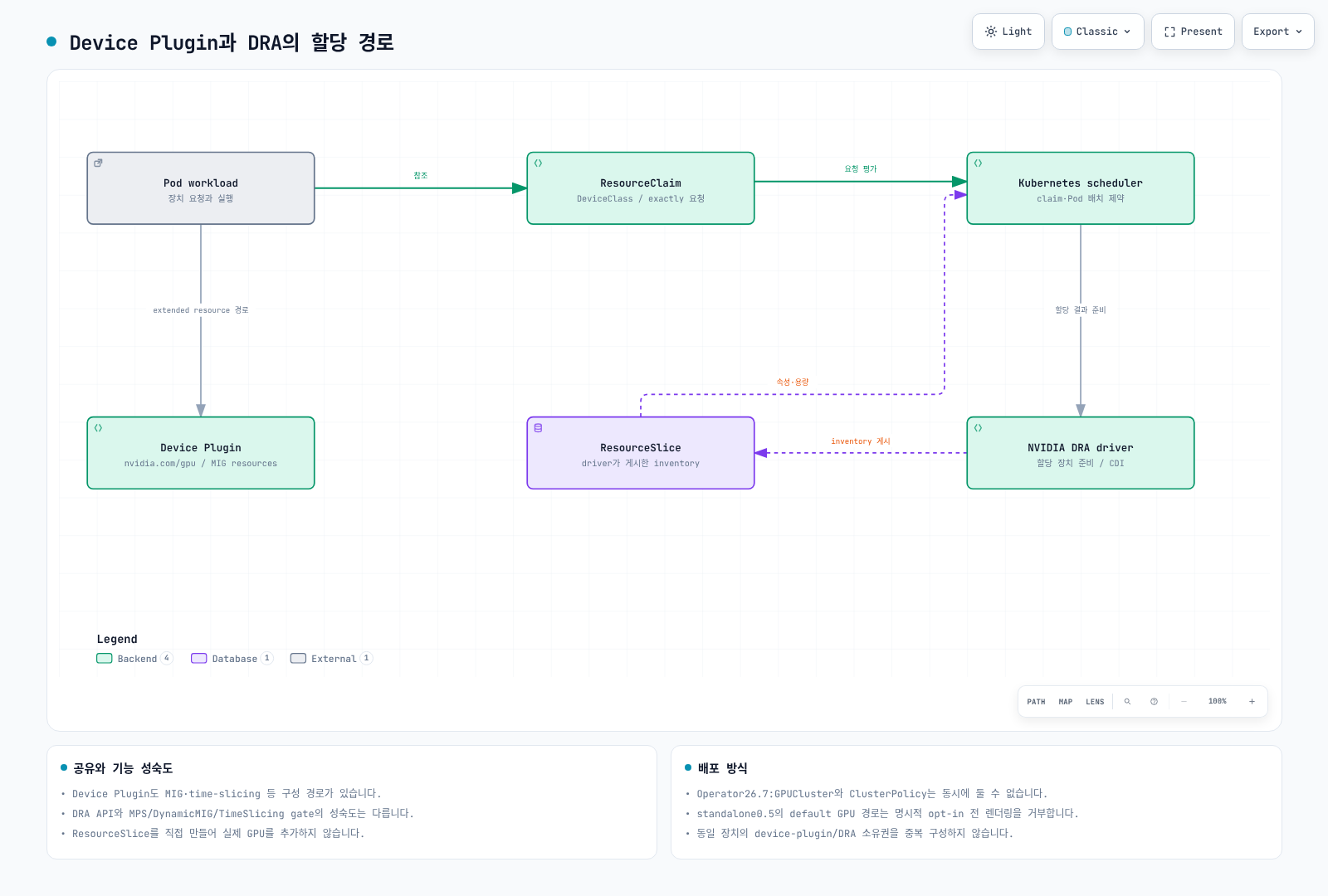
DRA는 DeviceClass, ResourceSlice, ResourceClaim/Template로 장치 속성·요청·할당을 표현합니다. driver가 ResourceSlice를 게시하고 scheduler/driver가 claim을 할당·준비합니다. 사용자가 임의 ResourceSlice를 만들어 실제 GPU를 추가하지 않습니다. Kubernetes DRA와 NVIDIA driver feature의 성숙도는 별도입니다.
현재 claim 예제
검토한 Kubernetes1.36.2의 resource.k8s.io/v1 스키마에서 requests.exactly를 사용합니다. NVIDIA driver0.5 지원표는 GPU allocation에1.34.2 이상, ComputeDomain에는1.32 이상을 구분합니다. EKS에서 실제 제공하는 API와 patch/platform version도 확인하세요. “1.31+면 모든 DRA 기능 가능”이라는 설명은 맞지 않습니다.
다음은 장치 inventory 명령을 실행할 단일 GPU claim과 Pod의 스키마 예제입니다. ml-workloads namespace, gpu.nvidia.com DeviceClass, driver/CDI·node와 권한을 별도로 준비해야 하며 이번 검토에서는 GPU에서 실행하지 않았습니다.
apiVersion: resource.k8s.io/v1
kind: ResourceClaimTemplate
metadata:
  namespace: ml-workloads
  name: single-gpu
spec:
  spec:
    devices:
      requests:
      - name: gpu
        exactly:
          deviceClassName: gpu.nvidia.com
          count: 1
---
apiVersion: v1
kind: Pod
metadata:
  name: gpu-inventory-demo
  namespace: ml-workloads
spec:
  restartPolicy: Never
  automountServiceAccountToken: false
  containers:
  - name: inspect
    image: ubuntu:24.04
    command:
    - nvidia-smi
    - -L
    resources:
      claims:
      - name: gpu
      requests:
        cpu: 100m
        memory: 64Mi
      limits:
        cpu: 500m
        memory: 128Mi
  resourceClaims:
  - name: gpu
    resourceClaimTemplateName: single-gpu
  tolerations:
  - key: nvidia.com/gpu
    operator: Exists
    effect: NoSchedule
CEL은 실제 게시된 typed attribute와 domain 구조를 사용합니다. 예전 device.topology.node==device.topology.node는 동일 node 배치 조건이 아니며 참조 자체도 해당 API가 아닙니다. matchAttribute도 실제 qualified attribute여야 합니다. 서로 다른 node의72GPU를 단일 Pod의 일반 GPU claim으로 자동 할당하는 것으로 NVL72 topology를 설명하지 않습니다.
NVIDIA0.5와 GPU Operator26.7의 차이
0.5 README에는 GPU allocation이 experimental/기본 비활성이라고 남아 있지만, 설치 문서·차트와 Operator26.7 문서가 일치하지 않습니다. 실제 standalone chart는 resources.gpus.enabled=true를 기본값으로 두면서 device plugin 충돌을 피하기 위해 명시적 opt-in이 없으면 렌더링부터 거부했습니다. 기본 설치가 GPU를 조용히 비활성화하고 성공한다고 설명하면 안 됩니다.
Operator26.7 관리 경로는 GPUCluster(singleton 이름 gpu-cluster)를 사용하며 ClusterPolicy와 동시에 둘 수 없습니다. preinstalled driver 경로에서 clusterPolicy.deployCR=false, gpuCluster.deployCR=true, driver.enabled=false를 사용합니다. GPUCluster는 GPU driver/toolkit 전체 설치를 대신하지 않으므로 driver와 CDI 선행 조건을 준비합니다. 이 경로에 standalone DRA release를 중복 설치하지 않습니다. 로컬 Helm 검증은 DeviceClass API가 있다는 모의 조건만 제공했고 실제 cluster 기능을 켠 것은 아닙니다.
full GPU/기존 MIG 할당과 ComputeDomain 지원, DynamicMIG·MPS·TimeSlicingSettings 같은 alpha 기능을 구분하세요. 확인한0.5 feature-gate code는 뒤의 세 기능을 기본false/Alpha로 선언합니다. 일부 gate의 문서 GA 표기와 source의 Beta 표기도 달라 exact release의 지원표·코드·설정을 함께 기록해야 합니다. GPU Operator25.3 하나로 모든 기능이 지원된다고 단정하지 않습니다.
Device Plugin도 기존 MIG·time-slicing·실험적 MPS 경로를 제공합니다. DRA만 GPU 공유가 가능하다는 비교는 잘못입니다.3g.20gb는 GPU instance 하나의 profile이며20GB짜리 instance3개가 아닙니다. MIG/전체 GPU 할당도 host·driver·권한·side channel 전체 격리를 자동 보장하지 않으며 MPS나 time-slicing을 보안 경계로 사용하지 않습니다.
Multi-Node NVLink와 ComputeDomain
GB200은 Grace Blackwell이며 Grace Hopper와 다릅니다. ComputeDomain은 여러 Pod/node의 MNNVL·IMEX 자원을 조율합니다. rack, EC2 instance, Kubernetes node와 Pod를 구분하고 실제 clique·fabric·device/driver 지원을 확인해야 합니다. 자의적인 nvswitchEnabled·graceHopperMode 필드나 schedulingGate만으로 topology가 구성되지 않습니다. schedulingGate를 넣으면 제거하는 controller가 없을 때 Pod가 계속 대기합니다.
에이전트 플랫폼과 MCP
Agentic AI 가이드의 현재 Kagent·LangGraph·Langfuse·Milvus API를 사용합니다. GitLab은 선택 가능한 source/CI 도구이며 privileged runner나 공개 ingress를 기본 요구로 만들지 않습니다. runner job이 사용하는 identity·네트워크·secret·image build 권한을 분리하고 실제 provider credential delivery를 검토합니다.
MCP는 tool 목록/호출 등의 protocol이며 표준 Kubernetes 자동 검색 controller나 OIDC gateway 배포본의 이름이 아닙니다. 기존 ghcr.io/anthropics/mcp-gateway:latest 이미지와 mcp.anthropic.com/tool label/config는 검증된 protocol 구현이 아니므로 제거했습니다. 사용할 실제 server/gateway의 release·transport·인증·권한·timeout·도구 입력 schema를 확인합니다. URL 환경 변수 하나로 tool 호출·인증이 구현되지는 않습니다.
Milvus에 GPU resource만 요청해 GPU index가 활성화되지는 않습니다. embedding dimension/model revision·index parameters·삭제 갱신·tenant filter를 맞춥니다. Langfuse2.x Deployment를 현재4.x platform 설치법으로 취급하지 않고 backend 의존성·파일 credential·계측 API와 민감 데이터 보존을 검토합니다.
저장소와 네트워크
EFS access point의 IAM/UID/GID·directory permission과 Pod namespace·PVC 경로를 확인합니다. IAM mount 옵션은 controller와 실제 mount 주체의 credential 설정을 대신하지 않습니다.
FSx CSI의 검토한 parameter와 파일시스템 capacity 단위를 사용합니다. PERSISTENT_2에 임의 s3ImportPath/s3ExportPath를 넣거나 유효하지 않은10Ti 용량을 복사하지 않습니다. 기존 filesystem과 새 동적 filesystem, DRA·backup의 호환 조건은 storage 가이드에서 구분합니다.
Mountpoint CSI2.8.0은 기존 S3 bucket의 static PV를 지원합니다. StorageClass/PVC만으로 bucket을 동적 생성하는 예제는 제거했습니다. Mountpoint는 완전한 POSIX filesystem이 아니므로 rename·random write·lock·checkpoint protocol을 확인해야 합니다.2.8의 지원표에서 AL2/Ubuntu22.04 지원이 제거됐으며, branch 직접 설치 대신 EKS add-on이나 공식 chart를 사용하도록 명시합니다.
EFA interface 수와 instance 전체 bandwidth를 곱해서 중복 계산하지 않습니다. p4d의“4×400Gbps”나 trn1n의“16×1600Gbps” 같은 기존 수치는 잘못됐습니다. 훈련 네트워크 가이드의 같은 AZ, 실제 interface·driver/libfabric/NCCL, device plugin·Pod 할당·보안 그룹 조건을 사용합니다. RAID0이나 efa-enabled tag만으로 EFA가 활성화되지 않습니다.
VPC subnet 분리는 보안 정책의 일부일 뿐 격리 전체를 대신하지 않습니다. 업무별 ingress/egress와 EFA self-reference 요구를 실제 SG/IAM으로 구성해야 하며 ConfigMap에 Terraform처럼 보이는 YAML을 저장해도 네트워크 규칙이 적용되지 않습니다. 전체 VPC CIDR 접근을 기본 허용하지 않습니다.
GPU 관측과 경보
DCGM Exporter4.6.0-4.8.3의 default counter 정의에서 XID_ERRORS는 마지막 오류 코드 gauge입니다. increase(XID_ERRORS)는 오류 횟수가 아니며, 코드가31에서13으로 바뀌면 counter reset처럼 해석될 수 있습니다. 현재 코드를 관찰하거나 별도로 활성화한 XID_ERRORS_TOTAL counter를 사용하세요. XID가 있다고 모두 하드웨어 고장인 것도 아닙니다.
FB_USED/FB_FREE는MiB gauge이고 아래 ratio는0~1입니다. 높은 VRAM 예약률이 곧 OOM은 아니므로 allocation 실패·실제 workload·model cache·사용 가능 메모리와 함께 판단합니다. 온도85C·GPU20% 같은 고정 수치를 모든 device의 장애·회수 기준으로 쓰지 않습니다. PCIe throughput·NVLink bandwidth의 gauge에 무조건 rate()를 적용하지 않고 실제 metric type/unit을 확인합니다.
다음 규칙은 단일 cluster Prometheus의 예시입니다. 여러 cluster를 통합하면 cluster label도 group/join에 포함해야 합니다. node/UUID·MIG label과 kube-state-metrics의 resource label 정규화를 실제 export에서 확인하세요.
groups:
- name: gpu-observations
  rules:
  - record: gpu:framebuffer_used_ratio
    expr: DCGM_FI_DEV_FB_USED / (DCGM_FI_DEV_FB_USED + DCGM_FI_DEV_FB_FREE)
  - alert: GPUReportedXIDCode
    expr: DCGM_FI_DEV_XID_ERRORS > 0
    for: 1m
    labels:
      severity: warning
    annotations:
      summary: "Inspect the reported XID code and workload context"
  - record: namespace:pending_gpu_requesting_pods:count
    expr: |
      count by (namespace) (
        max by (namespace, pod) (kube_pod_status_phase{phase="Pending"} == 1)
        and on (namespace, pod)
        max by (namespace, pod) (kube_pod_container_resource_requests{resource="nvidia_com_gpu"} > 0)
      )
Pending 규칙은 GPU를 요청한 대기 Pod의 수를 세며 GPU 부족을 원인으로 확정하지 않습니다. 여러 container가 GPU를 요청해도 Pod는 한 번만 집계합니다. Pod events·PVC·affinity·taint·quota·DRA claim·image pull을 함께 조사하세요. 경보 label에 없는 node 이름을 가정하지 않습니다.
실제 Prometheus가 rule 파일/PrometheusRule을 선택하고 DCGM·Ray·Karpenter의 올바른 Service/port를 scrape하도록 구성해야 합니다. Grafana 파일 provisioning은 HTTP API의 dashboard wrapper와 형식이 다르며 label 하나로 모든 datasource가 연결되지는 않습니다. Neuron monitor의 출력과 exporter endpoint도 별도로 준비합니다.
검증 범위
본문·퀴즈의 모든 원문과58개 고유 code block을 검토했습니다. 현재 DRA/Pod 스키마, 공식 Helm, OAuthenticator allow policy, Argo offline lint·script, Prometheus rule fixture를 검사했습니다. 실제 OAuth/cluster/GPU/DRA allocation·모델·S3 mount·MCP server를 실행하지 않았고 cloud 리소스나 유료 호출을 만들지 않았습니다.
참고 자료
- GPU Operator26.7 DRA installation
- NVIDIA DRA0.5 source
- DRA0.5 prerequisites
- DRA0.5 feature gates
- OAuthenticator17.4
- JupyterHub chart4.4.2
- Argo Workflows4.1.3
- Mountpoint CSI2.8.0
- DCGM Exporter counter definitions
- MCP tools specification