Part 8: EKS Integration
Supported Versions: Calico v3.29+ / Kubernetes 1.28+ / EKS 1.28+ Last Updated: February 23, 2026
Overview
This chapter covers Calico integration with Amazon EKS, including architecture patterns, installation methods, and EKS-specific optimizations. Learn how to leverage Calico's network policy capabilities alongside AWS VPC CNI for optimal EKS networking.
VPC CNI + Calico Architecture
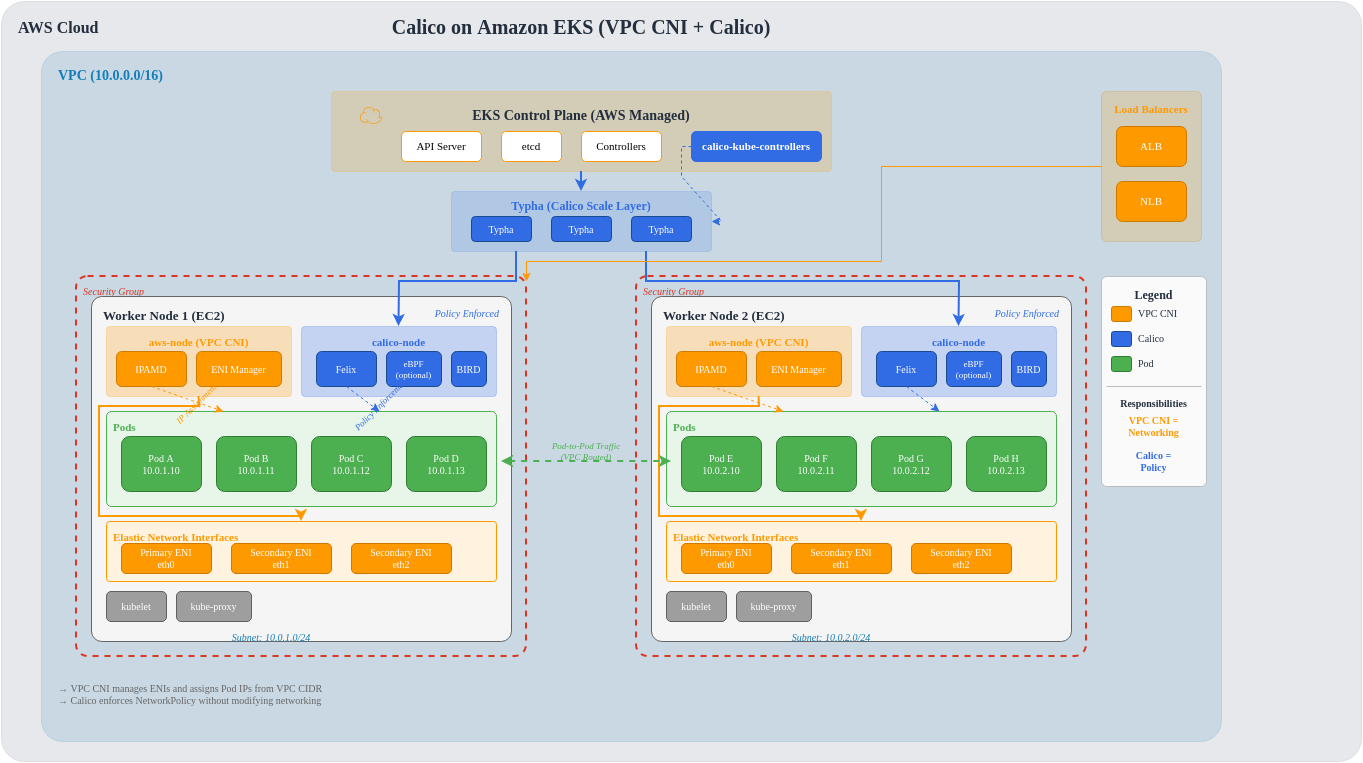
Amazon EKS uses AWS VPC CNI by default for pod networking. Calico can be added for advanced network policy capabilities while VPC CNI handles IP address management.
Architecture Deep Dive
Traffic Flow with VPC CNI + Calico
Installation Methods Comparison
Methods Overview
| Method | Complexity | Flexibility | Upgrade Path | EKS Integration |
|---|---|---|---|---|
| EKS Add-on | Low | Limited | Automatic | Native |
| Tigera Operator | Medium | High | Semi-auto | Good |
| Helm | Medium | Highest | Manual | Good |
| Manifest | High | Medium | Manual | Basic |
Method 1: EKS Add-on (Simplest)
The EKS add-on provides native integration with EKS lifecycle management.
# Enable via AWS CLI
aws eks create-addon \
  --cluster-name my-cluster \
  --addon-name vpc-cni \
  --addon-version v1.18.0-eksbuild.1 \
  --configuration-values '{"enableNetworkPolicy": "true"}'

# Or enable Calico as separate add-on (if available)
aws eks create-addon \
  --cluster-name my-cluster \
  --addon-name calico \
--service-account-role-arn arn:aws:iam::ACCOUNT:role/CalicoRole# eksctl configuration
apiVersion: eksctl.io/v1alpha5
kind: ClusterConfig
metadata:
name: my-cluster
region: us-east-1
version: "1.30"
addons:
- name: vpc-cni
version: latest
configurationValues: |
enableNetworkPolicy: "true"
nodeAgent:
enablePolicyEventLogs: "true"Pros:
- Automatic updates with EKS
- AWS support included
- Simple configuration
- Native CloudWatch integration
Cons:
- Limited to Kubernetes NetworkPolicy
- No Calico-specific features
- Less configuration flexibility
Method 2: Tigera Operator (Recommended)
# Install Tigera Operator
kubectl create -f https://raw.githubusercontent.com/projectcalico/calico/v3.29.0/manifests/tigera-operator.yaml# Installation resource for EKS
apiVersion: operator.tigera.io/v1
kind: Installation
metadata:
name: default
spec:
# Specify EKS as the Kubernetes provider
kubernetesProvider: EKS
# Use VPC CNI for networking
cni:
type: AmazonVPC
calicoNetwork:
# Disable Calico networking (using VPC CNI)
bgp: Disabled
# No IP pools needed (VPC CNI handles IPAM)
ipPools: []
# Linux dataplane
linuxDataplane: Iptables # or BPF for eBPF mode
# Component resources
componentResources:
- componentName: Node
resourceRequirements:
requests:
cpu: 100m
memory: 128Mi
limits:
cpu: 500m
memory: 256Mi
# Enable Typha for clusters > 50 nodes
typhaDeployment:
spec:
replicas: 3# Apply installation
kubectl apply -f installation.yaml
# Verify installation
kubectl get tigerastatus
kubectl get pods -n calico-systemPros:
- Full Calico features (GlobalNetworkPolicy, Tiers, etc.)
- Operator manages lifecycle
- Automatic component reconciliation
- eBPF dataplane support
Cons:
- Additional operator deployment
- Requires separate upgrades from EKS
Method 3: Helm Installation
# Add Tigera Helm repository
helm repo add projectcalico https://docs.tigera.io/calico/charts
helm repo update

# Install with EKS-specific values
helm install calico projectcalico/tigera-operator \
  --namespace tigera-operator \
  --create-namespace \
  --version v3.29.0 \
-f eks-values.yaml# eks-values.yaml
installation:
kubernetesProvider: EKS
cni:
type: AmazonVPC
calicoNetwork:
bgp: Disabled
linuxDataplane: Iptables
# Node configuration
nodeUpdateStrategy:
rollingUpdate:
maxUnavailable: 1
type: RollingUpdate
# Typha configuration
typhaDeployment:
replicas: 3
resources:
requests:
cpu: 100m
memory: 128Mi
limits:
cpu: 500m
memory: 256Mi
# Felix configuration via operator
felixConfiguration:
prometheusMetricsEnabled: true
prometheusMetricsPort: 9091
flowLogsFlushInterval: "15s"
flowLogsFileEnabled: true
# API server (for calicoctl access)
apiServer:
enabled: false # Set to true for Calico EnterprisePros:
- GitOps-friendly
- Version control for configuration
- Easy rollback
- Customizable values
Cons:
- Requires Helm knowledge
- Manual upgrade management
EKS Network Policy Controller (v1.14+)
EKS 1.25+ includes native Network Policy support via the VPC CNI.
Enabling Native Network Policy
# eksctl configuration
apiVersion: eksctl.io/v1alpha5
kind: ClusterConfig
metadata:
  name: network-policy-cluster
  region: us-east-1
  version: "1.30"

addons:
  - name: vpc-cni
    version: latest
    configurationValues: |
      enableNetworkPolicy: "true"
      nodeAgent:
        enablePolicyEventLogs: "true"
enableCloudWatchLogs: "true"# Enable via kubectl
kubectl set env daemonset aws-node -n kube-system ENABLE_NETWORK_POLICY=true
# Verify network policy agent
kubectl get pods -n kube-system -l k8s-app=aws-node
kubectl logs -n kube-system -l k8s-app=aws-node -c aws-network-policy-agentEKS Native vs Calico Network Policy
| Feature | EKS Native (VPC CNI) | Calico |
|---|---|---|
| Kubernetes NetworkPolicy | Yes | Yes |
| GlobalNetworkPolicy | No | Yes |
| Policy Tiers | No | Yes |
| L7 Policy (HTTP) | No | Yes (Enterprise) |
| DNS-based Policy | No | Yes |
| FQDN Egress Rules | No | Yes |
| Host Endpoint Policy | No | Yes |
| Policy Preview | No | Yes (Enterprise) |
| Flow Logs | CloudWatch | Prometheus/File |
| Performance | eBPF-optimized | iptables/eBPF |
Node Type Considerations
Feature Matrix by Node Type
| Feature | Managed Nodes | Self-Managed | Fargate |
|---|---|---|---|
| Calico CNI | No (VPC CNI) | Yes | No |
| Calico Policy | Yes | Yes | Limited |
| eBPF Dataplane | Yes | Yes | No |
| BGP | No | Yes | No |
| WireGuard | Yes | Yes | No |
| Host Endpoints | Yes | Yes | No |
| Custom IPAM | No | Yes | No |
| Node Taints | Yes | Yes | N/A |
Managed Node Groups
# eksctl with managed nodes and Calico
apiVersion: eksctl.io/v1alpha5
kind: ClusterConfig
metadata:
  name: managed-calico-cluster
  region: us-east-1
  version: "1.30"

managedNodeGroups:
  - name: calico-nodes
    instanceType: m5.large
    desiredCapacity: 3
    minSize: 2
    maxSize: 10
    volumeSize: 100
    volumeType: gp3

    # Labels for Calico node selector
    labels:
      calico-enabled: "true"

    # IAM policies for Calico
    iam:
      withAddonPolicies:
        cloudWatch: true

    # Taints (optional)
    taints:
      - key: calico
        value: "true"
        effect: NoSchedule
Self-Managed Nodes (Full Calico)
# Self-managed nodes with full Calico networking
apiVersion: eksctl.io/v1alpha5
kind: ClusterConfig
metadata:
  name: self-managed-calico
  region: us-east-1
  version: "1.30"

# Disable VPC CNI for self-managed nodes
addons:
  - name: vpc-cni
    version: latest
    configurationValues: |
      enableNetworkPolicy: "false"

nodeGroups:
  - name: calico-full-nodes
    instanceType: m5.xlarge
    desiredCapacity: 3

    # Custom AMI with Calico pre-installed (optional)
    ami: ami-0123456789abcdef0

    # Disable VPC CNI on these nodes
    overrideBootstrapCommand: |
      #!/bin/bash
      # Remove VPC CNI
      /etc/eks/bootstrap.sh my-cluster \
        --kubelet-extra-args '--network-plugin=cni'

    labels:
      networking: calico-full

# Then install full Calico CNI on these nodes
Fargate Considerations
# Fargate profile with limited Calico support
apiVersion: eksctl.io/v1alpha5
kind: ClusterConfig
metadata:
  name: fargate-cluster
  region: us-east-1

fargateProfiles:
  - name: default
    selectors:
      - namespace: default
      - namespace: production
    # Note: Only Kubernetes NetworkPolicy works on Fargate
    # Calico GlobalNetworkPolicy does NOT apply to Fargate pods
Fargate Limitations:
- Only Kubernetes standard NetworkPolicy
- No Calico GlobalNetworkPolicy
- No eBPF dataplane
- No host endpoint policies
- No custom IPAM
IRSA Configuration
IAM Roles for Service Accounts (IRSA) provides fine-grained IAM permissions for Calico components.
# Create IAM policy for Calico
# calico-policy.json
{
  "Version": "2012-10-17",
  "Statement": [
    {
      "Effect": "Allow",
      "Action": [
        "logs:CreateLogGroup",
        "logs:CreateLogStream",
        "logs:PutLogEvents",
        "logs:DescribeLogGroups",
        "logs:DescribeLogStreams"
      ],
      "Resource": "arn:aws:logs:*:*:log-group:/aws/calico/*"
    },
    {
      "Effect": "Allow",
      "Action": [
        "ec2:DescribeInstances",
        "ec2:DescribeNetworkInterfaces",
        "ec2:DescribeSecurityGroups",
        "ec2:DescribeSubnets",
        "ec2:DescribeVpcs"
      ],
      "Resource": "*"
    }
  ]
}# Create IAM policy
aws iam create-policy \
--policy-name CalicoPolicy \
--policy-document file://calico-policy.json
# Create IRSA for Calico
eksctl create iamserviceaccount \
--cluster my-cluster \
--namespace calico-system \
--name calico-node \
--attach-policy-arn arn:aws:iam::ACCOUNT:policy/CalicoPolicy \
--approve# Calico installation with IRSA
apiVersion: operator.tigera.io/v1
kind: Installation
metadata:
name: default
spec:
kubernetesProvider: EKS
cni:
type: AmazonVPC
# Reference the IRSA service account
nodeMetadata: "true"
calicoNetwork:
bgp: DisabledSecurity Group vs Calico Policy
Comparison
| Aspect | Security Groups | Calico Policy |
|---|---|---|
| Scope | Instance/ENI | Pod/Namespace/Cluster |
| Granularity | IP/Port | Labels/Selectors/FQDN |
| Layer | L3-L4 | L3-L7 |
| Pod Selection | By Instance | By Labels |
| Dynamic Updates | Limited | Real-time |
| Audit | CloudTrail | Flow Logs |
| Cross-AZ | Yes | Yes |
| Cost | Free | Free (OSS) |
Using Both Together
# Security Group for node-level protection
# (Managed via AWS Console or Terraform)

# Calico for pod-level protection
apiVersion: projectcalico.org/v3
kind: NetworkPolicy
metadata:
  name: frontend-policy
  namespace: production
spec:
  selector: app == 'frontend'
  ingress:
    - action: Allow
      source:
        selector: app == 'load-balancer'
      protocol: TCP
      destination:
        ports:
          - 80
          - 443
  egress:
    - action: Allow
      destination:
        selector: app == 'backend'
      protocol: TCP
      destination:
        ports:
          - 8080
---
# Security Groups for Pods (EKS feature)
apiVersion: vpcresources.k8s.aws/v1beta1
kind: SecurityGroupPolicy
metadata:
  name: frontend-sg
  namespace: production
spec:
  podSelector:
    matchLabels:
      app: frontend
  securityGroups:
    groupIds:
      - sg-0123456789abcdef0
EKS Upgrade Considerations
Compatibility Matrix
| EKS Version | Calico 3.26 | Calico 3.27 | Calico 3.28 | Calico 3.29 |
|---|---|---|---|---|
| 1.27 | Yes | Yes | Yes | Yes |
| 1.28 | Yes | Yes | Yes | Yes |
| 1.29 | Limited | Yes | Yes | Yes |
| 1.30 | No | Yes | Yes | Yes |
| 1.31 | No | Limited | Yes | Yes |
Upgrade Procedure
# 1. Check current versions
kubectl get pods -n calico-system -o jsonpath='{.items[*].spec.containers[*].image}'
aws eks describe-cluster --name my-cluster --query 'cluster.version'

# 2. Review release notes for compatibility
# https://docs.tigera.io/calico/latest/release-notes/

# 3. Upgrade Calico first (before EKS)
helm upgrade calico projectcalico/tigera-operator \
  --namespace tigera-operator \
  --version v3.29.0 \
  -f eks-values.yaml

# 4. Verify Calico health
kubectl get tigerastatus
calicoctl node status

# 5. Upgrade EKS control plane
aws eks update-cluster-version \
  --name my-cluster \
  --kubernetes-version 1.30

# 6. Upgrade node groups
eksctl upgrade nodegroup \
  --cluster my-cluster \
  --name calico-nodes \
  --kubernetes-version 1.30
Cost Considerations
Cost Factors
| Component | Cost Driver | Optimization |
|---|---|---|
| VPC CNI IPs | ENI attachment, IP allocation | Use prefix delegation |
| Calico Typha | Instance resources | Right-size replicas |
| Flow Logs | Storage, processing | Aggregate, filter |
| Cross-AZ | Data transfer | Zone affinity |
| eBPF | CPU efficiency | Enable where supported |
Cost Optimization Strategies
# 1. Enable VPC CNI prefix delegation (reduce ENI usage)
apiVersion: v1
kind: ConfigMap
metadata:
  name: amazon-vpc-cni
  namespace: kube-system
data:
  enable-prefix-delegation: "true"
  warm-prefix-target: "1"
---
# 2. Optimize Calico resource allocation
apiVersion: operator.tigera.io/v1
kind: Installation
metadata:
  name: default
spec:
  componentResources:
    - componentName: Node
      resourceRequirements:
        requests:
          cpu: 50m  # Start low, scale as needed
          memory: 64Mi
        limits:
          cpu: 200m
          memory: 128Mi
---
# 3. Reduce flow log storage
apiVersion: projectcalico.org/v3
kind: FelixConfiguration
metadata:
  name: default
spec:
  flowLogsFlushInterval: "60s"  # Less frequent
  flowLogsFileAggregationKindForAllowed: 2  # Aggregate allowed flows
EKS Performance Optimization
Prefix Delegation
# Enable prefix delegation for better IP density
apiVersion: v1
kind: ConfigMap
metadata:
  name: amazon-vpc-cni
  namespace: kube-system
data:
  enable-prefix-delegation: "true"
  warm-prefix-target: "1"
  minimum-ip-target: "16"
  warm-ip-target: "4"
eBPF on EKS
# Enable eBPF dataplane on EKS
apiVersion: operator.tigera.io/v1
kind: Installation
metadata:
  name: default
spec:
  kubernetesProvider: EKS
  cni:
    type: AmazonVPC
  calicoNetwork:
    bgp: Disabled
    linuxDataplane: BPF
---
apiVersion: projectcalico.org/v3
kind: FelixConfiguration
metadata:
  name: default
spec:
  bpfEnabled: true
  bpfExternalServiceMode: "Tunnel"  # or "DSR" for direct server return
  bpfKubeProxyIptablesCleanupEnabled: false  # Keep kube-proxy on EKS
  bpfDataIfacePattern: "^(eth.*)"
Note: On EKS, keep kube-proxy running even with eBPF mode, as VPC CNI integration requires it.
Complete eksctl Configuration
# Full EKS cluster with Calico - production-ready
apiVersion: eksctl.io/v1alpha5
kind: ClusterConfig

metadata:
  name: production-calico-cluster
  region: us-east-1
  version: "1.30"
  tags:
    environment: production
    networking: calico

# IAM configuration
iam:
  withOIDC: true
  serviceAccounts:
    - metadata:
        name: calico-node
        namespace: calico-system
      wellKnownPolicies:
        cloudWatch: true
      attachPolicy:
        Version: "2012-10-17"
        Statement:
          - Effect: Allow
            Action:
              - "ec2:DescribeInstances"
              - "ec2:DescribeNetworkInterfaces"
            Resource: "*"

# VPC configuration
vpc:
  cidr: 10.0.0.0/16
  nat:
    gateway: HighlyAvailable
  clusterEndpoints:
    publicAccess: true
    privateAccess: true

# Add-ons
addons:
  - name: vpc-cni
    version: latest
    configurationValues: |
      enableNetworkPolicy: "false"
      env:
        ENABLE_PREFIX_DELEGATION: "true"
        WARM_PREFIX_TARGET: "1"
  - name: coredns
    version: latest
  - name: kube-proxy
    version: latest

# Managed node groups
managedNodeGroups:
  - name: system-nodes
    instanceType: m5.large
    desiredCapacity: 3
    minSize: 3
    maxSize: 6
    volumeSize: 100
    volumeType: gp3
    labels:
      role: system
      calico: "true"
    taints:
      - key: CriticalAddonsOnly
        effect: NoSchedule
    iam:
      withAddonPolicies:
        cloudWatch: true
    availabilityZones:
      - us-east-1a
      - us-east-1b
      - us-east-1c

  - name: workload-nodes
    instanceType: m5.xlarge
    desiredCapacity: 6
    minSize: 3
    maxSize: 20
    volumeSize: 200
    volumeType: gp3
    labels:
      role: workload
      calico: "true"
    iam:
      withAddonPolicies:
        cloudWatch: true
        autoScaler: true
    availabilityZones:
      - us-east-1a
      - us-east-1b
      - us-east-1c

# Logging
cloudWatch:
  clusterLogging:
    enableTypes:
      - api
      - audit
      - authenticator
      - controllerManager
      - scheduler
Step-by-Step Helm Installation
# Step 1: Create EKS cluster
eksctl create cluster -f cluster-config.yaml

# Step 2: Verify cluster
kubectl get nodes
aws eks describe-cluster --name production-calico-cluster

# Step 3: Add Tigera Helm repo
helm repo add projectcalico https://docs.tigera.io/calico/charts
helm repo update

# Step 4: Create namespace
kubectl create namespace tigera-operator

# Step 5: Create values file
cat > calico-values.yaml << 'EOF'
installation:
  kubernetesProvider: EKS
  cni:
    type: AmazonVPC
  calicoNetwork:
    bgp: Disabled
    linuxDataplane: Iptables
  nodeUpdateStrategy:
    rollingUpdate:
      maxUnavailable: 1
    type: RollingUpdate
  componentResources:
    - componentName: Node
      resourceRequirements:
        requests:
          cpu: 100m
          memory: 128Mi
        limits:
          cpu: 500m
          memory: 256Mi
    - componentName: Typha
      resourceRequirements:
        requests:
          cpu: 100m
          memory: 128Mi
        limits:
          cpu: 500m
          memory: 256Mi

typhaDeployment:
  replicas: 3

apiServer:
  enabled: false
EOF

# Step 6: Install Calico
helm install calico projectcalico/tigera-operator \
  --namespace tigera-operator \
  --version v3.29.0 \
  -f calico-values.yaml

# Step 7: Wait for installation
kubectl wait --for=condition=Available deployment/calico-typha \
  -n calico-system --timeout=300s

# Step 8: Verify installation
kubectl get pods -n calico-system
kubectl get tigerastatus

# Step 9: Install calicoctl
curl -L https://github.com/projectcalico/calico/releases/download/v3.29.0/calicoctl-linux-amd64 -o calicoctl
chmod +x calicoctl
sudo mv calicoctl /usr/local/bin/

# Step 10: Configure calicoctl
export DATASTORE_TYPE=kubernetes
export KUBECONFIG=~/.kube/config

# Step 11: Verify connectivity
calicoctl node status
calicoctl get nodes -o wide

# Step 12: Apply default deny policy (optional)
kubectl apply -f - << 'EOF'
apiVersion: projectcalico.org/v3
kind: GlobalNetworkPolicy
metadata:
  name: default-deny
spec:
  selector: all()
  types:
    - Ingress
    - Egress
EOF

echo "Calico installation complete!"
References
- EKS Best Practices - Networking
- Calico on EKS Documentation
- VPC CNI Documentation
- EKS Add-ons
- Security Groups for Pods
Quiz
To test what you learned in this chapter, try the EKS Integration Quiz.