Part 1: Prerequisites
There are several ways to create an Amazon EKS cluster. In this chapter, we will learn how to create an EKS cluster using various tools and methods.
Table of Contents
- Prerequisites
- Creating a Cluster Using eksctl
- Creating a Cluster Using AWS Management Console
- Creating a Cluster Using AWS CLI
- Creating a Cluster Using Terraform
Prerequisites
Before creating an EKS cluster, the following prerequisites are required:
1. AWS Account
A valid AWS account is required. If you don't have an AWS account, you can sign up at the AWS website.
2. IAM Permissions
The following IAM permissions are required to create and manage an EKS cluster:
eks:*ec2:*iam:*cloudformation:*
If you have administrator permissions, no additional permission settings are required. Otherwise, you need to attach the following IAM policy to the user or role:
{
  "Version": "2012-10-17",
  "Statement": [
    {
      "Effect": "Allow",
      "Action": [
        "eks:*",
        "ec2:*",
        "iam:*",
        "cloudformation:*"
      ],
      "Resource": "*"
    }
  ]
}
3. Tool Installation
The following tools must be installed to create and manage an EKS cluster:
AWS CLI
AWS CLI is a unified tool for controlling AWS services from the command line.
macOS:
curl "https://awscli.amazonaws.com/AWSCLIV2.pkg" -o "AWSCLIV2.pkg"
sudo installer -pkg AWSCLIV2.pkg -target /Linux:
curl "https://awscli.amazonaws.com/awscli-exe-linux-x86_64.zip" -o "awscliv2.zip"
unzip awscliv2.zip
sudo ./aws/installWindows:
https://awscli.amazonaws.com/AWSCLIV2.msiAfter installing AWS CLI, run the following command to configure credentials:
aws configurekubectl
kubectl is a command-line tool for communicating with Kubernetes clusters.
macOS:
curl -LO "https://dl.k8s.io/release/$(curl -L -s https://dl.k8s.io/release/stable.txt)/bin/darwin/amd64/kubectl"
chmod +x ./kubectl
sudo mv ./kubectl /usr/local/bin/kubectlLinux:
curl -LO "https://dl.k8s.io/release/$(curl -L -s https://dl.k8s.io/release/stable.txt)/bin/linux/amd64/kubectl"
chmod +x ./kubectl
sudo mv ./kubectl /usr/local/bin/kubectlWindows:
curl -LO "https://dl.k8s.io/release/v1.26.0/bin/windows/amd64/kubectl.exe"eksctl
eksctl is a simple CLI tool for creating and managing EKS clusters.
macOS:
brew tap weaveworks/tap
brew install weaveworks/tap/eksctl
Or:
curl --silent --location "https://github.com/weaveworks/eksctl/releases/latest/download/eksctl_$(uname -s)_amd64.tar.gz" | tar xz -C /tmp
sudo mv /tmp/eksctl /usr/local/binLinux:
curl --silent --location "https://github.com/weaveworks/eksctl/releases/latest/download/eksctl_$(uname -s)_amd64.tar.gz" | tar xz -C /tmp
sudo mv /tmp/eksctl /usr/local/binWindows:
# PowerShell
$version = (Invoke-WebRequest -Uri "https://api.github.com/repos/weaveworks/eksctl/releases/latest" | ConvertFrom-Json).tag_name
Invoke-WebRequest -Uri "https://github.com/weaveworks/eksctl/releases/download/$version/eksctl_Windows_amd64.zip" -OutFile eksctl.zip
Expand-Archive -Path eksctl.zip -DestinationPath $env:USERPROFILE\.eksctl\bin
$env:PATH += ";$env:USERPROFILE\.eksctl\bin"
4. VPC and Subnets
An EKS cluster requires a VPC and subnets. You can use an existing VPC or create a new one. The VPC for an EKS cluster must meet the following requirements:
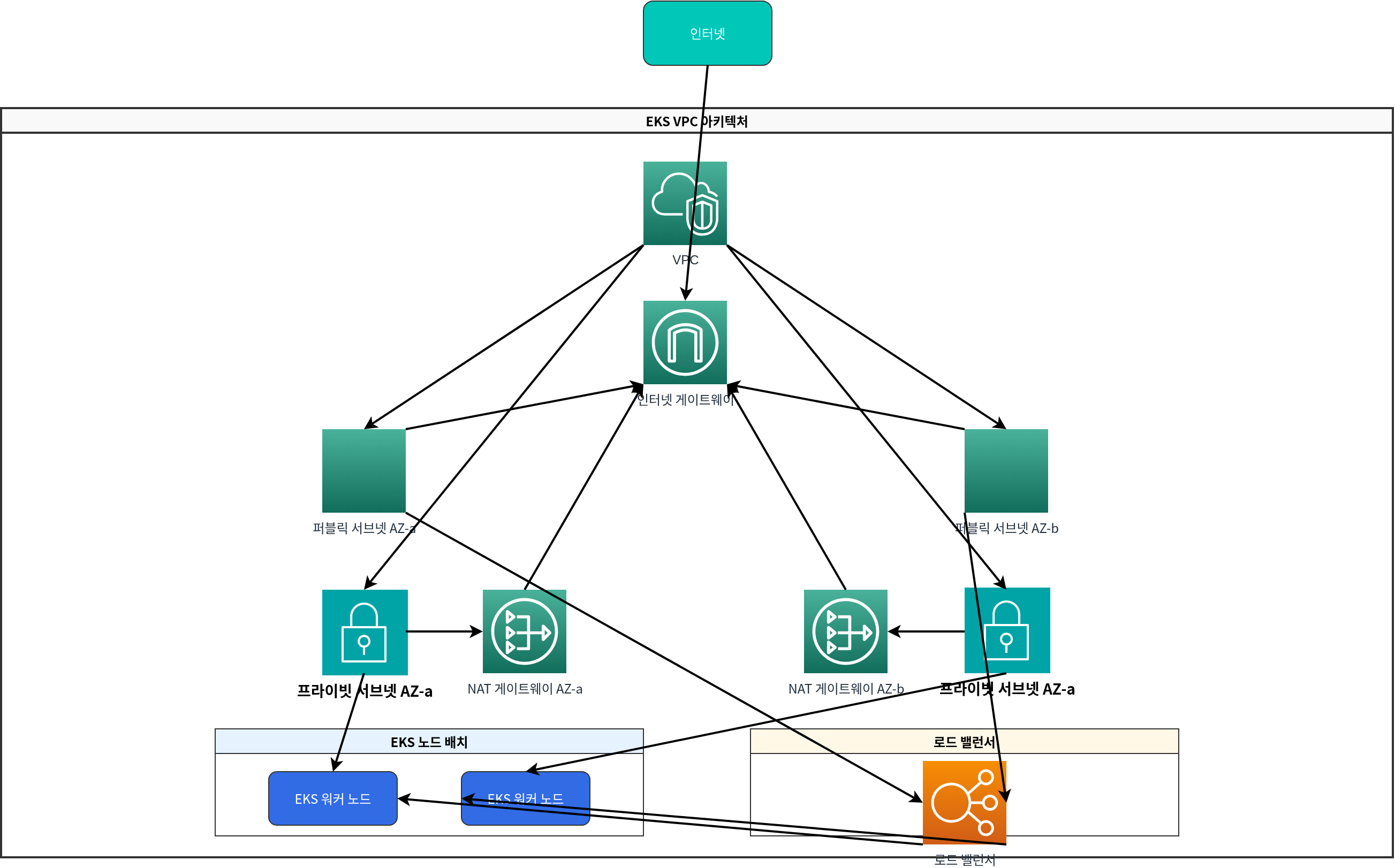
- At least 2 subnets must be in different availability zones.
- Subnets must have internet access (through a NAT gateway or internet gateway).
- Subnets must have sufficient IP addresses.
- Subnets must have appropriate tags.
VPC Tags for EKS Cluster
The following tags must be applied to enable the EKS cluster to use the VPC and subnets correctly:
VPC Tags:
kubernetes.io/cluster/<cluster-name>:sharedorowned
Public Subnet Tags:
kubernetes.io/cluster/<cluster-name>:sharedorownedkubernetes.io/role/elb:1
Private Subnet Tags:
kubernetes.io/cluster/<cluster-name>:sharedorownedkubernetes.io/role/internal-elb:1
Quiz
To test what you learned in this chapter, try the EKS Cluster Creation - Part 1 Quiz.