Prerequisites
< Table of Contents | Next: Network Configuration >
Supported Versions: EKS 1.31+, nodeadm 0.1+ Last Updated: February 23, 2026
This document covers the system requirements for on-premises nodes, GPU servers, and network infrastructure needed to deploy EKS Hybrid Nodes.
Network Prerequisites Overview
The following diagram shows the network prerequisites for connecting on-premises nodes to an EKS cluster, including VPC configuration, Transit Gateway/Virtual Private Gateway, and CIDR requirements.
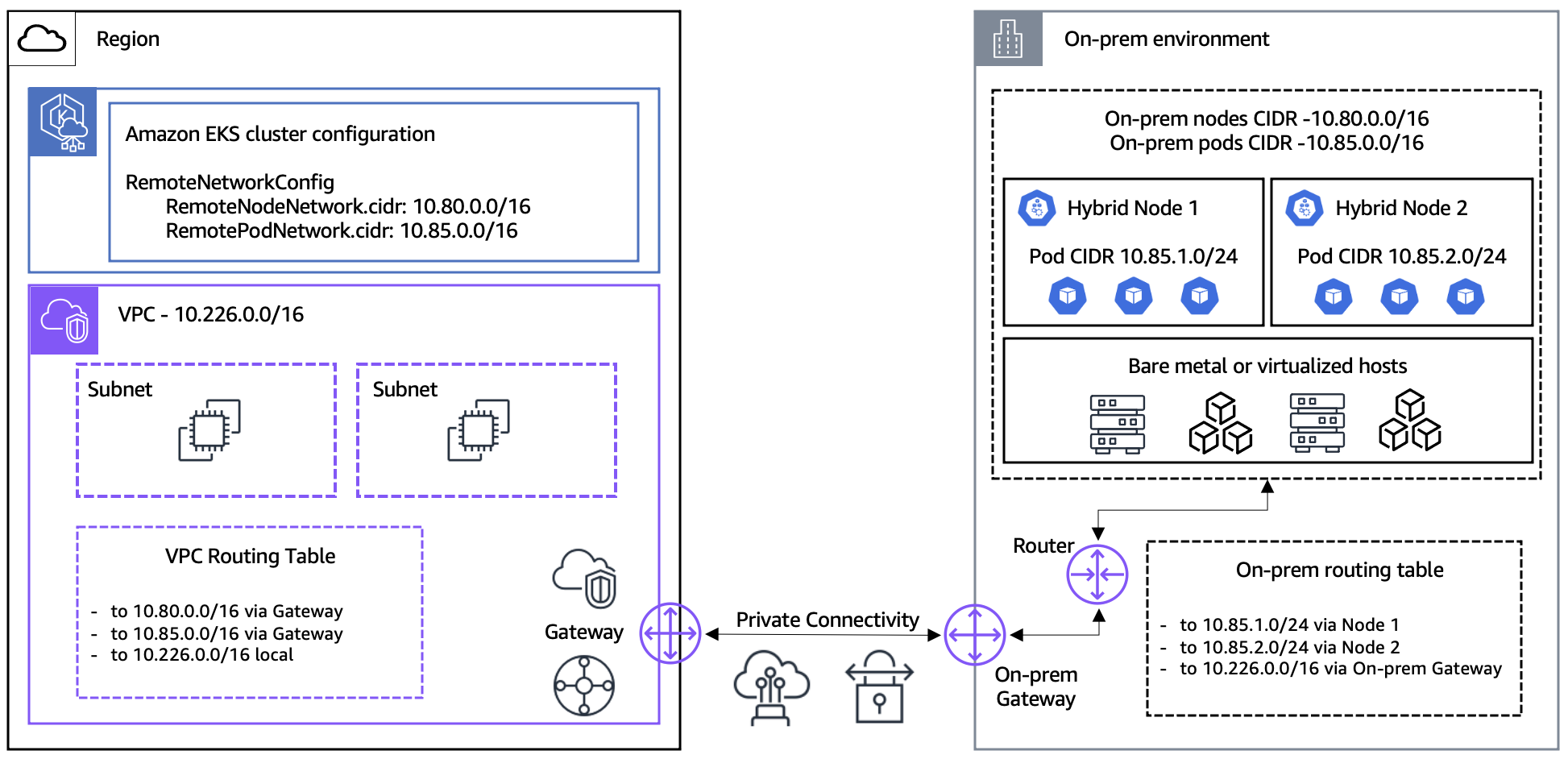
On-Premises Node Requirements
Supported Operating Systems
| Operating System | Version | Architecture |
|---|---|---|
| Ubuntu LTS | 20.04, 22.04, 24.04 | x86_64, arm64 |
| RHEL | 8, 9 | x86_64, arm64 |
| Amazon Linux | 2023 | x86_64, arm64 |
| Bottlerocket | v1.37.0 and above (VMware variants only) | x86_64 only |
Bottlerocket Note: Only VMware variants of Bottlerocket are supported for EKS Hybrid Nodes, and Kubernetes v1.28 or higher is required. Bottlerocket includes all necessary dependencies automatically, so the
nodeadmCLI is not required. ARM architecture is not supported for Bottlerocket.
ARM Architecture Notes:
- ARM nodes require ARMv8.2 or later with Crypto extension (for kube-proxy v1.31+)
- Raspberry Pi (pre-Pi 5) is not compatible — supports only ARMv8.0 which lacks the Crypto extension
- Pi 5 (ARMv8.2) and later are compatible
Container Runtime
# Check containerd version
containerd --version
# Required version: 1.6.x or higher

# Check Docker Engine version (includes containerd)
docker --version
# Required version: 20.10.10 or higher
OS-Specific containerd Notes:
- Ubuntu 24.04: Requires containerd v1.7.19 or later, or AppArmor profile configuration changes
- RHEL:
--containerd-source distrois not valid. Must use--containerd-source docker- Ubuntu 20.04 / RHEL 8: Default kernel is below 5.10, which is required for Cilium v1.18.x
Minimum Hardware Specifications
| Resource | Minimum (AWS Official) | Recommended |
|---|---|---|
| CPU | 1 vCPU | 4 cores or more |
| RAM | 1 GiB | 8 GB or more |
| Disk | 50 GB SSD | 100 GB NVMe SSD |
| Network | 100 Mbps | 10 Gbps or more |
Note: The AWS official minimum is 1 vCPU / 1 GiB, but 2 cores / 4 GB or more is recommended for running actual workloads.
System Configuration Check
# Verify swap is disabled
free -h
# Swap should be 0

# Disable swap
sudo swapoff -a
sudo sed -i '/ swap / s/^\(.*\)$/#\1/g' /etc/fstab

# Load required kernel modules
cat <<EOF | sudo tee /etc/modules-load.d/k8s.conf
overlay
br_netfilter
EOF

sudo modprobe overlay
sudo modprobe br_netfilter

# Set kernel parameters
cat <<EOF | sudo tee /etc/sysctl.d/k8s.conf
net.bridge.bridge-nf-call-iptables  = 1
net.bridge.bridge-nf-call-ip6tables = 1
net.ipv4.ip_forward                 = 1
EOF

sudo sysctl --system
Building Node Images with AWS Packer Templates
AWS provides example Packer templates for building node images for EKS Hybrid Nodes. These templates support OVA (vSphere), Qcow2, and Raw output formats.
Packer Prerequisites
| Tool | Minimum Version |
|---|---|
| Packer | v1.11.0+ |
| VMware vSphere Plugin | v1.4.0+ |
| QEMU Plugin | Latest |
Environment Variables
| Variable | Description | Default |
|---|---|---|
PKR_SSH_PASSWORD | SSH password | - |
ISO_URL | OS ISO image URL | - |
ISO_CHECKSUM | ISO checksum | - |
CREDENTIAL_PROVIDER | Credential provider (ssm or iam) | ssm |
K8S_VERSION | Kubernetes version | - |
NODEADM_ARCH | Architecture (amd64 or arm64) | amd64 |
RHEL-specific Variables:
| Variable | Description |
|---|---|
RH_USERNAME | Red Hat subscription username |
RH_PASSWORD | Red Hat subscription password |
vSphere-specific Variables:
| Variable | Description |
|---|---|
VSPHERE_SERVER | vCenter server address |
VSPHERE_USER | vCenter username |
VSPHERE_PASSWORD | vCenter password |
VSPHERE_DATACENTER | Datacenter name |
VSPHERE_CLUSTER | Cluster name |
VSPHERE_DATASTORE | Datastore name |
VSPHERE_NETWORK | Network name |
Build Commands
# Build vSphere OVA (Ubuntu 22.04)
packer build -only=general-build.vsphere-iso.ubuntu22 template.pkr.hcl

# Build QEMU image (RHEL 9)
packer build -only=general-build.qemu.rhel9 template.pkr.hcl

# Build Amazon Linux 2023
packer build -only=general-build.qemu.al2023 template.pkr.hclNote: Setting the
CREDENTIAL_PROVIDERenvironment variable toiambuilds an image for IAM Roles Anywhere. The default isssm.
GPU Server Requirements (Optional)
NVIDIA Driver
# Check NVIDIA driver version
nvidia-smi --query-gpu=driver_version --format=csv,noheader
# Required version: 550.x or higher

# Check CUDA version
nvcc --version
# Recommended version: CUDA 12.x
Supported GPU Models
| GPU Model | VRAM | Primary Use |
|---|---|---|
| NVIDIA H100 | 80 GB | Large-scale LLM training/inference |
| NVIDIA H200 | 141 GB | Very large models |
| NVIDIA A100 | 40/80 GB | AI/ML general purpose |
| NVIDIA L40S | 48 GB | Inference optimized |
GPU Driver Installation
Ubuntu 22.04 LTS (Recommended):
# Install kernel headers
sudo apt-get install -y linux-headers-$(uname -r)

# Add NVIDIA driver repository
distribution=$(. /etc/os-release;echo $ID$VERSION_ID | sed -e 's/\.//g')
wget https://developer.download.nvidia.com/compute/cuda/repos/$distribution/x86_64/cuda-keyring_1.1-1_all.deb
sudo dpkg -i cuda-keyring_1.1-1_all.deb
sudo apt-get update

# Install driver
sudo apt-get install -y cuda-drivers-550

# Install NVIDIA Container Toolkit
curl -fsSL https://nvidia.github.io/libnvidia-container/gpgkey | sudo gpg --dearmor -o /usr/share/keyrings/nvidia-container-toolkit-keyring.gpg
curl -s -L https://nvidia.github.io/libnvidia-container/stable/deb/nvidia-container-toolkit.list | \
  sed 's#deb https://#deb [signed-by=/usr/share/keyrings/nvidia-container-toolkit-keyring.gpg] https://#g' | \
  sudo tee /etc/apt/sources.list.d/nvidia-container-toolkit.list
sudo apt-get update
sudo apt-get install -y nvidia-container-toolkit

# Update containerd configuration
sudo nvidia-ctk runtime configure --runtime=containerd
sudo systemctl restart containerd
RHEL 9:
# Install kernel development packages
sudo dnf install -y kernel-devel-$(uname -r) kernel-headers-$(uname -r)

# Add NVIDIA driver repository
sudo dnf config-manager --add-repo https://developer.download.nvidia.com/compute/cuda/repos/rhel9/x86_64/cuda-rhel9.repo

# Install driver
sudo dnf module install -y nvidia-driver:550-dkms

# Install NVIDIA Container Toolkit
curl -s -L https://nvidia.github.io/libnvidia-container/stable/rpm/nvidia-container-toolkit.repo | \
  sudo tee /etc/yum.repos.d/nvidia-container-toolkit.repo
sudo dnf install -y nvidia-container-toolkit

# Update containerd configuration
sudo nvidia-ctk runtime configure --runtime=containerd
sudo systemctl restart containerd
Network Requirements
Bandwidth and Latency
| Item | Minimum | Recommended |
|---|---|---|
| Bandwidth | 100 Mbps | 10 Gbps or more |
| Latency | 200 ms RTT or less | 5 ms or less |
| Packet Loss | 0.1% or less | 0.01% or less |
| MTU | 1500 | 9000 (Jumbo Frame) |
Jumbo Frame Configuration
# Check MTU setting
ip link show eth0 | grep mtu

# Set MTU to 9000 (temporary)
sudo ip link set dev eth0 mtu 9000

# Permanent configuration (Amazon Linux 2023 - NetworkManager)
sudo nmcli connection modify "System eth0" 802-3-ethernet.mtu 9000
sudo nmcli connection up "System eth0"

# Verify configuration
nmcli connection show "System eth0" | grep mtu
IAM Credential Provider Setup
EKS Hybrid Nodes requires one of two credential providers to authenticate on-premises nodes with AWS.
Option A: SSM Hybrid Activations
SSM Hybrid Activations is the simpler option, requiring no PKI infrastructure.
# Create IAM role for hybrid nodes
aws iam create-role \
  --role-name EKSHybridNodeRole \
  --assume-role-policy-document '{
    "Version": "2012-10-17",
    "Statement": [{
      "Effect": "Allow",
      "Principal": {"Service": "ssm.amazonaws.com"},
      "Action": "sts:AssumeRole"
    }]
  }'

# Attach required policies
aws iam attach-role-policy \
  --role-name EKSHybridNodeRole \
  --policy-arn arn:aws:iam::aws:policy/AmazonEKSWorkerNodeMinimalPolicy

aws iam attach-role-policy \
  --role-name EKSHybridNodeRole \
  --policy-arn arn:aws:iam::aws:policy/AmazonSSMManagedInstanceCore

# Create SSM Hybrid Activation
aws ssm create-activation \
  --default-instance-name "eks-hybrid-node" \
  --iam-role EKSHybridNodeRole \
  --registration-limit 100 \
  --region ap-northeast-2
Option B: IAM Roles Anywhere
IAM Roles Anywhere uses X.509 certificates from your existing PKI, ideal for air-gap environments.
# 1. Create Trust Anchor with your CA certificate
aws rolesanywhere create-trust-anchor \
  --name "eks-hybrid-trust-anchor" \
  --source "sourceType=CERTIFICATE_BUNDLE,sourceData={x509CertificateData=$(cat ca.pem)}" \
  --enabled

# 2. Create Profile that maps to an IAM Role
aws rolesanywhere create-profile \
  --name "eks-hybrid-profile" \
  --role-arns arn:aws:iam::123456789012:role/EKSHybridNodeRole \
  --enabled

# 3. Issue X.509 certificate for each node (using your CA)
openssl req -new -key node.key -out node.csr -subj "/CN=hybrid-node-001"
openssl x509 -req -in node.csr -CA ca.pem -CAkey ca.key -CAcreateserial -out node.crt -days 365

# 4. Distribute cert and key to node
sudo mkdir -p /etc/iam/pki
sudo cp node.crt /etc/iam/pki/server.pem
sudo cp node.key /etc/iam/pki/server.key
CloudFormation-Based IAM Setup
Instead of CLI, you can use CloudFormation to set up IAM roles and related resources.
CloudFormation Template for SSM:
# Download template
curl -OL 'https://raw.githubusercontent.com/aws/eks-hybrid/refs/heads/main/example/hybrid-ssm-cfn.yaml'

# Create parameter file
cat > cfn-ssm-parameters.json << 'EOF'
[
  {"ParameterKey": "RoleName", "ParameterValue": "EKSHybridNodeRole"},
  {"ParameterKey": "SSMDeregisterConditionTagKey", "ParameterValue": "EKSClusterARN"},
  {"ParameterKey": "SSMDeregisterConditionTagValue", "ParameterValue": "arn:aws:eks:ap-northeast-2:123456789012:cluster/my-hybrid-cluster"}
]
EOF

# Deploy stack
aws cloudformation create-stack \
  --stack-name eks-hybrid-ssm-role \
  --template-body file://hybrid-ssm-cfn.yaml \
  --parameters file://cfn-ssm-parameters.json \
  --capabilities CAPABILITY_NAMED_IAM
CloudFormation Template for IAM Roles Anywhere:
# Download template
curl -OL 'https://raw.githubusercontent.com/aws/eks-hybrid/refs/heads/main/example/hybrid-ira-cfn.yaml'

# Create parameter file
cat > cfn-iamra-parameters.json << 'EOF'
[
  {"ParameterKey": "RoleName", "ParameterValue": "EKSHybridNodeRole"},
  {"ParameterKey": "CertAttributeTrustPolicy", "ParameterValue": "CN"},
  {"ParameterKey": "CABundleCert", "ParameterValue": "-----BEGIN CERTIFICATE-----\n...\n-----END CERTIFICATE-----"}
]
EOF

# Deploy stack
aws cloudformation create-stack \
  --stack-name eks-hybrid-iamra-role \
  --template-body file://hybrid-ira-cfn.yaml \
  --parameters file://cfn-iamra-parameters.json \
  --capabilities CAPABILITY_NAMED_IAM
IAM Policy Details
Details of the IAM policies required for the hybrid node role.
Required Managed Policies:
| Policy | Purpose |
|---|---|
AmazonEC2ContainerRegistryPullOnly | Pull container images from ECR |
AmazonSSMManagedInstanceCore | SSM agent core functionality (when using SSM) |
Optional Policies:
| Policy | Purpose |
|---|---|
eks-auth:AssumeRoleForPodIdentity | EKS Pod Identity support |
SSM Deregister Conditional Policy:
In multi-cluster environments, use the EKSClusterARN condition tag to ensure nodes can only be deregistered from specific clusters:
{
  "Version": "2012-10-17",
  "Statement": [
    {
      "Effect": "Allow",
      "Action": "ssm:DeregisterManagedInstance",
      "Resource": "*",
      "Condition": {
        "StringEquals": {
          "ssm:resourceTag/EKSClusterARN": "arn:aws:eks:ap-northeast-2:123456789012:cluster/my-hybrid-cluster"
        }
      }
    }
  ]
}
IAM Roles Anywhere Trust Policy Details
Trust policy configuration is critical when using IAM Roles Anywhere.
x509Subject/CN Mapping:
The certificate's CN (Common Name) must match the node name. This is used for audit tracking and node identification.
{
  "Version": "2012-10-17",
  "Statement": [
    {
      "Effect": "Allow",
      "Principal": {
        "Service": "rolesanywhere.amazonaws.com"
      },
      "Action": [
        "sts:AssumeRole",
        "sts:TagSession",
        "sts:SetSourceIdentity"
      ],
      "Condition": {
        "StringEquals": {
          "aws:PrincipalTag/x509Subject/CN": "${aws:RequestTag/x509Subject/CN}"
        },
        "ArnEquals": {
          "aws:SourceArn": "arn:aws:rolesanywhere:ap-northeast-2:123456789012:trust-anchor/TRUST_ANCHOR_ID"
        }
      }
    }
  ]
}
Key Components:
| Component | Description |
|---|---|
sts:SetSourceIdentity | Sets source identity for audit tracking |
sts:RoleSessionName | Session name bound to certificate CN |
x509Subject/CN | Certificate CN must match nodeName |
Credential Duration Comparison
| Aspect | SSM | IAM Roles Anywhere |
|---|---|---|
| Default Duration | 1 hour (fixed) | 1 hour (configurable) |
| Maximum Duration | 1 hour | 12 hours |
| Rotation | Automatic by AWS | Automatic, respects durationSeconds |
MaxSessionDuration | N/A | IAM role value must exceed profile's durationSeconds |
| Configuration | Not configurable | Set via profile's durationSeconds parameter |
Note: When using IAM Roles Anywhere, the IAM role's
MaxSessionDurationmust be greater than the profile'sdurationSecondsvalue. Otherwise, credential acquisition will fail.
Cluster Access Preparation
Hybrid nodes require appropriate access entries to join the EKS cluster.
HYBRID_LINUX Access Entry (Recommended)
The HYBRID_LINUX access entry type is specifically designed for hybrid nodes:
aws eks create-access-entry \
  --cluster-name my-hybrid-cluster \
  --principal-arn arn:aws:iam::123456789012:role/EKSHybridNodeRole \
  --type HYBRID_LINUX
This command automatically sets:
- Username:
system:node:{{SessionName}} - Kubernetes groups:
system:bootstrappers,system:nodes
aws-auth ConfigMap Alternative
When using API_AND_CONFIG_MAP authentication mode, you can use the aws-auth ConfigMap as an alternative:
apiVersion: v1
kind: ConfigMap
metadata:
  name: aws-auth
  namespace: kube-system
data:
  mapRoles: |
    - groups:
      - system:bootstrappers
      - system:nodes
      rolearn: arn:aws:iam::123456789012:role/EKSHybridNodeRole
username: system:node:{{SessionName}}kubectl apply -f aws-auth-cm.yamlNote: The
aws-authConfigMap method is a legacy approach. For new clusters, using theHYBRID_LINUXaccess entry is recommended.
VPC Configuration Requirements
The EKS cluster VPC must be properly configured to support Hybrid Nodes connectivity.
Route Table Configuration
VPC route tables must include routes for on-premises CIDRs:
| Destination | Target | Purpose |
|---|---|---|
| 10.0.0.0/16 (VPC CIDR) | local | VPC internal traffic |
| 10.80.0.0/16 (Remote Node CIDR) | TGW/VGW | Route to on-premises nodes |
| 10.85.0.0/16 (Remote Pod CIDR) | TGW/VGW | Route to on-premises pods |
Security Group Requirements
EKS auto-creates inbound rules when RemoteNodeNetwork / RemotePodNetwork are specified. Additional outbound rules must be configured manually:
| Direction | Protocol | Port | Source/Destination | Purpose |
|---|---|---|---|---|
| Inbound (auto) | TCP | 443 | Remote Node CIDR | Kubelet → API Server |
| Inbound (auto) | TCP | 443 | Remote Pod CIDR | Pod → API Server |
| Inbound (auto) | TCP | 10250 | Remote Node CIDR | API Server → Kubelet |
| Outbound (manual) | TCP | 10250 | Remote Node CIDR | API Server → Kubelet |
| Outbound (manual) | TCP | Webhook ports | Remote Pod CIDR | API Server → Webhooks |
Note: There is a limit of 60 inbound rules per security group. Verify rule counts when using multiple CIDRs.
API Server Endpoint Access Modes
| Mode | Kubelet Path | Use Case |
|---|---|---|
| Public | Internet → EKS API endpoint | Simple setup, internet required from on-prem |
| Private | VPN/DX → VPC ENI → API Server | Air-gap, maximum security (Recommended) |
Warning: Do NOT use the "Public and Private" mode with hybrid nodes. In this mode, hybrid nodes resolve the EKS API endpoint to public IPs only, causing private VPN/Direct Connect connections to fail. This results in nodes failing to join the cluster. You must choose either Public or Private, not both.
Recommendation: Use Private endpoint access for production hybrid environments.
EKS Cluster Creation for Hybrid Nodes
When creating an EKS cluster with hybrid nodes support, the following requirements apply:
- Authentication mode: Must use
APIorAPI_AND_CONFIG_MAP - IP address family: Must use IPv4
- Endpoint connectivity: Must use Public OR Private only ("Public and Private" not supported — causes hybrid node join failures)
- Remote networks: Specify
RemoteNodeNetworkandRemotePodNetworkCIDRs
Using eksctl
# cluster-config.yaml
apiVersion: eksctl.io/v1alpha5
kind: ClusterConfig

metadata:
  name: my-hybrid-cluster
  region: ap-northeast-2
  version: "1.31"

remoteNetworkConfig:
  iam:
    provider: ssm  # or 'ira' for IAM Roles Anywhere
  vpcGatewayID: tgw-0123456789abcdef0
  remoteNodeNetworks:
    - cidrs: ["10.80.0.0/16"]
  remotePodNetworks:
- cidrs: ["10.85.0.0/16"]eksctl create cluster -f cluster-config.yamlUsing AWS CLI
aws eks create-cluster \
    --name my-hybrid-cluster \
    --region ap-northeast-2 \
    --kubernetes-version 1.31 \
    --role-arn arn:aws:iam::123456789012:role/myAmazonEKSClusterRole \
    --resources-vpc-config subnetIds=subnet-xxx,subnet-yyy,securityGroupIds=sg-zzz,endpointPrivateAccess=true,endpointPublicAccess=false \
    --access-config authenticationMode=API_AND_CONFIG_MAP \
    --remote-network-config '{"remoteNodeNetworks":[{"cidrs":["10.80.0.0/16"]}],"remotePodNetworks":[{"cidrs":["10.85.0.0/16"]}]}'
Update kubeconfig
aws eks update-kubeconfig --name my-hybrid-cluster --region ap-northeast-2

# Verify cluster access
kubectl get svc
Supported Add-ons for Hybrid Nodes
Not all EKS add-ons are compatible with hybrid nodes. Amazon VPC CNI is not compatible.
AWS Add-ons
| Add-on | Minimum Compatible Version |
|---|---|
| kube-proxy | v1.25.14-eksbuild.2+ |
| CoreDNS | v1.9.3-eksbuild.7+ |
| ADOT (OpenTelemetry) | v0.102.1-eksbuild.2+ |
| CloudWatch Observability | v2.2.1-eksbuild.1+ |
| EKS Pod Identity Agent | v1.3.3-eksbuild.1+ |
| Node monitoring agent | v1.2.0-eksbuild.1+ |
| CSI snapshot controller | v8.1.0-eksbuild.1+ |
Community Add-ons
| Add-on | Minimum Compatible Version |
|---|---|
| Kubernetes Metrics Server | v0.7.2-eksbuild.1+ |
| cert-manager | v1.17.2-eksbuild.1+ |
| Prometheus Node Exporter | v1.9.1-eksbuild.2+ |
| kube-state-metrics | v2.15.0-eksbuild.4+ |
| External DNS | v0.19.0-eksbuild.1+ |