Part 5: Cluster Access, Validation, Upgrade and Deletion
Configuring Cluster Access
After creating an EKS cluster, configuration is required to access the cluster. In this section, we will learn how to configure cluster access.
Cluster Access Configuration Process
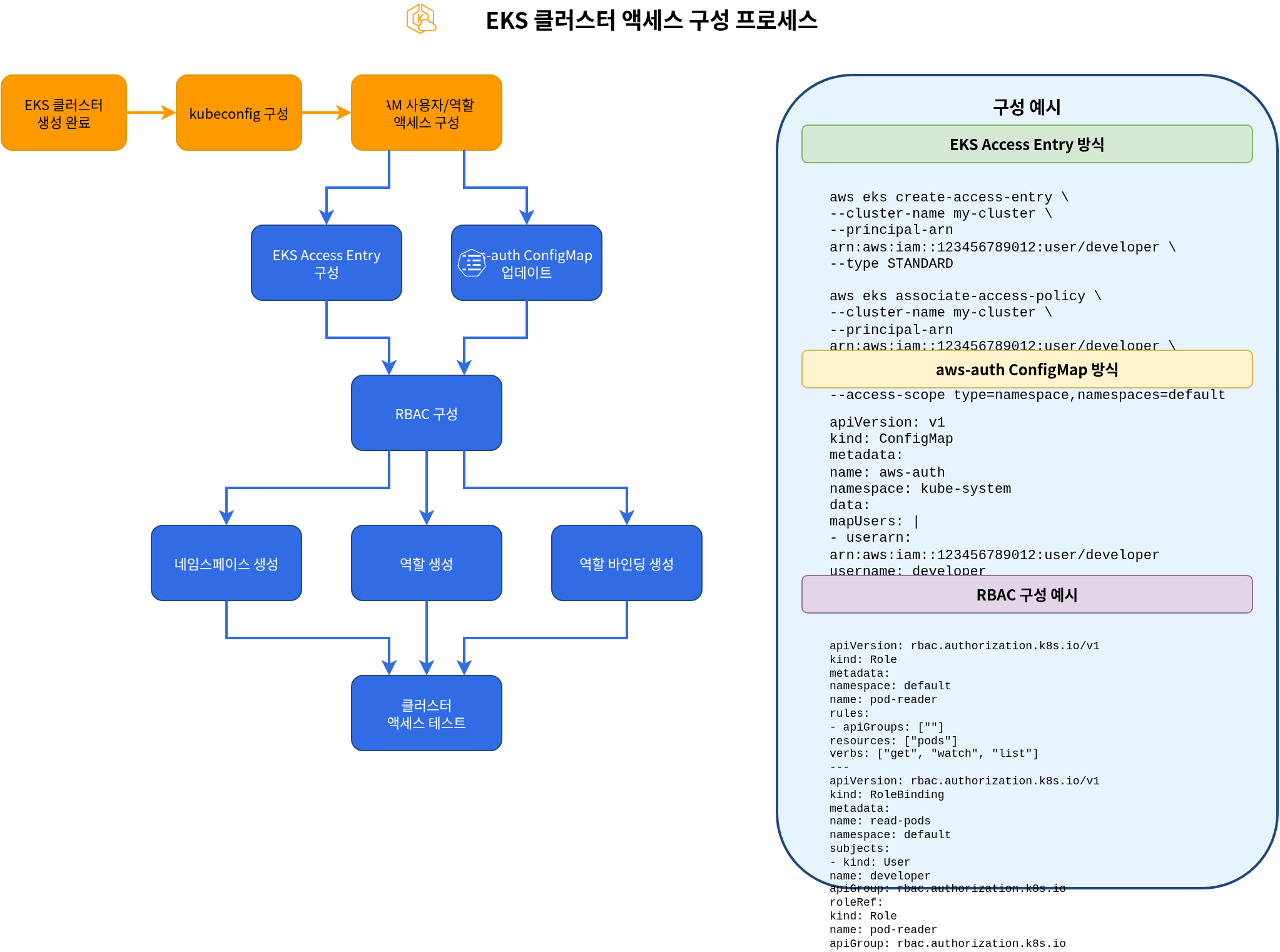
kubeconfig Configuration
You need to configure the kubeconfig file to access an EKS cluster. You can configure kubeconfig using AWS CLI:
aws eks update-kubeconfig \
  --name my-cluster \
  --region us-west-2
This command updates the ~/.kube/config file to enable access to the EKS cluster.
Configuring IAM User and Role Access
By default, only the IAM entity (user or role) that created the EKS cluster can access the cluster. There are two methods to grant cluster access to other IAM users or roles: the traditional aws-auth ConfigMap method and the new EKS Access Entry method.
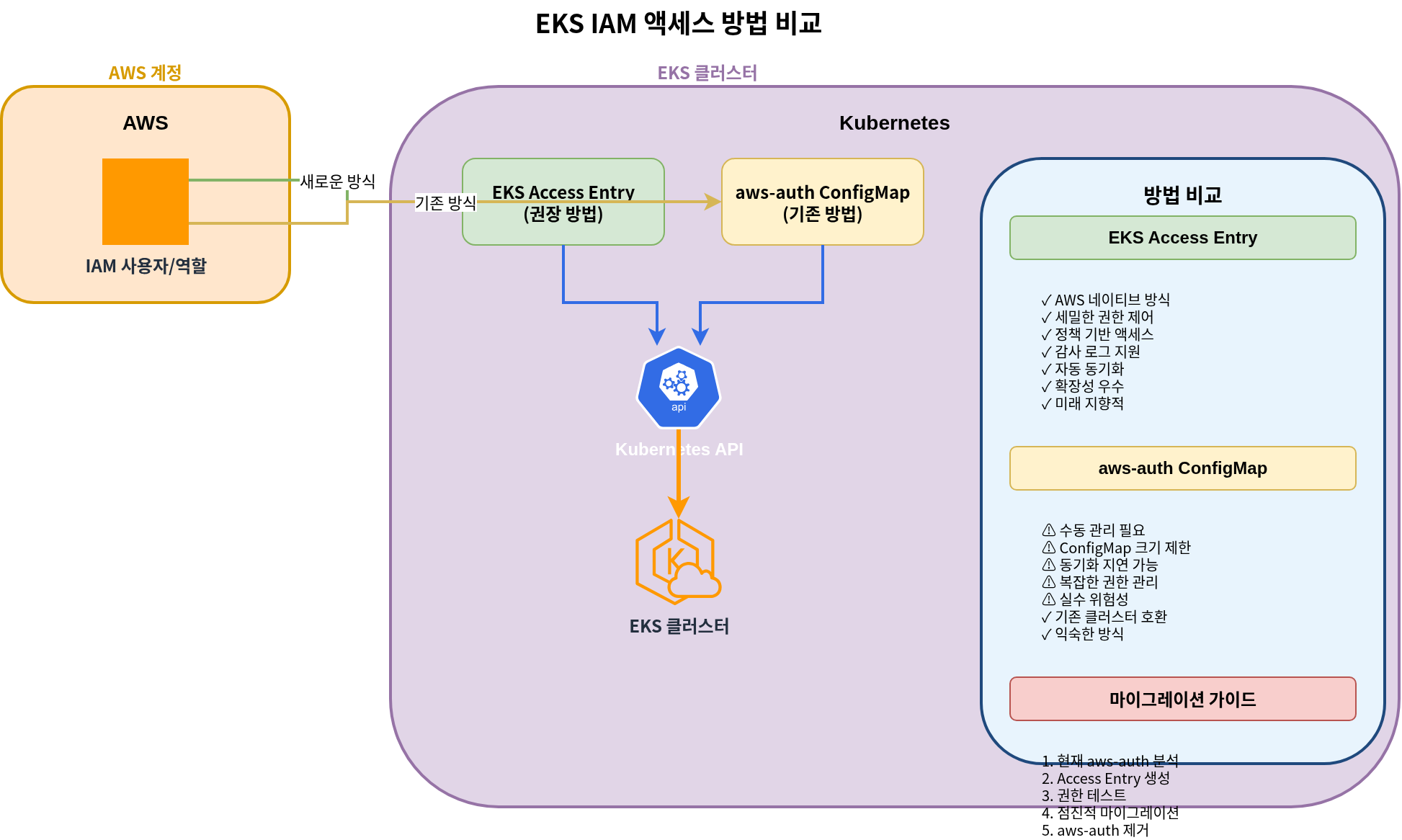
Method 1: EKS Access Entry (Recommended)
EKS Access Entry is a new method that replaces the aws-auth ConfigMap, providing a more stable and easier-to-manage approach.
- Enable Access Entry for the cluster:
aws eks update-cluster-config \
  --name my-cluster \
  --region us-west-2 \
--access-config authenticationMode=API_AND_CONFIG_MAP- Create Access Entry for an IAM role:
aws eks create-access-entry \
  --cluster-name my-cluster \
  --principal-arn arn:aws:iam::123456789012:role/MyRole \
  --username my-role \
--kubernetes-groups system:masters- Create Access Entry for an IAM user:
aws eks create-access-entry \
  --cluster-name my-cluster \
  --principal-arn arn:aws:iam::123456789012:user/my-user \
  --username my-user \
--kubernetes-groups system:masters- List Access Entries:
aws eks list-access-entries --cluster-name my-cluster- Describe Access Entry details:
aws eks describe-access-entry \
  --cluster-name my-cluster \
  --principal-arn arn:aws:iam::123456789012:user/my-user
Method 2: aws-auth ConfigMap (Legacy)
The aws-auth ConfigMap is the traditional method and is still supported, but using Access Entry is recommended for new clusters.
- Get the current
aws-authConfigMap:
kubectl get configmap aws-auth -n kube-system -o yaml > aws-auth.yaml- Edit the
aws-auth.yamlfile to add users or roles:
apiVersion: v1
kind: ConfigMap
metadata:
  name: aws-auth
  namespace: kube-system
data:
  mapRoles: |
    - rolearn: arn:aws:iam::123456789012:role/EKSNodeRole
      username: system:node:{{EC2PrivateDNSName}}
      groups:
        - system:bootstrappers
        - system:nodes
    # Additional role
    - rolearn: arn:aws:iam::123456789012:role/MyRole
      username: my-role
      groups:
        - system:masters
  mapUsers: |
    # IAM user
    - userarn: arn:aws:iam::123456789012:user/my-user
      username: my-user
      groups:
- system:masters- Apply the updated ConfigMap:
kubectl apply -f aws-auth.yamlNote: EKS Access Entry was introduced in 2023, and using Access Entry is recommended for new clusters. Existing clusters can be migrated to a hybrid mode that supports both methods.
RBAC Configuration
You can control access to resources within the cluster using Kubernetes Role-Based Access Control (RBAC).
- Create namespace:
kubectl create namespace dev- Create role:
# role.yaml
apiVersion: rbac.authorization.k8s.io/v1
kind: Role
metadata:
  namespace: dev
  name: developer
rules:
- apiGroups: [""]
  resources: ["pods", "services", "configmaps", "secrets"]
  verbs: ["get", "list", "watch", "create", "update", "patch", "delete"]
- apiGroups: ["apps"]
  resources: ["deployments", "statefulsets", "daemonsets"]
verbs: ["get", "list", "watch", "create", "update", "patch", "delete"]kubectl apply -f role.yaml- Create role binding:
# rolebinding.yaml
apiVersion: rbac.authorization.k8s.io/v1
kind: RoleBinding
metadata:
  name: developer-binding
  namespace: dev
subjects:
- kind: User
  name: my-user
  apiGroup: rbac.authorization.k8s.io
roleRef:
  kind: Role
  name: developer
apiGroup: rbac.authorization.k8s.iokubectl apply -f rolebinding.yamlCluster Validation
After creating an EKS cluster, you need to verify that the cluster is working correctly. In this section, we will learn how to validate the cluster.
Cluster Validation Process
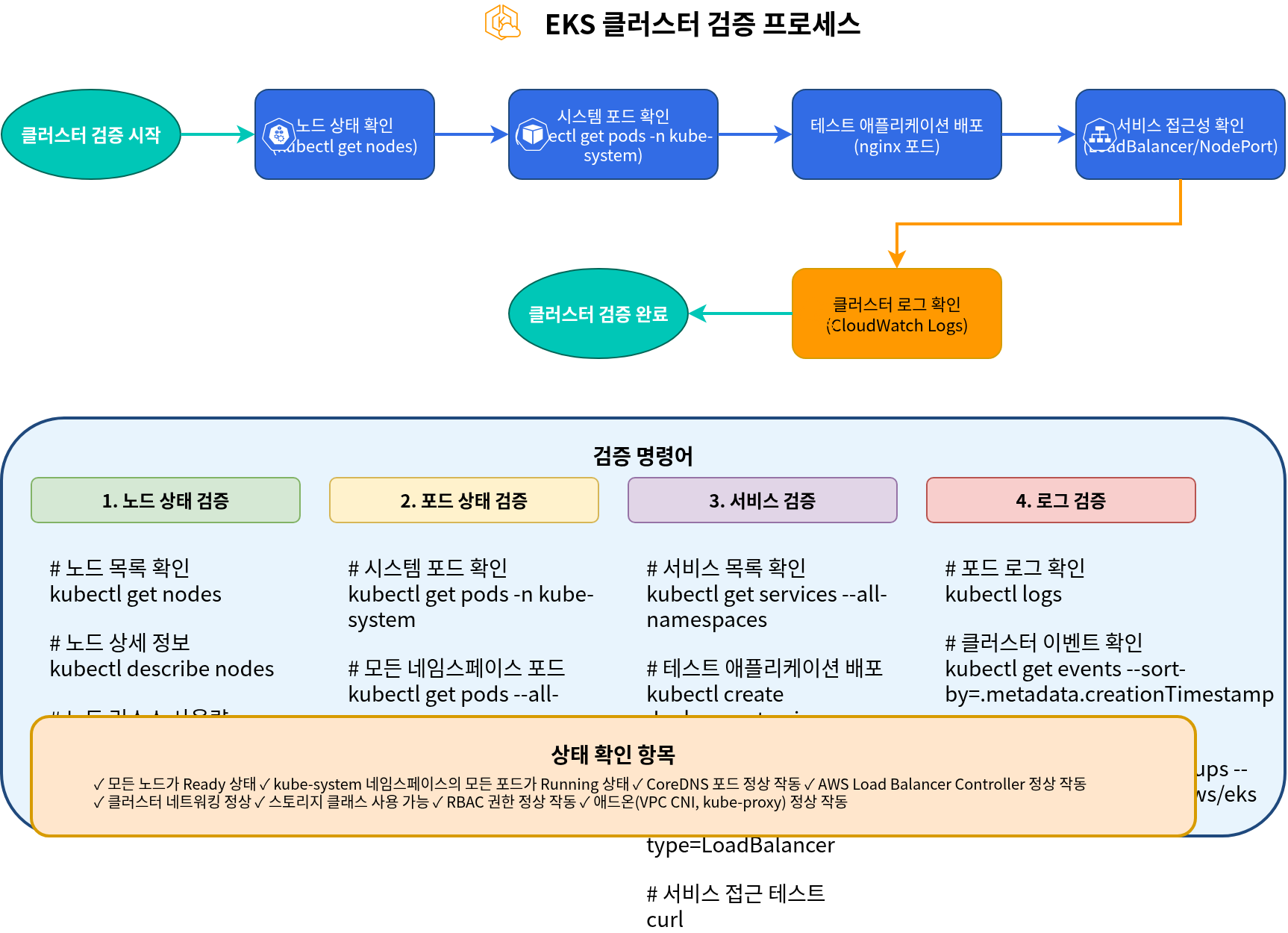
Verify Nodes
Verify the nodes in the cluster:
kubectl get nodesVerify that all nodes are in Ready state.
Verify System Pods
Verify the pods in the kube-system namespace:
kubectl get pods -n kube-systemVerify that all system pods are in Running state.
Deploy Test Application
Deploy a simple test application to verify that the cluster is working correctly:
# nginx.yaml
apiVersion: apps/v1
kind: Deployment
metadata:
  name: nginx
spec:
  replicas: 3
  selector:
    matchLabels:
      app: nginx
  template:
    metadata:
      labels:
        app: nginx
    spec:
      containers:
      - name: nginx
        image: nginx:latest
        ports:
        - containerPort: 80
---
apiVersion: v1
kind: Service
metadata:
  name: nginx
spec:
  type: LoadBalancer
  ports:
  - port: 80
    targetPort: 80
  selector:
app: nginxkubectl apply -f nginx.yamlVerify the deployment and service status:
kubectl get deployments
kubectl get pods
kubectl get services
Verify that you can access the application using the LoadBalancer service's external IP:
curl http://<EXTERNAL-IP>Verify Cluster Logs
Verify cluster logs in CloudWatch Logs:
aws logs describe-log-groups \
  --log-group-name-prefix /aws/eks/my-cluster
Cluster Upgrade
To keep an EKS cluster up to date, regular upgrades are required. In this section, we will learn how to upgrade a cluster.
Cluster Upgrade Process
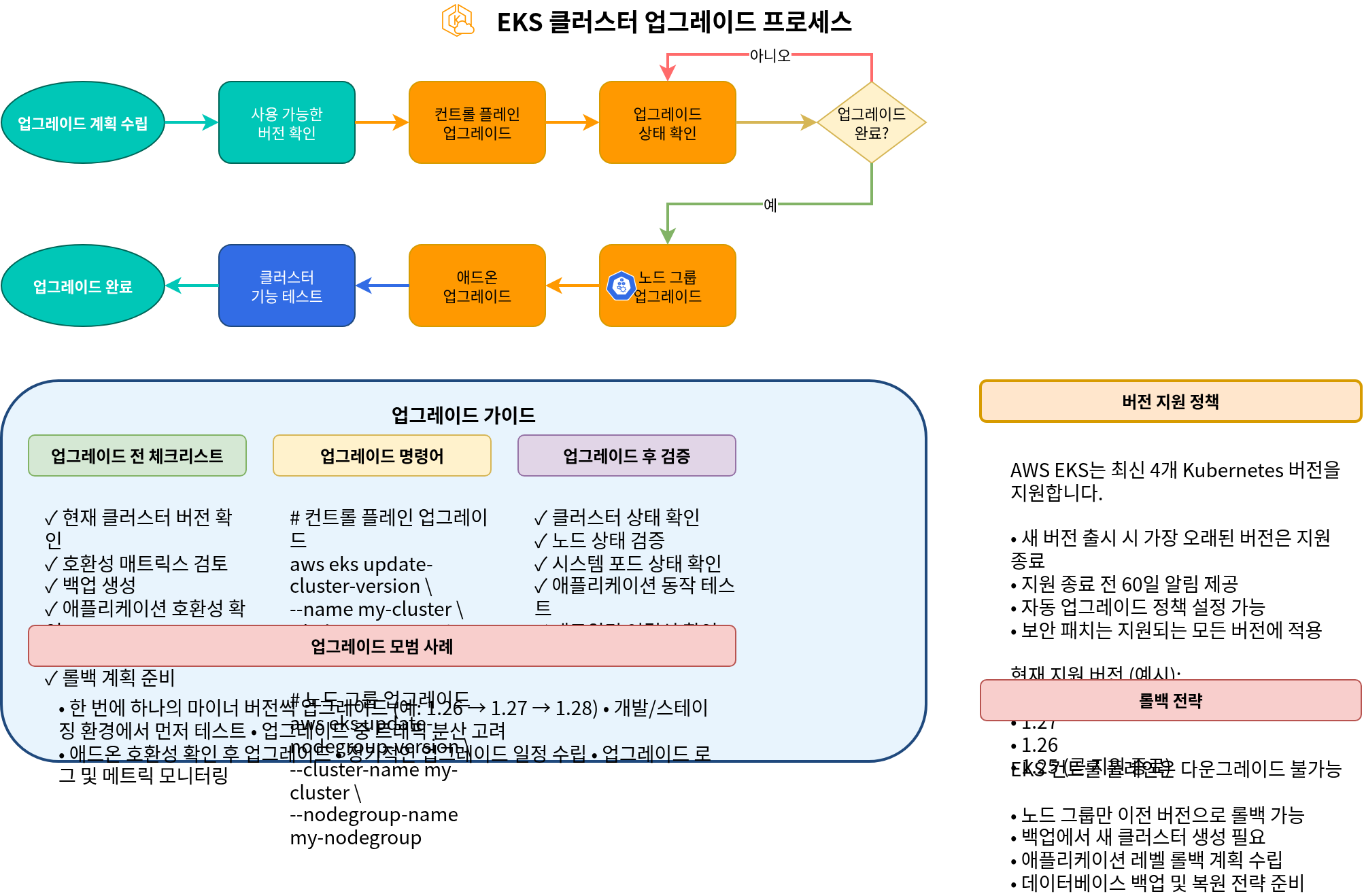
Control Plane Upgrade
To upgrade the EKS control plane, follow these steps:
- Check available Kubernetes versions:
aws eks describe-addon-versions \
  --kubernetes-version 1.27 \
--query "addons[].addonVersions[].compatibilities[].clusterVersion"- Upgrade the cluster:
aws eks update-cluster-version \
  --name my-cluster \
--kubernetes-version 1.27- Check upgrade status:
aws eks describe-update \
  --name my-cluster \
  --update-id <UPDATE-ID>
Node Upgrade
After upgrading the control plane, nodes must also be upgraded:
Managed Node Group Upgrade
aws eks update-nodegroup-version \
  --cluster-name my-cluster \
  --nodegroup-name my-nodegroup
Self-Managed Node Upgrade
For self-managed nodes, you need to create a new node group, migrate workloads, and then delete the old node group.
Add-on Upgrade
To upgrade EKS add-ons, follow these steps:
- Check available add-on versions:
aws eks describe-addon-versions \
  --addon-name vpc-cni \
--kubernetes-version 1.27- Upgrade the add-on:
aws eks update-addon \
  --cluster-name my-cluster \
  --addon-name vpc-cni \
  --addon-version <VERSION>
Cluster Deletion
When an EKS cluster is no longer needed, you can delete it to save costs. In this section, we will learn how to delete a cluster.
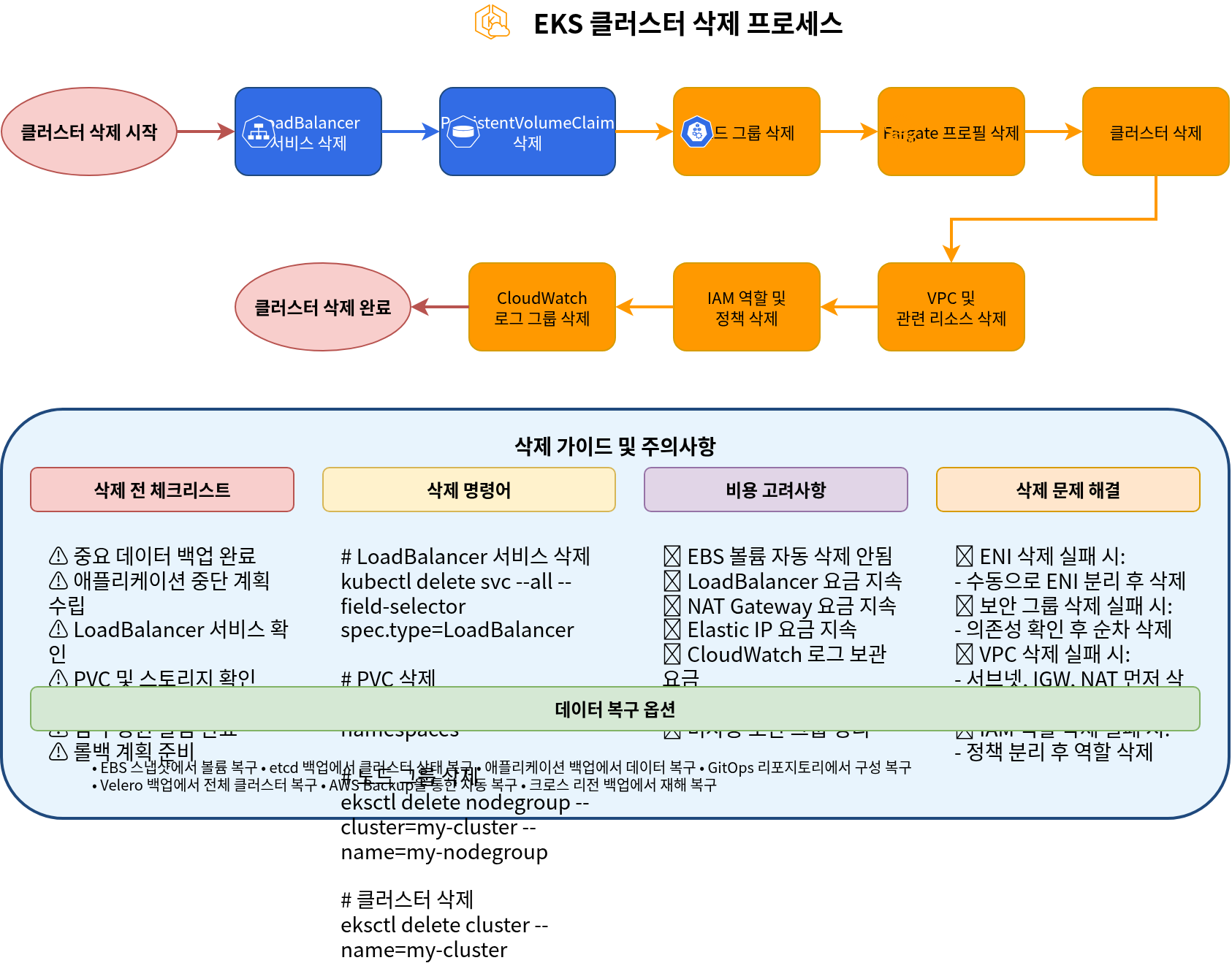
Cluster Deletion Process
Resource Cleanup
Before deleting a cluster, you must clean up all resources created in the cluster:
- Delete LoadBalancer services:
kubectl get services --all-namespaces -o json | jq -r '.items[] | select(.spec.type == "LoadBalancer") | .metadata.name + " " + .metadata.namespace' | while read name namespace; do
  kubectl delete service $name -n $namespace
done- Delete PersistentVolumeClaims:
kubectl delete pvc --all --all-namespacesDelete Cluster Using eksctl
If you created the cluster using eksctl, you can delete it with the following command:
eksctl delete cluster --name my-cluster --region us-west-2Delete Cluster Using AWS CLI
To delete a cluster using AWS CLI, follow these steps:
- Delete node group:
aws eks delete-nodegroup \
  --cluster-name my-cluster \
--nodegroup-name my-nodegroup- Delete Fargate profile:
aws eks delete-fargate-profile \
  --cluster-name my-cluster \
--fargate-profile-name my-fargate-profile- Delete cluster:
aws eks delete-cluster \
  --name my-cluster
Clean Up Related Resources
After deleting the EKS cluster, the following related resources may remain:
- VPC and related resources:
aws ec2 delete-vpc --vpc-id vpc-xxxxxxxxxxxxxxxxx- IAM roles and policies:
aws iam detach-role-policy \
  --role-name EKSClusterRole \
  --policy-arn arn:aws:iam::aws:policy/AmazonEKSClusterPolicy

aws iam delete-role --role-name EKSClusterRole

aws iam detach-role-policy \
  --role-name EKSNodeRole \
  --policy-arn arn:aws:iam::aws:policy/AmazonEKSWorkerNodePolicy

aws iam detach-role-policy \
  --role-name EKSNodeRole \
  --policy-arn arn:aws:iam::aws:policy/AmazonEKS_CNI_Policy

aws iam detach-role-policy \
  --role-name EKSNodeRole \
  --policy-arn arn:aws:iam::aws:policy/AmazonEC2ContainerRegistryReadOnly

aws iam delete-role --role-name EKSNodeRole- CloudWatch log groups:
aws logs delete-log-group \
  --log-group-name /aws/eks/my-cluster/cluster
Quiz
To test what you learned in this chapter, try the EKS Cluster Creation - Part 5 Quiz.