Parte 8: Integración con EKS
Versiones compatibles: Calico v3.29+ / Kubernetes 1.28+ / EKS 1.28+ Última actualización: February 23, 2026
Descripción general
Este capítulo cubre la integración de Calico con Amazon EKS, incluidos los patrones de arquitectura, los métodos de instalación y las optimizaciones específicas de EKS. Aprenda a aprovechar las capacidades de políticas de red de Calico junto con AWS VPC CNI para obtener una red de EKS óptima.
Arquitectura de VPC CNI + Calico
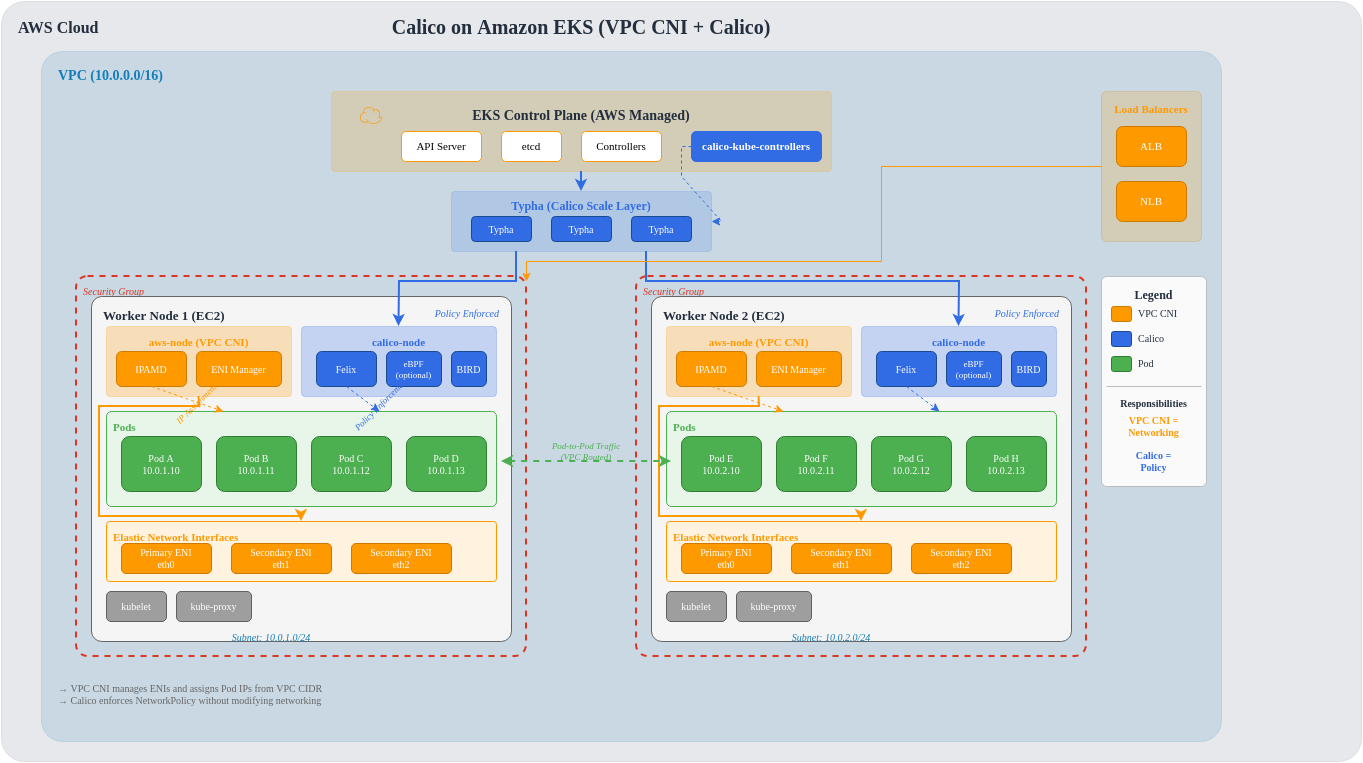
Amazon EKS utiliza AWS VPC CNI de forma predeterminada para la red de Pods. Se puede añadir Calico para obtener capacidades avanzadas de políticas de red mientras VPC CNI gestiona las direcciones IP.
Análisis detallado de la arquitectura
Flujo de tráfico con VPC CNI + Calico
Comparación de métodos de instalación
Descripción general de los métodos
| Método | Complejidad | Flexibilidad | Ruta de actualización | Integración con EKS |
|---|---|---|---|---|
| Complemento de EKS | Baja | Limitada | Automática | Nativa |
| Tigera Operator | Media | Alta | Semiautomática | Buena |
| Helm | Media | Máxima | Manual | Buena |
| Manifest | Alta | Media | Manual | Básica |
Método 1: complemento de EKS (el más sencillo)
El complemento de EKS proporciona integración nativa con la gestión del ciclo de vida de EKS.
# Enable via AWS CLI
aws eks create-addon \
  --cluster-name my-cluster \
  --addon-name vpc-cni \
  --addon-version v1.18.0-eksbuild.1 \
  --configuration-values '{"enableNetworkPolicy": "true"}'

# Or enable Calico as separate add-on (if available)
aws eks create-addon \
  --cluster-name my-cluster \
  --addon-name calico \
--service-account-role-arn arn:aws:iam::ACCOUNT:role/CalicoRole# eksctl configuration
apiVersion: eksctl.io/v1alpha5
kind: ClusterConfig
metadata:
name: my-cluster
region: us-east-1
version: "1.30"
addons:
- name: vpc-cni
version: latest
configurationValues: |
enableNetworkPolicy: "true"
nodeAgent:
enablePolicyEventLogs: "true"Ventajas:
- Actualizaciones automáticas con EKS
- Incluye soporte de AWS
- Configuración sencilla
- Integración nativa con CloudWatch
Desventajas:
- Limitado a Kubernetes NetworkPolicy
- Sin características específicas de Calico
- Menor flexibilidad de configuración
Método 2: Tigera Operator (recomendado)
# Install Tigera Operator
kubectl create -f https://raw.githubusercontent.com/projectcalico/calico/v3.29.0/manifests/tigera-operator.yaml# Installation resource for EKS
apiVersion: operator.tigera.io/v1
kind: Installation
metadata:
name: default
spec:
# Specify EKS as the Kubernetes provider
kubernetesProvider: EKS
# Use VPC CNI for networking
cni:
type: AmazonVPC
calicoNetwork:
# Disable Calico networking (using VPC CNI)
bgp: Disabled
# No IP pools needed (VPC CNI handles IPAM)
ipPools: []
# Linux dataplane
linuxDataplane: Iptables # or BPF for eBPF mode
# Component resources
componentResources:
- componentName: Node
resourceRequirements:
requests:
cpu: 100m
memory: 128Mi
limits:
cpu: 500m
memory: 256Mi
# Enable Typha for clusters > 50 nodes
typhaDeployment:
spec:
replicas: 3# Apply installation
kubectl apply -f installation.yaml
# Verify installation
kubectl get tigerastatus
kubectl get pods -n calico-systemVentajas:
- Características completas de Calico (GlobalNetworkPolicy, Tiers, etc.)
- El Operator gestiona el ciclo de vida
- Conciliación automática de componentes
- Compatibilidad con el dataplane eBPF
Desventajas:
- Despliegue de Operator adicional
- Requiere actualizaciones independientes de EKS
Método 3: instalación con Helm
# Add Tigera Helm repository
helm repo add projectcalico https://docs.tigera.io/calico/charts
helm repo update

# Install with EKS-specific values
helm install calico projectcalico/tigera-operator \
  --namespace tigera-operator \
  --create-namespace \
  --version v3.29.0 \
-f eks-values.yaml# eks-values.yaml
installation:
kubernetesProvider: EKS
cni:
type: AmazonVPC
calicoNetwork:
bgp: Disabled
linuxDataplane: Iptables
# Node configuration
nodeUpdateStrategy:
rollingUpdate:
maxUnavailable: 1
type: RollingUpdate
# Typha configuration
typhaDeployment:
replicas: 3
resources:
requests:
cpu: 100m
memory: 128Mi
limits:
cpu: 500m
memory: 256Mi
# Felix configuration via operator
felixConfiguration:
prometheusMetricsEnabled: true
prometheusMetricsPort: 9091
flowLogsFlushInterval: "15s"
flowLogsFileEnabled: true
# API server (for calicoctl access)
apiServer:
enabled: false # Set to true for Calico EnterpriseVentajas:
- Compatible con GitOps
- Control de versiones para la configuración
- Reversión sencilla
- Valores personalizables
Desventajas:
- Requiere conocimientos de Helm
- Gestión manual de actualizaciones
Controlador de Network Policy de EKS (v1.14+)
EKS 1.25+ incluye compatibilidad nativa con Network Policy mediante VPC CNI.
Habilitación de Network Policy nativa
# eksctl configuration
apiVersion: eksctl.io/v1alpha5
kind: ClusterConfig
metadata:
  name: network-policy-cluster
  region: us-east-1
  version: "1.30"

addons:
  - name: vpc-cni
    version: latest
    configurationValues: |
      enableNetworkPolicy: "true"
      nodeAgent:
        enablePolicyEventLogs: "true"
enableCloudWatchLogs: "true"# Enable via kubectl
kubectl set env daemonset aws-node -n kube-system ENABLE_NETWORK_POLICY=true
# Verify network policy agent
kubectl get pods -n kube-system -l k8s-app=aws-node
kubectl logs -n kube-system -l k8s-app=aws-node -c aws-network-policy-agentNetwork Policy nativa de EKS frente a Calico
| Característica | EKS nativo (VPC CNI) | Calico |
|---|---|---|
| Kubernetes NetworkPolicy | Sí | Sí |
| GlobalNetworkPolicy | No | Sí |
| Policy Tiers | No | Sí |
| L7 Policy (HTTP) | No | Sí (Enterprise) |
| DNS-based Policy | No | Sí |
| FQDN Egress Rules | No | Sí |
| Host Endpoint Policy | No | Sí |
| Policy Preview | No | Sí (Enterprise) |
| Flow Logs | CloudWatch | Prometheus/File |
| Rendimiento | Optimizado con eBPF | iptables/eBPF |
Consideraciones sobre el tipo de Node
Matriz de características por tipo de Node
| Característica | Nodes administrados | Autogestionado | Fargate |
|---|---|---|---|
| Calico CNI | No (VPC CNI) | Sí | No |
| Calico Policy | Sí | Sí | Limitado |
| eBPF Dataplane | Sí | Sí | No |
| BGP | No | Sí | No |
| WireGuard | Sí | Sí | No |
| Host Endpoints | Sí | Sí | No |
| Custom IPAM | No | Sí | No |
| Node Taints | Sí | Sí | N/A |
Grupos de Nodes administrados
# eksctl with managed nodes and Calico
apiVersion: eksctl.io/v1alpha5
kind: ClusterConfig
metadata:
  name: managed-calico-cluster
  region: us-east-1
  version: "1.30"

managedNodeGroups:
  - name: calico-nodes
    instanceType: m5.large
    desiredCapacity: 3
    minSize: 2
    maxSize: 10
    volumeSize: 100
    volumeType: gp3

    # Labels for Calico node selector
    labels:
      calico-enabled: "true"

    # IAM policies for Calico
    iam:
      withAddonPolicies:
        cloudWatch: true

    # Taints (optional)
    taints:
      - key: calico
        value: "true"
        effect: NoSchedule
Nodes autogestionados (Calico completo)
# Self-managed nodes with full Calico networking
apiVersion: eksctl.io/v1alpha5
kind: ClusterConfig
metadata:
  name: self-managed-calico
  region: us-east-1
  version: "1.30"

# Disable VPC CNI for self-managed nodes
addons:
  - name: vpc-cni
    version: latest
    configurationValues: |
      enableNetworkPolicy: "false"

nodeGroups:
  - name: calico-full-nodes
    instanceType: m5.xlarge
    desiredCapacity: 3

    # Custom AMI with Calico pre-installed (optional)
    ami: ami-0123456789abcdef0

    # Disable VPC CNI on these nodes
    overrideBootstrapCommand: |
      #!/bin/bash
      # Remove VPC CNI
      /etc/eks/bootstrap.sh my-cluster \
        --kubelet-extra-args '--network-plugin=cni'

    labels:
      networking: calico-full

# Then install full Calico CNI on these nodes
Consideraciones sobre Fargate
# Fargate profile with limited Calico support
apiVersion: eksctl.io/v1alpha5
kind: ClusterConfig
metadata:
  name: fargate-cluster
  region: us-east-1

fargateProfiles:
  - name: default
    selectors:
      - namespace: default
      - namespace: production
    # Note: Only Kubernetes NetworkPolicy works on Fargate
    # Calico GlobalNetworkPolicy does NOT apply to Fargate pods
Limitaciones de Fargate:
- Solo Kubernetes NetworkPolicy estándar
- Sin Calico GlobalNetworkPolicy
- Sin dataplane eBPF
- Sin políticas de Host Endpoint
- Sin IPAM personalizado
Configuración de IRSA
IAM Roles for Service Accounts (IRSA) proporciona permisos IAM detallados para los componentes de Calico.
# Create IAM policy for Calico
# calico-policy.json
{
  "Version": "2012-10-17",
  "Statement": [
    {
      "Effect": "Allow",
      "Action": [
        "logs:CreateLogGroup",
        "logs:CreateLogStream",
        "logs:PutLogEvents",
        "logs:DescribeLogGroups",
        "logs:DescribeLogStreams"
      ],
      "Resource": "arn:aws:logs:*:*:log-group:/aws/calico/*"
    },
    {
      "Effect": "Allow",
      "Action": [
        "ec2:DescribeInstances",
        "ec2:DescribeNetworkInterfaces",
        "ec2:DescribeSecurityGroups",
        "ec2:DescribeSubnets",
        "ec2:DescribeVpcs"
      ],
      "Resource": "*"
    }
  ]
}# Create IAM policy
aws iam create-policy \
--policy-name CalicoPolicy \
--policy-document file://calico-policy.json
# Create IRSA for Calico
eksctl create iamserviceaccount \
--cluster my-cluster \
--namespace calico-system \
--name calico-node \
--attach-policy-arn arn:aws:iam::ACCOUNT:policy/CalicoPolicy \
--approve# Calico installation with IRSA
apiVersion: operator.tigera.io/v1
kind: Installation
metadata:
name: default
spec:
kubernetesProvider: EKS
cni:
type: AmazonVPC
# Reference the IRSA service account
nodeMetadata: "true"
calicoNetwork:
bgp: DisabledSecurity Group frente a Calico Policy
Comparación
| Aspecto | Security Groups | Calico Policy |
|---|---|---|
| Alcance | Instance/ENI | Pod/Namespace/Cluster |
| Granularidad | IP/Port | Labels/Selectors/FQDN |
| Capa | L3-L4 | L3-L7 |
| Selección de Pod | Por Instance | Por Labels |
| Actualizaciones dinámicas | Limitadas | En tiempo real |
| Auditoría | CloudTrail | Flow Logs |
| Entre AZ | Sí | Sí |
| Costo | Gratuito | Gratuito (OSS) |
Uso de ambos conjuntamente
# Security Group for node-level protection
# (Managed via AWS Console or Terraform)

# Calico for pod-level protection
apiVersion: projectcalico.org/v3
kind: NetworkPolicy
metadata:
  name: frontend-policy
  namespace: production
spec:
  selector: app == 'frontend'
  ingress:
    - action: Allow
      source:
        selector: app == 'load-balancer'
      protocol: TCP
      destination:
        ports:
          - 80
          - 443
  egress:
    - action: Allow
      destination:
        selector: app == 'backend'
      protocol: TCP
      destination:
        ports:
          - 8080
---
# Security Groups for Pods (EKS feature)
apiVersion: vpcresources.k8s.aws/v1beta1
kind: SecurityGroupPolicy
metadata:
  name: frontend-sg
  namespace: production
spec:
  podSelector:
    matchLabels:
      app: frontend
  securityGroups:
    groupIds:
      - sg-0123456789abcdef0
Consideraciones sobre la actualización de EKS
Matriz de compatibilidad
| Versión de EKS | Calico 3.26 | Calico 3.27 | Calico 3.28 | Calico 3.29 |
|---|---|---|---|---|
| 1.27 | Sí | Sí | Sí | Sí |
| 1.28 | Sí | Sí | Sí | Sí |
| 1.29 | Limitado | Sí | Sí | Sí |
| 1.30 | No | Sí | Sí | Sí |
| 1.31 | No | Limitado | Sí | Sí |
Procedimiento de actualización
# 1. Check current versions
kubectl get pods -n calico-system -o jsonpath='{.items[*].spec.containers[*].image}'
aws eks describe-cluster --name my-cluster --query 'cluster.version'

# 2. Review release notes for compatibility
# https://docs.tigera.io/calico/latest/release-notes/

# 3. Upgrade Calico first (before EKS)
helm upgrade calico projectcalico/tigera-operator \
  --namespace tigera-operator \
  --version v3.29.0 \
  -f eks-values.yaml

# 4. Verify Calico health
kubectl get tigerastatus
calicoctl node status

# 5. Upgrade EKS control plane
aws eks update-cluster-version \
  --name my-cluster \
  --kubernetes-version 1.30

# 6. Upgrade node groups
eksctl upgrade nodegroup \
  --cluster my-cluster \
  --name calico-nodes \
  --kubernetes-version 1.30
Consideraciones de costo
Factores de costo
| Componente | Factor de costo | Optimización |
|---|---|---|
| IPs de VPC CNI | Adjuntos de ENI, asignación de IP | Usar delegación de prefijos |
| Calico Typha | Recursos de Instance | Ajustar correctamente las réplicas |
| Flow Logs | Almacenamiento, procesamiento | Agregar, filtrar |
| Entre AZ | Transferencia de datos | Afinidad de zona |
| eBPF | Eficiencia de CPU | Habilitar donde sea compatible |
Estrategias de optimización de costos
# 1. Enable VPC CNI prefix delegation (reduce ENI usage)
apiVersion: v1
kind: ConfigMap
metadata:
  name: amazon-vpc-cni
  namespace: kube-system
data:
  enable-prefix-delegation: "true"
  warm-prefix-target: "1"
---
# 2. Optimize Calico resource allocation
apiVersion: operator.tigera.io/v1
kind: Installation
metadata:
  name: default
spec:
  componentResources:
    - componentName: Node
      resourceRequirements:
        requests:
          cpu: 50m  # Start low, scale as needed
          memory: 64Mi
        limits:
          cpu: 200m
          memory: 128Mi
---
# 3. Reduce flow log storage
apiVersion: projectcalico.org/v3
kind: FelixConfiguration
metadata:
  name: default
spec:
  flowLogsFlushInterval: "60s"  # Less frequent
  flowLogsFileAggregationKindForAllowed: 2  # Aggregate allowed flows
Optimización del rendimiento de EKS
Delegación de prefijos
# Enable prefix delegation for better IP density
apiVersion: v1
kind: ConfigMap
metadata:
  name: amazon-vpc-cni
  namespace: kube-system
data:
  enable-prefix-delegation: "true"
  warm-prefix-target: "1"
  minimum-ip-target: "16"
  warm-ip-target: "4"
eBPF en EKS
# Enable eBPF dataplane on EKS
apiVersion: operator.tigera.io/v1
kind: Installation
metadata:
  name: default
spec:
  kubernetesProvider: EKS
  cni:
    type: AmazonVPC
  calicoNetwork:
    bgp: Disabled
    linuxDataplane: BPF
---
apiVersion: projectcalico.org/v3
kind: FelixConfiguration
metadata:
  name: default
spec:
  bpfEnabled: true
  bpfExternalServiceMode: "Tunnel"  # or "DSR" for direct server return
  bpfKubeProxyIptablesCleanupEnabled: false  # Keep kube-proxy on EKS
  bpfDataIfacePattern: "^(eth.*)"
Nota: En EKS, mantenga kube-proxy en ejecución incluso con el modo eBPF, ya que la integración con VPC CNI lo requiere.
Configuración completa de eksctl
# Full EKS cluster with Calico - production-ready
apiVersion: eksctl.io/v1alpha5
kind: ClusterConfig

metadata:
  name: production-calico-cluster
  region: us-east-1
  version: "1.30"
  tags:
    environment: production
    networking: calico

# IAM configuration
iam:
  withOIDC: true
  serviceAccounts:
    - metadata:
        name: calico-node
        namespace: calico-system
      wellKnownPolicies:
        cloudWatch: true
      attachPolicy:
        Version: "2012-10-17"
        Statement:
          - Effect: Allow
            Action:
              - "ec2:DescribeInstances"
              - "ec2:DescribeNetworkInterfaces"
            Resource: "*"

# VPC configuration
vpc:
  cidr: 10.0.0.0/16
  nat:
    gateway: HighlyAvailable
  clusterEndpoints:
    publicAccess: true
    privateAccess: true

# Add-ons
addons:
  - name: vpc-cni
    version: latest
    configurationValues: |
      enableNetworkPolicy: "false"
      env:
        ENABLE_PREFIX_DELEGATION: "true"
        WARM_PREFIX_TARGET: "1"
  - name: coredns
    version: latest
  - name: kube-proxy
    version: latest

# Managed node groups
managedNodeGroups:
  - name: system-nodes
    instanceType: m5.large
    desiredCapacity: 3
    minSize: 3
    maxSize: 6
    volumeSize: 100
    volumeType: gp3
    labels:
      role: system
      calico: "true"
    taints:
      - key: CriticalAddonsOnly
        effect: NoSchedule
    iam:
      withAddonPolicies:
        cloudWatch: true
    availabilityZones:
      - us-east-1a
      - us-east-1b
      - us-east-1c

  - name: workload-nodes
    instanceType: m5.xlarge
    desiredCapacity: 6
    minSize: 3
    maxSize: 20
    volumeSize: 200
    volumeType: gp3
    labels:
      role: workload
      calico: "true"
    iam:
      withAddonPolicies:
        cloudWatch: true
        autoScaler: true
    availabilityZones:
      - us-east-1a
      - us-east-1b
      - us-east-1c

# Logging
cloudWatch:
  clusterLogging:
    enableTypes:
      - api
      - audit
      - authenticator
      - controllerManager
      - scheduler
Instalación de Helm paso a paso
# Step 1: Create EKS cluster
eksctl create cluster -f cluster-config.yaml

# Step 2: Verify cluster
kubectl get nodes
aws eks describe-cluster --name production-calico-cluster

# Step 3: Add Tigera Helm repo
helm repo add projectcalico https://docs.tigera.io/calico/charts
helm repo update

# Step 4: Create namespace
kubectl create namespace tigera-operator

# Step 5: Create values file
cat > calico-values.yaml << 'EOF'
installation:
  kubernetesProvider: EKS
  cni:
    type: AmazonVPC
  calicoNetwork:
    bgp: Disabled
    linuxDataplane: Iptables
  nodeUpdateStrategy:
    rollingUpdate:
      maxUnavailable: 1
    type: RollingUpdate
  componentResources:
    - componentName: Node
      resourceRequirements:
        requests:
          cpu: 100m
          memory: 128Mi
        limits:
          cpu: 500m
          memory: 256Mi
    - componentName: Typha
      resourceRequirements:
        requests:
          cpu: 100m
          memory: 128Mi
        limits:
          cpu: 500m
          memory: 256Mi

typhaDeployment:
  replicas: 3

apiServer:
  enabled: false
EOF

# Step 6: Install Calico
helm install calico projectcalico/tigera-operator \
  --namespace tigera-operator \
  --version v3.29.0 \
  -f calico-values.yaml

# Step 7: Wait for installation
kubectl wait --for=condition=Available deployment/calico-typha \
  -n calico-system --timeout=300s

# Step 8: Verify installation
kubectl get pods -n calico-system
kubectl get tigerastatus

# Step 9: Install calicoctl
curl -L https://github.com/projectcalico/calico/releases/download/v3.29.0/calicoctl-linux-amd64 -o calicoctl
chmod +x calicoctl
sudo mv calicoctl /usr/local/bin/

# Step 10: Configure calicoctl
export DATASTORE_TYPE=kubernetes
export KUBECONFIG=~/.kube/config

# Step 11: Verify connectivity
calicoctl node status
calicoctl get nodes -o wide

# Step 12: Apply default deny policy (optional)
kubectl apply -f - << 'EOF'
apiVersion: projectcalico.org/v3
kind: GlobalNetworkPolicy
metadata:
  name: default-deny
spec:
  selector: all()
  types:
    - Ingress
    - Egress
EOF

echo "Calico installation complete!"
Referencias
- Prácticas recomendadas de EKS - Redes
- Documentación de Calico en EKS
- Documentación de VPC CNI
- Complementos de EKS
- Security Groups para Pods
Cuestionario
Para comprobar lo que aprendió en este capítulo, pruebe el cuestionario de integración de EKS.