Security
Supported Versions: Istio 1.28 Last Updated: February 19, 2026
Istio provides robust security features within the service mesh. Based on the Zero Trust security model, it automatically encrypts service-to-service communication and provides fine-grained access control.
Table of Contents
- Security Architecture Overview
- Core Security Features
- Security Components
- Detailed Documentation
- Security Best Practices
- Security Monitoring
Security Architecture Overview
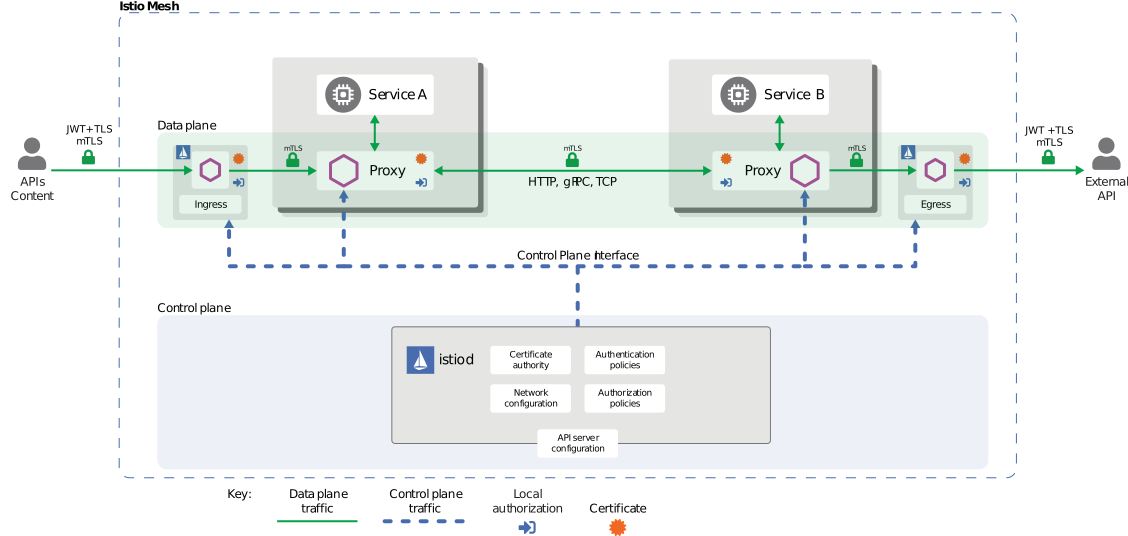
Istio implements a Zero Trust security model to protect all communication within the service mesh. The security architecture consists of 4 core layers:
Security Architecture Layers
Core Architecture Components:
Control Plane (istiod)
- Certificate Authority (CA): X.509 certificate issuance and management
- Configuration API: Security policy distribution and management
- Service Discovery: Workload identity management
Data Plane (Envoy Proxy)
- mTLS Termination Points: Encrypted communication between services
- Policy Enforcement: Authentication/authorization policy application
- Security Telemetry: Security metrics collection
Identity Management
- Strong identity management based on SPIFFE standard
- Integration with Kubernetes ServiceAccount
- Automatic certificate renewal (default 24 hours)
Policy Engine
- Declarative security policies (CRD-based)
- Fine-grained access control (RBAC)
- Audit logging support
Core Security Features
Istio provides the following core security features:
1. Communication Security (mTLS)

All service-to-service communication is automatically encrypted. Istio supports gradual migration through PERMISSIVE mode.
apiVersion: security.istio.io/v1
kind: PeerAuthentication
metadata:
  name: default
  namespace: istio-system
spec:
  mtls:
    mode: STRICT  # Production: STRICT, Migration: PERMISSIVE
Mode Descriptions:
- STRICT: Only mTLS allowed (recommended for production)
- PERMISSIVE: Both mTLS and plaintext allowed (for migration)
- DISABLE: mTLS disabled
2. Authentication
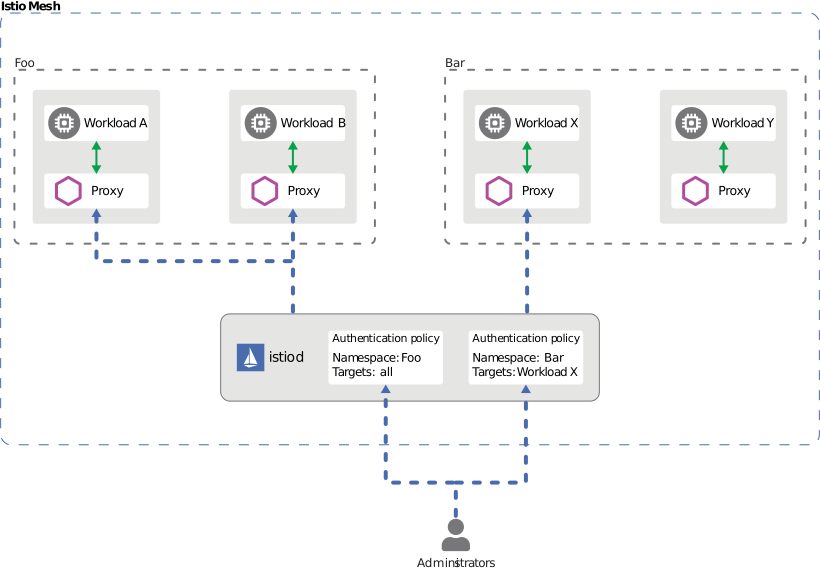
Istio provides two layers of authentication:
- Peer Authentication: Service-to-service authentication (mTLS + SPIFFE ID)
- Request Authentication: End-user authentication (JWT + OAuth/OIDC)
Example:
# Request Authentication (JWT)
apiVersion: security.istio.io/v1
kind: RequestAuthentication
metadata:
  name: jwt-auth
spec:
  jwtRules:
  - issuer: "https://accounts.google.com"
    jwksUri: "https://www.googleapis.com/oauth2/v3/certs"
3. Authorization
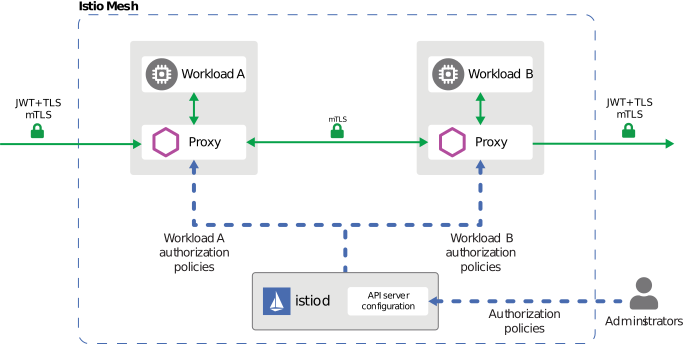
Fine-grained access control policies are applied. AuthorizationPolicy controls based on:
- Service Account / Namespace
- HTTP Method / Path
- IP Address
- JWT Claims
apiVersion: security.istio.io/v1
kind: AuthorizationPolicy
metadata:
  name: allow-read
spec:
  action: ALLOW
  rules:
  - from:
    - source:
        principals: ["cluster.local/ns/default/sa/myapp"]
    to:
    - operation:
        methods: ["GET"]
        paths: ["/api/*"]
Security Best Practices
1. Defense in Depth

Implement defense in depth by applying security at multiple layers:
Network Layer:
# 1. Enable mTLS STRICT mode
apiVersion: security.istio.io/v1
kind: PeerAuthentication
metadata:
  name: default
  namespace: istio-system
spec:
  mtls:
    mode: STRICT
Application Layer:
# 2. Enable JWT authentication
apiVersion: security.istio.io/v1
kind: RequestAuthentication
metadata:
  name: require-jwt
spec:
  jwtRules:
  - issuer: "https://your-auth-provider.com"
    jwksUri: "https://your-auth-provider.com/.well-known/jwks.json"
Access Control Layer:
# 3. Default deny policy
apiVersion: security.istio.io/v1
kind: AuthorizationPolicy
metadata:
  name: deny-all
spec:
  action: DENY
  rules:
  - {}
---
# 4. Allow only required access
apiVersion: security.istio.io/v1
kind: AuthorizationPolicy
metadata:
  name: allow-specific
spec:
  action: ALLOW
  rules:
  - from:
    - source:
        principals: ["cluster.local/ns/frontend/sa/webapp"]
    to:
    - operation:
        methods: ["GET", "POST"]
2. Principle of Least Privilege
- Grant only minimum required permissions to each service
- Separate ServiceAccounts granularly
- Utilize namespace isolation
3. Security Monitoring
- Enable Istio Access Logs
- Collect security metrics with Prometheus
- Monitor mTLS status with Kiali
Next Steps
- mTLS: Service-to-service encryption and identity management
- Authentication: JWT and OAuth/OIDC integration
- Authorization: Fine-grained access control policies
References
Official Documentation
Related Standards
Quiz
To test your knowledge from this chapter, try the Istio Security Quiz.