Introduction to EKS
Supported Versions: Amazon EKS 1.31, 1.32, 1.33 Last Updated: February 21, 2026
Amazon Elastic Kubernetes Service (EKS) is a managed service for running Kubernetes on AWS. In this chapter, we will explore the basic concepts of EKS, its architecture, and the differences from standard Kubernetes.
EKS and Kubernetes
EKS is a managed service that provides standard Kubernetes APIs. For detailed information about the basic concepts and operation of Kubernetes, refer to the Introduction to Kubernetes document.
Key Benefits of EKS
- Managed Control Plane: AWS manages the availability and scalability of the Kubernetes control plane
- Enhanced Security: Authentication and authorization through integration with AWS IAM
- AWS Service Integration: Seamless integration with other AWS services (ELB, ECR, IAM, etc.)
- Various Compute Options: Support for multiple compute options including EC2, Fargate, and Bottlerocket
- Auto Scaling: Auto scaling support through Cluster Autoscaler, Karpenter, etc.
- Managed Node Groups: Automated node lifecycle management
EKS Architecture and Components
The overall architecture of Amazon EKS is as follows:
Control Plane
EKS provides a highly available control plane. The control plane runs across multiple availability zones and consists of the following components:
- API Server: Exposes the Kubernetes API and handles interaction with the cluster.
- etcd: A distributed key-value store that stores the cluster state.
- Controller Manager: Runs controllers that manage the cluster state.
- Scheduler: Assigns pods to nodes.
In EKS, these control plane components are managed by AWS, so users don't need to manage them directly.
Data Plane
The EKS data plane can be configured with the following options:
- Managed Node Groups: Node groups consisting of EC2 instances where AWS manages the node lifecycle.
- Self-Managed Nodes: EC2 instances managed directly by the user.
- AWS Fargate: A serverless compute engine that eliminates the need to manage infrastructure for running containers.
Networking
EKS uses the Amazon VPC CNI plugin to provide pod networking. This plugin assigns VPC IP addresses to each pod, enabling the use of AWS networking capabilities.
Differences Between Standard Kubernetes and EKS
Management Responsibility
- Standard Kubernetes: Users must manage both the control plane and data plane.
- EKS: AWS manages the control plane, and users only need to manage the data plane.
Networking
- Standard Kubernetes: You can choose from various CNI plugins.
- EKS: By default, Amazon VPC CNI is used, and each pod is assigned a VPC IP address.
Load Balancing
- Standard Kubernetes: A separate controller must be installed to use
LoadBalancertype services. - EKS:
LoadBalancertype services automatically create an AWS Network Load Balancer (NLB). To use an Application Load Balancer (ALB), you need to install the AWS Load Balancer Controller.
Storage
- Standard Kubernetes: Various storage drivers must be installed and configured manually.
- EKS: The AWS EBS CSI driver is provided by default, and drivers for other AWS storage services like EFS and FSx can be easily installed.
EKS Cost Structure
The costs incurred when operating an EKS cluster are as follows:
- EKS Control Plane Cost: An hourly fee is charged per cluster.
- Compute Costs:
- EC2 instances (managed or self-managed nodes)
- Fargate (charged based on pod runtime and resource usage)
- Storage Costs: Costs for storage services such as EBS, EFS, FSx
- Network Costs: Data transfer and load balancer usage costs
Cost Optimization Strategies
- Use Spot Instances: Can reduce costs by up to 90%.
- Leverage Fargate: Suitable for workloads with low utilization.
- Configure Auto Scaling: Automatically scale nodes up and down as needed.
- Locality Routing: Keep traffic within the same availability zone to reduce network costs.
- EKS Auto Mode: Optimize costs through automatic cluster scaling.
- Hybrid Nodes: Increase cost efficiency by mixing various instance types.
Integration with AWS Services
EKS integrates with the following AWS services:
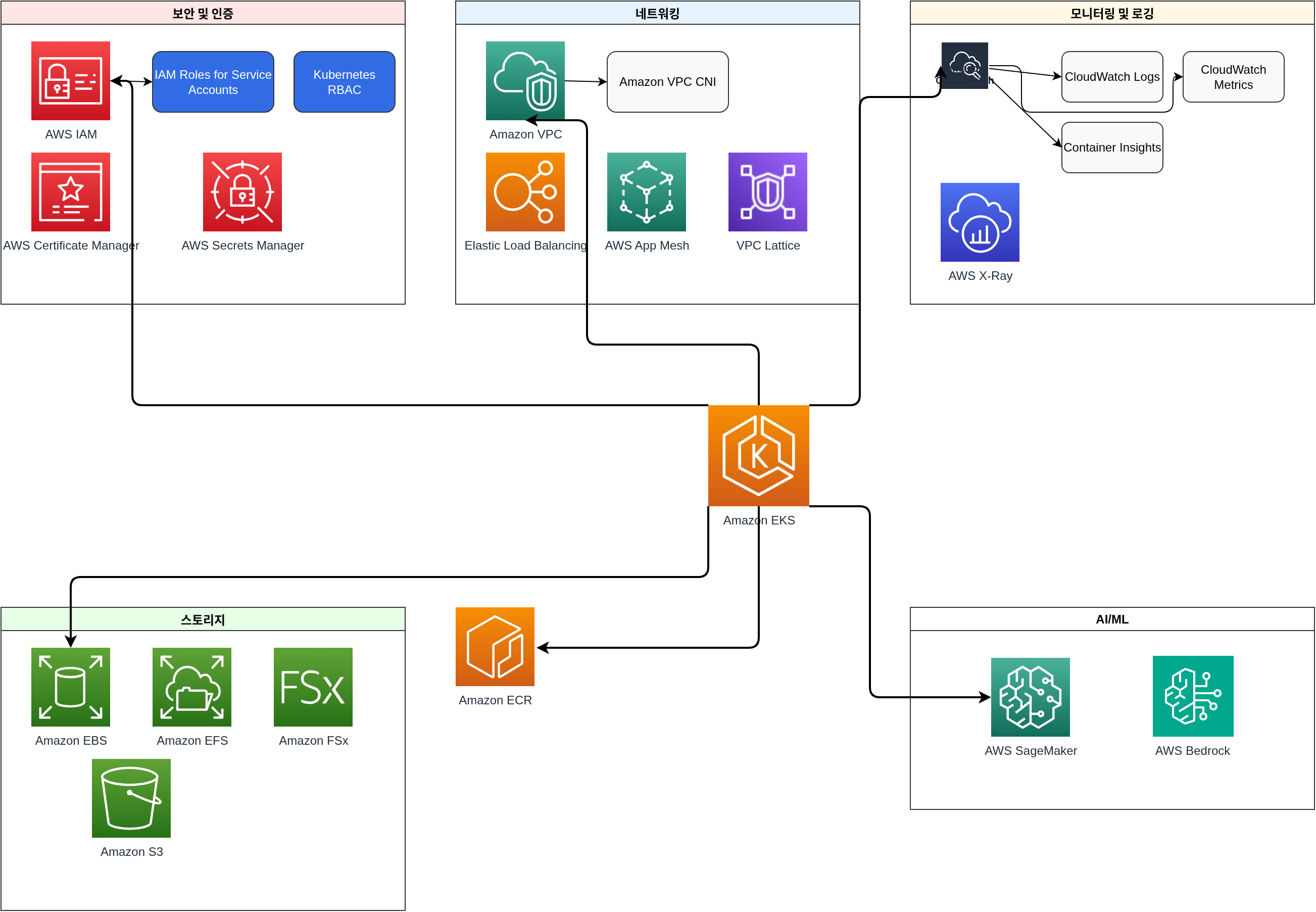
- IAM: Manages authentication and authorization by integrating with Kubernetes RBAC.
- VPC: Provides networking infrastructure.
- CloudWatch: Provides monitoring and logging.
- ALB/NLB: Provides load balancing.
- ECR: Provides container image registry.
- EBS/EFS/FSx: Provides persistent storage.
- AWS App Mesh: Provides service mesh capabilities.
- AWS Certificate Manager: Manages SSL/TLS certificates.
- AWS Secrets Manager: Securely stores and manages sensitive information.
- AWS SageMaker: Runs machine learning workloads.
- AWS Bedrock: Leverages generative AI models.
EKS Best Practices
- Cluster Design:
- Deploy nodes across multiple availability zones
- Select appropriate instance types
- Establish node group strategy
- Security:
- Apply the principle of least privilege
- Implement network policies
- Apply pod security policies
- Image scanning and vulnerability management
- Networking:
- Proper subnet design
- Security group configuration
- Leverage Locality Routing
- Monitoring and Logging:
- Enable CloudWatch Container Insights
- Configure control plane logging
- Leverage Prometheus and Grafana
- Upgrade Strategy:
- Plan regular upgrades
- Consider blue/green deployment strategy
- Perform testing before upgrades
Quiz
To test what you learned in this chapter, try the Amazon EKS Introduction Quiz.