EKS Hybrid Nodes
Supported Versions: EKS 1.31+, nodeadm 0.1+ Last Updated: February 23, 2026
Amazon EKS Hybrid Nodes is a feature that allows you to manage on-premises servers from the AWS EKS control plane. This guide covers the concepts, configuration methods, and practical usage of EKS Hybrid Nodes in production environments.
Table of Contents
- Prerequisites and System Requirements
- Network Configuration
- Air-Gap Environment Setup (S3 + VPC Endpoints)
- Node Bootstrap
- GPU Server Integration
- Workload Placement Strategies
- Node Lifecycle Management
- Operations and Maintenance
- Bare Metal Server OS Installation and Migration Guide
- Hybrid Nodes Gateway
What are Hybrid Nodes?
EKS Hybrid Nodes is a feature that enables you to register servers in your on-premises data center or edge environment as Kubernetes nodes managed by the AWS EKS control plane. This allows you to manage cloud and on-premises infrastructure as a single Kubernetes cluster.
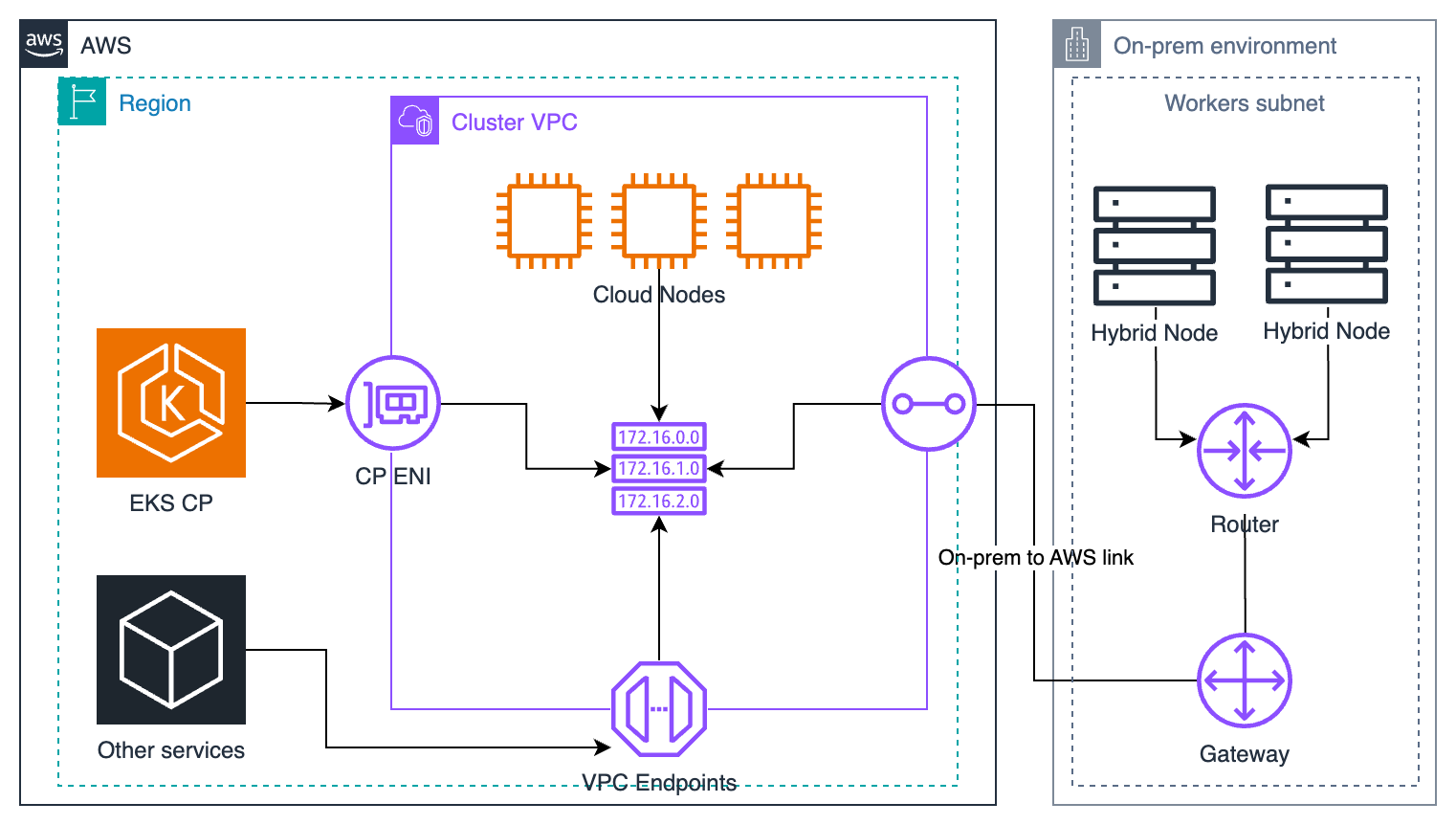
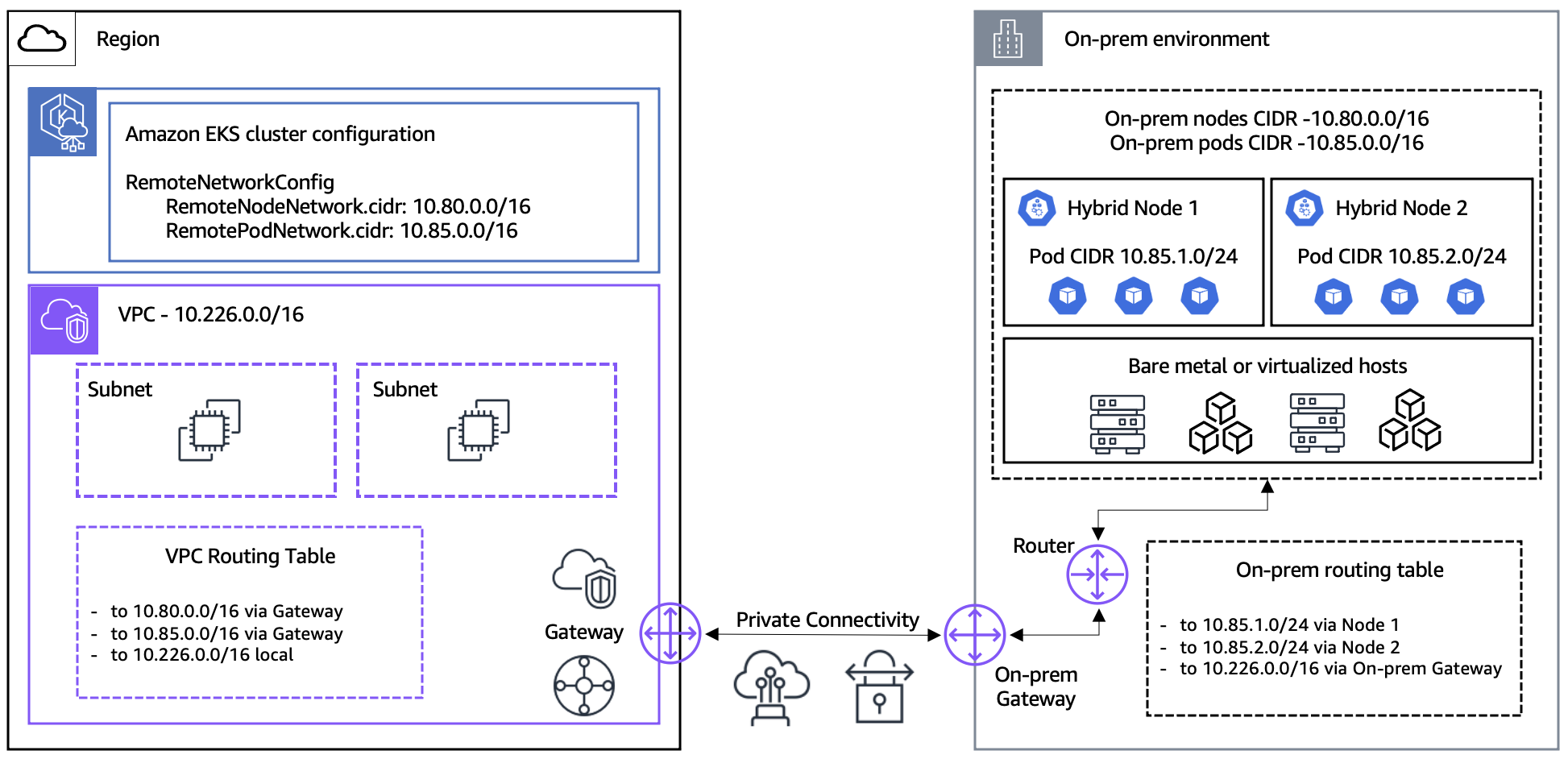
The following diagram shows the network prerequisites including VPC, subnets, Transit Gateway/Virtual Private Gateway, and Remote Node/Pod CIDR connectivity.
Why Use Hybrid Nodes?
1. Regulatory Compliance and Data Sovereignty
Certain industries (finance, healthcare, government) have regulations requiring data to remain within specific regions or facilities. With Hybrid Nodes, you can keep sensitive data on-premises while leveraging EKS management capabilities.
# Example of regulatory compliance workload placement
apiVersion: v1
kind: Pod
metadata:
  name: financial-data-processor
spec:
  nodeSelector:
    topology.kubernetes.io/zone: "on-premises"
    compliance.company.io/data-sovereignty: "required"
  containers:
  - name: processor
    image: harbor.internal.company.io/finance/data-processor:v1.2.0
2. Data Gravity
When large datasets exist on-premises, it's more efficient to bring compute closer to the data rather than moving data to the cloud.
3. Leveraging Existing Hardware
You can continue to utilize already-invested high-performance servers (especially GPU servers) while applying modern Kubernetes-based workload management.
4. Unified Management
Managing Kubernetes workloads in both cloud and on-premises environments from a single control plane reduces operational complexity.
Architecture Components
The EKS Hybrid Nodes architecture consists of the following components:
| Component | Location | Role |
|---|---|---|
| EKS Control Plane | AWS | API server, etcd, controller manager, scheduler |
| nodeadm | On-Premises | Node bootstrap and management agent |
| kubelet | On-Premises | Pod execution and node status reporting |
| containerd | On-Premises | Container runtime |
| VPN/Direct Connect | Network | Secure connection between AWS and on-premises |
| SSM Agent or IAM Roles Anywhere | On-Premises | Credential management |
Key Constraints and Limitations
- Network connectivity: Requires reliable on-premises to AWS connectivity via VPN or Direct Connect (not suitable for disconnected, intermittent, limited, or denied environments)
- CIDR limits: Up to 15 CIDRs for Remote Node Networks and Remote Pod Networks per cluster
- IPv4 only: Must use IPv4 address family (IPv6 not supported for hybrid nodes)
- Authentication mode: Cluster must use
APIorAPI_AND_CONFIG_MAPauthentication mode - Endpoint access: Must use Public OR Private only ("Public and Private" not supported — causes hybrid node join failures)
- Per-vCPU pricing: Hybrid nodes are charged per-vCPU hourly (no minimum commitments)
- Cloud infrastructure: Not supported on cloud infrastructure (running on EC2 will incur hybrid node fees)
- VPC CNI: Amazon VPC CNI is not compatible with hybrid nodes; use Cilium or Calico
Credential Provider Options
EKS Hybrid Nodes supports two credential providers for authenticating on-premises nodes with AWS:
| Feature | SSM Hybrid Activations | IAM Roles Anywhere |
|---|---|---|
| Setup complexity | Simple — activation code/ID pair | Moderate — requires PKI infrastructure |
| Certificate required | No | Yes (X.509 certificate per node) |
| Air-gap compatible | No (requires SSM endpoint access) | Yes (works with local CA) |
| Credential rotation | Automatic (AWS managed, 1-hour TTL fixed) | Automatic (certificate-based, 1-12 hours configurable) |
| Node naming | Auto-generated (mi-xxxx, not customizable) | Custom (must match certificate CN) |
| Scaling limits | 1,000 free per account per region; advanced-instances tier for more (extra cost) | No limits |
| AWS dependency | SSM service | IAM Roles Anywhere service |
| Best for | Standard environments with internet/VPN | Air-gap, strict compliance, existing PKI |
Recommendation: Use SSM Hybrid Activations for simplicity in most environments. Choose IAM Roles Anywhere when you need air-gap support or already have PKI infrastructure.
Primary Use Cases
- AI/ML Workloads: Model training on on-premises GPU servers, inference services in the cloud
- Financial Services: Transaction data processing on-premises, analytics in the cloud
- Manufacturing: Edge computing in factories integrated with central cloud
- Media Processing: Large media file processing where the data resides
Next Steps
Start with the Prerequisites and System Requirements to ensure your environment is ready for EKS Hybrid Nodes.
Quiz
To test your understanding of EKS Hybrid Nodes, try the following quiz:
Related Documents
- EKS Resiliency Guide - High availability configuration in hybrid environments
- EKS Cost Optimization - Cost management strategies
- EKS Monitoring and Logging - Integrated monitoring configuration