Part 6: eBPF Dataplane
Supported Versions: Calico v3.29+ / Kubernetes 1.28+ Last Updated: February 23, 2026
Introduction
Calico's eBPF dataplane represents a significant evolution in Kubernetes networking, replacing traditional iptables-based packet processing with modern eBPF programs. This approach delivers substantial performance improvements, reduced latency, and enhanced observability capabilities.
This deep dive explores eBPF fundamentals from a networking perspective, Calico's eBPF architecture, migration strategies, and performance optimization techniques.
eBPF Fundamentals
What is eBPF?
eBPF (extended Berkeley Packet Filter) is a revolutionary technology that allows running sandboxed programs in the Linux kernel without modifying kernel source code or loading kernel modules.
Key eBPF Concepts for Networking
| Concept | Description | Use in Calico |
|---|---|---|
| Programs | Bytecode executed at kernel hooks | Packet filtering, routing |
| Maps | Key-value stores shared between programs | Route tables, policy rules |
| Hooks | Attachment points in kernel | XDP, TC, socket |
| Helpers | Kernel functions callable from eBPF | Packet manipulation, map operations |
| BTF | Type information for maps/programs | Debug info, CO-RE |
eBPF vs iptables
| Aspect | iptables | eBPF |
|---|---|---|
| Architecture | Sequential rule chains | Direct execution |
| Complexity | O(n) rule matching | O(1) map lookup |
| Kernel Crossings | Multiple per packet | Minimal |
| Programmability | Fixed rule types | Flexible programs |
| Observability | Limited counters | Rich metrics |
| CPU Efficiency | Higher interrupt overhead | Lower overhead |
Calico eBPF Architecture
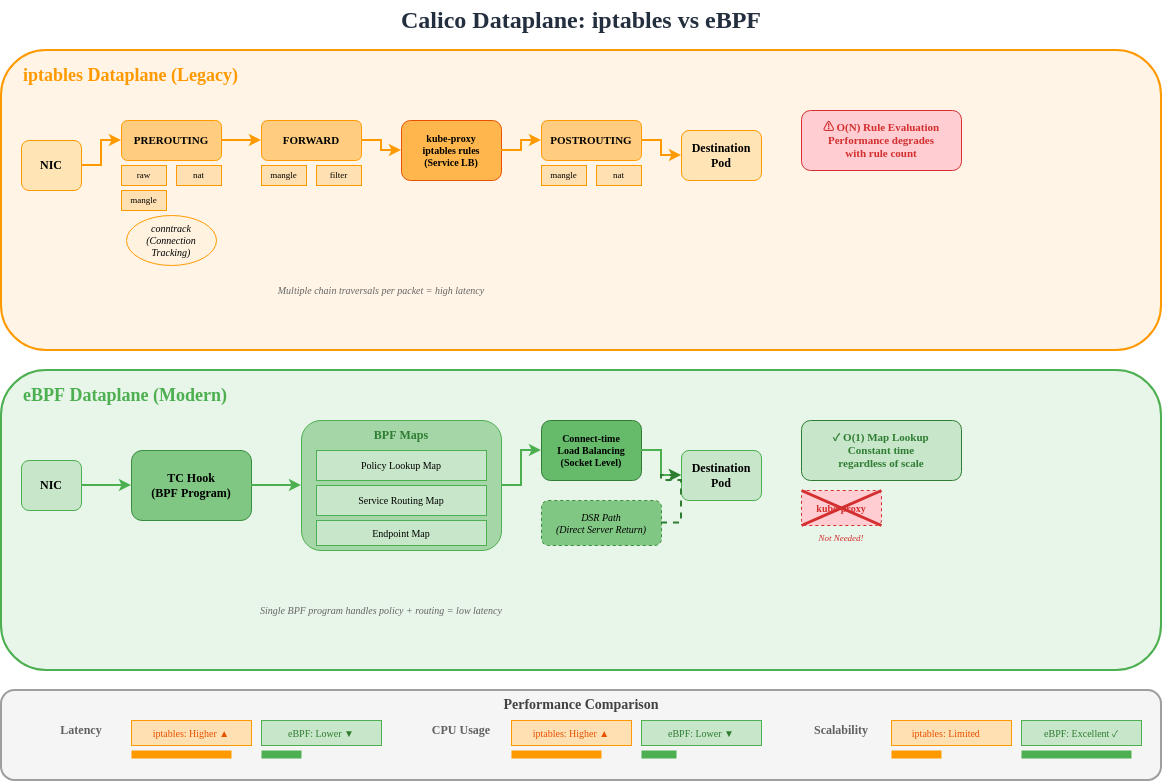
Architecture Comparison
eBPF Program Types in Calico
Calico uses multiple eBPF program types for different functions:
TC (Traffic Control) Programs
TC programs are the primary dataplane hook for Calico:
Ingress TC Program Functions:
├── Policy enforcement (allow/deny)
├── Connection tracking lookup
├── Service load balancing (DNAT)
├── Tunnel decapsulation
└── Metrics collection

Egress TC Program Functions:
├── Policy enforcement (egress rules)
├── SNAT for masquerade
├── Tunnel encapsulation
└── DSR return path handling
XDP (eXpress Data Path) Programs
XDP provides the earliest packet processing hook:
Socket Programs
Socket-level eBPF for service mesh integration:
# sockops: Intercept socket operations
- connect() -> Redirect to local sidecar
- accept() -> Apply connection policies
- close() -> Cleanup connection state

# sk_msg: Process socket data
- sendmsg() -> Apply L7 policy
- recvmsg() -> Inspect response
BPF Map Structures
Map Types Used by Calico
| Map Type | Purpose | Example Use |
|---|---|---|
| Hash Map | Key-value lookup | Connection tracking |
| LRU Hash | Auto-evicting cache | NAT table |
| Array | Fixed-size indexed | Endpoint config |
| LPM Trie | Longest prefix match | Route lookup |
| Per-CPU Array | Scalable counters | Statistics |
Route Map Structure
// Simplified route map entry
struct calico_route_key {
    __be32 prefix;
    __u32 prefix_len;
};

struct calico_route_value {
    __u32 flags;          // LOCAL, REMOTE, HOST, etc.
    __be32 next_hop;      // Next hop IP
    __u32 ifindex;        // Interface index
    __u8 mac[6];          // Destination MAC
};
Connection Tracking Map
// Connection tracking key
struct calico_ct_key {
    __be32 src_ip;
    __be32 dst_ip;
    __be16 src_port;
    __be16 dst_port;
    __u8 protocol;
};

// Connection tracking value
struct calico_ct_value {
    __u64 created;        // Timestamp
    __u64 last_seen;      // Last packet
    __be32 orig_dst;      // Pre-DNAT destination
    __be16 orig_port;     // Pre-DNAT port
    __u32 flags;          // Connection state
};
Policy Map Structure
// Policy rule entry
struct calico_policy_key {
    __u32 policy_id;
    __u32 rule_index;
};

struct calico_policy_value {
    __u32 action;         // ALLOW, DENY, PASS
    __u32 flags;
    __be32 src_net;
    __be32 src_mask;
    __be32 dst_net;
    __be32 dst_mask;
    __be16 port_start;
    __be16 port_end;
};
Direct Server Return (DSR)
DSR Overview
DSR allows response traffic to bypass the load balancer, reducing latency and load balancer resource consumption.
DSR Modes in Calico
| Mode | Description | Use Case |
|---|---|---|
| Disabled | All traffic through LB | Default, all environments |
| IPIP | Response via IPIP tunnel | Cross-subnet |
| DSR | Direct response | Same L2 network |
Enabling DSR
apiVersion: projectcalico.org/v3
kind: FelixConfiguration
metadata:
  name: default
spec:
  bpfEnabled: true
  bpfExternalServiceMode: DSR
DSR Requirements
- Server and client must be on same L2 network OR
- Use IPIP/VXLAN encapsulation for cross-subnet
- External client IP must be routable from servers
- No SNAT on ingress path
Connect-Time Load Balancing
Traditional vs Connect-Time LB
Benefits of Connect-Time LB
| Aspect | Per-Packet | Connect-Time |
|---|---|---|
| NAT overhead | Every packet | Connection setup only |
| Connection tracking | Required | Minimal |
| Latency | Higher (NAT lookup) | Lower (direct) |
| CPU usage | Higher | Lower |
How Connect-Time LB Works
// Simplified connect-time LB logic
int bpf_connect4(struct bpf_sock_addr *ctx) {
    // Check if destination is a Service IP
    struct lb_backend *backend = lookup_service(ctx->user_ip4, ctx->user_port);

    if (backend) {
        // Rewrite destination to backend pod
        ctx->user_ip4 = backend->pod_ip;
        ctx->user_port = backend->pod_port;
    }

    return 1; // Allow connection
}
XDP Acceleration
XDP Processing Levels
XDP Modes
| Mode | Location | Performance | Requirements |
|---|---|---|---|
| Offload | NIC hardware | Fastest | SmartNIC |
| Native | NIC driver | Fast | Driver support |
| Generic | Network stack | Baseline | Any NIC |
Enabling XDP in Calico
apiVersion: projectcalico.org/v3
kind: FelixConfiguration
metadata:
  name: default
spec:
  bpfEnabled: true

  # XDP mode: Disabled, Enabled, Offload
  xdpEnabled: Enabled

  # Interfaces for XDP
  # Uses same detection as BPF dataplane interface
XDP Use Cases in Calico
- DDoS Protection: Drop malicious traffic at NIC
- Blocklist Enforcement: Early rejection of blocked IPs
- Rate Limiting: Packet rate limits before stack
- Metrics Collection: Wire-speed packet counting
eBPF Mode Requirements
Kernel Requirements
| Requirement | Minimum Version | Notes |
|---|---|---|
| Linux Kernel | 5.3+ | 5.8+ recommended |
| BTF Support | Required | CONFIG_DEBUG_INFO_BTF=y |
| BPF Syscall | Required | CONFIG_BPF_SYSCALL=y |
| BPF JIT | Required | CONFIG_BPF_JIT=y |
Verify Kernel Support
# Check kernel version
uname -r

# Check BTF support
ls /sys/kernel/btf/vmlinux

# Check BPF support
cat /boot/config-$(uname -r) | grep -E "CONFIG_BPF|CONFIG_DEBUG_INFO_BTF"

# Required output:
# CONFIG_BPF=y
# CONFIG_BPF_SYSCALL=y
# CONFIG_BPF_JIT=y
# CONFIG_DEBUG_INFO_BTF=y
Distribution Support
| Distribution | eBPF Ready | Notes |
|---|---|---|
| Ubuntu 20.04+ | Yes | Kernel 5.4+ |
| Ubuntu 22.04+ | Yes | Kernel 5.15+ (recommended) |
| RHEL/CentOS 8.2+ | Yes | Kernel 4.18+ with backports |
| Amazon Linux 2 | Partial | May need kernel upgrade |
| Amazon Linux 2023 | Yes | Kernel 6.1+ |
| Bottlerocket | Yes | Purpose-built for containers |
Calico Version Requirements
# Minimum Calico versions for eBPF features
eBPF dataplane basic:     v3.13.0
Connect-time LB:          v3.16.0
XDP acceleration:         v3.18.0
Dual-stack eBPF:         v3.20.0
Host-networked pods:      v3.13.0 (with limitations)
Node Configuration
apiVersion: projectcalico.org/v3
kind: FelixConfiguration
metadata:
  name: default
spec:
  # Enable eBPF dataplane
  bpfEnabled: true

  # Data interface detection
  # Auto-detect: first interface with default route
  # Or specify pattern: "eth*"
  bpfDataIfacePattern: "^((en|eth|wl)[opsx].*|(eth|wlan|eno)[0-9].*)"

  # External service mode: Tunnel or DSR
  bpfExternalServiceMode: Tunnel

  # Log level for BPF programs
  bpfLogLevel: Info

  # Kube-proxy replacement
  bpfKubeProxyIptablesCleanupEnabled: true

  # Connection tracking
  bpfConnectTimeLoadBalancingEnabled: true
iptables to eBPF Migration
Pre-Migration Checklist
# 1. Verify kernel requirements
uname -r  # Should be 5.3+
ls /sys/kernel/btf/vmlinux  # BTF must exist

# 2. Check Calico version
kubectl get deployment -n kube-system calico-kube-controllers -o jsonpath='{.spec.template.spec.containers[0].image}'
# Should be v3.13.0+

# 3. Verify CNI plugin
kubectl get ds -n kube-system calico-node -o jsonpath='{.spec.template.spec.containers[0].env}' | grep -i cni

# 4. Check existing networking mode
calicoctl get felixconfiguration default -o yaml | grep -i bpf

# 5. Verify no conflicting CNI
ls /etc/cni/net.d/
Migration Steps
Step 1: Update FelixConfiguration (dry-run)
# Save current configuration
kubectl get felixconfiguration default -o yaml > felix-backup.yaml

# Create eBPF configuration
apiVersion: projectcalico.org/v3
kind: FelixConfiguration
metadata:
  name: default
spec:
  bpfEnabled: false  # Not enabled yet
  bpfLogLevel: Debug  # For troubleshooting
  bpfDataIfacePattern: "^((en|eth|wl)[opsx].*|(eth|wlan|eno)[0-9].*)"
  bpfExternalServiceMode: Tunnel
  bpfKubeProxyIptablesCleanupEnabled: false  # Don't cleanup yet
Step 2: Disable kube-proxy (if using Calico as replacement)
# Option A: Scale down kube-proxy
kubectl -n kube-system patch daemonset kube-proxy -p '{"spec":{"template":{"spec":{"nodeSelector":{"non-calico":"true"}}}}}'

# Option B: Add calico node selector to skip kube-proxy nodes
# Only if running both temporarily
Step 3: Enable eBPF on test node
# Label test node
kubectl label node test-node-1 calico-ebpf=enabled

# Apply node-specific config
calicoctl apply -f - <<EOF
apiVersion: projectcalico.org/v3
kind: FelixConfiguration
metadata:
  name: node.test-node-1
spec:
  bpfEnabled: true
EOF
Step 4: Validate test node
# Check BPF programs loaded
kubectl exec -n kube-system calico-node-xxxxx -c calico-node -- \
  bpftool prog list

# Verify connectivity
kubectl run test-pod --image=busybox --restart=Never --overrides='{"spec":{"nodeName":"test-node-1"}}' -- sleep 3600
kubectl exec test-pod -- wget -O- http://kubernetes.default.svc

# Check logs
kubectl logs -n kube-system -l k8s-app=calico-node -c calico-node | grep -i bpf
Step 5: Roll out to all nodes
apiVersion: projectcalico.org/v3
kind: FelixConfiguration
metadata:
  name: default
spec:
  bpfEnabled: true
  bpfLogLevel: Info
  bpfDataIfacePattern: "^((en|eth|wl)[opsx].*|(eth|wlan|eno)[0-9].*)"
  bpfExternalServiceMode: Tunnel
  bpfKubeProxyIptablesCleanupEnabled: true
  bpfConnectTimeLoadBalancingEnabled: true
Step 6: Cleanup iptables rules
# After confirming eBPF is working
calicoctl patch felixconfiguration default -p '{"spec":{"bpfKubeProxyIptablesCleanupEnabled":true}}'

# Verify iptables rules are minimal
iptables -L -n | wc -l  # Should be significantly reduced
Rollback Procedure
# Disable eBPF
calicoctl patch felixconfiguration default -p '{"spec":{"bpfEnabled":false}}'

# Restore kube-proxy if disabled
kubectl -n kube-system patch daemonset kube-proxy -p '{"spec":{"template":{"spec":{"nodeSelector":null}}}}'

# Wait for calico-node restart
kubectl rollout status ds/calico-node -n kube-system

# Verify iptables rules restored
iptables -L -n -v
Performance Benchmarks
Latency Comparison
| Scenario | iptables | eBPF | Improvement |
|---|---|---|---|
| Pod-to-Pod (same node) | 45 μs | 25 μs | 44% |
| Pod-to-Pod (cross node) | 120 μs | 80 μs | 33% |
| Service (ClusterIP) | 150 μs | 60 μs | 60% |
| Service (NodePort) | 180 μs | 70 μs | 61% |
Throughput Comparison
| Scenario | iptables | eBPF | Improvement |
|---|---|---|---|
| TCP single stream | 15 Gbps | 23 Gbps | 53% |
| TCP multi-stream | 35 Gbps | 48 Gbps | 37% |
| UDP single stream | 8 Gbps | 18 Gbps | 125% |
| Small packets (64B) | 2M pps | 5M pps | 150% |
CPU Efficiency
Connection rate test (connections/sec):

iptables dataplane:
├── 1000 rules: 50,000 conn/s
├── 5000 rules: 35,000 conn/s
└── 10000 rules: 20,000 conn/s

eBPF dataplane:
├── 1000 rules: 120,000 conn/s
├── 5000 rules: 115,000 conn/s
└── 10000 rules: 110,000 conn/s

Note: eBPF performance remains nearly constant regardless of rule count
Running Your Own Benchmarks
# Install netperf
apt-get install netperf

# Pod-to-Pod latency (TCP_RR)
kubectl exec client-pod -- netperf -H server-pod-ip -t TCP_RR -l 30

# Throughput (TCP_STREAM)
kubectl exec client-pod -- netperf -H server-pod-ip -t TCP_STREAM -l 30

# Service latency
kubectl exec client-pod -- netperf -H service-cluster-ip -t TCP_RR -l 30

# Compare with iperf3
kubectl exec client-pod -- iperf3 -c server-pod-ip -t 30
eBPF Debugging
bpftool Commands
# List loaded BPF programs
bpftool prog list

# Show program details
bpftool prog show id 123

# Dump program instructions
bpftool prog dump xlated id 123

# List BPF maps
bpftool map list

# Dump map contents
bpftool map dump id 456

# Show map entries
bpftool map lookup id 456 key 0x0a 0x00 0x01 0x0a
TC Filter Inspection
# Show TC filters on interface
tc filter show dev eth0 ingress
tc filter show dev eth0 egress

# Show BPF program attached to TC
tc filter show dev eth0 ingress | grep bpf

# Detailed filter info
tc -s filter show dev eth0 ingress
Calico BPF Debugging
# Enable debug logging
calicoctl patch felixconfiguration default -p '{"spec":{"bpfLogLevel":"Debug"}}'

# View BPF debug logs
kubectl logs -n kube-system -l k8s-app=calico-node -c calico-node | grep -i "bpf\|ebpf"

# Check BPF map contents via calico-node
kubectl exec -n kube-system calico-node-xxxxx -c calico-node -- \
  calico-bpf conntrack dump

# Show routes in BPF map
kubectl exec -n kube-system calico-node-xxxxx -c calico-node -- \
  calico-bpf routes dump

# Show NAT entries
kubectl exec -n kube-system calico-node-xxxxx -c calico-node -- \
  calico-bpf nat dump
Common Debug Scenarios
Connectivity Issues:
# Check if BPF programs are loaded
bpftool prog list | grep calico

# Verify route is in BPF map
kubectl exec -n kube-system calico-node-xxxxx -c calico-node -- \
  calico-bpf routes dump | grep "10.244.1.5"

# Check conntrack entries
kubectl exec -n kube-system calico-node-xxxxx -c calico-node -- \
  calico-bpf conntrack dump | grep "10.244.1.5"

# Verify policy is allowing traffic
kubectl exec -n kube-system calico-node-xxxxx -c calico-node -- \
  calico-bpf policy dump
Service Load Balancing Issues:
# Check service backends in NAT map
kubectl exec -n kube-system calico-node-xxxxx -c calico-node -- \
  calico-bpf nat dump | grep "10.96.0.1"

# Verify frontend entry exists
kubectl exec -n kube-system calico-node-xxxxx -c calico-node -- \
  calico-bpf nat frontend list
Limitations and Known Issues
Current Limitations
| Limitation | Description | Workaround |
|---|---|---|
| Host-networked pods | Limited policy support | Use iptables for host pods |
| IPv6 | Partial support | Use dual-stack mode |
| Wireguard | Not with eBPF | Use IPsec or disable encryption |
| Service topology | Limited support | Use standard kube-proxy |
| Windows nodes | Not supported | Use iptables dataplane |
Known Issues
# Issue: BPF program fails to load
# Cause: Kernel too old or BTF missing
# Solution: Upgrade kernel or enable BTF

# Issue: Services not accessible
# Cause: kube-proxy and Calico BPF conflict
# Solution: Fully disable kube-proxy

# Issue: NodePort not working
# Cause: DSR mode with non-routable client IPs
# Solution: Use Tunnel mode instead of DSR

# Issue: High memory usage
# Cause: Large conntrack table
# Solution: Tune conntrack limits
Checking for Issues
# Check for BPF verifier errors
dmesg | grep -i "bpf\|verifier"

# Check Felix logs for BPF errors
kubectl logs -n kube-system -l k8s-app=calico-node -c calico-node | grep -i error

# Verify BPF map limits
cat /proc/sys/kernel/bpf_map_max_entries
Kube-proxy Replacement
Complete Kube-proxy Replacement
Calico eBPF can fully replace kube-proxy for service load balancing:
apiVersion: projectcalico.org/v3
kind: FelixConfiguration
metadata:
  name: default
spec:
  bpfEnabled: true
  bpfKubeProxyIptablesCleanupEnabled: true
  bpfKubeProxyMinSyncPeriod: 1s

  # Disable kube-proxy IPVS/iptables cleanup
  # (Calico will manage service rules)
Disable kube-proxy
# Method 1: Scale to zero
kubectl -n kube-system scale deployment kube-proxy --replicas=0

# Method 2: Delete DaemonSet
kubectl -n kube-system delete ds kube-proxy

# Method 3: Prevent scheduling (reversible)
kubectl -n kube-system patch ds kube-proxy -p '{"spec":{"template":{"spec":{"nodeSelector":{"non-calico":"true"}}}}}'
Verify Replacement
# Check no kube-proxy rules in iptables
iptables -t nat -L KUBE-SERVICES 2>/dev/null | wc -l
# Should be 0 or minimal

# Verify Calico is handling services
kubectl exec -n kube-system calico-node-xxxxx -c calico-node -- \
  calico-bpf nat frontend list

# Test service connectivity
kubectl run test --image=busybox --rm -it -- wget -O- http://kubernetes.default.svc
Service Features Comparison
| Feature | kube-proxy (iptables) | kube-proxy (IPVS) | Calico eBPF |
|---|---|---|---|
| ClusterIP | Yes | Yes | Yes |
| NodePort | Yes | Yes | Yes |
| LoadBalancer | Yes | Yes | Yes |
| ExternalIPs | Yes | Yes | Yes |
| SessionAffinity | Yes | Yes | Yes |
| Topology | Yes | Yes | Limited |
| ProxyMode | iptables | IPVS | eBPF |
Best Practices
Deployment Recommendations
- Verify kernel requirements before enabling eBPF
- Test on non-production cluster first
- Enable incrementally using node selectors
- Monitor performance during rollout
- Keep rollback plan ready
Configuration Best Practices
apiVersion: projectcalico.org/v3
kind: FelixConfiguration
metadata:
  name: default
spec:
  # Production settings
  bpfEnabled: true
  bpfLogLevel: Warn  # Reduce logging in production

  # Interface detection
  bpfDataIfacePattern: "^((en|eth)[0-9]+)"

  # Service mode based on topology
  bpfExternalServiceMode: Tunnel  # Safe default

  # Connection tracking
  bpfConnectTimeLoadBalancingEnabled: true

  # Cleanup legacy rules
  bpfKubeProxyIptablesCleanupEnabled: true
Monitoring eBPF Dataplane
# Prometheus metrics to monitor
calico_bpf_num_maps                    # Number of BPF maps
calico_bpf_map_size_bytes              # Size of each map
calico_bpf_conntrack_entries           # Active connections
calico_bpf_nat_frontend_entries        # Service frontends
calico_bpf_nat_backend_entries         # Service backends
felix_bpf_dataplane_apply_time_seconds # Dataplane sync time
Summary
Calico's eBPF dataplane represents a significant advancement in Kubernetes networking:
| Benefit | Impact |
|---|---|
| Performance | Up to 60% latency reduction |
| Scalability | O(1) rule lookup vs O(n) |
| Efficiency | Lower CPU usage |
| Observability | Rich BPF-based metrics |
| Simplicity | Replaces kube-proxy |
When to Use eBPF Dataplane
- High-throughput workloads
- Latency-sensitive applications
- Large clusters with many services
- Environments requiring detailed observability
- Linux kernel 5.3+ available
When to Stay with iptables
- Windows node support required
- Older kernel versions
- Wireguard encryption needed
- Complex service topology requirements
- Risk-averse environments requiring proven technology