Zonal Cluster Operations: Traffic Shifting, Upgrade Rollback, and Data-Layer AZ Affinity
Supported Versions: Amazon EKS 1.33+, AWS Load Balancer Controller 2.9+, Kafka 2.4+ (KIP-392), Valkey GLIDE 1.x Last Updated: July 15, 2026
< Previous: Tekton Pipelines | Table of Contents >
The single most common theme in customer questions is "operations." One combination keeps coming up: split clusters by zone to isolate failures, shift traffic with load balancer target group weights, and when something breaks, roll back in place instead of standing up a new cluster. This guide ties that combination together as a single operational strategy, and adds the piece that's usually missing: pinning the read path of your DB/cache/messaging layer to a zone.
The detailed procedures for each piece already live elsewhere in this repo. This document explains why they get used together, and fills in the data-layer gap that didn't exist before.
Table of Contents
- Why Zonal Operations
- Traffic Layer: Target Group + TargetGroupBinding + Weight Shifting
- Upgrades: Why In-Place + Native Rollback Became the Default
- Data Layer: Pinning the Read Path to a Zone
- Recommended Combination Summary
Why Zonal Operations
A multi-AZ single cluster and a fleet of one cluster per AZ (zonal/single-zone) trade off differently.
| Aspect | Multi-AZ single cluster | Zonal (single-zone) clusters |
|---|---|---|
| Failure isolation | An AZ failure affects part of the cluster | An AZ failure only affects that zonal cluster; the rest are unaffected |
| Cross-AZ cost | Pod-to-pod traffic crosses AZ boundaries ($0.01/GB) | Same-AZ traffic only, no inter-AZ transfer cost |
| Upgrades | Rolling update, the whole cluster moves version at once | Zone-by-zone sequential upgrade, other zones stay on the previous version |
| Operational complexity | One cluster to manage | N clusters plus a traffic-routing layer to keep in sync |
AWS ships this exact pattern as the Cell-Based Architecture for Amazon EKS Guidance. Here, one zonal cluster is a "cell," and a group of cells within a Region is a "supercell." A routing layer in front of the cells (Route 53 weighted routing plus Application Recovery Controller) handles failover, and an ALB inside each cell distributes traffic within it. The key property: traffic never crosses a cell boundary, so there is no inter-AZ data transfer cost to begin with.
Zonal/blue-green architecture itself is already covered in ops/02-infrastructure-advanced.md, and the maturity-model view of Multi-AZ/Cell-Based Architecture is in eks/10-eks-resiliency.md. This guide wires traffic shifting, upgrades, and data reads together into one operational loop on top of that.
Traffic Layer: Target Group + TargetGroupBinding + Weight Shifting
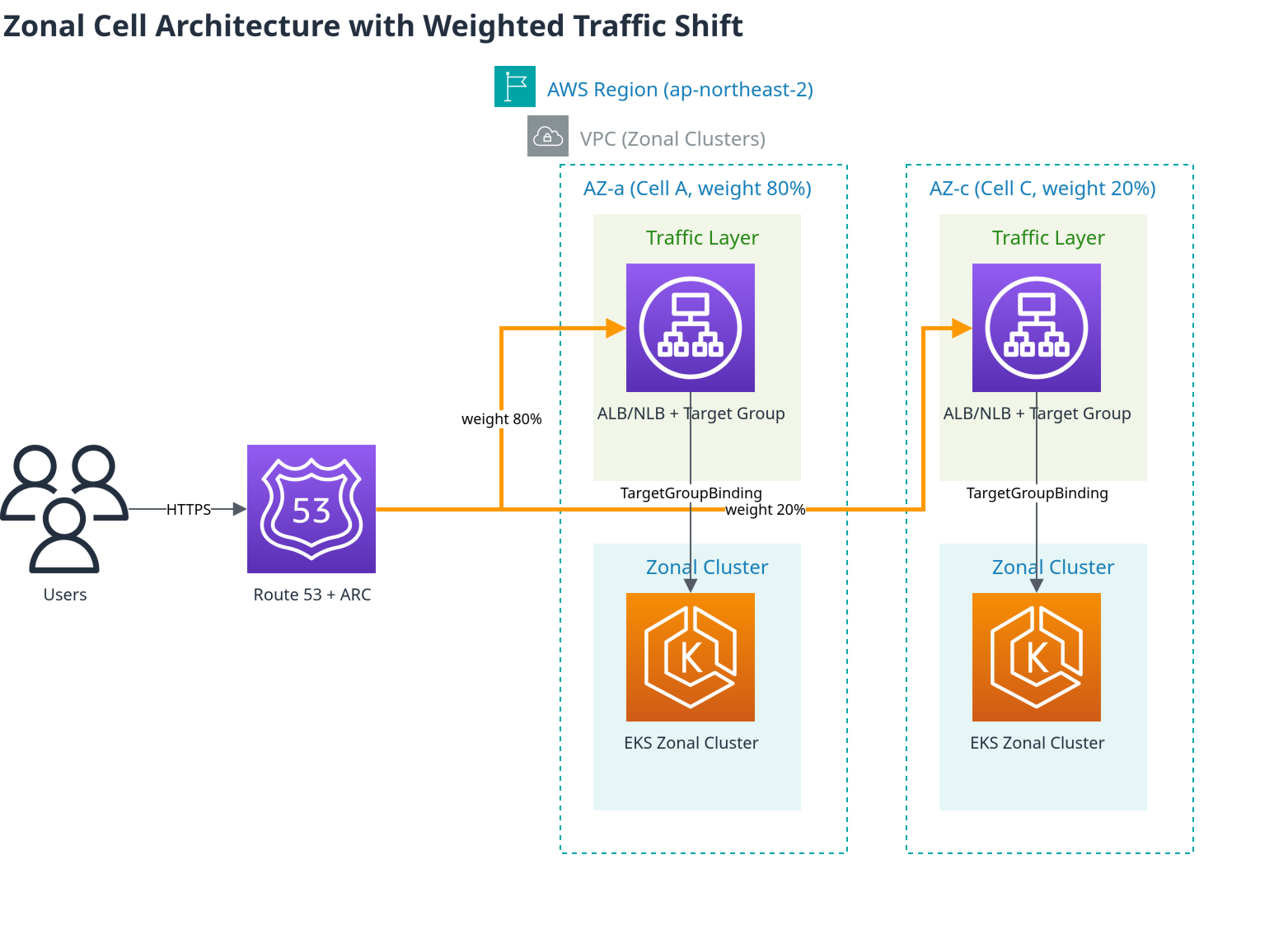
The standard pattern for moving traffic across multiple zonal clusters:
- Create the NLB/ALB and Target Groups outside the cluster with IaC such as Terraform (so the load balancer survives even if a cluster is replaced).
- Bind each zonal cluster's Service to its Target Group with the
TargetGroupBindingCRD. - Move traffic between clusters by adjusting Target Group weight on the load balancer, without touching anything inside the clusters.
apiVersion: elbv2.k8s.aws/v1beta1
kind: TargetGroupBinding
metadata:
  name: zone-a-tgb
  namespace: production
spec:
  targetGroupARN: arn:aws:elasticloadbalancing:ap-northeast-2:ACCOUNT:targetgroup/zone-a-tg/xxxxxxxxxxxx
  serviceRef:
    name: app-service
    port: 80
targetType: ip# Adjust weight between target groups in the ALB listener's forward action
aws elbv2 modify-listener \
--listener-arn "$LISTENER_ARN" \
--default-actions '[{
"Type": "forward",
"ForwardConfig": {
"TargetGroups": [
{"TargetGroupArn": "'"$ZONE_A_TG_ARN"'", "Weight": 20},
{"TargetGroupArn": "'"$ZONE_C_TG_ARN"'", "Weight": 80}
]
}
}]'TargetGroupBinding's basic/advanced/multi-port configuration is covered in networking/03-aws-lb-controller.md, and the full Terraform setup for NLB weighted target groups plus Route 53 weighted routing is in ops/02-infrastructure-advanced.md.
Planned shifts vs. failure-triggered shifts: weight adjustment is for planned transitions like upgrades and deployments. Unplanned situations like an AZ outage are handled by ARC (Application Recovery Controller) Zonal Shift, which detects and shifts automatically — the two mechanisms don't compete, they split planned vs. reactive duty.
Upgrades: Why In-Place + Native Rollback Became the Default
In July 2026, Amazon EKS GA'd native Kubernetes version rollback. If a problem surfaces after an upgrade, you can revert one minor version at a time, within 7 days, and Rollback Readiness Insights automatically pre-checks API compatibility, kubelet version skew, and add-on versions before you roll back. On Auto Mode clusters, rollback covers the data plane (worker nodes) as well as the control plane — but if you're upgrading a zonal cluster in place with self-managed node groups (as in the next section), that automatic data-plane rollback doesn't apply; only the control plane reverts, so node/AMI/add-on changes need to be reverted separately. Neither case carries an extra charge.
Before this feature existed, the only answer to "what happens if the new version is bad" was a standing blue/green cluster fleet you could validate against before cutting over. Now, teams already running a zonal (single-zone-per-cluster) setup have a lighter-weight option: upgrade each zonal cluster in place, one zone at a time, and use native rollback as the safety net instead.
| Approach | When it's the right call |
|---|---|
| Standing blue/green cluster fleet | You need to validate the new version against real production traffic on a fully separate cluster before cutting over, or you need to revert node/AMI/add-on changes wholesale (native rollback only reverts the control plane) |
| Zonal in-place + native rollback | You already run zonal clusters for availability reasons (not just for upgrades), you want to avoid the cost of running two full cluster fleets at all times, and you can tolerate the ~7-day rollback eligibility window instead of an instant cluster-level failback |
| Route 53 weighted DNS cutover | Clusters live in entirely different Regions/accounts, or you need to replace the NLB layer itself |
The execution runbook (shift NLB weight -> in-place upgrade -> validate -> restore weight, plus the cases where the full blue/green fleet is still the right call) is already documented in ops/11-upgrade-operations.md's "Alternative: Zonal In-Place Upgrade with Native Rollback" section, so it isn't repeated here. For the exact conditions under which a rollback is eligible (a cluster created at the target version can't roll back, an already re-upgraded cluster can't, etc.), see eks/08-eks-upgrades.md's Rollback Procedure.
Data Layer: Pinning the Read Path to a Zone
Traffic shifting and upgrades are usually already in place for a team with a zonal architecture. The read path of DB/cache/messaging is the part that quietly gets missed — an application pod may live entirely inside one AZ, but the DB reader, cache replica, or Kafka broker it talks to gets assigned round-robin across AZs, generating inter-AZ cost and latency nobody notices until the bill arrives.
The underlying principle is the same everywhere: writes have to go to the leader/primary, so they may cross AZs regardless — but reads can be routed to a same-AZ replica. For workloads that are mostly reads (caches, lookup queries, consumers), that alone removes a large share of the inter-AZ cost.
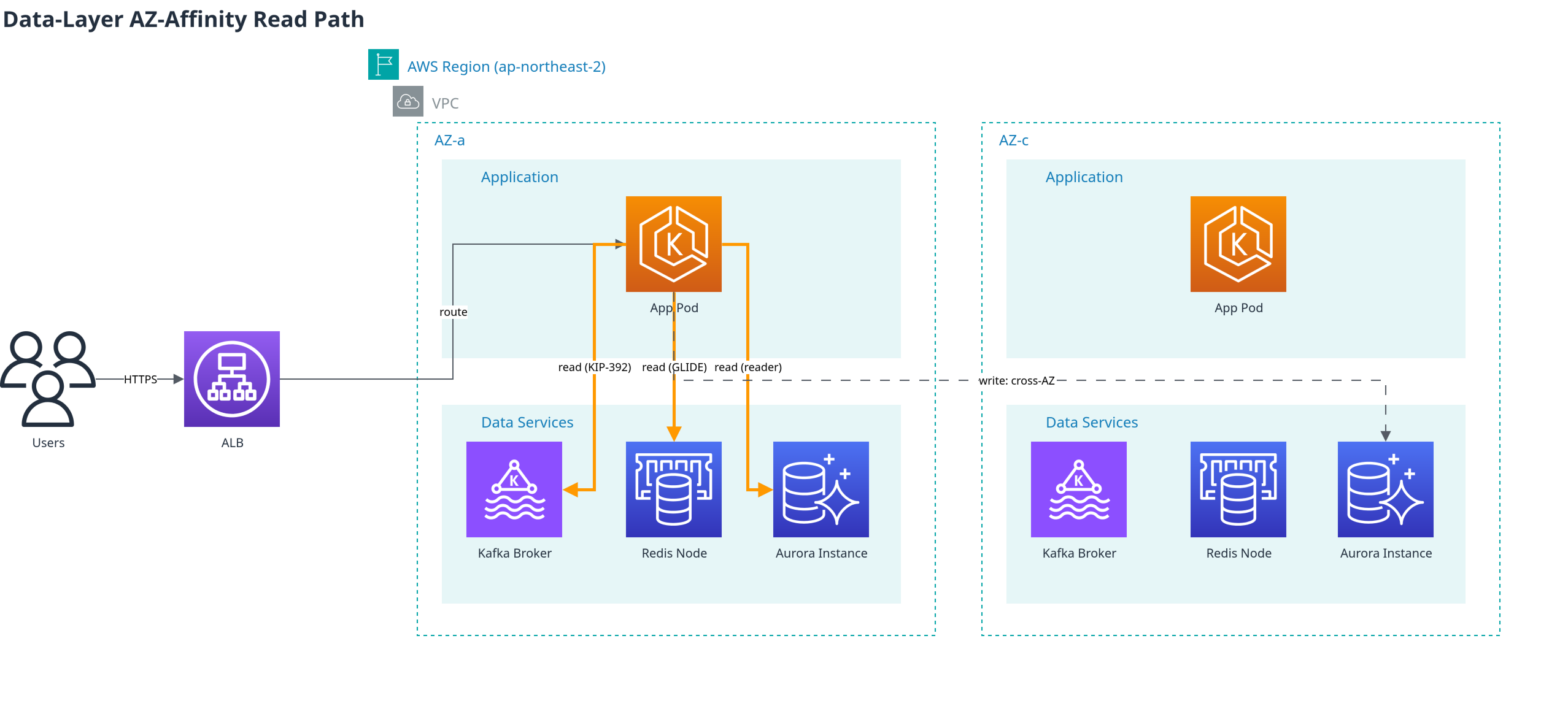
Doing this requires the pod to know which AZ it's in. The Kubernetes Downward API does not inject the node's zone label (topology.kubernetes.io/zone) into a pod directly, so one of the following is needed:
- EC2 IMDS lookup: the pod or a sidecar calls
http://169.254.169.254/latest/meta-data/placement/availability-zonedirectly - Admission-time label injection: a mutating policy such as Kyverno copies the node's
topology.k8s.aws/zone-idlabel onto a pod annotation — the pattern AWS recommends in its MSK-on-EKS rack awareness guide; seesecurity/01-kyverno-policy-management.mdin this repo for how to write the Kyverno policy - Built-in operator support: operators like Strimzi treat rack-awareness as a first-class feature, so an init-container handles it with no custom implementation
Kafka: KIP-392 Follower Fetching
KIP-392 (Kafka 2.4+) lets a consumer fetch directly from a follower replica in its own rack (AZ) instead of always going to the partition leader.
Brokers: set
replica.selector.class=org.apache.kafka.common.replica.RackAwareReplicaSelector, and give every broker abroker.rack(AZ ID)Consumers: set the
client.rackconsumer property to the consumer's own AZ ID, obtained via one of the zone-awareness methods aboveWith Strimzi, the operator supports this natively:
yamlapiVersion: kafka.strimzi.io/v1beta2 kind: Kafka spec: kafka: rack: topologyKey: topology.kubernetes.io/zone config: replica.selector.class: org.apache.kafka.common.replica.RackAwareReplicaSelectorSetting
rack.topologyKeymakes Strimzi automatically configurebroker.rackand inject the client rack via an init-container.Also worth knowing: KIP-881 takes this a step further and makes a consumer group's partition assignment itself rack-aware.
For running Kafka on EKS more broadly, see data-on-eks/kafka/.
Redis/Valkey (ElastiCache): AZ-Affinity Read Strategies
The Valkey GLIDE client supports four read strategies via its ReadFrom setting.
| Strategy | Behavior |
|---|---|
PRIMARY | Always reads from the primary (default, AZ-agnostic) |
PREFER_REPLICA | Round-robins across replicas, falls back on failure |
AZ_AFFINITY | Prefers a same-AZ replica, falls back otherwise |
AZ_AFFINITY_REPLICAS_AND_PRIMARY | Same-AZ replica first, then same-AZ primary, then other AZs as a last resort |
For read-heavy workloads (>99% reads), AZ_AFFINITY_REPLICAS_AND_PRIMARY is the recommended balance of cost savings and availability.
from glide import GlideClient, GlideClientConfiguration, ReadFrom

config = GlideClientConfiguration(
    addresses=[...],
    read_from=ReadFrom.AZ_AFFINITY_REPLICAS_AND_PRIMARY,
    client_az="ap-northeast-2a",  # the pod's AZ, obtained via one of the methods above
)
client = await GlideClient.create(config)
As a real-world example, HotelTrader cut inter-AZ data transfer cost by 95% and improved average latency by 49% after adopting Valkey GLIDE's AZ-affinity routing (without AZ awareness, cache requests were distributed randomly across AZs, generating unnecessary transfer costs). See the AWS database blog post for details.
Aurora/RDS: The Reader Endpoint's Limits, and Workarounds
Aurora's default reader endpoint is round-robin DNS with no AZ awareness — a replica in the same AZ gets no priority. This isn't a missing feature so much as a current, real constraint; the open aws-advanced-jdbc-wrapper#1139 issue is asking for AZ affinity itself.
Two workarounds exist:
Per-AZ custom endpoints: group the replica instances in a given AZ into a custom endpoint, and point that AZ's application traffic at it.
bashaws rds create-db-cluster-endpoint \ --db-cluster-identifier my-aurora-cluster \ --db-cluster-endpoint-identifier reader-az-a \ --endpoint-type READER \ --static-members db-instance-az-a-1 db-instance-az-a-2AWS Advanced JDBC Wrapper: provides read/write splitting and a
fastestResponsereader-selection strategy. It isn't true AZ affinity, but it favors the fastest-responding reader, which is usually the same-AZ one.
If you need genuine AZ affinity, option 1 (custom endpoints) is the only reliable route until the open issue above is resolved.
Complementary Kubernetes Service-Layer Options
To pin Service traffic itself to an AZ at the application layer, see Topology Aware Routing (GA); if you run a service mesh, see Istio Zone-Aware Routing. Combined with the data-layer strategies above, the entire read path from application to cache/DB/messaging stays inside the AZ.
Recommended Combination Summary
| Layer | Recommended as of 2026 | Alternative/fallback |
|---|---|---|
| Architecture | Zonal (single-zone) clusters + Cell-Based Architecture | Multi-AZ single cluster (smaller ops teams) |
| Traffic shifting | Target Group + TargetGroupBinding + weight adjustment | Route 53 weighted DNS (different Region/account) |
| Failure response | ARC Zonal Shift (automatic) | Manual weight adjustment |
| Upgrades | Zonal in-place + EKS native rollback (7 days) | Standing blue/green cluster fleet (when full pre-validation is required) |
| Kafka reads | KIP-392 (client.rack + RackAwareReplicaSelector), or Strimzi's rack.topologyKey | Allow region-wide fallback (automatic if no local follower) |
| Cache reads | Valkey GLIDE AZ_AFFINITY_REPLICAS_AND_PRIMARY | PREFER_REPLICA (when AZ awareness isn't needed) |
| DB reads | Aurora per-AZ custom endpoints | AWS Advanced JDBC Wrapper fastestResponse |
Recommended rollout order is traffic-shifting layer -> upgrade/rollback -> data read layer, since it's hard to measure the payoff (especially cost savings) of the later layers without the earlier ones in place.