Infrastructure Setup
Supported Versions: Terraform >= 1.10, AWS Provider >= 5.40, EKS >= 1.29 Last Updated: February 19, 2026
< Table of Contents | Next: NLB Weighted Routing and Blue/Green Clusters >
Overview
This guide presents a production-ready Terraform architecture for deploying Amazon EKS clusters with Auto Mode enabled. The 3-layer approach separates infrastructure concerns by change frequency, ownership, and blast radius, enabling teams to work independently while maintaining operational safety.
Key Design Principles:
- Separation of Concerns: Each layer has distinct ownership and change patterns
- Blast Radius Minimization: Changes in one layer cannot accidentally affect others
- State Isolation: Independent Terraform state files per layer
- GitOps Ready: Terraform manages AWS infrastructure; Kubernetes resources are managed by ArgoCD
1. 3-Layer Architecture Introduction
Why Separate Layers?
Traditional monolithic Terraform configurations create several operational challenges:
- Long Plan/Apply Times: Every change requires evaluating all resources
- Blast Radius: A single misconfiguration can affect the entire infrastructure
- Team Conflicts: Multiple teams competing for the same state file
- Change Risk: Network changes bundled with application changes increase deployment risk
The 3-layer architecture addresses these challenges by organizing infrastructure into distinct tiers based on stability and ownership.
Layer Characteristics
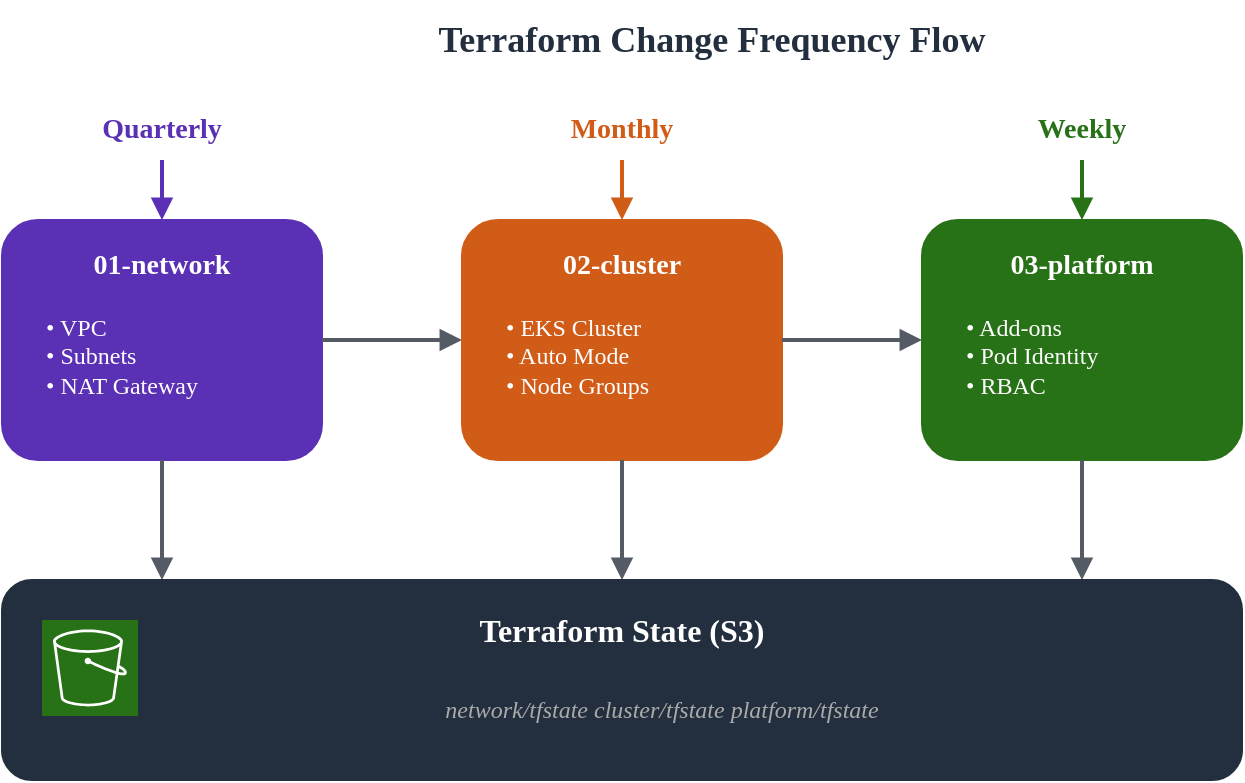
| Layer | Name | Change Frequency | Primary Owner | Blast Radius | Dependencies |
|---|---|---|---|---|---|
| 01 | Network | Quarterly | Infrastructure Team | High | None |
| 02 | Cluster | Monthly | Platform Team | Medium | 01-network |
| 03 | Platform | Weekly | Platform/App Teams | Low | 01-network, 02-cluster |
Directory Structure
eks-terraform/
├── 00-shared/
│   ├── variables.tf          # Common variables across all layers
│   ├── backend.tf.template   # Backend configuration template
│   └── providers.tf.template # Provider configuration template
├── 01-network/
│   ├── main.tf               # VPC, subnets, NAT Gateway
│   ├── variables.tf          # Network-specific variables
│   ├── outputs.tf            # VPC ID, subnet IDs for downstream
│   ├── backend.tf            # S3 backend: network/terraform.tfstate
│   └── providers.tf
├── 02-cluster/
│   ├── main.tf               # EKS cluster with Auto Mode
│   ├── data.tf               # Remote state from 01-network
│   ├── variables.tf          # Cluster-specific variables
│   ├── outputs.tf            # Cluster endpoint, OIDC provider
│   ├── backend.tf            # S3 backend: cluster/terraform.tfstate
│   └── providers.tf
└── 03-platform/
    ├── main.tf               # Add-ons, Pod Identity, RBAC
    ├── data.tf               # Remote state from 01-network, 02-cluster
    ├── variables.tf          # Platform-specific variables
    ├── outputs.tf            # Add-on ARNs, role mappings
    ├── backend.tf            # S3 backend: platform/terraform.tfstate
    └── providers.tf
Change Flow Visualization
2. 00-shared: Common Configuration
The shared layer contains configuration templates and common variables used across all layers. This ensures consistency and reduces duplication.
S3 Backend Configuration
First, create the S3 bucket for Terraform state management:
Note: Starting from Terraform 1.10, the S3 backend supports native state locking via
use_lockfile = true, leveraging S3 conditional writes. This eliminates the need for a DynamoDB table for state locking.
# 00-shared/bootstrap/main.tf
# Run this once to create backend infrastructure

terraform {
  required_version = ">= 1.10.0"
  required_providers {
    aws = {
      source  = "hashicorp/aws"
      version = ">= 5.40.0"
    }
  }
}

provider "aws" {
  region = var.region
}

variable "region" {
  description = "AWS region"
  type        = string
  default     = "ap-northeast-2"
}

variable "project_name" {
  description = "Project name for resource naming"
  type        = string
  default     = "eks-platform"
}

variable "environment" {
  description = "Environment name"
  type        = string
  default     = "prod"
}

locals {
  bucket_name = "${var.project_name}-${var.environment}-tfstate"
}

# S3 bucket for Terraform state
resource "aws_s3_bucket" "terraform_state" {
  bucket = local.bucket_name

  lifecycle {
    prevent_destroy = true
  }

  tags = {
    Name        = local.bucket_name
    Environment = var.environment
    ManagedBy   = "terraform"
  }
}

resource "aws_s3_bucket_versioning" "terraform_state" {
  bucket = aws_s3_bucket.terraform_state.id
  versioning_configuration {
    status = "Enabled"
  }
}

resource "aws_s3_bucket_server_side_encryption_configuration" "terraform_state" {
  bucket = aws_s3_bucket.terraform_state.id

  rule {
    apply_server_side_encryption_by_default {
      sse_algorithm = "aws:kms"
    }
    bucket_key_enabled = true
  }
}

resource "aws_s3_bucket_public_access_block" "terraform_state" {
  bucket = aws_s3_bucket.terraform_state.id

  block_public_acls       = true
  block_public_policy     = true
  ignore_public_acls      = true
  restrict_public_buckets = true
}

output "state_bucket_name" {
  value = aws_s3_bucket.terraform_state.id
}
Common Variables
# 00-shared/variables.tf
# Common variables used across all layers

variable "region" {
  description = "AWS region for all resources"
  type        = string
  default     = "ap-northeast-2"
}

variable "environment" {
  description = "Environment name (dev, staging, prod)"
  type        = string
  default     = "prod"

  validation {
    condition     = contains(["dev", "staging", "prod"], var.environment)
    error_message = "Environment must be dev, staging, or prod."
  }
}

variable "project_name" {
  description = "Project name used for resource naming"
  type        = string
  default     = "eks-platform"

  validation {
    condition     = can(regex("^[a-z][a-z0-9-]{2,20}$", var.project_name))
    error_message = "Project name must be lowercase, start with letter, 3-21 chars."
  }
}

variable "common_tags" {
  description = "Common tags applied to all resources"
  type        = map(string)
  default = {
    ManagedBy = "terraform"
    Project   = "eks-platform"
  }
}

locals {
  # Standard naming convention
  name_prefix = "${var.project_name}-${var.environment}"

  # Merge common tags with environment
  tags = merge(var.common_tags, {
    Environment = var.environment
  })

  # Backend configuration
  state_bucket = "${var.project_name}-${var.environment}-tfstate"
}
3. 01-network: VPC Configuration
The network layer establishes the foundational VPC infrastructure. This layer changes infrequently and requires careful planning due to its high blast radius.
Design Considerations
For this architecture, we use a Blue/Green zone design:
- Blue Zone: ap-northeast-2a (primary)
- Green Zone: ap-northeast-2c (secondary)
This single-zone per cluster approach provides:
- Data locality for stateful workloads
- Cost optimization (reduced cross-AZ traffic)
- Clear failure domain isolation
Main Configuration
# 01-network/main.tf

terraform {
  required_version = ">= 1.10.0"
  required_providers {
    aws = {
      source  = "hashicorp/aws"
      version = ">= 5.40.0"
    }
  }
}

provider "aws" {
  region = var.region

  default_tags {
    tags = local.tags
  }
}

locals {
  name_prefix = "${var.project_name}-${var.environment}"

  tags = {
    Environment = var.environment
    Project     = var.project_name
    ManagedBy   = "terraform"
    Layer       = "network"
  }

  # Availability zones for blue/green clusters
  azs = ["ap-northeast-2a", "ap-northeast-2c"]

  # Subnet CIDR allocation
  # VPC: 10.0.0.0/16 (65,536 IPs)
  # Public subnets:  10.0.0.0/20, 10.0.16.0/20  (4,096 IPs each)
  # Private subnets: 10.0.128.0/18, 10.0.192.0/18 (16,384 IPs each)
  public_subnets  = ["10.0.0.0/20", "10.0.16.0/20"]
  private_subnets = ["10.0.128.0/18", "10.0.192.0/18"]
}

module "vpc" {
  source  = "terraform-aws-modules/vpc/aws"
  version = "~> 5.5"

  name = "${local.name_prefix}-vpc"
  cidr = var.vpc_cidr

  azs             = local.azs
  public_subnets  = local.public_subnets
  private_subnets = local.private_subnets

  # NAT Gateway configuration
  enable_nat_gateway     = true
  single_nat_gateway     = false  # One per AZ for HA
  one_nat_gateway_per_az = true

  # DNS settings
  enable_dns_hostnames = true
  enable_dns_support   = true

  # VPC Flow Logs
  enable_flow_log                      = true
  create_flow_log_cloudwatch_log_group = true
  create_flow_log_cloudwatch_iam_role  = true
  flow_log_max_aggregation_interval    = 60

  # Public subnet tags for EKS load balancers
  public_subnet_tags = {
    "kubernetes.io/role/elb" = "1"
    Type                     = "public"
  }

  # Private subnet tags for EKS internal load balancers
  private_subnet_tags = {
    "kubernetes.io/role/internal-elb" = "1"
    Type                              = "private"
  }

  tags = local.tags
}

# Additional subnet tags for specific clusters
# Blue cluster (ap-northeast-2a)
resource "aws_ec2_tag" "private_subnet_blue_cluster" {
  resource_id = module.vpc.private_subnets[0]
  key         = "kubernetes.io/cluster/${local.name_prefix}-blue"
  value       = "shared"
}

resource "aws_ec2_tag" "public_subnet_blue_cluster" {
  resource_id = module.vpc.public_subnets[0]
  key         = "kubernetes.io/cluster/${local.name_prefix}-blue"
  value       = "shared"
}

# Green cluster (ap-northeast-2c)
resource "aws_ec2_tag" "private_subnet_green_cluster" {
  resource_id = module.vpc.private_subnets[1]
  key         = "kubernetes.io/cluster/${local.name_prefix}-green"
  value       = "shared"
}

resource "aws_ec2_tag" "public_subnet_green_cluster" {
  resource_id = module.vpc.public_subnets[1]
  key         = "kubernetes.io/cluster/${local.name_prefix}-green"
  value       = "shared"
}

# VPC Endpoints for AWS services (reduces NAT costs)
module "vpc_endpoints" {
  source  = "terraform-aws-modules/vpc/aws//modules/vpc-endpoints"
  version = "~> 5.5"

  vpc_id = module.vpc.vpc_id

  endpoints = {
    s3 = {
      service      = "s3"
      service_type = "Gateway"
      route_table_ids = concat(
        module.vpc.private_route_table_ids,
        module.vpc.public_route_table_ids
      )
      tags = { Name = "${local.name_prefix}-s3-endpoint" }
    }
    ecr_api = {
      service             = "ecr.api"
      private_dns_enabled = true
      subnet_ids          = module.vpc.private_subnets
      security_group_ids  = [aws_security_group.vpc_endpoints.id]
      tags                = { Name = "${local.name_prefix}-ecr-api-endpoint" }
    }
    ecr_dkr = {
      service             = "ecr.dkr"
      private_dns_enabled = true
      subnet_ids          = module.vpc.private_subnets
      security_group_ids  = [aws_security_group.vpc_endpoints.id]
      tags                = { Name = "${local.name_prefix}-ecr-dkr-endpoint" }
    }
    sts = {
      service             = "sts"
      private_dns_enabled = true
      subnet_ids          = module.vpc.private_subnets
      security_group_ids  = [aws_security_group.vpc_endpoints.id]
      tags                = { Name = "${local.name_prefix}-sts-endpoint" }
    }
    logs = {
      service             = "logs"
      private_dns_enabled = true
      subnet_ids          = module.vpc.private_subnets
      security_group_ids  = [aws_security_group.vpc_endpoints.id]
      tags                = { Name = "${local.name_prefix}-logs-endpoint" }
    }
  }

  tags = local.tags
}

# Security group for VPC endpoints
resource "aws_security_group" "vpc_endpoints" {
  name        = "${local.name_prefix}-vpc-endpoints-sg"
  description = "Security group for VPC endpoints"
  vpc_id      = module.vpc.vpc_id

  ingress {
    description = "HTTPS from VPC"
    from_port   = 443
    to_port     = 443
    protocol    = "tcp"
    cidr_blocks = [var.vpc_cidr]
  }

  egress {
    description = "All outbound"
    from_port   = 0
    to_port     = 0
    protocol    = "-1"
    cidr_blocks = ["0.0.0.0/0"]
  }

  tags = merge(local.tags, {
    Name = "${local.name_prefix}-vpc-endpoints-sg"
  })
}
Variables
# 01-network/variables.tf

variable "region" {
  description = "AWS region"
  type        = string
  default     = "ap-northeast-2"
}

variable "environment" {
  description = "Environment name"
  type        = string
  default     = "prod"
}

variable "project_name" {
  description = "Project name"
  type        = string
  default     = "eks-platform"
}

variable "vpc_cidr" {
  description = "VPC CIDR block"
  type        = string
  default     = "10.0.0.0/16"

  validation {
    condition     = can(cidrnetmask(var.vpc_cidr))
    error_message = "VPC CIDR must be a valid IPv4 CIDR block."
  }
}
Outputs
# 01-network/outputs.tf

output "vpc_id" {
  description = "VPC ID"
  value       = module.vpc.vpc_id
}

output "vpc_cidr" {
  description = "VPC CIDR block"
  value       = module.vpc.vpc_cidr_block
}

output "private_subnet_ids" {
  description = "Private subnet IDs"
  value       = module.vpc.private_subnets
}

output "public_subnet_ids" {
  description = "Public subnet IDs"
  value       = module.vpc.public_subnets
}

output "private_subnet_cidrs" {
  description = "Private subnet CIDR blocks"
  value       = module.vpc.private_subnets_cidr_blocks
}

output "public_subnet_cidrs" {
  description = "Public subnet CIDR blocks"
  value       = module.vpc.public_subnets_cidr_blocks
}

output "nat_gateway_ids" {
  description = "NAT Gateway IDs"
  value       = module.vpc.natgw_ids
}

output "azs" {
  description = "Availability zones used"
  value       = module.vpc.azs
}

# Zone-specific outputs for blue/green clusters
output "blue_zone" {
  description = "Blue cluster availability zone"
  value       = module.vpc.azs[0]
}

output "green_zone" {
  description = "Green cluster availability zone"
  value       = module.vpc.azs[1]
}

output "blue_private_subnet_id" {
  description = "Blue cluster private subnet ID"
  value       = module.vpc.private_subnets[0]
}

output "green_private_subnet_id" {
  description = "Green cluster private subnet ID"
  value       = module.vpc.private_subnets[1]
}

output "blue_public_subnet_id" {
  description = "Blue cluster public subnet ID"
  value       = module.vpc.public_subnets[0]
}

output "green_public_subnet_id" {
  description = "Green cluster public subnet ID"
  value       = module.vpc.public_subnets[1]
}

output "vpc_endpoints_sg_id" {
  description = "VPC endpoints security group ID"
  value       = aws_security_group.vpc_endpoints.id
}
Backend Configuration
# 01-network/backend.tf

terraform {
  backend "s3" {
    bucket         = "eks-platform-prod-tfstate"
    key            = "network/terraform.tfstate"
    region         = "ap-northeast-2"
    encrypt        = true
    use_lockfile   = true
  }
}
4. 02-cluster: EKS Auto Mode
The cluster layer deploys EKS with Auto Mode enabled. Auto Mode simplifies cluster operations by automating compute, networking, and storage management.
Understanding EKS Auto Mode
EKS Auto Mode provides:
- Compute Auto Mode: Automatic node provisioning and scaling
- Network Auto Mode: Managed VPC CNI with automatic IP management
- Storage Auto Mode: Dynamic storage class provisioning
For more details on EKS Auto Mode, see Getting Started with EKS Auto Mode.
Data Sources
# 02-cluster/data.tf

# Reference network layer outputs
data "terraform_remote_state" "network" {
  backend = "s3"

  config = {
    bucket = "eks-platform-prod-tfstate"
    key    = "network/terraform.tfstate"
    region = "ap-northeast-2"
  }
}

# Current AWS account and region
data "aws_caller_identity" "current" {}
data "aws_region" "current" {}

# EKS cluster auth for kubectl provider
data "aws_eks_cluster_auth" "cluster" {
  name = module.eks.cluster_name
}
Main Configuration
# 02-cluster/main.tf

terraform {
  required_version = ">= 1.10.0"
  required_providers {
    aws = {
      source  = "hashicorp/aws"
      version = ">= 5.40.0"
    }
    kubernetes = {
      source  = "hashicorp/kubernetes"
      version = ">= 2.25.0"
    }
  }
}

provider "aws" {
  region = var.region

  default_tags {
    tags = local.tags
  }
}

provider "kubernetes" {
  host                   = module.eks.cluster_endpoint
  cluster_ca_certificate = base64decode(module.eks.cluster_certificate_authority_data)
  token                  = data.aws_eks_cluster_auth.cluster.token
}

locals {
  name_prefix = "${var.project_name}-${var.environment}"
  cluster_name = "${local.name_prefix}-${var.cluster_color}"

  tags = {
    Environment = var.environment
    Project     = var.project_name
    ManagedBy   = "terraform"
    Layer       = "cluster"
    ClusterColor = var.cluster_color
  }

  # Network outputs from layer 01
  vpc_id             = data.terraform_remote_state.network.outputs.vpc_id
  private_subnet_ids = data.terraform_remote_state.network.outputs.private_subnet_ids
  public_subnet_ids  = data.terraform_remote_state.network.outputs.public_subnet_ids

  # Select subnet based on cluster color
  cluster_subnet_id = var.cluster_color == "blue" ? data.terraform_remote_state.network.outputs.blue_private_subnet_id : data.terraform_remote_state.network.outputs.green_private_subnet_id
}

module "eks" {
  source  = "terraform-aws-modules/eks/aws"
  version = "~> 20.8"

  cluster_name    = local.cluster_name
  cluster_version = var.cluster_version

  # Network configuration
  vpc_id     = local.vpc_id
  subnet_ids = local.private_subnet_ids

  # Cluster endpoint access
  cluster_endpoint_public_access  = true
  cluster_endpoint_private_access = true

  # EKS Auto Mode Configuration
  cluster_compute_config = {
    enabled    = true
    node_pools = ["general-purpose", "system"]
  }

  # Enable Auto Mode for networking
  cluster_kubernetes_network_config = {
    elastic_load_balancing = {
      enabled = true
    }
  }

  # Enable Auto Mode for storage
  cluster_storage_config = {
    block_storage = {
      enabled = true
    }
  }

  # Control plane logging
  cluster_enabled_log_types = [
    "api",
    "audit",
    "authenticator",
    "controllerManager",
    "scheduler"
  ]

  # Encryption configuration
  cluster_encryption_config = {
    provider_key_arn = aws_kms_key.eks.arn
    resources        = ["secrets"]
  }

  # Access configuration - using Access Entries (recommended)
  authentication_mode = "API_AND_CONFIG_MAP"

  # Cluster access entries
  access_entries = {
    # Cluster admin
    admin = {
      kubernetes_groups = []
      principal_arn     = var.cluster_admin_arn
      policy_associations = {
        admin = {
          policy_arn = "arn:aws:eks::aws:cluster-access-policy/AmazonEKSClusterAdminPolicy"
          access_scope = {
            type = "cluster"
          }
        }
      }
    }
  }

  tags = local.tags
}

# KMS key for EKS secrets encryption
resource "aws_kms_key" "eks" {
  description             = "KMS key for EKS ${local.cluster_name} secrets encryption"
  deletion_window_in_days = 7
  enable_key_rotation     = true

  tags = merge(local.tags, {
    Name = "${local.cluster_name}-eks-secrets"
  })
}

resource "aws_kms_alias" "eks" {
  name          = "alias/${local.cluster_name}-eks-secrets"
  target_key_id = aws_kms_key.eks.key_id
}

# CloudWatch Log Group for EKS control plane logs
resource "aws_cloudwatch_log_group" "eks" {
  name              = "/aws/eks/${local.cluster_name}/cluster"
  retention_in_days = var.log_retention_days

  tags = local.tags
}

# Security group rules for cluster
resource "aws_security_group_rule" "cluster_ingress_vpc" {
  description       = "Allow VPC traffic to cluster API"
  type              = "ingress"
  from_port         = 443
  to_port           = 443
  protocol          = "tcp"
  cidr_blocks       = [data.terraform_remote_state.network.outputs.vpc_cidr]
  security_group_id = module.eks.cluster_security_group_id
}
Variables
# 02-cluster/variables.tf

variable "region" {
  description = "AWS region"
  type        = string
  default     = "ap-northeast-2"
}

variable "environment" {
  description = "Environment name"
  type        = string
  default     = "prod"
}

variable "project_name" {
  description = "Project name"
  type        = string
  default     = "eks-platform"
}

variable "cluster_color" {
  description = "Cluster color identifier (blue or green)"
  type        = string
  default     = "blue"

  validation {
    condition     = contains(["blue", "green"], var.cluster_color)
    error_message = "Cluster color must be blue or green."
  }
}

variable "cluster_version" {
  description = "EKS cluster version"
  type        = string
  default     = "1.30"
}

variable "cluster_admin_arn" {
  description = "IAM ARN for cluster admin access"
  type        = string
}

variable "log_retention_days" {
  description = "CloudWatch log retention in days"
  type        = number
  default     = 30
}
Outputs
# 02-cluster/outputs.tf

output "cluster_name" {
  description = "EKS cluster name"
  value       = module.eks.cluster_name
}

output "cluster_endpoint" {
  description = "EKS cluster API endpoint"
  value       = module.eks.cluster_endpoint
}

output "cluster_certificate_authority_data" {
  description = "Base64 encoded cluster CA certificate"
  value       = module.eks.cluster_certificate_authority_data
  sensitive   = true
}

output "cluster_arn" {
  description = "EKS cluster ARN"
  value       = module.eks.cluster_arn
}

output "cluster_version" {
  description = "EKS cluster Kubernetes version"
  value       = module.eks.cluster_version
}

output "cluster_security_group_id" {
  description = "EKS cluster security group ID"
  value       = module.eks.cluster_security_group_id
}

output "node_security_group_id" {
  description = "EKS node security group ID"
  value       = module.eks.node_security_group_id
}

output "oidc_provider_arn" {
  description = "OIDC provider ARN for IRSA"
  value       = module.eks.oidc_provider_arn
}

output "oidc_provider_url" {
  description = "OIDC provider URL"
  value       = module.eks.cluster_oidc_issuer_url
}

output "cluster_primary_security_group_id" {
  description = "EKS cluster primary security group ID"
  value       = module.eks.cluster_primary_security_group_id
}

output "kms_key_arn" {
  description = "KMS key ARN for secrets encryption"
  value       = aws_kms_key.eks.arn
}

output "cluster_color" {
  description = "Cluster color identifier"
  value       = var.cluster_color
}
Backend Configuration
# 02-cluster/backend.tf

terraform {
  backend "s3" {
    bucket         = "eks-platform-prod-tfstate"
    key            = "cluster/blue/terraform.tfstate"  # Use cluster/green/ for green cluster
    region         = "ap-northeast-2"
    encrypt        = true
    use_lockfile   = true
  }
}
5. 03-platform: Add-ons and Pod Identity
The platform layer manages EKS add-ons, Pod Identity associations, and access entries for application teams. This layer changes frequently as teams onboard and application requirements evolve.
Data Sources
# 03-platform/data.tf

# Reference network layer
data "terraform_remote_state" "network" {
  backend = "s3"

  config = {
    bucket = "eks-platform-prod-tfstate"
    key    = "network/terraform.tfstate"
    region = "ap-northeast-2"
  }
}

# Reference cluster layer
data "terraform_remote_state" "cluster" {
  backend = "s3"

  config = {
    bucket = "eks-platform-prod-tfstate"
    key    = "cluster/${var.cluster_color}/terraform.tfstate"
    region = "ap-northeast-2"
  }
}

# Current AWS account
data "aws_caller_identity" "current" {}
data "aws_region" "current" {}

# EKS cluster auth
data "aws_eks_cluster_auth" "cluster" {
  name = data.terraform_remote_state.cluster.outputs.cluster_name
}
Main Configuration
# 03-platform/main.tf

terraform {
  required_version = ">= 1.10.0"
  required_providers {
    aws = {
      source  = "hashicorp/aws"
      version = ">= 5.40.0"
    }
    kubernetes = {
      source  = "hashicorp/kubernetes"
      version = ">= 2.25.0"
    }
  }
}

provider "aws" {
  region = var.region

  default_tags {
    tags = local.tags
  }
}

provider "kubernetes" {
  host                   = data.terraform_remote_state.cluster.outputs.cluster_endpoint
  cluster_ca_certificate = base64decode(data.terraform_remote_state.cluster.outputs.cluster_certificate_authority_data)
  token                  = data.aws_eks_cluster_auth.cluster.token
}

locals {
  name_prefix  = "${var.project_name}-${var.environment}"
  cluster_name = data.terraform_remote_state.cluster.outputs.cluster_name
  oidc_provider_arn = data.terraform_remote_state.cluster.outputs.oidc_provider_arn

  tags = {
    Environment  = var.environment
    Project      = var.project_name
    ManagedBy    = "terraform"
    Layer        = "platform"
    ClusterColor = var.cluster_color
  }
}

#------------------------------------------------------------------------------
# EKS Add-ons
#------------------------------------------------------------------------------

# EBS CSI Driver Add-on
resource "aws_eks_addon" "ebs_csi" {
  cluster_name = local.cluster_name
  addon_name   = "aws-ebs-csi-driver"

  addon_version            = var.ebs_csi_version
  resolve_conflicts_on_create = "OVERWRITE"
  resolve_conflicts_on_update = "OVERWRITE"

  pod_identity_association {
    role_arn        = aws_iam_role.ebs_csi.arn
    service_account = "ebs-csi-controller-sa"
  }

  tags = local.tags
}

# EBS CSI Driver IAM Role
resource "aws_iam_role" "ebs_csi" {
  name = "${local.cluster_name}-ebs-csi-role"

  assume_role_policy = jsonencode({
    Version = "2012-10-17"
    Statement = [
      {
        Effect = "Allow"
        Principal = {
          Service = "pods.eks.amazonaws.com"
        }
        Action = [
          "sts:AssumeRole",
          "sts:TagSession"
        ]
      }
    ]
  })

  tags = local.tags
}

resource "aws_iam_role_policy_attachment" "ebs_csi" {
  policy_arn = "arn:aws:iam::aws:policy/service-role/AmazonEBSCSIDriverPolicy"
  role       = aws_iam_role.ebs_csi.name
}

# CoreDNS Add-on (managed by Auto Mode but can be customized)
resource "aws_eks_addon" "coredns" {
  cluster_name = local.cluster_name
  addon_name   = "coredns"

  addon_version            = var.coredns_version
  resolve_conflicts_on_create = "OVERWRITE"
  resolve_conflicts_on_update = "OVERWRITE"

  tags = local.tags
}

#------------------------------------------------------------------------------
# Pod Identity Associations
#------------------------------------------------------------------------------

# ArgoCD Pod Identity
resource "aws_eks_pod_identity_association" "argocd" {
  cluster_name    = local.cluster_name
  namespace       = "argocd"
  service_account = "argocd-server"
  role_arn        = aws_iam_role.argocd.arn

  tags = local.tags
}

resource "aws_iam_role" "argocd" {
  name = "${local.cluster_name}-argocd-role"

  assume_role_policy = jsonencode({
    Version = "2012-10-17"
    Statement = [
      {
        Effect = "Allow"
        Principal = {
          Service = "pods.eks.amazonaws.com"
        }
        Action = [
          "sts:AssumeRole",
          "sts:TagSession"
        ]
      }
    ]
  })

  tags = local.tags
}

# ArgoCD ECR access policy
resource "aws_iam_role_policy" "argocd_ecr" {
  name = "ecr-access"
  role = aws_iam_role.argocd.id

  policy = jsonencode({
    Version = "2012-10-17"
    Statement = [
      {
        Effect = "Allow"
        Action = [
          "ecr:GetAuthorizationToken",
          "ecr:BatchCheckLayerAvailability",
          "ecr:GetDownloadUrlForLayer",
          "ecr:BatchGetImage"
        ]
        Resource = "*"
      }
    ]
  })
}

# External Secrets Operator Pod Identity
resource "aws_eks_pod_identity_association" "external_secrets" {
  cluster_name    = local.cluster_name
  namespace       = "external-secrets"
  service_account = "external-secrets"
  role_arn        = aws_iam_role.external_secrets.arn

  tags = local.tags
}

resource "aws_iam_role" "external_secrets" {
  name = "${local.cluster_name}-external-secrets-role"

  assume_role_policy = jsonencode({
    Version = "2012-10-17"
    Statement = [
      {
        Effect = "Allow"
        Principal = {
          Service = "pods.eks.amazonaws.com"
        }
        Action = [
          "sts:AssumeRole",
          "sts:TagSession"
        ]
      }
    ]
  })

  tags = local.tags
}

# External Secrets Secrets Manager access
resource "aws_iam_role_policy" "external_secrets_sm" {
  name = "secrets-manager-access"
  role = aws_iam_role.external_secrets.id

  policy = jsonencode({
    Version = "2012-10-17"
    Statement = [
      {
        Effect = "Allow"
        Action = [
          "secretsmanager:GetSecretValue",
          "secretsmanager:DescribeSecret",
          "secretsmanager:ListSecrets"
        ]
        Resource = "arn:aws:secretsmanager:${data.aws_region.current.name}:${data.aws_caller_identity.current.account_id}:secret:${var.project_name}/*"
      },
      {
        Effect = "Allow"
        Action = [
          "ssm:GetParameter",
          "ssm:GetParameters",
          "ssm:GetParametersByPath"
        ]
        Resource = "arn:aws:ssm:${data.aws_region.current.name}:${data.aws_caller_identity.current.account_id}:parameter/${var.project_name}/*"
      }
    ]
  })
}

# Application Pod Identity (ECR pull)
resource "aws_eks_pod_identity_association" "app_ecr" {
  for_each = toset(var.app_namespaces)

  cluster_name    = local.cluster_name
  namespace       = each.value
  service_account = "default"
  role_arn        = aws_iam_role.app_ecr.arn

  tags = local.tags
}

resource "aws_iam_role" "app_ecr" {
  name = "${local.cluster_name}-app-ecr-role"

  assume_role_policy = jsonencode({
    Version = "2012-10-17"
    Statement = [
      {
        Effect = "Allow"
        Principal = {
          Service = "pods.eks.amazonaws.com"
        }
        Action = [
          "sts:AssumeRole",
          "sts:TagSession"
        ]
      }
    ]
  })

  tags = local.tags
}

resource "aws_iam_role_policy_attachment" "app_ecr" {
  policy_arn = "arn:aws:iam::aws:policy/AmazonEC2ContainerRegistryReadOnly"
  role       = aws_iam_role.app_ecr.name
}

#------------------------------------------------------------------------------
# Access Entries for Teams
#------------------------------------------------------------------------------

# Developer access (namespace-scoped)
resource "aws_eks_access_entry" "developers" {
  for_each = var.developer_roles

  cluster_name  = local.cluster_name
  principal_arn = each.value.arn
  type          = "STANDARD"

  tags = local.tags
}

resource "aws_eks_access_policy_association" "developers" {
  for_each = var.developer_roles

  cluster_name  = local.cluster_name
  principal_arn = each.value.arn
  policy_arn    = "arn:aws:eks::aws:cluster-access-policy/AmazonEKSEditPolicy"

  access_scope {
    type       = "namespace"
    namespaces = each.value.namespaces
  }

  depends_on = [aws_eks_access_entry.developers]
}

# Read-only access for monitoring
resource "aws_eks_access_entry" "readonly" {
  for_each = var.readonly_roles

  cluster_name  = local.cluster_name
  principal_arn = each.value
  type          = "STANDARD"

  tags = local.tags
}

resource "aws_eks_access_policy_association" "readonly" {
  for_each = var.readonly_roles

  cluster_name  = local.cluster_name
  principal_arn = each.value
  policy_arn    = "arn:aws:eks::aws:cluster-access-policy/AmazonEKSViewPolicy"

  access_scope {
    type = "cluster"
  }

  depends_on = [aws_eks_access_entry.readonly]
}
Variables
# 03-platform/variables.tf

variable "region" {
  description = "AWS region"
  type        = string
  default     = "ap-northeast-2"
}

variable "environment" {
  description = "Environment name"
  type        = string
  default     = "prod"
}

variable "project_name" {
  description = "Project name"
  type        = string
  default     = "eks-platform"
}

variable "cluster_color" {
  description = "Cluster color identifier"
  type        = string
  default     = "blue"
}

variable "ebs_csi_version" {
  description = "EBS CSI driver addon version"
  type        = string
  default     = "v1.28.0-eksbuild.1"
}

variable "coredns_version" {
  description = "CoreDNS addon version"
  type        = string
  default     = "v1.11.1-eksbuild.6"
}

variable "app_namespaces" {
  description = "Application namespaces for ECR Pod Identity"
  type        = list(string)
  default     = ["default", "apps", "staging"]
}

variable "developer_roles" {
  description = "Developer IAM roles and their namespace access"
  type = map(object({
    arn        = string
    namespaces = list(string)
  }))
  default = {}
}

variable "readonly_roles" {
  description = "Read-only IAM role ARNs"
  type        = map(string)
  default     = {}
}
Outputs
# 03-platform/outputs.tf

output "ebs_csi_role_arn" {
  description = "EBS CSI driver IAM role ARN"
  value       = aws_iam_role.ebs_csi.arn
}

output "argocd_role_arn" {
  description = "ArgoCD IAM role ARN"
  value       = aws_iam_role.argocd.arn
}

output "external_secrets_role_arn" {
  description = "External Secrets IAM role ARN"
  value       = aws_iam_role.external_secrets.arn
}

output "app_ecr_role_arn" {
  description = "Application ECR access IAM role ARN"
  value       = aws_iam_role.app_ecr.arn
}

output "configured_namespaces" {
  description = "Namespaces with Pod Identity configured"
  value       = var.app_namespaces
}
Backend Configuration
# 03-platform/backend.tf

terraform {
  backend "s3" {
    bucket         = "eks-platform-prod-tfstate"
    key            = "platform/blue/terraform.tfstate"  # Use platform/green/ for green cluster
    region         = "ap-northeast-2"
    encrypt        = true
    use_lockfile   = true
  }
}
6. Inter-Layer Integration
Remote State Pattern
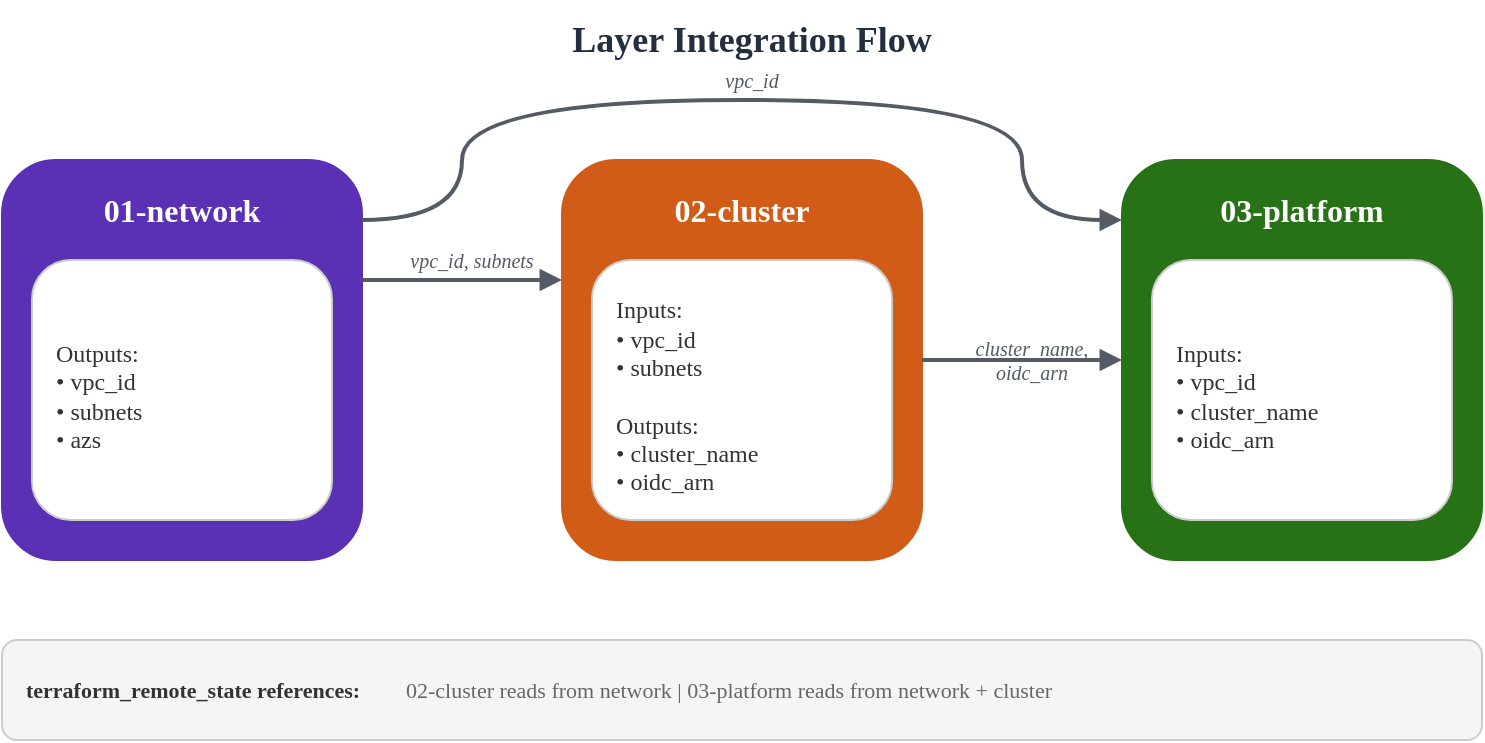
The terraform_remote_state data source enables layers to consume outputs from other layers without tight coupling.
# Pattern: Consuming outputs from another layer
data "terraform_remote_state" "network" {
  backend = "s3"

  config = {
    bucket = "eks-platform-prod-tfstate"
    key    = "network/terraform.tfstate"
    region = "ap-northeast-2"
  }
}

# Usage
locals {
  vpc_id = data.terraform_remote_state.network.outputs.vpc_id
}
Output/Data Flow
State Management Best Practices
- Use Consistent Bucket Naming:
{project}-{env}-tfstate - Organize by Layer and Color:
network/,cluster/blue/,platform/green/ - Enable Versioning: Recover from state corruption
- Enable Encryption: Protect sensitive values in state
- Use S3 Native Locking (Terraform 1.10+): Enable
use_lockfile = truein backend configuration for S3 conditional writes-based state locking without DynamoDB
State File Organization
s3://eks-platform-prod-tfstate/
├── network/
│   └── terraform.tfstate
├── cluster/
│   ├── blue/
│   │   └── terraform.tfstate
│   └── green/
│       └── terraform.tfstate
└── platform/
    ├── blue/
    │   └── terraform.tfstate
    └── green/
        └── terraform.tfstate
7. Validation
Deployment Order
The layers must be deployed in order due to dependencies:
# Step 1: Bootstrap (run once)
cd 00-shared/bootstrap
terraform init
terraform apply

# Step 2: Network layer
cd ../../01-network
terraform init
terraform apply

# Step 3: Cluster layer (blue)
cd ../02-cluster
# Edit backend.tf to use cluster/blue/terraform.tfstate
# Edit terraform.tfvars to set cluster_color = "blue"
terraform init
terraform apply

# Step 4: Platform layer (blue)
cd ../03-platform
# Edit backend.tf to use platform/blue/terraform.tfstate
# Edit terraform.tfvars to set cluster_color = "blue"
terraform init
terraform apply
Verification Commands
After deploying the cluster, verify the configuration:
# Configure kubectl
aws eks update-kubeconfig --name eks-platform-prod-blue --region ap-northeast-2

# Verify cluster access
kubectl cluster-info

# Check nodes (Auto Mode will provision as needed)
kubectl get nodes

# Verify Auto Mode node pools
kubectl get nodepools

# Check EKS add-ons
kubectl get pods -n kube-system

# Verify Pod Identity agent
kubectl get pods -n kube-system -l app.kubernetes.io/name=eks-pod-identity-agent

# Check storage classes
kubectl get storageclass

# Verify OIDC provider
aws eks describe-cluster --name eks-platform-prod-blue \
  --query "cluster.identity.oidc.issuer" --output text
Smoke Test Script
Create a comprehensive smoke test:
#!/bin/bash
# smoke-test.sh - Validate EKS cluster deployment

set -e

CLUSTER_NAME="${1:-eks-platform-prod-blue}"
REGION="${2:-ap-northeast-2}"

echo "=== EKS Cluster Smoke Test ==="
echo "Cluster: $CLUSTER_NAME"
echo "Region: $REGION"
echo ""

# Update kubeconfig
echo "1. Configuring kubectl..."
aws eks update-kubeconfig --name "$CLUSTER_NAME" --region "$REGION"

# Test cluster connectivity
echo "2. Testing cluster connectivity..."
kubectl cluster-info || { echo "FAIL: Cannot connect to cluster"; exit 1; }

# Check cluster version
echo "3. Checking cluster version..."
CLUSTER_VERSION=$(kubectl version --short 2>/dev/null | grep Server | awk '{print $3}')
echo "   Cluster version: $CLUSTER_VERSION"

# Check nodes
echo "4. Checking nodes..."
NODE_COUNT=$(kubectl get nodes --no-headers 2>/dev/null | wc -l)
echo "   Node count: $NODE_COUNT"

# Check system pods
echo "5. Checking system pods..."
PENDING_PODS=$(kubectl get pods -n kube-system --field-selector=status.phase!=Running,status.phase!=Succeeded --no-headers 2>/dev/null | wc -l)
if [ "$PENDING_PODS" -gt 0 ]; then
  echo "   WARNING: $PENDING_PODS pods not running in kube-system"
  kubectl get pods -n kube-system --field-selector=status.phase!=Running,status.phase!=Succeeded
else
  echo "   All system pods running"
fi

# Check storage classes
echo "6. Checking storage classes..."
kubectl get storageclass

# Check Pod Identity agent
echo "7. Checking Pod Identity agent..."
PI_PODS=$(kubectl get pods -n kube-system -l app.kubernetes.io/name=eks-pod-identity-agent --no-headers 2>/dev/null | wc -l)
echo "   Pod Identity agent pods: $PI_PODS"

# Test pod creation
echo "8. Testing pod creation..."
kubectl run smoke-test --image=nginx:alpine --restart=Never --rm -it --timeout=60s -- echo "Pod creation successful" 2>/dev/null || true

# Check Auto Mode node pools
echo "9. Checking Auto Mode node pools..."
kubectl get nodepools 2>/dev/null || echo "   NodePools CRD not available (expected if no workloads yet)"

echo ""
echo "=== Smoke Test Complete ==="
Terraform Validation
# Validate all layers
for layer in 01-network 02-cluster 03-platform; do
  echo "Validating $layer..."
  cd "$layer"
  terraform validate
  terraform fmt -check
  cd ..
done

# Plan without applying (dry run)
cd 01-network && terraform plan -out=plan.out
cd ../02-cluster && terraform plan -out=plan.out
cd ../03-platform && terraform plan -out=plan.out
Key Design Principles
Terraform Manages AWS Infrastructure Only
This architecture follows a clear separation:
| Layer | Terraform Manages | GitOps Manages |
|---|---|---|
| Network | VPC, Subnets, NAT, Endpoints | - |
| Cluster | EKS, KMS, CloudWatch | - |
| Platform | Add-ons, IAM Roles, Access Entries | - |
| Kubernetes | - | NodePool, Deployments, Services |
Kubernetes resources (NodePool definitions, application Deployments) are managed by ArgoCD GitOps. See GitOps Pipeline Configuration for details.
Cross-References
- Getting Started with EKS Auto Mode
- EKS Security Best Practices
- NLB Weighted Routing and Blue/Green Clusters
- GitOps Pipeline Configuration
< Table of Contents | Next: NLB Weighted Routing and Blue/Green Clusters >