Part 2: Creating Clusters with eksctl
Creating a Cluster Using eksctl
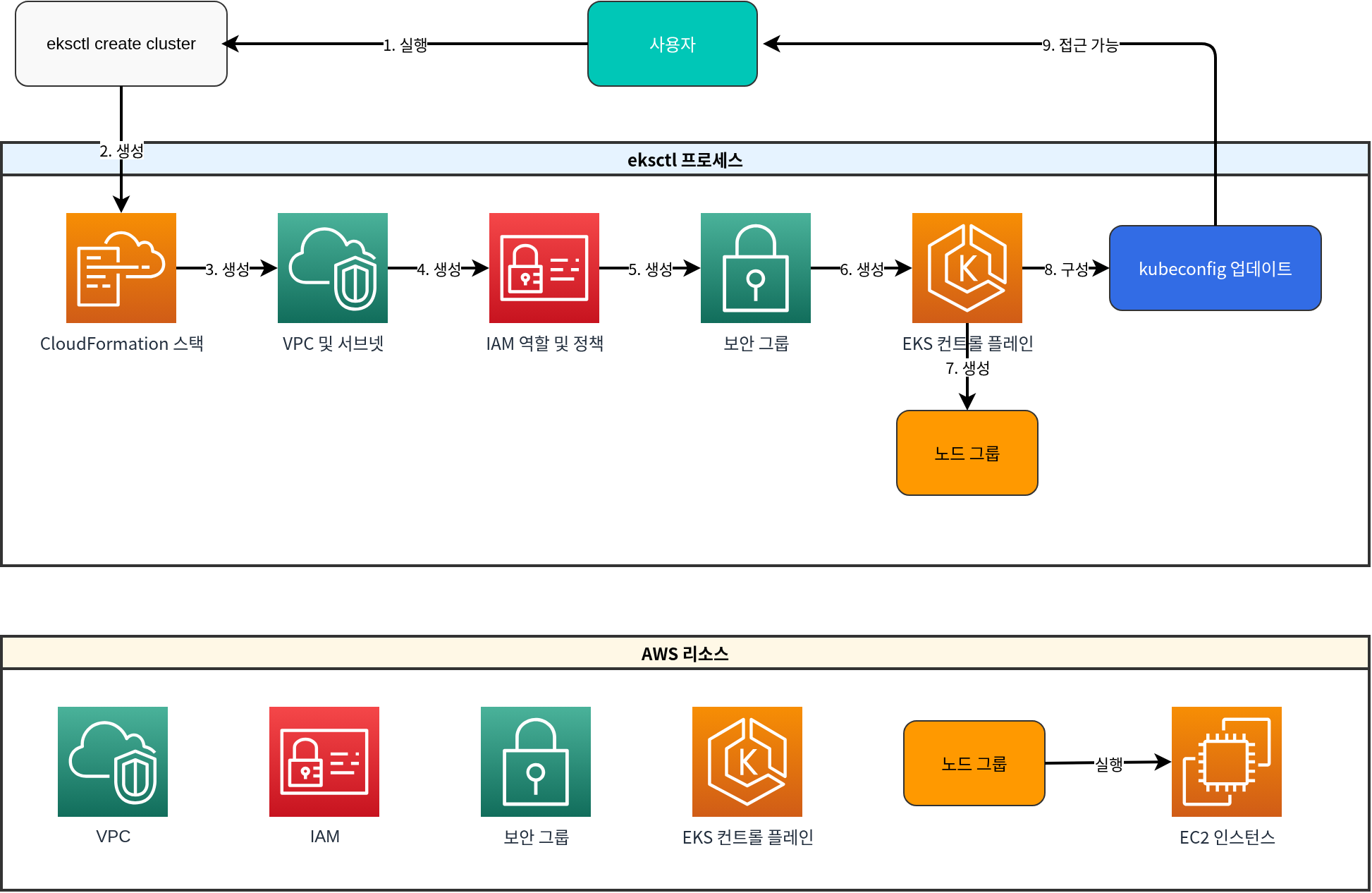
eksctl is the simplest way to create and manage EKS clusters. eksctl uses CloudFormation to create EKS clusters and related resources.
The following diagram shows the EKS cluster creation process using eksctl:
Basic Cluster Creation
To create the most basic form of an EKS cluster, run the following command:
eksctl create cluster --name my-cluster --region us-west-2This command creates a cluster with the following default settings:
- 2 m5.large nodes
- New VPC and subnets
- Default Amazon Linux 2 AMI
- Latest Kubernetes version
Creating a Cluster Using a Configuration File
For more complex configurations, you can define the cluster using a YAML file:
# cluster.yaml
apiVersion: eksctl.io/v1alpha5
kind: ClusterConfig

metadata:
  name: my-eks-cluster
  region: us-west-2
  version: "1.26"

vpc:
  id: vpc-12345678
  subnets:
    private:
      us-west-2a:
        id: subnet-12345678
      us-west-2b:
        id: subnet-87654321
    public:
      us-west-2a:
        id: subnet-23456789
      us-west-2b:
        id: subnet-98765432

managedNodeGroups:
  - name: ng-1
    instanceType: m5.large
    desiredCapacity: 2
    minSize: 1
    maxSize: 3
    privateNetworking: true
    volumeSize: 80
    volumeType: gp3
    iam:
      withAddonPolicies:
        imageBuilder: true
        autoScaler: true
        externalDNS: true
        certManager: true
        appMesh: true
        ebs: true
        fsx: true
        efs: true
        albIngress: true
        xRay: true
        cloudWatch: true

  - name: ng-2
    instanceType: c5.xlarge
    desiredCapacity: 2
    privateNetworking: true
    spot: true

fargate:
  profiles:
    - name: fp-default
      selectors:
        - namespace: default
          labels:
            env: fargate
    - name: fp-kube-system
      selectors:
        - namespace: kube-system
          labels:
            k8s-app: kube-dns

cloudWatch:
  clusterLogging:
    enableTypes: ["api", "audit", "authenticator", "controllerManager", "scheduler"]
To create a cluster using this configuration file, run the following command:
eksctl create cluster -f cluster.yamlCreating Managed Node Groups
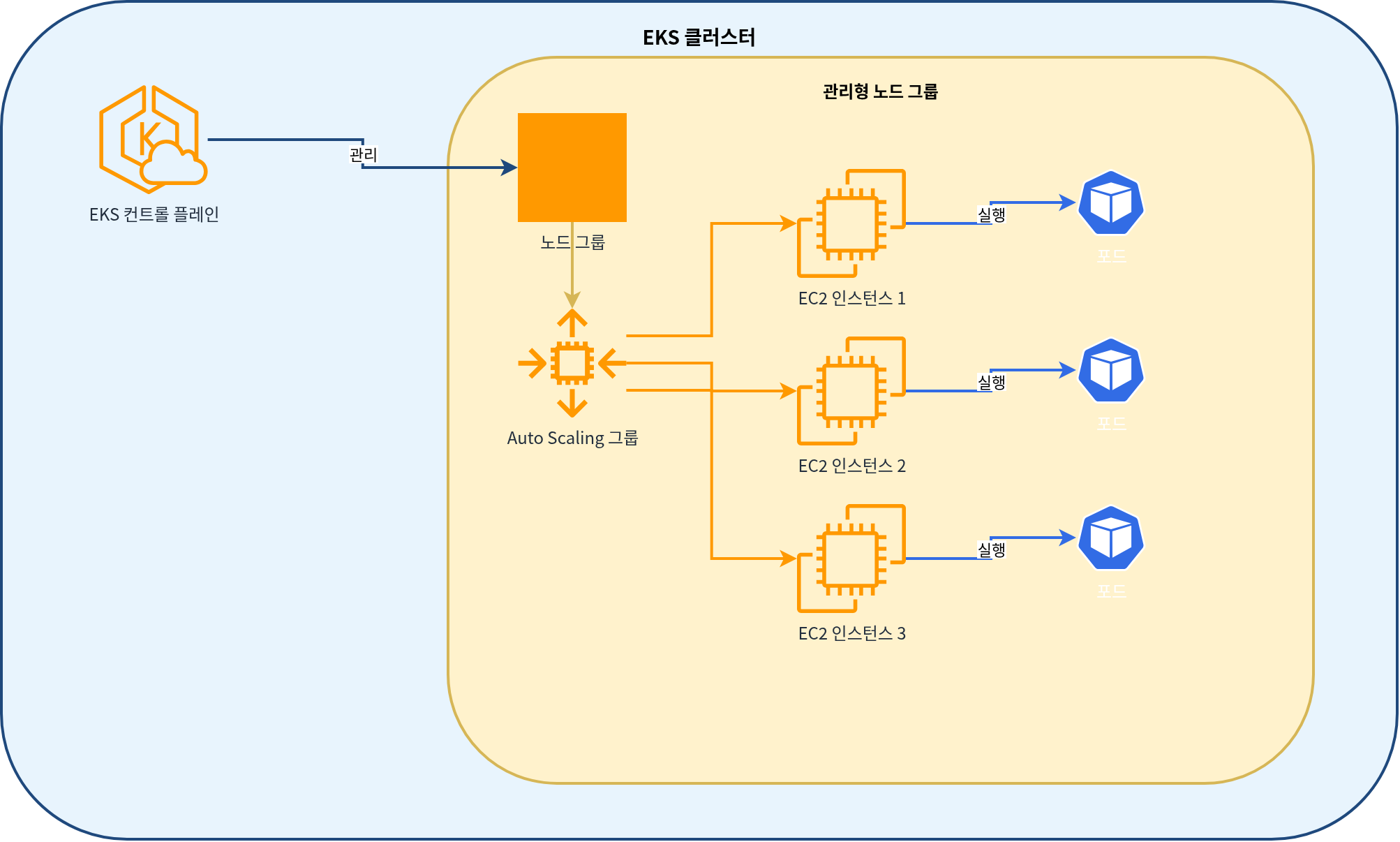
The following diagram shows the managed node group architecture for an EKS cluster:
To add a managed node group to an existing cluster, run the following command:
eksctl create nodegroup \
  --cluster my-cluster \
  --region us-west-2 \
  --name my-nodegroup \
  --node-type m5.large \
  --nodes 3 \
  --nodes-min 1 \
  --nodes-max 5 \
  --ssh-access \
  --ssh-public-key my-key
Or you can use a configuration file:
# nodegroup.yaml
apiVersion: eksctl.io/v1alpha5
kind: ClusterConfig

metadata:
  name: my-cluster
  region: us-west-2

managedNodeGroups:
  - name: my-nodegroup
    instanceType: m5.large
    desiredCapacity: 3
    minSize: 1
    maxSize: 5
    volumeSize: 80
    volumeType: gp3
    ssh:
      allow: true
publicKeyName: my-keyeksctl create nodegroup -f nodegroup.yamlCreating Fargate Profiles
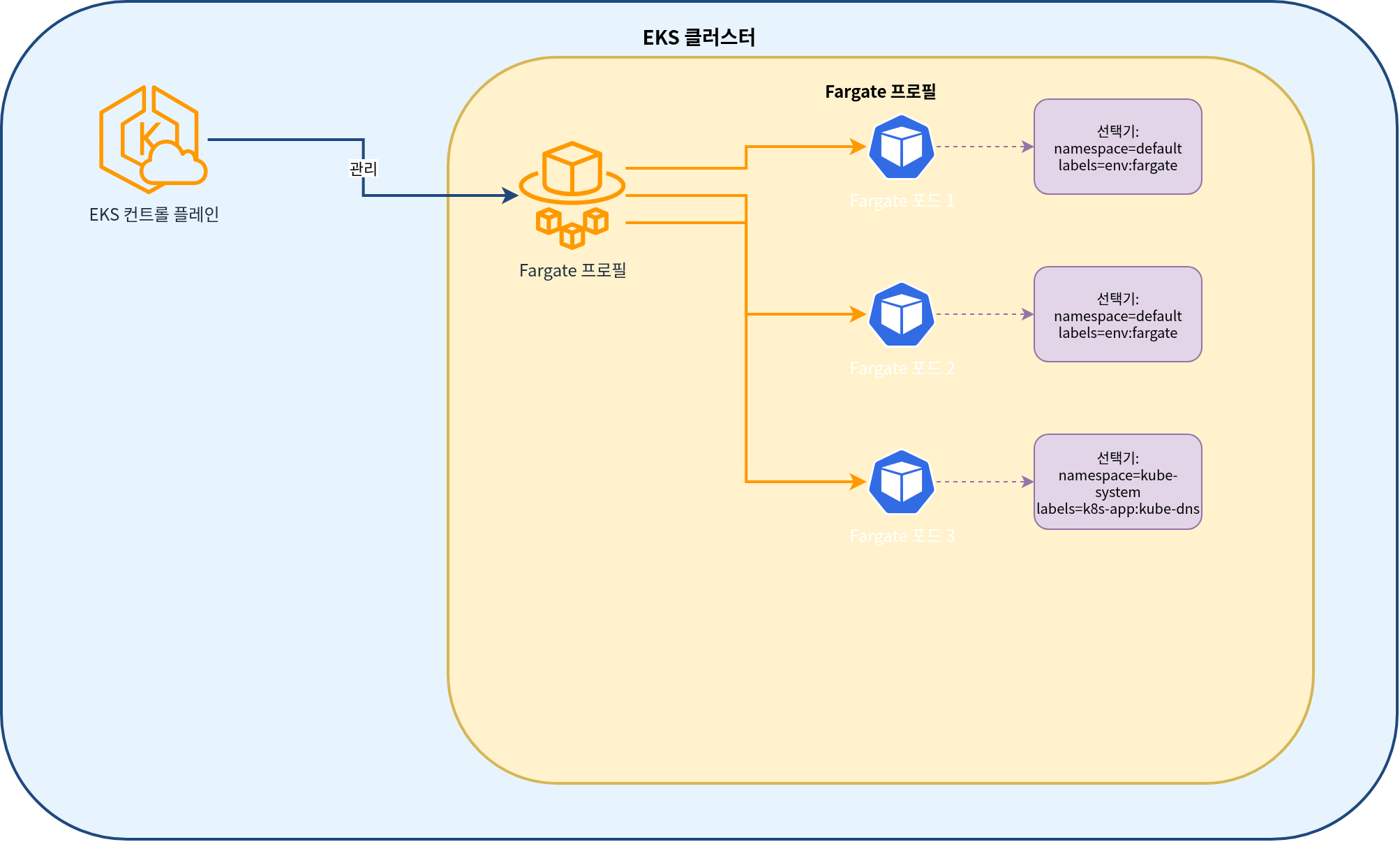
The following diagram shows the EKS Fargate profile architecture:
To create a Fargate profile, run the following command:
eksctl create fargateprofile \
  --cluster my-cluster \
  --region us-west-2 \
  --name my-fargate-profile \
  --namespace default \
  --labels env=fargate
Or you can use a configuration file:
# fargate.yaml
apiVersion: eksctl.io/v1alpha5
kind: ClusterConfig

metadata:
  name: my-cluster
  region: us-west-2

fargate:
  profiles:
    - name: my-fargate-profile
      selectors:
        - namespace: default
          labels:
env: fargateeksctl create fargateprofile -f fargate.yamlUpdating a Cluster
You can update an existing cluster using eksctl:
# Upgrade cluster version
eksctl upgrade cluster --name=my-cluster --version=1.27

# Upgrade node group
eksctl upgrade nodegroup --cluster=my-cluster --name=my-nodegroup
Deleting a Cluster
You can delete a cluster using eksctl:
eksctl delete cluster --name=my-cluster --region=us-west-2EKS Cluster Lifecycle Management
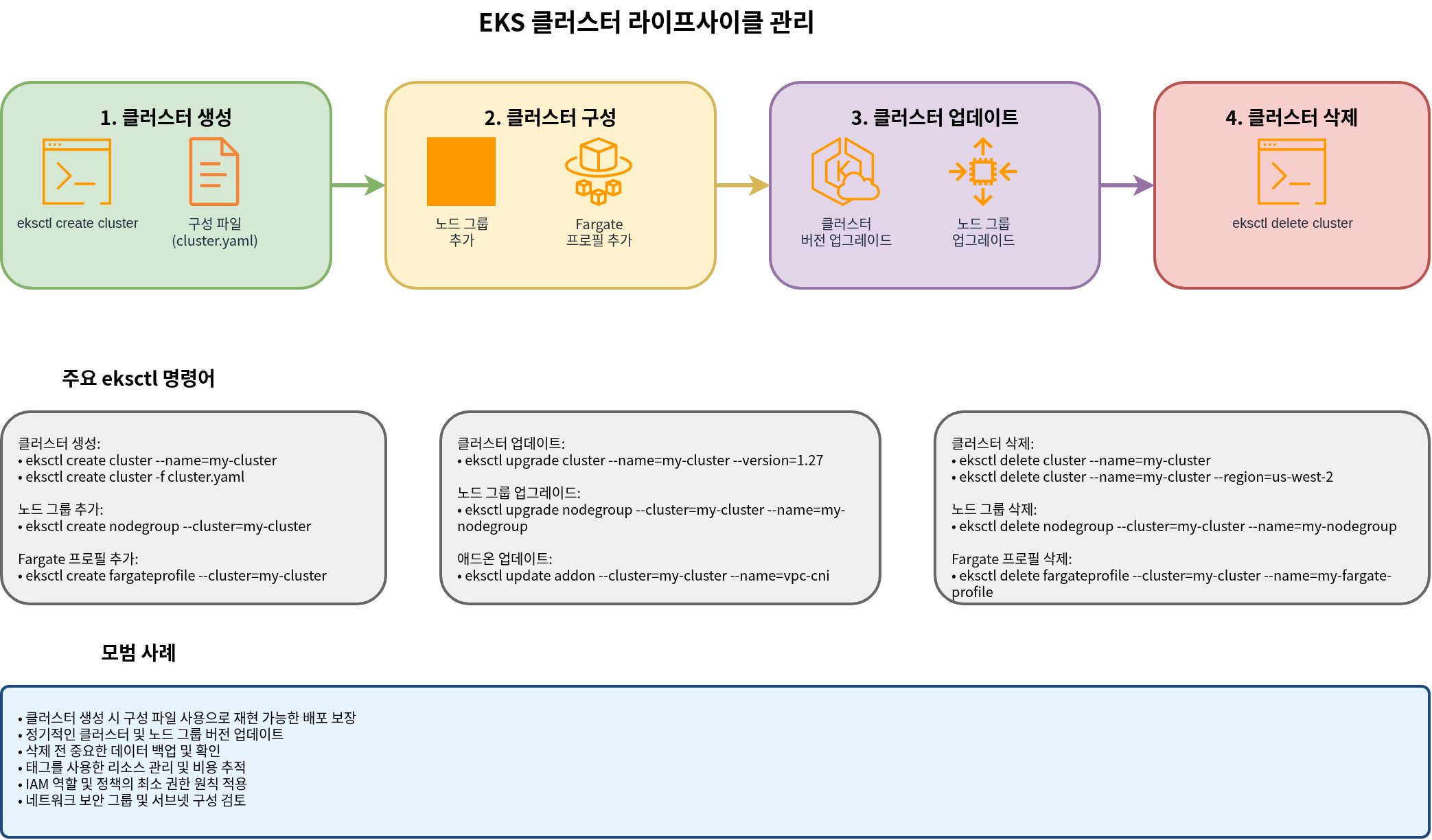
The following diagram shows the overall lifecycle management process for an EKS cluster:
Quiz
To test what you learned in this chapter, try the EKS Cluster Creation - Part 2 Quiz.