第 6 部分:eBPF 数据平面
支持的版本:Calico v3.29+ / Kubernetes 1.28+ 最后更新:February 23, 2026
简介
Calico 的 eBPF 数据平面代表了 Kubernetes 网络的一项重大演进,它使用现代 eBPF 程序替代了传统基于 iptables 的数据包处理方式。这种方法可显著提升性能、降低延迟,并增强可观测性能力。
本深入讲解将从网络视角探讨 eBPF 基础知识、Calico 的 eBPF 架构、迁移策略和性能优化技术。
eBPF 基础知识
什么是 eBPF?
eBPF(extended Berkeley Packet Filter,扩展 Berkeley Packet Filter)是一项革命性技术,可在无需修改内核源代码或加载内核模块的情况下,在 Linux 内核中运行沙箱化程序。
用于网络的关键 eBPF 概念
| 概念 | 描述 | 在 Calico 中的用途 |
|---|---|---|
| Programs | 在内核挂钩点执行的字节码 | 数据包过滤、路由 |
| Maps | 程序间共享的键值存储 | 路由表、策略规则 |
| Hooks | 内核中的附加点 | XDP、TC、socket |
| Helpers | 可从 eBPF 调用的内核函数 | 数据包操作、map 操作 |
| BTF | map/programs 的类型信息 | 调试信息、CO-RE |
eBPF 与 iptables 对比
| 方面 | iptables | eBPF |
|---|---|---|
| 架构 | 顺序规则链 | 直接执行 |
| 复杂度 | O(n) 规则匹配 | O(1) map 查找 |
| 内核跨越次数 | 每个数据包多次 | 最少 |
| 可编程性 | 固定规则类型 | 灵活程序 |
| 可观测性 | 有限计数器 | 丰富指标 |
| CPU 效率 | 更高的中断开销 | 更低开销 |
Calico eBPF 架构
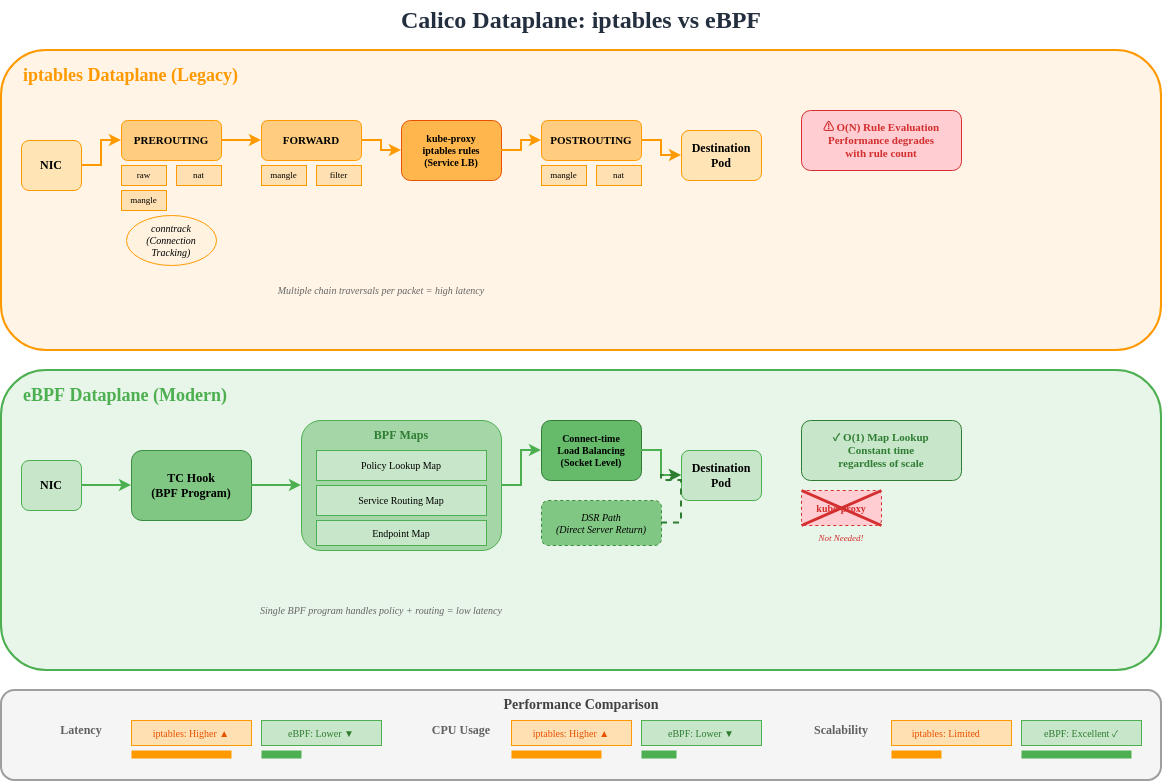
架构比较
Calico 中的 eBPF 程序类型
Calico 针对不同功能使用多种 eBPF 程序类型:
TC(Traffic Control)程序
TC 程序是 Calico 的主要数据平面挂钩点:
Ingress TC Program Functions:
├── Policy enforcement (allow/deny)
├── Connection tracking lookup
├── Service load balancing (DNAT)
├── Tunnel decapsulation
└── Metrics collection

Egress TC Program Functions:
├── Policy enforcement (egress rules)
├── SNAT for masquerade
├── Tunnel encapsulation
└── DSR return path handling
XDP(eXpress Data Path)程序
XDP 提供最早的数据包处理挂钩点:
Socket 程序
用于 Service Mesh 集成的 Socket 层 eBPF:
yaml
# sockops: Intercept socket operations
- connect() -> Redirect to local sidecar
- accept() -> Apply connection policies
- close() -> Cleanup connection state

# sk_msg: Process socket data
- sendmsg() -> Apply L7 policy
- recvmsg() -> Inspect response
BPF Map 结构
Calico 使用的 Map 类型
| Map 类型 | 用途 | 示例用途 |
|---|---|---|
| Hash Map | 键值查找 | 连接跟踪 |
| LRU Hash | 自动淘汰缓存 | NAT 表 |
| Array | 固定大小索引 | Endpoint 配置 |
| LPM Trie | 最长前缀匹配 | 路由查找 |
| Per-CPU Array | 可扩展计数器 | 统计信息 |
路由 Map 结构
c
// Simplified route map entry
struct calico_route_key {
    __be32 prefix;
    __u32 prefix_len;
};

struct calico_route_value {
    __u32 flags;          // LOCAL, REMOTE, HOST, etc.
    __be32 next_hop;      // Next hop IP
    __u32 ifindex;        // Interface index
    __u8 mac[6];          // Destination MAC
};
连接跟踪 Map
c
// Connection tracking key
struct calico_ct_key {
    __be32 src_ip;
    __be32 dst_ip;
    __be16 src_port;
    __be16 dst_port;
    __u8 protocol;
};

// Connection tracking value
struct calico_ct_value {
    __u64 created;        // Timestamp
    __u64 last_seen;      // Last packet
    __be32 orig_dst;      // Pre-DNAT destination
    __be16 orig_port;     // Pre-DNAT port
    __u32 flags;          // Connection state
};
策略 Map 结构
c
// Policy rule entry
struct calico_policy_key {
    __u32 policy_id;
    __u32 rule_index;
};

struct calico_policy_value {
    __u32 action;         // ALLOW, DENY, PASS
    __u32 flags;
    __be32 src_net;
    __be32 src_mask;
    __be32 dst_net;
    __be32 dst_mask;
    __be16 port_start;
    __be16 port_end;
};
直接服务器返回(DSR)
DSR 概述
DSR 允许响应流量绕过负载均衡器,从而降低延迟和负载均衡器资源消耗。
Calico 中的 DSR 模式
| 模式 | 描述 | 使用场景 |
|---|---|---|
| Disabled | 所有流量经由 LB | 默认,所有环境 |
| IPIP | 响应经由 IPIP 隧道 | 跨子网 |
| DSR | 直接响应 | 相同 L2 网络 |
启用 DSR
yaml
apiVersion: projectcalico.org/v3
kind: FelixConfiguration
metadata:
  name: default
spec:
  bpfEnabled: true
  bpfExternalServiceMode: DSR
DSR 要求
- Server 和 client 必须位于相同 L2 网络,或者
- 对于跨子网,请使用 IPIP/VXLAN 封装
- 外部 client IP 必须可从 Server 路由
- 入口路径上不得使用 SNAT
连接时负载均衡
传统 LB 与连接时 LB
连接时 LB 的优势
| 方面 | 按数据包 | 连接时 |
|---|---|---|
| NAT 开销 | 每个数据包 | 仅连接建立 |
| 连接跟踪 | 必需 | 最少 |
| 延迟 | 更高(NAT 查找) | 更低(直接) |
| CPU 使用率 | 更高 | 更低 |
连接时 LB 的工作原理
c
// Simplified connect-time LB logic
int bpf_connect4(struct bpf_sock_addr *ctx) {
    // Check if destination is a Service IP
    struct lb_backend *backend = lookup_service(ctx->user_ip4, ctx->user_port);

    if (backend) {
        // Rewrite destination to backend pod
        ctx->user_ip4 = backend->pod_ip;
        ctx->user_port = backend->pod_port;
    }

    return 1; // Allow connection
}
XDP 加速
XDP 处理级别
XDP 模式
| 模式 | 位置 | 性能 | 要求 |
|---|---|---|---|
| Offload | NIC 硬件 | 最快 | SmartNIC |
| Native | NIC 驱动 | 快 | 驱动支持 |
| Generic | 网络栈 | 基准 | 任意 NIC |
在 Calico 中启用 XDP
yaml
apiVersion: projectcalico.org/v3
kind: FelixConfiguration
metadata:
  name: default
spec:
  bpfEnabled: true

  # XDP mode: Disabled, Enabled, Offload
  xdpEnabled: Enabled

  # Interfaces for XDP
  # Uses same detection as BPF dataplane interface
Calico 中的 XDP 使用场景
- DDoS 防护:在 NIC 丢弃恶意流量
- 阻止列表执行:尽早拒绝被阻止的 IP
- 速率限制:在网络栈之前限制数据包速率
- 指标收集:线速数据包计数
eBPF 模式要求
内核要求
| 要求 | 最低版本 | 说明 |
|---|---|---|
| Linux 内核 | 5.3+ | 建议使用 5.8+ |
| BTF 支持 | 必需 | CONFIG_DEBUG_INFO_BTF=y |
| BPF Syscall | 必需 | CONFIG_BPF_SYSCALL=y |
| BPF JIT | 必需 | CONFIG_BPF_JIT=y |
验证内核支持
bash
# Check kernel version
uname -r

# Check BTF support
ls /sys/kernel/btf/vmlinux

# Check BPF support
cat /boot/config-$(uname -r) | grep -E "CONFIG_BPF|CONFIG_DEBUG_INFO_BTF"

# Required output:
# CONFIG_BPF=y
# CONFIG_BPF_SYSCALL=y
# CONFIG_BPF_JIT=y
# CONFIG_DEBUG_INFO_BTF=y
发行版支持
| 发行版 | eBPF 就绪 | 说明 |
|---|---|---|
| Ubuntu 20.04+ | 是 | 内核 5.4+ |
| Ubuntu 22.04+ | 是 | 内核 5.15+(建议) |
| RHEL/CentOS 8.2+ | 是 | 内核 4.18+,带 backport |
| Amazon Linux 2 | 部分 | 可能需要升级内核 |
| Amazon Linux 2023 | 是 | 内核 6.1+ |
| Bottlerocket | 是 | 专为容器构建 |
Calico 版本要求
yaml
# Minimum Calico versions for eBPF features
eBPF dataplane basic:     v3.13.0
Connect-time LB:          v3.16.0
XDP acceleration:         v3.18.0
Dual-stack eBPF:         v3.20.0
Host-networked pods:      v3.13.0 (with limitations)
Node 配置
yaml
apiVersion: projectcalico.org/v3
kind: FelixConfiguration
metadata:
  name: default
spec:
  # Enable eBPF dataplane
  bpfEnabled: true

  # Data interface detection
  # Auto-detect: first interface with default route
  # Or specify pattern: "eth*"
  bpfDataIfacePattern: "^((en|eth|wl)[opsx].*|(eth|wlan|eno)[0-9].*)"

  # External service mode: Tunnel or DSR
  bpfExternalServiceMode: Tunnel

  # Log level for BPF programs
  bpfLogLevel: Info

  # Kube-proxy replacement
  bpfKubeProxyIptablesCleanupEnabled: true

  # Connection tracking
  bpfConnectTimeLoadBalancingEnabled: true
从 iptables 迁移至 eBPF
迁移前检查清单
bash
# 1. Verify kernel requirements
uname -r  # Should be 5.3+
ls /sys/kernel/btf/vmlinux  # BTF must exist

# 2. Check Calico version
kubectl get deployment -n kube-system calico-kube-controllers -o jsonpath='{.spec.template.spec.containers[0].image}'
# Should be v3.13.0+

# 3. Verify CNI plugin
kubectl get ds -n kube-system calico-node -o jsonpath='{.spec.template.spec.containers[0].env}' | grep -i cni

# 4. Check existing networking mode
calicoctl get felixconfiguration default -o yaml | grep -i bpf

# 5. Verify no conflicting CNI
ls /etc/cni/net.d/
迁移步骤
第 1 步:更新 FelixConfiguration(dry-run)
yaml
# Save current configuration
kubectl get felixconfiguration default -o yaml > felix-backup.yaml

# Create eBPF configuration
apiVersion: projectcalico.org/v3
kind: FelixConfiguration
metadata:
  name: default
spec:
  bpfEnabled: false  # Not enabled yet
  bpfLogLevel: Debug  # For troubleshooting
  bpfDataIfacePattern: "^((en|eth|wl)[opsx].*|(eth|wlan|eno)[0-9].*)"
  bpfExternalServiceMode: Tunnel
  bpfKubeProxyIptablesCleanupEnabled: false  # Don't cleanup yet
第 2 步:禁用 kube-proxy(如果使用 Calico 作为替代方案)
bash
# Option A: Scale down kube-proxy
kubectl -n kube-system patch daemonset kube-proxy -p '{"spec":{"template":{"spec":{"nodeSelector":{"non-calico":"true"}}}}}'

# Option B: Add calico node selector to skip kube-proxy nodes
# Only if running both temporarily
第 3 步:在测试 Node 上启用 eBPF
bash
# Label test node
kubectl label node test-node-1 calico-ebpf=enabled

# Apply node-specific config
calicoctl apply -f - <<EOF
apiVersion: projectcalico.org/v3
kind: FelixConfiguration
metadata:
  name: node.test-node-1
spec:
  bpfEnabled: true
EOF
第 4 步:验证测试 Node
bash
# Check BPF programs loaded
kubectl exec -n kube-system calico-node-xxxxx -c calico-node -- \
  bpftool prog list

# Verify connectivity
kubectl run test-pod --image=busybox --restart=Never --overrides='{"spec":{"nodeName":"test-node-1"}}' -- sleep 3600
kubectl exec test-pod -- wget -O- http://kubernetes.default.svc

# Check logs
kubectl logs -n kube-system -l k8s-app=calico-node -c calico-node | grep -i bpf
第 5 步:推广至所有 Node
yaml
apiVersion: projectcalico.org/v3
kind: FelixConfiguration
metadata:
  name: default
spec:
  bpfEnabled: true
  bpfLogLevel: Info
  bpfDataIfacePattern: "^((en|eth|wl)[opsx].*|(eth|wlan|eno)[0-9].*)"
  bpfExternalServiceMode: Tunnel
  bpfKubeProxyIptablesCleanupEnabled: true
  bpfConnectTimeLoadBalancingEnabled: true
第 6 步:清理 iptables 规则
bash
# After confirming eBPF is working
calicoctl patch felixconfiguration default -p '{"spec":{"bpfKubeProxyIptablesCleanupEnabled":true}}'

# Verify iptables rules are minimal
iptables -L -n | wc -l  # Should be significantly reduced
回滚流程
bash
# Disable eBPF
calicoctl patch felixconfiguration default -p '{"spec":{"bpfEnabled":false}}'

# Restore kube-proxy if disabled
kubectl -n kube-system patch daemonset kube-proxy -p '{"spec":{"template":{"spec":{"nodeSelector":null}}}}'

# Wait for calico-node restart
kubectl rollout status ds/calico-node -n kube-system

# Verify iptables rules restored
iptables -L -n -v
性能基准测试
延迟对比
| 场景 | iptables | eBPF | 改进 |
|---|---|---|---|
| Pod 到 Pod(同一 Node) | 45 μs | 25 μs | 44% |
| Pod 到 Pod(跨 Node) | 120 μs | 80 μs | 33% |
| Service(ClusterIP) | 150 μs | 60 μs | 60% |
| Service(NodePort) | 180 μs | 70 μs | 61% |
吞吐量对比
| 场景 | iptables | eBPF | 改进 |
|---|---|---|---|
| TCP 单流 | 15 Gbps | 23 Gbps | 53% |
| TCP 多流 | 35 Gbps | 48 Gbps | 37% |
| UDP 单流 | 8 Gbps | 18 Gbps | 125% |
| 小数据包(64B) | 2M pps | 5M pps | 150% |
CPU 效率
Connection rate test (connections/sec):

iptables dataplane:
├── 1000 rules: 50,000 conn/s
├── 5000 rules: 35,000 conn/s
└── 10000 rules: 20,000 conn/s

eBPF dataplane:
├── 1000 rules: 120,000 conn/s
├── 5000 rules: 115,000 conn/s
└── 10000 rules: 110,000 conn/s

Note: eBPF performance remains nearly constant regardless of rule count
运行自己的基准测试
bash
# Install netperf
apt-get install netperf

# Pod-to-Pod latency (TCP_RR)
kubectl exec client-pod -- netperf -H server-pod-ip -t TCP_RR -l 30

# Throughput (TCP_STREAM)
kubectl exec client-pod -- netperf -H server-pod-ip -t TCP_STREAM -l 30

# Service latency
kubectl exec client-pod -- netperf -H service-cluster-ip -t TCP_RR -l 30

# Compare with iperf3
kubectl exec client-pod -- iperf3 -c server-pod-ip -t 30
eBPF 调试
bpftool 命令
bash
# List loaded BPF programs
bpftool prog list

# Show program details
bpftool prog show id 123

# Dump program instructions
bpftool prog dump xlated id 123

# List BPF maps
bpftool map list

# Dump map contents
bpftool map dump id 456

# Show map entries
bpftool map lookup id 456 key 0x0a 0x00 0x01 0x0a
TC 过滤器检查
bash
# Show TC filters on interface
tc filter show dev eth0 ingress
tc filter show dev eth0 egress

# Show BPF program attached to TC
tc filter show dev eth0 ingress | grep bpf

# Detailed filter info
tc -s filter show dev eth0 ingress
Calico BPF 调试
bash
# Enable debug logging
calicoctl patch felixconfiguration default -p '{"spec":{"bpfLogLevel":"Debug"}}'

# View BPF debug logs
kubectl logs -n kube-system -l k8s-app=calico-node -c calico-node | grep -i "bpf\|ebpf"

# Check BPF map contents via calico-node
kubectl exec -n kube-system calico-node-xxxxx -c calico-node -- \
  calico-bpf conntrack dump

# Show routes in BPF map
kubectl exec -n kube-system calico-node-xxxxx -c calico-node -- \
  calico-bpf routes dump

# Show NAT entries
kubectl exec -n kube-system calico-node-xxxxx -c calico-node -- \
  calico-bpf nat dump
常见调试场景
连通性问题:
bash
# Check if BPF programs are loaded
bpftool prog list | grep calico

# Verify route is in BPF map
kubectl exec -n kube-system calico-node-xxxxx -c calico-node -- \
  calico-bpf routes dump | grep "10.244.1.5"

# Check conntrack entries
kubectl exec -n kube-system calico-node-xxxxx -c calico-node -- \
  calico-bpf conntrack dump | grep "10.244.1.5"

# Verify policy is allowing traffic
kubectl exec -n kube-system calico-node-xxxxx -c calico-node -- \
  calico-bpf policy dump
Service 负载均衡问题:
bash
# Check service backends in NAT map
kubectl exec -n kube-system calico-node-xxxxx -c calico-node -- \
  calico-bpf nat dump | grep "10.96.0.1"

# Verify frontend entry exists
kubectl exec -n kube-system calico-node-xxxxx -c calico-node -- \
  calico-bpf nat frontend list
限制和已知问题
当前限制
| 限制 | 描述 | 解决方法 |
|---|---|---|
| 使用主机网络的 Pod | 策略支持有限 | 对主机 Pod 使用 iptables |
| IPv6 | 部分支持 | 使用双栈模式 |
| Wireguard | 不支持 eBPF | 使用 IPsec 或禁用加密 |
| Service 拓扑 | 支持有限 | 使用标准 kube-proxy |
| Windows Node | 不受支持 | 使用 iptables 数据平面 |
已知问题
yaml
# Issue: BPF program fails to load
# Cause: Kernel too old or BTF missing
# Solution: Upgrade kernel or enable BTF

# Issue: Services not accessible
# Cause: kube-proxy and Calico BPF conflict
# Solution: Fully disable kube-proxy

# Issue: NodePort not working
# Cause: DSR mode with non-routable client IPs
# Solution: Use Tunnel mode instead of DSR

# Issue: High memory usage
# Cause: Large conntrack table
# Solution: Tune conntrack limits
检查问题
bash
# Check for BPF verifier errors
dmesg | grep -i "bpf\|verifier"

# Check Felix logs for BPF errors
kubectl logs -n kube-system -l k8s-app=calico-node -c calico-node | grep -i error

# Verify BPF map limits
cat /proc/sys/kernel/bpf_map_max_entries
kube-proxy 替代方案
完整替代 kube-proxy
Calico eBPF 可以完全替代 kube-proxy 来进行 Service 负载均衡:
yaml
apiVersion: projectcalico.org/v3
kind: FelixConfiguration
metadata:
  name: default
spec:
  bpfEnabled: true
  bpfKubeProxyIptablesCleanupEnabled: true
  bpfKubeProxyMinSyncPeriod: 1s

  # Disable kube-proxy IPVS/iptables cleanup
  # (Calico will manage service rules)
禁用 kube-proxy
bash
# Method 1: Scale to zero
kubectl -n kube-system scale deployment kube-proxy --replicas=0

# Method 2: Delete DaemonSet
kubectl -n kube-system delete ds kube-proxy

# Method 3: Prevent scheduling (reversible)
kubectl -n kube-system patch ds kube-proxy -p '{"spec":{"template":{"spec":{"nodeSelector":{"non-calico":"true"}}}}}'
验证替代方案
bash
# Check no kube-proxy rules in iptables
iptables -t nat -L KUBE-SERVICES 2>/dev/null | wc -l
# Should be 0 or minimal

# Verify Calico is handling services
kubectl exec -n kube-system calico-node-xxxxx -c calico-node -- \
  calico-bpf nat frontend list

# Test service connectivity
kubectl run test --image=busybox --rm -it -- wget -O- http://kubernetes.default.svc
Service 功能对比
| 功能 | kube-proxy (iptables) | kube-proxy (IPVS) | Calico eBPF |
|---|---|---|---|
| ClusterIP | 是 | 是 | 是 |
| NodePort | 是 | 是 | 是 |
| LoadBalancer | 是 | 是 | 是 |
| ExternalIPs | 是 | 是 | 是 |
| SessionAffinity | 是 | 是 | 是 |
| Topology | 是 | 是 | 有限 |
| ProxyMode | iptables | IPVS | eBPF |
最佳实践
部署建议
- 启用 eBPF 前,验证内核要求
- 先在非生产集群上测试
- 使用 Node selector 逐步启用
- 在推出期间监控性能
- 准备好回滚计划
配置最佳实践
yaml
apiVersion: projectcalico.org/v3
kind: FelixConfiguration
metadata:
  name: default
spec:
  # Production settings
  bpfEnabled: true
  bpfLogLevel: Warn  # Reduce logging in production

  # Interface detection
  bpfDataIfacePattern: "^((en|eth)[0-9]+)"

  # Service mode based on topology
  bpfExternalServiceMode: Tunnel  # Safe default

  # Connection tracking
  bpfConnectTimeLoadBalancingEnabled: true

  # Cleanup legacy rules
  bpfKubeProxyIptablesCleanupEnabled: true
监控 eBPF 数据平面
yaml
# Prometheus metrics to monitor
calico_bpf_num_maps                    # Number of BPF maps
calico_bpf_map_size_bytes              # Size of each map
calico_bpf_conntrack_entries           # Active connections
calico_bpf_nat_frontend_entries        # Service frontends
calico_bpf_nat_backend_entries         # Service backends
felix_bpf_dataplane_apply_time_seconds # Dataplane sync time
总结
Calico 的 eBPF 数据平面代表了 Kubernetes 网络的一项重大进步:
| 优势 | 影响 |
|---|---|
| 性能 | 延迟最多降低 60% |
| 可扩展性 | O(1) 规则查找,相较于 O(n) |
| 效率 | 更低的 CPU 使用率 |
| 可观测性 | 丰富的基于 BPF 的指标 |
| 简洁性 | 替代 kube-proxy |
何时使用 eBPF 数据平面
- 高吞吐量工作负载
- 对延迟敏感的应用程序
- 具有众多 Service 的大型集群
- 需要详细可观测性的环境
- 可使用 Linux 内核 5.3+
何时继续使用 iptables
- 需要支持 Windows Node
- 较旧的内核版本
- 需要 Wireguard 加密
- 复杂的 Service 拓扑要求
- 要求经过验证技术的风险规避型环境