パート 6: eBPF Dataplane
対応バージョン: Calico v3.29+ / Kubernetes 1.28+ 最終更新: February 23, 2026
はじめに
Calico の eBPF Dataplane は、従来の iptables ベースのパケット処理を最新の eBPF プログラムに置き換える、Kubernetes ネットワーキングにおける重要な進化です。このアプローチにより、大幅なパフォーマンス向上、レイテンシの低減、オブザーバビリティ機能の強化が実現します。
この詳細解説では、ネットワーキングの観点から eBPF の基礎、Calico の eBPF アーキテクチャ、移行戦略、パフォーマンス最適化の手法を取り上げます。
eBPF の基礎
eBPF とは?
eBPF(extended Berkeley Packet Filter)は、Linux カーネルのソースコードを変更したりカーネルモジュールをロードしたりせずに、サンドボックス化されたプログラムを Linux カーネル内で実行できる革新的な技術です。
ネットワーキングにおける主要な eBPF の概念
| 概念 | 説明 | Calico での用途 |
|---|---|---|
| Programs | カーネルフックで実行されるバイトコード | パケットフィルタリング、ルーティング |
| Maps | プログラム間で共有される Key-value ストア | ルートテーブル、ポリシールール |
| Hooks | カーネル内のアタッチポイント | XDP、TC、socket |
| Helpers | eBPF から呼び出せるカーネル関数 | パケット操作、Map 操作 |
| BTF | Map/プログラムの型情報 | デバッグ情報、CO-RE |
eBPF と iptables の比較
| 観点 | iptables | eBPF |
|---|---|---|
| アーキテクチャ | 順次的なルールチェーン | 直接実行 |
| 複雑性 | O(n) のルールマッチング | O(1) の Map ルックアップ |
| カーネル境界の通過 | パケットごとに複数回 | 最小限 |
| プログラマビリティ | 固定されたルールタイプ | 柔軟なプログラム |
| オブザーバビリティ | 限定的なカウンター | 豊富なメトリクス |
| CPU 効率 | より高い割り込みオーバーヘッド | より低いオーバーヘッド |
Calico eBPF アーキテクチャ
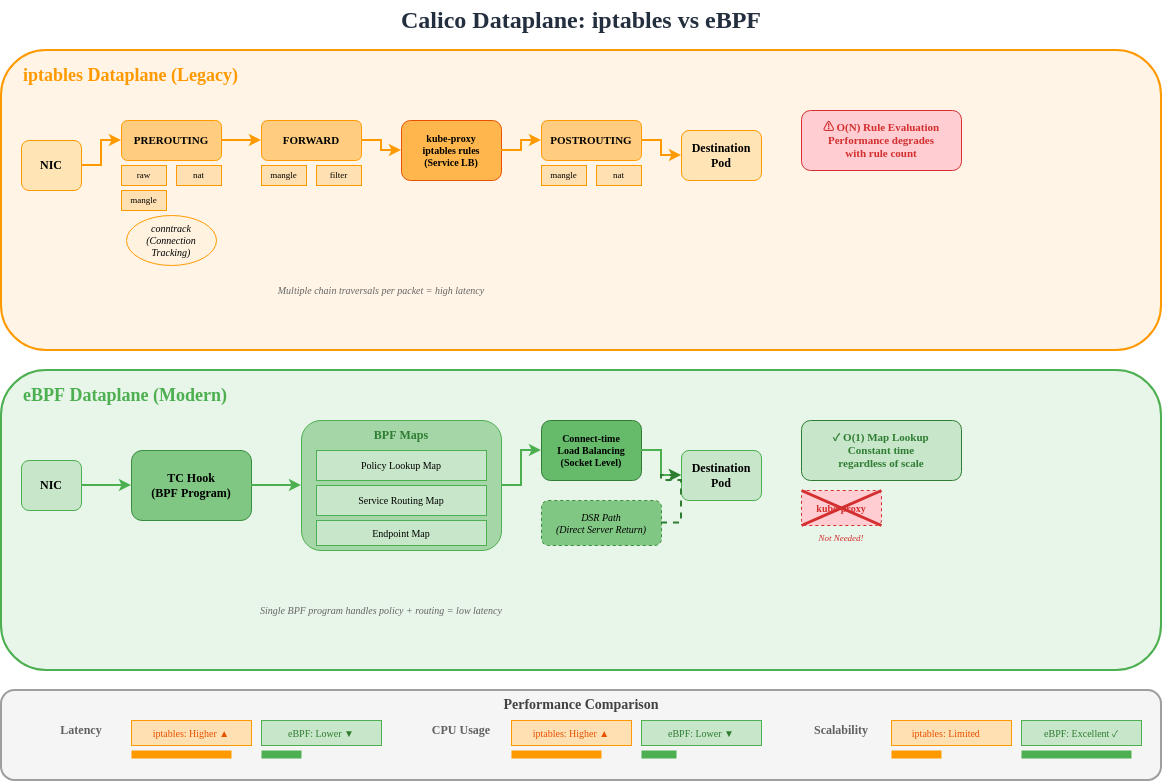
アーキテクチャの比較
Calico の eBPF プログラムタイプ
Calico は、異なる機能のために複数の eBPF プログラムタイプを使用します。
TC(Traffic Control)プログラム
TC プログラムは Calico における主要な Dataplane フックです。
Ingress TC Program Functions:
├── Policy enforcement (allow/deny)
├── Connection tracking lookup
├── Service load balancing (DNAT)
├── Tunnel decapsulation
└── Metrics collection

Egress TC Program Functions:
├── Policy enforcement (egress rules)
├── SNAT for masquerade
├── Tunnel encapsulation
└── DSR return path handling
XDP(eXpress Data Path)プログラム
XDP は最も早い段階でパケットを処理するフックを提供します。
Socket プログラム
Service Mesh 統合のための Socket レベル eBPF:
# sockops: Intercept socket operations
- connect() -> Redirect to local sidecar
- accept() -> Apply connection policies
- close() -> Cleanup connection state

# sk_msg: Process socket data
- sendmsg() -> Apply L7 policy
- recvmsg() -> Inspect response
BPF Map 構造
Calico が使用する Map タイプ
| Map タイプ | 目的 | 使用例 |
|---|---|---|
| Hash Map | Key-value ルックアップ | Connection tracking |
| LRU Hash | 自動退避キャッシュ | NAT テーブル |
| Array | 固定サイズのインデックス | Endpoint 設定 |
| LPM Trie | 最長プレフィックス一致 | ルートルックアップ |
| Per-CPU Array | スケーラブルなカウンター | 統計情報 |
Route Map 構造
// Simplified route map entry
struct calico_route_key {
    __be32 prefix;
    __u32 prefix_len;
};

struct calico_route_value {
    __u32 flags;          // LOCAL, REMOTE, HOST, etc.
    __be32 next_hop;      // Next hop IP
    __u32 ifindex;        // Interface index
    __u8 mac[6];          // Destination MAC
};
Connection Tracking Map
// Connection tracking key
struct calico_ct_key {
    __be32 src_ip;
    __be32 dst_ip;
    __be16 src_port;
    __be16 dst_port;
    __u8 protocol;
};

// Connection tracking value
struct calico_ct_value {
    __u64 created;        // Timestamp
    __u64 last_seen;      // Last packet
    __be32 orig_dst;      // Pre-DNAT destination
    __be16 orig_port;     // Pre-DNAT port
    __u32 flags;          // Connection state
};
Policy Map 構造
// Policy rule entry
struct calico_policy_key {
    __u32 policy_id;
    __u32 rule_index;
};

struct calico_policy_value {
    __u32 action;         // ALLOW, DENY, PASS
    __u32 flags;
    __be32 src_net;
    __be32 src_mask;
    __be32 dst_net;
    __be32 dst_mask;
    __be16 port_start;
    __be16 port_end;
};
Direct Server Return(DSR)
DSR の概要
DSR では、レスポンストラフィックが Load Balancer をバイパスできるため、レイテンシと Load Balancer のリソース消費を削減できます。
Calico の DSR モード
| モード | 説明 | ユースケース |
|---|---|---|
| Disabled | すべてのトラフィックが LB を経由 | デフォルト、すべての環境 |
| IPIP | IPIP Tunnel 経由のレスポンス | サブネット間 |
| DSR | 直接レスポンス | 同一 L2 ネットワーク |
DSR の有効化
apiVersion: projectcalico.org/v3
kind: FelixConfiguration
metadata:
  name: default
spec:
  bpfEnabled: true
  bpfExternalServiceMode: DSR
DSR の要件
- Server と Client が同じ L2 ネットワーク上にある、または
- サブネット間には IPIP/VXLAN カプセル化を使用する
- External Client IP が Server からルーティング可能である
- Ingress パスに SNAT がない
Connect-Time Load Balancing
従来の LB と Connect-Time LB
Connect-Time LB の利点
| 観点 | パケットごと | Connect-Time |
|---|---|---|
| NAT オーバーヘッド | すべてのパケット | 接続確立時のみ |
| Connection tracking | 必須 | 最小限 |
| レイテンシ | 高い(NAT ルックアップ) | 低い(直接) |
| CPU 使用率 | 高い | 低い |
Connect-Time LB の仕組み
// Simplified connect-time LB logic
int bpf_connect4(struct bpf_sock_addr *ctx) {
    // Check if destination is a Service IP
    struct lb_backend *backend = lookup_service(ctx->user_ip4, ctx->user_port);

    if (backend) {
        // Rewrite destination to backend pod
        ctx->user_ip4 = backend->pod_ip;
        ctx->user_port = backend->pod_port;
    }

    return 1; // Allow connection
}
XDP アクセラレーション
XDP 処理レベル
XDP モード
| モード | 場所 | パフォーマンス | 要件 |
|---|---|---|---|
| Offload | NIC ハードウェア | 最速 | SmartNIC |
| Native | NIC Driver | 高速 | Driver サポート |
| Generic | Network Stack | ベースライン | 任意の NIC |
Calico での XDP の有効化
apiVersion: projectcalico.org/v3
kind: FelixConfiguration
metadata:
  name: default
spec:
  bpfEnabled: true

  # XDP mode: Disabled, Enabled, Offload
  xdpEnabled: Enabled

  # Interfaces for XDP
  # Uses same detection as BPF dataplane interface
Calico における XDP のユースケース
- DDoS Protection: NIC で悪意のあるトラフィックを Drop
- Blocklist Enforcement: ブロックされた IP を早期に拒否
- Rate Limiting: Stack より前でのパケットレート制限
- Metrics Collection: ワイヤスピードでのパケットカウント
eBPF モードの要件
カーネル要件
| 要件 | 最小バージョン | 備考 |
|---|---|---|
| Linux Kernel | 5.3+ | 5.8+ 推奨 |
| BTF Support | 必須 | CONFIG_DEBUG_INFO_BTF=y |
| BPF Syscall | 必須 | CONFIG_BPF_SYSCALL=y |
| BPF JIT | 必須 | CONFIG_BPF_JIT=y |
カーネルサポートの検証
# Check kernel version
uname -r

# Check BTF support
ls /sys/kernel/btf/vmlinux

# Check BPF support
cat /boot/config-$(uname -r) | grep -E "CONFIG_BPF|CONFIG_DEBUG_INFO_BTF"

# Required output:
# CONFIG_BPF=y
# CONFIG_BPF_SYSCALL=y
# CONFIG_BPF_JIT=y
# CONFIG_DEBUG_INFO_BTF=y
Distribution のサポート
| Distribution | eBPF 対応 | 備考 |
|---|---|---|
| Ubuntu 20.04+ | はい | Kernel 5.4+ |
| Ubuntu 22.04+ | はい | Kernel 5.15+(推奨) |
| RHEL/CentOS 8.2+ | はい | バックポート付き Kernel 4.18+ |
| Amazon Linux 2 | 部分的 | Kernel のアップグレードが必要な場合あり |
| Amazon Linux 2023 | はい | Kernel 6.1+ |
| Bottlerocket | はい | Container 用に特化 |
Calico バージョンの要件
# Minimum Calico versions for eBPF features
eBPF dataplane basic:     v3.13.0
Connect-time LB:          v3.16.0
XDP acceleration:         v3.18.0
Dual-stack eBPF:         v3.20.0
Host-networked pods:      v3.13.0 (with limitations)
Node 設定
apiVersion: projectcalico.org/v3
kind: FelixConfiguration
metadata:
  name: default
spec:
  # Enable eBPF dataplane
  bpfEnabled: true

  # Data interface detection
  # Auto-detect: first interface with default route
  # Or specify pattern: "eth*"
  bpfDataIfacePattern: "^((en|eth|wl)[opsx].*|(eth|wlan|eno)[0-9].*)"

  # External service mode: Tunnel or DSR
  bpfExternalServiceMode: Tunnel

  # Log level for BPF programs
  bpfLogLevel: Info

  # Kube-proxy replacement
  bpfKubeProxyIptablesCleanupEnabled: true

  # Connection tracking
  bpfConnectTimeLoadBalancingEnabled: true
iptables から eBPF への移行
移行前チェックリスト
# 1. Verify kernel requirements
uname -r  # Should be 5.3+
ls /sys/kernel/btf/vmlinux  # BTF must exist

# 2. Check Calico version
kubectl get deployment -n kube-system calico-kube-controllers -o jsonpath='{.spec.template.spec.containers[0].image}'
# Should be v3.13.0+

# 3. Verify CNI plugin
kubectl get ds -n kube-system calico-node -o jsonpath='{.spec.template.spec.containers[0].env}' | grep -i cni

# 4. Check existing networking mode
calicoctl get felixconfiguration default -o yaml | grep -i bpf

# 5. Verify no conflicting CNI
ls /etc/cni/net.d/
移行手順
ステップ 1: FelixConfiguration の更新(dry-run)
# Save current configuration
kubectl get felixconfiguration default -o yaml > felix-backup.yaml

# Create eBPF configuration
apiVersion: projectcalico.org/v3
kind: FelixConfiguration
metadata:
  name: default
spec:
  bpfEnabled: false  # Not enabled yet
  bpfLogLevel: Debug  # For troubleshooting
  bpfDataIfacePattern: "^((en|eth|wl)[opsx].*|(eth|wlan|eno)[0-9].*)"
  bpfExternalServiceMode: Tunnel
  bpfKubeProxyIptablesCleanupEnabled: false  # Don't cleanup yet
ステップ 2: kube-proxy の無効化(Calico を置き換えとして使用する場合)
# Option A: Scale down kube-proxy
kubectl -n kube-system patch daemonset kube-proxy -p '{"spec":{"template":{"spec":{"nodeSelector":{"non-calico":"true"}}}}}'

# Option B: Add calico node selector to skip kube-proxy nodes
# Only if running both temporarily
ステップ 3: テスト Node で eBPF を有効化
# Label test node
kubectl label node test-node-1 calico-ebpf=enabled

# Apply node-specific config
calicoctl apply -f - <<EOF
apiVersion: projectcalico.org/v3
kind: FelixConfiguration
metadata:
  name: node.test-node-1
spec:
  bpfEnabled: true
EOF
ステップ 4: テスト Node を検証
# Check BPF programs loaded
kubectl exec -n kube-system calico-node-xxxxx -c calico-node -- \
  bpftool prog list

# Verify connectivity
kubectl run test-pod --image=busybox --restart=Never --overrides='{"spec":{"nodeName":"test-node-1"}}' -- sleep 3600
kubectl exec test-pod -- wget -O- http://kubernetes.default.svc

# Check logs
kubectl logs -n kube-system -l k8s-app=calico-node -c calico-node | grep -i bpf
ステップ 5: すべての Node にロールアウト
apiVersion: projectcalico.org/v3
kind: FelixConfiguration
metadata:
  name: default
spec:
  bpfEnabled: true
  bpfLogLevel: Info
  bpfDataIfacePattern: "^((en|eth|wl)[opsx].*|(eth|wlan|eno)[0-9].*)"
  bpfExternalServiceMode: Tunnel
  bpfKubeProxyIptablesCleanupEnabled: true
  bpfConnectTimeLoadBalancingEnabled: true
ステップ 6: iptables ルールのクリーンアップ
# After confirming eBPF is working
calicoctl patch felixconfiguration default -p '{"spec":{"bpfKubeProxyIptablesCleanupEnabled":true}}'

# Verify iptables rules are minimal
iptables -L -n | wc -l  # Should be significantly reduced
ロールバック手順
# Disable eBPF
calicoctl patch felixconfiguration default -p '{"spec":{"bpfEnabled":false}}'

# Restore kube-proxy if disabled
kubectl -n kube-system patch daemonset kube-proxy -p '{"spec":{"template":{"spec":{"nodeSelector":null}}}}'

# Wait for calico-node restart
kubectl rollout status ds/calico-node -n kube-system

# Verify iptables rules restored
iptables -L -n -v
パフォーマンスベンチマーク
レイテンシの比較
| シナリオ | iptables | eBPF | 改善率 |
|---|---|---|---|
| Pod 間(同一 Node) | 45 μs | 25 μs | 44% |
| Pod 間(Node 間) | 120 μs | 80 μs | 33% |
| Service(ClusterIP) | 150 μs | 60 μs | 60% |
| Service(NodePort) | 180 μs | 70 μs | 61% |
スループットの比較
| シナリオ | iptables | eBPF | 改善率 |
|---|---|---|---|
| TCP 単一ストリーム | 15 Gbps | 23 Gbps | 53% |
| TCP 複数ストリーム | 35 Gbps | 48 Gbps | 37% |
| UDP 単一ストリーム | 8 Gbps | 18 Gbps | 125% |
| 小さいパケット(64B) | 2M pps | 5M pps | 150% |
CPU 効率
Connection rate test (connections/sec):

iptables dataplane:
├── 1000 rules: 50,000 conn/s
├── 5000 rules: 35,000 conn/s
└── 10000 rules: 20,000 conn/s

eBPF dataplane:
├── 1000 rules: 120,000 conn/s
├── 5000 rules: 115,000 conn/s
└── 10000 rules: 110,000 conn/s

Note: eBPF performance remains nearly constant regardless of rule count
独自のベンチマークの実行
# Install netperf
apt-get install netperf

# Pod-to-Pod latency (TCP_RR)
kubectl exec client-pod -- netperf -H server-pod-ip -t TCP_RR -l 30

# Throughput (TCP_STREAM)
kubectl exec client-pod -- netperf -H server-pod-ip -t TCP_STREAM -l 30

# Service latency
kubectl exec client-pod -- netperf -H service-cluster-ip -t TCP_RR -l 30

# Compare with iperf3
kubectl exec client-pod -- iperf3 -c server-pod-ip -t 30
eBPF のデバッグ
bpftool コマンド
# List loaded BPF programs
bpftool prog list

# Show program details
bpftool prog show id 123

# Dump program instructions
bpftool prog dump xlated id 123

# List BPF maps
bpftool map list

# Dump map contents
bpftool map dump id 456

# Show map entries
bpftool map lookup id 456 key 0x0a 0x00 0x01 0x0a
TC Filter の調査
# Show TC filters on interface
tc filter show dev eth0 ingress
tc filter show dev eth0 egress

# Show BPF program attached to TC
tc filter show dev eth0 ingress | grep bpf

# Detailed filter info
tc -s filter show dev eth0 ingress
Calico BPF のデバッグ
# Enable debug logging
calicoctl patch felixconfiguration default -p '{"spec":{"bpfLogLevel":"Debug"}}'

# View BPF debug logs
kubectl logs -n kube-system -l k8s-app=calico-node -c calico-node | grep -i "bpf\|ebpf"

# Check BPF map contents via calico-node
kubectl exec -n kube-system calico-node-xxxxx -c calico-node -- \
  calico-bpf conntrack dump

# Show routes in BPF map
kubectl exec -n kube-system calico-node-xxxxx -c calico-node -- \
  calico-bpf routes dump

# Show NAT entries
kubectl exec -n kube-system calico-node-xxxxx -c calico-node -- \
  calico-bpf nat dump
一般的なデバッグシナリオ
接続性の問題:
# Check if BPF programs are loaded
bpftool prog list | grep calico

# Verify route is in BPF map
kubectl exec -n kube-system calico-node-xxxxx -c calico-node -- \
  calico-bpf routes dump | grep "10.244.1.5"

# Check conntrack entries
kubectl exec -n kube-system calico-node-xxxxx -c calico-node -- \
  calico-bpf conntrack dump | grep "10.244.1.5"

# Verify policy is allowing traffic
kubectl exec -n kube-system calico-node-xxxxx -c calico-node -- \
  calico-bpf policy dump
Service Load Balancing の問題:
# Check service backends in NAT map
kubectl exec -n kube-system calico-node-xxxxx -c calico-node -- \
  calico-bpf nat dump | grep "10.96.0.1"

# Verify frontend entry exists
kubectl exec -n kube-system calico-node-xxxxx -c calico-node -- \
  calico-bpf nat frontend list
制限事項と既知の問題
現在の制限事項
| 制限事項 | 説明 | 回避策 |
|---|---|---|
| Host-networked pods | 限定的な Policy サポート | Host Pod には iptables を使用 |
| IPv6 | 部分的なサポート | Dual-stack モードを使用 |
| Wireguard | eBPF とは併用不可 | IPsec を使用するか暗号化を無効化 |
| Service topology | 限定的なサポート | 標準の kube-proxy を使用 |
| Windows nodes | 未サポート | iptables Dataplane を使用 |
既知の問題
# Issue: BPF program fails to load
# Cause: Kernel too old or BTF missing
# Solution: Upgrade kernel or enable BTF

# Issue: Services not accessible
# Cause: kube-proxy and Calico BPF conflict
# Solution: Fully disable kube-proxy

# Issue: NodePort not working
# Cause: DSR mode with non-routable client IPs
# Solution: Use Tunnel mode instead of DSR

# Issue: High memory usage
# Cause: Large conntrack table
# Solution: Tune conntrack limits
問題の確認
# Check for BPF verifier errors
dmesg | grep -i "bpf\|verifier"

# Check Felix logs for BPF errors
kubectl logs -n kube-system -l k8s-app=calico-node -c calico-node | grep -i error

# Verify BPF map limits
cat /proc/sys/kernel/bpf_map_max_entries
Kube-proxy の置き換え
Kube-proxy の完全な置き換え
Calico eBPF は、Service Load Balancing で kube-proxy を完全に置き換えることができます。
apiVersion: projectcalico.org/v3
kind: FelixConfiguration
metadata:
  name: default
spec:
  bpfEnabled: true
  bpfKubeProxyIptablesCleanupEnabled: true
  bpfKubeProxyMinSyncPeriod: 1s

  # Disable kube-proxy IPVS/iptables cleanup
  # (Calico will manage service rules)
kube-proxy の無効化
# Method 1: Scale to zero
kubectl -n kube-system scale deployment kube-proxy --replicas=0

# Method 2: Delete DaemonSet
kubectl -n kube-system delete ds kube-proxy

# Method 3: Prevent scheduling (reversible)
kubectl -n kube-system patch ds kube-proxy -p '{"spec":{"template":{"spec":{"nodeSelector":{"non-calico":"true"}}}}}'
置き換えの検証
# Check no kube-proxy rules in iptables
iptables -t nat -L KUBE-SERVICES 2>/dev/null | wc -l
# Should be 0 or minimal

# Verify Calico is handling services
kubectl exec -n kube-system calico-node-xxxxx -c calico-node -- \
  calico-bpf nat frontend list

# Test service connectivity
kubectl run test --image=busybox --rm -it -- wget -O- http://kubernetes.default.svc
Service 機能の比較
| 機能 | kube-proxy(iptables) | kube-proxy(IPVS) | Calico eBPF |
|---|---|---|---|
| ClusterIP | はい | はい | はい |
| NodePort | はい | はい | はい |
| LoadBalancer | はい | はい | はい |
| ExternalIPs | はい | はい | はい |
| SessionAffinity | はい | はい | はい |
| Topology | はい | はい | 限定的 |
| ProxyMode | iptables | IPVS | eBPF |
ベストプラクティス
Deployment の推奨事項
- eBPF を有効化する前にカーネル要件を検証する
- まず本番以外の Cluster でテストする
- Node Selector を使用して段階的に有効化する
- ロールアウト中にパフォーマンスを監視する
- ロールバック計画を準備しておく
設定のベストプラクティス
apiVersion: projectcalico.org/v3
kind: FelixConfiguration
metadata:
  name: default
spec:
  # Production settings
  bpfEnabled: true
  bpfLogLevel: Warn  # Reduce logging in production

  # Interface detection
  bpfDataIfacePattern: "^((en|eth)[0-9]+)"

  # Service mode based on topology
  bpfExternalServiceMode: Tunnel  # Safe default

  # Connection tracking
  bpfConnectTimeLoadBalancingEnabled: true

  # Cleanup legacy rules
  bpfKubeProxyIptablesCleanupEnabled: true
eBPF Dataplane のモニタリング
# Prometheus metrics to monitor
calico_bpf_num_maps                    # Number of BPF maps
calico_bpf_map_size_bytes              # Size of each map
calico_bpf_conntrack_entries           # Active connections
calico_bpf_nat_frontend_entries        # Service frontends
calico_bpf_nat_backend_entries         # Service backends
felix_bpf_dataplane_apply_time_seconds # Dataplane sync time
まとめ
Calico の eBPF Dataplane は、Kubernetes ネットワーキングにおける大きな進歩をもたらします。
| 利点 | 影響 |
|---|---|
| パフォーマンス | 最大 60% のレイテンシ削減 |
| スケーラビリティ | O(n) に対して O(1) のルールルックアップ |
| 効率性 | CPU 使用率の低減 |
| オブザーバビリティ | 豊富な BPF ベースのメトリクス |
| シンプルさ | kube-proxy を置き換え |
eBPF Dataplane を使用すべき場合
- 高スループットのワークロード
- レイテンシに敏感なアプリケーション
- 多数の Service を持つ大規模 Cluster
- 詳細なオブザーバビリティが必要な環境
- Linux Kernel 5.3+ が利用可能
iptables を維持すべき場合
- Windows Node のサポートが必要
- 古い Kernel バージョン
- Wireguard 暗号化が必要
- 複雑な Service Topology の要件
- 実績ある技術を必要とするリスク回避的な環境