Configuración de infraestructura
Versiones compatibles: Terraform >= 1.10, AWS Provider >= 5.40, EKS >= 1.29 Última actualización: February 19, 2026
< Tabla de contenido | Siguiente: Enrutamiento ponderado NLB y Blue/Green Clusters >
Descripción general
Esta guía presenta una arquitectura Terraform lista para producción para desplegar Amazon EKS Clusters con Auto Mode habilitado. El enfoque de 3 capas separa las responsabilidades de infraestructura por frecuencia de cambio, propiedad y blast radius, lo que permite que los equipos trabajen de forma independiente mientras mantienen la seguridad operativa.
Principios clave de diseño:
- Separación de responsabilidades: Cada capa tiene una propiedad y patrones de cambio distintos
- Minimización del blast radius: Los cambios en una capa no pueden afectar accidentalmente a las demás
- Aislamiento del estado: Archivos de estado Terraform independientes por capa
- Preparado para GitOps: Terraform gestiona la infraestructura de AWS; los recursos de Kubernetes son gestionados por ArgoCD
1. Introducción a la arquitectura de 3 capas
¿Por qué separar las capas?
Las configuraciones monolíticas tradicionales de Terraform crean varios desafíos operativos:
- Tiempos largos de Plan/Apply: Cada cambio requiere evaluar todos los recursos
- Blast Radius: Una sola configuración incorrecta puede afectar a toda la infraestructura
- Conflictos entre equipos: Varios equipos compiten por el mismo archivo de estado
- Riesgo de cambio: Los cambios de Network agrupados con cambios de aplicación aumentan el riesgo de despliegue
La arquitectura de 3 capas aborda estos desafíos organizando la infraestructura en niveles distintos según estabilidad y propiedad.
Características de las capas
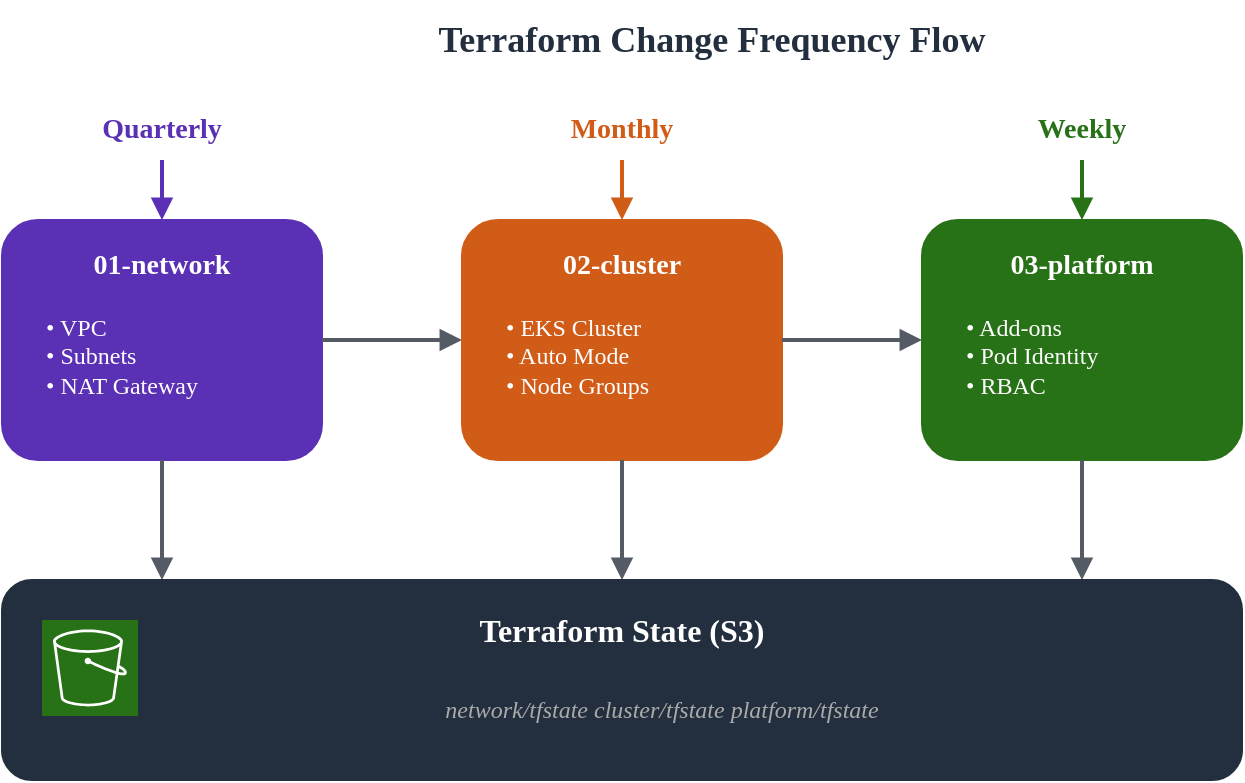
| Capa | Nombre | Frecuencia de cambio | Propietario principal | Blast Radius | Dependencias |
|---|---|---|---|---|---|
| 01 | Network | Trimestral | Equipo de infraestructura | Alto | Ninguna |
| 02 | Cluster | Mensual | Equipo de plataforma | Medio | 01-network |
| 03 | Platform | Semanal | Equipos Platform/App | Bajo | 01-network, 02-cluster |
Estructura de directorios
eks-terraform/
├── 00-shared/
│   ├── variables.tf          # Common variables across all layers
│   ├── backend.tf.template   # Backend configuration template
│   └── providers.tf.template # Provider configuration template
├── 01-network/
│   ├── main.tf               # VPC, subnets, NAT Gateway
│   ├── variables.tf          # Network-specific variables
│   ├── outputs.tf            # VPC ID, subnet IDs for downstream
│   ├── backend.tf            # S3 backend: network/terraform.tfstate
│   └── providers.tf
├── 02-cluster/
│   ├── main.tf               # EKS cluster with Auto Mode
│   ├── data.tf               # Remote state from 01-network
│   ├── variables.tf          # Cluster-specific variables
│   ├── outputs.tf            # Cluster endpoint, OIDC provider
│   ├── backend.tf            # S3 backend: cluster/terraform.tfstate
│   └── providers.tf
└── 03-platform/
    ├── main.tf               # Add-ons, Pod Identity, RBAC
    ├── data.tf               # Remote state from 01-network, 02-cluster
    ├── variables.tf          # Platform-specific variables
    ├── outputs.tf            # Add-on ARNs, role mappings
    ├── backend.tf            # S3 backend: platform/terraform.tfstate
    └── providers.tf
Visualización del flujo de cambios
2. 00-shared: Configuración común
La capa compartida contiene plantillas de configuración y variables comunes usadas en todas las capas. Esto garantiza consistencia y reduce la duplicación.
Configuración del backend S3
Primero, crea el bucket S3 para la gestión del estado de Terraform:
Nota: A partir de Terraform 1.10, el backend S3 admite bloqueo de estado nativo mediante
use_lockfile = true, aprovechando escrituras condicionales de S3. Esto elimina la necesidad de una tabla DynamoDB para el bloqueo de estado.
# 00-shared/bootstrap/main.tf
# Run this once to create backend infrastructure

terraform {
  required_version = ">= 1.10.0"
  required_providers {
    aws = {
      source  = "hashicorp/aws"
      version = ">= 5.40.0"
    }
  }
}

provider "aws" {
  region = var.region
}

variable "region" {
  description = "AWS region"
  type        = string
  default     = "ap-northeast-2"
}

variable "project_name" {
  description = "Project name for resource naming"
  type        = string
  default     = "eks-platform"
}

variable "environment" {
  description = "Environment name"
  type        = string
  default     = "prod"
}

locals {
  bucket_name = "${var.project_name}-${var.environment}-tfstate"
}

# S3 bucket for Terraform state
resource "aws_s3_bucket" "terraform_state" {
  bucket = local.bucket_name

  lifecycle {
    prevent_destroy = true
  }

  tags = {
    Name        = local.bucket_name
    Environment = var.environment
    ManagedBy   = "terraform"
  }
}

resource "aws_s3_bucket_versioning" "terraform_state" {
  bucket = aws_s3_bucket.terraform_state.id
  versioning_configuration {
    status = "Enabled"
  }
}

resource "aws_s3_bucket_server_side_encryption_configuration" "terraform_state" {
  bucket = aws_s3_bucket.terraform_state.id

  rule {
    apply_server_side_encryption_by_default {
      sse_algorithm = "aws:kms"
    }
    bucket_key_enabled = true
  }
}

resource "aws_s3_bucket_public_access_block" "terraform_state" {
  bucket = aws_s3_bucket.terraform_state.id

  block_public_acls       = true
  block_public_policy     = true
  ignore_public_acls      = true
  restrict_public_buckets = true
}

output "state_bucket_name" {
  value = aws_s3_bucket.terraform_state.id
}
Variables comunes
# 00-shared/variables.tf
# Common variables used across all layers

variable "region" {
  description = "AWS region for all resources"
  type        = string
  default     = "ap-northeast-2"
}

variable "environment" {
  description = "Environment name (dev, staging, prod)"
  type        = string
  default     = "prod"

  validation {
    condition     = contains(["dev", "staging", "prod"], var.environment)
    error_message = "Environment must be dev, staging, or prod."
  }
}

variable "project_name" {
  description = "Project name used for resource naming"
  type        = string
  default     = "eks-platform"

  validation {
    condition     = can(regex("^[a-z][a-z0-9-]{2,20}$", var.project_name))
    error_message = "Project name must be lowercase, start with letter, 3-21 chars."
  }
}

variable "common_tags" {
  description = "Common tags applied to all resources"
  type        = map(string)
  default = {
    ManagedBy = "terraform"
    Project   = "eks-platform"
  }
}

locals {
  # Standard naming convention
  name_prefix = "${var.project_name}-${var.environment}"

  # Merge common tags with environment
  tags = merge(var.common_tags, {
    Environment = var.environment
  })

  # Backend configuration
  state_bucket = "${var.project_name}-${var.environment}-tfstate"
}
3. 01-network: Configuración de VPC
La capa de Network establece la infraestructura VPC fundamental. Esta capa cambia con poca frecuencia y requiere una planificación cuidadosa debido a su alto blast radius.
Consideraciones de diseño
Para esta arquitectura, usamos un diseño de zonas Blue/Green:
- Blue Zone: ap-northeast-2a (primaria)
- Green Zone: ap-northeast-2c (secundaria)
Este enfoque de una sola zona por Cluster proporciona:
- Localidad de datos para workloads con estado
- Optimización de costos (menor tráfico entre AZ)
- Aislamiento claro del dominio de falla
Configuración principal
# 01-network/main.tf

terraform {
  required_version = ">= 1.10.0"
  required_providers {
    aws = {
      source  = "hashicorp/aws"
      version = ">= 5.40.0"
    }
  }
}

provider "aws" {
  region = var.region

  default_tags {
    tags = local.tags
  }
}

locals {
  name_prefix = "${var.project_name}-${var.environment}"

  tags = {
    Environment = var.environment
    Project     = var.project_name
    ManagedBy   = "terraform"
    Layer       = "network"
  }

  # Availability zones for blue/green clusters
  azs = ["ap-northeast-2a", "ap-northeast-2c"]

  # Subnet CIDR allocation
  # VPC: 10.0.0.0/16 (65,536 IPs)
  # Public subnets:  10.0.0.0/20, 10.0.16.0/20  (4,096 IPs each)
  # Private subnets: 10.0.128.0/18, 10.0.192.0/18 (16,384 IPs each)
  public_subnets  = ["10.0.0.0/20", "10.0.16.0/20"]
  private_subnets = ["10.0.128.0/18", "10.0.192.0/18"]
}

module "vpc" {
  source  = "terraform-aws-modules/vpc/aws"
  version = "~> 5.5"

  name = "${local.name_prefix}-vpc"
  cidr = var.vpc_cidr

  azs             = local.azs
  public_subnets  = local.public_subnets
  private_subnets = local.private_subnets

  # NAT Gateway configuration
  enable_nat_gateway     = true
  single_nat_gateway     = false  # One per AZ for HA
  one_nat_gateway_per_az = true

  # DNS settings
  enable_dns_hostnames = true
  enable_dns_support   = true

  # VPC Flow Logs
  enable_flow_log                      = true
  create_flow_log_cloudwatch_log_group = true
  create_flow_log_cloudwatch_iam_role  = true
  flow_log_max_aggregation_interval    = 60

  # Public subnet tags for EKS load balancers
  public_subnet_tags = {
    "kubernetes.io/role/elb" = "1"
    Type                     = "public"
  }

  # Private subnet tags for EKS internal load balancers
  private_subnet_tags = {
    "kubernetes.io/role/internal-elb" = "1"
    Type                              = "private"
  }

  tags = local.tags
}

# Additional subnet tags for specific clusters
# Blue cluster (ap-northeast-2a)
resource "aws_ec2_tag" "private_subnet_blue_cluster" {
  resource_id = module.vpc.private_subnets[0]
  key         = "kubernetes.io/cluster/${local.name_prefix}-blue"
  value       = "shared"
}

resource "aws_ec2_tag" "public_subnet_blue_cluster" {
  resource_id = module.vpc.public_subnets[0]
  key         = "kubernetes.io/cluster/${local.name_prefix}-blue"
  value       = "shared"
}

# Green cluster (ap-northeast-2c)
resource "aws_ec2_tag" "private_subnet_green_cluster" {
  resource_id = module.vpc.private_subnets[1]
  key         = "kubernetes.io/cluster/${local.name_prefix}-green"
  value       = "shared"
}

resource "aws_ec2_tag" "public_subnet_green_cluster" {
  resource_id = module.vpc.public_subnets[1]
  key         = "kubernetes.io/cluster/${local.name_prefix}-green"
  value       = "shared"
}

# VPC Endpoints for AWS services (reduces NAT costs)
module "vpc_endpoints" {
  source  = "terraform-aws-modules/vpc/aws//modules/vpc-endpoints"
  version = "~> 5.5"

  vpc_id = module.vpc.vpc_id

  endpoints = {
    s3 = {
      service      = "s3"
      service_type = "Gateway"
      route_table_ids = concat(
        module.vpc.private_route_table_ids,
        module.vpc.public_route_table_ids
      )
      tags = { Name = "${local.name_prefix}-s3-endpoint" }
    }
    ecr_api = {
      service             = "ecr.api"
      private_dns_enabled = true
      subnet_ids          = module.vpc.private_subnets
      security_group_ids  = [aws_security_group.vpc_endpoints.id]
      tags                = { Name = "${local.name_prefix}-ecr-api-endpoint" }
    }
    ecr_dkr = {
      service             = "ecr.dkr"
      private_dns_enabled = true
      subnet_ids          = module.vpc.private_subnets
      security_group_ids  = [aws_security_group.vpc_endpoints.id]
      tags                = { Name = "${local.name_prefix}-ecr-dkr-endpoint" }
    }
    sts = {
      service             = "sts"
      private_dns_enabled = true
      subnet_ids          = module.vpc.private_subnets
      security_group_ids  = [aws_security_group.vpc_endpoints.id]
      tags                = { Name = "${local.name_prefix}-sts-endpoint" }
    }
    logs = {
      service             = "logs"
      private_dns_enabled = true
      subnet_ids          = module.vpc.private_subnets
      security_group_ids  = [aws_security_group.vpc_endpoints.id]
      tags                = { Name = "${local.name_prefix}-logs-endpoint" }
    }
  }

  tags = local.tags
}

# Security group for VPC endpoints
resource "aws_security_group" "vpc_endpoints" {
  name        = "${local.name_prefix}-vpc-endpoints-sg"
  description = "Security group for VPC endpoints"
  vpc_id      = module.vpc.vpc_id

  ingress {
    description = "HTTPS from VPC"
    from_port   = 443
    to_port     = 443
    protocol    = "tcp"
    cidr_blocks = [var.vpc_cidr]
  }

  egress {
    description = "All outbound"
    from_port   = 0
    to_port     = 0
    protocol    = "-1"
    cidr_blocks = ["0.0.0.0/0"]
  }

  tags = merge(local.tags, {
    Name = "${local.name_prefix}-vpc-endpoints-sg"
  })
}
Variables
# 01-network/variables.tf

variable "region" {
  description = "AWS region"
  type        = string
  default     = "ap-northeast-2"
}

variable "environment" {
  description = "Environment name"
  type        = string
  default     = "prod"
}

variable "project_name" {
  description = "Project name"
  type        = string
  default     = "eks-platform"
}

variable "vpc_cidr" {
  description = "VPC CIDR block"
  type        = string
  default     = "10.0.0.0/16"

  validation {
    condition     = can(cidrnetmask(var.vpc_cidr))
    error_message = "VPC CIDR must be a valid IPv4 CIDR block."
  }
}
Outputs
# 01-network/outputs.tf

output "vpc_id" {
  description = "VPC ID"
  value       = module.vpc.vpc_id
}

output "vpc_cidr" {
  description = "VPC CIDR block"
  value       = module.vpc.vpc_cidr_block
}

output "private_subnet_ids" {
  description = "Private subnet IDs"
  value       = module.vpc.private_subnets
}

output "public_subnet_ids" {
  description = "Public subnet IDs"
  value       = module.vpc.public_subnets
}

output "private_subnet_cidrs" {
  description = "Private subnet CIDR blocks"
  value       = module.vpc.private_subnets_cidr_blocks
}

output "public_subnet_cidrs" {
  description = "Public subnet CIDR blocks"
  value       = module.vpc.public_subnets_cidr_blocks
}

output "nat_gateway_ids" {
  description = "NAT Gateway IDs"
  value       = module.vpc.natgw_ids
}

output "azs" {
  description = "Availability zones used"
  value       = module.vpc.azs
}

# Zone-specific outputs for blue/green clusters
output "blue_zone" {
  description = "Blue cluster availability zone"
  value       = module.vpc.azs[0]
}

output "green_zone" {
  description = "Green cluster availability zone"
  value       = module.vpc.azs[1]
}

output "blue_private_subnet_id" {
  description = "Blue cluster private subnet ID"
  value       = module.vpc.private_subnets[0]
}

output "green_private_subnet_id" {
  description = "Green cluster private subnet ID"
  value       = module.vpc.private_subnets[1]
}

output "blue_public_subnet_id" {
  description = "Blue cluster public subnet ID"
  value       = module.vpc.public_subnets[0]
}

output "green_public_subnet_id" {
  description = "Green cluster public subnet ID"
  value       = module.vpc.public_subnets[1]
}

output "vpc_endpoints_sg_id" {
  description = "VPC endpoints security group ID"
  value       = aws_security_group.vpc_endpoints.id
}
Configuración del backend
# 01-network/backend.tf

terraform {
  backend "s3" {
    bucket         = "eks-platform-prod-tfstate"
    key            = "network/terraform.tfstate"
    region         = "ap-northeast-2"
    encrypt        = true
    use_lockfile   = true
  }
}
4. 02-cluster: EKS Auto Mode
La capa de Cluster despliega EKS con Auto Mode habilitado. Auto Mode simplifica las operaciones del Cluster al automatizar la gestión de compute, networking y storage.
Entender EKS Auto Mode
EKS Auto Mode proporciona:
- Compute Auto Mode: Aprovisionamiento y escalado automático de nodos
- Network Auto Mode: VPC CNI gestionado con administración automática de IP
- Storage Auto Mode: Aprovisionamiento dinámico de storage classes
Para obtener más detalles sobre EKS Auto Mode, consulta Introducción a EKS Auto Mode.
Data Sources
# 02-cluster/data.tf

# Reference network layer outputs
data "terraform_remote_state" "network" {
  backend = "s3"

  config = {
    bucket = "eks-platform-prod-tfstate"
    key    = "network/terraform.tfstate"
    region = "ap-northeast-2"
  }
}

# Current AWS account and region
data "aws_caller_identity" "current" {}
data "aws_region" "current" {}

# EKS cluster auth for kubectl provider
data "aws_eks_cluster_auth" "cluster" {
  name = module.eks.cluster_name
}
Configuración principal
# 02-cluster/main.tf

terraform {
  required_version = ">= 1.10.0"
  required_providers {
    aws = {
      source  = "hashicorp/aws"
      version = ">= 5.40.0"
    }
    kubernetes = {
      source  = "hashicorp/kubernetes"
      version = ">= 2.25.0"
    }
  }
}

provider "aws" {
  region = var.region

  default_tags {
    tags = local.tags
  }
}

provider "kubernetes" {
  host                   = module.eks.cluster_endpoint
  cluster_ca_certificate = base64decode(module.eks.cluster_certificate_authority_data)
  token                  = data.aws_eks_cluster_auth.cluster.token
}

locals {
  name_prefix = "${var.project_name}-${var.environment}"
  cluster_name = "${local.name_prefix}-${var.cluster_color}"

  tags = {
    Environment = var.environment
    Project     = var.project_name
    ManagedBy   = "terraform"
    Layer       = "cluster"
    ClusterColor = var.cluster_color
  }

  # Network outputs from layer 01
  vpc_id             = data.terraform_remote_state.network.outputs.vpc_id
  private_subnet_ids = data.terraform_remote_state.network.outputs.private_subnet_ids
  public_subnet_ids  = data.terraform_remote_state.network.outputs.public_subnet_ids

  # Select subnet based on cluster color
  cluster_subnet_id = var.cluster_color == "blue" ? data.terraform_remote_state.network.outputs.blue_private_subnet_id : data.terraform_remote_state.network.outputs.green_private_subnet_id
}

module "eks" {
  source  = "terraform-aws-modules/eks/aws"
  version = "~> 20.8"

  cluster_name    = local.cluster_name
  cluster_version = var.cluster_version

  # Network configuration
  vpc_id     = local.vpc_id
  subnet_ids = local.private_subnet_ids

  # Cluster endpoint access
  cluster_endpoint_public_access  = true
  cluster_endpoint_private_access = true

  # EKS Auto Mode Configuration
  cluster_compute_config = {
    enabled    = true
    node_pools = ["general-purpose", "system"]
  }

  # Enable Auto Mode for networking
  cluster_kubernetes_network_config = {
    elastic_load_balancing = {
      enabled = true
    }
  }

  # Enable Auto Mode for storage
  cluster_storage_config = {
    block_storage = {
      enabled = true
    }
  }

  # Control plane logging
  cluster_enabled_log_types = [
    "api",
    "audit",
    "authenticator",
    "controllerManager",
    "scheduler"
  ]

  # Encryption configuration
  cluster_encryption_config = {
    provider_key_arn = aws_kms_key.eks.arn
    resources        = ["secrets"]
  }

  # Access configuration - using Access Entries (recommended)
  authentication_mode = "API_AND_CONFIG_MAP"

  # Cluster access entries
  access_entries = {
    # Cluster admin
    admin = {
      kubernetes_groups = []
      principal_arn     = var.cluster_admin_arn
      policy_associations = {
        admin = {
          policy_arn = "arn:aws:eks::aws:cluster-access-policy/AmazonEKSClusterAdminPolicy"
          access_scope = {
            type = "cluster"
          }
        }
      }
    }
  }

  tags = local.tags
}

# KMS key for EKS secrets encryption
resource "aws_kms_key" "eks" {
  description             = "KMS key for EKS ${local.cluster_name} secrets encryption"
  deletion_window_in_days = 7
  enable_key_rotation     = true

  tags = merge(local.tags, {
    Name = "${local.cluster_name}-eks-secrets"
  })
}

resource "aws_kms_alias" "eks" {
  name          = "alias/${local.cluster_name}-eks-secrets"
  target_key_id = aws_kms_key.eks.key_id
}

# CloudWatch Log Group for EKS control plane logs
resource "aws_cloudwatch_log_group" "eks" {
  name              = "/aws/eks/${local.cluster_name}/cluster"
  retention_in_days = var.log_retention_days

  tags = local.tags
}

# Security group rules for cluster
resource "aws_security_group_rule" "cluster_ingress_vpc" {
  description       = "Allow VPC traffic to cluster API"
  type              = "ingress"
  from_port         = 443
  to_port           = 443
  protocol          = "tcp"
  cidr_blocks       = [data.terraform_remote_state.network.outputs.vpc_cidr]
  security_group_id = module.eks.cluster_security_group_id
}
Variables
# 02-cluster/variables.tf

variable "region" {
  description = "AWS region"
  type        = string
  default     = "ap-northeast-2"
}

variable "environment" {
  description = "Environment name"
  type        = string
  default     = "prod"
}

variable "project_name" {
  description = "Project name"
  type        = string
  default     = "eks-platform"
}

variable "cluster_color" {
  description = "Cluster color identifier (blue or green)"
  type        = string
  default     = "blue"

  validation {
    condition     = contains(["blue", "green"], var.cluster_color)
    error_message = "Cluster color must be blue or green."
  }
}

variable "cluster_version" {
  description = "EKS cluster version"
  type        = string
  default     = "1.30"
}

variable "cluster_admin_arn" {
  description = "IAM ARN for cluster admin access"
  type        = string
}

variable "log_retention_days" {
  description = "CloudWatch log retention in days"
  type        = number
  default     = 30
}
Outputs
# 02-cluster/outputs.tf

output "cluster_name" {
  description = "EKS cluster name"
  value       = module.eks.cluster_name
}

output "cluster_endpoint" {
  description = "EKS cluster API endpoint"
  value       = module.eks.cluster_endpoint
}

output "cluster_certificate_authority_data" {
  description = "Base64 encoded cluster CA certificate"
  value       = module.eks.cluster_certificate_authority_data
  sensitive   = true
}

output "cluster_arn" {
  description = "EKS cluster ARN"
  value       = module.eks.cluster_arn
}

output "cluster_version" {
  description = "EKS cluster Kubernetes version"
  value       = module.eks.cluster_version
}

output "cluster_security_group_id" {
  description = "EKS cluster security group ID"
  value       = module.eks.cluster_security_group_id
}

output "node_security_group_id" {
  description = "EKS node security group ID"
  value       = module.eks.node_security_group_id
}

output "oidc_provider_arn" {
  description = "OIDC provider ARN for IRSA"
  value       = module.eks.oidc_provider_arn
}

output "oidc_provider_url" {
  description = "OIDC provider URL"
  value       = module.eks.cluster_oidc_issuer_url
}

output "cluster_primary_security_group_id" {
  description = "EKS cluster primary security group ID"
  value       = module.eks.cluster_primary_security_group_id
}

output "kms_key_arn" {
  description = "KMS key ARN for secrets encryption"
  value       = aws_kms_key.eks.arn
}

output "cluster_color" {
  description = "Cluster color identifier"
  value       = var.cluster_color
}
Configuración del backend
# 02-cluster/backend.tf

terraform {
  backend "s3" {
    bucket         = "eks-platform-prod-tfstate"
    key            = "cluster/blue/terraform.tfstate"  # Use cluster/green/ for green cluster
    region         = "ap-northeast-2"
    encrypt        = true
    use_lockfile   = true
  }
}
5. 03-platform: Add-ons y Pod Identity
La capa de Platform gestiona add-ons de EKS, asociaciones de Pod Identity y access entries para equipos de aplicaciones. Esta capa cambia con frecuencia a medida que los equipos se incorporan y evolucionan los requisitos de las aplicaciones.
Data Sources
# 03-platform/data.tf

# Reference network layer
data "terraform_remote_state" "network" {
  backend = "s3"

  config = {
    bucket = "eks-platform-prod-tfstate"
    key    = "network/terraform.tfstate"
    region = "ap-northeast-2"
  }
}

# Reference cluster layer
data "terraform_remote_state" "cluster" {
  backend = "s3"

  config = {
    bucket = "eks-platform-prod-tfstate"
    key    = "cluster/${var.cluster_color}/terraform.tfstate"
    region = "ap-northeast-2"
  }
}

# Current AWS account
data "aws_caller_identity" "current" {}
data "aws_region" "current" {}

# EKS cluster auth
data "aws_eks_cluster_auth" "cluster" {
  name = data.terraform_remote_state.cluster.outputs.cluster_name
}
Configuración principal
# 03-platform/main.tf

terraform {
  required_version = ">= 1.10.0"
  required_providers {
    aws = {
      source  = "hashicorp/aws"
      version = ">= 5.40.0"
    }
    kubernetes = {
      source  = "hashicorp/kubernetes"
      version = ">= 2.25.0"
    }
  }
}

provider "aws" {
  region = var.region

  default_tags {
    tags = local.tags
  }
}

provider "kubernetes" {
  host                   = data.terraform_remote_state.cluster.outputs.cluster_endpoint
  cluster_ca_certificate = base64decode(data.terraform_remote_state.cluster.outputs.cluster_certificate_authority_data)
  token                  = data.aws_eks_cluster_auth.cluster.token
}

locals {
  name_prefix  = "${var.project_name}-${var.environment}"
  cluster_name = data.terraform_remote_state.cluster.outputs.cluster_name
  oidc_provider_arn = data.terraform_remote_state.cluster.outputs.oidc_provider_arn

  tags = {
    Environment  = var.environment
    Project      = var.project_name
    ManagedBy    = "terraform"
    Layer        = "platform"
    ClusterColor = var.cluster_color
  }
}

#------------------------------------------------------------------------------
# EKS Add-ons
#------------------------------------------------------------------------------

# EBS CSI Driver Add-on
resource "aws_eks_addon" "ebs_csi" {
  cluster_name = local.cluster_name
  addon_name   = "aws-ebs-csi-driver"

  addon_version            = var.ebs_csi_version
  resolve_conflicts_on_create = "OVERWRITE"
  resolve_conflicts_on_update = "OVERWRITE"

  pod_identity_association {
    role_arn        = aws_iam_role.ebs_csi.arn
    service_account = "ebs-csi-controller-sa"
  }

  tags = local.tags
}

# EBS CSI Driver IAM Role
resource "aws_iam_role" "ebs_csi" {
  name = "${local.cluster_name}-ebs-csi-role"

  assume_role_policy = jsonencode({
    Version = "2012-10-17"
    Statement = [
      {
        Effect = "Allow"
        Principal = {
          Service = "pods.eks.amazonaws.com"
        }
        Action = [
          "sts:AssumeRole",
          "sts:TagSession"
        ]
      }
    ]
  })

  tags = local.tags
}

resource "aws_iam_role_policy_attachment" "ebs_csi" {
  policy_arn = "arn:aws:iam::aws:policy/service-role/AmazonEBSCSIDriverPolicy"
  role       = aws_iam_role.ebs_csi.name
}

# CoreDNS Add-on (managed by Auto Mode but can be customized)
resource "aws_eks_addon" "coredns" {
  cluster_name = local.cluster_name
  addon_name   = "coredns"

  addon_version            = var.coredns_version
  resolve_conflicts_on_create = "OVERWRITE"
  resolve_conflicts_on_update = "OVERWRITE"

  tags = local.tags
}

#------------------------------------------------------------------------------
# Pod Identity Associations
#------------------------------------------------------------------------------

# ArgoCD Pod Identity
resource "aws_eks_pod_identity_association" "argocd" {
  cluster_name    = local.cluster_name
  namespace       = "argocd"
  service_account = "argocd-server"
  role_arn        = aws_iam_role.argocd.arn

  tags = local.tags
}

resource "aws_iam_role" "argocd" {
  name = "${local.cluster_name}-argocd-role"

  assume_role_policy = jsonencode({
    Version = "2012-10-17"
    Statement = [
      {
        Effect = "Allow"
        Principal = {
          Service = "pods.eks.amazonaws.com"
        }
        Action = [
          "sts:AssumeRole",
          "sts:TagSession"
        ]
      }
    ]
  })

  tags = local.tags
}

# ArgoCD ECR access policy
resource "aws_iam_role_policy" "argocd_ecr" {
  name = "ecr-access"
  role = aws_iam_role.argocd.id

  policy = jsonencode({
    Version = "2012-10-17"
    Statement = [
      {
        Effect = "Allow"
        Action = [
          "ecr:GetAuthorizationToken",
          "ecr:BatchCheckLayerAvailability",
          "ecr:GetDownloadUrlForLayer",
          "ecr:BatchGetImage"
        ]
        Resource = "*"
      }
    ]
  })
}

# External Secrets Operator Pod Identity
resource "aws_eks_pod_identity_association" "external_secrets" {
  cluster_name    = local.cluster_name
  namespace       = "external-secrets"
  service_account = "external-secrets"
  role_arn        = aws_iam_role.external_secrets.arn

  tags = local.tags
}

resource "aws_iam_role" "external_secrets" {
  name = "${local.cluster_name}-external-secrets-role"

  assume_role_policy = jsonencode({
    Version = "2012-10-17"
    Statement = [
      {
        Effect = "Allow"
        Principal = {
          Service = "pods.eks.amazonaws.com"
        }
        Action = [
          "sts:AssumeRole",
          "sts:TagSession"
        ]
      }
    ]
  })

  tags = local.tags
}

# External Secrets Secrets Manager access
resource "aws_iam_role_policy" "external_secrets_sm" {
  name = "secrets-manager-access"
  role = aws_iam_role.external_secrets.id

  policy = jsonencode({
    Version = "2012-10-17"
    Statement = [
      {
        Effect = "Allow"
        Action = [
          "secretsmanager:GetSecretValue",
          "secretsmanager:DescribeSecret",
          "secretsmanager:ListSecrets"
        ]
        Resource = "arn:aws:secretsmanager:${data.aws_region.current.name}:${data.aws_caller_identity.current.account_id}:secret:${var.project_name}/*"
      },
      {
        Effect = "Allow"
        Action = [
          "ssm:GetParameter",
          "ssm:GetParameters",
          "ssm:GetParametersByPath"
        ]
        Resource = "arn:aws:ssm:${data.aws_region.current.name}:${data.aws_caller_identity.current.account_id}:parameter/${var.project_name}/*"
      }
    ]
  })
}

# Application Pod Identity (ECR pull)
resource "aws_eks_pod_identity_association" "app_ecr" {
  for_each = toset(var.app_namespaces)

  cluster_name    = local.cluster_name
  namespace       = each.value
  service_account = "default"
  role_arn        = aws_iam_role.app_ecr.arn

  tags = local.tags
}

resource "aws_iam_role" "app_ecr" {
  name = "${local.cluster_name}-app-ecr-role"

  assume_role_policy = jsonencode({
    Version = "2012-10-17"
    Statement = [
      {
        Effect = "Allow"
        Principal = {
          Service = "pods.eks.amazonaws.com"
        }
        Action = [
          "sts:AssumeRole",
          "sts:TagSession"
        ]
      }
    ]
  })

  tags = local.tags
}

resource "aws_iam_role_policy_attachment" "app_ecr" {
  policy_arn = "arn:aws:iam::aws:policy/AmazonEC2ContainerRegistryReadOnly"
  role       = aws_iam_role.app_ecr.name
}

#------------------------------------------------------------------------------
# Access Entries for Teams
#------------------------------------------------------------------------------

# Developer access (namespace-scoped)
resource "aws_eks_access_entry" "developers" {
  for_each = var.developer_roles

  cluster_name  = local.cluster_name
  principal_arn = each.value.arn
  type          = "STANDARD"

  tags = local.tags
}

resource "aws_eks_access_policy_association" "developers" {
  for_each = var.developer_roles

  cluster_name  = local.cluster_name
  principal_arn = each.value.arn
  policy_arn    = "arn:aws:eks::aws:cluster-access-policy/AmazonEKSEditPolicy"

  access_scope {
    type       = "namespace"
    namespaces = each.value.namespaces
  }

  depends_on = [aws_eks_access_entry.developers]
}

# Read-only access for monitoring
resource "aws_eks_access_entry" "readonly" {
  for_each = var.readonly_roles

  cluster_name  = local.cluster_name
  principal_arn = each.value
  type          = "STANDARD"

  tags = local.tags
}

resource "aws_eks_access_policy_association" "readonly" {
  for_each = var.readonly_roles

  cluster_name  = local.cluster_name
  principal_arn = each.value
  policy_arn    = "arn:aws:eks::aws:cluster-access-policy/AmazonEKSViewPolicy"

  access_scope {
    type = "cluster"
  }

  depends_on = [aws_eks_access_entry.readonly]
}
Variables
# 03-platform/variables.tf

variable "region" {
  description = "AWS region"
  type        = string
  default     = "ap-northeast-2"
}

variable "environment" {
  description = "Environment name"
  type        = string
  default     = "prod"
}

variable "project_name" {
  description = "Project name"
  type        = string
  default     = "eks-platform"
}

variable "cluster_color" {
  description = "Cluster color identifier"
  type        = string
  default     = "blue"
}

variable "ebs_csi_version" {
  description = "EBS CSI driver addon version"
  type        = string
  default     = "v1.28.0-eksbuild.1"
}

variable "coredns_version" {
  description = "CoreDNS addon version"
  type        = string
  default     = "v1.11.1-eksbuild.6"
}

variable "app_namespaces" {
  description = "Application namespaces for ECR Pod Identity"
  type        = list(string)
  default     = ["default", "apps", "staging"]
}

variable "developer_roles" {
  description = "Developer IAM roles and their namespace access"
  type = map(object({
    arn        = string
    namespaces = list(string)
  }))
  default = {}
}

variable "readonly_roles" {
  description = "Read-only IAM role ARNs"
  type        = map(string)
  default     = {}
}
Outputs
# 03-platform/outputs.tf

output "ebs_csi_role_arn" {
  description = "EBS CSI driver IAM role ARN"
  value       = aws_iam_role.ebs_csi.arn
}

output "argocd_role_arn" {
  description = "ArgoCD IAM role ARN"
  value       = aws_iam_role.argocd.arn
}

output "external_secrets_role_arn" {
  description = "External Secrets IAM role ARN"
  value       = aws_iam_role.external_secrets.arn
}

output "app_ecr_role_arn" {
  description = "Application ECR access IAM role ARN"
  value       = aws_iam_role.app_ecr.arn
}

output "configured_namespaces" {
  description = "Namespaces with Pod Identity configured"
  value       = var.app_namespaces
}
Configuración del backend
# 03-platform/backend.tf

terraform {
  backend "s3" {
    bucket         = "eks-platform-prod-tfstate"
    key            = "platform/blue/terraform.tfstate"  # Use platform/green/ for green cluster
    region         = "ap-northeast-2"
    encrypt        = true
    use_lockfile   = true
  }
}
6. Integración entre capas
Patrón de Remote State
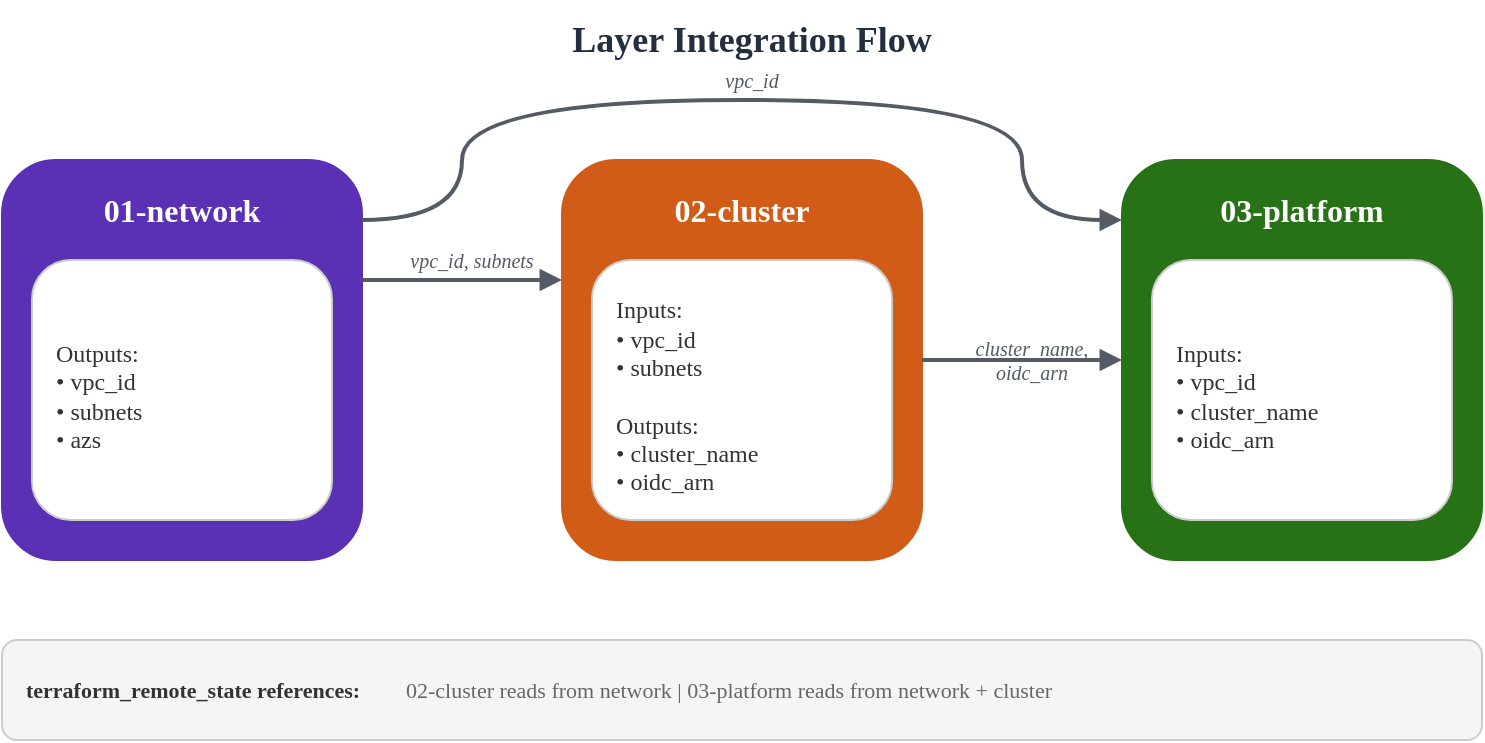
El data source terraform_remote_state permite que las capas consuman outputs de otras capas sin acoplamiento estrecho.
# Pattern: Consuming outputs from another layer
data "terraform_remote_state" "network" {
  backend = "s3"

  config = {
    bucket = "eks-platform-prod-tfstate"
    key    = "network/terraform.tfstate"
    region = "ap-northeast-2"
  }
}

# Usage
locals {
  vpc_id = data.terraform_remote_state.network.outputs.vpc_id
}
Flujo de Output/Data
Mejores prácticas de gestión de estado
- Usa una nomenclatura de buckets consistente:
{project}-{env}-tfstate - Organiza por capa y color:
network/,cluster/blue/,platform/green/ - Habilita Versioning: Recuperación ante corrupción del estado
- Habilita Encryption: Protege valores sensibles en el estado
- Usa bloqueo nativo de S3 (Terraform 1.10+): Habilita
use_lockfile = trueen la configuración del backend para bloqueo de estado basado en escrituras condicionales de S3 sin DynamoDB
Organización de archivos de estado
s3://eks-platform-prod-tfstate/
├── network/
│   └── terraform.tfstate
├── cluster/
│   ├── blue/
│   │   └── terraform.tfstate
│   └── green/
│       └── terraform.tfstate
└── platform/
    ├── blue/
    │   └── terraform.tfstate
    └── green/
        └── terraform.tfstate
7. Validación
Orden de despliegue
Las capas deben desplegarse en orden debido a las dependencias:
# Step 1: Bootstrap (run once)
cd 00-shared/bootstrap
terraform init
terraform apply

# Step 2: Network layer
cd ../../01-network
terraform init
terraform apply

# Step 3: Cluster layer (blue)
cd ../02-cluster
# Edit backend.tf to use cluster/blue/terraform.tfstate
# Edit terraform.tfvars to set cluster_color = "blue"
terraform init
terraform apply

# Step 4: Platform layer (blue)
cd ../03-platform
# Edit backend.tf to use platform/blue/terraform.tfstate
# Edit terraform.tfvars to set cluster_color = "blue"
terraform init
terraform apply
Comandos de verificación
Después de desplegar el Cluster, verifica la configuración:
# Configure kubectl
aws eks update-kubeconfig --name eks-platform-prod-blue --region ap-northeast-2

# Verify cluster access
kubectl cluster-info

# Check nodes (Auto Mode will provision as needed)
kubectl get nodes

# Verify Auto Mode node pools
kubectl get nodepools

# Check EKS add-ons
kubectl get pods -n kube-system

# Verify Pod Identity agent
kubectl get pods -n kube-system -l app.kubernetes.io/name=eks-pod-identity-agent

# Check storage classes
kubectl get storageclass

# Verify OIDC provider
aws eks describe-cluster --name eks-platform-prod-blue \
  --query "cluster.identity.oidc.issuer" --output text
Script de Smoke Test
Crea un smoke test completo:
#!/bin/bash
# smoke-test.sh - Validate EKS cluster deployment

set -e

CLUSTER_NAME="${1:-eks-platform-prod-blue}"
REGION="${2:-ap-northeast-2}"

echo "=== EKS Cluster Smoke Test ==="
echo "Cluster: $CLUSTER_NAME"
echo "Region: $REGION"
echo ""

# Update kubeconfig
echo "1. Configuring kubectl..."
aws eks update-kubeconfig --name "$CLUSTER_NAME" --region "$REGION"

# Test cluster connectivity
echo "2. Testing cluster connectivity..."
kubectl cluster-info || { echo "FAIL: Cannot connect to cluster"; exit 1; }

# Check cluster version
echo "3. Checking cluster version..."
CLUSTER_VERSION=$(kubectl version --short 2>/dev/null | grep Server | awk '{print $3}')
echo "   Cluster version: $CLUSTER_VERSION"

# Check nodes
echo "4. Checking nodes..."
NODE_COUNT=$(kubectl get nodes --no-headers 2>/dev/null | wc -l)
echo "   Node count: $NODE_COUNT"

# Check system pods
echo "5. Checking system pods..."
PENDING_PODS=$(kubectl get pods -n kube-system --field-selector=status.phase!=Running,status.phase!=Succeeded --no-headers 2>/dev/null | wc -l)
if [ "$PENDING_PODS" -gt 0 ]; then
  echo "   WARNING: $PENDING_PODS pods not running in kube-system"
  kubectl get pods -n kube-system --field-selector=status.phase!=Running,status.phase!=Succeeded
else
  echo "   All system pods running"
fi

# Check storage classes
echo "6. Checking storage classes..."
kubectl get storageclass

# Check Pod Identity agent
echo "7. Checking Pod Identity agent..."
PI_PODS=$(kubectl get pods -n kube-system -l app.kubernetes.io/name=eks-pod-identity-agent --no-headers 2>/dev/null | wc -l)
echo "   Pod Identity agent pods: $PI_PODS"

# Test pod creation
echo "8. Testing pod creation..."
kubectl run smoke-test --image=nginx:alpine --restart=Never --rm -it --timeout=60s -- echo "Pod creation successful" 2>/dev/null || true

# Check Auto Mode node pools
echo "9. Checking Auto Mode node pools..."
kubectl get nodepools 2>/dev/null || echo "   NodePools CRD not available (expected if no workloads yet)"

echo ""
echo "=== Smoke Test Complete ==="
Validación de Terraform
# Validate all layers
for layer in 01-network 02-cluster 03-platform; do
  echo "Validating $layer..."
  cd "$layer"
  terraform validate
  terraform fmt -check
  cd ..
done

# Plan without applying (dry run)
cd 01-network && terraform plan -out=plan.out
cd ../02-cluster && terraform plan -out=plan.out
cd ../03-platform && terraform plan -out=plan.out
Principios clave de diseño
Terraform gestiona solo infraestructura de AWS
Esta arquitectura sigue una separación clara:
| Capa | Terraform gestiona | GitOps gestiona |
|---|---|---|
| Network | VPC, Subnets, NAT, Endpoints | - |
| Cluster | EKS, KMS, CloudWatch | - |
| Platform | Add-ons, IAM Roles, Access Entries | - |
| Kubernetes | - | NodePool, Deployments, Services |
Los recursos de Kubernetes (definiciones de NodePool, Deployments de aplicaciones) son gestionados por ArgoCD GitOps. Consulta Configuración de GitOps Pipeline para más detalles.
Referencias cruzadas
- Introducción a EKS Auto Mode
- Mejores prácticas de seguridad de EKS
- Enrutamiento ponderado NLB y Blue/Green Clusters
- Configuración de GitOps Pipeline
< Tabla de contenido | Siguiente: Enrutamiento ponderado NLB y Blue/Green Clusters >