EKS Hybrid Nodes
対応バージョン: EKS 1.31+, nodeadm 0.1+ 最終更新: February 23, 2026
Amazon EKS Hybrid Nodes は、AWS EKS control plane からオンプレミスサーバーを管理できるようにする機能です。このガイドでは、本番環境における EKS Hybrid Nodes の概念、設定方法、および実践的な利用方法について説明します。
目次
- 前提条件とシステム要件
- ネットワーク設定
- Air-Gap 環境セットアップ (S3 + VPC Endpoints)
- Node Bootstrap
- GPU Server 統合
- Workload 配置戦略
- Node ライフサイクル管理
- 運用とメンテナンス
- Bare Metal Server OS インストールおよび移行ガイド
- Hybrid Nodes Gateway
Hybrid Nodes とは?
EKS Hybrid Nodes は、オンプレミスデータセンターまたは edge 環境内のサーバーを、AWS EKS control plane によって管理される Kubernetes nodes として登録できるようにする機能です。これにより、cloud とオンプレミスのインフラストラクチャを単一の Kubernetes cluster として管理できます。
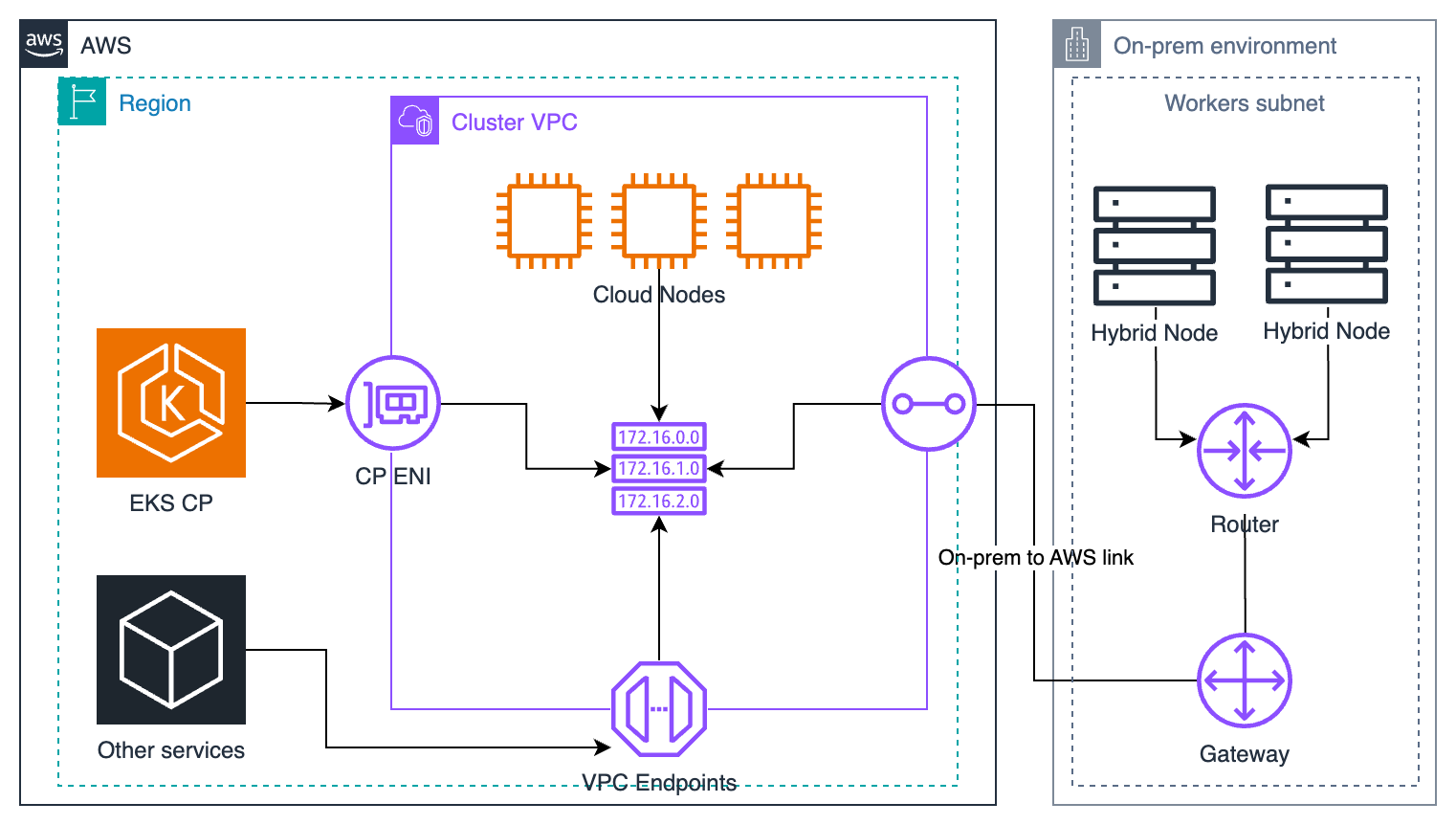
次の図は、VPC、subnets、Transit Gateway/Virtual Private Gateway、および Remote Node/Pod CIDR 接続を含むネットワーク前提条件を示しています。
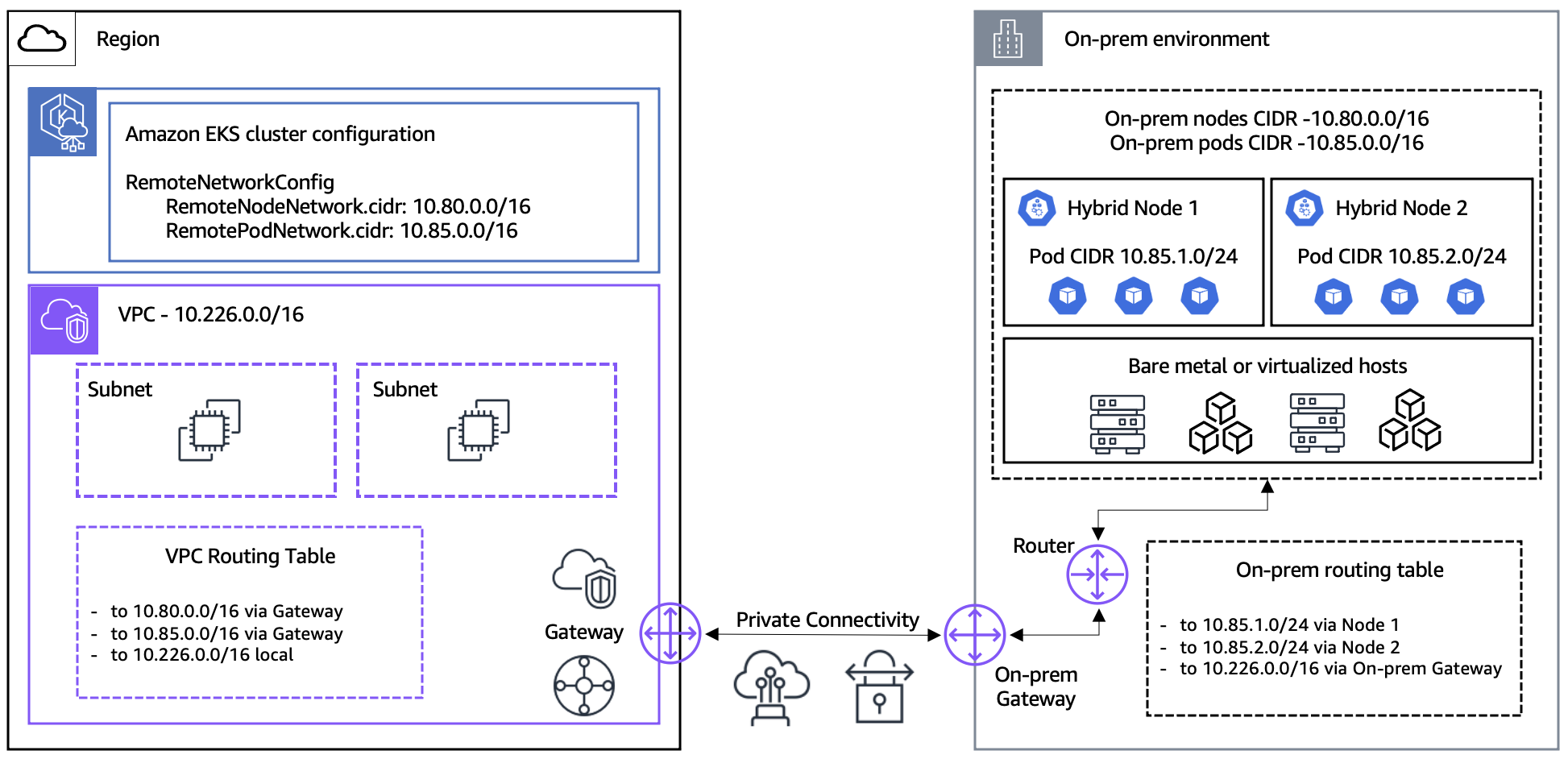
Hybrid Nodes を使用する理由
1. 規制コンプライアンスとデータ主権
特定の業界 (金融、医療、政府) には、データを特定のリージョンまたは施設内に保持することを求める規制があります。Hybrid Nodes を使用すると、EKS の管理機能を活用しながら、機密データをオンプレミスに保持できます。
# Example of regulatory compliance workload placement
apiVersion: v1
kind: Pod
metadata:
  name: financial-data-processor
spec:
  nodeSelector:
    topology.kubernetes.io/zone: "on-premises"
    compliance.company.io/data-sovereignty: "required"
  containers:
  - name: processor
    image: harbor.internal.company.io/finance/data-processor:v1.2.0
2. Data Gravity
大規模なデータセットがオンプレミスに存在する場合、データを cloud に移動するよりも、compute をデータの近くに配置する方が効率的です。
3. 既存 Hardware の活用
すでに投資済みの高性能サーバー (特に GPU servers) を引き続き活用しながら、最新の Kubernetes ベースの workload 管理を適用できます。
4. 統合管理
単一の control plane から cloud とオンプレミスの両方の環境で Kubernetes workloads を管理することで、運用の複雑さを軽減できます。
アーキテクチャコンポーネント
EKS Hybrid Nodes アーキテクチャは、次のコンポーネントで構成されています。
| Component | Location | Role |
|---|---|---|
| EKS Control Plane | AWS | API server, etcd, controller manager, scheduler |
| nodeadm | On-Premises | Node bootstrap and management agent |
| kubelet | On-Premises | Pod execution and node status reporting |
| containerd | On-Premises | Container runtime |
| VPN/Direct Connect | Network | Secure connection between AWS and on-premises |
| SSM Agent or IAM Roles Anywhere | On-Premises | Credential management |
主な制約と制限事項
- ネットワーク接続: VPN または Direct Connect 経由で、オンプレミスから AWS への信頼性の高い接続が必要です (切断、断続的、制限付き、または拒否された環境には適していません)
- CIDR 制限: Cluster ごとに Remote Node Networks と Remote Pod Networks で最大 15 個の CIDR
- IPv4 のみ: IPv4 address family を使用する必要があります (hybrid nodes では IPv6 はサポートされていません)
- 認証モード: Cluster は
APIまたはAPI_AND_CONFIG_MAP認証モードを使用する必要があります - Endpoint access: Public または Private のどちらかのみを使用する必要があります ("Public and Private" は サポートされていません — hybrid node の join 失敗を引き起こします)
- vCPU 単位の料金: Hybrid nodes は vCPU ごとに時間単位で課金されます (最低利用コミットメントなし)
- Cloud インフラストラクチャ: Cloud インフラストラクチャ上ではサポートされていません (EC2 上で実行すると hybrid node 料金が発生します)
- VPC CNI: Amazon VPC CNI は hybrid nodes と互換性がありません。Cilium または Calico を使用してください
Credential Provider オプション
EKS Hybrid Nodes は、オンプレミス nodes を AWS で認証するために 2 つの credential providers をサポートしています。
| Feature | SSM Hybrid Activations | IAM Roles Anywhere |
|---|---|---|
| Setup complexity | Simple — activation code/ID pair | Moderate — requires PKI infrastructure |
| Certificate required | No | Yes (X.509 certificate per node) |
| Air-gap compatible | No (requires SSM endpoint access) | Yes (works with local CA) |
| Credential rotation | Automatic (AWS managed, 1-hour TTL fixed) | Automatic (certificate-based, 1-12 hours configurable) |
| Node naming | Auto-generated (mi-xxxx, not customizable) | Custom (must match certificate CN) |
| Scaling limits | 1,000 free per account per region; advanced-instances tier for more (extra cost) | No limits |
| AWS dependency | SSM service | IAM Roles Anywhere service |
| Best for | Standard environments with internet/VPN | Air-gap, strict compliance, existing PKI |
推奨: ほとんどの環境では、シンプルさを重視して SSM Hybrid Activations を使用してください。Air-gap サポートが必要な場合、または既存の PKI インフラストラクチャがある場合は、IAM Roles Anywhere を選択してください。
主なユースケース
- AI/ML Workloads: オンプレミス GPU servers での model training、cloud での inference services
- Financial Services: オンプレミスでの transaction data processing、cloud での analytics
- Manufacturing: 中央 cloud と統合された工場での edge computing
- Media Processing: データが存在する場所での大規模 media file processing
次のステップ
EKS Hybrid Nodes のために環境が準備できていることを確認するには、前提条件とシステム要件 から始めてください。
クイズ
EKS Hybrid Nodes の理解度を確認するには、次のクイズを試してください。
関連ドキュメント
- EKS Resiliency Guide - Hybrid 環境での高可用性設定
- EKS Cost Optimization - コスト管理戦略
- EKS Monitoring and Logging - 統合監視設定