先决条件
支持的版本: EKS 1.31+, nodeadm 0.1+ 最后更新: February 23, 2026
本文档介绍部署 EKS Hybrid Nodes 所需的本地节点、GPU 服务器和网络基础设施的系统要求。
网络先决条件概览
下图展示了将本地节点连接到 EKS cluster 的网络先决条件,包括 VPC 配置、Transit Gateway/Virtual Private Gateway 以及 CIDR 要求。
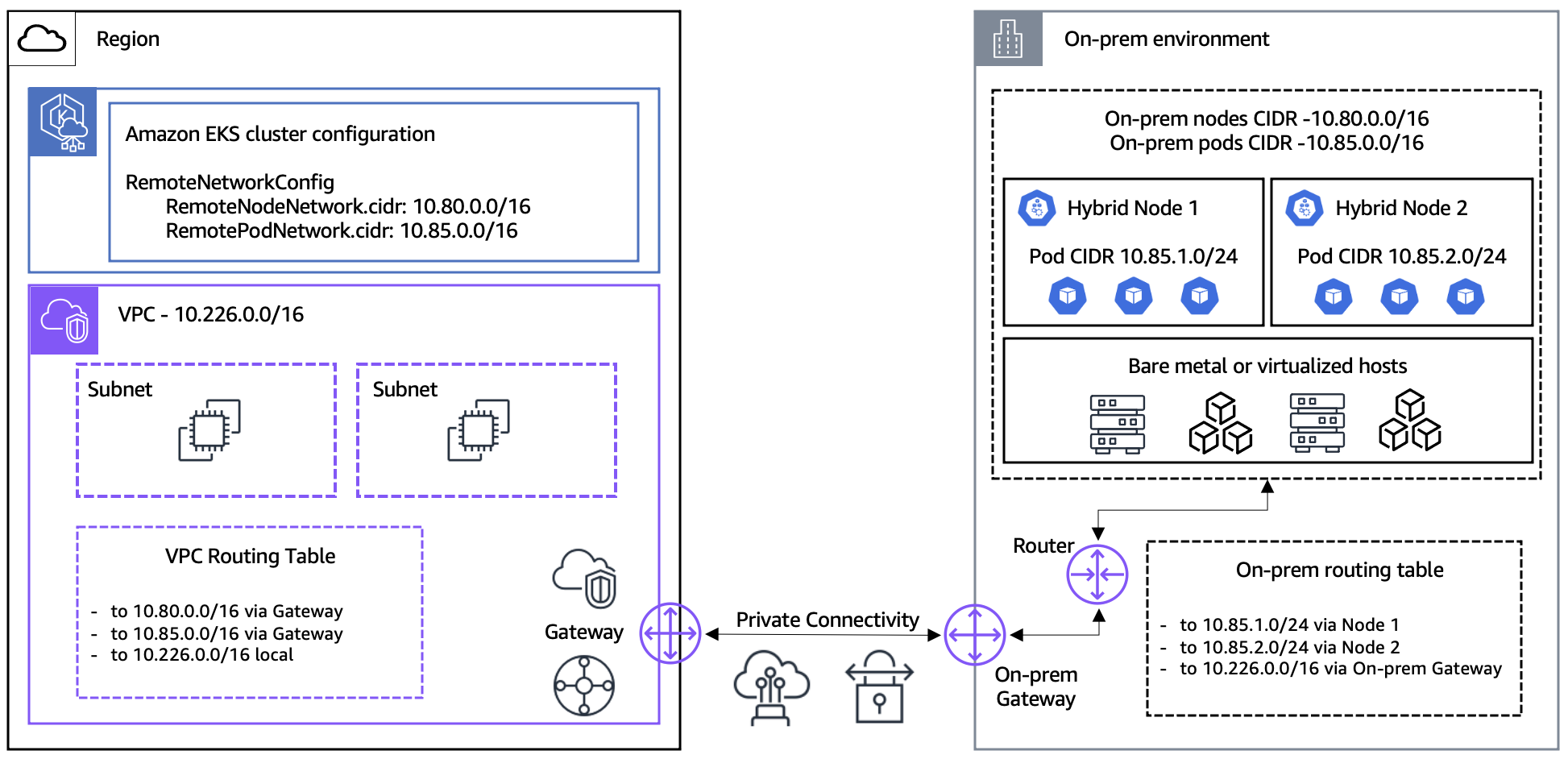
本地 Node 要求
支持的操作系统
| 操作系统 | 版本 | 架构 |
|---|---|---|
| Ubuntu LTS | 20.04, 22.04, 24.04 | x86_64, arm64 |
| RHEL | 8, 9 | x86_64, arm64 |
| Amazon Linux | 2023 | x86_64, arm64 |
| Bottlerocket | v1.37.0 及以上(仅 VMware 变体) | 仅 x86_64 |
Bottlerocket 说明: EKS Hybrid Nodes 仅支持 Bottlerocket 的 VMware 变体,并且需要 Kubernetes v1.28 或更高版本。Bottlerocket 会自动包含所有必要依赖,因此不需要
nodeadmCLI。不支持 Bottlerocket 的 ARM 架构。
ARM 架构说明:
- ARM 节点需要 带 Crypto 扩展的 ARMv8.2 或更高版本(用于 kube-proxy v1.31+)
- Raspberry Pi(Pi 5 之前)不兼容 — 仅支持 ARMv8.0,缺少 Crypto 扩展
- Pi 5(ARMv8.2)及更高版本兼容
Container Runtime
# Check containerd version
containerd --version
# Required version: 1.6.x or higher

# Check Docker Engine version (includes containerd)
docker --version
# Required version: 20.10.10 or higher
特定 OS 的 containerd 说明:
- Ubuntu 24.04: 需要 containerd v1.7.19 或更高版本,或调整 AppArmor profile 配置
- RHEL:
--containerd-source distro无效。必须使用--containerd-source docker- Ubuntu 20.04 / RHEL 8: 默认 kernel 低于 5.10,而 Cilium v1.18.x 需要 5.10 或更高版本
最低硬件规格
| 资源 | 最低要求(AWS 官方) | 推荐配置 |
|---|---|---|
| CPU | 1 vCPU | 4 核或更多 |
| RAM | 1 GiB | 8 GB 或更多 |
| Disk | 50 GB SSD | 100 GB NVMe SSD |
| Network | 100 Mbps | 10 Gbps 或更多 |
说明: AWS 官方最低要求为 1 vCPU / 1 GiB,但建议使用 2 核 / 4 GB 或更高配置来运行实际工作负载。
系统配置检查
# Verify swap is disabled
free -h
# Swap should be 0

# Disable swap
sudo swapoff -a
sudo sed -i '/ swap / s/^\(.*\)$/#\1/g' /etc/fstab

# Load required kernel modules
cat <<EOF | sudo tee /etc/modules-load.d/k8s.conf
overlay
br_netfilter
EOF

sudo modprobe overlay
sudo modprobe br_netfilter

# Set kernel parameters
cat <<EOF | sudo tee /etc/sysctl.d/k8s.conf
net.bridge.bridge-nf-call-iptables  = 1
net.bridge.bridge-nf-call-ip6tables = 1
net.ipv4.ip_forward                 = 1
EOF

sudo sysctl --system
使用 AWS Packer Templates 构建 Node 镜像
AWS 提供了用于为 EKS Hybrid Nodes 构建 Node 镜像的示例 Packer templates。这些 templates 支持 OVA(vSphere)、Qcow2 和 Raw 输出格式。
Packer 先决条件
| 工具 | 最低版本 |
|---|---|
| Packer | v1.11.0+ |
| VMware vSphere Plugin | v1.4.0+ |
| QEMU Plugin | Latest |
环境变量
| 变量 | 描述 | 默认值 |
|---|---|---|
PKR_SSH_PASSWORD | SSH 密码 | - |
ISO_URL | OS ISO 镜像 URL | - |
ISO_CHECKSUM | ISO 校验和 | - |
CREDENTIAL_PROVIDER | Credential provider(ssm 或 iam) | ssm |
K8S_VERSION | Kubernetes 版本 | - |
NODEADM_ARCH | 架构(amd64 或 arm64) | amd64 |
RHEL 特定变量:
| 变量 | 描述 |
|---|---|
RH_USERNAME | Red Hat subscription 用户名 |
RH_PASSWORD | Red Hat subscription 密码 |
vSphere 特定变量:
| 变量 | 描述 |
|---|---|
VSPHERE_SERVER | vCenter server 地址 |
VSPHERE_USER | vCenter 用户名 |
VSPHERE_PASSWORD | vCenter 密码 |
VSPHERE_DATACENTER | Datacenter 名称 |
VSPHERE_CLUSTER | Cluster 名称 |
VSPHERE_DATASTORE | Datastore 名称 |
VSPHERE_NETWORK | Network 名称 |
构建命令
# Build vSphere OVA (Ubuntu 22.04)
packer build -only=general-build.vsphere-iso.ubuntu22 template.pkr.hcl

# Build QEMU image (RHEL 9)
packer build -only=general-build.qemu.rhel9 template.pkr.hcl

# Build Amazon Linux 2023
packer build -only=general-build.qemu.al2023 template.pkr.hcl说明: 将
CREDENTIAL_PROVIDER环境变量设置为iam会构建用于 IAM Roles Anywhere 的镜像。默认值为ssm。
GPU Server 要求(可选)
NVIDIA Driver
# Check NVIDIA driver version
nvidia-smi --query-gpu=driver_version --format=csv,noheader
# Required version: 550.x or higher

# Check CUDA version
nvcc --version
# Recommended version: CUDA 12.x
支持的 GPU 型号
| GPU Model | VRAM | 主要用途 |
|---|---|---|
| NVIDIA H100 | 80 GB | 大规模 LLM 训练/推理 |
| NVIDIA H200 | 141 GB | 超大模型 |
| NVIDIA A100 | 40/80 GB | AI/ML 通用用途 |
| NVIDIA L40S | 48 GB | 针对推理优化 |
GPU Driver 安装
Ubuntu 22.04 LTS(推荐):
# Install kernel headers
sudo apt-get install -y linux-headers-$(uname -r)

# Add NVIDIA driver repository
distribution=$(. /etc/os-release;echo $ID$VERSION_ID | sed -e 's/\.//g')
wget https://developer.download.nvidia.com/compute/cuda/repos/$distribution/x86_64/cuda-keyring_1.1-1_all.deb
sudo dpkg -i cuda-keyring_1.1-1_all.deb
sudo apt-get update

# Install driver
sudo apt-get install -y cuda-drivers-550

# Install NVIDIA Container Toolkit
curl -fsSL https://nvidia.github.io/libnvidia-container/gpgkey | sudo gpg --dearmor -o /usr/share/keyrings/nvidia-container-toolkit-keyring.gpg
curl -s -L https://nvidia.github.io/libnvidia-container/stable/deb/nvidia-container-toolkit.list | \
  sed 's#deb https://#deb [signed-by=/usr/share/keyrings/nvidia-container-toolkit-keyring.gpg] https://#g' | \
  sudo tee /etc/apt/sources.list.d/nvidia-container-toolkit.list
sudo apt-get update
sudo apt-get install -y nvidia-container-toolkit

# Update containerd configuration
sudo nvidia-ctk runtime configure --runtime=containerd
sudo systemctl restart containerd
RHEL 9:
# Install kernel development packages
sudo dnf install -y kernel-devel-$(uname -r) kernel-headers-$(uname -r)

# Add NVIDIA driver repository
sudo dnf config-manager --add-repo https://developer.download.nvidia.com/compute/cuda/repos/rhel9/x86_64/cuda-rhel9.repo

# Install driver
sudo dnf module install -y nvidia-driver:550-dkms

# Install NVIDIA Container Toolkit
curl -s -L https://nvidia.github.io/libnvidia-container/stable/rpm/nvidia-container-toolkit.repo | \
  sudo tee /etc/yum.repos.d/nvidia-container-toolkit.repo
sudo dnf install -y nvidia-container-toolkit

# Update containerd configuration
sudo nvidia-ctk runtime configure --runtime=containerd
sudo systemctl restart containerd
网络要求
带宽和延迟
| 项目 | 最低要求 | 推荐配置 |
|---|---|---|
| Bandwidth | 100 Mbps | 10 Gbps 或更多 |
| Latency | 200 ms RTT 或更低 | 5 ms 或更低 |
| Packet Loss | 0.1% 或更低 | 0.01% 或更低 |
| MTU | 1500 | 9000(Jumbo Frame) |
Jumbo Frame 配置
# Check MTU setting
ip link show eth0 | grep mtu

# Set MTU to 9000 (temporary)
sudo ip link set dev eth0 mtu 9000

# Permanent configuration (Amazon Linux 2023 - NetworkManager)
sudo nmcli connection modify "System eth0" 802-3-ethernet.mtu 9000
sudo nmcli connection up "System eth0"

# Verify configuration
nmcli connection show "System eth0" | grep mtu
IAM Credential Provider 设置
EKS Hybrid Nodes 需要两个 Credential provider 之一,才能使用 AWS 对本地节点进行身份验证。
选项 A: SSM Hybrid Activations
SSM Hybrid Activations 是更简单的选项,不需要 PKI 基础设施。
# Create IAM role for hybrid nodes
aws iam create-role \
  --role-name EKSHybridNodeRole \
  --assume-role-policy-document '{
    "Version": "2012-10-17",
    "Statement": [{
      "Effect": "Allow",
      "Principal": {"Service": "ssm.amazonaws.com"},
      "Action": "sts:AssumeRole"
    }]
  }'

# Attach required policies
aws iam attach-role-policy \
  --role-name EKSHybridNodeRole \
  --policy-arn arn:aws:iam::aws:policy/AmazonEKSWorkerNodeMinimalPolicy

aws iam attach-role-policy \
  --role-name EKSHybridNodeRole \
  --policy-arn arn:aws:iam::aws:policy/AmazonSSMManagedInstanceCore

# Create SSM Hybrid Activation
aws ssm create-activation \
  --default-instance-name "eks-hybrid-node" \
  --iam-role EKSHybridNodeRole \
  --registration-limit 100 \
  --region ap-northeast-2
选项 B: IAM Roles Anywhere
IAM Roles Anywhere 使用来自现有 PKI 的 X.509 证书,非常适合 air-gap 环境。
# 1. Create Trust Anchor with your CA certificate
aws rolesanywhere create-trust-anchor \
  --name "eks-hybrid-trust-anchor" \
  --source "sourceType=CERTIFICATE_BUNDLE,sourceData={x509CertificateData=$(cat ca.pem)}" \
  --enabled

# 2. Create Profile that maps to an IAM Role
aws rolesanywhere create-profile \
  --name "eks-hybrid-profile" \
  --role-arns arn:aws:iam::123456789012:role/EKSHybridNodeRole \
  --enabled

# 3. Issue X.509 certificate for each node (using your CA)
openssl req -new -key node.key -out node.csr -subj "/CN=hybrid-node-001"
openssl x509 -req -in node.csr -CA ca.pem -CAkey ca.key -CAcreateserial -out node.crt -days 365

# 4. Distribute cert and key to node
sudo mkdir -p /etc/iam/pki
sudo cp node.crt /etc/iam/pki/server.pem
sudo cp node.key /etc/iam/pki/server.key
基于 CloudFormation 的 IAM 设置
除了 CLI,也可以使用 CloudFormation 设置 IAM roles 和相关资源。
用于 SSM 的 CloudFormation Template:
# Download template
curl -OL 'https://raw.githubusercontent.com/aws/eks-hybrid/refs/heads/main/example/hybrid-ssm-cfn.yaml'

# Create parameter file
cat > cfn-ssm-parameters.json << 'EOF'
[
  {"ParameterKey": "RoleName", "ParameterValue": "EKSHybridNodeRole"},
  {"ParameterKey": "SSMDeregisterConditionTagKey", "ParameterValue": "EKSClusterARN"},
  {"ParameterKey": "SSMDeregisterConditionTagValue", "ParameterValue": "arn:aws:eks:ap-northeast-2:123456789012:cluster/my-hybrid-cluster"}
]
EOF

# Deploy stack
aws cloudformation create-stack \
  --stack-name eks-hybrid-ssm-role \
  --template-body file://hybrid-ssm-cfn.yaml \
  --parameters file://cfn-ssm-parameters.json \
  --capabilities CAPABILITY_NAMED_IAM
用于 IAM Roles Anywhere 的 CloudFormation Template:
# Download template
curl -OL 'https://raw.githubusercontent.com/aws/eks-hybrid/refs/heads/main/example/hybrid-ira-cfn.yaml'

# Create parameter file
cat > cfn-iamra-parameters.json << 'EOF'
[
  {"ParameterKey": "RoleName", "ParameterValue": "EKSHybridNodeRole"},
  {"ParameterKey": "CertAttributeTrustPolicy", "ParameterValue": "CN"},
  {"ParameterKey": "CABundleCert", "ParameterValue": "-----BEGIN CERTIFICATE-----\n...\n-----END CERTIFICATE-----"}
]
EOF

# Deploy stack
aws cloudformation create-stack \
  --stack-name eks-hybrid-iamra-role \
  --template-body file://hybrid-ira-cfn.yaml \
  --parameters file://cfn-iamra-parameters.json \
  --capabilities CAPABILITY_NAMED_IAM
IAM Policy 详情
混合节点 role 所需的 IAM policies 详情。
必需的 Managed Policies:
| Policy | 用途 |
|---|---|
AmazonEC2ContainerRegistryPullOnly | 从 ECR 拉取 container images |
AmazonSSMManagedInstanceCore | SSM agent 核心功能(使用 SSM 时) |
可选 Policies:
| Policy | 用途 |
|---|---|
eks-auth:AssumeRoleForPodIdentity | EKS Pod Identity 支持 |
SSM 注销条件 Policy:
在多 cluster 环境中,使用 EKSClusterARN condition tag 确保节点只能从特定 cluster 注销:
{
  "Version": "2012-10-17",
  "Statement": [
    {
      "Effect": "Allow",
      "Action": "ssm:DeregisterManagedInstance",
      "Resource": "*",
      "Condition": {
        "StringEquals": {
          "ssm:resourceTag/EKSClusterARN": "arn:aws:eks:ap-northeast-2:123456789012:cluster/my-hybrid-cluster"
        }
      }
    }
  ]
}
IAM Roles Anywhere Trust Policy 详情
使用 IAM Roles Anywhere 时,Trust policy 配置至关重要。
x509Subject/CN 映射:
证书的 CN(Common Name)必须与 node name 匹配。这用于审计跟踪和节点识别。
{
  "Version": "2012-10-17",
  "Statement": [
    {
      "Effect": "Allow",
      "Principal": {
        "Service": "rolesanywhere.amazonaws.com"
      },
      "Action": [
        "sts:AssumeRole",
        "sts:TagSession",
        "sts:SetSourceIdentity"
      ],
      "Condition": {
        "StringEquals": {
          "aws:PrincipalTag/x509Subject/CN": "${aws:RequestTag/x509Subject/CN}"
        },
        "ArnEquals": {
          "aws:SourceArn": "arn:aws:rolesanywhere:ap-northeast-2:123456789012:trust-anchor/TRUST_ANCHOR_ID"
        }
      }
    }
  ]
}
关键组件:
| Component | 描述 |
|---|---|
sts:SetSourceIdentity | 设置用于审计跟踪的 source identity |
sts:RoleSessionName | 绑定到证书 CN 的 session name |
x509Subject/CN | 证书 CN 必须与 nodeName 匹配 |
Credential 持续时间比较
| 方面 | SSM | IAM Roles Anywhere |
|---|---|---|
| Default Duration | 1 小时(固定) | 1 小时(可配置) |
| Maximum Duration | 1 小时 | 12 小时 |
| Rotation | 由 AWS 自动完成 | 自动,遵循 durationSeconds |
MaxSessionDuration | N/A | IAM role 值必须超过 profile 的 durationSeconds |
| Configuration | 不可配置 | 通过 profile 的 durationSeconds 参数设置 |
说明: 使用 IAM Roles Anywhere 时,IAM role 的
MaxSessionDuration必须大于 profile 的durationSeconds值。否则,credential 获取将失败。
Cluster Access 准备
混合节点需要适当的 access entries 才能加入 EKS cluster。
HYBRID_LINUX Access Entry(推荐)
HYBRID_LINUX access entry 类型专为混合节点设计:
aws eks create-access-entry \
  --cluster-name my-hybrid-cluster \
  --principal-arn arn:aws:iam::123456789012:role/EKSHybridNodeRole \
  --type HYBRID_LINUX
此命令会自动设置:
- Username:
system:node:{{SessionName}} - Kubernetes groups:
system:bootstrappers,system:nodes
aws-auth ConfigMap 替代方案
使用 API_AND_CONFIG_MAP authentication mode 时,可以使用 aws-auth ConfigMap 作为替代方案:
apiVersion: v1
kind: ConfigMap
metadata:
  name: aws-auth
  namespace: kube-system
data:
  mapRoles: |
    - groups:
      - system:bootstrappers
      - system:nodes
      rolearn: arn:aws:iam::123456789012:role/EKSHybridNodeRole
username: system:node:{{SessionName}}kubectl apply -f aws-auth-cm.yaml说明:
aws-authConfigMap 方法是 legacy 方法。对于新 cluster,建议使用HYBRID_LINUXaccess entry。
VPC 配置要求
EKS cluster VPC 必须正确配置,以支持 Hybrid Nodes 连接。
Route Table 配置
VPC route tables 必须包含本地 CIDR 的路由:
| Destination | Target | 用途 |
|---|---|---|
| 10.0.0.0/16 (VPC CIDR) | local | VPC 内部流量 |
| 10.80.0.0/16 (Remote Node CIDR) | TGW/VGW | 到本地节点的路由 |
| 10.85.0.0/16 (Remote Pod CIDR) | TGW/VGW | 到本地 pods 的路由 |
Security Group 要求
指定 RemoteNodeNetwork / RemotePodNetwork 时,EKS 会自动创建 inbound rules。必须手动配置额外的 outbound rules:
| Direction | Protocol | Port | Source/Destination | 用途 |
|---|---|---|---|---|
| Inbound (auto) | TCP | 443 | Remote Node CIDR | Kubelet → API Server |
| Inbound (auto) | TCP | 443 | Remote Pod CIDR | Pod → API Server |
| Inbound (auto) | TCP | 10250 | Remote Node CIDR | API Server → Kubelet |
| Outbound (manual) | TCP | 10250 | Remote Node CIDR | API Server → Kubelet |
| Outbound (manual) | TCP | Webhook ports | Remote Pod CIDR | API Server → Webhooks |
说明: 每个 security group 最多支持 60 条 inbound rules。使用多个 CIDR 时请验证规则数量。
API Server Endpoint 访问模式
| Mode | Kubelet Path | 使用场景 |
|---|---|---|
| Public | Internet → EKS API endpoint | 简单设置,需要本地环境访问 internet |
| Private | VPN/DX → VPC ENI → API Server | Air-gap,最高安全性 (推荐) |
警告: 不要对混合节点使用 "Public and Private" 模式。 在此模式下,混合节点只会将 EKS API endpoint 解析为公网 IP,导致私有 VPN/Direct Connect 连接失败。这会导致节点无法加入 cluster。必须选择 Public 或 Private,不能同时选择两者。
建议: 生产混合环境使用 Private endpoint access。
用于 Hybrid Nodes 的 EKS Cluster 创建
创建支持混合节点的 EKS cluster 时,适用以下要求:
- Authentication mode: 必须使用
API或API_AND_CONFIG_MAP - IP address family: 必须使用 IPv4
- Endpoint connectivity: 必须仅使用 Public 或 Private(不支持 "Public and Private" — 会导致混合节点加入失败)
- Remote networks: 指定
RemoteNodeNetwork和RemotePodNetworkCIDR
使用 eksctl
# cluster-config.yaml
apiVersion: eksctl.io/v1alpha5
kind: ClusterConfig

metadata:
  name: my-hybrid-cluster
  region: ap-northeast-2
  version: "1.31"

remoteNetworkConfig:
  iam:
    provider: ssm  # or 'ira' for IAM Roles Anywhere
  vpcGatewayID: tgw-0123456789abcdef0
  remoteNodeNetworks:
    - cidrs: ["10.80.0.0/16"]
  remotePodNetworks:
- cidrs: ["10.85.0.0/16"]eksctl create cluster -f cluster-config.yaml使用 AWS CLI
aws eks create-cluster \
    --name my-hybrid-cluster \
    --region ap-northeast-2 \
    --kubernetes-version 1.31 \
    --role-arn arn:aws:iam::123456789012:role/myAmazonEKSClusterRole \
    --resources-vpc-config subnetIds=subnet-xxx,subnet-yyy,securityGroupIds=sg-zzz,endpointPrivateAccess=true,endpointPublicAccess=false \
    --access-config authenticationMode=API_AND_CONFIG_MAP \
    --remote-network-config '{"remoteNodeNetworks":[{"cidrs":["10.80.0.0/16"]}],"remotePodNetworks":[{"cidrs":["10.85.0.0/16"]}]}'
更新 kubeconfig
aws eks update-kubeconfig --name my-hybrid-cluster --region ap-northeast-2

# Verify cluster access
kubectl get svc
Hybrid Nodes 支持的 Add-ons
并非所有 EKS add-ons 都与混合节点兼容。Amazon VPC CNI 不兼容。
AWS Add-ons
| Add-on | 最低兼容版本 |
|---|---|
| kube-proxy | v1.25.14-eksbuild.2+ |
| CoreDNS | v1.9.3-eksbuild.7+ |
| ADOT (OpenTelemetry) | v0.102.1-eksbuild.2+ |
| CloudWatch Observability | v2.2.1-eksbuild.1+ |
| EKS Pod Identity Agent | v1.3.3-eksbuild.1+ |
| Node monitoring agent | v1.2.0-eksbuild.1+ |
| CSI snapshot controller | v8.1.0-eksbuild.1+ |
Community Add-ons
| Add-on | 最低兼容版本 |
|---|---|
| Kubernetes Metrics Server | v0.7.2-eksbuild.1+ |
| cert-manager | v1.17.2-eksbuild.1+ |
| Prometheus Node Exporter | v1.9.1-eksbuild.2+ |
| kube-state-metrics | v2.15.0-eksbuild.4+ |
| External DNS | v0.19.0-eksbuild.1+ |