パート2:アーキテクチャ
サポート対象バージョン: Calico v3.29+ / Kubernetes 1.28+ 最終更新: February 23, 2026
概要
このセクションでは、Calico のアーキテクチャを詳しく解説します。各コンポーネントの動作と相互作用を理解することは、本番環境で Calico を効果的にデプロイ、トラブルシューティング、最適化するうえで不可欠です。
全体アーキテクチャ図
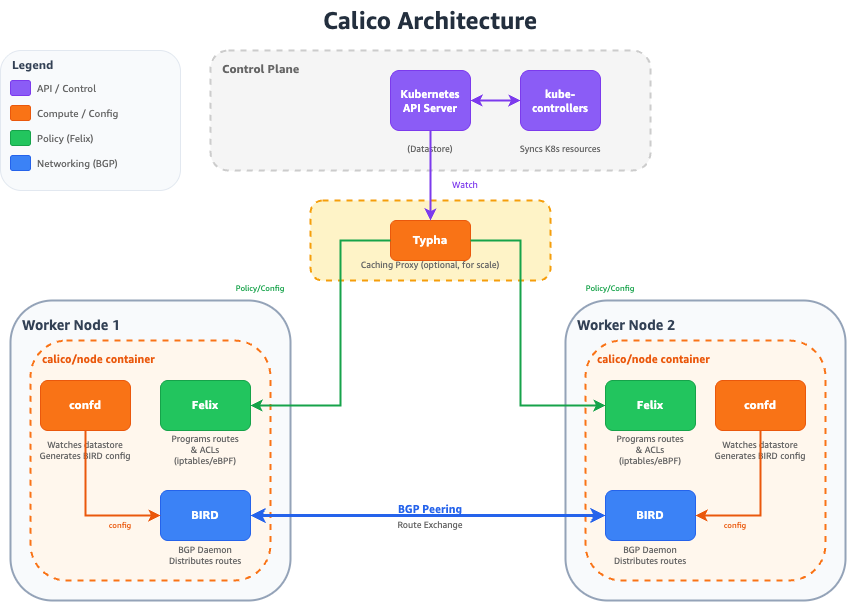
Felix:Calico Agent
Felix は、クラスター内のすべての Node で実行される主要な Calico Agent です。必要な接続性の提供とネットワークポリシーの適用のため、ホスト上のルートおよび ACL(Access Control List)をプログラムします。
Felix の責務
主な機能
- ルートのプログラミング: Pod CIDR ブロックのルートを管理します
- ACL の適用: ネットワークポリシー用の iptables/nftables/eBPF ルールをプログラムします
- インターフェース管理: Workload Endpoint のインターフェースを設定します
- ヘルスレポート: Node と Endpoint のヘルスを Datastore に報告します
- IPAM の連携: ローカル Workload の IP アドレス割り当てを管理します
Felix のデータプレーンオプション
Felix は複数のデータプレーンバックエンドをサポートします。
| Data Plane | 説明 | 最適な用途 |
|---|---|---|
| iptables | 従来の Linux ファイアウォール | 互換性、成熟したデプロイメント |
| nftables | 最新の Linux ファイアウォール | 新しいカーネル、より優れたパフォーマンス |
| eBPF | カーネル内でプログラム可能 | 最大のパフォーマンス、kube-proxy の置き換え |
FelixConfiguration リソース
apiVersion: projectcalico.org/v3
kind: FelixConfiguration
metadata:
  name: default
spec:
  # Logging configuration
  logSeverityScreen: Info
  logSeverityFile: Warning
  logFilePath: /var/log/calico/felix.log

  # Data plane selection
  bpfEnabled: false                    # Set true for eBPF data plane
  bpfDataIfacePattern: ^((en|wl|eth).*|bond[0-9]+)$
  bpfConnectTimeLoadBalancingEnabled: true
  bpfExternalServiceMode: Tunnel

  # iptables configuration
  iptablesBackend: Auto               # Auto, Legacy, NFT
  iptablesRefreshInterval: 90s
  iptablesPostWriteCheckIntervalSecs: 1
  iptablesLockFilePath: /run/xtables.lock
  iptablesLockTimeoutSecs: 0
  iptablesLockProbeIntervalMillis: 50

  # Performance tuning
  ipipMTU: 1440
  vxlanMTU: 1410
  wireguardMTU: 1420

  # Health and metrics
  healthEnabled: true
  healthPort: 9099
  prometheusMetricsEnabled: true
  prometheusMetricsPort: 9091
  prometheusGoMetricsEnabled: true
  prometheusProcessMetricsEnabled: true

  # Policy configuration
  defaultEndpointToHostAction: Drop
  failsafeInboundHostPorts:
    - protocol: TCP
      port: 22
    - protocol: UDP
      port: 68
  failsafeOutboundHostPorts:
    - protocol: UDP
      port: 53
    - protocol: UDP
      port: 67

  # Interface configuration
  interfacePrefix: cali
  chainInsertMode: Insert

  # Reporting
  reportingIntervalSecs: 30
  reportingTTLSecs: 90
Felix の iptables ルール構造
Felix は効率的に処理できるよう、iptables ルールをチェーンに整理します。
                         ┌─────────────────────────────────────────┐
                         │              FORWARD Chain              │
                         └─────────────────┬───────────────────────┘
                                           │
                         ┌─────────────────▼───────────────────────┐
                         │          cali-FORWARD (Calico)          │
                         └─────────────────┬───────────────────────┘
                                           │
              ┌────────────────────────────┼────────────────────────────┐
              │                            │                            │
┌─────────────▼─────────────┐ ┌────────────▼────────────┐ ┌─────────────▼─────────────┐
│   cali-from-wl-dispatch   │ │   cali-to-wl-dispatch   │ │    cali-from-host-ep     │
│  (from workload traffic)  │ │  (to workload traffic)  │ │   (from host endpoints)   │
└─────────────┬─────────────┘ └────────────┬────────────┘ └─────────────┬─────────────┘
              │                            │                            │
┌─────────────▼─────────────┐ ┌────────────▼────────────┐ ┌─────────────▼─────────────┐
│    cali-fw-caliXXXXXX     │ │    cali-tw-caliXXXXXX   │ │    Per-endpoint policy    │
│    (per-endpoint rules)   │ │   (per-endpoint rules)  │ │          chains           │
└───────────────────────────┘ └─────────────────────────┘ └───────────────────────────┘
Felix のデータフロー
BIRD:BGP ルーティングデーモン
BIRD(BIRD Internet Routing Daemon)は、Node 間でルートを配布するために Calico が使用する BGP デーモンです。
Calico アーキテクチャにおける BIRD
BGP セッションタイプ
| セッションタイプ | ユースケース | 設定 |
|---|---|---|
| Node-to-Node Mesh | 小規模クラスターのデフォルト | 自動、フルメッシュ |
| Route Reflector | 大規模クラスター(100+ Node) | 専用の RR Node |
| External Peering | オンプレミス統合 | 手動の BGP ピア設定 |
BGP 設定例
Node-to-Node Mesh(デフォルト)
apiVersion: projectcalico.org/v3
kind: BGPConfiguration
metadata:
  name: default
spec:
  logSeverityScreen: Info
  nodeToNodeMeshEnabled: true
  asNumber: 64512
Route Reflector の設定
# Disable node-to-node mesh
apiVersion: projectcalico.org/v3
kind: BGPConfiguration
metadata:
  name: default
spec:
  nodeToNodeMeshEnabled: false
  asNumber: 64512
---
# Configure route reflector nodes
apiVersion: projectcalico.org/v3
kind: Node
metadata:
  name: node-rr-1
  labels:
    route-reflector: "true"
spec:
  bgp:
    routeReflectorClusterID: 224.0.0.1
---
# Configure BGP peer to route reflector
apiVersion: projectcalico.org/v3
kind: BGPPeer
metadata:
  name: peer-to-rr
spec:
  nodeSelector: "!has(route-reflector)"
  peerSelector: route-reflector == "true"
外部 BGP ピアリング
apiVersion: projectcalico.org/v3
kind: BGPPeer
metadata:
  name: tor-switch-peer
spec:
  peerIP: 10.0.0.1
  asNumber: 65001
  nodeSelector: rack == 'rack-1'
  password:
    secretKeyRef:
      name: bgp-passwords
      key: tor-password
  sourceAddress: UseNodeIP
  keepOriginalNextHop: false
ルート伝播プロセス
BIRD ステータスコマンド
# Access BIRD CLI on a Calico node
kubectl exec -n calico-system calico-node-xxxxx -c calico-node -- birdcl

# Show BGP protocol status
birdcl> show protocols
name     proto    table    state  since       info
kernel1  Kernel   master   up     2024-01-01
device1  Device   master   up     2024-01-01
direct1  Direct   master   up     2024-01-01
Mesh_10_0_1_10  BGP  master  up   2024-01-01  Established
Mesh_10_0_1_11  BGP  master  up   2024-01-01  Established

# Show BGP routes
birdcl> show route protocol Mesh_10_0_1_10
192.168.1.0/26     via 10.0.1.10 on eth0 [Mesh_10_0_1_10 2024-01-01] * (100/0) [i]
192.168.1.64/26    via 10.0.1.10 on eth0 [Mesh_10_0_1_10 2024-01-01] * (100/0) [i]

# Show route details
birdcl> show route 192.168.1.0/26 all
confd:設定管理
confd は、Calico Datastore を監視し、BIRD 設定ファイルを生成する軽量な設定管理ツールです。
confd のワークフロー
confd テンプレート処理
confd は Go テンプレートを使用して BIRD 設定を生成します。
# Template: /etc/calico/confd/templates/bird.cfg.template
# Output: /etc/calico/confd/config/bird.cfg

router id {{.NodeIP}};

protocol kernel {
    learn;
    persist;
    scan time 2;
    import all;
    export {{if .ExportKernel}}all{{else}}none{{end}};
}

protocol device {
    scan time 2;
}

{{range .BGPPeers}}
protocol bgp {{.Name}} {
    local as {{$.LocalAS}};
    neighbor {{.PeerIP}} as {{.PeerAS}};
    import all;
    export {{if .ExportFilter}}filter {{.ExportFilter}}{{else}}all{{end}};
    {{if .Password}}password "{{.Password}}";{{end}}
    graceful restart;
}
{{end}}
Typha:スケーリングコンポーネント
Typha は、Kubernetes API Server と Felix Agent の間に配置されるファンアウトプロキシです。Datastore の更新をキャッシュして配布することで、API Server の負荷を軽減します。
Typha が必要な理由
Typha のスケーリング計算
推奨される Typha レプリカ数は、クラスターサイズによって異なります。
Typha Replicas = max(3, ceil(Nodes / 200))

Examples:
- 50 nodes:   3 Typha replicas (minimum)
- 200 nodes:  3 Typha replicas
- 500 nodes:  3 Typha replicas
- 1000 nodes: 5 Typha replicas
- 2000 nodes: 10 Typha replicas
Typha Deployment の設定
apiVersion: apps/v1
kind: Deployment
metadata:
  name: calico-typha
  namespace: calico-system
spec:
  replicas: 3
  revisionHistoryLimit: 2
  selector:
    matchLabels:
      k8s-app: calico-typha
  strategy:
    type: RollingUpdate
    rollingUpdate:
      maxSurge: 1
      maxUnavailable: 1
  template:
    metadata:
      labels:
        k8s-app: calico-typha
    spec:
      nodeSelector:
        kubernetes.io/os: linux
      tolerations:
      - key: CriticalAddonsOnly
        operator: Exists
      priorityClassName: system-cluster-critical
      serviceAccountName: calico-typha
      containers:
      - name: calico-typha
        image: calico/typha:v3.29.0
        ports:
        - containerPort: 5473
          name: calico-typha
          protocol: TCP
        env:
        - name: TYPHA_LOGSEVERITYSCREEN
          value: "info"
        - name: TYPHA_LOGFILEPATH
          value: "none"
        - name: TYPHA_LOGSEVERITYSYS
          value: "none"
        - name: TYPHA_CONNECTIONREBALANCINGMODE
          value: "kubernetes"
        - name: TYPHA_DATASTORETYPE
          value: "kubernetes"
        - name: TYPHA_HEALTHENABLED
          value: "true"
        - name: TYPHA_PROMETHEUSMETRICSENABLED
          value: "true"
        - name: TYPHA_PROMETHEUSMETRICSPORT
          value: "9093"
        livenessProbe:
          httpGet:
            path: /liveness
            port: 9098
          periodSeconds: 30
          initialDelaySeconds: 30
        readinessProbe:
          httpGet:
            path: /readiness
            port: 9098
          periodSeconds: 10
        resources:
          requests:
            cpu: 100m
            memory: 128Mi
          limits:
            cpu: 1000m
            memory: 512Mi
---
apiVersion: v1
kind: Service
metadata:
  name: calico-typha
  namespace: calico-system
spec:
  ports:
  - port: 5473
    protocol: TCP
    targetPort: calico-typha
    name: calico-typha
  selector:
    k8s-app: calico-typha
Typha のファンアウトアーキテクチャ
kube-controllers:Kubernetes 統合
calico-kube-controllers Pod は、Kubernetes リソースと Calico Datastore を同期する一連のコントローラーを実行します。
コントローラーの概要
| コントローラー | 目的 |
|---|---|
| Node Controller | Kubernetes Node を Calico Node リソースと同期します |
| Policy Controller | Kubernetes NetworkPolicy を Calico ポリシーと同期します |
| Namespace Controller | プロファイル管理用に Namespace ラベルを同期します |
| ServiceAccount Controller | RBAC 用に Service Account ラベルを同期します |
| WorkloadEndpoint Controller | 古い Workload Endpoint をクリーンアップします |
コントローラーのリコンシリエーションループ
kube-controllers の設定
apiVersion: v1
kind: ConfigMap
metadata:
  name: calico-kube-controllers-config
  namespace: calico-system
data:
  config: |
    {
      "logSeverityScreen": "info",
      "healthEnabled": true,
      "prometheusPort": 9094,
      "controllers": {
        "node": {
          "hostEndpoint": {
            "autoCreate": "Disabled"
          },
          "syncLabels": "Enabled",
          "leakGracePeriod": "15m"
        },
        "policy": {
          "reconcilerPeriod": "5m"
        },
        "workloadEndpoint": {
          "reconcilerPeriod": "5m"
        },
        "namespace": {
          "reconcilerPeriod": "5m"
        },
        "serviceAccount": {
          "reconcilerPeriod": "5m"
        }
      }
    }
Datastore のオプション
Calico は、設定と状態を保存するために 2 種類の Datastore バックエンドをサポートしています。
Kubernetes API Datastore(推奨)
利点:
- 管理すべき個別の etcd クラスターが不要
- アクセス制御に Kubernetes RBAC を使用
- よりシンプルな運用モデル
- あらゆる Kubernetes ディストリビューションで動作
etcd Datastore(レガシー)
利点:
- Kubernetes API Server から分離されている
- Kubernetes 以外の Workload(VM、ベアメタル)に使用可能
- 非常に大規模なクラスター向けの歴史的な選択肢
Datastore の比較
| 機能 | Kubernetes API | etcd |
|---|---|---|
| 運用の複雑さ | 低い | 高い |
| スケーラビリティ | 良好(Typha 使用時) | 優れている |
| 非 K8s Workload | 制限あり | 完全サポート |
| バックアップ/リストア | K8s 経由 | 個別のツール |
| アクセス制御 | K8s RBAC | etcd 認証 |
| 推奨 | デフォルトの選択肢 | 特別なケースのみ |
コンポーネントの相互作用シーケンス
パケットフロー分析
受信パケットフロー(Pod 間、同一 Node)
送信パケットフロー(Pod 間、IPIP を使用する異なる Node)
パケット構造の比較
Original Pod-to-Pod Packet:
┌─────────────────────────────────────────────────────────────┐
│ Ethernet │   IP Header    │   TCP/UDP   │     Payload      │
│  Header  │ Src: 192.168.1.10 │   Header    │                  │
│          │ Dst: 192.168.2.10 │             │                  │
└─────────────────────────────────────────────────────────────┘

IPIP Encapsulated Packet:
┌───────────────────────────────────────────────────────────────────────────────┐
│ Ethernet │   Outer IP     │   Inner IP     │   TCP/UDP   │     Payload      │
│  Header  │ Src: 10.0.1.10 │ Src: 192.168.1.10 │   Header    │                  │
│          │ Dst: 10.0.1.11 │ Dst: 192.168.2.10 │             │                  │
│          │ Proto: 4 (IPIP)│                │             │                  │
└───────────────────────────────────────────────────────────────────────────────┘
まとめ
Calico のアーキテクチャは、スケーラビリティ、パフォーマンス、運用のシンプルさを考慮して設計されています。
- Felix: すべての Node 上で動作し、ルートと ACL をプログラムする主力 Agent
- BIRD: BGP 経由でルートを配布し、ネイティブルーティング統合を実現
- confd: Datastore と BIRD 設定を橋渡し
- Typha: API Server の負荷を軽減してシステムをスケール
- kube-controllers: Kubernetes と Calico の同期を維持
- Datastore: 設定の保存先として Kubernetes API(推奨)または etcd
これらのコンポーネントとその相互作用を理解することは、次の点で不可欠です。
- 接続性の問題のトラブルシューティング
- 大規模環境でのパフォーマンス最適化
- キャパシティとアーキテクチャの計画
- 既存のネットワークインフラストラクチャとの統合
クイズ
この章で学んだ内容を確認するには、アーキテクチャクイズに挑戦してください。