Part 3: ネットワーキングモード
サポート対象バージョン: Calico v3.29+ / Kubernetes 1.28+ 最終更新: February 23, 2026
概要
Calico は、さまざまなインフラストラクチャ要件、パフォーマンスニーズ、運用上の制約に対応するため、複数のネットワーキングモードをサポートしています。このセクションでは、各ネットワーキングモードを詳しく解説し、環境に最適なモードを選択して設定できるようにします。
ネットワーキングモードの概要
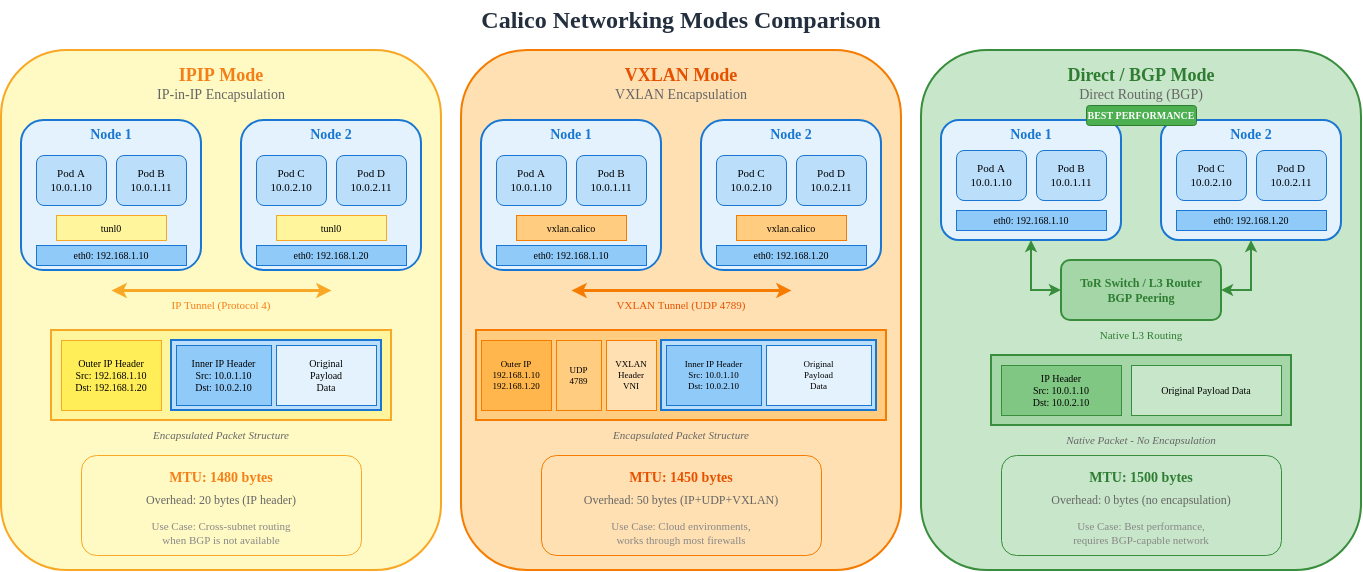
IPIP モード
IP-in-IP(IPIP)は、Calico のデフォルトのカプセル化モードです。サブネット間通信のために、元の IP パケットを別の IP パケット内にラップします。
IPIP パケット構造
Standard IP Packet (1500 bytes MTU):
┌──────────────────────────────────────────────────────────────────┐
│ Ethernet │    IP Header (20B)    │  TCP/UDP  │     Payload      │
│   (14B)  │ Src: 192.168.1.10     │   (20B)   │   (up to 1460B)  │
│          │ Dst: 192.168.2.10     │           │                   │
└──────────────────────────────────────────────────────────────────┘

IPIP Encapsulated Packet (1500 bytes outer MTU):
┌───────────────────────────────────────────────────────────────────────────────┐
│ Ethernet │  Outer IP (20B)   │  Inner IP (20B)   │ TCP/UDP │    Payload     │
│   (14B)  │ Src: 10.0.1.10    │ Src: 192.168.1.10 │  (20B)  │ (up to 1440B)  │
│          │ Dst: 10.0.1.11    │ Dst: 192.168.2.10 │         │                │
│          │ Proto: 4 (IPIP)   │                   │         │                │
└───────────────────────────────────────────────────────────────────────────────┘
                                ▲
                                │
                         20 bytes overhead
                         Effective MTU: 1480
IPIP モードのオプション
| モード | 説明 | ユースケース |
|---|---|---|
| Always | すべての Pod 間トラフィックをカプセル化 | クラウド環境、シンプルなセットアップ |
| CrossSubnet | サブネット間トラフィックのみをカプセル化 | ハイブリッド環境、最適化されたパフォーマンス |
| Never | IPIP を無効化(Direct ルーティングで使用) | BGP を使用するオンプレミス |
IPIP CrossSubnet モード
CrossSubnet は、L3 境界をまたぐトラフィックのみをカプセル化する最適化です。
IPIP IPPool 設定
yaml
apiVersion: projectcalico.org/v3
kind: IPPool
metadata:
  name: default-ipv4-ippool
spec:
  cidr: 192.168.0.0/16
  blockSize: 26                    # /26 = 64 IPs per block
  ipipMode: Always                 # Options: Always, CrossSubnet, Never
  vxlanMode: Never
  natOutgoing: true
  nodeSelector: all()
---
# CrossSubnet mode for optimized performance
apiVersion: projectcalico.org/v3
kind: IPPool
metadata:
  name: crosssubnet-ippool
spec:
  cidr: 10.244.0.0/16
  blockSize: 26
  ipipMode: CrossSubnet
  vxlanMode: Never
  natOutgoing: true
  nodeSelector: all()
IPIP トンネルインターフェイス
bash
# View IPIP tunnel interface on a node
ip link show tunl0

# Expected output:
# tunl0@NONE: <NOARP,UP,LOWER_UP> mtu 1480 qdisc noqueue state UNKNOWN mode DEFAULT group default qlen 1000
#     link/ipip 0.0.0.0 brd 0.0.0.0

# View IPIP routes
ip route | grep tunl0

# Expected output:
# 192.168.2.0/26 via 10.0.1.11 dev tunl0 proto bird onlink
# 192.168.3.0/26 via 10.0.1.12 dev tunl0 proto bird onlink
IPIP パケットフロー図
VXLAN モード
VXLAN(Virtual Extensible LAN)は、Layer 2 フレームを UDP パケットにカプセル化する業界標準のオーバーレイプロトコルです。
VXLAN パケット構造
VXLAN Encapsulated Packet:
┌─────────────────────────────────────────────────────────────────────────────────────────┐
│ Outer    │ Outer IP (20B)   │  UDP (8B)  │ VXLAN  │ Inner    │ Inner IP │ TCP/ │ Pay- │
│ Ethernet │ Src: 10.0.1.10   │ Src: rand  │ Header │ Ethernet │  (20B)   │ UDP  │ load │
│  (14B)   │ Dst: 10.0.1.11   │ Dst: 4789  │  (8B)  │  (14B)   │          │(20B) │      │
└─────────────────────────────────────────────────────────────────────────────────────────┘
                                                      ▲
                                                      │
                                               50 bytes overhead
                                               Effective MTU: 1450
VXLAN コンポーネント
| コンポーネント | 説明 |
|---|---|
| VTEP | VXLAN Tunnel Endpoint - encap/decap ポイント |
| VNI | VXLAN Network Identifier(Calico は固定 VNI を使用) |
| UDP Port | 4789(IANA 割り当て) |
| Multicast/Unicast | Calico は既知のピア VTEP と Unicast を使用 |
VXLAN IPPool 設定
yaml
apiVersion: projectcalico.org/v3
kind: IPPool
metadata:
  name: vxlan-ippool
spec:
  cidr: 10.244.0.0/16
  blockSize: 26
  ipipMode: Never
  vxlanMode: Always                # Options: Always, CrossSubnet, Never
  natOutgoing: true
  nodeSelector: all()
---
# VXLAN CrossSubnet mode
apiVersion: projectcalico.org/v3
kind: IPPool
metadata:
  name: vxlan-crosssubnet-ippool
spec:
  cidr: 10.245.0.0/16
  blockSize: 26
  ipipMode: Never
  vxlanMode: CrossSubnet
  natOutgoing: true
  nodeSelector: all()
VXLAN インターフェイス設定
bash
# View VXLAN interface
ip link show vxlan.calico

# Expected output:
# vxlan.calico: <BROADCAST,MULTICAST,UP,LOWER_UP> mtu 1450 qdisc noqueue state UNKNOWN mode DEFAULT group default
#     link/ether 66:5b:5c:5d:5e:5f brd ff:ff:ff:ff:ff:ff

# View VXLAN FDB (Forwarding Database)
bridge fdb show dev vxlan.calico

# Expected output:
# 66:a1:a2:a3:a4:a5 dst 10.0.1.11 self permanent
# 66:b1:b2:b3:b4:b5 dst 10.0.1.12 self permanent

# View VXLAN routes
ip route | grep vxlan

# Expected output:
# 10.244.1.0/26 via 10.244.1.0 dev vxlan.calico onlink
# 10.244.2.0/26 via 10.244.2.0 dev vxlan.calico onlink
VXLAN パケットフロー
Direct/非カプセル化モード
Direct ルーティングモードは、カプセル化なしでネイティブ IP ルーティングを使用し、可能な限り最高のパフォーマンスを提供します。
Direct モードの要件
| 要件 | 説明 |
|---|---|
| L2 隣接性 | Node は同じ L2 ネットワーク上にある必要があります。OR |
| BGP ルーティング | 外部ルーターは BGP を介して Pod ルートを学習する必要があります |
| ルート伝播 | 物理ネットワークが Pod CIDR をルーティングする必要があります |
Direct モードのトポロジー
Direct モードの IPPool 設定
yaml
apiVersion: projectcalico.org/v3
kind: IPPool
metadata:
  name: direct-routing-pool
spec:
  cidr: 192.168.0.0/16
  blockSize: 26
  ipipMode: Never                  # Disable IPIP
  vxlanMode: Never                 # Disable VXLAN
  natOutgoing: true
  nodeSelector: all()
Direct モードの BGP 設定
yaml
# Global BGP configuration
apiVersion: projectcalico.org/v3
kind: BGPConfiguration
metadata:
  name: default
spec:
  logSeverityScreen: Info
  nodeToNodeMeshEnabled: true      # Full mesh for small clusters
  asNumber: 64512
---
# Peer with ToR switches
apiVersion: projectcalico.org/v3
kind: BGPPeer
metadata:
  name: rack1-tor
spec:
  peerIP: 10.0.1.1
  asNumber: 65001
  nodeSelector: rack == 'rack1'
---
apiVersion: projectcalico.org/v3
kind: BGPPeer
metadata:
  name: rack2-tor
spec:
  peerIP: 10.0.2.1
  asNumber: 65001
  nodeSelector: rack == 'rack2'
Direct モードのルート
bash
# View routes on a node in direct mode
ip route

# Expected output (no tunnel interfaces):
# default via 10.0.1.1 dev eth0
# 10.0.1.0/24 dev eth0 proto kernel scope link src 10.0.1.10
# 192.168.1.0/26 dev cali123456 scope link           # Local pods
# 192.168.1.64/26 via 10.0.1.11 dev eth0 proto bird  # Node 2 pods
# 192.168.2.0/26 via 10.0.1.1 dev eth0 proto bird    # Rack 2 via ToR
# 192.168.2.64/26 via 10.0.1.1 dev eth0 proto bird   # Rack 2 via ToR
モード比較
IPIP vs VXLAN vs Direct
| 機能 | IPIP | VXLAN | Direct |
|---|---|---|---|
| プロトコル | IP Protocol 4 | UDP Port 4789 | Native IP |
| オーバーヘッド | 20 bytes | 50 bytes | 0 bytes |
| MTU | 1480 | 1450 | 1500 |
| ファイアウォール互換性 | IP proto 4 が必要な場合あり | UDP pass-through | Native |
| ハードウェアオフロード | Limited | Better support | Full support |
| L2 要件 | No | No | Yes(または BGP) |
| Multicast | Not needed | Not needed(unicast) | Not needed |
| パフォーマンス | Good | Good | Best |
| 複雑さ | Low | Low | Medium |
パフォーマンスベンチマーク比較
Test Environment:
- Nodes: 3x c5.xlarge (AWS)
- Network: 10 Gbps
- Tool: iperf3 TCP, 60 second test

Results (TCP throughput, single stream):

┌─────────────────────────────────────────────────────────────┐
│                    Throughput (Gbps)                        │
├─────────────────────────────────────────────────────────────┤
│ Direct Mode      ████████████████████████████████  9.41     │
│ IPIP Mode        ███████████████████████████████   9.12     │
│ VXLAN Mode       ██████████████████████████████    8.89     │
└─────────────────────────────────────────────────────────────┘

Latency (microseconds, p99):

┌─────────────────────────────────────────────────────────────┐
│                    Latency (μs)                             │
├─────────────────────────────────────────────────────────────┤
│ Direct Mode      ████                              45       │
│ IPIP Mode        █████                             52       │
│ VXLAN Mode       ██████                            61       │
└─────────────────────────────────────────────────────────────┘

CPU Usage (% per Gbps):

┌─────────────────────────────────────────────────────────────┐
│                    CPU (% per Gbps)                         │
├─────────────────────────────────────────────────────────────┤
│ Direct Mode      ███                               2.1      │
│ IPIP Mode        ████                              2.8      │
│ VXLAN Mode       █████                             3.4      │
└─────────────────────────────────────────────────────────────┘
パケットフローの比較
クラウドプロバイダーの互換性
| プロバイダー | IPIP | VXLAN | Direct | 推奨 |
|---|---|---|---|---|
| AWS EC2 | Yes | Yes | VPC ルーティング使用 | VXLAN または IPIP CrossSubnet |
| AWS EKS | Yes | Yes | Limited | VXLAN(デフォルト) |
| Azure | Yes | Yes | UDR 使用 | VXLAN |
| GCP | Yes | Yes | VPC ルート使用 | IPIP CrossSubnet |
| オンプレミス | Yes | Yes | Yes(BGP) | Direct(BGP 使用) |
| Bare Metal | Yes | Yes | Yes | Direct(BGP 使用) |
| OpenStack | Yes | Yes | Yes | neutron 設定に依存 |
AWS 固有の設定
yaml
# For AWS EC2/EKS with VXLAN
apiVersion: operator.tigera.io/v1
kind: Installation
metadata:
  name: default
spec:
  kubernetesProvider: EKS
  cni:
    type: Calico
  calicoNetwork:
    bgp: Disabled                  # AWS VPC doesn't support BGP
    ipPools:
    - cidr: 10.244.0.0/16
      encapsulation: VXLAN
      natOutgoing: Enabled
      nodeSelector: all()
BGP を使用するオンプレミス
yaml
# For on-premises with BGP peering
apiVersion: operator.tigera.io/v1
kind: Installation
metadata:
  name: default
spec:
  kubernetesProvider: ""
  cni:
    type: Calico
  calicoNetwork:
    bgp: Enabled
    ipPools:
    - cidr: 192.168.0.0/16
      encapsulation: None          # Direct routing
      natOutgoing: Enabled
      nodeSelector: all()
モード移行ガイド
IPIP から VXLAN への移行
bash
# Step 1: Create new VXLAN IPPool
cat <<EOF | kubectl apply -f -
apiVersion: projectcalico.org/v3
kind: IPPool
metadata:
  name: vxlan-pool
spec:
  cidr: 10.245.0.0/16
  blockSize: 26
  ipipMode: Never
  vxlanMode: Always
  natOutgoing: true
  nodeSelector: all()
EOF

# Step 2: Disable old IPIP pool (prevents new allocations)
calicoctl patch ippool default-ipv4-ippool -p '{"spec": {"disabled": true}}'

# Step 3: Rolling restart workloads to get new IPs
kubectl rollout restart deployment -n <namespace>

# Step 4: After all pods migrated, delete old pool
calicoctl delete ippool default-ipv4-ippool
Overlay から Direct への移行
yaml
# Step 1: Ensure BGP is configured
apiVersion: projectcalico.org/v3
kind: BGPConfiguration
metadata:
  name: default
spec:
  nodeToNodeMeshEnabled: true
  asNumber: 64512
---
# Step 2: Configure BGP peers (for external routing)
apiVersion: projectcalico.org/v3
kind: BGPPeer
metadata:
  name: tor-peer
spec:
  peerIP: 10.0.0.1
  asNumber: 65001
---
# Step 3: Create direct mode IPPool
apiVersion: projectcalico.org/v3
kind: IPPool
metadata:
  name: direct-pool
spec:
  cidr: 192.168.0.0/16
  ipipMode: Never
  vxlanMode: Never
  natOutgoing: true
MTU 最適化ガイド
モード別の MTU 計算
| モード | ベース MTU | オーバーヘッド | 有効 MTU | 設定 |
|---|---|---|---|---|
| Direct | 1500 | 0 | 1500 | 変更不要 |
| IPIP | 1500 | 20 | 1480 | ipipMTU: 1480 |
| VXLAN | 1500 | 50 | 1450 | vxlanMTU: 1450 |
| WireGuard | 1500 | 60 | 1440 | wireguardMTU: 1440 |
| IPIP + WireGuard | 1500 | 80 | 1420 | オーバーヘッドの合計 |
MTU 設定
yaml
apiVersion: projectcalico.org/v3
kind: FelixConfiguration
metadata:
  name: default
spec:
  # Auto-detect MTU (recommended)
  mtuIfacePattern: ^((en|wl|eth).*|bond[0-9]+)$

  # Or set explicit values
  ipipMTU: 1480
  vxlanMTU: 1450
  wireguardMTU: 1440
Jumbo Frames の設定
yaml
# For networks supporting jumbo frames (MTU 9000)
apiVersion: projectcalico.org/v3
kind: FelixConfiguration
metadata:
  name: default
spec:
  ipipMTU: 8980              # 9000 - 20 (IPIP overhead)
  vxlanMTU: 8950             # 9000 - 50 (VXLAN overhead)
MTU の検証
bash
# Check interface MTU
ip link show | grep mtu

# Test path MTU
ping -M do -s 1472 <destination-pod-ip>   # For 1500 MTU
ping -M do -s 1452 <destination-pod-ip>   # For IPIP (1480 MTU)
ping -M do -s 1422 <destination-pod-ip>   # For VXLAN (1450 MTU)

# Check for MTU issues in tcpdump
tcpdump -i eth0 'icmp[icmptype] == 3 and icmp[icmpcode] == 4'
意思決定フローチャート
まとめ
最適な Calico パフォーマンスを得るには、適切なネットワーキングモードの選択が重要です。
- IPIP モード: クラウド環境向けのデフォルトの選択肢で、設定が簡単です
- VXLAN モード: より優れたファイアウォール互換性を持つ標準的なオーバーレイプロトコルです
- Direct モード: BGP インフラストラクチャを備えたオンプレミス向けの最大パフォーマンス
主な考慮事項:
- クラウドデプロイメント: VXLAN または IPIP CrossSubnet を使用
- BGP を使用するオンプレミス: 最高のパフォーマンスには Direct モードを使用
- 混在環境: IPIP または VXLAN CrossSubnet は優れたバランスを提供
- パフォーマンスが重要: 適切な BGP 設定で Direct モードを使用
前へ: Part 2 - Calico アーキテクチャの詳細解説
クイズ
この章で学んだ内容を確認するには、ネットワーキングモードのクイズを試してください。