EKS Storage
最終更新: July 3, 2026
Amazon EKS で applications を実行する際、data の保存と管理にはさまざまな storage options があります。このドキュメントでは、EKS storage の基本概念と、Amazon EBS (Elastic Block Store) および Amazon EFS (Elastic File System) の使用方法について説明します。
Table of Contents
- Kubernetes Storage Basic Concepts
- Amazon EKS Storage Options Overview
- Storage with Amazon EBS
- Storage with Amazon EFS
- Storage Classes and Dynamic Provisioning
Kubernetes Storage Basic Concepts
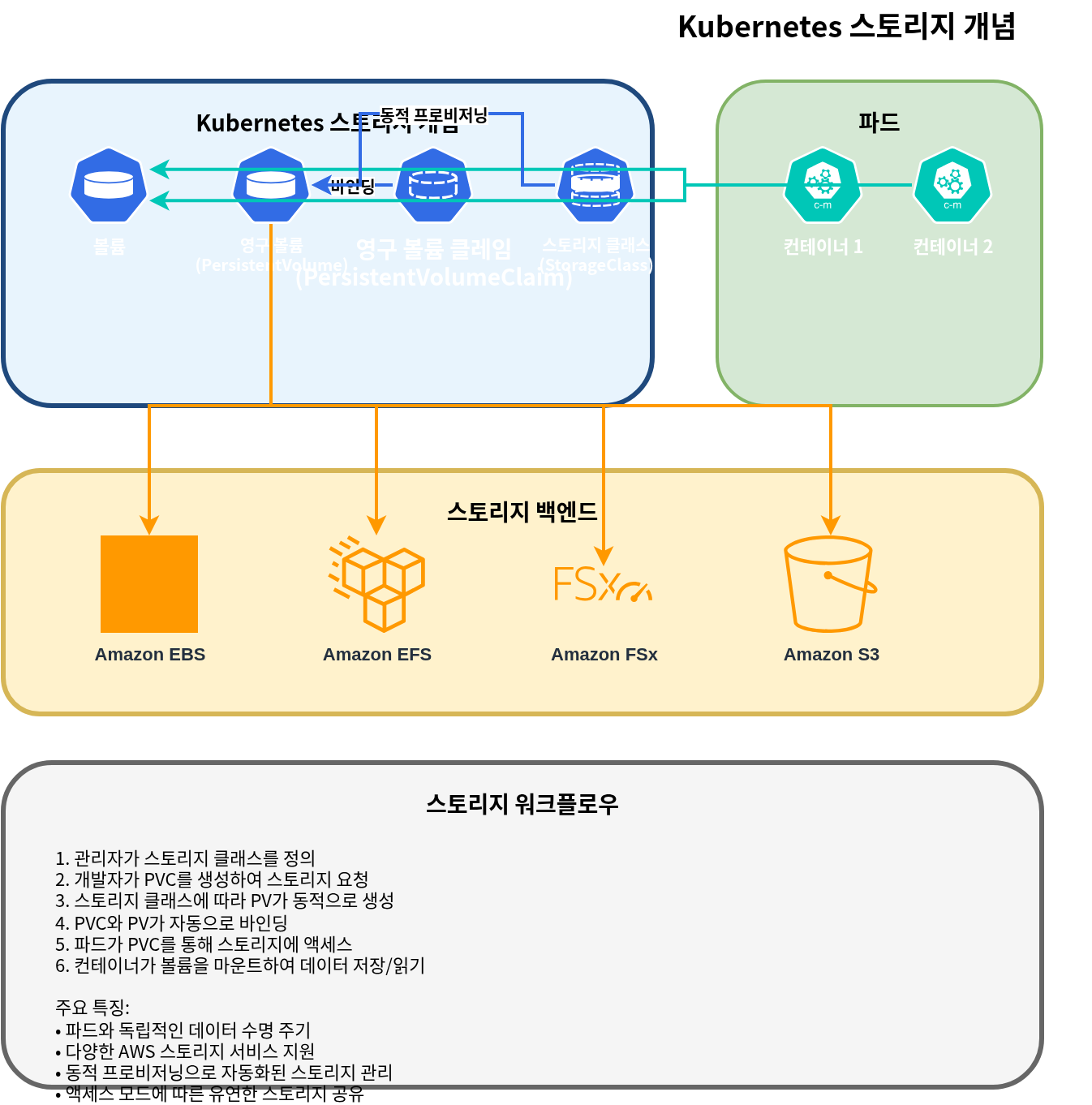
まず、Kubernetes で storage を管理するための主要な概念を理解しましょう。
Volume
volume は、pod 内の containers に mount できる directory であり、container が再起動しても data は保持されます。volume の lifetime は pod の lifetime と同じで、pod が削除されると volume も削除されます。
Persistent Volume (PV)
persistent volume は、administrator によって provision されるか、storage class を通じて動的に provision される cluster storage の一部です。PVs は pods とは独立した lifecycle を持ち、pods が削除されても PVs は保持されます。
Persistent Volume Claim (PVC)
persistent volume claim は、user による storage の要求です。PVC は特定の size と access mode を持つ storage を要求し、この request は適切な PV に bind されます。
StorageClass
storage class は、administrator が提供する storage の「class」を記述します。storage classes を使用すると、PVCs が作成されたときに PVs を動的に provision できます。
Access Modes
Kubernetes は次の access modes をサポートしています。
- ReadWriteOnce (RWO): 単一 node から read/write として mount できます
- ReadOnlyMany (ROX): 複数 nodes から read-only として mount できます
- ReadWriteMany (RWX): 複数 nodes から read/write として mount できます
- ReadWriteOncePod (RWOP): 単一 pod のみから read/write として mount できます (Kubernetes 1.22+)
Amazon EKS Storage Options Overview
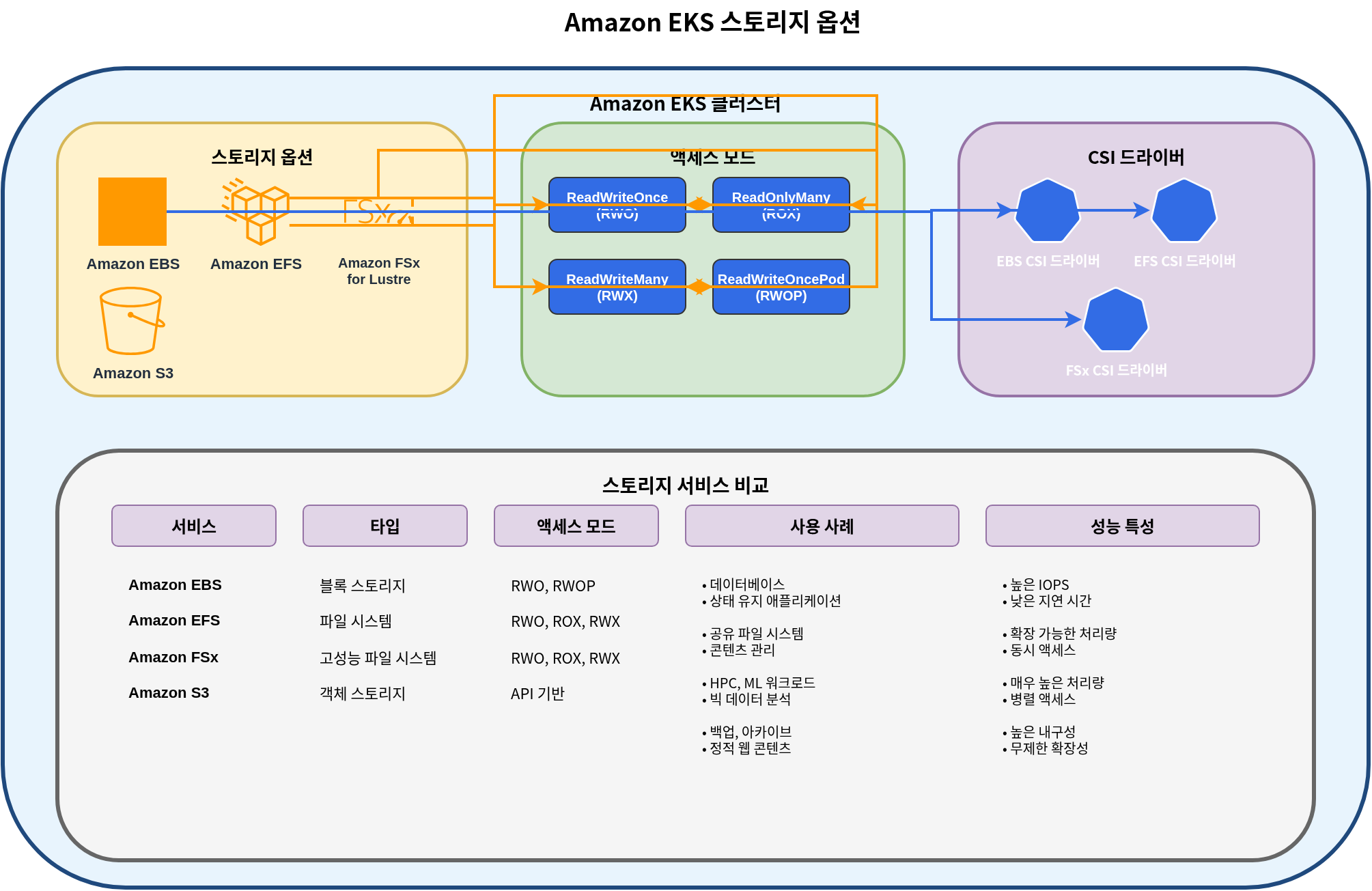
Amazon EKS では、containerized applications に storage を提供するために、さまざまな AWS storage services を活用できます。
Main Storage Options
- Amazon EBS (Elastic Block Store)
- Block storage、単一 node に mount 可能 (RWO)
- 高性能で耐久性のある block storage
- databases、stateful applications に適しています
- Amazon EFS (Elastic File System)
- fully managed NFS file system
- 複数 nodes から同時に mount 可能 (RWX)
- shared file systems を必要とする workloads に適しています
- Amazon FSx for Lustre
- 高性能 file system
- machine learning、HPC、big data analytics に適しています
- 複数 nodes から同時に mount 可能 (RWX)
- Amazon S3 (Simple Storage Service)
- Object storage
- volume として直接 mount することはできませんが、S3 API 経由でアクセスできます
- large-scale data storage に適しています
- EC2 Instance Store (Local NVMe)
- EC2 instance に物理的に接続された ephemeral local NVMe storage で、非常に低い latency を提供します
- EC2 Instance Store CSI Driver は 2026 年 5 月に Amazon EKS add-on として general availability (GA) に到達したため、EKS Console/CLI から標準 add-on として install および管理できるようになりました(以前は community manifests を使用した手動 install が必要でした)。driver は volume lifecycle を自動的に管理し、operational overhead を削減します
- AI/ML ephemeral data processing、Spark/Hadoop local caching、high-throughput log processing、および database cache tiers に適しています
- Cost: driver 自体は無料です。instance store を含む基盤となる EC2 instance の料金のみを支払います (source)
Storage Options Comparison
| Storage Option | Type | Access Mode | Performance | Use Cases |
|---|---|---|---|---|
| Amazon EBS | Block | RWO | High | Databases, stateful applications |
| Amazon EFS | File | RWX | Medium | Shared files, web servers, CMS |
| FSx for Lustre | File | RWX | Very High | HPC, ML training, big data |
| Amazon S3 | Object | API Access | Medium | Backup, archive, static content |
| EC2 Instance Store | Block (local NVMe) | RWO, ephemeral | Very High (ultra-low latency) | AI/ML ephemeral data, local caching, high-throughput log processing |
Storage with Amazon EBS
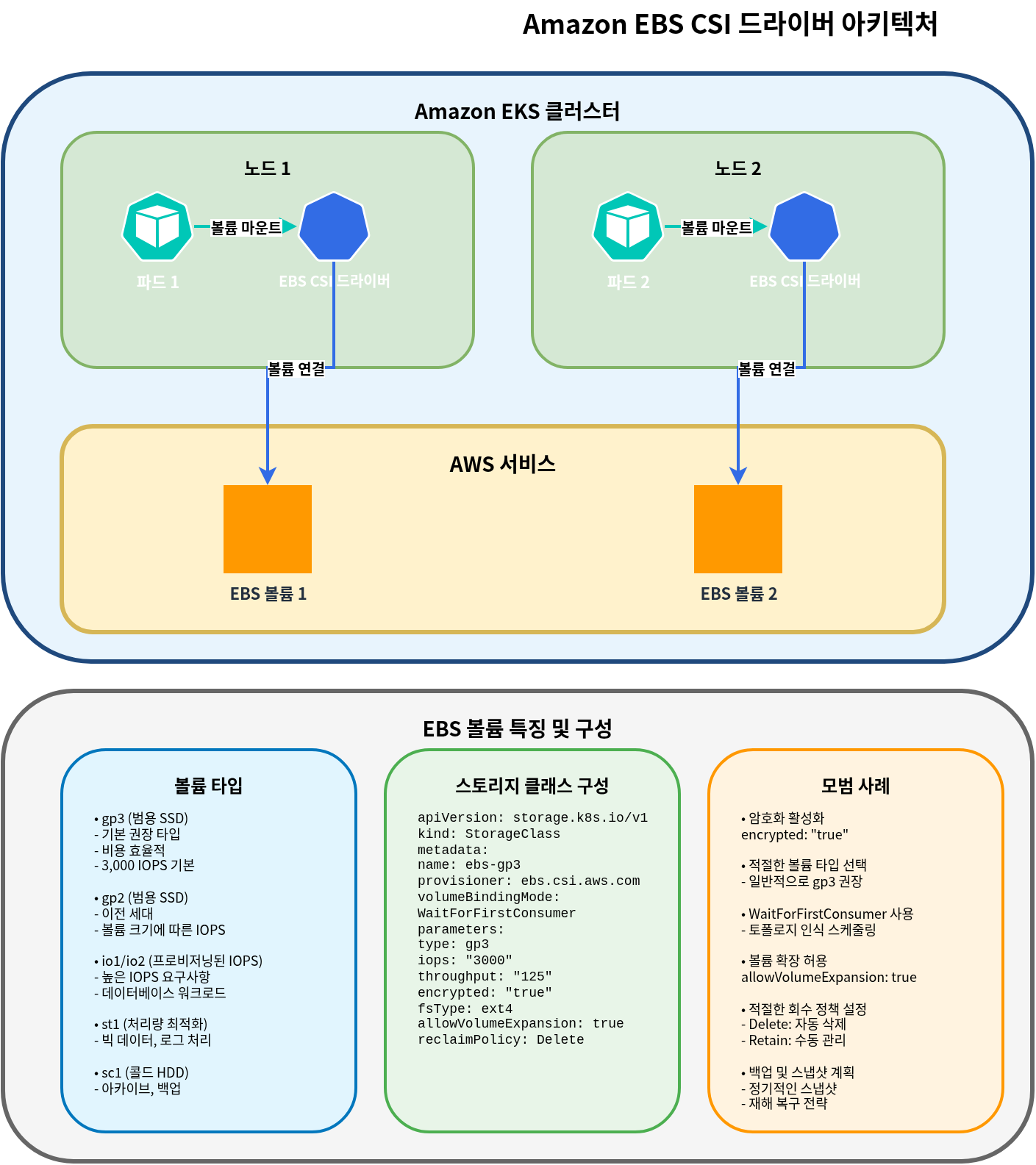
Amazon EBS は、EC2 instances に attach できる block-level storage volumes を提供します。EKS では、EBS CSI (Container Storage Interface) driver を通じて、EBS volumes を Kubernetes pods に mount できます。
Installing EBS CSI Driver
EKS で EBS volumes を使用するには、EBS CSI driver を install する必要があります。この driver は Amazon EKS add-on として提供されます。
# Install EBS CSI driver
eksctl create addon --name aws-ebs-csi-driver --cluster my-cluster --version latest

# Or using AWS CLI
aws eks create-addon --cluster-name my-cluster --addon-name aws-ebs-csi-driver --addon-version latest
Creating EBS Storage Class
EBS volumes の dynamic provisioning 用に storage class を作成します。ここでは gp3 volume type を使用します。
apiVersion: storage.k8s.io/v1
kind: StorageClass
metadata:
  name: ebs-gp3
provisioner: ebs.csi.aws.com
volumeBindingMode: WaitForFirstConsumer
parameters:
  type: gp3
  encrypted: "true"
  fsType: ext4
Creating Persistent Volume Claim (PVC)
application で使用する PVC を作成します。
apiVersion: v1
kind: PersistentVolumeClaim
metadata:
  name: ebs-claim
spec:
  accessModes:
    - ReadWriteOnce
  storageClassName: ebs-gp3
  resources:
    requests:
      storage: 10Gi
Using PVC in a Pod
作成した PVC を pod に mount します。
apiVersion: v1
kind: Pod
metadata:
  name: app-with-ebs
spec:
  containers:
  - name: app
    image: nginx
    volumeMounts:
    - mountPath: "/data"
      name: ebs-volume
  volumes:
  - name: ebs-volume
    persistentVolumeClaim:
      claimName: ebs-claim
EBS Volume Snapshots
EBS volumes の snapshots を作成して data を backup できます。
apiVersion: snapshot.storage.k8s.io/v1
kind: VolumeSnapshot
metadata:
  name: ebs-snapshot
spec:
  volumeSnapshotClassName: csi-aws-vsc
  source:
    persistentVolumeClaimName: ebs-claim
EBS Volume Expansion
必要に応じて EBS volumes の size を拡張できます。
apiVersion: v1
kind: PersistentVolumeClaim
metadata:
  name: ebs-claim
spec:
  accessModes:
    - ReadWriteOnce
  storageClassName: ebs-gp3
  resources:
    requests:
      storage: 20Gi  # Expanded from 10Gi to 20Gi
EBS Volume Types and Performance
Amazon EBS はさまざまな volume types を提供します。
| Volume Type | Description | Use Cases |
|---|---|---|
| gp3 | General Purpose SSD | Suitable for most workloads, cost-effective |
| io2 | Provisioned IOPS SSD | High-performance databases |
| st1 | Throughput Optimized HDD | Big data, log processing |
| sc1 | Cold HDD | Infrequently accessed data |
EKS では、gp3 volume type が推奨されます。gp3 は consistent performance を提供しながら cost-effective です。
Storage with Amazon EFS
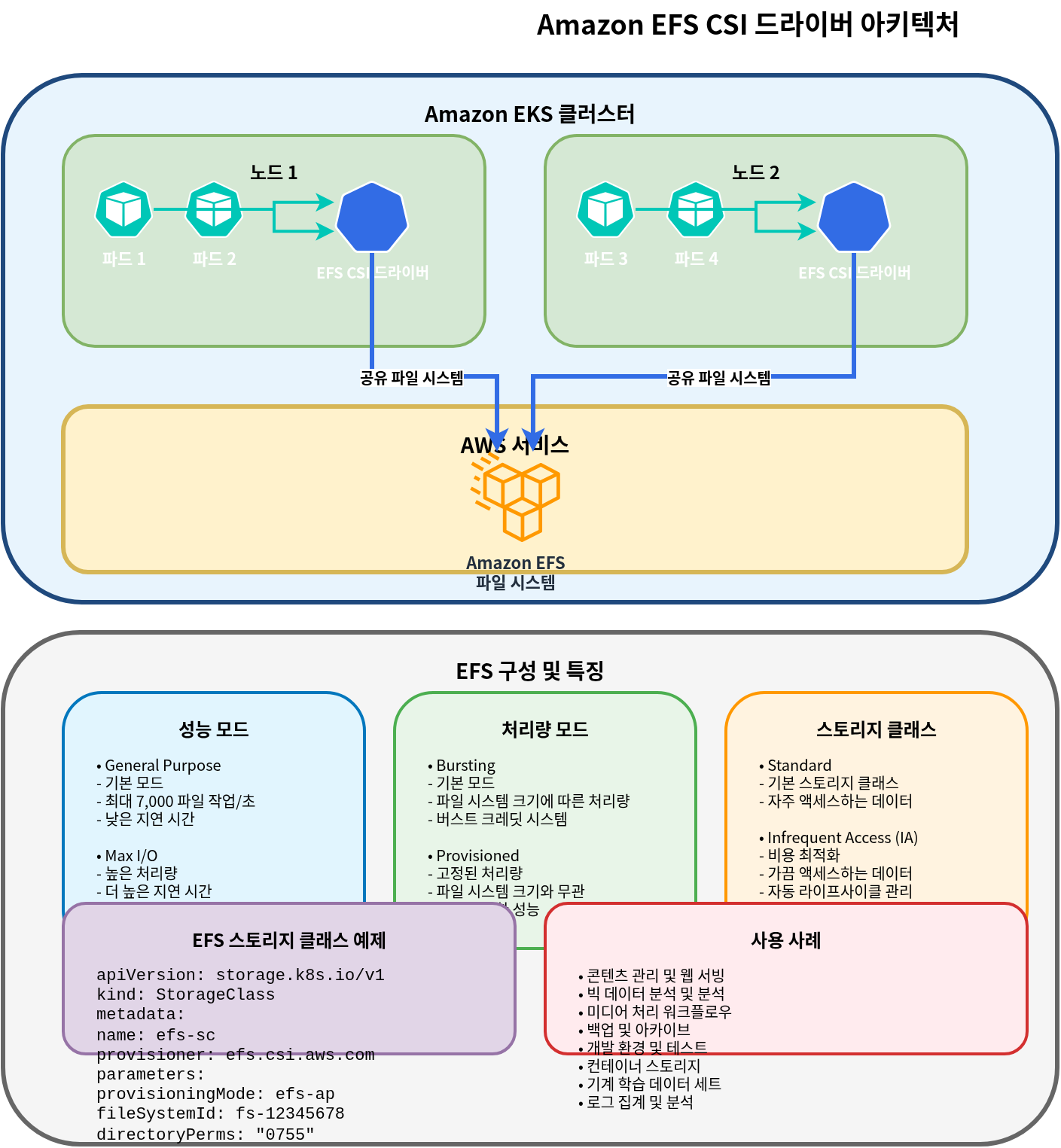
Amazon EFS は、複数の EC2 instances から同時にアクセスできる fully managed NFS file system です。EKS では、EFS CSI driver を通じて EFS file systems を複数の pods に同時に mount できます。
Installing EFS CSI Driver
EKS で EFS を使用するには、EFS CSI driver を install する必要があります。
# Install EFS CSI driver
eksctl create addon --name aws-efs-csi-driver --cluster my-cluster --version latest

# Or using AWS CLI
aws eks create-addon --cluster-name my-cluster --addon-name aws-efs-csi-driver --addon-version latest
Creating EFS File System
AWS Management Console、AWS CLI、または AWS CloudFormation を使用して EFS file system を作成します。
# Create EFS file system using AWS CLI
aws efs create-file-system \
  --performance-mode generalPurpose \
  --throughput-mode bursting \
  --encrypted \
  --tags Key=Name,Value=MyEFSFileSystem

# Save file system ID
EFS_FS_ID=$(aws efs describe-file-systems --query "FileSystems[?Name=='MyEFSFileSystem'].FileSystemId" --output text)

# Get EKS cluster VPC ID
VPC_ID=$(aws eks describe-cluster --name my-cluster --query "cluster.resourcesVpcConfig.vpcId" --output text)

# Create security group
aws ec2 create-security-group \
  --group-name MyEFSSecurityGroup \
  --description "Security group for EFS mount targets" \
  --vpc-id $VPC_ID

SG_ID=$(aws ec2 describe-security-groups \
  --filters Name=group-name,Values=MyEFSSecurityGroup \
  --query "SecurityGroups[0].GroupId" --output text)

# Allow NFS traffic
aws ec2 authorize-security-group-ingress \
  --group-id $SG_ID \
  --protocol tcp \
  --port 2049 \
  --cidr 10.0.0.0/16

# Get subnet IDs
SUBNET_IDS=$(aws ec2 describe-subnets \
  --filters "Name=vpc-id,Values=$VPC_ID" \
  --query "Subnets[*].SubnetId" --output text)

# Create mount target in each subnet
for SUBNET_ID in $SUBNET_IDS; do
  aws efs create-mount-target \
    --file-system-id $EFS_FS_ID \
    --subnet-id $SUBNET_ID \
    --security-groups $SG_ID
done
Creating EFS Storage Class
EFS を使用するための storage class を作成します。
apiVersion: storage.k8s.io/v1
kind: StorageClass
metadata:
  name: efs-sc
provisioner: efs.csi.aws.com
parameters:
  provisioningMode: efs-ap
  fileSystemId: fs-0123456789abcdef0  # Created EFS file system ID
  directoryPerms: "700"
Creating Persistent Volume Claim (PVC)
EFS を使用するための PVC を作成します。
apiVersion: v1
kind: PersistentVolumeClaim
metadata:
  name: efs-claim
spec:
  accessModes:
    - ReadWriteMany  # Can read/write simultaneously from multiple nodes
  storageClassName: efs-sc
  resources:
    requests:
      storage: 5Gi
Using EFS PVC in a Pod
作成した PVC を pod に mount します。
apiVersion: v1
kind: Pod
metadata:
  name: app-with-efs
spec:
  containers:
  - name: app
    image: nginx
    volumeMounts:
    - mountPath: "/shared-data"
      name: efs-volume
  volumes:
  - name: efs-volume
    persistentVolumeClaim:
      claimName: efs-claim
EFS Access Points
EFS access points を使用すると、特定の directories への access を制限し、user と group permissions を設定できます。
apiVersion: v1
kind: PersistentVolume
metadata:
  name: efs-pv
spec:
  capacity:
    storage: 5Gi
  volumeMode: Filesystem
  accessModes:
    - ReadWriteMany
  persistentVolumeReclaimPolicy: Retain
  storageClassName: efs-sc
  csi:
    driver: efs.csi.aws.com
    volumeHandle: fs-0123456789abcdef0::fsap-0123456789abcdef0
    # volumeHandle format: {EFS file system ID}::{EFS access point ID}
EFS Performance Modes and Throughput Modes
Amazon EFS は 2 つの performance modes と 3 つの throughput modes を提供します。
Performance Modes:
- General Purpose: ほとんどの workloads に推奨されます
- Max I/O: 高い parallel processing を必要とする workloads に適しています
Throughput Modes:
- Bursting: default mode。file system size に基づいて burst credits を提供します
- Provisioned: consistent throughput が必要な場合に使用します
- Elastic: workload に基づいて throughput を自動的に調整します(推奨)
Storage Classes and Dynamic Provisioning
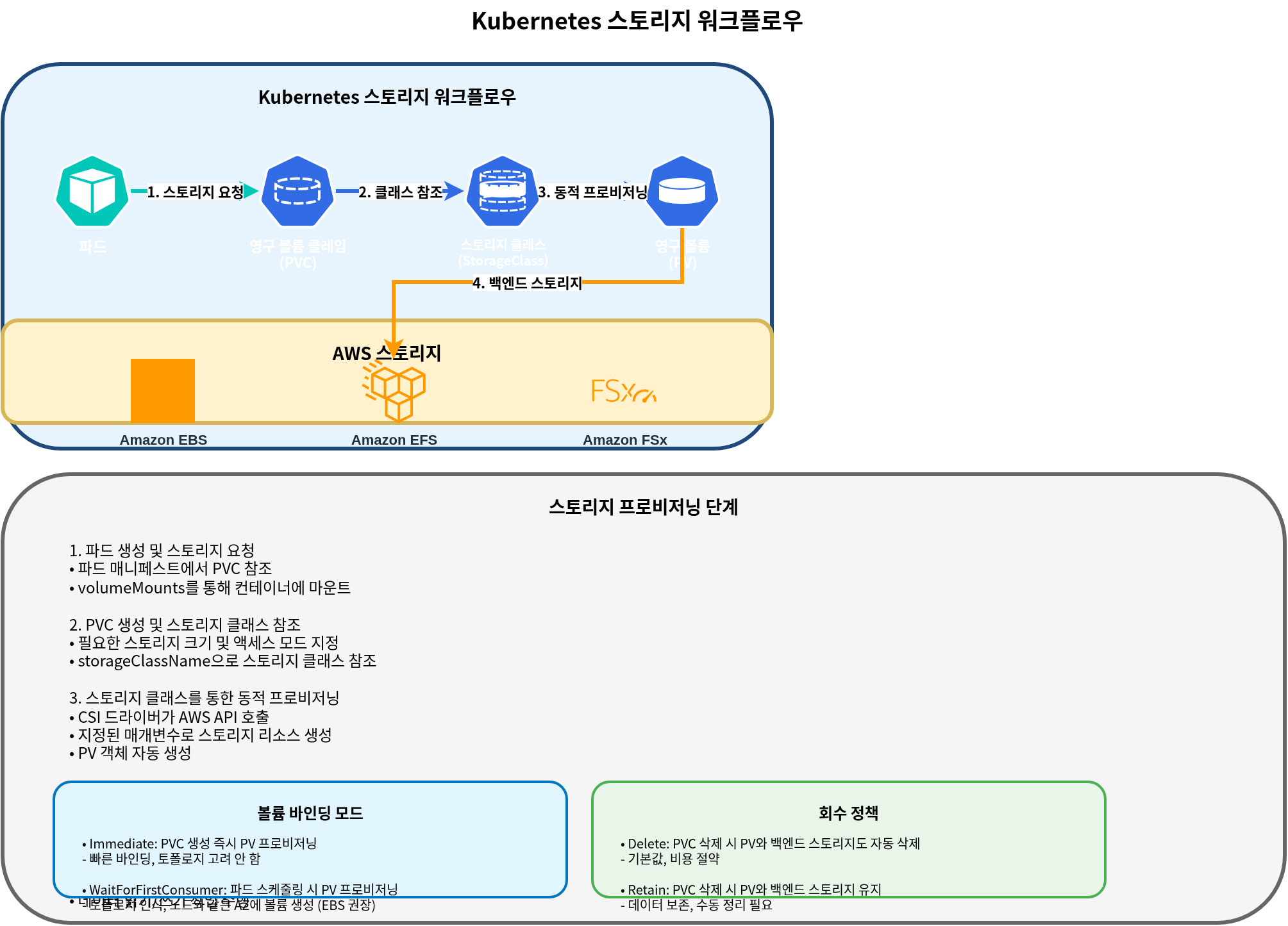
Kubernetes storage classes を使用すると、persistent volumes を動的に provision できます。EKS では、さまざまな AWS storage services 用に storage classes を設定できます。
Volume Binding Modes
storage class の volumeBindingMode field は、PVCs が作成されたときに PVs がどのように bind されるかを決定します。
- Immediate: PVC が作成されると、PV をすぐに provision して bind します。
- WaitForFirstConsumer: pod が PVC を使用しようとするまで PV provisioning を遅延します。
EBS のような node-local storage では、WaitForFirstConsumer の使用が推奨されます。これにより、volume は pod が schedule される node と同じ availability zone に作成されます。
Setting Default Storage Class
特定の storage class を default として設定すると、PVC で storage class が指定されていない場合でも、その storage class を使用できます。
apiVersion: storage.k8s.io/v1
kind: StorageClass
metadata:
  name: ebs-gp3
  annotations:
    storageclass.kubernetes.io/is-default-class: "true"
provisioner: ebs.csi.aws.com
volumeBindingMode: WaitForFirstConsumer
parameters:
  type: gp3
  encrypted: "true"
Storage Class Examples
1. EBS gp3 Storage Class
apiVersion: storage.k8s.io/v1
kind: StorageClass
metadata:
  name: ebs-gp3
provisioner: ebs.csi.aws.com
volumeBindingMode: WaitForFirstConsumer
parameters:
  type: gp3
  encrypted: "true"
  iops: "3000"
  throughput: "125"
2. EFS Storage Class
apiVersion: storage.k8s.io/v1
kind: StorageClass
metadata:
  name: efs-sc
provisioner: efs.csi.aws.com
parameters:
  provisioningMode: efs-ap
  fileSystemId: fs-0123456789abcdef0
  directoryPerms: "700"
3. FSx for Lustre Storage Class
apiVersion: storage.k8s.io/v1
kind: StorageClass
metadata:
  name: fsx-lustre
provisioner: fsx.csi.aws.com
parameters:
  subnetId: subnet-0123456789abcdef0
  securityGroupIds: sg-0123456789abcdef0
  deploymentType: SCRATCH_2
  automaticBackupRetentionDays: "0"
  dailyAutomaticBackupStartTime: "00:00"
  perUnitStorageThroughput: "200"
  dataCompressionType: "NONE"
Reclaim Policies
persistent volume の reclaim policy は、PVC が削除されたときに PV とその data がどのように扱われるかを決定します。
- Delete: PVC が削除されると、PV とその data も削除されます。
- Retain: PVC が削除されても、PV と data は保持されます。administrator が手動で clean up する必要があります。
- Recycle: deprecated policy です。代わりに dynamic provisioning と storage classes を使用してください。
storage class の persistentVolumeReclaimPolicy field を使用して reclaim policy を設定できます。
apiVersion: storage.k8s.io/v1
kind: StorageClass
metadata:
  name: ebs-gp3-retain
provisioner: ebs.csi.aws.com
volumeBindingMode: WaitForFirstConsumer
reclaimPolicy: Retain
parameters:
  type: gp3
  encrypted: "true"
Conclusion
Amazon EKS では、さまざまな storage options を使用して、application requirements を満たす storage solutions を構成できます。このドキュメントでは、EBS と EFS を中心に、基本概念と configuration methods について説明しました。次のドキュメントでは、FSx for Lustre と S3 を使用した advanced storage configurations について説明します。
Quiz
この章で学んだ内容を確認するには、topic quiz に挑戦してください。