第 3 部分:网络模式
支持的版本: Calico v3.29+ / Kubernetes 1.28+ 最后更新: February 23, 2026
概述
Calico 支持多种网络模式,以适应不同的基础设施要求、性能需求和运维约束。本节将深入介绍每种网络模式,帮助你为环境选择并配置最佳模式。
网络模式概览
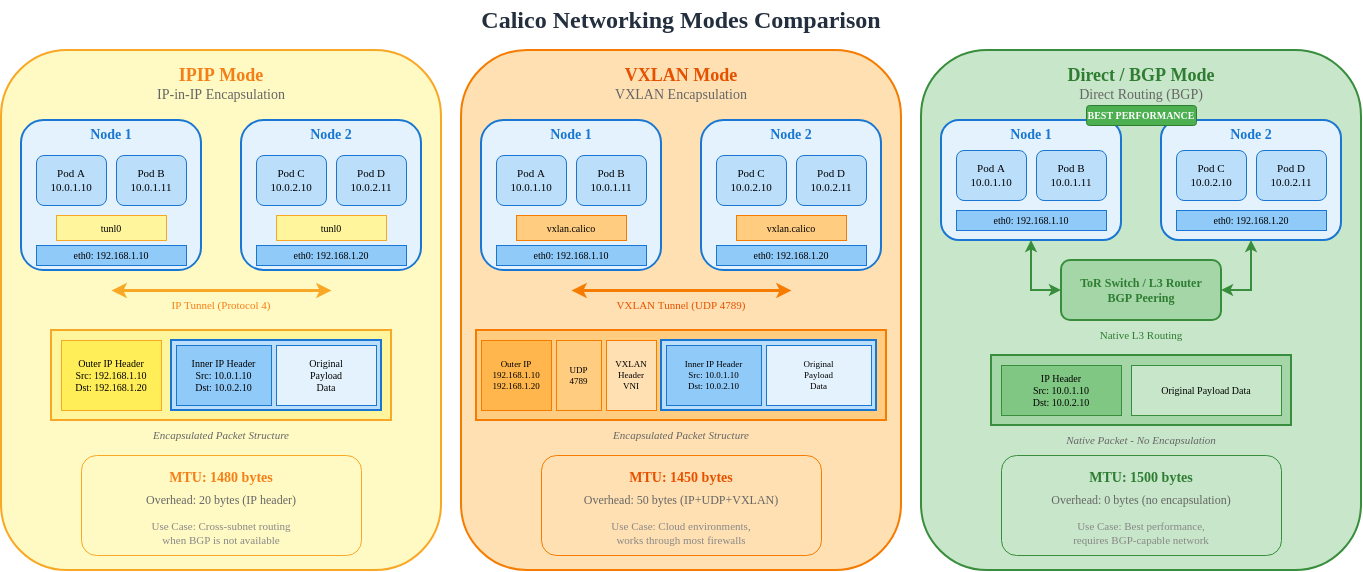
IPIP 模式
IP-in-IP(IPIP)是 Calico 的默认封装模式。它将原始 IP 数据包封装在另一个 IP 数据包中,以实现跨子网通信。
IPIP 数据包结构
Standard IP Packet (1500 bytes MTU):
┌──────────────────────────────────────────────────────────────────┐
│ Ethernet │    IP Header (20B)    │  TCP/UDP  │     Payload      │
│   (14B)  │ Src: 192.168.1.10     │   (20B)   │   (up to 1460B)  │
│          │ Dst: 192.168.2.10     │           │                   │
└──────────────────────────────────────────────────────────────────┘

IPIP Encapsulated Packet (1500 bytes outer MTU):
┌───────────────────────────────────────────────────────────────────────────────┐
│ Ethernet │  Outer IP (20B)   │  Inner IP (20B)   │ TCP/UDP │    Payload     │
│   (14B)  │ Src: 10.0.1.10    │ Src: 192.168.1.10 │  (20B)  │ (up to 1440B)  │
│          │ Dst: 10.0.1.11    │ Dst: 192.168.2.10 │         │                │
│          │ Proto: 4 (IPIP)   │                   │         │                │
└───────────────────────────────────────────────────────────────────────────────┘
                                ▲
                                │
                         20 bytes overhead
                         Effective MTU: 1480
IPIP 模式选项
| Mode | Description | Use Case |
|---|---|---|
| Always | All pod-to-pod traffic is encapsulated | Cloud environments, simple setup |
| CrossSubnet | Only cross-subnet traffic is encapsulated | Hybrid environments, optimized performance |
| Never | IPIP disabled (use with Direct routing) | On-premises with BGP |
IPIP CrossSubnet 模式
CrossSubnet 是一种优化方式,仅封装跨越 L3 边界的流量:
IPIP IPPool 配置
yaml
apiVersion: projectcalico.org/v3
kind: IPPool
metadata:
  name: default-ipv4-ippool
spec:
  cidr: 192.168.0.0/16
  blockSize: 26                    # /26 = 64 IPs per block
  ipipMode: Always                 # Options: Always, CrossSubnet, Never
  vxlanMode: Never
  natOutgoing: true
  nodeSelector: all()
---
# CrossSubnet mode for optimized performance
apiVersion: projectcalico.org/v3
kind: IPPool
metadata:
  name: crosssubnet-ippool
spec:
  cidr: 10.244.0.0/16
  blockSize: 26
  ipipMode: CrossSubnet
  vxlanMode: Never
  natOutgoing: true
  nodeSelector: all()
IPIP 隧道接口
bash
# View IPIP tunnel interface on a node
ip link show tunl0

# Expected output:
# tunl0@NONE: <NOARP,UP,LOWER_UP> mtu 1480 qdisc noqueue state UNKNOWN mode DEFAULT group default qlen 1000
#     link/ipip 0.0.0.0 brd 0.0.0.0

# View IPIP routes
ip route | grep tunl0

# Expected output:
# 192.168.2.0/26 via 10.0.1.11 dev tunl0 proto bird onlink
# 192.168.3.0/26 via 10.0.1.12 dev tunl0 proto bird onlink
IPIP 数据包流图
VXLAN 模式
VXLAN(Virtual Extensible LAN)是一种业界标准的覆盖网络协议,可将第 2 层帧封装在 UDP 数据包中。
VXLAN 数据包结构
VXLAN Encapsulated Packet:
┌─────────────────────────────────────────────────────────────────────────────────────────┐
│ Outer    │ Outer IP (20B)   │  UDP (8B)  │ VXLAN  │ Inner    │ Inner IP │ TCP/ │ Pay- │
│ Ethernet │ Src: 10.0.1.10   │ Src: rand  │ Header │ Ethernet │  (20B)   │ UDP  │ load │
│  (14B)   │ Dst: 10.0.1.11   │ Dst: 4789  │  (8B)  │  (14B)   │          │(20B) │      │
└─────────────────────────────────────────────────────────────────────────────────────────┘
                                                      ▲
                                                      │
                                               50 bytes overhead
                                               Effective MTU: 1450
VXLAN 组件
| Component | Description |
|---|---|
| VTEP | VXLAN Tunnel Endpoint - encap/decap point |
| VNI | VXLAN Network Identifier (Calico uses fixed VNI) |
| UDP Port | 4789 (IANA assigned) |
| Multicast/Unicast | Calico uses unicast with known peer VTEPs |
VXLAN IPPool 配置
yaml
apiVersion: projectcalico.org/v3
kind: IPPool
metadata:
  name: vxlan-ippool
spec:
  cidr: 10.244.0.0/16
  blockSize: 26
  ipipMode: Never
  vxlanMode: Always                # Options: Always, CrossSubnet, Never
  natOutgoing: true
  nodeSelector: all()
---
# VXLAN CrossSubnet mode
apiVersion: projectcalico.org/v3
kind: IPPool
metadata:
  name: vxlan-crosssubnet-ippool
spec:
  cidr: 10.245.0.0/16
  blockSize: 26
  ipipMode: Never
  vxlanMode: CrossSubnet
  natOutgoing: true
  nodeSelector: all()
VXLAN 接口配置
bash
# View VXLAN interface
ip link show vxlan.calico

# Expected output:
# vxlan.calico: <BROADCAST,MULTICAST,UP,LOWER_UP> mtu 1450 qdisc noqueue state UNKNOWN mode DEFAULT group default
#     link/ether 66:5b:5c:5d:5e:5f brd ff:ff:ff:ff:ff:ff

# View VXLAN FDB (Forwarding Database)
bridge fdb show dev vxlan.calico

# Expected output:
# 66:a1:a2:a3:a4:a5 dst 10.0.1.11 self permanent
# 66:b1:b2:b3:b4:b5 dst 10.0.1.12 self permanent

# View VXLAN routes
ip route | grep vxlan

# Expected output:
# 10.244.1.0/26 via 10.244.1.0 dev vxlan.calico onlink
# 10.244.2.0/26 via 10.244.2.0 dev vxlan.calico onlink
VXLAN 数据包流
Direct/未封装模式
Direct 路由模式使用原生 IP 路由而不进行任何封装,可提供尽可能高的性能。
Direct 模式的要求
| Requirement | Description |
|---|---|
| L2 Adjacency | Nodes must be on the same L2 network, OR |
| BGP Routing | External routers must learn pod routes via BGP |
| Route Propagation | Physical network must route pod CIDRs |
Direct 模式拓扑
Direct 模式 IPPool 配置
yaml
apiVersion: projectcalico.org/v3
kind: IPPool
metadata:
  name: direct-routing-pool
spec:
  cidr: 192.168.0.0/16
  blockSize: 26
  ipipMode: Never                  # Disable IPIP
  vxlanMode: Never                 # Disable VXLAN
  natOutgoing: true
  nodeSelector: all()
Direct 模式的 BGP 配置
yaml
# Global BGP configuration
apiVersion: projectcalico.org/v3
kind: BGPConfiguration
metadata:
  name: default
spec:
  logSeverityScreen: Info
  nodeToNodeMeshEnabled: true      # Full mesh for small clusters
  asNumber: 64512
---
# Peer with ToR switches
apiVersion: projectcalico.org/v3
kind: BGPPeer
metadata:
  name: rack1-tor
spec:
  peerIP: 10.0.1.1
  asNumber: 65001
  nodeSelector: rack == 'rack1'
---
apiVersion: projectcalico.org/v3
kind: BGPPeer
metadata:
  name: rack2-tor
spec:
  peerIP: 10.0.2.1
  asNumber: 65001
  nodeSelector: rack == 'rack2'
Direct 模式路由
bash
# View routes on a node in direct mode
ip route

# Expected output (no tunnel interfaces):
# default via 10.0.1.1 dev eth0
# 10.0.1.0/24 dev eth0 proto kernel scope link src 10.0.1.10
# 192.168.1.0/26 dev cali123456 scope link           # Local pods
# 192.168.1.64/26 via 10.0.1.11 dev eth0 proto bird  # Node 2 pods
# 192.168.2.0/26 via 10.0.1.1 dev eth0 proto bird    # Rack 2 via ToR
# 192.168.2.64/26 via 10.0.1.1 dev eth0 proto bird   # Rack 2 via ToR
模式比较
IPIP 与 VXLAN 与 Direct
| Feature | IPIP | VXLAN | Direct |
|---|---|---|---|
| Protocol | IP Protocol 4 | UDP Port 4789 | Native IP |
| Overhead | 20 bytes | 50 bytes | 0 bytes |
| MTU | 1480 | 1450 | 1500 |
| Firewall Friendly | May need IP proto 4 | UDP pass-through | Native |
| Hardware Offload | Limited | Better support | Full support |
| L2 Requirement | No | No | Yes (or BGP) |
| Multicast | Not needed | Not needed (unicast) | Not needed |
| Performance | Good | Good | Best |
| Complexity | Low | Low | Medium |
性能基准对比
Test Environment:
- Nodes: 3x c5.xlarge (AWS)
- Network: 10 Gbps
- Tool: iperf3 TCP, 60 second test

Results (TCP throughput, single stream):

┌─────────────────────────────────────────────────────────────┐
│                    Throughput (Gbps)                        │
├─────────────────────────────────────────────────────────────┤
│ Direct Mode      ████████████████████████████████  9.41     │
│ IPIP Mode        ███████████████████████████████   9.12     │
│ VXLAN Mode       ██████████████████████████████    8.89     │
└─────────────────────────────────────────────────────────────┘

Latency (microseconds, p99):

┌─────────────────────────────────────────────────────────────┐
│                    Latency (μs)                             │
├─────────────────────────────────────────────────────────────┤
│ Direct Mode      ████                              45       │
│ IPIP Mode        █████                             52       │
│ VXLAN Mode       ██████                            61       │
└─────────────────────────────────────────────────────────────┘

CPU Usage (% per Gbps):

┌─────────────────────────────────────────────────────────────┐
│                    CPU (% per Gbps)                         │
├─────────────────────────────────────────────────────────────┤
│ Direct Mode      ███                               2.1      │
│ IPIP Mode        ████                              2.8      │
│ VXLAN Mode       █████                             3.4      │
└─────────────────────────────────────────────────────────────┘
数据包流比较
云服务提供商兼容性
| Provider | IPIP | VXLAN | Direct | Recommended |
|---|---|---|---|---|
| AWS EC2 | Yes | Yes | With VPC routing | VXLAN or IPIP CrossSubnet |
| AWS EKS | Yes | Yes | Limited | VXLAN (default) |
| Azure | Yes | Yes | With UDR | VXLAN |
| GCP | Yes | Yes | With VPC routes | IPIP CrossSubnet |
| On-Premises | Yes | Yes | Yes (BGP) | Direct (with BGP) |
| Bare Metal | Yes | Yes | Yes | Direct (with BGP) |
| OpenStack | Yes | Yes | Yes | Depends on neutron config |
AWS 专用配置
yaml
# For AWS EC2/EKS with VXLAN
apiVersion: operator.tigera.io/v1
kind: Installation
metadata:
  name: default
spec:
  kubernetesProvider: EKS
  cni:
    type: Calico
  calicoNetwork:
    bgp: Disabled                  # AWS VPC doesn't support BGP
    ipPools:
    - cidr: 10.244.0.0/16
      encapsulation: VXLAN
      natOutgoing: Enabled
      nodeSelector: all()
使用 BGP 的本地部署
yaml
# For on-premises with BGP peering
apiVersion: operator.tigera.io/v1
kind: Installation
metadata:
  name: default
spec:
  kubernetesProvider: ""
  cni:
    type: Calico
  calicoNetwork:
    bgp: Enabled
    ipPools:
    - cidr: 192.168.0.0/16
      encapsulation: None          # Direct routing
      natOutgoing: Enabled
      nodeSelector: all()
模式迁移指南
从 IPIP 迁移到 VXLAN
bash
# Step 1: Create new VXLAN IPPool
cat <<EOF | kubectl apply -f -
apiVersion: projectcalico.org/v3
kind: IPPool
metadata:
  name: vxlan-pool
spec:
  cidr: 10.245.0.0/16
  blockSize: 26
  ipipMode: Never
  vxlanMode: Always
  natOutgoing: true
  nodeSelector: all()
EOF

# Step 2: Disable old IPIP pool (prevents new allocations)
calicoctl patch ippool default-ipv4-ippool -p '{"spec": {"disabled": true}}'

# Step 3: Rolling restart workloads to get new IPs
kubectl rollout restart deployment -n <namespace>

# Step 4: After all pods migrated, delete old pool
calicoctl delete ippool default-ipv4-ippool
从覆盖网络迁移到 Direct
yaml
# Step 1: Ensure BGP is configured
apiVersion: projectcalico.org/v3
kind: BGPConfiguration
metadata:
  name: default
spec:
  nodeToNodeMeshEnabled: true
  asNumber: 64512
---
# Step 2: Configure BGP peers (for external routing)
apiVersion: projectcalico.org/v3
kind: BGPPeer
metadata:
  name: tor-peer
spec:
  peerIP: 10.0.0.1
  asNumber: 65001
---
# Step 3: Create direct mode IPPool
apiVersion: projectcalico.org/v3
kind: IPPool
metadata:
  name: direct-pool
spec:
  cidr: 192.168.0.0/16
  ipipMode: Never
  vxlanMode: Never
  natOutgoing: true
MTU 优化指南
按模式计算 MTU
| Mode | Base MTU | Overhead | Effective MTU | Configuration |
|---|---|---|---|---|
| Direct | 1500 | 0 | 1500 | No change needed |
| IPIP | 1500 | 20 | 1480 | ipipMTU: 1480 |
| VXLAN | 1500 | 50 | 1450 | vxlanMTU: 1450 |
| WireGuard | 1500 | 60 | 1440 | wireguardMTU: 1440 |
| IPIP + WireGuard | 1500 | 80 | 1420 | Combined overhead |
MTU 配置
yaml
apiVersion: projectcalico.org/v3
kind: FelixConfiguration
metadata:
  name: default
spec:
  # Auto-detect MTU (recommended)
  mtuIfacePattern: ^((en|wl|eth).*|bond[0-9]+)$

  # Or set explicit values
  ipipMTU: 1480
  vxlanMTU: 1450
  wireguardMTU: 1440
巨型帧配置
yaml
# For networks supporting jumbo frames (MTU 9000)
apiVersion: projectcalico.org/v3
kind: FelixConfiguration
metadata:
  name: default
spec:
  ipipMTU: 8980              # 9000 - 20 (IPIP overhead)
  vxlanMTU: 8950             # 9000 - 50 (VXLAN overhead)
验证 MTU
bash
# Check interface MTU
ip link show | grep mtu

# Test path MTU
ping -M do -s 1472 <destination-pod-ip>   # For 1500 MTU
ping -M do -s 1452 <destination-pod-ip>   # For IPIP (1480 MTU)
ping -M do -s 1422 <destination-pod-ip>   # For VXLAN (1450 MTU)

# Check for MTU issues in tcpdump
tcpdump -i eth0 'icmp[icmptype] == 3 and icmp[icmpcode] == 4'
决策流程图
总结
选择合适的网络模式对于实现最佳 Calico 性能至关重要:
- IPIP 模式:适用于云环境的默认选择,配置简单
- VXLAN 模式:具有更好的防火墙兼容性,是标准的覆盖网络协议
- Direct 模式:适用于具备 BGP 基础设施的本地部署,可实现最高性能
关键考虑因素:
- 云部署:使用 VXLAN 或 IPIP CrossSubnet
- 使用 BGP 的本地部署:使用 Direct 模式以获得最佳性能
- 混合环境:IPIP 或 VXLAN CrossSubnet 可提供良好的平衡
- 性能关键场景:使用具有正确 BGP 配置的 Direct 模式
测验
要测试你在本章学到的内容,请尝试网络模式测验。