第 3 部分:使用 AWS Management Console 和 CLI 创建 Cluster
使用 AWS Management Console 创建 Cluster
使用 AWS Management Console 创建 EKS cluster 的步骤如下:
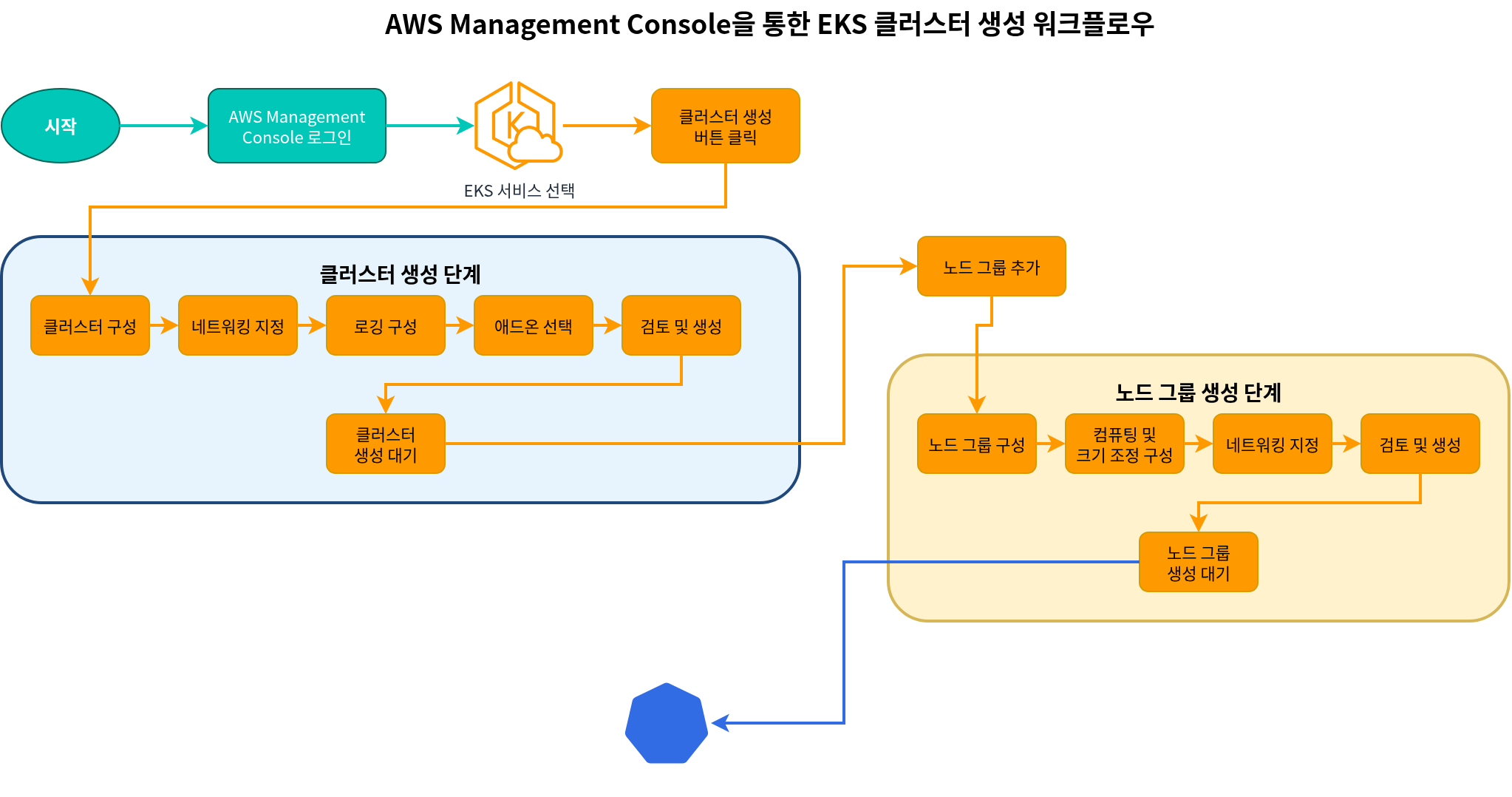
- 登录到 AWS Management Console。
- 搜索 "EKS",或从 services 列表中选择 "Elastic Kubernetes Service"。
- 在 "Clusters" 页面上,点击 "Create cluster" 按钮。
Cluster 配置
- 在 "Configure cluster" 页面上,输入以下信息:
- Cluster name:输入 cluster 的唯一名称。
- Kubernetes version:选择要使用的 Kubernetes version。
- Cluster service role:创建新的 role 或选择现有 role。
- Tags:根据需要添加 tags。
- 点击 "Next" 按钮。
指定 Networking
- 在 "Specify networking" 页面上,输入以下信息:
- VPC:创建新的 VPC 或选择现有 VPC。
- Subnets:选择要用于 cluster 的 subnets。至少 2 个 subnets 必须位于不同的 availability zones。
- Security groups:选择要用于 cluster 的 security groups。
- Cluster endpoint access:配置对 cluster API server endpoint 的访问。
- Public:可以从互联网访问 API server。
- Private:只能从 VPC 内部访问 API server。
- Public and Private:可以同时从互联网和 VPC 内部访问 API server。
- 点击 "Next" 按钮。
配置 Logging
- 在 "Configure logging" 页面上,输入以下信息:
- Control plane logging:选择要启用的 log types。
- API server logs
- Audit logs
- Authenticator logs
- Controller manager logs
- Scheduler logs
- 点击 "Next" 按钮。
- Control plane logging:选择要启用的 log types。
选择 Add-ons
- 在 "Select add-ons" 页面上,输入以下信息:
- Amazon VPC CNI:用于 pod networking 的 CNI plugin。
- CoreDNS:cluster 内的 DNS service。
- kube-proxy:提供 network proxy 和 load balancing。
- 点击 "Next" 按钮。
Review and Create
- 在 "Review and create" 页面上,检查配置并点击 "Create" 按钮。
Cluster 创建完成后,你可以点击 "Add node group" 按钮来添加 node group。
添加 Node Group
- 在 "Node group configuration" 页面上,输入以下信息:
- Node group name:输入 node group 的唯一名称。
- Node IAM role:创建新的 role 或选择现有 role。
- 点击 "Next" 按钮。
- 在 "Set compute and scaling configuration" 页面上,输入以下信息:
- AMI type:选择要用于 nodes 的 AMI type。
- Instance type:选择要用于 nodes 的 EC2 instance type。
- Disk size:指定 nodes 的 disk size。
- Node count:指定 nodes 的最小、最大和期望数量。
- 点击 "Next" 按钮。
- 在 "Specify networking" 页面上,输入以下信息:
- Subnets:选择要用于 node group 的 subnets。
- Remote access configuration:配置 SSH access。
- 点击 "Next" 按钮。
- 在 "Review and create" 页面上,检查配置并点击 "Create" 按钮。
使用 AWS CLI 创建 Cluster
使用 AWS CLI 创建 EKS cluster 的过程包含多个步骤。当需要更多控制时,这种方法很有用。
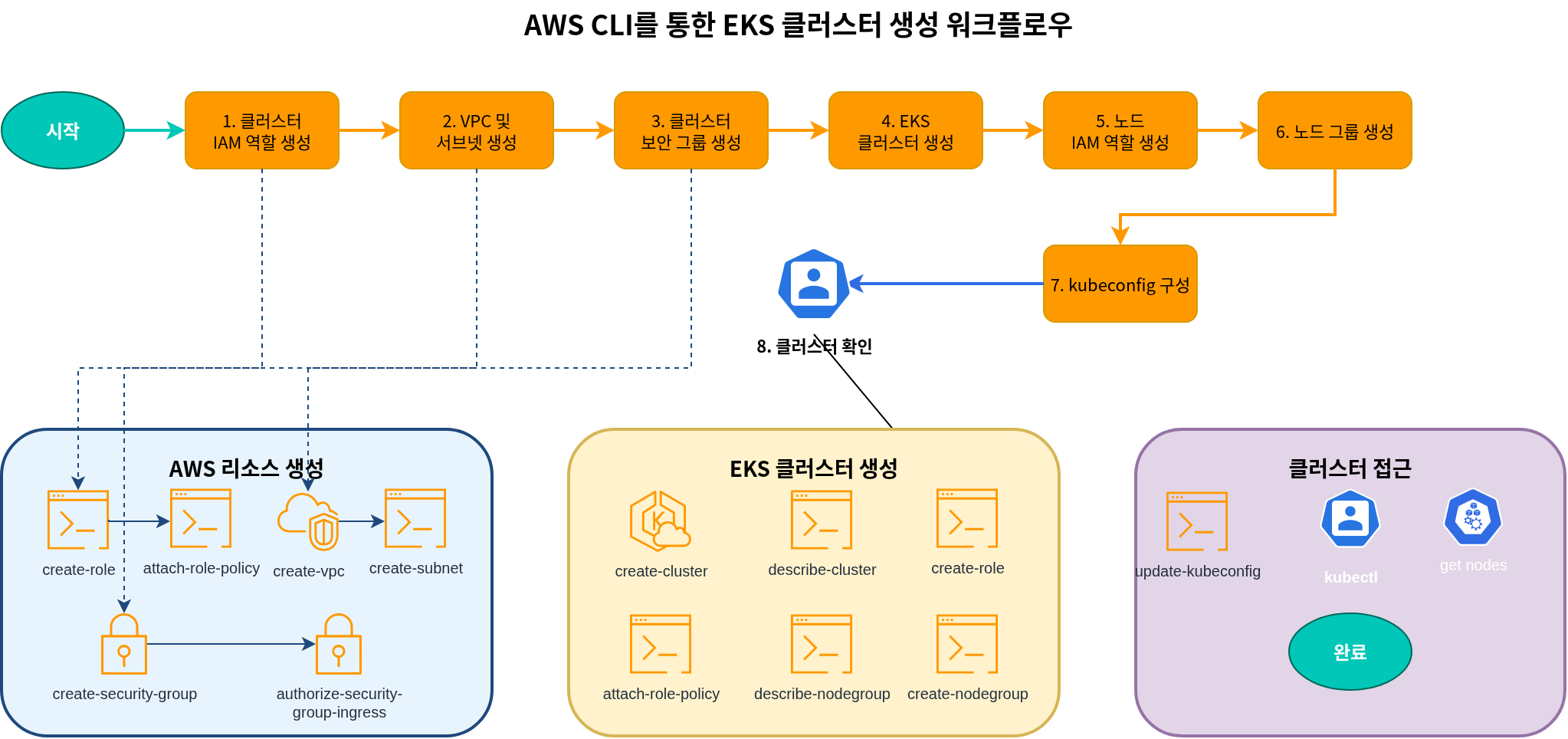
1. 创建 Cluster IAM Role
EKS cluster 需要一个 IAM role,允许 Kubernetes control plane 管理 AWS resources。
bash
# Create role
aws iam create-role \
  --role-name EKSClusterRole \
  --assume-role-policy-document '{
    "Version": "2012-10-17",
    "Statement": [
      {
        "Effect": "Allow",
        "Principal": {
          "Service": "eks.amazonaws.com"
        },
        "Action": "sts:AssumeRole"
      }
    ]
  }'

# Attach required policy
aws iam attach-role-policy \
  --role-name EKSClusterRole \
  --policy-arn arn:aws:iam::aws:policy/AmazonEKSClusterPolicy
2. 创建 VPC 和 Subnets
EKS cluster 需要 VPC 和 subnets。你可以使用现有 VPC,也可以创建新的 VPC。
bash
# Create VPC
aws ec2 create-vpc \
  --cidr-block 10.0.0.0/16 \
  --tag-specifications 'ResourceType=vpc,Tags=[{Key=Name,Value=EKS-VPC}]' \
  --query Vpc.VpcId \
  --output text

# Create subnets
aws ec2 create-subnet \
  --vpc-id vpc-xxxxxxxxxxxxxxxxx \
  --cidr-block 10.0.1.0/24 \
  --availability-zone us-west-2a \
  --tag-specifications 'ResourceType=subnet,Tags=[{Key=Name,Value=EKS-Subnet-1}]' \
  --query Subnet.SubnetId \
  --output text

aws ec2 create-subnet \
  --vpc-id vpc-xxxxxxxxxxxxxxxxx \
  --cidr-block 10.0.2.0/24 \
  --availability-zone us-west-2b \
  --tag-specifications 'ResourceType=subnet,Tags=[{Key=Name,Value=EKS-Subnet-2}]' \
  --query Subnet.SubnetId \
  --output text
3. 创建 Cluster Security Group
EKS cluster 需要 security group。
bash
# Create security group
aws ec2 create-security-group \
  --group-name EKS-Cluster-SG \
  --description "Security group for EKS cluster" \
  --vpc-id vpc-xxxxxxxxxxxxxxxxx \
  --query GroupId \
  --output text

# Add inbound rule
aws ec2 authorize-security-group-ingress \
  --group-id sg-xxxxxxxxxxxxxxxxx \
  --protocol tcp \
  --port 443 \
  --cidr 0.0.0.0/0
4. 创建 EKS Cluster
现在可以创建 EKS cluster。
bash
aws eks create-cluster \
  --name my-cluster \
  --role-arn arn:aws:iam::123456789012:role/EKSClusterRole \
  --resources-vpc-config subnetIds=subnet-xxxxxxxxxxxxxxxxx,subnet-yyyyyyyyyyyyyyyyy,securityGroupIds=sg-zzzzzzzzzzzzzzzzz \
  --kubernetes-version 1.26
等待 cluster 创建完成。要检查 cluster status,请运行以下命令:
bash
aws eks describe-cluster \
  --name my-cluster \
  --query "cluster.status"
5. 创建 Node IAM Role
EKS nodes 需要 IAM role 才能访问 AWS resources。
bash
# Create role
aws iam create-role \
  --role-name EKSNodeRole \
  --assume-role-policy-document '{
    "Version": "2012-10-17",
    "Statement": [
      {
        "Effect": "Allow",
        "Principal": {
          "Service": "ec2.amazonaws.com"
        },
        "Action": "sts:AssumeRole"
      }
    ]
  }'

# Attach required policies
aws iam attach-role-policy \
  --role-name EKSNodeRole \
  --policy-arn arn:aws:iam::aws:policy/AmazonEKSWorkerNodePolicy

aws iam attach-role-policy \
  --role-name EKSNodeRole \
  --policy-arn arn:aws:iam::aws:policy/AmazonEKS_CNI_Policy

aws iam attach-role-policy \
  --role-name EKSNodeRole \
  --policy-arn arn:aws:iam::aws:policy/AmazonEC2ContainerRegistryReadOnly
6. 创建 Node Group
现在可以创建 node group。
bash
aws eks create-nodegroup \
  --cluster-name my-cluster \
  --nodegroup-name my-nodegroup \
  --node-role arn:aws:iam::123456789012:role/EKSNodeRole \
  --subnets subnet-xxxxxxxxxxxxxxxxx subnet-yyyyyyyyyyyyyyyyy \
  --disk-size 80 \
  --scaling-config minSize=1,maxSize=3,desiredSize=2 \
  --instance-types m5.large
等待 node group 创建完成。要检查 node group status,请运行以下命令:
bash
aws eks describe-nodegroup \
  --cluster-name my-cluster \
  --nodegroup-name my-nodegroup \
  --query "nodegroup.status"
7. 配置 kubeconfig
你需要配置 kubeconfig 文件以访问 cluster。
bash
aws eks update-kubeconfig \
  --name my-cluster \
  --region us-west-2
8. 验证 Cluster
验证 cluster 是否已正确配置。
bash
kubectl get nodes测验
为了测试你在本章学到的内容,请尝试 EKS Cluster Creation - Part 3 Quiz。