身份验证
Istio 支持服务到服务身份验证(Peer Authentication)和最终用户身份验证(Request Authentication)。
目录
身份验证概述
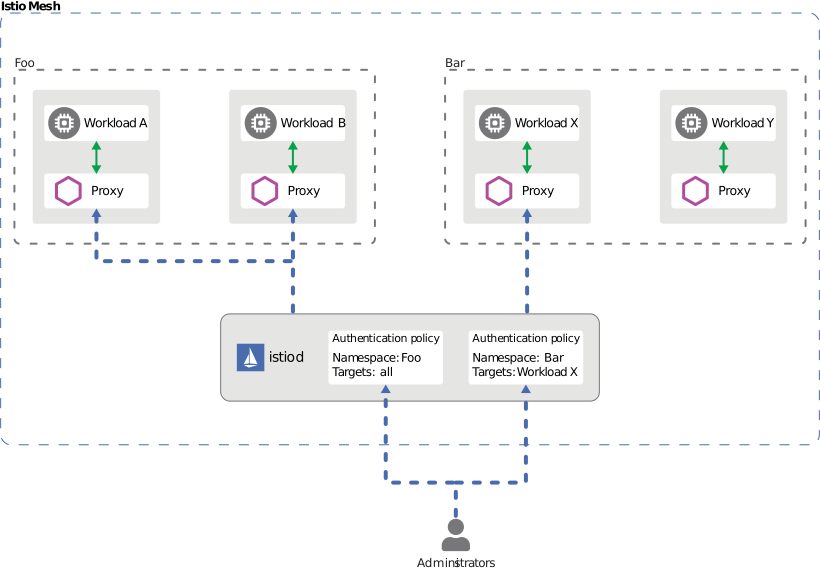
Istio 提供两种类型的身份验证:
对等身份验证(服务到服务身份验证)
- 使用 mTLS 的服务到服务身份验证
- 基于 SPIFFE ID 的身份验证
- 使用 PeerAuthentication CRD 配置
请求身份验证(最终用户身份验证)
- 基于 JWT token 的用户身份验证
- 与 OAuth/OIDC 提供商集成
- 使用 RequestAuthentication CRD 配置
请求身份验证 (JWT)
基本 JWT 验证
yaml
apiVersion: security.istio.io/v1
kind: RequestAuthentication
metadata:
  name: jwt-auth
  namespace: default
spec:
  selector:
    matchLabels:
      app: myapp
  jwtRules:
  - issuer: "https://accounts.google.com"
    jwksUri: "https://www.googleapis.com/oauth2/v3/certs"
支持多个签发者
yaml
apiVersion: security.istio.io/v1
kind: RequestAuthentication
metadata:
  name: multi-issuer-jwt
  namespace: default
spec:
  jwtRules:
  - issuer: "https://accounts.google.com"
    jwksUri: "https://www.googleapis.com/oauth2/v3/certs"
  - issuer: "https://login.microsoftonline.com/tenant-id/v2.0"
    jwksUri: "https://login.microsoftonline.com/tenant-id/discovery/v2.0/keys"
自定义 Header
yaml
apiVersion: security.istio.io/v1
kind: RequestAuthentication
metadata:
  name: jwt-custom-header
  namespace: default
spec:
  jwtRules:
  - issuer: "https://auth.example.com"
    jwksUri: "https://auth.example.com/.well-known/jwks.json"
    fromHeaders:
    - name: "X-Auth-Token"
      prefix: "Bearer "
OAuth/OIDC 集成
AWS Cognito
yaml
apiVersion: security.istio.io/v1
kind: RequestAuthentication
metadata:
  name: cognito-jwt
  namespace: default
spec:
  jwtRules:
  - issuer: "https://cognito-idp.{region}.amazonaws.com/{userPoolId}"
    jwksUri: "https://cognito-idp.{region}.amazonaws.com/{userPoolId}/.well-known/jwks.json"
Keycloak
yaml
apiVersion: security.istio.io/v1
kind: RequestAuthentication
metadata:
  name: keycloak-jwt
  namespace: default
spec:
  jwtRules:
  - issuer: "https://keycloak.example.com/auth/realms/myrealm"
    jwksUri: "https://keycloak.example.com/auth/realms/myrealm/protocol/openid-connect/certs"
Auth0
yaml
apiVersion: security.istio.io/v1
kind: RequestAuthentication
metadata:
  name: auth0-jwt
  namespace: default
spec:
  jwtRules:
  - issuer: "https://your-tenant.auth0.com/"
    jwksUri: "https://your-tenant.auth0.com/.well-known/jwks.json"
    audiences:
    - "https://your-api.example.com"
实践示例
JWT 验证 + 授权
yaml
# JWT Verification
apiVersion: security.istio.io/v1
kind: RequestAuthentication
metadata:
  name: jwt-auth
  namespace: default
spec:
  selector:
    matchLabels:
      app: myapp
  jwtRules:
  - issuer: "https://auth.example.com"
    jwksUri: "https://auth.example.com/.well-known/jwks.json"
---
# Deny requests without JWT
apiVersion: security.istio.io/v1
kind: AuthorizationPolicy
metadata:
  name: require-jwt
  namespace: default
spec:
  selector:
    matchLabels:
      app: myapp
  action: DENY
  rules:
  - from:
    - source:
        notRequestPrincipals: ["*"]
故障排除
JWT 验证失败
bash
# 1. Check RequestAuthentication
kubectl get requestauthentication -A
kubectl describe requestauthentication <name> -n <namespace>

# 2. Decode JWT token
echo "<jwt-token>" | cut -d'.' -f2 | base64 -d | jq

# 3. Verify JWKS endpoint
curl https://auth.example.com/.well-known/jwks.json

# 4. Check Envoy logs
kubectl logs <pod-name> -c istio-proxy -n <namespace> | grep JWT