Infraestructura avanzada
Versiones compatibles: Terraform >= 1.5, AWS Provider >= 5.40, EKS >= 1.29 Última actualización: February 19, 2026
< Anterior: Infraestructura Terraform de 3 capas | Tabla de contenido | Siguiente: Pipelines de CI >
Descripción general
Esta guía cubre patrones avanzados de infraestructura para ejecutar workloads de producción en EKS con alta disponibilidad y deployments sin tiempo de inactividad. La arquitectura de clusters Blue/Green permite actualizaciones de cluster sin interrupciones, recuperación ante desastres y gestión del tráfico entre múltiples zonas de disponibilidad.
Temas clave:
- Arquitectura de doble cluster Blue/Green
- Target groups ponderados de NLB para distribución de tráfico
- Cambio de tráfico basado en DNS con Route53
- Ubicación de datos consciente de la zona para workloads con estado
- Failover automatizado con CloudWatch y Lambda
1. Descripción general de la arquitectura Blue/Green
¿Por qué clusters Blue/Green?
Las actualizaciones tradicionales in-place de clusters conllevan un riesgo significativo:
- Interrupción de workloads durante actualizaciones del control plane
- El drenaje de Nodes puede causar problemas de capacidad
- Complejidad de rollback cuando surgen problemas
- Ventanas de mantenimiento extendidas
La arquitectura Blue/Green elimina estos riesgos manteniendo dos clusters independientes:
| Aspecto | Actualización in-place | Blue/Green |
|---|---|---|
| Riesgo de tiempo de inactividad | Medio-alto | Casi cero |
| Tiempo de rollback | 30-60 minutos | Segundos (DNS/NLB) |
| Pruebas | Limitadas | Tráfico completo de producción |
| Costo | Cluster único | 2x cluster (durante la transición) |
Diagrama de arquitectura
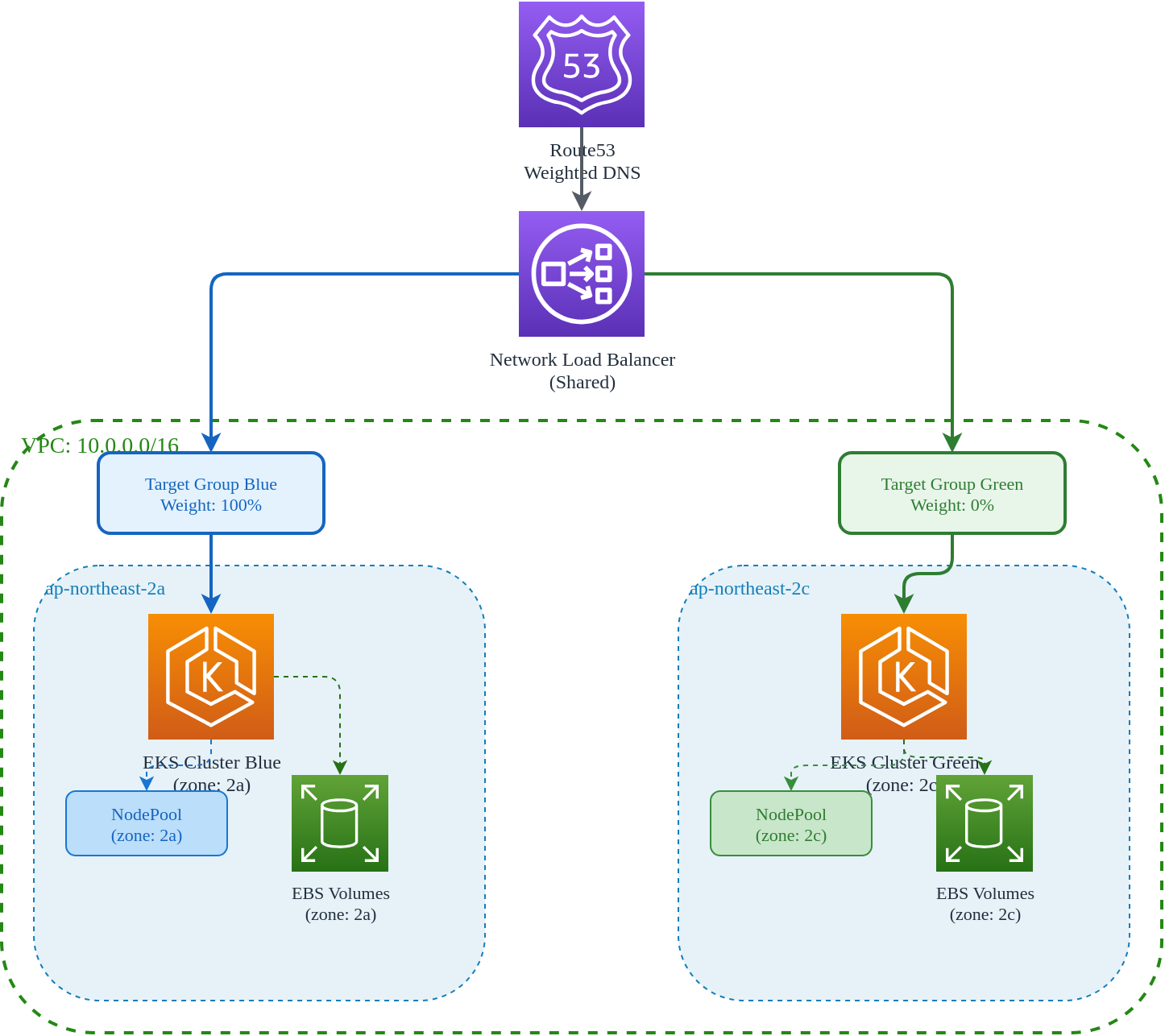
Justificación del diseño de zona única
Cada cluster opera en una sola zona de disponibilidad:
Ventajas:
- Localidad de datos: Los Pods siempre se programan cerca de sus volúmenes de almacenamiento
- Optimización de costos: Cero costos de transferencia de datos entre AZ
- Aislamiento de fallas: La falla de una AZ afecta solo a un cluster
- Redes simplificadas: Sin balanceo de carga multi-AZ complejo
Compensaciones:
- Mayor riesgo de una sola AZ (mitigado por el failover Blue/Green)
- Requiere planificación cuidadosa de capacidad por zona
Asignación de zonas
| Cluster | Zona de disponibilidad | Propósito |
|---|---|---|
| Blue | ap-northeast-2a | Producción primaria |
| Green | ap-northeast-2c | Objetivo secundario/de actualización |
2. Target groups ponderados de NLB
Configuración de Network Load Balancer
El NLB compartido distribuye el tráfico entre los clusters Blue y Green según los pesos de los target groups.
# nlb/main.tf

terraform {
  required_version = ">= 1.5.0"
  required_providers {
    aws = {
      source  = "hashicorp/aws"
      version = ">= 5.40.0"
    }
  }
}

provider "aws" {
  region = var.region

  default_tags {
    tags = local.tags
  }
}

locals {
  name_prefix = "${var.project_name}-${var.environment}"

  tags = {
    Environment = var.environment
    Project     = var.project_name
    ManagedBy   = "terraform"
    Component   = "nlb"
  }
}

# Reference network layer for VPC and subnets
data "terraform_remote_state" "network" {
  backend = "s3"

  config = {
    bucket = "${var.project_name}-${var.environment}-tfstate"
    key    = "network/terraform.tfstate"
    region = var.region
  }
}

#------------------------------------------------------------------------------
# Network Load Balancer
#------------------------------------------------------------------------------

resource "aws_lb" "main" {
  name               = "${local.name_prefix}-nlb"
  internal           = false
  load_balancer_type = "network"

  # Deploy in both AZs for high availability
  subnets = data.terraform_remote_state.network.outputs.public_subnet_ids

  enable_deletion_protection = var.environment == "prod"
  enable_cross_zone_load_balancing = true

  tags = merge(local.tags, {
    Name = "${local.name_prefix}-nlb"
  })
}

#------------------------------------------------------------------------------
# Target Groups - Blue Cluster
#------------------------------------------------------------------------------

resource "aws_lb_target_group" "blue_http" {
  name        = "${local.name_prefix}-blue-http"
  port        = 80
  protocol    = "TCP"
  vpc_id      = data.terraform_remote_state.network.outputs.vpc_id
  target_type = "ip"

  health_check {
    enabled             = true
    protocol            = "HTTP"
    port                = "traffic-port"
    path                = "/healthz"
    healthy_threshold   = 2
    unhealthy_threshold = 2
    interval            = 10
    timeout             = 5
  }

  # Deregistration delay for graceful shutdown
  deregistration_delay = 30

  tags = merge(local.tags, {
    Name    = "${local.name_prefix}-blue-http"
    Cluster = "blue"
  })
}

resource "aws_lb_target_group" "blue_https" {
  name        = "${local.name_prefix}-blue-https"
  port        = 443
  protocol    = "TCP"
  vpc_id      = data.terraform_remote_state.network.outputs.vpc_id
  target_type = "ip"

  health_check {
    enabled             = true
    protocol            = "HTTPS"
    port                = "traffic-port"
    path                = "/healthz"
    healthy_threshold   = 2
    unhealthy_threshold = 2
    interval            = 10
    timeout             = 5
  }

  deregistration_delay = 30

  tags = merge(local.tags, {
    Name    = "${local.name_prefix}-blue-https"
    Cluster = "blue"
  })
}

#------------------------------------------------------------------------------
# Target Groups - Green Cluster
#------------------------------------------------------------------------------

resource "aws_lb_target_group" "green_http" {
  name        = "${local.name_prefix}-green-http"
  port        = 80
  protocol    = "TCP"
  vpc_id      = data.terraform_remote_state.network.outputs.vpc_id
  target_type = "ip"

  health_check {
    enabled             = true
    protocol            = "HTTP"
    port                = "traffic-port"
    path                = "/healthz"
    healthy_threshold   = 2
    unhealthy_threshold = 2
    interval            = 10
    timeout             = 5
  }

  deregistration_delay = 30

  tags = merge(local.tags, {
    Name    = "${local.name_prefix}-green-http"
    Cluster = "green"
  })
}

resource "aws_lb_target_group" "green_https" {
  name        = "${local.name_prefix}-green-https"
  port        = 443
  protocol    = "TCP"
  vpc_id      = data.terraform_remote_state.network.outputs.vpc_id
  target_type = "ip"

  health_check {
    enabled             = true
    protocol            = "HTTPS"
    port                = "traffic-port"
    path                = "/healthz"
    healthy_threshold   = 2
    unhealthy_threshold = 2
    interval            = 10
    timeout             = 5
  }

  deregistration_delay = 30

  tags = merge(local.tags, {
    Name    = "${local.name_prefix}-green-https"
    Cluster = "green"
  })
}

#------------------------------------------------------------------------------
# Listeners with Weighted Target Groups
#------------------------------------------------------------------------------

resource "aws_lb_listener" "http" {
  load_balancer_arn = aws_lb.main.arn
  port              = 80
  protocol          = "TCP"

  default_action {
    type = "forward"

    forward {
      target_group {
        arn    = aws_lb_target_group.blue_http.arn
        weight = var.blue_weight
      }
      target_group {
        arn    = aws_lb_target_group.green_http.arn
        weight = var.green_weight
      }

      stickiness {
        enabled  = true
        duration = 3600  # 1 hour session stickiness
      }
    }
  }

  tags = merge(local.tags, {
    Name = "${local.name_prefix}-http-listener"
  })
}

resource "aws_lb_listener" "https" {
  load_balancer_arn = aws_lb.main.arn
  port              = 443
  protocol          = "TCP"

  default_action {
    type = "forward"

    forward {
      target_group {
        arn    = aws_lb_target_group.blue_https.arn
        weight = var.blue_weight
      }
      target_group {
        arn    = aws_lb_target_group.green_https.arn
        weight = var.green_weight
      }

      stickiness {
        enabled  = true
        duration = 3600
      }
    }
  }

  tags = merge(local.tags, {
    Name = "${local.name_prefix}-https-listener"
  })
}
Variables
# nlb/variables.tf

variable "region" {
  description = "AWS region"
  type        = string
  default     = "ap-northeast-2"
}

variable "environment" {
  description = "Environment name"
  type        = string
  default     = "prod"
}

variable "project_name" {
  description = "Project name"
  type        = string
  default     = "eks-platform"
}

variable "blue_weight" {
  description = "Traffic weight for blue cluster (0-100)"
  type        = number
  default     = 100

  validation {
    condition     = var.blue_weight >= 0 && var.blue_weight <= 100
    error_message = "Blue weight must be between 0 and 100."
  }
}

variable "green_weight" {
  description = "Traffic weight for green cluster (0-100)"
  type        = number
  default     = 0

  validation {
    condition     = var.green_weight >= 0 && var.green_weight <= 100
    error_message = "Green weight must be between 0 and 100."
  }
}
Outputs
# nlb/outputs.tf

output "nlb_arn" {
  description = "NLB ARN"
  value       = aws_lb.main.arn
}

output "nlb_dns_name" {
  description = "NLB DNS name"
  value       = aws_lb.main.dns_name
}

output "nlb_zone_id" {
  description = "NLB hosted zone ID"
  value       = aws_lb.main.zone_id
}

output "blue_http_target_group_arn" {
  description = "Blue HTTP target group ARN"
  value       = aws_lb_target_group.blue_http.arn
}

output "blue_https_target_group_arn" {
  description = "Blue HTTPS target group ARN"
  value       = aws_lb_target_group.blue_https.arn
}

output "green_http_target_group_arn" {
  description = "Green HTTP target group ARN"
  value       = aws_lb_target_group.green_http.arn
}

output "green_https_target_group_arn" {
  description = "Green HTTPS target group ARN"
  value       = aws_lb_target_group.green_https.arn
}

output "current_weights" {
  description = "Current traffic weights"
  value = {
    blue  = var.blue_weight
    green = var.green_weight
  }
}
Ajuste de pesos para deployments
Ajuste los pesos progresivamente para deployments estilo canary:
# terraform.tfvars examples for different deployment stages

# Stage 1: All traffic to Blue (default)
blue_weight  = 100
green_weight = 0

# Stage 2: Canary - 10% to Green
blue_weight  = 90
green_weight = 10

# Stage 3: 50/50 split
blue_weight  = 50
green_weight = 50

# Stage 4: All traffic to Green
blue_weight  = 0
green_weight = 100
Aplique los cambios de pesos:
# Update weights
terraform apply -var="blue_weight=90" -var="green_weight=10"

# Verify listener configuration
aws elbv2 describe-listeners \
  --load-balancer-arn $(terraform output -raw nlb_arn) \
  --query 'Listeners[*].DefaultActions[*].ForwardConfig.TargetGroups'
3. Cambio de tráfico basado en DNS
Enrutamiento ponderado de Route53
Para un control más granular y enrutamiento global, use registros ponderados de Route53 junto con, o en lugar de, pesos de NLB.
# dns/main.tf

terraform {
  required_version = ">= 1.5.0"
  required_providers {
    aws = {
      source  = "hashicorp/aws"
      version = ">= 5.40.0"
    }
  }
}

provider "aws" {
  region = var.region
}

locals {
  name_prefix = "${var.project_name}-${var.environment}"
}

# Reference NLB outputs
data "terraform_remote_state" "nlb" {
  backend = "s3"

  config = {
    bucket = "${var.project_name}-${var.environment}-tfstate"
    key    = "nlb/terraform.tfstate"
    region = var.region
  }
}

#------------------------------------------------------------------------------
# Route53 Hosted Zone
#------------------------------------------------------------------------------

data "aws_route53_zone" "main" {
  name         = var.domain_name
  private_zone = false
}

#------------------------------------------------------------------------------
# Health Checks
#------------------------------------------------------------------------------

resource "aws_route53_health_check" "blue" {
  fqdn              = "blue.${var.domain_name}"
  port              = 443
  type              = "HTTPS"
  resource_path     = "/healthz"
  failure_threshold = 3
  request_interval  = 10

  tags = {
    Name        = "${local.name_prefix}-blue-health"
    Environment = var.environment
    Cluster     = "blue"
  }
}

resource "aws_route53_health_check" "green" {
  fqdn              = "green.${var.domain_name}"
  port              = 443
  type              = "HTTPS"
  resource_path     = "/healthz"
  failure_threshold = 3
  request_interval  = 10

  tags = {
    Name        = "${local.name_prefix}-green-health"
    Environment = var.environment
    Cluster     = "green"
  }
}

#------------------------------------------------------------------------------
# Weighted DNS Records
#------------------------------------------------------------------------------

# Primary record - Blue cluster
resource "aws_route53_record" "app_blue" {
  zone_id = data.aws_route53_zone.main.zone_id
  name    = "app.${var.domain_name}"
  type    = "A"

  set_identifier = "blue"
  weighted_routing_policy {
    weight = var.blue_dns_weight
  }

  alias {
    name                   = data.terraform_remote_state.nlb.outputs.nlb_dns_name
    zone_id                = data.terraform_remote_state.nlb.outputs.nlb_zone_id
    evaluate_target_health = true
  }

  health_check_id = aws_route53_health_check.blue.id
}

# Secondary record - Green cluster
resource "aws_route53_record" "app_green" {
  zone_id = data.aws_route53_zone.main.zone_id
  name    = "app.${var.domain_name}"
  type    = "A"

  set_identifier = "green"
  weighted_routing_policy {
    weight = var.green_dns_weight
  }

  alias {
    name                   = data.terraform_remote_state.nlb.outputs.nlb_dns_name
    zone_id                = data.terraform_remote_state.nlb.outputs.nlb_zone_id
    evaluate_target_health = true
  }

  health_check_id = aws_route53_health_check.green.id
}

#------------------------------------------------------------------------------
# Direct Cluster Access Records
#------------------------------------------------------------------------------

# Blue cluster direct access
resource "aws_route53_record" "blue_direct" {
  zone_id = data.aws_route53_zone.main.zone_id
  name    = "blue.${var.domain_name}"
  type    = "A"

  alias {
    name                   = data.terraform_remote_state.nlb.outputs.nlb_dns_name
    zone_id                = data.terraform_remote_state.nlb.outputs.nlb_zone_id
    evaluate_target_health = true
  }
}

# Green cluster direct access
resource "aws_route53_record" "green_direct" {
  zone_id = data.aws_route53_zone.main.zone_id
  name    = "green.${var.domain_name}"
  type    = "A"

  alias {
    name                   = data.terraform_remote_state.nlb.outputs.nlb_dns_name
    zone_id                = data.terraform_remote_state.nlb.outputs.nlb_zone_id
    evaluate_target_health = true
  }
}

#------------------------------------------------------------------------------
# Failover Configuration
#------------------------------------------------------------------------------

# Primary failover record
resource "aws_route53_record" "app_primary" {
  zone_id = data.aws_route53_zone.main.zone_id
  name    = "failover.${var.domain_name}"
  type    = "A"

  set_identifier = "primary"
  failover_routing_policy {
    type = "PRIMARY"
  }

  alias {
    name                   = data.terraform_remote_state.nlb.outputs.nlb_dns_name
    zone_id                = data.terraform_remote_state.nlb.outputs.nlb_zone_id
    evaluate_target_health = true
  }

  health_check_id = aws_route53_health_check.blue.id
}

# Secondary failover record
resource "aws_route53_record" "app_secondary" {
  zone_id = data.aws_route53_zone.main.zone_id
  name    = "failover.${var.domain_name}"
  type    = "A"

  set_identifier = "secondary"
  failover_routing_policy {
    type = "SECONDARY"
  }

  alias {
    name                   = data.terraform_remote_state.nlb.outputs.nlb_dns_name
    zone_id                = data.terraform_remote_state.nlb.outputs.nlb_zone_id
    evaluate_target_health = true
  }

  health_check_id = aws_route53_health_check.green.id
}
Variables
# dns/variables.tf

variable "region" {
  description = "AWS region"
  type        = string
  default     = "ap-northeast-2"
}

variable "environment" {
  description = "Environment name"
  type        = string
  default     = "prod"
}

variable "project_name" {
  description = "Project name"
  type        = string
  default     = "eks-platform"
}

variable "domain_name" {
  description = "Domain name for Route53 records"
  type        = string
}

variable "blue_dns_weight" {
  description = "DNS weight for blue cluster (0-255)"
  type        = number
  default     = 255

  validation {
    condition     = var.blue_dns_weight >= 0 && var.blue_dns_weight <= 255
    error_message = "DNS weight must be between 0 and 255."
  }
}

variable "green_dns_weight" {
  description = "DNS weight for green cluster (0-255)"
  type        = number
  default     = 0

  validation {
    condition     = var.green_dns_weight >= 0 && var.green_dns_weight <= 255
    error_message = "DNS weight must be between 0 and 255."
  }
}
Estrategia de TTL
El TTL de DNS afecta la rapidez con la que el tráfico cambia cuando se modifican los pesos:
| Valor de TTL | Tiempo de cambio | Caso de uso |
|---|---|---|
| 60 segundos | ~2-3 minutos | Failover rápido |
| 300 segundos | ~10-15 minutos | Operaciones normales |
| 3600 segundos | ~1-2 horas | Enrutamiento estable |
Para registros Alias de Route53, el TTL se hereda del destino (NLB). Para control explícito de TTL, use registros que no sean alias con direcciones IP.
4. Ubicación de Nodes de datos
Conceptos de afinidad de zona
Para workloads con estado, los Pods deben programarse en la misma zona que sus volúmenes persistentes. EKS Auto Mode gestiona gran parte de esto automáticamente, pero comprender los conceptos ayuda con la resolución de problemas.
Configuración de zona de NodePool
El YAML real de NodePool se gestiona mediante ArgoCD GitOps (consulte Configuración de GitOps Pipeline), pero estos son los conceptos clave:
# Conceptual NodePool for Blue cluster (zone: ap-northeast-2a)
# Actual resource managed by ArgoCD, not Terraform
apiVersion: karpenter.sh/v1
kind: NodePool
metadata:
  name: blue-data-nodes
spec:
  template:
    spec:
      requirements:
        - key: topology.kubernetes.io/zone
          operator: In
          values:
            - ap-northeast-2a
        - key: karpenter.sh/capacity-type
          operator: In
          values:
            - on-demand
        - key: node.kubernetes.io/instance-type
          operator: In
          values:
            - r6i.xlarge
            - r6i.2xlarge
            - r6i.4xlarge
      nodeClassRef:
        group: eks.amazonaws.com
        kind: NodeClass
        name: default
  limits:
    cpu: 1000
    memory: 4000Gi
  disruption:
    consolidationPolicy: WhenEmpty
    consolidateAfter: 30m
TopologySpreadConstraints
Asegure que los workloads se distribuyan correctamente dentro de un cluster de una sola zona:
# Example Deployment with topology constraints
apiVersion: apps/v1
kind: Deployment
metadata:
  name: api-server
spec:
  replicas: 3
  selector:
    matchLabels:
      app: api-server
  template:
    metadata:
      labels:
        app: api-server
    spec:
      topologySpreadConstraints:
        # Spread across nodes within the zone
        - maxSkew: 1
          topologyKey: kubernetes.io/hostname
          whenUnsatisfiable: DoNotSchedule
          labelSelector:
            matchLabels:
              app: api-server
      containers:
        - name: api-server
          image: myapp/api-server:latest
          resources:
            requests:
              cpu: 500m
              memory: 512Mi
Afinidad de Pod para co-ubicación
Co-ubique Pods relacionados para reducir la latencia:
# Cache pods should be near API pods
apiVersion: apps/v1
kind: Deployment
metadata:
  name: cache
spec:
  replicas: 3
  selector:
    matchLabels:
      app: cache
  template:
    metadata:
      labels:
        app: cache
    spec:
      affinity:
        podAffinity:
          preferredDuringSchedulingIgnoredDuringExecution:
            - weight: 100
              podAffinityTerm:
                labelSelector:
                  matchLabels:
                    app: api-server
                topologyKey: kubernetes.io/hostname
        podAntiAffinity:
          requiredDuringSchedulingIgnoredDuringExecution:
            - labelSelector:
                matchLabels:
                  app: cache
              topologyKey: kubernetes.io/hostname
      containers:
        - name: redis
          image: redis:7-alpine
StatefulSet con almacenamiento específico de zona
Para bases de datos y otros workloads con estado:
# PostgreSQL StatefulSet with zone-locked storage
apiVersion: apps/v1
kind: StatefulSet
metadata:
  name: postgresql
spec:
  serviceName: postgresql
  replicas: 1
  selector:
    matchLabels:
      app: postgresql
  template:
    metadata:
      labels:
        app: postgresql
    spec:
      # Node selector ensures pod schedules in correct zone
      nodeSelector:
        topology.kubernetes.io/zone: ap-northeast-2a
      containers:
        - name: postgresql
          image: postgres:15
          ports:
            - containerPort: 5432
          volumeMounts:
            - name: data
              mountPath: /var/lib/postgresql/data
          env:
            - name: POSTGRES_DB
              value: myapp
            - name: PGDATA
              value: /var/lib/postgresql/data/pgdata
  volumeClaimTemplates:
    - metadata:
        name: data
      spec:
        accessModes:
          - ReadWriteOnce
        storageClassName: ebs-sc  # Auto Mode managed
        resources:
          requests:
            storage: 100Gi
Storage Class para aprovisionamiento específico de zona
# StorageClass that provisions in specific zone
apiVersion: storage.k8s.io/v1
kind: StorageClass
metadata:
  name: ebs-sc-zone-a
provisioner: ebs.csi.aws.com
parameters:
  type: gp3
  iops: "3000"
  throughput: "125"
  encrypted: "true"
allowedTopologies:
  - matchLabelExpressions:
      - key: topology.kubernetes.io/zone
        values:
          - ap-northeast-2a
volumeBindingMode: WaitForFirstConsumer
reclaimPolicy: Retain
5. Automatización de failover
Alarmas de CloudWatch
Monitoree la salud del cluster y active failover automatizado:
# failover/cloudwatch.tf

resource "aws_cloudwatch_metric_alarm" "blue_unhealthy" {
  alarm_name          = "${local.name_prefix}-blue-unhealthy"
  comparison_operator = "LessThanThreshold"
  evaluation_periods  = 2
  metric_name         = "HealthyHostCount"
  namespace           = "AWS/NetworkELB"
  period              = 60
  statistic           = "Average"
  threshold           = 1
  alarm_description   = "Blue cluster has no healthy targets"

  dimensions = {
    TargetGroup  = aws_lb_target_group.blue_http.arn_suffix
    LoadBalancer = aws_lb.main.arn_suffix
  }

  alarm_actions = [
    aws_sns_topic.alerts.arn,
    aws_lambda_function.failover.arn
  ]

  ok_actions = [
    aws_sns_topic.alerts.arn
  ]

  tags = local.tags
}

resource "aws_cloudwatch_metric_alarm" "green_unhealthy" {
  alarm_name          = "${local.name_prefix}-green-unhealthy"
  comparison_operator = "LessThanThreshold"
  evaluation_periods  = 2
  metric_name         = "HealthyHostCount"
  namespace           = "AWS/NetworkELB"
  period              = 60
  statistic           = "Average"
  threshold           = 1
  alarm_description   = "Green cluster has no healthy targets"

  dimensions = {
    TargetGroup  = aws_lb_target_group.green_http.arn_suffix
    LoadBalancer = aws_lb.main.arn_suffix
  }

  alarm_actions = [
    aws_sns_topic.alerts.arn
  ]

  tags = local.tags
}

# SNS Topic for alerts
resource "aws_sns_topic" "alerts" {
  name = "${local.name_prefix}-failover-alerts"
  tags = local.tags
}

resource "aws_sns_topic_subscription" "email" {
  topic_arn = aws_sns_topic.alerts.arn
  protocol  = "email"
  endpoint  = var.alert_email
}
Función Lambda de failover
Cambio de pesos automatizado cuando un cluster se vuelve no saludable:
# failover/lambda.tf

resource "aws_lambda_function" "failover" {
  filename         = data.archive_file.failover.output_path
  function_name    = "${local.name_prefix}-failover"
  role             = aws_iam_role.failover_lambda.arn
  handler          = "index.handler"
  source_code_hash = data.archive_file.failover.output_base64sha256
  runtime          = "python3.11"
  timeout          = 30

  environment {
    variables = {
      LISTENER_ARN_HTTP  = aws_lb_listener.http.arn
      LISTENER_ARN_HTTPS = aws_lb_listener.https.arn
      BLUE_TG_ARN_HTTP   = aws_lb_target_group.blue_http.arn
      BLUE_TG_ARN_HTTPS  = aws_lb_target_group.blue_https.arn
      GREEN_TG_ARN_HTTP  = aws_lb_target_group.green_http.arn
      GREEN_TG_ARN_HTTPS = aws_lb_target_group.green_https.arn
      SNS_TOPIC_ARN      = aws_sns_topic.alerts.arn
    }
  }

  tags = local.tags
}

data "archive_file" "failover" {
  type        = "zip"
  source_file = "${path.module}/lambda/failover.py"
  output_path = "${path.module}/lambda/failover.zip"
}

# Lambda IAM Role
resource "aws_iam_role" "failover_lambda" {
  name = "${local.name_prefix}-failover-lambda-role"

  assume_role_policy = jsonencode({
    Version = "2012-10-17"
    Statement = [
      {
        Action = "sts:AssumeRole"
        Effect = "Allow"
        Principal = {
          Service = "lambda.amazonaws.com"
        }
      }
    ]
  })

  tags = local.tags
}

resource "aws_iam_role_policy" "failover_lambda" {
  name = "failover-policy"
  role = aws_iam_role.failover_lambda.id

  policy = jsonencode({
    Version = "2012-10-17"
    Statement = [
      {
        Effect = "Allow"
        Action = [
          "logs:CreateLogGroup",
          "logs:CreateLogStream",
          "logs:PutLogEvents"
        ]
        Resource = "arn:aws:logs:*:*:*"
      },
      {
        Effect = "Allow"
        Action = [
          "elasticloadbalancing:ModifyListener",
          "elasticloadbalancing:DescribeListeners",
          "elasticloadbalancing:DescribeTargetGroups",
          "elasticloadbalancing:DescribeTargetHealth"
        ]
        Resource = "*"
      },
      {
        Effect = "Allow"
        Action = [
          "sns:Publish"
        ]
        Resource = aws_sns_topic.alerts.arn
      }
    ]
  })
}

# CloudWatch permission to invoke Lambda
resource "aws_lambda_permission" "cloudwatch" {
  statement_id  = "AllowCloudWatch"
  action        = "lambda:InvokeFunction"
  function_name = aws_lambda_function.failover.function_name
  principal     = "lambda.alarms.cloudwatch.amazonaws.com"
  source_arn    = aws_cloudwatch_metric_alarm.blue_unhealthy.arn
}
Código de la función Lambda
# failover/lambda/failover.py
"""
Automated failover handler for Blue/Green EKS clusters.
Triggered by CloudWatch alarms when a cluster becomes unhealthy.
"""

import json
import os
import boto3
from datetime import datetime

elbv2 = boto3.client('elbv2')
sns = boto3.client('sns')

def handler(event, context):
    """
    Handle CloudWatch alarm and adjust NLB weights.
    """
    print(f"Event received: {json.dumps(event)}")

    # Parse CloudWatch alarm
    alarm_name = event.get('alarmName', '')
    alarm_state = event.get('newStateValue', '')

    if alarm_state != 'ALARM':
        print(f"Alarm state is {alarm_state}, not ALARM. No action needed.")
        return {'statusCode': 200, 'body': 'No action needed'}

    # Determine which cluster is unhealthy
    if 'blue' in alarm_name.lower():
        unhealthy_cluster = 'blue'
        healthy_cluster = 'green'
    elif 'green' in alarm_name.lower():
        unhealthy_cluster = 'green'
        healthy_cluster = 'blue'
    else:
        print(f"Cannot determine cluster from alarm name: {alarm_name}")
        return {'statusCode': 400, 'body': 'Unknown alarm'}

    print(f"Unhealthy cluster: {unhealthy_cluster}")
    print(f"Switching traffic to: {healthy_cluster}")

    # Get environment variables
    listener_arns = [
        os.environ['LISTENER_ARN_HTTP'],
        os.environ['LISTENER_ARN_HTTPS']
    ]

    target_groups = {
        'blue': {
            'http': os.environ['BLUE_TG_ARN_HTTP'],
            'https': os.environ['BLUE_TG_ARN_HTTPS']
        },
        'green': {
            'http': os.environ['GREEN_TG_ARN_HTTP'],
            'https': os.environ['GREEN_TG_ARN_HTTPS']
        }
    }

    # Check health of target cluster before switching
    healthy_tg_arn = target_groups[healthy_cluster]['http']
    health_response = elbv2.describe_target_health(TargetGroupArn=healthy_tg_arn)
    healthy_targets = [
        t for t in health_response['TargetHealthDescriptions']
        if t['TargetHealth']['State'] == 'healthy'
    ]

    if len(healthy_targets) == 0:
        message = f"CRITICAL: Both clusters unhealthy! Cannot failover."
        print(message)
        notify(message, 'CRITICAL')
        return {'statusCode': 500, 'body': message}

    # Update listener weights
    for listener_arn in listener_arns:
        protocol = 'https' if '443' in listener_arn else 'http'

        new_action = {
            'Type': 'forward',
            'ForwardConfig': {
                'TargetGroups': [
                    {
                        'TargetGroupArn': target_groups[unhealthy_cluster][protocol],
                        'Weight': 0
                    },
                    {
                        'TargetGroupArn': target_groups[healthy_cluster][protocol],
                        'Weight': 100
                    }
                ],
                'TargetGroupStickinessConfig': {
                    'Enabled': True,
                    'DurationSeconds': 3600
                }
            }
        }

        elbv2.modify_listener(
            ListenerArn=listener_arn,
            DefaultActions=[new_action]
        )

        print(f"Updated listener {listener_arn}")

    # Send notification
    message = (
        f"FAILOVER EXECUTED\n"
        f"Time: {datetime.utcnow().isoformat()}Z\n"
        f"Unhealthy Cluster: {unhealthy_cluster}\n"
        f"Traffic Redirected To: {healthy_cluster}\n"
        f"Healthy Targets in {healthy_cluster}: {len(healthy_targets)}\n"
        f"\n"
        f"Action Required: Investigate {unhealthy_cluster} cluster health."
    )
    notify(message, 'FAILOVER')

    return {
        'statusCode': 200,
        'body': f'Failover to {healthy_cluster} completed'
    }


def notify(message, severity):
    """Send notification via SNS."""
    sns_topic_arn = os.environ.get('SNS_TOPIC_ARN')
    if sns_topic_arn:
        sns.publish(
            TopicArn=sns_topic_arn,
            Subject=f'[{severity}] EKS Cluster Failover Alert',
            Message=message
        )
Regla de EventBridge
Active verificaciones de failover en una programación:
# failover/eventbridge.tf

resource "aws_cloudwatch_event_rule" "health_check" {
  name                = "${local.name_prefix}-health-check"
  description         = "Periodic health check for EKS clusters"
  schedule_expression = "rate(1 minute)"

  tags = local.tags
}

resource "aws_cloudwatch_event_target" "health_check" {
  rule      = aws_cloudwatch_event_rule.health_check.name
  target_id = "HealthCheckLambda"
  arn       = aws_lambda_function.health_check.arn
}

resource "aws_lambda_permission" "eventbridge" {
  statement_id  = "AllowEventBridge"
  action        = "lambda:InvokeFunction"
  function_name = aws_lambda_function.health_check.function_name
  principal     = "events.amazonaws.com"
  source_arn    = aws_cloudwatch_event_rule.health_check.arn
}
Procedimiento de switchover manual
Para mantenimiento planificado o failover manual:
#!/bin/bash
# manual-switchover.sh - Manually switch traffic between clusters

set -e

TARGET_CLUSTER="${1:-green}"  # Target cluster to receive traffic
REGION="${2:-ap-northeast-2}"

echo "=== Manual Cluster Switchover ==="
echo "Target: $TARGET_CLUSTER"
echo "Region: $REGION"
echo ""

# Validate target
if [[ "$TARGET_CLUSTER" != "blue" && "$TARGET_CLUSTER" != "green" ]]; then
  echo "ERROR: Target cluster must be 'blue' or 'green'"
  exit 1
fi

# Set weights based on target
if [ "$TARGET_CLUSTER" == "blue" ]; then
  BLUE_WEIGHT=100
  GREEN_WEIGHT=0
else
  BLUE_WEIGHT=0
  GREEN_WEIGHT=100
fi

echo "Setting weights: Blue=$BLUE_WEIGHT%, Green=$GREEN_WEIGHT%"
echo ""

# Confirm with user
read -p "Proceed with switchover? (yes/no): " CONFIRM
if [ "$CONFIRM" != "yes" ]; then
  echo "Aborted."
  exit 0
fi

# Apply Terraform changes
cd "$(dirname "$0")/../nlb"
terraform apply \
  -var="blue_weight=$BLUE_WEIGHT" \
  -var="green_weight=$GREEN_WEIGHT" \
  -auto-approve

echo ""
echo "=== Switchover Complete ==="
echo "Traffic is now routed to: $TARGET_CLUSTER"
echo ""
echo "Verify with:"
echo "  aws elbv2 describe-listeners --load-balancer-arn \$(terraform output -raw nlb_arn)"
Script de rollback gradual
#!/bin/bash
# gradual-rollback.sh - Gradually shift traffic back to original cluster

set -e

FROM_CLUSTER="${1:-green}"
TO_CLUSTER="${2:-blue}"
STEP="${3:-10}"  # Percentage step
INTERVAL="${4:-60}"  # Seconds between steps

echo "=== Gradual Traffic Shift ==="
echo "From: $FROM_CLUSTER"
echo "To: $TO_CLUSTER"
echo "Step: $STEP%"
echo "Interval: ${INTERVAL}s"
echo ""

cd "$(dirname "$0")/../nlb"

# Current weights
CURRENT_FROM=100
CURRENT_TO=0

while [ $CURRENT_TO -lt 100 ]; do
  CURRENT_FROM=$((CURRENT_FROM - STEP))
  CURRENT_TO=$((CURRENT_TO + STEP))

  # Clamp values
  [ $CURRENT_FROM -lt 0 ] && CURRENT_FROM=0
  [ $CURRENT_TO -gt 100 ] && CURRENT_TO=100

  echo "Setting: $FROM_CLUSTER=$CURRENT_FROM%, $TO_CLUSTER=$CURRENT_TO%"

  if [ "$TO_CLUSTER" == "blue" ]; then
    terraform apply \
      -var="blue_weight=$CURRENT_TO" \
      -var="green_weight=$CURRENT_FROM" \
      -auto-approve
  else
    terraform apply \
      -var="blue_weight=$CURRENT_FROM" \
      -var="green_weight=$CURRENT_TO" \
      -auto-approve
  fi

  if [ $CURRENT_TO -lt 100 ]; then
    echo "Waiting ${INTERVAL}s before next step..."
    sleep $INTERVAL
  fi
done

echo ""
echo "=== Traffic Shift Complete ==="
echo "All traffic now routed to: $TO_CLUSTER"
Resumen
La arquitectura de cluster Blue/Green con enrutamiento ponderado de NLB proporciona:
- Deployments sin tiempo de inactividad: Cambie el tráfico de forma gradual o instantánea
- Rollback rápido: Segundos para volver al cluster anterior
- Dominios de falla aislados: Las fallas de AZ afectan solo a un cluster
- Pruebas en producción: Dirija un pequeño porcentaje al nuevo cluster
- Recuperación automatizada: CloudWatch + Lambda para failover automático
Documentación relacionada
- Infraestructura Terraform de 3 capas
- Pipelines de CI
- Configuración de GitOps Pipeline
- Introducción a EKS Auto Mode
< Anterior: Infraestructura Terraform de 3 capas | Tabla de contenido | Siguiente: Pipelines de CI >