mTLS
Mutual TLS (mTLS) es una funcionalidad de seguridad central de Istio que cifra y autentica automáticamente la comunicación entre servicios.
Índice
- Descripción general de mTLS
- Modos de mTLS
- Administración de certificados
- Configuración de PeerAuthentication
- Integración de mTLS con servicios de AWS
- mTLS con servicios externos
- Estrategia de migración
- Problemas comunes y soluciones
- Rendimiento y monitoreo
Descripción general de mTLS
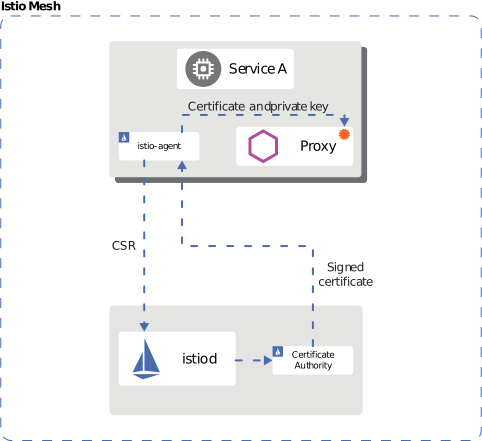
Istio aplica automáticamente mTLS a la comunicación entre servicios, implementando una red Zero Trust.
Seguridad basada en identidad
Istio utiliza el estándar SPIFFE (Secure Production Identity Framework for Everyone) para asignar identidades sólidas a cada workload:
spiffe://cluster.local/ns/default/sa/productpage
  |         |           |     |      |    |
  |         |           |     |      |    +- ServiceAccount name
  |         |           |     |      +----- "sa" (ServiceAccount)
  |         |           |     +------------ Namespace name
  |         |           +------------------ "ns" (Namespace)
  |         +------------------------------ Trust Domain
  +---------------------------------------- Protocol
Proceso de aprovisionamiento de identidad:
- Kubernetes crea un Pod y asigna un ServiceAccount
- Istio Agent se inicia dentro del Pod
- Agent envía una CSR (Certificate Signing Request) a Istiod
- Istiod emite un certificado X.509 según el SPIFFE ID
- Agent entrega el certificado a Envoy (protocolo SDS)
- Renovación automática de certificados (TTL predeterminado: 24 horas)
Modos de mTLS
Modo STRICT (recomendado)
apiVersion: security.istio.io/v1
kind: PeerAuthentication
metadata:
  name: default
  namespace: istio-system
spec:
  mtls:
    mode: STRICT  # Only mTLS allowed
Modo PERMISSIVE (para migración)
apiVersion: security.istio.io/v1
kind: PeerAuthentication
metadata:
  name: default
  namespace: default
spec:
  mtls:
    mode: PERMISSIVE  # Both mTLS and plaintext allowed
Modo DISABLE
apiVersion: security.istio.io/v1
kind: PeerAuthentication
metadata:
  name: disable-mtls
  namespace: default
spec:
  mtls:
    mode: DISABLE  # mTLS disabled
Administración de certificados

Certificado de CA predeterminado de Istio
Istio genera automáticamente una CA raíz autofirmada durante la instalación. El diagrama anterior muestra la jerarquía de certificados de Istio:
- CA raíz: Ancla de confianza de nivel superior
- CA intermedia: CA intermedia para emitir certificados de workload
- Certificados de workload: Certificados mTLS para cada servicio (renovación automática)
Propiedades predeterminadas del certificado:
- Período de validez: 90 días (renovación automática: 24 horas antes de la expiración)
- Tamaño de clave: RSA de 2048 bits
- Algoritmo de firma: SHA-256
Verificación de certificados
# 1. Check CA certificate
kubectl get secret istio-ca-secret -n istio-system -o yaml

# 2. Check workload certificate
istioctl proxy-config secret <pod-name> -n <namespace>

# 3. Certificate details
istioctl proxy-config secret <pod-name> -n <namespace> -o json | \
  jq -r '.dynamicActiveSecrets[0].secret.tlsCertificate.certificateChain.inlineBytes' | \
  base64 -d | openssl x509 -text -noout

# 4. Check certificate expiration date
istioctl proxy-config secret <pod-name> -n <namespace> -o json | \
  jq -r '.dynamicActiveSecrets[0].secret.tlsCertificate.certificateChain.inlineBytes' | \
  base64 -d | openssl x509 -noout -dates
Uso de certificados de CA personalizados
En entornos de producción, se recomienda usar CA internas empresariales o CA públicas.
Paso 1: Generar el certificado y la clave de CA
# 1. Generate Root CA
openssl genrsa -out root-key.pem 4096

openssl req -new -x509 -days 3650 -key root-key.pem \
  -out root-cert.pem \
  -subj "/C=US/ST=California/L=San Francisco/O=MyOrg/OU=IT/CN=Root CA"

# 2. Generate Intermediate CA
openssl genrsa -out ca-key.pem 4096

openssl req -new -key ca-key.pem -out ca-cert.csr \
  -subj "/C=US/ST=California/L=San Francisco/O=MyOrg/OU=IT/CN=Intermediate CA"

# 3. Sign Intermediate CA with Root CA
cat > ca-extensions.txt <<EOF
basicConstraints=CA:TRUE
keyUsage=keyCertSign,cRLSign
EOF

openssl x509 -req -days 1825 -in ca-cert.csr \
  -CA root-cert.pem -CAkey root-key.pem -CAcreateserial \
  -out ca-cert.pem -extfile ca-extensions.txt

# 4. Create Certificate Chain
cat ca-cert.pem root-cert.pem > cert-chain.pem
Paso 2: Crear un Secret de Kubernetes
kubectl create secret generic cacerts -n istio-system \
  --from-file=ca-cert.pem=ca-cert.pem \
  --from-file=ca-key.pem=ca-key.pem \
  --from-file=root-cert.pem=root-cert.pem \
  --from-file=cert-chain.pem=cert-chain.pem
Paso 3: Reiniciar Istio
# Restart istiod to load new CA certificate
kubectl rollout restart deployment/istiod -n istio-system

# Restart all workloads to issue new certificates
kubectl rollout restart deployment -n <namespace>
Paso 4: Verificación
# Verify CA certificate is loaded correctly
kubectl logs -l app=istiod -n istio-system | grep "Use plugged-in cert"

# Verify workload certificates are issued by new CA
istioctl proxy-config secret <pod-name> -n <namespace> -o json | \
  jq -r '.dynamicActiveSecrets[0].secret.tlsCertificate.certificateChain.inlineBytes' | \
  base64 -d | openssl x509 -noout -issuer
Integración con AWS Certificate Manager (ACM)
Puede usar ACM Private CA para administrar los certificados de Istio.
Paso 1: Crear una ACM Private CA
# Create ACM Private CA
aws acm-pca create-certificate-authority \
  --certificate-authority-configuration \
    "KeyAlgorithm=RSA_4096,SigningAlgorithm=SHA256WITHRSA,Subject={CommonName=Istio CA}" \
  --certificate-authority-type ROOT \
  --tags Key=Name,Value=istio-root-ca

# Save CA ARN
CA_ARN=$(aws acm-pca list-certificate-authorities \
  --query 'CertificateAuthorities[0].Arn' --output text)

# Generate Root CA certificate
aws acm-pca get-certificate-authority-csr \
  --certificate-authority-arn $CA_ARN \
  --output text > ca.csr

aws acm-pca issue-certificate \
  --certificate-authority-arn $CA_ARN \
  --csr fileb://ca.csr \
  --signing-algorithm SHA256WITHRSA \
  --template-arn arn:aws:acm-pca:::template/RootCACertificate/V1 \
  --validity Value=10,Type=YEARS

# Install certificate
CERT_ARN=$(aws acm-pca list-certificates \
  --certificate-authority-arn $CA_ARN \
  --query 'Certificates[0].Arn' --output text)

aws acm-pca get-certificate \
  --certificate-authority-arn $CA_ARN \
  --certificate-arn $CERT_ARN \
  --output text > root-cert.pem

aws acm-pca import-certificate-authority-certificate \
  --certificate-authority-arn $CA_ARN \
  --certificate fileb://root-cert.pem
Paso 2: Instalar Cert-Manager + AWS PCA Issuer
# Install Cert-Manager
kubectl apply -f https://github.com/cert-manager/cert-manager/releases/download/v1.13.0/cert-manager.yaml

# Install AWS PCA Issuer
helm repo add awspca https://cert-manager.github.io/aws-privateca-issuer
helm install aws-pca-issuer awspca/aws-privateca-issuer -n cert-manager
Paso 3: Crear AWSPCAIssuer
apiVersion: awspca.cert-manager.io/v1beta1
kind: AWSPCAClusterIssuer
metadata:
  name: istio-ca
spec:
  arn: ${CA_ARN}
  region: us-west-2
Paso 4: Usar en Istio
apiVersion: cert-manager.io/v1
kind: Certificate
metadata:
  name: istio-ca-cert
  namespace: istio-system
spec:
  secretName: cacerts
  commonName: "Istio CA"
  isCA: true
  duration: 87600h  # 10 years
  renewBefore: 720h  # 30 days
  issuerRef:
    kind: AWSPCAClusterIssuer
    name: istio-ca
Política de renovación de certificados
# Configure certificate policy with Istio Operator
apiVersion: install.istio.io/v1alpha1
kind: IstioOperator
metadata:
  name: istio-control-plane
  namespace: istio-system
spec:
  meshConfig:
    certificates:
      - secretName: dns.istio-system-service-account
        dnsNames:
          - istiod.istio-system.svc
          - istiod.istio-system
    caCertificates:
      - secretName: cacerts
        certProvider: cert-manager
  values:
    pilot:
      env:
        # Workload certificate TTL (default: 24 hours)
        CITADEL_CERT_TTL: "24h"
        # Certificate renewal grace period (default: 15 minutes)
        CITADEL_GRACE_PERIOD: "15m"
Rotación de certificados
# 1. Generate new CA certificate (repeat steps above)

# 2. Update existing Secret
kubectl create secret generic cacerts -n istio-system \
  --from-file=ca-cert.pem=new-ca-cert.pem \
  --from-file=ca-key.pem=new-ca-key.pem \
  --from-file=root-cert.pem=new-root-cert.pem \
  --from-file=cert-chain.pem=new-cert-chain.pem \
  --dry-run=client -o yaml | kubectl apply -f -

# 3. Restart istiod (zero-downtime rolling update)
kubectl rollout restart deployment/istiod -n istio-system

# 4. Gradual workload certificate renewal
# Method 1: Wait for automatic renewal (within 24 hours)
# Method 2: Manual rolling restart
for ns in $(kubectl get ns -o jsonpath='{.items[*].metadata.name}'); do
  echo "Restarting deployments in namespace: $ns"
  kubectl rollout restart deployment -n $ns
done
Configuración de PeerAuthentication
Configuración global
apiVersion: security.istio.io/v1
kind: PeerAuthentication
metadata:
  name: default
  namespace: istio-system
spec:
  mtls:
    mode: STRICT
Configuración a nivel de Namespace
apiVersion: security.istio.io/v1
kind: PeerAuthentication
metadata:
  name: namespace-policy
  namespace: production
spec:
  mtls:
    mode: STRICT
Configuración a nivel de workload
apiVersion: security.istio.io/v1
kind: PeerAuthentication
metadata:
  name: workload-policy
  namespace: default
spec:
  selector:
    matchLabels:
      app: reviews
      version: v1
  mtls:
    mode: STRICT
Configuración a nivel de puerto
apiVersion: security.istio.io/v1
kind: PeerAuthentication
metadata:
  name: port-policy
  namespace: default
spec:
  selector:
    matchLabels:
      app: myapp
  mtls:
    mode: STRICT
  portLevelMtls:
    8080:
      mode: DISABLE  # mTLS disabled for port 8080
Integración de mTLS con servicios de AWS
AWS Application Load Balancer (ALB) y mTLS
ALB admite mTLS basado en certificados de cliente.
Paso 1: Configurar mTLS en ALB
# 1. Create Trust Store (upload CA certificate)
aws elbv2 create-trust-store \
  --name istio-client-trust-store \
  --ca-certificates-bundle-s3-bucket my-bucket \
  --ca-certificates-bundle-s3-key ca-bundle.pem

# 2. Configure mTLS on ALB listener
aws elbv2 modify-listener \
  --listener-arn arn:aws:elasticloadbalancing:region:account:listener/app/my-alb/xxx \
  --mutual-authentication Mode=verify,TrustStoreArn=arn:aws:elasticloadbalancing:region:account:truststore/istio-client-trust-store/xxx
Paso 2: Configuración de AWS Load Balancer Controller
apiVersion: v1
kind: Service
metadata:
  name: istio-gateway
  namespace: istio-system
  annotations:
    service.beta.kubernetes.io/aws-load-balancer-type: "external"
    service.beta.kubernetes.io/aws-load-balancer-nlb-target-type: "ip"
    service.beta.kubernetes.io/aws-load-balancer-scheme: "internet-facing"
    # mTLS configuration
    service.beta.kubernetes.io/aws-load-balancer-ssl-cert: "arn:aws:acm:region:account:certificate/xxx"
    service.beta.kubernetes.io/aws-load-balancer-ssl-negotiation-policy: "ELBSecurityPolicy-TLS13-1-2-2021-06"
    service.beta.kubernetes.io/aws-load-balancer-mutual-authentication: '[{"port": 443, "mode": "verify", "trustStore": "arn:aws:elasticloadbalancing:region:account:truststore/istio-client-trust-store/xxx"}]'
spec:
  type: LoadBalancer
  selector:
    istio: ingressgateway
  ports:
  - name: https
    port: 443
    targetPort: 8443
Paso 3: Verificar el certificado de cliente en Istio Gateway
apiVersion: networking.istio.io/v1
kind: Gateway
metadata:
  name: public-gateway
  namespace: istio-system
spec:
  selector:
    istio: ingressgateway
  servers:
  - port:
      number: 8443
      name: https
      protocol: HTTPS
    tls:
      mode: SIMPLE  # ALB already completed mTLS verification
      credentialName: gateway-cert
    hosts:
    - "*.example.com"
---
apiVersion: v1
kind: ConfigMap
metadata:
  name: istio-envoy-custom
  namespace: istio-system
data:
  custom-bootstrap.yaml: |
    static_resources:
      listeners:
      - name: http_listener
        address:
          socket_address:
            address: 0.0.0.0
            port_value: 8443
        filter_chains:
        - filters:
          - name: envoy.filters.network.http_connection_manager
            typed_config:
              "@type": type.googleapis.com/envoy.extensions.filters.network.http_connection_manager.v3.HttpConnectionManager
              # Verify client certificate headers forwarded from ALB
              forward_client_cert_details: APPEND_FORWARD
              set_current_client_cert_details:
                subject: true
                cert: true
                chain: true
                dns: true
                uri: true
Paso 4: Reenviar la información del certificado de cliente
ALB reenvía la información del certificado de cliente como encabezados HTTP:
apiVersion: security.istio.io/v1beta1
kind: AuthorizationPolicy
metadata:
  name: verify-client-cert
  namespace: default
spec:
  action: ALLOW
  rules:
  - when:
    - key: request.headers[x-amzn-mtls-clientcert-serial-number]
      values: ["*"]
    - key: request.headers[x-amzn-mtls-clientcert-subject]
      values: ["CN=trusted-client,O=MyOrg*"]
Encabezados reenviados por ALB:
X-Amzn-Mtls-Clientcert-Serial-Number: Número de serie del certificadoX-Amzn-Mtls-Clientcert-Subject: Subject DN del certificadoX-Amzn-Mtls-Clientcert-Issuer: Issuer DN del certificadoX-Amzn-Mtls-Clientcert-Validity: Período de validezX-Amzn-Mtls-Clientcert-Leaf: Certificado de cliente (PEM)
Amazon CloudFront y mTLS
CloudFront admite la verificación de certificados de cliente.
Paso 1: Crear una distribución de CloudFront
# 1. Upload Trust Store (CA certificate) to S3
aws s3 cp ca-bundle.pem s3://my-bucket/ca-bundle.pem

# 2. Create CloudFront distribution
cat > cloudfront-config.json <<EOF
{
  "CallerReference": "istio-mtls-$(date +%s)",
  "Origins": {
    "Quantity": 1,
    "Items": [
      {
        "Id": "istio-gateway",
        "DomainName": "k8s-istiosystem-istiogateway-xxx.elb.us-west-2.amazonaws.com",
        "CustomOriginConfig": {
          "HTTPPort": 80,
          "HTTPSPort": 443,
          "OriginProtocolPolicy": "https-only",
          "OriginSslProtocols": {
            "Quantity": 1,
            "Items": ["TLSv1.2"]
          }
        }
      }
    ]
  },
  "DefaultCacheBehavior": {
    "TargetOriginId": "istio-gateway",
    "ViewerProtocolPolicy": "https-only",
    "TrustedSigners": {
      "Enabled": false,
      "Quantity": 0
    },
    "ForwardedValues": {
      "QueryString": true,
      "Headers": {
        "Quantity": 1,
        "Items": ["*"]
      }
    },
    "MinTTL": 0
  },
  "ViewerCertificate": {
    "CloudFrontDefaultCertificate": false,
    "ACMCertificateArn": "arn:aws:acm:us-east-1:account:certificate/xxx",
    "SSLSupportMethod": "sni-only",
    "MinimumProtocolVersion": "TLSv1.2_2021"
  }
}
EOF

aws cloudfront create-distribution --distribution-config file://cloudfront-config.json

# 3. Configure mTLS on CloudFront
DIST_ID=$(aws cloudfront list-distributions --query 'DistributionList.Items[0].Id' --output text)

aws cloudfront update-distribution \
  --id $DIST_ID \
  --distribution-config '{
    "ViewerCertificate": {
      "ACMCertificateArn": "arn:aws:acm:us-east-1:account:certificate/xxx",
      "SSLSupportMethod": "sni-only",
      "MinimumProtocolVersion": "TLSv1.2_2021",
      "CertificateSource": "acm"
    },
    "CustomOriginConfig": {
      "OriginSslProtocols": {
        "Quantity": 1,
        "Items": ["TLSv1.2"]
      }
    }
  }'
Paso 2: Verificar el certificado con CloudFront Function
function handler(event) {
    var request = event.request;
    var headers = request.headers;

    // Headers forwarded by CloudFront after client certificate verification
    var clientCertSerial = headers['cloudfront-viewer-tls-client-cert-serial-number'];
    var clientCertSubject = headers['cloudfront-viewer-tls-client-cert-subject'];

    if (!clientCertSerial || !clientCertSubject) {
        return {
            statusCode: 403,
            statusDescription: 'Forbidden',
            body: 'Client certificate required'
        };
    }

    // Check allowed certificate serial numbers
    var allowedSerials = ['1234567890ABCDEF', 'FEDCBA0987654321'];
    if (!allowedSerials.includes(clientCertSerial.value)) {
        return {
            statusCode: 403,
            statusDescription: 'Forbidden',
            body: 'Invalid client certificate'
        };
    }

    // Forward certificate information to Istio
    headers['x-client-cert-serial'] = clientCertSerial;
    headers['x-client-cert-subject'] = clientCertSubject;

    return request;
}
Paso 3: Verificar los encabezados de CloudFront en Istio
apiVersion: security.istio.io/v1beta1
kind: AuthorizationPolicy
metadata:
  name: verify-cloudfront-client-cert
  namespace: default
spec:
  action: ALLOW
  rules:
  - when:
    - key: request.headers[x-client-cert-serial]
      values:
      - "1234567890ABCDEF"
      - "FEDCBA0987654321"
    - key: request.headers[x-client-cert-subject]
      values: ["CN=trusted-client,O=MyOrg*"]
Arquitectura mTLS de extremo a extremo
mTLS en toda la ruta desde el cliente hasta el backend:
Seguridad por segmento:
- Cliente -> CloudFront: mTLS (verificación del certificado de cliente)
- CloudFront -> ALB: TLS + encabezados con información del certificado
- ALB -> Istio Gateway: TLS + encabezados con información del certificado
- Dentro de Istio Mesh: mTLS automático (Envoy a Envoy)
mTLS con servicios externos
Integración con sistemas heredados
# When legacy system doesn't support mTLS
apiVersion: networking.istio.io/v1beta1
kind: DestinationRule
metadata:
  name: legacy-system
  namespace: default
spec:
  host: legacy.external.com
  trafficPolicy:
    tls:
      mode: SIMPLE  # Use one-way TLS only
---
apiVersion: networking.istio.io/v1beta1
kind: ServiceEntry
metadata:
  name: legacy-system
  namespace: default
spec:
  hosts:
  - legacy.external.com
  ports:
  - number: 443
    name: https
    protocol: HTTPS
  location: MESH_EXTERNAL
  resolution: DNS
Autenticación de cliente mTLS para API externas
Cuando Istio necesita presentar un certificado de cliente a una API externa:
# 1. Create client certificate Secret
apiVersion: v1
kind: Secret
metadata:
  name: client-mtls-credential
  namespace: istio-system
type: kubernetes.io/tls
data:
  tls.crt: <base64-encoded-cert>
  tls.key: <base64-encoded-key>
  ca.crt: <base64-encoded-ca>
---
# 2. Configure client certificate in DestinationRule
apiVersion: networking.istio.io/v1beta1
kind: DestinationRule
metadata:
  name: external-api-mtls
  namespace: default
spec:
  host: api.external.com
  trafficPolicy:
    tls:
      mode: MUTUAL  # Use mTLS
      clientCertificate: /etc/certs/tls.crt
      privateKey: /etc/certs/tls.key
      caCertificates: /etc/certs/ca.crt
---
# 3. Register external API with ServiceEntry
apiVersion: networking.istio.io/v1beta1
kind: ServiceEntry
metadata:
  name: external-api
  namespace: default
spec:
  hosts:
  - api.external.com
  ports:
  - number: 443
    name: https
    protocol: HTTPS
  location: MESH_EXTERNAL
  resolution: DNS
mTLS externo mediante Egress Gateway
# 1. Deploy Egress Gateway
apiVersion: install.istio.io/v1alpha1
kind: IstioOperator
spec:
  components:
    egressGateways:
    - name: istio-egressgateway
      enabled: true
      k8s:
        serviceAnnotations:
          networking.istio.io/exportTo: "*"
---
# 2. Gateway resource
apiVersion: networking.istio.io/v1
kind: Gateway
metadata:
  name: egress-gateway
  namespace: istio-system
spec:
  selector:
    istio: egressgateway
  servers:
  - port:
      number: 443
      name: tls
      protocol: TLS
    hosts:
    - api.external.com
    tls:
      mode: ISTIO_MUTUAL  # mTLS inside mesh
---
# 3. Route traffic with VirtualService
apiVersion: networking.istio.io/v1
kind: VirtualService
metadata:
  name: external-api-through-egress
  namespace: default
spec:
  hosts:
  - api.external.com
  gateways:
  - mesh  # From inside mesh
  - istio-system/egress-gateway  # To Egress Gateway
  http:
  - match:
    - gateways:
      - mesh
      port: 443
    route:
    - destination:
        host: istio-egressgateway.istio-system.svc.cluster.local
        port:
          number: 443
  - match:
    - gateways:
      - istio-system/egress-gateway
      port: 443
    route:
    - destination:
        host: api.external.com
        port:
          number: 443
---
# 4. DestinationRule (from Egress Gateway to external)
apiVersion: networking.istio.io/v1beta1
kind: DestinationRule
metadata:
  name: external-api-mtls
  namespace: istio-system
spec:
  host: api.external.com
  trafficPolicy:
    tls:
      mode: MUTUAL
      clientCertificate: /etc/istio/egress-certs/tls.crt
      privateKey: /etc/istio/egress-certs/tls.key
      caCertificates: /etc/istio/egress-certs/ca.crt
Estrategia de migración
Paso 1: Comprobar el estado actual
# Check current mTLS configuration
kubectl get peerauthentication -A

# Check mTLS status by service
istioctl authn tls-check <pod-name> -n <namespace>
Paso 2: Cambiar al modo PERMISSIVE
apiVersion: security.istio.io/v1
kind: PeerAuthentication
metadata:
  name: default
  namespace: istio-system
spec:
  mtls:
    mode: PERMISSIVE  # Allow both mTLS and plaintext
Paso 3: Monitoreo
# Verify mTLS connections
kubectl exec -it <pod-name> -c istio-proxy -- \
  curl -s localhost:15000/stats/prometheus | grep ssl

# Verify plaintext connections
kubectl exec -it <pod-name> -c istio-proxy -- \
  curl -s localhost:15000/stats/prometheus | grep plaintext
Paso 4: Cambiar al modo STRICT
apiVersion: security.istio.io/v1
kind: PeerAuthentication
metadata:
  name: default
  namespace: istio-system
spec:
  mtls:
    mode: STRICT  # Only mTLS allowed
Problemas comunes y soluciones
1. Error de conexión mTLS
Síntomas:
upstream connect error or disconnect/reset before headers. reset reason: connection failureAnálisis de la causa raíz:
# 1. Check PeerAuthentication
kubectl get peerauthentication -A

# 2. Check DestinationRule mTLS mode
kubectl get destinationrule -A -o yaml | grep -A 5 "trafficPolicy"

# 3. Check certificates
istioctl proxy-config secret <pod-name> -n <namespace>

# 4. Verify TLS connection
istioctl authn tls-check <source-pod> <dest-service> -n <namespace>

# 5. Check Envoy logs in detail
kubectl logs <pod-name> -c istio-proxy -n <namespace> | grep -E "(TLS|SSL|certificate)"Soluciones:
- Incompatibilidad entre PeerAuthentication y DestinationRule:
# Problem: PeerAuthentication is STRICT, DestinationRule is DISABLE
# Solution: Change DestinationRule to ISTIO_MUTUAL
apiVersion: networking.istio.io/v1beta1
kind: DestinationRule
metadata:
  name: fix-mtls
spec:
  host: myservice.default.svc.cluster.local
  trafficPolicy:
    tls:
mode: ISTIO_MUTUAL # Match STRICT mode- Pod sin inyección de sidecar:
# Add istio-injection label to namespace
kubectl label namespace default istio-injection=enabled

# Restart pod
kubectl rollout restart deployment/<deployment-name> -n default
2. Problema de expiración de certificados
Síntomas:
TLS error: Secret is not supplied by SDS
x509: certificate has expired
Comprobar la expiración de certificados:
# Check workload certificate expiration date
istioctl proxy-config secret <pod-name> -n <namespace> -o json | \
  jq -r '.dynamicActiveSecrets[0].secret.tlsCertificate.certificateChain.inlineBytes' | \
  base64 -d | openssl x509 -noout -dates

# Check CA certificate expiration
kubectl get secret istio-ca-secret -n istio-system -o json | \
  jq -r '.data."ca-cert.pem"' | base64 -d | openssl x509 -noout -dates

# Check certificate expiration for all workloads
for pod in $(kubectl get pods -n default -o jsonpath='{.items[*].metadata.name}'); do
  echo "Pod: $pod"
  istioctl proxy-config secret $pod -n default -o json 2>/dev/null | \
    jq -r '.dynamicActiveSecrets[0].secret.tlsCertificate.certificateChain.inlineBytes' | \
    base64 -d 2>/dev/null | openssl x509 -noout -dates 2>/dev/null || echo "No cert found"
doneSoluciones:
# 1. Restart istiod (trigger new certificate issuance)
kubectl rollout restart deployment/istiod -n istio-system

# 2. Restart specific workload (renew certificate)
kubectl delete pod <pod-name> -n <namespace>

# 3. Renew CA certificate (see "Certificate Rotation" section above)
3. Desfase de reloj (problema de sincronización de hora)
Síntomas:
certificate is not valid yet
certificate verify failedCausa: Error de verificación del certificado debido a una diferencia de hora entre Pods/nodos
Verificación:
# Check node time
kubectl get nodes -o wide
for node in $(kubectl get nodes -o jsonpath='{.items[*].metadata.name}'); do
  echo "Node: $node"
  kubectl debug node/$node -it --image=busybox -- date
done

# Check pod time
kubectl exec -it <pod-name> -c istio-proxy -n <namespace> -- date

# Check time difference (acceptable range: +/- 5 minutes)Soluciones:
# 1. NTP configuration (node level)
sudo systemctl restart chrony
sudo chronyc tracking

# 2. NTP sync is default on EKS
# Verify Amazon Time Sync Service usage
curl http://169.254.169.123/latest/meta-data/system

# 3. Add grace period to certificate start time
# Istio Operator configuration
apiVersion: install.istio.io/v1alpha1
kind: IstioOperator
spec:
  values:
    pilot:
      env:
        CERT_NOTBEFORE_GRACE_DURATION: "10m"  # Start time grace period
4. Dependencia circular
Síntomas:
upstream connect error or disconnect/reset before headersCausa: Tiempo de espera del handshake mTLS durante llamadas de Service A -> Service B -> Service A
Verificación:
# Check service call chain
istioctl analyze -n <namespace>

# Check Envoy clusters
istioctl proxy-config cluster <pod-name> -n <namespace>Solución:
# Set appropriate timeout in DestinationRule
apiVersion: networking.istio.io/v1beta1
kind: DestinationRule
metadata:
  name: service-with-timeout
spec:
  host: myservice.default.svc.cluster.local
  trafficPolicy:
    connectionPool:
      tcp:
        connectTimeout: 30s  # Increase connection timeout
    tls:
      mode: ISTIO_MUTUAL
5. Protocolo mixto (mTLS + texto sin cifrar)
Síntomas:
SSL routines:OPENSSL_internal:WRONG_VERSION_NUMBERCausa: Algunos servicios usan mTLS, mientras que otros usan texto sin cifrar
Verificación:
# Check mTLS status for all services
for svc in $(kubectl get svc -n default -o jsonpath='{.items[*].metadata.name}'); do
  echo "Service: $svc"
  istioctl authn tls-check $(kubectl get pod -n default -l app=test -o jsonpath='{.items[0].metadata.name}') $svc.default.svc.cluster.local -n default
doneSolución:
# Gradual migration with PERMISSIVE mode
apiVersion: security.istio.io/v1
kind: PeerAuthentication
metadata:
  name: migration-policy
  namespace: default
spec:
  mtls:
    mode: PERMISSIVE  # Allow both mTLS and plaintext
6. mTLS de Headless Service
Síntomas: Error de conexión mTLS en Headless Service
Solución:
apiVersion: networking.istio.io/v1beta1
kind: DestinationRule
metadata:
  name: headless-service-mtls
spec:
  host: headless-service.default.svc.cluster.local
  trafficPolicy:
    tls:
      mode: ISTIO_MUTUAL
    portLevelSettings:
    - port:
        number: 3306
      tls:
        mode: ISTIO_MUTUAL
7. Conflicto entre mTLS y NetworkPolicy
Síntomas: Error de conexión mTLS después de aplicar NetworkPolicy
Solución:
apiVersion: networking.k8s.io/v1
kind: NetworkPolicy
metadata:
  name: allow-istio-mtls
  namespace: default
spec:
  podSelector: {}
  policyTypes:
  - Ingress
  - Egress
  ingress:
  - from:
    - namespaceSelector:
        matchLabels:
          name: istio-system  # Allow istiod
    - podSelector: {}  # Allow pods in same namespace
    ports:
    - protocol: TCP
      port: 15008  # Envoy mTLS port
    - protocol: TCP
      port: 15012  # Pilot discovery
  egress:
  - to:
    - namespaceSelector:
        matchLabels:
          name: istio-system
    ports:
    - protocol: TCP
      port: 15012
  - to:
    - podSelector: {}
    ports:
    - protocol: TCP
      port: 15008
Rendimiento y monitoreo
Impacto de mTLS en el rendimiento
| Métrica | Texto sin cifrar | mTLS | Aumento |
|---|---|---|---|
| Latencia (p50) | 5ms | 6ms | +20% |
| Latencia (p99) | 15ms | 18ms | +20% |
| Uso de CPU | 10% | 15% | +50% |
| Uso de memoria | 100MB | 120MB | +20% |
| Rendimiento (RPS) | 10000 | 8500 | -15% |
Métodos de optimización:
- Aceleración de hardware (AES-NI):
# Check AES-NI support on CPU
grep -m1 -o aes /proc/cpuinfo

# Recommended EC2 instance types:
# - c5.*, c6i.*, c7g.*: AES-NI supported
# - m5.*, m6i.*, r5.*: General purpose- Usar TLS 1.3 (handshake más rápido):
apiVersion: install.istio.io/v1alpha1
kind: IstioOperator
spec:
  meshConfig:
    defaultConfig:
      proxyMetadata:
TLS_MIN_PROTOCOL_VERSION: TLSv1_3- Agrupación de conexiones:
apiVersion: networking.istio.io/v1beta1
kind: DestinationRule
metadata:
  name: connection-pool
spec:
  host: myservice.default.svc.cluster.local
  trafficPolicy:
    connectionPool:
      tcp:
        maxConnections: 100
        connectTimeout: 30ms
      http:
        http1MaxPendingRequests: 1024
        http2MaxRequests: 1024
        maxRequestsPerConnection: 10
        idleTimeout: 900s
Métricas de Prometheus
Métricas de conexión mTLS:
# mTLS connection success rate
sum(rate(istio_tcp_connections_opened_total{connection_security_policy="mutual_tls"}[5m])) by (destination_service_name)
/
sum(rate(istio_tcp_connections_opened_total[5m])) by (destination_service_name)

# mTLS handshake time (p99)
histogram_quantile(0.99,
  sum(rate(envoy_listener_ssl_connection_handshake_duration_bucket[5m])) by (le)
)

# Days until first certificate expires
envoy_server_days_until_first_cert_expiring

# mTLS error rate
sum(rate(istio_requests_total{response_code=~"5.*",connection_security_policy="mutual_tls"}[5m]))
/
sum(rate(istio_requests_total{connection_security_policy="mutual_tls"}[5m]))
Panel de Grafana
apiVersion: v1
kind: ConfigMap
metadata:
  name: istio-mtls-dashboard
  namespace: istio-system
data:
  dashboard.json: |
    {
      "dashboard": {
        "title": "Istio mTLS Monitoring",
        "panels": [
          {
            "title": "mTLS Connection Success Rate",
            "targets": [{
              "expr": "sum(rate(istio_tcp_connections_opened_total{connection_security_policy=\"mutual_tls\"}[5m])) / sum(rate(istio_tcp_connections_opened_total[5m]))"
            }]
          },
          {
            "title": "Certificate Expiration",
            "targets": [{
              "expr": "envoy_server_days_until_first_cert_expiring"
            }]
          },
          {
            "title": "mTLS Handshake Duration (p99)",
            "targets": [{
              "expr": "histogram_quantile(0.99, sum(rate(envoy_listener_ssl_connection_handshake_duration_bucket[5m])) by (le))"
            }]
          }
        ]
      }
    }
Alertas de expiración de certificados
apiVersion: monitoring.coreos.com/v1
kind: PrometheusRule
metadata:
  name: istio-cert-expiration-alert
  namespace: istio-system
spec:
  groups:
  - name: istio-certificates
    interval: 30s
    rules:
    - alert: IstioCertificateExpiringSoon
      expr: envoy_server_days_until_first_cert_expiring < 7
      for: 1h
      labels:
        severity: warning
      annotations:
        summary: "Istio certificate expiring in {{ $value }} days"
        description: "Certificate for {{ $labels.pod }} will expire in {{ $value }} days"

    - alert: IstioCertificateExpired
      expr: envoy_server_days_until_first_cert_expiring < 0
      for: 5m
      labels:
        severity: critical
      annotations:
        summary: "Istio certificate has expired"
        description: "Certificate for {{ $labels.pod }} has expired"

    - alert: IstioMTLSConnectionFailure
      expr: |
        sum(rate(istio_requests_total{response_code=~"5.*",connection_security_policy="mutual_tls"}[5m]))
        /
        sum(rate(istio_requests_total{connection_security_policy="mutual_tls"}[5m])) > 0.05
      for: 5m
      labels:
        severity: warning
      annotations:
        summary: "High mTLS connection failure rate"
        description: "mTLS error rate is {{ $value | humanizePercentage }} for {{ $labels.destination_service_name }}"
Registro y depuración
# 1. Change Envoy log level dynamically
istioctl proxy-config log <pod-name> -n <namespace> --level connection:debug,tls:debug

# 2. Filter mTLS-related logs
kubectl logs <pod-name> -c istio-proxy -n <namespace> | grep -E "(TLS|SSL|certificate|handshake)"

# 3. Check certificates from Envoy Admin Interface
kubectl exec -it <pod-name> -c istio-proxy -n <namespace> -- \
  curl -s localhost:15000/certs | jq '.'

# 4. TLS connection statistics
kubectl exec -it <pod-name> -c istio-proxy -n <namespace> -- \
  curl -s localhost:15000/stats | grep ssl

# 5. Real-time mTLS traffic verification
istioctl dashboard envoy <pod-name>.<namespace>
# Check ssl metrics at http://localhost:15000/stats/prometheus
Prácticas recomendadas
Entorno de producción:
- Usar el modo STRICT
- Usar certificados de CA personalizados
- Configurar la renovación automática de certificados
- Configurar alertas de expiración
Optimización del rendimiento:
- Usar TLS 1.3
- Habilitar la agrupación de conexiones
- Usar instancias compatibles con AES-NI
Monitoreo:
- Realizar seguimiento de la expiración de certificados
- Monitorear la tasa de éxito de las conexiones mTLS
- Realizar seguimiento de la latencia del handshake
Seguridad:
- Rotación periódica de CA
- Principio de mínimo privilegio
- Usar junto con NetworkPolicy