AgentCore
AgentCore は Amazon Bedrock AgentCore Runtime と Gateway をベースに、AI アシスタント(/assistant)のツール実行を担当します。v1 の単一 EC2 組み込み方式とは異なり、v2 は Runtime + 9 セクション Gateway + Memory + Code Interpreter をすべてサーバーレスに分離しました。
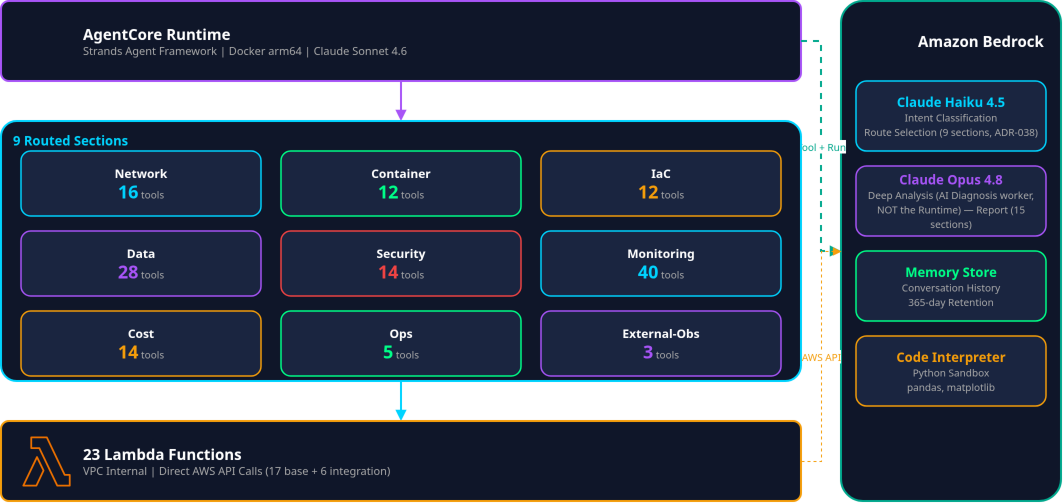
8 つの AWS ドメイン Gateway + external-obs(外部オブザーバビリティ)= 9 つのルーティングセクション · 全カタログ基準で 160 個の MCP ツール(Lambda ターゲット 27 個の定義分 — ベンダーホスティングの mcpServer ターゲットは除く) · 30 個の Lambda スライス(21 個は agentcore_enabled、9 個は integrations_enabled でゲート、いずれもデフォルト off)をサーバーレスで運用し、分類器が質問を 1〜3 個のルートに分類して並列呼び出し後に合成します。→ なぜ AWSops なのか
アーキテクチャ
AI ルーティングフロー
デプロイ要件
| 項目 | 要件 |
|---|---|
| Docker | arm64 必須(docker buildx --platform linux/arm64 --load、make agentcore がビルド + push まで実行) |
| agent.py | GATEWAYS_JSON env で Gateway URL を注入(アカウントごとのハードコーディングなし) |
| Code Interpreter / Memory | 名前にハイフン不可、アンダースコアのみ使用 |
| Memory Store | 最大 365 日保持(eventExpiryDuration) |
| 設定の source of truth | SSM /ops/awsops-v2/agentcore/{runtime_arn,interpreter_id,memory_id} — provision.py が書き込み、web BFF がランタイムに読み取り(UI には公開されない) |
| Runtime の更新 | 冪等な provisioner(scripts/v2/agentcore/provision.py)の再実行で反映 — 作成直後の Gateway が READY 遷移前だと最初の target 作成が失敗することがあるが、再実行で解消 |
AgentCore Runtime
構成
| 項目 | 説明 |
|---|---|
| エンジン | Strands Agent Framework |
| コンテナ | Docker arm64(ECR に保存、make agentcore) |
| 実行環境 | AgentCore マネージドサービス(Bedrock AgentCore Runtime) |
| モデル | Claude Haiku 4.5(ADR-038 ルーティング分類器)/ Runtime 自体は Sonnet 4.6 のみ実行(agent/agent.py にハードコーディング)。Opus 4.8 は Runtime ではなく、別の AI 診断(非同期ワーカー) Deep ティアでのみ選択的に使用 |
ステータス
- READY: 正常稼働中
- CREATING: 作成中
- UPDATING: 更新中
- FAILED: エラー状態
Gateway 詳細
v2 は 8 つの AWS ドメイン Gateway(awsops-v2-{network,container,data,security,cost,monitoring,iac,ops}-gateway)+ external-obs(外部オブザーバビリティ・連携コネクタをホスティングするルーティングセクション、チャットルーティングキーは observability としてエイリアス)で構成されます。ツール数は全カタログ(scripts/v2/agentcore/catalog.py)基準であり、有効化は agentcore_enabled/integrations_enabled フラグでゲートされます(新規インストールのデフォルトは off)。ライブ環境ではフリートのデプロイが完了しており、9 つの Gateway すべてが READY な MCP ターゲットを保有し、チャットセクション 16 キーがすべて有効です(2026-08-02)。
Network Gateway (17 tools)
VPC、ENI、Reachability、Flow Logs、TGW、VPN、Network Firewall のツールを提供します。
| カテゴリ | ツール |
|---|---|
| flow-monitor | query_flow_logs |
| reachability-read | check_reachability |
| network-mcp | get_path_trace_methodology, find_ip_address, get_eni_details, list_vpcs, get_vpc_network_details, get_vpc_flow_logs, describe_network, list_transit_gateways, get_tgw_details, get_tgw_routes, get_all_tgw_routes, list_tgw_peerings, list_vpn_connections, list_network_firewalls, get_firewall_rules |
Container Gateway (19 tools)
EKS、ECS、Istio サービスメッシュ関連のツールを提供します。
| カテゴリ | ツール |
|---|---|
| istio-read | mesh_overview, list_virtual_services, list_destination_rules, list_istio_gateways, list_service_entries, list_authorization_policies, list_peer_authentications |
| eks-mcp | list_eks_clusters, get_eks_vpc_config, get_eks_insights, get_cloudwatch_logs, get_cloudwatch_metrics, get_eks_metrics_guidance, get_policies_for_role, search_eks_troubleshoot_guide, generate_app_manifest |
| ecs-mcp | ecs_resource_management, ecs_troubleshooting_tool, wait_for_service_ready |
IaC Gateway (12 tools)
Infrastructure as Code 関連のツールを提供します。
| カテゴリ | ツール |
|---|---|
| iac-mcp | validate_cloudformation_template, check_cloudformation_template_compliance, troubleshoot_cloudformation_deployment, search_cdk_documentation, search_cloudformation_documentation, cdk_best_practices, read_iac_documentation_page |
| terraform-mcp | SearchAwsProviderDocs, SearchAwsccProviderDocs, SearchSpecificAwsIaModules, SearchUserProvidedModule, terraform_best_practices |
Data Gateway (24 tools)
AWS のデータベースおよびストリーミングサービスのツールを提供します。
| カテゴリ | ツール |
|---|---|
| rds-mcp | list_db_instances, list_db_clusters, describe_db_instance, describe_db_cluster, execute_sql, list_snapshots |
| dynamodb-mcp | list_tables, describe_table, query_table, get_item, dynamodb_data_modeling, compute_performances_and_costs |
| msk-mcp | list_clusters, get_cluster_info, get_configuration_info, get_bootstrap_brokers, list_nodes, msk_best_practices |
| valkey-mcp | list_cache_clusters, describe_cache_cluster, list_replication_groups, describe_replication_group, list_serverless_caches, elasticache_best_practices |
Security Gateway (14 tools)
IAM およびセキュリティ分析のツールを提供します。(P1f でデプロイされたスライス)
| ツール | 説明 |
|---|---|
list_users / get_user | IAM ユーザーの一覧/詳細 |
list_roles / get_role_details | IAM ロールの一覧/詳細 |
list_groups / get_group | IAM グループの一覧/詳細 |
list_policies | ポリシー一覧 |
list_user_policies / list_role_policies | ユーザー/ロールのポリシー一覧 |
get_user_policy / get_role_policy | ユーザー/ロールのインラインポリシー |
list_access_keys | Access Key 一覧 |
simulate_principal_policy | ポリシーシミュレーション |
get_account_security_summary | アカウントセキュリティ要約 |
Monitoring Gateway (36 tools)
CloudWatch、CloudTrail(AWS ネイティブ)に加え、OpenSearch、Loki/Tempo/Mimir(オブザーバビリティスタック)のツールを提供します(Prometheus・ClickHouse は External-Obs が担当 — ADR-004)。
| カテゴリ | ツール |
|---|---|
| cloudwatch-mcp (11) | メトリクス/アラーム/Logs Insights の照会 |
| cloudtrail-mcp (5) | lookup_events, list_event_data_stores, lake_query, get_query_status, get_query_results |
| opensearch-mcp (4) | OpenSearch のドメイン/インデックス照会 |
loki-mcp / tempo-mcp / mimir-mcp(loki 5・tempo 5・mimir 6、integrations_enabled) | LogQL/TraceQL の照会 — Loki/Tempo/Mimir はこの Gateway に残留(ADR-004;Prometheus·ClickHouse は External-Obs へ移動) |
Cost Gateway (14 tools)
コスト分析・予測・FinOps のツールを提供します。
| カテゴリ | ツール |
|---|---|
| cost-mcp (9) | get_today_date, get_cost_and_usage, get_cost_and_usage_comparisons, get_cost_comparison_drivers, get_cost_forecast, get_dimension_values, get_tag_values, get_pricing, list_budgets |
| finops-mcp (5) | Compute Optimizer のリサイジング、RI/SP 推奨、Cost Optimization Hub、Trusted Advisor |
Ops Gateway (11 tools)
AWS ドキュメント検索・運用ヘルパー・インベントリ照会ツールを提供します。
| カテゴリ | ツール |
|---|---|
| core-helpers | prompt_understanding, suggest_aws_commands |
| inventory-read | find_unused_resources, get_topology, query_inventory, inventory_summary |
| aws-knowledge | search_documentation, read_documentation, recommend, list_regions, get_regional_availability |
External-Obs (13 tools, ルーティングキー: observability)
外部オブザーバビリティ・連携コネクタをホスティングする 9 番目のルーティングセクションです(ADR-004 改訂 2026-06-24)。カタログには notion-mcp(3 tools)が定義されています(integrations_enabled ゲート、デフォルト off)。Prometheus(6 tools)・ClickHouse(4 tools)のコネクタターゲットもこのセクションに配置されます(catalog.py — prometheus-mcp-target/clickhouse-mcp-target の gateway=external-obs)。
Code Interpreter
Python コード実行のためのサンドボックス環境を提供します。
特徴
- 分離された環境: 安全な Python 実行
- データ分析: pandas、numpy などのライブラリをサポート
- 可視化: matplotlib、plotly などのチャート生成
- ファイル処理: JSON、CSV などのデータパース
使用例
「AWS のコストデータを月別推移チャートで可視化して」
「この JSON データをパースして統計を計算して」
ルーティング表示(AI アシスタント)
v2 は v1 の独立した「AgentCore」ダッシュボードページ(呼び出し統計・設定照会)の代わりに、AI アシスタントのチャット画面内でルーティング情報をインライン表示します。
- 回答ごとにどのセクション(Gateway)が処理したかをバッジで表示します。
- 複数ドメインを並列照会して合成した回答は、
multi:network+dataのように貢献した各 Gateway の 「via」チップで表示されます。 - 別のルートで再度質問できる代替ルートチップ(最大 2 個)も併せて提供されます。
- チャットレールで最近の会話スレッド一覧を確認できます(全文検索機能はまだありません)。
AgentCore Runtime ARN・Memory ID などの設定値は SSM のみに存在し、UI には公開されません(オペレーターは terraform output/SSM で確認)。
既知の制限事項
| 項目 | 制限 |
|---|---|
| Docker アーキテクチャ | arm64 必須 |
| Code Interpreter / Memory の名前 | ハイフン不可、アンダースコアのみ |
| 会話履歴の保持 | 最大 365 日 |
| AgentCore の応答 | 最終テキストのみ返却(ツール推論はタイピング効果でストリーミング) |
| ツール有効化フラグ | 30 スライスは agentcore_enabled(21)・integrations_enabled(9)でゲート — ライブ環境はフリートのデプロイ完了(2026-08-02)、新規インストールのデフォルトは off |
| ベンダー mcpServer ターゲット | external-obs のベンダーホスティング mcpServer ターゲット(Datadog・Dynatrace・New Relic)は capability=read がプロトコルレベルで強制されません(ADR-017)— read-only 保証は Lambda ターゲットが対象で、エンドポイント未設定時は SKIP。ランタイムでは fail-closed のツール allowlist(OFFICIAL_MCP_TOOL_ALLOWLIST_JSON — カタログに転写された read ツールのみ通過、agent/agent.py)が補完 |