AgentCore
AgentCore 基于 Amazon Bedrock AgentCore Runtime 和 Gateway,负责 AI 助手(/assistant)的工具执行。与 v1 的单一 EC2 内嵌方式不同,v2 将 Runtime + 9 个分区 Gateway + Memory + Code Interpreter 全部拆分为无服务器架构。
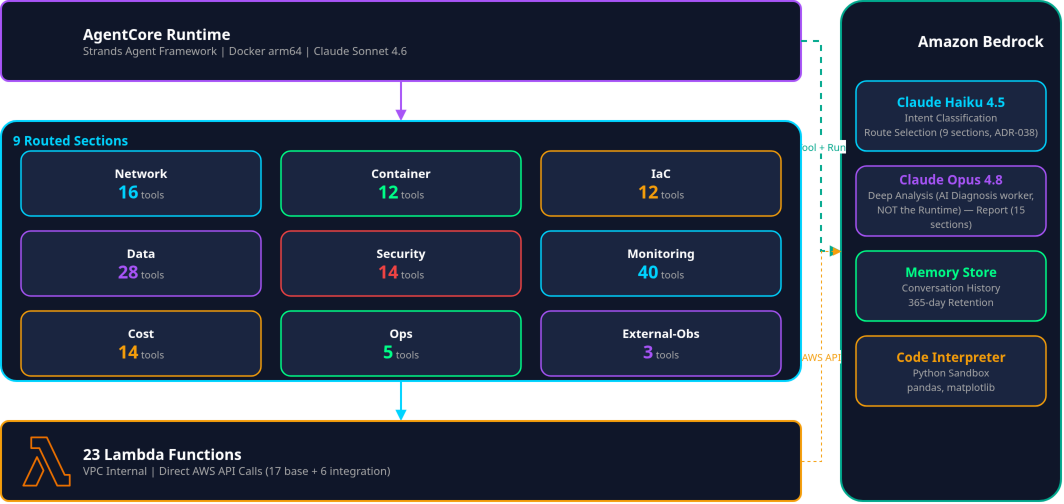
8 个 AWS 领域 Gateway + external-obs(外部可观测性)= 9 个路由分区 · 按完整目录计 160 个 MCP 工具(27 个 Lambda 目标的定义 — 不含厂商托管的 mcpServer 目标) · 以无服务器方式运营 30 个 Lambda 切片(21 个由 agentcore_enabled 门控,9 个由 integrations_enabled 门控,两者默认均为 off),分类器将问题分类到 1~3 个路由,并行调用后合成。→ 为什么选择 AWSops
架构
AI 路由流程
部署要求
| 项目 | 要求 |
|---|---|
| Docker | 必须为 arm64(docker buildx --platform linux/arm64 --load,make agentcore 会完成构建+push) |
| agent.py | 通过 GATEWAYS_JSON env 注入 Gateway URL(没有按账户硬编码) |
| Code Interpreter / Memory | 名称中不可使用连字符,只能使用下划线 |
| Memory Store | 最长保留 365 天(eventExpiryDuration) |
| 配置 source of truth | SSM /ops/awsops-v2/agentcore/{runtime_arn,interpreter_id,memory_id} — 由 provision.py 写入,web BFF 在运行时读取(不在 UI 中暴露) |
| Runtime 更新 | 通过重新运行幂等 provisioner(scripts/v2/agentcore/provision.py)生效 — 刚创建的 Gateway 在进入 READY 之前,首次创建 target 可能失败,重新运行即可解决 |
AgentCore Runtime
构成
| 项目 | 说明 |
|---|---|
| 引擎 | Strands Agent Framework |
| 容器 | Docker arm64(存储于 ECR,make agentcore) |
| 运行环境 | AgentCore 托管服务(Bedrock AgentCore Runtime) |
| 模型 | Claude Haiku 4.5(ADR-038 路由分类器)/ Runtime 本身仅运行 Sonnet 4.6(agent/agent.py 硬编码)。Opus 4.8 不在 Runtime 中使用,仅在独立的 AI 诊断(异步 worker) Deep 层级中按需选用 |
状态
- READY:正常运行中
- CREATING:创建中
- UPDATING:更新中
- FAILED:错误状态
Gateway 详解
v2 由 8 个 AWS 领域 Gateway(awsops-v2-{network,container,data,security,cost,monitoring,iac,ops}-gateway)+ external-obs(托管外部可观测性·集成连接器的路由分区,聊天路由键别名为 observability)构成。工具数量以完整目录(scripts/v2/agentcore/catalog.py)为准,启用由 agentcore_enabled/integrations_enabled 标志门控(新装环境默认 off)。当前线上环境编队已部署完毕 — 9 个 Gateway 均持有 READY 的 MCP 目标,聊天分区 16 个键全部激活(2026-08-02)。
Network Gateway (17 tools)
提供 VPC、ENI、Reachability、Flow Logs、TGW、VPN、Network Firewall 工具。
| 类别 | 工具 |
|---|---|
| flow-monitor | query_flow_logs |
| reachability-read | check_reachability |
| network-mcp | get_path_trace_methodology、find_ip_address、get_eni_details、list_vpcs、get_vpc_network_details、get_vpc_flow_logs、describe_network、list_transit_gateways、get_tgw_details、get_tgw_routes、get_all_tgw_routes、list_tgw_peerings、list_vpn_connections、list_network_firewalls、get_firewall_rules |
Container Gateway (19 tools)
提供 EKS、ECS、Istio 服务网格相关工具。
| 类别 | 工具 |
|---|---|
| istio-read | mesh_overview、list_virtual_services、list_destination_rules、list_istio_gateways、list_service_entries、list_authorization_policies、list_peer_authentications |
| eks-mcp | list_eks_clusters、get_eks_vpc_config、get_eks_insights、get_cloudwatch_logs、get_cloudwatch_metrics、get_eks_metrics_guidance、get_policies_for_role、search_eks_troubleshoot_guide、generate_app_manifest |
| ecs-mcp | ecs_resource_management、ecs_troubleshooting_tool、wait_for_service_ready |
IaC Gateway (12 tools)
提供 Infrastructure as Code 相关工具。
| 类别 | 工具 |
|---|---|
| iac-mcp | validate_cloudformation_template、check_cloudformation_template_compliance、troubleshoot_cloudformation_deployment、search_cdk_documentation、search_cloudformation_documentation、cdk_best_practices、read_iac_documentation_page |
| terraform-mcp | SearchAwsProviderDocs、SearchAwsccProviderDocs、SearchSpecificAwsIaModules、SearchUserProvidedModule、terraform_best_practices |
Data Gateway (24 tools)
提供 AWS 数据库及流式服务工具。
| 类别 | 工具 |
|---|---|
| rds-mcp | list_db_instances、list_db_clusters、describe_db_instance、describe_db_cluster、execute_sql、list_snapshots |
| dynamodb-mcp | list_tables、describe_table、query_table、get_item、dynamodb_data_modeling、compute_performances_and_costs |
| msk-mcp | list_clusters、get_cluster_info、get_configuration_info、get_bootstrap_brokers、list_nodes、msk_best_practices |
| valkey-mcp | list_cache_clusters、describe_cache_cluster、list_replication_groups、describe_replication_group、list_serverless_caches、elasticache_best_practices |
Security Gateway (14 tools)
提供 IAM 及安全分析工具。(在 P1f 部署的切片)
| 工具 | 说明 |
|---|---|
list_users / get_user | IAM 用户列表/详情 |
list_roles / get_role_details | IAM 角色列表/详情 |
list_groups / get_group | IAM 组列表/详情 |
list_policies | 策略列表 |
list_user_policies / list_role_policies | 用户/角色策略列表 |
get_user_policy / get_role_policy | 用户/角色内联策略 |
list_access_keys | Access Key 列表 |
simulate_principal_policy | 策略模拟 |
get_account_security_summary | 账户安全摘要 |
Monitoring Gateway (36 tools)
除 CloudWatch、CloudTrail(AWS 原生)外,还提供 OpenSearch、Loki/Tempo/Mimir(可观测性栈)工具(Prometheus·ClickHouse 由 External-Obs 负责 — ADR-004)。
| 类别 | 工具 |
|---|---|
| cloudwatch-mcp (11) | 指标/告警/日志洞察查询 |
| cloudtrail-mcp (5) | lookup_events、list_event_data_stores、lake_query、get_query_status、get_query_results |
| opensearch-mcp (4) | OpenSearch 域/索引查询 |
loki-mcp / tempo-mcp / mimir-mcp(loki 5·tempo 5·mimir 6,integrations_enabled) | LogQL/TraceQL 查询 — Loki/Tempo/Mimir 保留在此 Gateway(ADR-004;Prometheus·ClickHouse 已迁移至 External-Obs) |
Cost Gateway (14 tools)
提供成本分析·预测·FinOps 工具。
| 类别 | 工具 |
|---|---|
| cost-mcp (9) | get_today_date、get_cost_and_usage、get_cost_and_usage_comparisons、get_cost_comparison_drivers、get_cost_forecast、get_dimension_values、get_tag_values、get_pricing、list_budgets |
| finops-mcp (5) | Compute Optimizer 规格调整、RI/SP 推荐、Cost Optimization Hub、Trusted Advisor |
Ops Gateway (11 tools)
提供 AWS 文档检索·运维辅助·清单查询工具。
| 类别 | 工具 |
|---|---|
| core-helpers | prompt_understanding、suggest_aws_commands |
| inventory-read | find_unused_resources、get_topology、query_inventory、inventory_summary |
| aws-knowledge | search_documentation、read_documentation、recommend、list_regions、get_regional_availability |
External-Obs (13 tools, 路由键: observability)
托管外部可观测性·集成连接器的第 9 个路由分区(ADR-004 修订 2026-06-24)。目录中定义了 notion-mcp(3 tools)(由 integrations_enabled 门控,默认 off)。Prometheus(6 tools)·ClickHouse(4 tools)连接器目标同样部署在此分区(catalog.py — prometheus-mcp-target/clickhouse-mcp-target 的 gateway=external-obs)。
Code Interpreter
提供用于执行 Python 代码的沙箱环境。
特点
- 隔离环境:安全的 Python 执行
- 数据分析:支持 pandas、numpy 等库
- 可视化:生成 matplotlib、plotly 等图表
- 文件处理:解析 JSON、CSV 等数据
使用示例
"将 AWS 成本数据可视化为按月趋势图"
"解析这份 JSON 数据并计算统计信息"
路由显示(AI 助手)
v2 不再使用 v1 那样单独的 "AgentCore" 仪表板页面(调用统计·配置查询),而是在 AI 助手聊天界面内以内联方式展示路由信息。
- 每条回答都会以徽章显示由哪个分区(Gateway)处理。
- 并行查询多个领域后合成的回答会以
multi:network+data这样的形式,用参与的各 Gateway 的 "via" 标签片显示。 - 同时提供最多 2 个可用其他路由再次提问的备选路由标签片。
- 可以在聊天侧栏中查看最近的对话线程列表(尚不支持全文搜索功能)。
AgentCore Runtime ARN·Memory ID 等配置值仅存在于 SSM,不在 UI 中暴露(运维人员可通过 terraform output/SSM 确认)。
已知限制
| 项目 | 限制 |
|---|---|
| Docker 架构 | 必须为 arm64 |
| Code Interpreter / Memory 名称 | 不可使用连字符,仅限下划线 |
| 对话历史保留 | 最长 365 天 |
| AgentCore 响应 | 仅返回最终文本(工具推理以打字效果流式呈现) |
| 工具启用标志 | 30 个切片由 agentcore_enabled(21)·integrations_enabled(9)门控 — 线上环境编队已部署完毕(2026-08-02),新装环境默认 off |
| 厂商 mcpServer 目标 | external-obs 的厂商托管 mcpServer 目标(Datadog·Dynatrace·New Relic)的 capability=read 不在协议层强制(ADR-017)— read-only 保证以 Lambda 目标为准;未配置端点时 SKIP。运行时由 fail-closed 工具 allowlist(OFFICIAL_MCP_TOOL_ALLOWLIST_JSON — 仅放行目录转写的 read 工具,agent/agent.py)作为补偿控制 |