mTLS
Mutual TLS (mTLS)는 Istio의 핵심 보안 기능으로, 서비스 간 통신을 자동으로 암호화하고 인증합니다.
목차
mTLS 개요
Istio는 서비스 간 통신에 자동으로 mTLS를 적용하여 Zero Trust 네트워크를 구현합니다.
Identity 기반 보안
Istio는 SPIFFE (Secure Production Identity Framework for Everyone) 표준을 사용하여 각 워크로드에 강력한 신원을 부여합니다:
spiffe://cluster.local/ns/default/sa/productpage
  │         │           │     │      │    │
  │         │           │     │      │    └─ ServiceAccount 이름
  │         │           │     │      └────── "sa" (ServiceAccount)
  │         │           │     └───────────── Namespace 이름
  │         │           └─────────────────── "ns" (Namespace)
  │         └─────────────────────────────── Trust Domain
  └───────────────────────────────────────── 프로토콜
Identity 프로비저닝 과정:
- Kubernetes가 파드를 생성하고 ServiceAccount를 할당
- Istio Agent가 파드 내에서 시작
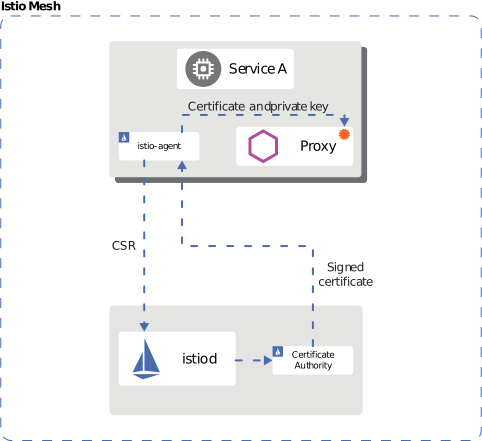
- Agent가 Istiod에 CSR (Certificate Signing Request) 전송
- Istiod가 SPIFFE ID 기반 X.509 인증서 발급
- Agent가 Envoy에 인증서 전달 (SDS 프로토콜)
- 인증서 자동 갱신 (기본 TTL: 24시간)
mTLS 모드
STRICT 모드 (권장)
apiVersion: security.istio.io/v1
kind: PeerAuthentication
metadata:
  name: default
  namespace: istio-system
spec:
  mtls:
    mode: STRICT  # mTLS만 허용
PERMISSIVE 모드 (마이그레이션용)
apiVersion: security.istio.io/v1
kind: PeerAuthentication
metadata:
  name: default
  namespace: default
spec:
  mtls:
    mode: PERMISSIVE  # mTLS와 평문 모두 허용
DISABLE 모드
apiVersion: security.istio.io/v1
kind: PeerAuthentication
metadata:
  name: disable-mtls
  namespace: default
spec:
  mtls:
    mode: DISABLE  # mTLS 비활성화
인증서 관리

Istio 기본 CA 인증서
Istio는 설치 시 자동으로 자체 서명된 루트 CA를 생성합니다. 위 다이어그램은 Istio의 인증서 계층 구조를 보여줍니다:
- Root CA: 최상위 신뢰 앵커
- Intermediate CA: 워크로드 인증서 발급용 중간 CA
- Workload Certificates: 각 서비스의 mTLS 인증서 (자동 갱신)
기본 인증서 속성:
- 유효 기간: 90일 (자동 갱신: 만료 24시간 전)
- 키 크기: 2048-bit RSA
- 서명 알고리즘: SHA-256
인증서 확인
# 1. CA 인증서 확인
kubectl get secret istio-ca-secret -n istio-system -o yaml

# 2. 워크로드 인증서 확인
istioctl proxy-config secret <pod-name> -n <namespace>

# 3. 인증서 상세 정보
istioctl proxy-config secret <pod-name> -n <namespace> -o json | \
  jq -r '.dynamicActiveSecrets[0].secret.tlsCertificate.certificateChain.inlineBytes' | \
  base64 -d | openssl x509 -text -noout

# 4. 인증서 만료 날짜 확인
istioctl proxy-config secret <pod-name> -n <namespace> -o json | \
  jq -r '.dynamicActiveSecrets[0].secret.tlsCertificate.certificateChain.inlineBytes' | \
  base64 -d | openssl x509 -noout -dates
사용자 정의 CA 인증서 사용
프로덕션 환경에서는 기업 내부 CA 또는 공인 CA를 사용하는 것이 좋습니다.
1단계: CA 인증서 및 키 생성
# 1. Root CA 생성
openssl genrsa -out root-key.pem 4096

openssl req -new -x509 -days 3650 -key root-key.pem \
  -out root-cert.pem \
  -subj "/C=KR/ST=Seoul/L=Seoul/O=MyOrg/OU=IT/CN=Root CA"

# 2. Intermediate CA 생성
openssl genrsa -out ca-key.pem 4096

openssl req -new -key ca-key.pem -out ca-cert.csr \
  -subj "/C=KR/ST=Seoul/L=Seoul/O=MyOrg/OU=IT/CN=Intermediate CA"

# 3. Intermediate CA를 Root CA로 서명
cat > ca-extensions.txt <<EOF
basicConstraints=CA:TRUE
keyUsage=keyCertSign,cRLSign
EOF

openssl x509 -req -days 1825 -in ca-cert.csr \
  -CA root-cert.pem -CAkey root-key.pem -CAcreateserial \
  -out ca-cert.pem -extfile ca-extensions.txt

# 4. Certificate Chain 생성
cat ca-cert.pem root-cert.pem > cert-chain.pem
2단계: Kubernetes Secret 생성
kubectl create secret generic cacerts -n istio-system \
  --from-file=ca-cert.pem=ca-cert.pem \
  --from-file=ca-key.pem=ca-key.pem \
  --from-file=root-cert.pem=root-cert.pem \
  --from-file=cert-chain.pem=cert-chain.pem
3단계: Istio 재시작
# istiod를 재시작하여 새 CA 인증서 로드
kubectl rollout restart deployment/istiod -n istio-system

# 모든 워크로드 재시작하여 새 인증서 발급
kubectl rollout restart deployment -n <namespace>
4단계: 검증
# CA 인증서가 올바르게 로드되었는지 확인
kubectl logs -l app=istiod -n istio-system | grep "Use plugged-in cert"

# 워크로드 인증서가 새 CA로 발급되었는지 확인
istioctl proxy-config secret <pod-name> -n <namespace> -o json | \
  jq -r '.dynamicActiveSecrets[0].secret.tlsCertificate.certificateChain.inlineBytes' | \
  base64 -d | openssl x509 -noout -issuer
AWS Certificate Manager (ACM) 통합
ACM Private CA를 사용하여 Istio 인증서를 관리할 수 있습니다.
1단계: ACM Private CA 생성
# ACM Private CA 생성
aws acm-pca create-certificate-authority \
  --certificate-authority-configuration \
    "KeyAlgorithm=RSA_4096,SigningAlgorithm=SHA256WITHRSA,Subject={CommonName=Istio CA}" \
  --certificate-authority-type ROOT \
  --tags Key=Name,Value=istio-root-ca

# CA ARN 저장
CA_ARN=$(aws acm-pca list-certificate-authorities \
  --query 'CertificateAuthorities[0].Arn' --output text)

# Root CA 인증서 생성
aws acm-pca get-certificate-authority-csr \
  --certificate-authority-arn $CA_ARN \
  --output text > ca.csr

aws acm-pca issue-certificate \
  --certificate-authority-arn $CA_ARN \
  --csr fileb://ca.csr \
  --signing-algorithm SHA256WITHRSA \
  --template-arn arn:aws:acm-pca:::template/RootCACertificate/V1 \
  --validity Value=10,Type=YEARS

# 인증서 설치
CERT_ARN=$(aws acm-pca list-certificates \
  --certificate-authority-arn $CA_ARN \
  --query 'Certificates[0].Arn' --output text)

aws acm-pca get-certificate \
  --certificate-authority-arn $CA_ARN \
  --certificate-arn $CERT_ARN \
  --output text > root-cert.pem

aws acm-pca import-certificate-authority-certificate \
  --certificate-authority-arn $CA_ARN \
  --certificate fileb://root-cert.pem
2단계: Cert-Manager + AWS PCA Issuer 설치
# Cert-Manager 설치
kubectl apply -f https://github.com/cert-manager/cert-manager/releases/download/v1.13.0/cert-manager.yaml

# AWS PCA Issuer 설치
helm repo add awspca https://cert-manager.github.io/aws-privateca-issuer
helm install aws-pca-issuer awspca/aws-privateca-issuer -n cert-manager
3단계: AWSPCAIssuer 생성
apiVersion: awspca.cert-manager.io/v1beta1
kind: AWSPCAClusterIssuer
metadata:
  name: istio-ca
spec:
  arn: ${CA_ARN}
  region: us-west-2
4단계: Istio에서 사용
apiVersion: cert-manager.io/v1
kind: Certificate
metadata:
  name: istio-ca-cert
  namespace: istio-system
spec:
  secretName: cacerts
  commonName: "Istio CA"
  isCA: true
  duration: 87600h  # 10 years
  renewBefore: 720h  # 30 days
  issuerRef:
    kind: AWSPCAClusterIssuer
    name: istio-ca
인증서 갱신 정책
# Istio Operator로 인증서 정책 설정
apiVersion: install.istio.io/v1alpha1
kind: IstioOperator
metadata:
  name: istio-control-plane
  namespace: istio-system
spec:
  meshConfig:
    certificates:
      - secretName: dns.istio-system-service-account
        dnsNames:
          - istiod.istio-system.svc
          - istiod.istio-system
    caCertificates:
      - secretName: cacerts
        certProvider: cert-manager
  values:
    pilot:
      env:
        # 워크로드 인증서 TTL (기본: 24시간)
        CITADEL_CERT_TTL: "24h"
        # 인증서 갱신 Grace Period (기본: 15분)
        CITADEL_GRACE_PERIOD: "15m"
인증서 순환 (Rotation)
# 1. 새 CA 인증서 생성 (위의 단계 반복)

# 2. 기존 Secret 업데이트
kubectl create secret generic cacerts -n istio-system \
  --from-file=ca-cert.pem=new-ca-cert.pem \
  --from-file=ca-key.pem=new-ca-key.pem \
  --from-file=root-cert.pem=new-root-cert.pem \
  --from-file=cert-chain.pem=new-cert-chain.pem \
  --dry-run=client -o yaml | kubectl apply -f -

# 3. istiod 재시작 (무중단 롤링 업데이트)
kubectl rollout restart deployment/istiod -n istio-system

# 4. 점진적 워크로드 인증서 갱신
# 방법 1: 자동 갱신 대기 (24시간 이내)
# 방법 2: 수동 롤링 재시작
for ns in $(kubectl get ns -o jsonpath='{.items[*].metadata.name}'); do
  echo "Restarting deployments in namespace: $ns"
  kubectl rollout restart deployment -n $ns
done
PeerAuthentication 설정
전역 설정
apiVersion: security.istio.io/v1
kind: PeerAuthentication
metadata:
  name: default
  namespace: istio-system
spec:
  mtls:
    mode: STRICT
네임스페이스별 설정
apiVersion: security.istio.io/v1
kind: PeerAuthentication
metadata:
  name: namespace-policy
  namespace: production
spec:
  mtls:
    mode: STRICT
워크로드별 설정
apiVersion: security.istio.io/v1
kind: PeerAuthentication
metadata:
  name: workload-policy
  namespace: default
spec:
  selector:
    matchLabels:
      app: reviews
      version: v1
  mtls:
    mode: STRICT
포트별 설정
apiVersion: security.istio.io/v1
kind: PeerAuthentication
metadata:
  name: port-policy
  namespace: default
spec:
  selector:
    matchLabels:
      app: myapp
  mtls:
    mode: STRICT
  portLevelMtls:
    8080:
      mode: DISABLE  # 8080 포트는 mTLS 비활성화
AWS 서비스와 mTLS 통합
AWS Application Load Balancer (ALB)와 mTLS
ALB는 클라이언트 인증서 기반 mTLS를 지원합니다.
1단계: ALB에 mTLS 설정
# 1. Trust Store 생성 (CA 인증서 업로드)
aws elbv2 create-trust-store \
  --name istio-client-trust-store \
  --ca-certificates-bundle-s3-bucket my-bucket \
  --ca-certificates-bundle-s3-key ca-bundle.pem

# 2. ALB 리스너에 mTLS 설정
aws elbv2 modify-listener \
  --listener-arn arn:aws:elasticloadbalancing:region:account:listener/app/my-alb/xxx \
  --mutual-authentication Mode=verify,TrustStoreArn=arn:aws:elasticloadbalancing:region:account:truststore/istio-client-trust-store/xxx
2단계: AWS Load Balancer Controller 설정
apiVersion: v1
kind: Service
metadata:
  name: istio-gateway
  namespace: istio-system
  annotations:
    service.beta.kubernetes.io/aws-load-balancer-type: "external"
    service.beta.kubernetes.io/aws-load-balancer-nlb-target-type: "ip"
    service.beta.kubernetes.io/aws-load-balancer-scheme: "internet-facing"
    # mTLS 설정
    service.beta.kubernetes.io/aws-load-balancer-ssl-cert: "arn:aws:acm:region:account:certificate/xxx"
    service.beta.kubernetes.io/aws-load-balancer-ssl-negotiation-policy: "ELBSecurityPolicy-TLS13-1-2-2021-06"
    service.beta.kubernetes.io/aws-load-balancer-mutual-authentication: '[{"port": 443, "mode": "verify", "trustStore": "arn:aws:elasticloadbalancing:region:account:truststore/istio-client-trust-store/xxx"}]'
spec:
  type: LoadBalancer
  selector:
    istio: ingressgateway
  ports:
  - name: https
    port: 443
    targetPort: 8443
3단계: Istio Gateway에서 클라이언트 인증서 검증
apiVersion: networking.istio.io/v1
kind: Gateway
metadata:
  name: public-gateway
  namespace: istio-system
spec:
  selector:
    istio: ingressgateway
  servers:
  - port:
      number: 8443
      name: https
      protocol: HTTPS
    tls:
      mode: SIMPLE  # ALB가 이미 mTLS 검증 완료
      credentialName: gateway-cert
    hosts:
    - "*.example.com"
---
apiVersion: v1
kind: ConfigMap
metadata:
  name: istio-envoy-custom
  namespace: istio-system
data:
  custom-bootstrap.yaml: |
    static_resources:
      listeners:
      - name: http_listener
        address:
          socket_address:
            address: 0.0.0.0
            port_value: 8443
        filter_chains:
        - filters:
          - name: envoy.filters.network.http_connection_manager
            typed_config:
              "@type": type.googleapis.com/envoy.extensions.filters.network.http_connection_manager.v3.HttpConnectionManager
              # ALB에서 전달된 클라이언트 인증서 헤더 검증
              forward_client_cert_details: APPEND_FORWARD
              set_current_client_cert_details:
                subject: true
                cert: true
                chain: true
                dns: true
                uri: true
4단계: 클라이언트 인증서 정보 전달
ALB는 클라이언트 인증서 정보를 HTTP 헤더로 전달합니다:
apiVersion: security.istio.io/v1beta1
kind: AuthorizationPolicy
metadata:
  name: verify-client-cert
  namespace: default
spec:
  action: ALLOW
  rules:
  - when:
    - key: request.headers[x-amzn-mtls-clientcert-serial-number]
      values: ["*"]
    - key: request.headers[x-amzn-mtls-clientcert-subject]
      values: ["CN=trusted-client,O=MyOrg*"]
ALB가 전달하는 헤더:
X-Amzn-Mtls-Clientcert-Serial-Number: 인증서 시리얼 번호X-Amzn-Mtls-Clientcert-Subject: 인증서 Subject DNX-Amzn-Mtls-Clientcert-Issuer: 인증서 Issuer DNX-Amzn-Mtls-Clientcert-Validity: 유효 기간X-Amzn-Mtls-Clientcert-Leaf: 클라이언트 인증서 (PEM)
Amazon CloudFront와 mTLS
CloudFront는 클라이언트 인증서 검증을 지원합니다.
1단계: CloudFront 배포 생성
# 1. S3에 Trust Store (CA 인증서) 업로드
aws s3 cp ca-bundle.pem s3://my-bucket/ca-bundle.pem

# 2. CloudFront 배포 생성
cat > cloudfront-config.json <<EOF
{
  "CallerReference": "istio-mtls-$(date +%s)",
  "Origins": {
    "Quantity": 1,
    "Items": [
      {
        "Id": "istio-gateway",
        "DomainName": "k8s-istiosystem-istiogateway-xxx.elb.us-west-2.amazonaws.com",
        "CustomOriginConfig": {
          "HTTPPort": 80,
          "HTTPSPort": 443,
          "OriginProtocolPolicy": "https-only",
          "OriginSslProtocols": {
            "Quantity": 1,
            "Items": ["TLSv1.2"]
          }
        }
      }
    ]
  },
  "DefaultCacheBehavior": {
    "TargetOriginId": "istio-gateway",
    "ViewerProtocolPolicy": "https-only",
    "TrustedSigners": {
      "Enabled": false,
      "Quantity": 0
    },
    "ForwardedValues": {
      "QueryString": true,
      "Headers": {
        "Quantity": 1,
        "Items": ["*"]
      }
    },
    "MinTTL": 0
  },
  "ViewerCertificate": {
    "CloudFrontDefaultCertificate": false,
    "ACMCertificateArn": "arn:aws:acm:us-east-1:account:certificate/xxx",
    "SSLSupportMethod": "sni-only",
    "MinimumProtocolVersion": "TLSv1.2_2021"
  }
}
EOF

aws cloudfront create-distribution --distribution-config file://cloudfront-config.json

# 3. CloudFront에 mTLS 설정
DIST_ID=$(aws cloudfront list-distributions --query 'DistributionList.Items[0].Id' --output text)

aws cloudfront update-distribution \
  --id $DIST_ID \
  --distribution-config '{
    "ViewerCertificate": {
      "ACMCertificateArn": "arn:aws:acm:us-east-1:account:certificate/xxx",
      "SSLSupportMethod": "sni-only",
      "MinimumProtocolVersion": "TLSv1.2_2021",
      "CertificateSource": "acm"
    },
    "CustomOriginConfig": {
      "OriginSslProtocols": {
        "Quantity": 1,
        "Items": ["TLSv1.2"]
      }
    }
  }'
2단계: CloudFront Function으로 인증서 검증
function handler(event) {
    var request = event.request;
    var headers = request.headers;

    // CloudFront가 클라이언트 인증서 검증 후 전달하는 헤더
    var clientCertSerial = headers['cloudfront-viewer-tls-client-cert-serial-number'];
    var clientCertSubject = headers['cloudfront-viewer-tls-client-cert-subject'];

    if (!clientCertSerial || !clientCertSubject) {
        return {
            statusCode: 403,
            statusDescription: 'Forbidden',
            body: 'Client certificate required'
        };
    }

    // 허용된 인증서 시리얼 번호 체크
    var allowedSerials = ['1234567890ABCDEF', 'FEDCBA0987654321'];
    if (!allowedSerials.includes(clientCertSerial.value)) {
        return {
            statusCode: 403,
            statusDescription: 'Forbidden',
            body: 'Invalid client certificate'
        };
    }

    // Istio로 인증서 정보 전달
    headers['x-client-cert-serial'] = clientCertSerial;
    headers['x-client-cert-subject'] = clientCertSubject;

    return request;
}
3단계: Istio에서 CloudFront 헤더 검증
apiVersion: security.istio.io/v1beta1
kind: AuthorizationPolicy
metadata:
  name: verify-cloudfront-client-cert
  namespace: default
spec:
  action: ALLOW
  rules:
  - when:
    - key: request.headers[x-client-cert-serial]
      values:
      - "1234567890ABCDEF"
      - "FEDCBA0987654321"
    - key: request.headers[x-client-cert-subject]
      values: ["CN=trusted-client,O=MyOrg*"]
End-to-End mTLS 아키텍처
클라이언트부터 백엔드까지 전체 구간 mTLS:
구간별 보안:
- 클라이언트 → CloudFront: mTLS (클라이언트 인증서 검증)
- CloudFront → ALB: TLS + 인증서 정보 헤더
- ALB → Istio Gateway: TLS + 인증서 정보 헤더
- Istio Mesh 내부: 자동 mTLS (Envoy-to-Envoy)
외부 서비스와 mTLS
Legacy 시스템 통합
# Legacy 시스템이 mTLS를 지원하지 않는 경우
apiVersion: networking.istio.io/v1beta1
kind: DestinationRule
metadata:
  name: legacy-system
  namespace: default
spec:
  host: legacy.external.com
  trafficPolicy:
    tls:
      mode: SIMPLE  # 단방향 TLS만 사용
---
apiVersion: networking.istio.io/v1beta1
kind: ServiceEntry
metadata:
  name: legacy-system
  namespace: default
spec:
  hosts:
  - legacy.external.com
  ports:
  - number: 443
    name: https
    protocol: HTTPS
  location: MESH_EXTERNAL
  resolution: DNS
외부 API mTLS 클라이언트 인증
Istio에서 외부 API에 클라이언트 인증서를 제시해야 하는 경우:
# 1. 클라이언트 인증서 Secret 생성
apiVersion: v1
kind: Secret
metadata:
  name: client-mtls-credential
  namespace: istio-system
type: kubernetes.io/tls
data:
  tls.crt: <base64-encoded-cert>
  tls.key: <base64-encoded-key>
  ca.crt: <base64-encoded-ca>
---
# 2. DestinationRule에서 클라이언트 인증서 설정
apiVersion: networking.istio.io/v1beta1
kind: DestinationRule
metadata:
  name: external-api-mtls
  namespace: default
spec:
  host: api.external.com
  trafficPolicy:
    tls:
      mode: MUTUAL  # mTLS 사용
      clientCertificate: /etc/certs/tls.crt
      privateKey: /etc/certs/tls.key
      caCertificates: /etc/certs/ca.crt
---
# 3. ServiceEntry로 외부 API 등록
apiVersion: networking.istio.io/v1beta1
kind: ServiceEntry
metadata:
  name: external-api
  namespace: default
spec:
  hosts:
  - api.external.com
  ports:
  - number: 443
    name: https
    protocol: HTTPS
  location: MESH_EXTERNAL
  resolution: DNS
Egress Gateway를 통한 외부 mTLS
# 1. Egress Gateway 배포
apiVersion: install.istio.io/v1alpha1
kind: IstioOperator
spec:
  components:
    egressGateways:
    - name: istio-egressgateway
      enabled: true
      k8s:
        serviceAnnotations:
          networking.istio.io/exportTo: "*"
---
# 2. Gateway 리소스
apiVersion: networking.istio.io/v1
kind: Gateway
metadata:
  name: egress-gateway
  namespace: istio-system
spec:
  selector:
    istio: egressgateway
  servers:
  - port:
      number: 443
      name: tls
      protocol: TLS
    hosts:
    - api.external.com
    tls:
      mode: ISTIO_MUTUAL  # 메시 내부는 mTLS
---
# 3. VirtualService로 트래픽 라우팅
apiVersion: networking.istio.io/v1
kind: VirtualService
metadata:
  name: external-api-through-egress
  namespace: default
spec:
  hosts:
  - api.external.com
  gateways:
  - mesh  # 메시 내부에서
  - istio-system/egress-gateway  # Egress Gateway로
  http:
  - match:
    - gateways:
      - mesh
      port: 443
    route:
    - destination:
        host: istio-egressgateway.istio-system.svc.cluster.local
        port:
          number: 443
  - match:
    - gateways:
      - istio-system/egress-gateway
      port: 443
    route:
    - destination:
        host: api.external.com
        port:
          number: 443
---
# 4. DestinationRule (Egress Gateway에서 외부로)
apiVersion: networking.istio.io/v1beta1
kind: DestinationRule
metadata:
  name: external-api-mtls
  namespace: istio-system
spec:
  host: api.external.com
  trafficPolicy:
    tls:
      mode: MUTUAL
      clientCertificate: /etc/istio/egress-certs/tls.crt
      privateKey: /etc/istio/egress-certs/tls.key
      caCertificates: /etc/istio/egress-certs/ca.crt
마이그레이션 전략
1단계: 현재 상태 확인
# 현재 mTLS 설정 확인
kubectl get peerauthentication -A

# 서비스별 mTLS 상태 확인
istioctl authn tls-check <pod-name> -n <namespace>
2단계: PERMISSIVE 모드로 전환
apiVersion: security.istio.io/v1
kind: PeerAuthentication
metadata:
  name: default
  namespace: istio-system
spec:
  mtls:
    mode: PERMISSIVE  # mTLS와 평문 모두 허용
3단계: 모니터링
# mTLS 연결 확인
kubectl exec -it <pod-name> -c istio-proxy -- \
  curl -s localhost:15000/stats/prometheus | grep ssl

# 평문 연결 확인
kubectl exec -it <pod-name> -c istio-proxy -- \
  curl -s localhost:15000/stats/prometheus | grep plaintext
4단계: STRICT 모드로 전환
apiVersion: security.istio.io/v1
kind: PeerAuthentication
metadata:
  name: default
  namespace: istio-system
spec:
  mtls:
    mode: STRICT  # mTLS만 허용
일반적인 문제와 해결
1. mTLS 연결 실패
증상:
upstream connect error or disconnect/reset before headers. reset reason: connection failure원인 분석:
# 1. PeerAuthentication 확인
kubectl get peerauthentication -A

# 2. DestinationRule mTLS 모드 확인
kubectl get destinationrule -A -o yaml | grep -A 5 "trafficPolicy"

# 3. 인증서 확인
istioctl proxy-config secret <pod-name> -n <namespace>

# 4. TLS 연결 확인
istioctl authn tls-check <source-pod> <dest-service> -n <namespace>

# 5. Envoy 로그 상세 확인
kubectl logs <pod-name> -c istio-proxy -n <namespace> | grep -E "(TLS|SSL|certificate)"
해결 방법:
- PeerAuthentication과 DestinationRule 불일치:
# 문제: PeerAuthentication은 STRICT, DestinationRule은 DISABLE
# 해결: DestinationRule을 ISTIO_MUTUAL로 변경
apiVersion: networking.istio.io/v1beta1
kind: DestinationRule
metadata:
  name: fix-mtls
spec:
  host: myservice.default.svc.cluster.local
  trafficPolicy:
    tls:
mode: ISTIO_MUTUAL # STRICT 모드와 일치- 사이드카가 주입되지 않은 파드:
# 네임스페이스에 istio-injection 레이블 추가
kubectl label namespace default istio-injection=enabled

# 파드 재시작
kubectl rollout restart deployment/<deployment-name> -n default
2. 인증서 만료 문제
증상:
TLS error: Secret is not supplied by SDS
x509: certificate has expired
인증서 만료 확인:
# 워크로드 인증서 만료 날짜 확인
istioctl proxy-config secret <pod-name> -n <namespace> -o json | \
  jq -r '.dynamicActiveSecrets[0].secret.tlsCertificate.certificateChain.inlineBytes' | \
  base64 -d | openssl x509 -noout -dates

# CA 인증서 만료 확인
kubectl get secret istio-ca-secret -n istio-system -o json | \
  jq -r '.data."ca-cert.pem"' | base64 -d | openssl x509 -noout -dates

# 모든 워크로드의 인증서 만료 날짜 체크
for pod in $(kubectl get pods -n default -o jsonpath='{.items[*].metadata.name}'); do
  echo "Pod: $pod"
  istioctl proxy-config secret $pod -n default -o json 2>/dev/null | \
    jq -r '.dynamicActiveSecrets[0].secret.tlsCertificate.certificateChain.inlineBytes' | \
    base64 -d 2>/dev/null | openssl x509 -noout -dates 2>/dev/null || echo "No cert found"
done
해결 방법:
# 1. istiod 재시작 (새 인증서 발급 트리거)
kubectl rollout restart deployment/istiod -n istio-system

# 2. 특정 워크로드 재시작 (인증서 갱신)
kubectl delete pod <pod-name> -n <namespace>

# 3. CA 인증서 갱신 (위의 "인증서 순환" 섹션 참조)
3. Clock Skew (시간 동기화 문제)
증상:
certificate is not valid yet
certificate verify failed원인: 파드/노드 간 시간 차이로 인증서 검증 실패
확인:
# 노드 시간 확인
kubectl get nodes -o wide
for node in $(kubectl get nodes -o jsonpath='{.items[*].metadata.name}'); do
  echo "Node: $node"
  kubectl debug node/$node -it --image=busybox -- date
done

# 파드 시간 확인
kubectl exec -it <pod-name> -c istio-proxy -n <namespace> -- date

# 시간 차이 확인 (허용 범위: ±5분)
해결 방법:
# 1. NTP 설정 (노드 레벨)
sudo systemctl restart chrony
sudo chronyc tracking

# 2. EKS에서는 기본적으로 NTP 동기화됨
# Amazon Time Sync Service 사용 확인
curl http://169.254.169.123/latest/meta-data/system

# 3. 인증서 유효 시작 시간에 여유 추가
# Istio Operator 설정
apiVersion: install.istio.io/v1alpha1
kind: IstioOperator
spec:
  values:
    pilot:
      env:
        CERT_NOTBEFORE_GRACE_DURATION: "10m"  # 시작 시간 여유
4. 순환 참조 (Circular Dependency)
증상:
upstream connect error or disconnect/reset before headers원인: Service A → Service B → Service A 호출 시 mTLS 핸드셰이크 타임아웃
확인:
# 서비스 호출 체인 확인
istioctl analyze -n <namespace>

# Envoy 클러스터 확인
istioctl proxy-config cluster <pod-name> -n <namespace>
해결 방법:
# DestinationRule에 적절한 timeout 설정
apiVersion: networking.istio.io/v1beta1
kind: DestinationRule
metadata:
  name: service-with-timeout
spec:
  host: myservice.default.svc.cluster.local
  trafficPolicy:
    connectionPool:
      tcp:
        connectTimeout: 30s  # 연결 타임아웃 증가
    tls:
      mode: ISTIO_MUTUAL
5. Mixed Protocol (mTLS + 평문)
증상:
SSL routines:OPENSSL_internal:WRONG_VERSION_NUMBER원인: 일부 서비스는 mTLS, 일부는 평문 사용
확인:
# 모든 서비스의 mTLS 상태 확인
for svc in $(kubectl get svc -n default -o jsonpath='{.items[*].metadata.name}'); do
  echo "Service: $svc"
  istioctl authn tls-check $(kubectl get pod -n default -l app=test -o jsonpath='{.items[0].metadata.name}') $svc.default.svc.cluster.local -n default
done
해결 방법:
# PERMISSIVE 모드로 점진적 마이그레이션
apiVersion: security.istio.io/v1
kind: PeerAuthentication
metadata:
  name: migration-policy
  namespace: default
spec:
  mtls:
    mode: PERMISSIVE  # mTLS와 평문 모두 허용
6. Headless Service mTLS
증상: Headless 서비스에서 mTLS 연결 실패
해결 방법:
apiVersion: networking.istio.io/v1beta1
kind: DestinationRule
metadata:
  name: headless-service-mtls
spec:
  host: headless-service.default.svc.cluster.local
  trafficPolicy:
    tls:
      mode: ISTIO_MUTUAL
    portLevelSettings:
    - port:
        number: 3306
      tls:
        mode: ISTIO_MUTUAL
7. mTLS와 네트워크 정책 충돌
증상: NetworkPolicy 적용 후 mTLS 연결 실패
해결 방법:
apiVersion: networking.k8s.io/v1
kind: NetworkPolicy
metadata:
  name: allow-istio-mtls
  namespace: default
spec:
  podSelector: {}
  policyTypes:
  - Ingress
  - Egress
  ingress:
  - from:
    - namespaceSelector:
        matchLabels:
          name: istio-system  # istiod 허용
    - podSelector: {}  # 같은 네임스페이스 파드 허용
    ports:
    - protocol: TCP
      port: 15008  # Envoy mTLS port
    - protocol: TCP
      port: 15012  # Pilot discovery
  egress:
  - to:
    - namespaceSelector:
        matchLabels:
          name: istio-system
    ports:
    - protocol: TCP
      port: 15012
  - to:
    - podSelector: {}
    ports:
    - protocol: TCP
      port: 15008
성능 및 모니터링
mTLS 성능 영향
| 지표 | 평문 | mTLS | 증가율 |
|---|---|---|---|
| 지연 시간 (p50) | 5ms | 6ms | +20% |
| 지연 시간 (p99) | 15ms | 18ms | +20% |
| CPU 사용률 | 10% | 15% | +50% |
| 메모리 사용률 | 100MB | 120MB | +20% |
| 처리량 (RPS) | 10000 | 8500 | -15% |
최적화 방법:
- 하드웨어 가속 (AES-NI):
# CPU에서 AES-NI 지원 확인
grep -m1 -o aes /proc/cpuinfo

# EC2 인스턴스 타입 권장:
# - c5.*, c6i.*, c7g.*: AES-NI 지원
# - m5.*, m6i.*, r5.*: 범용- TLS 1.3 사용 (더 빠른 핸드셰이크):
apiVersion: install.istio.io/v1alpha1
kind: IstioOperator
spec:
  meshConfig:
    defaultConfig:
      proxyMetadata:
TLS_MIN_PROTOCOL_VERSION: TLSv1_3- Connection Pooling:
apiVersion: networking.istio.io/v1beta1
kind: DestinationRule
metadata:
  name: connection-pool
spec:
  host: myservice.default.svc.cluster.local
  trafficPolicy:
    connectionPool:
      tcp:
        maxConnections: 100
        connectTimeout: 30ms
      http:
        http1MaxPendingRequests: 1024
        http2MaxRequests: 1024
        maxRequestsPerConnection: 10
        idleTimeout: 900s
Prometheus 메트릭
mTLS 연결 메트릭:
# mTLS 연결 성공률
sum(rate(istio_tcp_connections_opened_total{connection_security_policy="mutual_tls"}[5m])) by (destination_service_name)
/
sum(rate(istio_tcp_connections_opened_total[5m])) by (destination_service_name)

# mTLS 핸드셰이크 시간 (p99)
histogram_quantile(0.99,
  sum(rate(envoy_listener_ssl_connection_handshake_duration_bucket[5m])) by (le)
)

# 인증서 만료까지 남은 시간
envoy_server_days_until_first_cert_expiring

# mTLS 오류율
sum(rate(istio_requests_total{response_code=~"5.*",connection_security_policy="mutual_tls"}[5m]))
/
sum(rate(istio_requests_total{connection_security_policy="mutual_tls"}[5m]))
Grafana 대시보드
apiVersion: v1
kind: ConfigMap
metadata:
  name: istio-mtls-dashboard
  namespace: istio-system
data:
  dashboard.json: |
    {
      "dashboard": {
        "title": "Istio mTLS Monitoring",
        "panels": [
          {
            "title": "mTLS Connection Success Rate",
            "targets": [{
              "expr": "sum(rate(istio_tcp_connections_opened_total{connection_security_policy=\"mutual_tls\"}[5m])) / sum(rate(istio_tcp_connections_opened_total[5m]))"
            }]
          },
          {
            "title": "Certificate Expiration",
            "targets": [{
              "expr": "envoy_server_days_until_first_cert_expiring"
            }]
          },
          {
            "title": "mTLS Handshake Duration (p99)",
            "targets": [{
              "expr": "histogram_quantile(0.99, sum(rate(envoy_listener_ssl_connection_handshake_duration_bucket[5m])) by (le))"
            }]
          }
        ]
      }
    }
인증서 만료 알림
apiVersion: monitoring.coreos.com/v1
kind: PrometheusRule
metadata:
  name: istio-cert-expiration-alert
  namespace: istio-system
spec:
  groups:
  - name: istio-certificates
    interval: 30s
    rules:
    - alert: IstioCertificateExpiringSoon
      expr: envoy_server_days_until_first_cert_expiring < 7
      for: 1h
      labels:
        severity: warning
      annotations:
        summary: "Istio certificate expiring in {{ $value }} days"
        description: "Certificate for {{ $labels.pod }} will expire in {{ $value }} days"

    - alert: IstioCertificateExpired
      expr: envoy_server_days_until_first_cert_expiring < 0
      for: 5m
      labels:
        severity: critical
      annotations:
        summary: "Istio certificate has expired"
        description: "Certificate for {{ $labels.pod }} has expired"

    - alert: IstioMTLSConnectionFailure
      expr: |
        sum(rate(istio_requests_total{response_code=~"5.*",connection_security_policy="mutual_tls"}[5m]))
        /
        sum(rate(istio_requests_total{connection_security_policy="mutual_tls"}[5m])) > 0.05
      for: 5m
      labels:
        severity: warning
      annotations:
        summary: "High mTLS connection failure rate"
        description: "mTLS error rate is {{ $value | humanizePercentage }} for {{ $labels.destination_service_name }}"
로깅 및 디버깅
# 1. Envoy 로그 레벨 변경 (동적)
istioctl proxy-config log <pod-name> -n <namespace> --level connection:debug,tls:debug

# 2. mTLS 관련 로그 필터링
kubectl logs <pod-name> -c istio-proxy -n <namespace> | grep -E "(TLS|SSL|certificate|handshake)"

# 3. Envoy Admin Interface에서 인증서 확인
kubectl exec -it <pod-name> -c istio-proxy -n <namespace> -- \
  curl -s localhost:15000/certs | jq '.'

# 4. TLS 연결 통계
kubectl exec -it <pod-name> -c istio-proxy -n <namespace> -- \
  curl -s localhost:15000/stats | grep ssl

# 5. 실시간 mTLS 트래픽 확인
istioctl dashboard envoy <pod-name>.<namespace>
# http://localhost:15000/stats/prometheus 에서 ssl 메트릭 확인
베스트 프랙티스
프로덕션 환경:
- STRICT 모드 사용
- 사용자 정의 CA 인증서 사용
- 인증서 자동 갱신 설정
- 만료 알림 구성
성능 최적화:
- TLS 1.3 사용
- Connection pooling 활성화
- AES-NI 지원 인스턴스 사용
모니터링:
- 인증서 만료 추적
- mTLS 연결 성공률 모니터링
- 핸드셰이크 지연 시간 추적
보안:
- 정기적인 CA 순환
- 최소 권한 원칙
- NetworkPolicy와 함께 사용