EBS
Manage and monitor EBS (Elastic Block Store) volumes and snapshots.
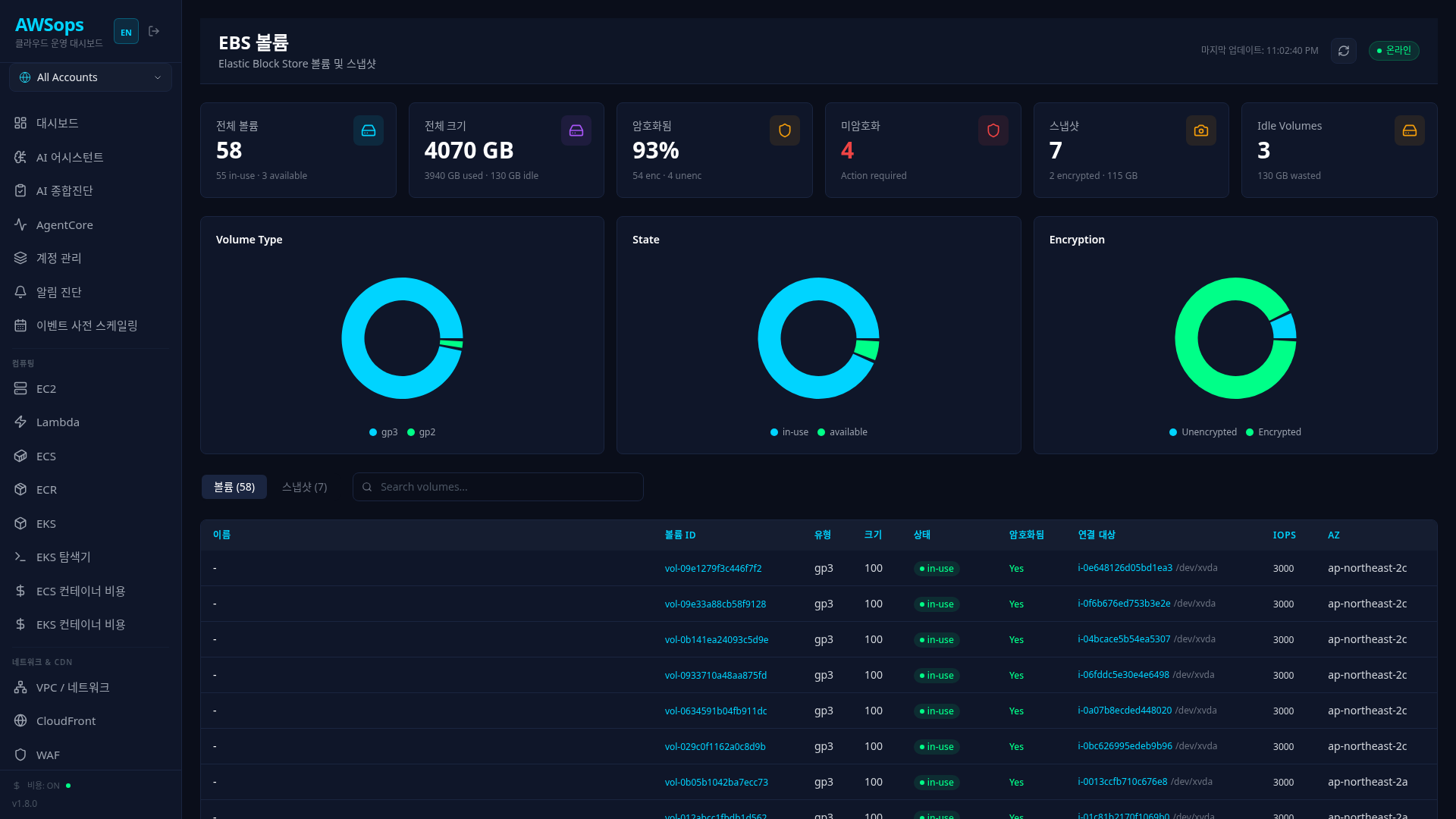
Key Features
Statistics Cards
- Total Volumes: Total number of volumes (in-use/available breakdown)
- Total Size: Total storage capacity (used/idle capacity)
- Encrypted: Percentage of encrypted volumes
- Unencrypted: Number of unencrypted volumes (security warning)
- Snapshots: Number of snapshots and encryption status
- Idle Volumes: Number of idle volumes (cost optimization targets)
Visualization Charts
- Volume Type: Distribution by type (gp3, gp2, io1, io2, etc.)
- State: Distribution by state (in-use, available, etc.)
- Encryption: Distribution by encryption status
Volumes/Snapshots Tabs
View volumes and snapshots in separate tabs:
- Volumes Tab: Volume list, type, size, IOPS, attached EC2
- Snapshots Tab: Snapshot list, creation date, encryption status
Detail Panel
Click on a volume to view in the right panel:
- Volume ID, name, type, size
- IOPS, Throughput, AZ
- Live measured metrics (Read/Write IOPS · Queue Length · Burst Balance [published for gp2/st1/sc1 only]) — latest values + 1-hour 5-min sparklines (CloudWatch; a missing series reads as unavailable)
- Multi-Attach setting
- Encryption verdict banner: encrypted (green, with the KMS key) / unencrypted (red, with the encrypted-copy recommendation) — no banner when encryption is unknown
- Idle-volume hint: a banner recommending cleanup when the volume was detached (available) at the last sync
- Encryption status and KMS key (fields)
- Attached EC2 instance information — each attachment flags DeleteOnTermination when set (the volume is deleted with the instance)
- List of snapshots for the volume
How to Use
View Volumes
- Check the full volume list in the Volumes tab
- Filter by entering volume ID, name, type, etc. in the search box
- Click a table row to view detailed information
View Snapshots
- Click the Snapshots tab
- Search by snapshot ID, volume ID, or name
- Check creation date and encryption status
Check EC2 Attachments
In the "Attached Resources" section of the volume detail panel:
- Attached EC2 instance ID
- Device path (e.g., /dev/xvda)
- Instance name, type, status
- DeleteOnTermination flag (shown only on attachments that have it set)
Tips
Volumes in "available" state are not attached to EC2 and only incur costs. Check them in the Idle Volumes card and the idle banner in the volume detail, and delete unnecessary volumes.
For security compliance, it is recommended to encrypt all EBS volumes. Check unencrypted volumes in the Unencrypted card and apply encryption by creating an encrypted snapshot and restoring from it.
AI Analysis Tips
Try asking the AI assistant:
- "Show me the list of unencrypted EBS volumes"
- "What is the total capacity and estimated cost of idle EBS volumes?"
- "How much cost savings would migrating from gp2 to gp3 provide?"
- "Check the IOPS settings for volumes attached to a specific EC2"
The AI assistant supports EBS volume analysis, snapshot management, and cost optimization through the Data Gateway (15 tools).
Related Pages
- EC2 - Instances with EBS volumes attached
- Cost Explorer - EBS cost analysis
- Security - Security check for unencrypted volumes