Introduction to AWSops
AWSops is a unified operations dashboard that lets you view your AWS and Kubernetes operations in real time, ask questions in natural language, and diagnose them with AI. Browse resource inventory, cost, topology, and EKS from one place; ask the AI assistant whatever you need; and get a comprehensive AI diagnosis report on the state of your account.
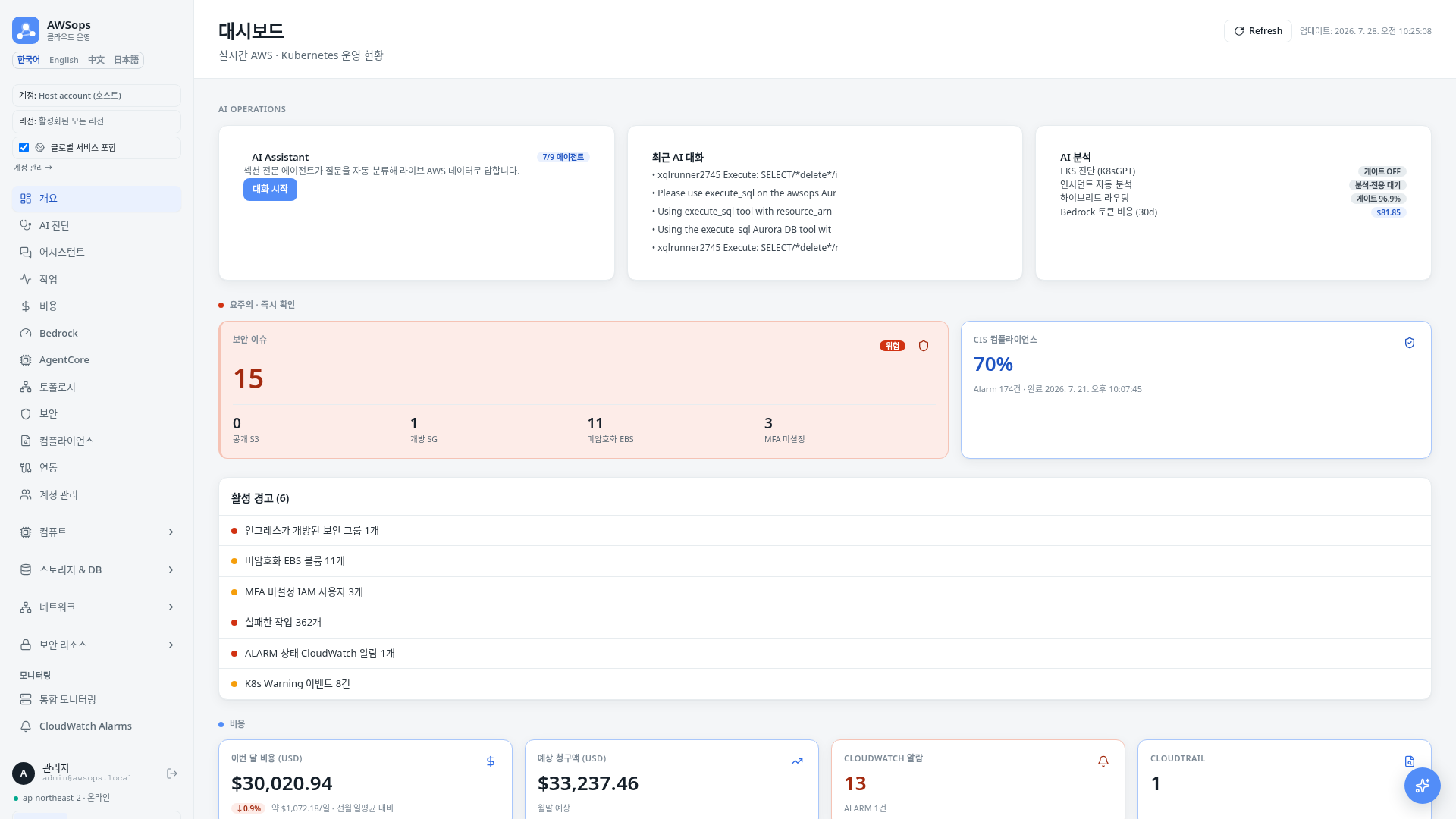
What you can do
- Dashboard at a glance — compute, storage, network, security, and cost KPIs plus distribution charts on the main screen.
- AI Assistant — ask operations questions in natural language; each question is auto-routed to the right domain and answered in markdown.
- AI Diagnosis — generate a comprehensive report on your account’s operational health at the depth you choose, and export it as MD, DOCX, or PDF.
- Resource Inventory — sort, search, and inspect 20+ resource types such as EC2, Lambda, RDS, S3, VPC, and IAM.
- Topology — explore the request flow from Route53 → CloudFront → LB → Target Group → target as a graph.
- EKS / Kubernetes — review your cluster fleet and nodes, pods, and deployments read-only.
- Cost analysis — see the per-service cost breakdown and trends, plus Bedrock model usage.
- Datasource Explore — query connected observability datasources in their native query language.
A read-only operations dashboard
AWSops does not change your AWS resources. It focuses on observing, analyzing, and diagnosing; for actions that require installing or changing something (for example, OpenCost) it provides guidance and scripts you run yourself.
Next steps
- Sign In — how to reach the dashboard
- Layout & Themes — sidebar, command palette, themes, mobile
- Dashboard — tour the main screen
- AI Assistant — ask questions in natural language
- AI Diagnosis — build a comprehensive diagnosis report