VPC / Network
A unified monitoring page to view your AWS network infrastructure at a glance.
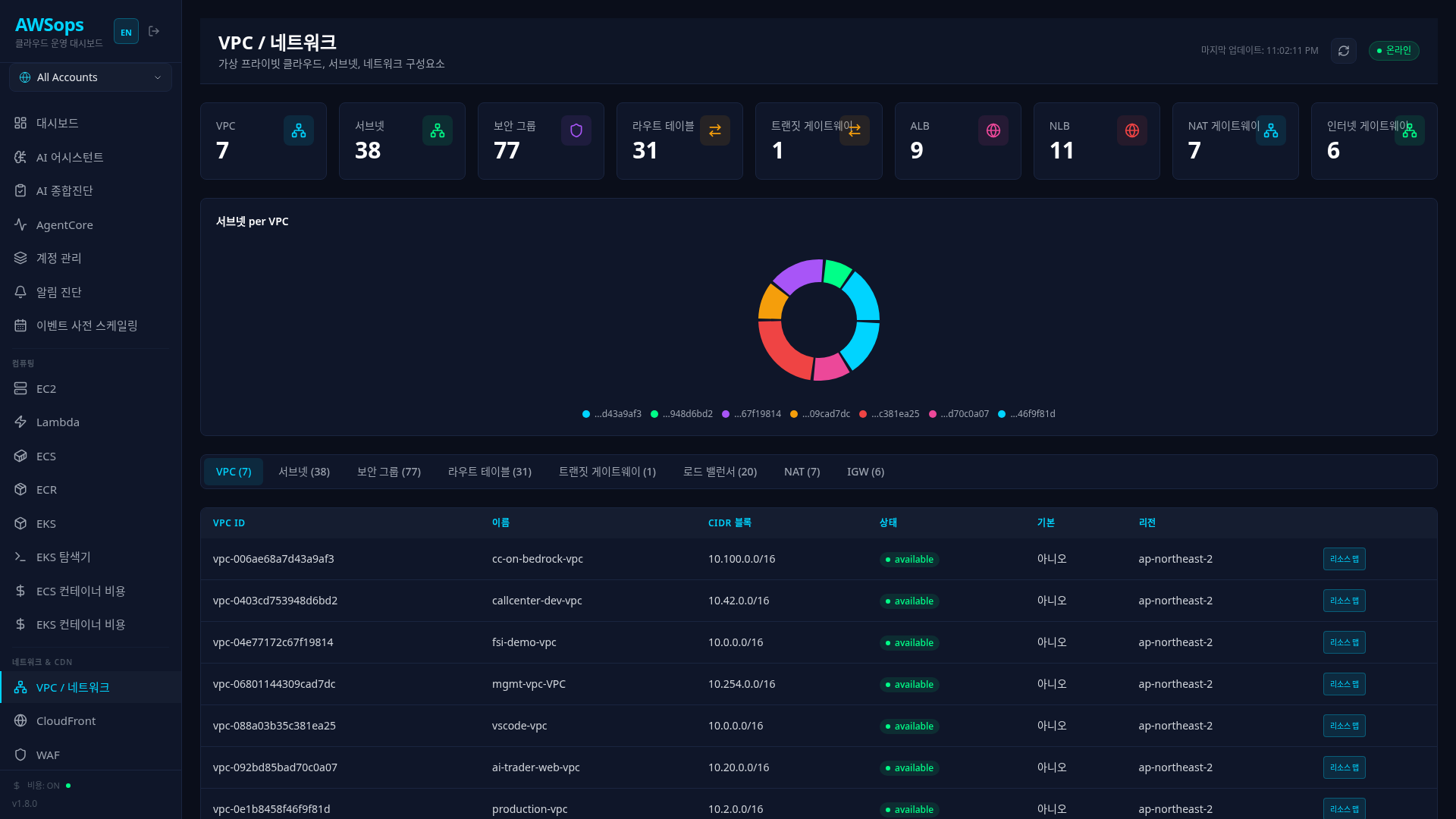
Key Features
Tab-Based Resource Organization
Manage network resources systematically across 8 tabs:
| Tab | Resource | Key Information |
|---|---|---|
| VPCs | Virtual Private Cloud | CIDR, Tenancy, DNS Settings |
| Subnets | Subnets | AZ, CIDR, Public/Private, Subnets-per-VPC bar chart |
| Security Groups | Security Groups | Inbound/Outbound Rules |
| Route Tables | Route Tables | Routes, Subnet Associations |
| Transit Gateway | TGW | VPC Attachments, Route Tables |
| ELB | Load Balancers | ALB/NLB, Target Groups, Listeners |
| NAT | NAT Gateway | EIP, Connection Status |
| IGW | Internet Gateway | VPC Attachment |
Resource Map
Visualize relationships between all resources within a VPC:
- 5-Column Layout: External (IGW/TGW) → VPCs → Subnets → Compute → NAT
- Interaction: Click to highlight related resources
- Search: Search EC2, Subnet, VPC by name/ID/CIDR
Detail Panel
Click a resource row to view detailed information in a slide panel:
- Transit Gateway: Route tables, routes, attached VPCs
- Security Group: Full list of inbound/outbound rules
- ELB: Target groups, listeners, health check settings
How to Use
View Resource Lists
- Select the resource type from the top tabs
- Review resources in the table
- Click a row to open the detail panel
Use the Resource Map
- Click the Resource Map button in the VPCs tab
- View infrastructure structure in the 5-column view
- Click resources to highlight relationships
- Use the search bar to find specific resources
Analyze Transit Gateway
- Select the Transit Gateway tab
- Click a TGW row
- In the detail panel:
- Route Tables: TGW route table list
- Routes: Routes for each table (VPC CIDR → Attachment)
- Attachments: List of attached VPCs/VPNs
Tips
Network Troubleshooting
When you ask network-related questions in the AI Assistant, the Network Gateway is automatically activated. It leverages 17 specialized tools including:
- Reachability Analyzer: Analyze connectivity paths between two endpoints
- VPC Flow Logs: Analyze network traffic patterns
- Transit Gateway Routing: Diagnose multi-VPC routing issues
- Security Group Rule Validation: Analyze inbound/outbound rules
Example question: "EC2 i-xxx cannot connect to RDS" → Reachability Analyzer runs automatically
Security Group Rules Check
Click a row in the Security Groups tab to view all inbound/outbound rules at a glance. Ports open to 0.0.0.0/0 are highlighted in orange as a warning.
Related Pages
- Topology - React Flow-based infrastructure visualization
- WAF - Web Application Firewall rule management
- CloudFront - CDN distribution management
- Security - Open Security Group detection