CloudFront
A page to monitor and manage Amazon CloudFront CDN distributions.
Key Features
Summary Statistics
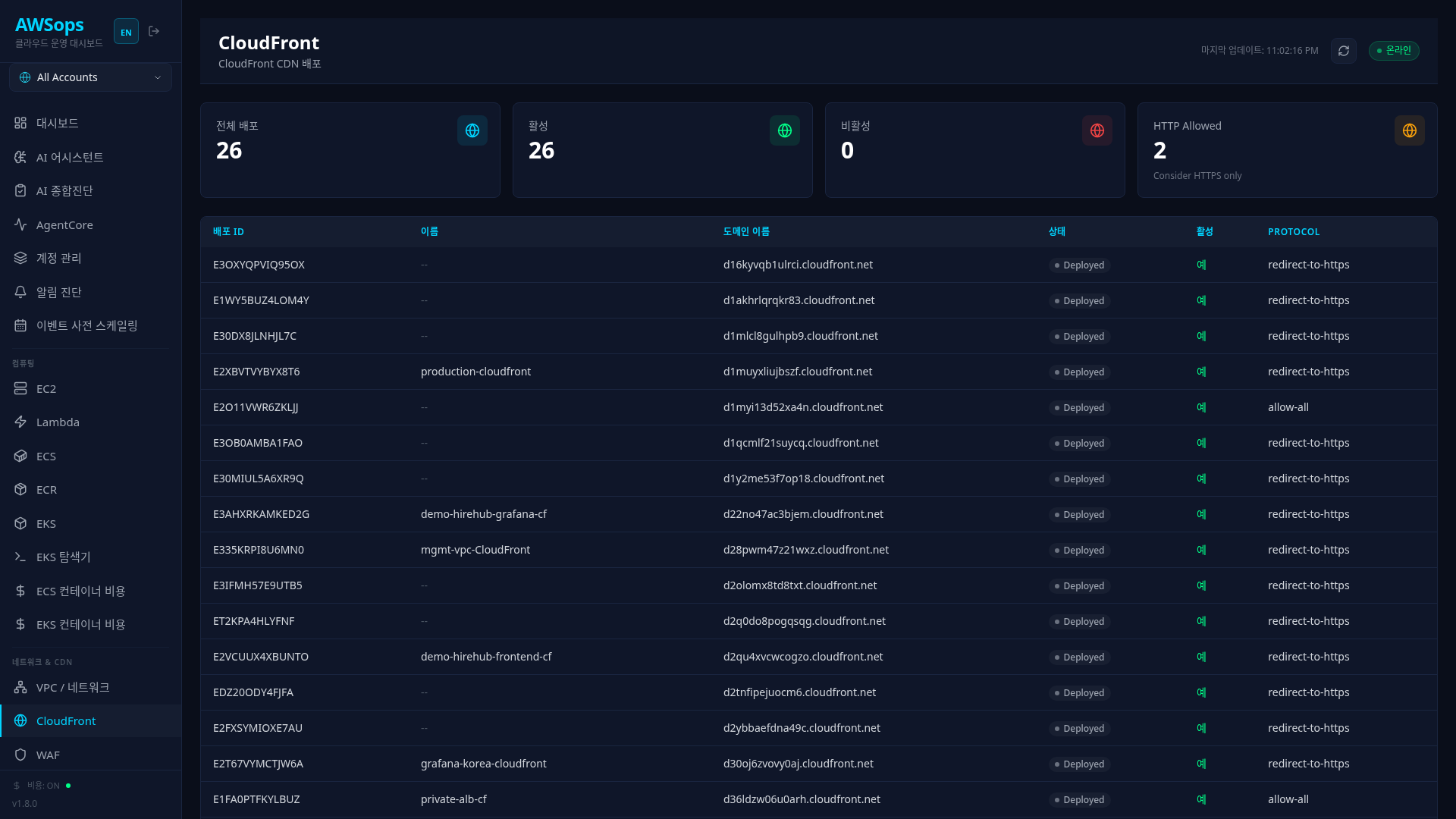
View overall CloudFront distribution status in the top cards:
| Metric | Description |
|---|---|
| Distributions | Total number of distributions |
| Enabled | Number of enabled distributions |
| Disabled | Number of disabled distributions |
| HTTP Allowed | Distributions allowing HTTP (security warning) |
When the HTTP Allowed card appears in orange, HTTPS-only configuration is recommended. A "Consider HTTPS only" message is displayed.
Distribution List
View all CloudFront distributions in the table:
- Distribution ID: Unique identifier
- Name: Distribution name (tag-based)
- Domain: CloudFront domain (xxx.cloudfront.net)
- Status: Deployed, InProgress, etc.
- Enabled: Enabled status
- Protocol: Viewer Protocol Policy
Detail Panel
Click a distribution row to view detailed information:
Distribution Section
- ID, ARN, Domain
- HTTP Version, IPv6 support
- Price Class (PriceClass_All, PriceClass_100, etc.)
- WAF ACL association status
Origins Section
- Each origin's ID and Domain
- S3, ALB, Custom Origin identification
Aliases (CNAMEs) Section
- List of alternate domain names
Tags Section
- Resource tag key-value pairs
How to Use
Check Distribution Status
- Navigate to the CloudFront page
- Review overall status in the top summary cards
- Find specific distributions in the table
- Check deployment status in the Status column
View Distribution Details
- Click a distribution row in the table
- The right slide panel opens
- Review detailed information by section:
- Distribution: Basic settings
- Origins: Origin server configuration
- Aliases: CNAME settings
- Tags: Resource tags
Review Security Settings
- Check the HTTP Allowed card (0 is safe)
- Verify Protocol in distribution details
- Check WAF ACL association (for enhanced security)
Tips
All CloudFront distributions should use redirect-to-https or https-only Viewer Protocol Policy. The card turns green when HTTP Allowed reaches 0.
For production distributions, associate a WAF Web ACL to block web attacks (SQL Injection, XSS, etc.). Check the association status in the WAF ACL field of the detail panel.
Pricing and performance vary by Price Class:
- PriceClass_All: All edge locations worldwide (best performance, highest cost)
- PriceClass_200: Most regions (balanced)
- PriceClass_100: North America/Europe only (lowest cost)