EKS Explorer
A page for exploring Kubernetes resources with a K9s-style terminal UI.
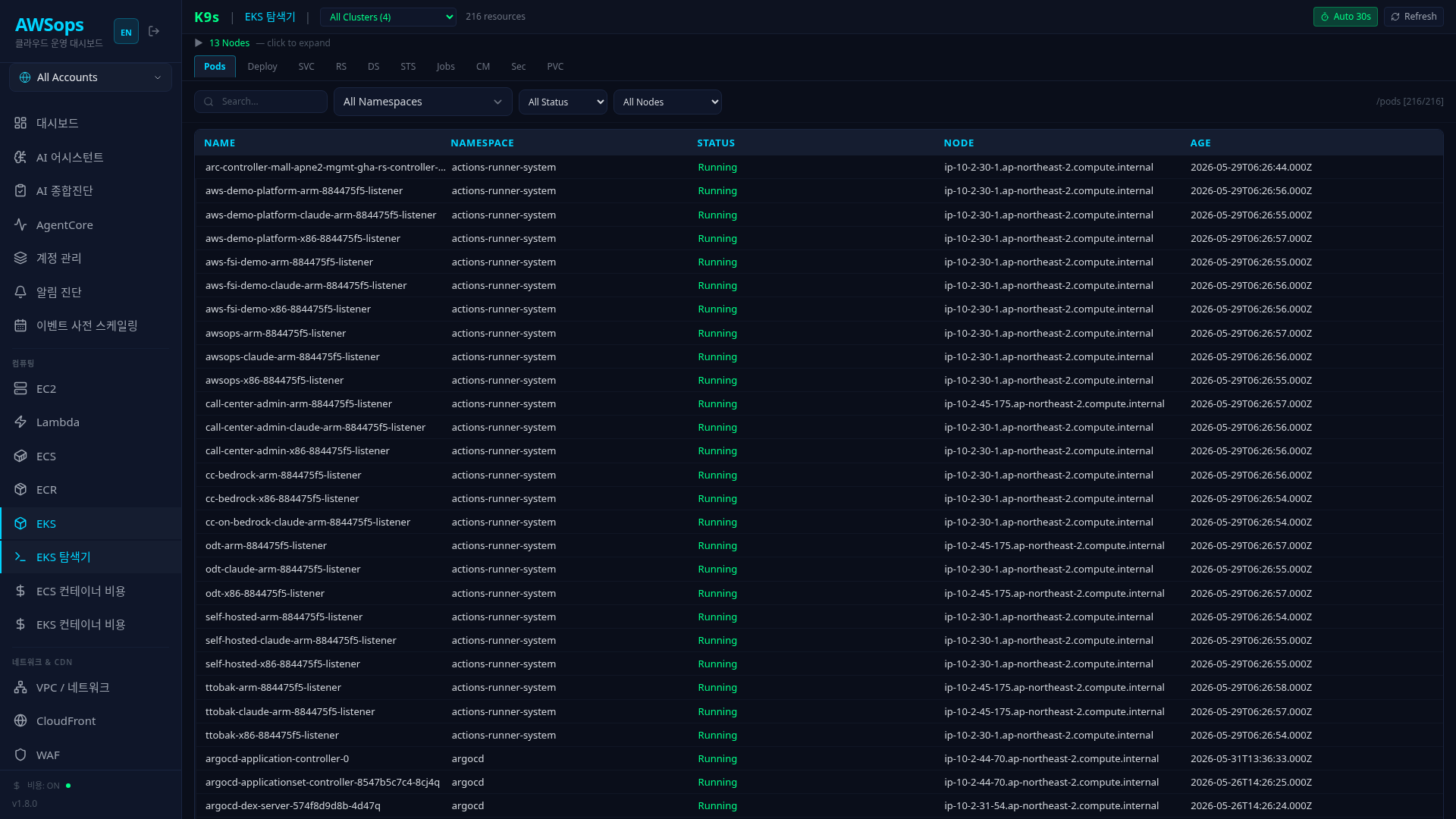
Key Features
Top Bar
- K9s | Explorer: Current page indicator
- Cluster selection: Select cluster from dropdown
- Resource count: Number of currently displayed resources
- Auto Refresh: 30-second auto-refresh toggle
- Refresh: Manual refresh button
Node Header (Collapse/Expand)
Click to display node list and resource usage:
- CPU/Memory usage bar per node
- Node count display
Resource Tabs
Switch between 10 types of Kubernetes resources via tabs:
| Tab | Resource | Key Columns |
|---|---|---|
| Pods | Pod | NAME, NAMESPACE, STATUS, NODE, AGE |
| Deploy | Deployment | NAME, NAMESPACE, DESIRED, AVAILABLE, READY |
| SVC | Service | NAME, NAMESPACE, TYPE, CLUSTER-IP, AGE |
| RS | ReplicaSet | NAME, NAMESPACE, DESIRED, READY, AVAILABLE |
| DS | DaemonSet | NAME, NAMESPACE, DESIRED, CURRENT, READY |
| STS | StatefulSet | NAME, NAMESPACE, DESIRED, READY |
| Jobs | Job | NAME, NAMESPACE, ACTIVE, SUCCEEDED, FAILED |
| CM | ConfigMap | NAME, NAMESPACE, AGE |
| Sec | Secret | NAME, NAMESPACE, TYPE, AGE |
| PVC | PersistentVolumeClaim | NAME, NAMESPACE, STATUS, STORAGECLASS, CAPACITY |
Filters
- Search: Text search (all fields)
- Namespace: Namespace filter
- Status: Status filter (Running, Pending, etc.)
- Node: Node filter (Pods tab)
- Clear: Reset filters
Pagination
- Rows per page: 25, 50, 100, 200
- Page navigation: Prev / Next
Detail Panel
Click a resource to open the detail panel on the right:
- Detailed information in YAML format
- Customized information display per resource type
Status Bar
- Keyboard shortcut guide (Tab, Enter, Esc, /)
- Auto-refresh status display
- Current resource type and namespace
How to Use
- Click Compute > K8s > Explorer in the sidebar
- Select a cluster at the top
- Click tabs to switch between resource types
- Use search and filters to find specific resources
- Click a resource to view detailed information
Keyboard Shortcuts
| Key | Action |
|---|---|
| Tab | Switch resource tabs |
| Enter | View selected resource details |
| Esc | Close detail panel |
| / | Focus search box |
Tips
Namespace Filter Usage
Use the namespace dropdown to view only resources in a specific namespace. You can exclude system namespaces (kube-system) and view only application namespaces.
Auto Refresh
Enable Auto 30s during operational monitoring to automatically refresh data every 30 seconds.
AI Analysis
You can analyze with the AI Assistant using queries like "kube-system namespace Pod list", "Find Pending status Pods", "Analyze Pods on a specific node", etc.
Related Pages
- EKS Overview - Overall cluster status
- EKS Pods - Pod detailed dashboard
- EKS Deployments - Deployment details
- EKS Services - Service details