EKS Services
A page for viewing the list and network configuration of Kubernetes Services.
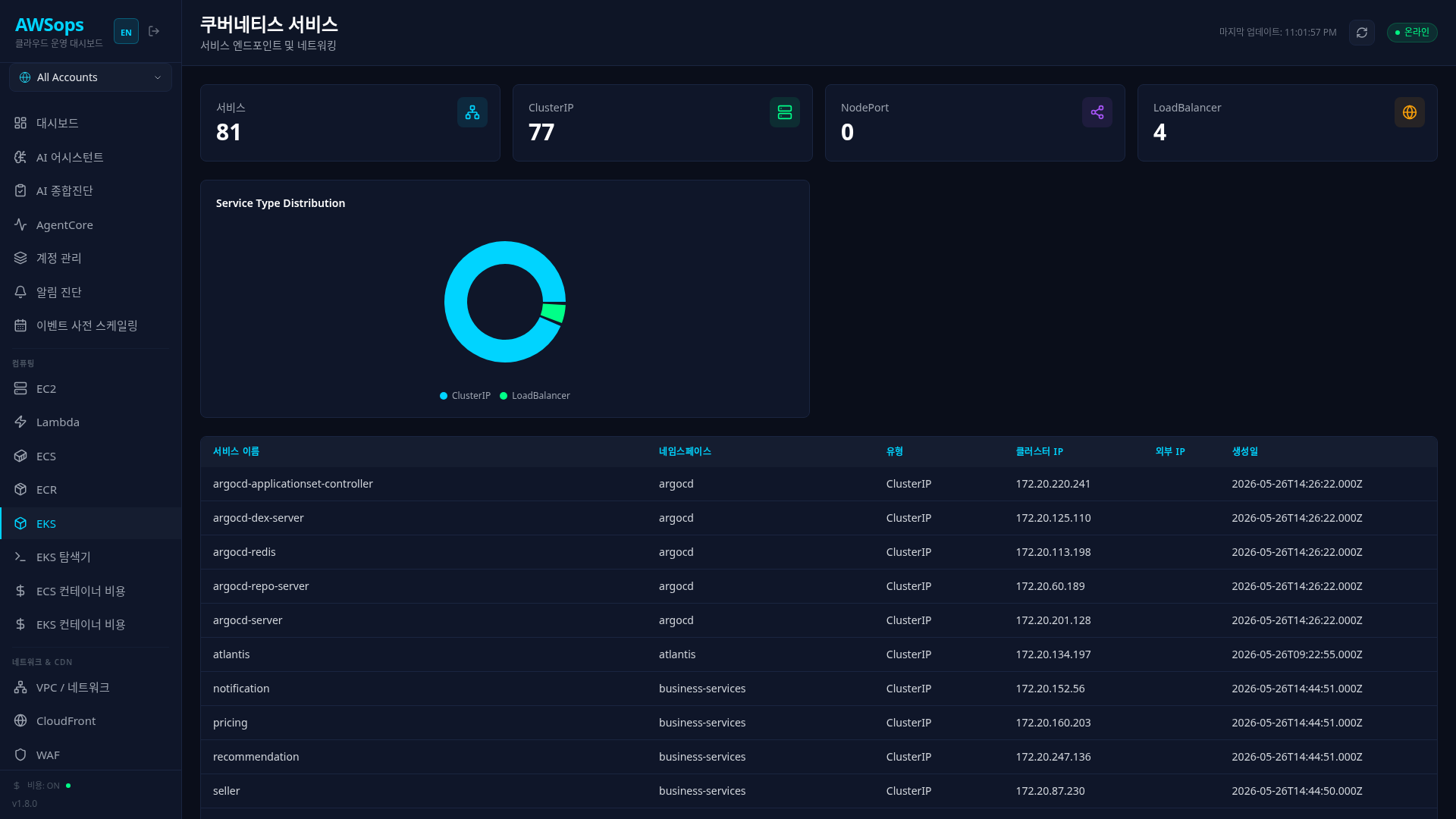
Key Features
Stats Cards
- Total Services: Total Service count (cyan)
- ClusterIP: ClusterIP type service count (green)
- NodePort: NodePort type service count (purple)
- LoadBalancer: LoadBalancer type service count (orange)
Service Type Distribution Chart
Visualize service type distribution with a pie chart:
- ClusterIP, NodePort, LoadBalancer, Other (ExternalName, etc.)
Service Resources Charts
Two top-15 bar charts of per-service resource requests:
- CPU per Service (millicores) / Memory per Service (MiB) — each Service's selector is joined to Running pods in the same (cluster, namespace) and their scheduler-effective requests (max of app-container sum and init-container max, plus overhead) are summed
- Values are requests (reservations), not live usage (stated in the caption)
- Services without a selector (ExternalName / manual Endpoints) or with no matching Running pods are excluded rather than charted as 0, and a cluster whose pods fetch failed is excluded from the charts with its name shown in the caption
Service Table
| Column | Description |
|---|---|
| Name | Service name |
| Namespace | Namespace |
| Type | Service type |
| Cluster IP | Cluster internal IP |
| External IP | External IP (LoadBalancer type) |
| Created | Creation time |
Understanding Service Types
ClusterIP (Default)
- Accessible only within the cluster
- Used for internal service-to-service communication
- Examples: Backend API, Database
NodePort
- Externally accessible via a specific port on all nodes
- Port range: 30000-32767
- Primarily used in development/test environments
LoadBalancer
- Automatically creates cloud load balancer (AWS ELB/NLB)
- Routes external traffic to the service
- Used for production external services
ExternalName
- Maps external DNS names to internal cluster names
- Creates CNAME records
How to Use
- Click Compute > K8s > Services in the sidebar
- Review service type distribution from the stats cards
- Check External IP for LoadBalancer services
- Check Cluster IP for each service in the table
AWS Integration
LoadBalancer Type + AWS
- AWS ELB/NLB automatically provisioned on Service creation
- Control settings via Annotations:
service.beta.kubernetes.io/aws-load-balancer-type: nlbservice.beta.kubernetes.io/aws-load-balancer-internal: "true"
Cost Considerations
- LoadBalancer type incurs AWS ELB cost for each service
- Use single ALB for multiple services: AWS Load Balancer Controller + Ingress
Tips
LoadBalancer External IP Check
If External IP is <pending>:
- AWS Load Balancer is being provisioned
- Check for missing subnet tags
- Check IAM permissions
ClusterIP Service Access
ClusterIP services cannot be directly accessed from outside the cluster. Use LoadBalancer or Ingress for external access.
AI Analysis
You can analyze with the AI Assistant using queries like "Service list", "LoadBalancer service status", "Find LoadBalancers without External IP", etc.
Related Pages
- EKS Overview - Overall cluster status
- EKS Deployments - Deployments connected to Services
- VPC - Network configuration and load balancers
- EKS Explorer - Ingress details