ECR (Elastic Container Registry)
A page for viewing ECR repository and image information.
This screen isn't a dedicated page — it's served through v2's shared inventory view (/inventory/ecr, under the "Compute" group in the sidebar). The content below reflects the actual v2 inventory view configuration (HIGHLIGHTS.ecr/INVENTORY_TYPES.ecr in web/lib/inventory-types.ts), not v1's dedicated ECR page.
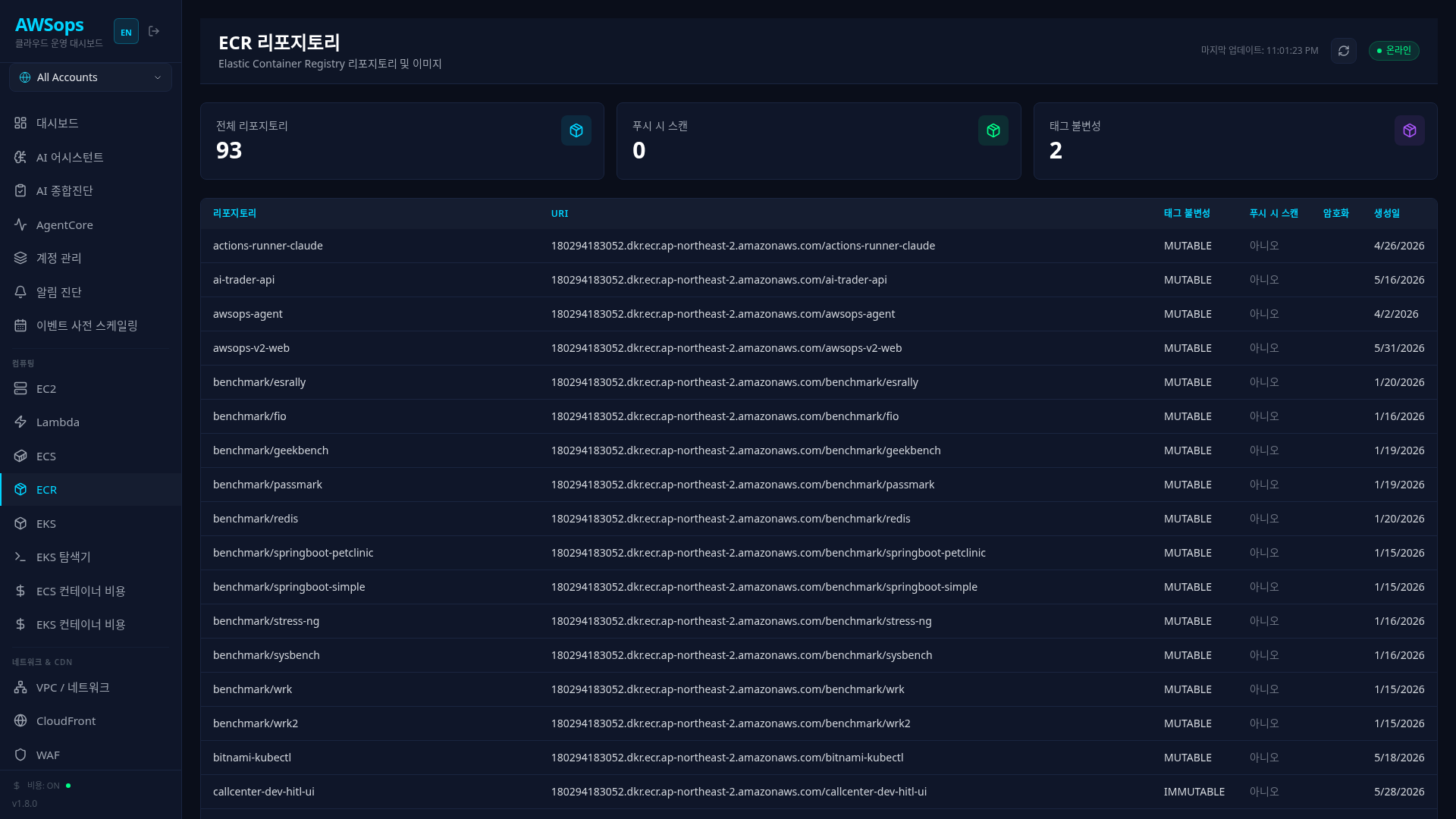
Key Features
Highlight Cards
- Scan on Push: Number of repositories with automatic scan on image push enabled
- Immutable tags: Number of repositories with tag immutability (IMMUTABLE) set
- Mutable tags: Number of repositories with tag mutability (MUTABLE) set
There is no card showing total repository count (check the table row count instead).
Repository Table
| Column | Description |
|---|---|
| URI | Repository URI (image push/pull address) |
| Tag mutability | Tag mutability (MUTABLE/IMMUTABLE) |
| Scan on Push (Basic) | Repository-level basic scan-on-push setting (Yes/No) |
| Encryption | Encryption type (as-is — AES256/KMS/KMS_DSSE etc.) |
| Created | Creation date |
The Encryption column is the encryption type derived from encryption_configuration (rendered as-is — AES256/KMS/KMS_DSSE etc.). The Scan on Push (Basic) column reflects the repository-level basic scanning setting only; registry-level Inspector enhanced scanning is not represented.
Detail Panel
Click a repository to view detailed information:
- Identity section: Name, Account, Region, ARN, Registry ID, URI, Created
- Config section: Tag Mutability, Image Scanning Configuration (includes scan-on-push), Lifecycle Policy
- Security section: Encryption Type (derived pass-through — AES256/KMS/KMS_DSSE etc.) + the raw Encryption Configuration
- Tags section: Tags configured on the repository
How to Use
- Click Compute > ECR in the sidebar
- Review Scan on Push / immutable-tag status from the highlight cards at the top
- Click a repository to view its URI, Scan on Push, and Encryption settings
Security Configuration Guide
Scan on Push
- Recommended: Enable on all repositories
- Automatically runs vulnerability scan on image push
- Discovered CVEs can be viewed on the Security page
Immutable Tags
- Recommended: Enable on production repositories
- Tags pushed once cannot be overwritten
- Useful for deployment tracking and rollback
Encryption
- AES256: Default AWS managed encryption
- KMS: When using Customer Managed Keys (CMK)
Tips
If the Scan on Push count on the highlight card is lower than the total repository count, some repositories have scanning disabled. Check each one in the Config section of its detail panel.
You can find the full address for docker pull or docker push in the URI field of the detail panel.
You can analyze with the AI Assistant using queries like "ECR repository list", "Find repositories with scan disabled", "Analyze container image vulnerabilities", etc.