아키텍처
지원 버전: Istio 1.28+ API 버전:
networking.istio.io/v1,security.istio.io/v1마지막 업데이트: 2026년 2월 19일
Istio의 내부 아키텍처와 네트워킹 메커니즘을 심층적으로 다룹니다.
배경 및 역사는 기본 개념 문서를 참고하세요.
중요 변경사항 (Istio 1.5+):
- Pilot, Citadel, Galley, Mixer는 별도 컴포넌트가 아닙니다
- Istiod라는 단일 바이너리(
pilot-discovery)로 통합되었습니다 - Pilot/Citadel/Galley 용어는 기능을 설명하기 위한 역사적 명칭입니다
목차
- Istio 아키텍처 개요
- Control Plane: Istiod
- Data Plane: Envoy Proxy
- Sidecar Injection 메커니즘
- iptables와 트래픽 가로채기
- DNS 처리 메커니즘
- xDS API 통신
- Sidecar 리소스를 통한 최적화
Istio 아키텍처 개요
전체 구조
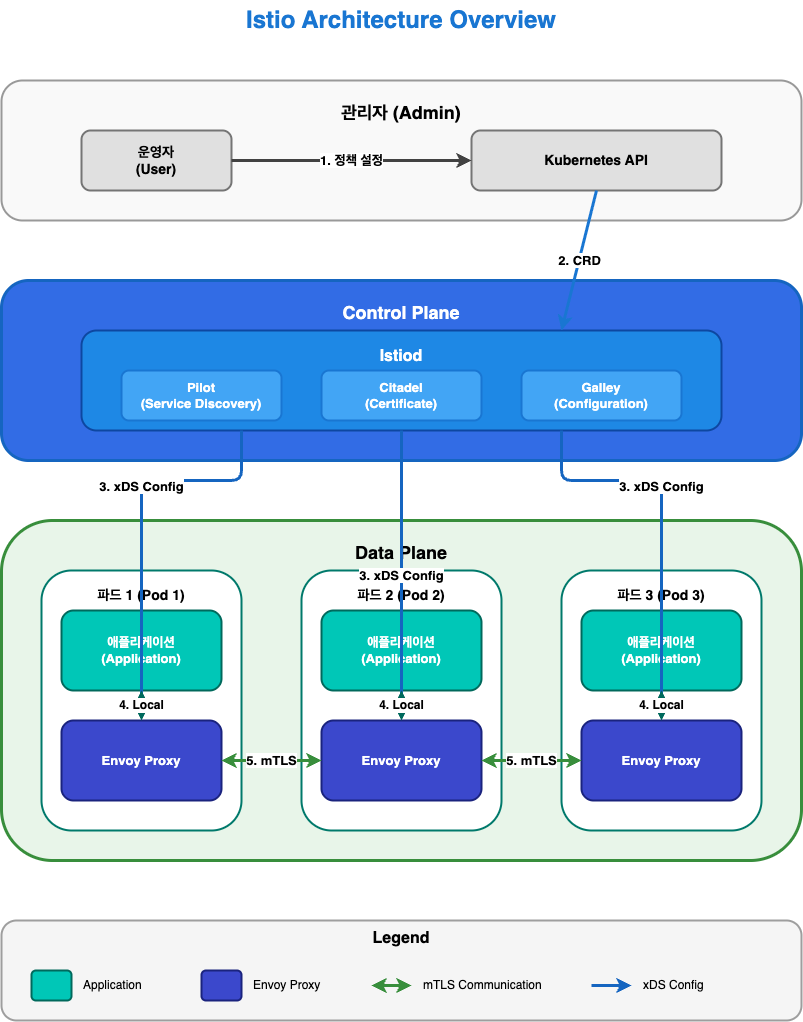
Control Plane vs Data Plane
| 구분 | Control Plane (Istiod) | Data Plane (Envoy) |
|---|---|---|
| 역할 | 정책 관리, 구성 배포 | 실제 트래픽 처리 |
| 위치 | 별도 파드 (일반적으로 1-3개) | 모든 애플리케이션 파드 |
| 언어 | Go | C++ |
| 부하 | 낮음 | 높음 (모든 트래픽) |
| 확장성 | 수평 확장 (HA) | 자동 (파드당 1개) |
Control Plane: Istiod
Istiod 내부 구조
중요: Istio 1.5 이후 Pilot, Citadel, Galley는 별도 컴포넌트가 아닌 Istiod 내부 기능입니다.
Istiod의 주요 기능
참고: 아래 기능들은 Istio 1.28에서 Istiod 내부에 통합되어 있습니다. 역사적 명칭(Pilot, Citadel, Galley)은 기능을 설명하기 위해 사용됩니다.
1. Service Discovery (Pilot 기능)
# Kubernetes Service 감지
apiVersion: v1
kind: Service
metadata:
  name: reviews
spec:
  selector:
    app: reviews
  ports:
  - port: 9080
Istiod는 다음을 추적합니다:
- Kubernetes Service
- Endpoints (파드 IP)
- Pod 상태 변화
- 외부 서비스 (ServiceEntry)
2. Traffic Management (Pilot 기능)
Istio CRD를 Envoy 구성으로 변환:
# VirtualService (사용자 정의)
apiVersion: networking.istio.io/v1
kind: VirtualService
metadata:
  name: reviews
spec:
  hosts:
  - reviews
  http:
  - route:
    - destination:
        host: reviews
        subset: v1
      weight: 90
    - destination:
        host: reviews
        subset: v2
      weight: 10
↓ Istiod가 Envoy 구성으로 변환 ↓
{
  "route_config": {
    "weighted_clusters": {
      "clusters": [
        {"name": "outbound|9080|v1|reviews", "weight": 90},
        {"name": "outbound|9080|v2|reviews", "weight": 10}
      ]
    }
  }
}
3. Certificate Management (Citadel 기능)
SPIFFE ID 형식:
spiffe://cluster.local/ns/default/sa/reviews4. Configuration Validation (Galley 기능)
# 잘못된 설정
apiVersion: networking.istio.io/v1
kind: VirtualService
metadata:
  name: invalid
spec:
  hosts:
  - reviews
  http:
  - route:
    - destination:
        host: non-existent-service  # ❌ 존재하지 않는 서비스
Istiod는 적용 전에 검증:
$ kubectl apply -f invalid-vs.yaml
Error from server: admission webhook "validation.istio.io" denied the request:
configuration is invalid: host "non-existent-service" not found
Istiod 프로세스 구조
Istio 1.28의 실제 구현:
# Istiod 파드 내부 프로세스
$ kubectl exec -n istio-system deploy/istiod -- ps aux
USER       PID  COMMAND
istio-p+     1  /usr/local/bin/pilot-discovery discovery

# 단일 바이너리 'pilot-discovery'가 모든 기능 수행
주요 포인트:
- Istiod는
pilot-discovery라는 단일 Go 바이너리로 실행됩니다 - Pilot, Citadel, Galley는 코드 레벨의 패키지/모듈로 존재하지만, 별도 프로세스가 아닙니다
- 모든 기능이 하나의 프로세스 내에서 goroutine으로 실행됩니다
Istiod가 제공하는 주요 포트:
| 포트 | 프로토콜 | 용도 | 기능 |
|---|---|---|---|
| 15010 | gRPC | xDS (legacy) | 이전 버전 호환성 |
| 15012 | gRPC | xDS over TLS | 주요 xDS API 엔드포인트 |
| 15014 | HTTP | Control plane monitoring | 메트릭 및 헬스 체크 |
| 15017 | HTTPS | Webhook | Sidecar injection |
| 8080 | HTTP | Debug | 디버깅 인터페이스 |
Istiod 배포
고가용성 구성:
apiVersion: apps/v1
kind: Deployment
metadata:
  name: istiod
  namespace: istio-system
spec:
  replicas: 3  # HA를 위한 3개 replica
  selector:
    matchLabels:
      app: istiod
  template:
    metadata:
      labels:
        app: istiod
    spec:
      containers:
      - name: discovery
        image: istio/pilot:1.28.0
        resources:
          requests:
            cpu: 500m
            memory: 2Gi
리소스 사용량 (일반적):
- CPU: 0.5 - 2 cores
- Memory: 2 - 4 GB
- 수천 개의 서비스와 파드 처리 가능
Data Plane: Envoy Proxy
Envoy 아키텍처
Envoy의 주요 구성 요소
1. Listeners
포트를 수신하고 연결을 받아들입니다:
{
  "name": "0.0.0.0_15001",
  "address": {
    "socket_address": {
      "address": "0.0.0.0",
      "port_value": 15001
    }
  },
  "filter_chains": [...]
}
Istio의 기본 Listeners:
0.0.0.0:15001: 모든 아웃바운드 TCP 트래픽0.0.0.0:15006: 모든 인바운드 TCP 트래픽0.0.0.0:15021: Health check0.0.0.0:15090: Prometheus 메트릭
2. Filters
요청/응답을 처리하는 플러그인:
3. Clusters
업스트림 서비스의 논리적 그룹:
{
  "name": "outbound|9080|v1|reviews.default.svc.cluster.local",
  "type": "EDS",
  "eds_cluster_config": {
    "service_name": "outbound|9080|v1|reviews.default.svc.cluster.local"
  },
  "circuit_breakers": {...},
  "outlier_detection": {...}
}
4. Endpoints
실제 파드 IP 목록:
{
  "cluster_name": "outbound|9080|v1|reviews",
  "endpoints": [
    {
      "lb_endpoints": [
        {"endpoint": {"address": {"socket_address": {"address": "10.244.1.5", "port_value": 9080}}}},
        {"endpoint": {"address": {"socket_address": {"address": "10.244.2.8", "port_value": 9080}}}}
      ]
    }
  ]
}
Envoy 성능
벤치마크 (일반적인 환경):
- 처리량: 10,000+ RPS per core
- 지연 시간 추가: < 1ms (P99)
- 메모리: 50-100 MB (기본 구성)
- CPU: 0.1-0.5 cores (일반적인 부하)
Sidecar Injection 메커니즘
Injection 방식
원본 vs Injection 후
원본 Deployment:
apiVersion: apps/v1
kind: Deployment
metadata:
  name: reviews
spec:
  template:
    spec:
      containers:
      - name: reviews
        image: reviews:v1
        ports:
        - containerPort: 9080
Injection 후:
apiVersion: v1
kind: Pod
metadata:
  annotations:
    sidecar.istio.io/status: '{"initContainers":["istio-init"],"containers":["istio-proxy"]}'
spec:
  initContainers:
  - name: istio-init
    image: istio/proxyv2:1.28.0
    command: ['istio-iptables', ...]
    securityContext:
      capabilities:
        add: [NET_ADMIN, NET_RAW]
  containers:
  - name: reviews
    image: reviews:v1
    ports:
    - containerPort: 9080
  - name: istio-proxy
    image: istio/proxyv2:1.28.0
    args: ['proxy', 'sidecar', ...]
Sidecar Injection 활성화
자동 주입 (권장)
Namespace 레벨:
# 네임스페이스에 레이블 추가
kubectl label namespace default istio-injection=enabled

# 이후 해당 네임스페이스에 배포되는 모든 파드에 자동으로 사이드카 주입
kubectl apply -f deployment.yaml
Pod 레벨 (Annotation):
apiVersion: v1
kind: Pod
metadata:
  annotations:
    sidecar.istio.io/inject: "true"  # 파드별 주입 활성화
spec:
  containers:
  - name: app
    image: myapp:v1
수동 주입
istioctl kube-inject 명령어를 사용하여 YAML 파일에 직접 사이드카를 주입합니다.
# YAML 파일에 사이드카 주입 후 배포
istioctl kube-inject -f deployment.yaml | kubectl apply -f -

# 또는 파일로 저장
istioctl kube-inject -f deployment.yaml -o deployment-injected.yaml
kubectl apply -f deployment-injected.yaml
수동 주입 사용 시나리오:
- 자동 주입을 사용할 수 없는 환경
- CI/CD 파이프라인에서 명시적으로 제어하고 싶을 때
- 디버깅 목적으로 주입된 YAML을 확인하고 싶을 때
iptables와 트래픽 가로채기
istio-init 컨테이너
역할: 파드의 네트워크 트래픽을 Envoy Proxy로 리다이렉트하는 iptables 규칙 설정
iptables 규칙 상세
istio-init가 실행하는 명령:
#!/bin/bash
# istio-iptables 스크립트 (단순화)

# 1. OUTPUT 체인: 애플리케이션의 아웃바운드 트래픽
iptables -t nat -A OUTPUT -p tcp \
  -m owner ! --uid-owner 1337 \  # Envoy UID 제외
  -j REDIRECT --to-port 15001     # Envoy 아웃바운드 포트

# 2. PREROUTING 체인: 파드로 들어오는 인바운드 트래픽
iptables -t nat -A PREROUTING -p tcp \
  -j REDIRECT --to-port 15006     # Envoy 인바운드 포트

# 3. 제외 규칙
# - localhost 트래픽
iptables -t nat -I OUTPUT -d 127.0.0.1/32 -j RETURN

# - Istiod 통신 (15012)
iptables -t nat -I OUTPUT -p tcp --dport 15012 -j RETURN

# - DNS (53)
iptables -t nat -I OUTPUT -p udp --dport 53 -j RETURN
트래픽 흐름 (iptables 적용 후)
iptables 규칙 확인
파드 내부에서 확인:
# 파드에 진입
kubectl exec -it <pod-name> -c istio-proxy -- /bin/bash

# iptables 규칙 확인
iptables -t nat -L -n -v

# OUTPUT 체인
Chain OUTPUT (policy ACCEPT)
target     prot opt source     destination
ISTIO_OUTPUT  tcp  --  0.0.0.0/0  0.0.0.0/0

# ISTIO_OUTPUT 상세
Chain ISTIO_OUTPUT (1 references)
RETURN     all  --  0.0.0.0/0  127.0.0.1           # localhost 제외
RETURN     all  --  0.0.0.0/0  0.0.0.0/0           owner UID match 1337  # Envoy 제외
REDIRECT   tcp  --  0.0.0.0/0  0.0.0.0/0           redir ports 15001  # 나머지 리다이렉트

# PREROUTING 체인
Chain PREROUTING (policy ACCEPT)
ISTIO_INBOUND  tcp  --  0.0.0.0/0  0.0.0.0/0

# ISTIO_INBOUND 상세
Chain ISTIO_INBOUND (1 references)
REDIRECT   tcp  --  0.0.0.0/0  0.0.0.0/0           redir ports 15006
iptables vs eBPF (CNI Plugin)
Istio는 두 가지 트래픽 가로채기 방식을 지원합니다:
| 방식 | 장점 | 단점 | 사용 시나리오 |
|---|---|---|---|
| iptables | 간단, 범용적 | Init Container 필요 | 기본 설정 |
| eBPF (CNI) | Init 불필요, 빠름 | 최신 커널 필요 | 고성능, Ambient Mode |
DNS 처리 메커니즘
Kubernetes DNS 기본 동작
/etc/resolv.conf (파드 내부):
nameserver 10.96.0.10  # kube-dns ClusterIP
search default.svc.cluster.local svc.cluster.local cluster.local
options ndots:5
Envoy의 DNS 처리
Istio에서는 Envoy가 DNS를 처리합니다:
장점:
- CoreDNS 호출 불필요 (성능 향상)
- 동적 Endpoint 업데이트
- 고급 라우팅 (버전, 가중치 등)
DNS Proxy (선택 사항)
Istio 1.8+부터 DNS Proxy 기능 추가:
apiVersion: install.istio.io/v1alpha1
kind: IstioOperator
spec:
  meshConfig:
    defaultConfig:
      proxyMetadata:
        ISTIO_META_DNS_CAPTURE: "true"  # DNS Proxy 활성화
동작 방식:
DNS Proxy iptables 규칙:
# UDP 53번 포트를 Envoy DNS Proxy로 리다이렉트
iptables -t nat -A OUTPUT -p udp --dport 53 \
  -m owner ! --uid-owner 1337 \
  -j REDIRECT --to-port 15053
xDS API 통신
xDS Protocol 개요
xDS: Discovery Service의 약자로, Envoy의 동적 구성 프로토콜입니다.
xDS API 종류
| API | 이름 | 역할 | 예시 |
|---|---|---|---|
| LDS | Listener Discovery | 수신 포트 구성 | 15001, 15006 |
| RDS | Route Discovery | HTTP 라우팅 규칙 | VirtualService |
| CDS | Cluster Discovery | 업스트림 서비스 | DestinationRule |
| EDS | Endpoint Discovery | 파드 IP 목록 | Service Endpoints |
| SDS | Secret Discovery | TLS 인증서 | mTLS 인증서 |
xDS 통신 흐름
xDS 통신 확인
Envoy Admin API로 확인:
# 파드 내부에서
kubectl exec -it <pod-name> -c istio-proxy -- curl localhost:15000/config_dump

# LDS (Listeners)
kubectl exec -it <pod-name> -c istio-proxy -- \
  curl -s localhost:15000/config_dump | jq '.configs[0].dynamic_listeners'

# CDS (Clusters)
kubectl exec -it <pod-name> -c istio-proxy -- \
  curl -s localhost:15000/config_dump | jq '.configs[1].dynamic_active_clusters'

# EDS (Endpoints)
kubectl exec -it <pod-name> -c istio-proxy -- \
  curl -s localhost:15000/clusters | grep -A 5 "reviews"

# RDS (Routes)
kubectl exec -it <pod-name> -c istio-proxy -- \
  curl -s localhost:15000/config_dump | jq '.configs[2].dynamic_route_configs'
istioctl로 확인:
# Listener 구성
istioctl proxy-config listeners <pod-name> -n default

# Cluster 구성
istioctl proxy-config clusters <pod-name> -n default

# Endpoint 구성
istioctl proxy-config endpoints <pod-name> -n default

# Route 구성
istioctl proxy-config routes <pod-name> -n default
Sidecar 리소스를 통한 최적화
문제: 모든 서비스 정보 수신
기본적으로 각 Envoy는 메시 전체의 모든 서비스 정보를 받습니다:
문제점:
- 메모리 사용량 증가
- CPU 사용량 증가 (구성 처리)
- 네트워크 대역폭 낭비
- Istiod 부하 증가
해결책: Sidecar 리소스
Sidecar 리소스로 필요한 서비스만 수신하도록 제한:
apiVersion: networking.istio.io/v1
kind: Sidecar
metadata:
  name: default
  namespace: default
spec:
  egress:
  - hosts:
    - "./*"  # 같은 네임스페이스의 모든 서비스
    - "istio-system/*"  # istio-system의 모든 서비스
    - "production/reviews"  # production 네임스페이스의 reviews만
Sidecar 리소스 예제
1. 네임스페이스 격리
apiVersion: networking.istio.io/v1
kind: Sidecar
metadata:
  name: default
  namespace: team-a
spec:
  egress:
  - hosts:
    - "team-a/*"  # 자신의 네임스페이스만
    - "istio-system/*"  # 시스템 서비스
    - "shared/*"  # 공유 서비스
2. 특정 서비스만 접근
apiVersion: networking.istio.io/v1
kind: Sidecar
metadata:
  name: frontend
  namespace: default
spec:
  workloadSelector:
    labels:
      app: frontend
  egress:
  - hosts:
    - "default/reviews"
    - "default/ratings"
    - "default/details"
  - port:
      number: 443
      protocol: HTTPS
    hosts:
    - "external/*"
3. 외부 서비스만 접근
apiVersion: networking.istio.io/v1
kind: Sidecar
metadata:
  name: external-only
  namespace: default
spec:
  workloadSelector:
    labels:
      app: batch-job
  egress:
  - hosts:
    - "./*"  # 같은 네임스페이스
  outboundTrafficPolicy:
    mode: REGISTRY_ONLY  # ServiceEntry에 등록된 것만
Sidecar 리소스 효과
Before (Sidecar 없음):
- 1000개 서비스 → 1000개 Cluster 구성
- Envoy 메모리: ~500 MB
- 구성 푸시 시간: 5-10초
After (Sidecar 적용):
- 10개 서비스 → 10개 Cluster 구성
- Envoy 메모리: ~80 MB
- 구성 푸시 시간: < 1초
DNS와 Sidecar 통합
apiVersion: networking.istio.io/v1
kind: Sidecar
metadata:
  name: dns-optimized
  namespace: default
spec:
  egress:
  - hosts:
    - "default/reviews"
    - "default/ratings"
  # Envoy는 reviews, ratings의 DNS만 처리
# 나머지는 CoreDNS로 전달결과:
- Envoy는
reviews,ratings만 해석 google.com등 외부 도메인은 CoreDNS로 전달- 메모리 및 CPU 절약