ECS Container Cost
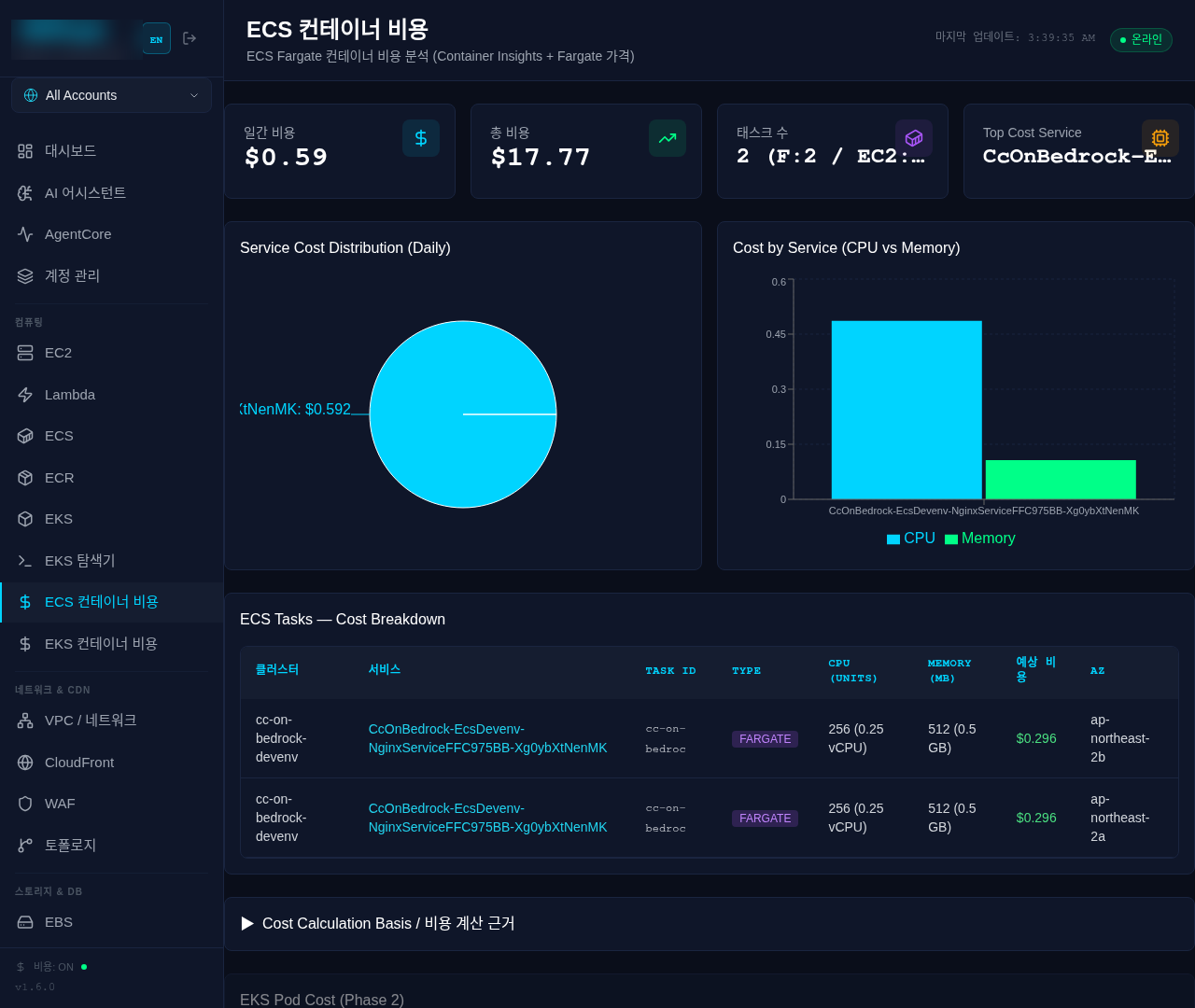
This document describes v1's dedicated ECS Container Cost page (stats cards, charts, and the "Cost Calculation Basis" toggle). v2 has no dedicated page — its equivalents live on the /inventory/ecs_task inventory view: the Cost/Day/Cost/Mo columns, the daily-cost-total KPI tile, and a collapsible Cost Calculation Basis panel below the table (matching v1's toggle). The column values are a static estimate derived from the task definition's allocated cpu/memory — not from CloudWatch Container Insights utilization metrics (web/lib/inventory-derived.ts's ecs_task deriver — unit prices come from the single source web/lib/cost-basis.ts). The pricing constants and formula below ($0.04656/$0.00511, (CPU units/1024)×rate×24 + (MB/1024)×rate×24) match that static-estimate logic and are accurate — don't change those. But this document's pie chart and the "calculated from CloudWatch Container Insights metrics" claim are v1-only and don't exist in v2 (v2's estimate is static-constant based, and ephemeral-storage pricing is not reflected). The Cost by Service (CPU vs Memory) chart, however, DOES exist in v2 — rendered on /inventory/ecs_task as per-service grouped bars (FARGATE tasks only, static estimate, top 10).
A page for analyzing the cost of ECS Fargate tasks. Costs are calculated based on Fargate pricing and CloudWatch Container Insights metrics.
Key Features
Stats Cards
- Daily Cost (ECS): Total daily cost (cyan)
- Monthly Estimate: Estimated monthly cost (green)
- Running Tasks: Number of running tasks - Fargate/EC2 breakdown (purple)
- Top Cost Service: Highest cost service (orange)
Service Cost Distribution Chart
Pie chart showing daily cost distribution by service
Cost by Service (CPU vs Memory) Chart
Compares CPU cost vs Memory cost per service. In v2 this renders as shared-scale grouped bars (both $ series on one scale — real proportions preserved) instead of stacked bars, with cluster/service labels, FARGATE-only scope, top 10, and a 'sampled' tag past the 500-row cap.
ECS Tasks Table
| Column | Description |
|---|---|
| Cluster | Cluster name |
| Service | Service name |
| Task ID | Task ID (first 12 characters) |
| Type | Launch type (FARGATE/EC2) |
| CPU (units) | CPU units and vCPU equivalent |
| Memory (MB) | Memory and GB equivalent |
| Daily Cost | Daily cost (Fargate only) |
| AZ | Availability Zone |
Cost Calculation Method
Fargate Pricing (v2 actual values — ap-northeast-2 (Seoul) rates, web/lib/inventory-derived.ts)
| Resource | Rate | Billing Unit |
|---|---|---|
| vCPU | $0.04656 | per vCPU-hour |
| Memory | $0.00511 | per GB-hour |
| Ephemeral Storage (>20GB) | $0.000111 | per GB-hour |
These are fixed, static estimate constants applied regardless of the task's actual AWS region — the deriver does not look up a per-task region column.
Calculation Formula
CPU Cost = (CPU Units / 1024) x $0.04656/hr x 24hr
Memory Cost = (Memory MB / 1024) x $0.00511/hr x 24hr
Daily Cost = CPU Cost + Memory Cost
Monthly Estimate = Daily Cost x 30
Calculation Example
Fargate Task: 512 CPU units (0.5 vCPU) + 1024 MB (1 GB)
- CPU: 0.5 vCPU x $0.04656/hr x 24hr = $0.5587/day
- Memory: 1 GB x $0.00511/hr x 24hr = $0.1226/day
- Total: $0.681/day ($20.44/month)
How to Use
- Click Compute > Container Cost in the sidebar
- Review overall cost status from the stats cards
- Identify high-cost services from the charts
- Check detailed cost per task in the table
- Expand the "Cost Calculation Basis" section to verify calculation basis
Support Scope
| Item | Support |
|---|---|
| Fargate Launch Type | O (cost calculation supported) |
| EC2 Launch Type | X (requires node cost distribution, not supported) |
| Spot Fargate | - (based on On-Demand pricing) |
Tips
EC2 type tasks are displayed as "N/A (EC2)". EC2 costs require node cost distribution and are currently not supported.
If one side is significantly higher in the CPU vs Memory chart, consider adjusting the task definition. Fargate has limited CPU and Memory combinations.
The fargatePricing field of data/config.json was v1's override mechanism — it does not exist in v2.
You can analyze with the AI Assistant using queries like "ECS cost analysis", "Highest cost service", "Fargate cost optimization recommendations", etc.
Related Pages
- ECS - ECS cluster and service status
- EKS Container Cost - EKS Pod cost analysis
- Cost - Overall AWS cost analysis